You install ai, copy the chat snippet from the docs, and ten minutes later there's a working assistant on a page in your Next.js app. Tokens stream in, the textarea clears on submit, the markdown even renders. It's almost too easy — which is the part that bites teams later.
The Vercel AI SDK is genuinely good. The problem is that the documented snippets are optimized for time-to-first-demo, and most of the production work happens in the seams between them: structured output, tool calls, error states, provider switching, and "what does this look like when the model returns nothing useful." That's the version that ships to paying users, and it's worth being deliberate about it.
The Three Functions You Will Actually Use
The SDK exposes a small core surface: generateText, streamText, generateObject, and streamObject, all imported from the ai package. You pair them with a model from a provider package — @ai-sdk/openai, @ai-sdk/anthropic, @ai-sdk/google, and so on. The provider abstraction is the headline value: the same call shape works across every supported model, and you can flip between them in a config file rather than rewriting your handlers.
import { generateText, streamText, generateObject } from "ai";
import { openai } from "@ai-sdk/openai";
import { anthropic } from "@ai-sdk/anthropic";

const model = process.env.MODEL === "claude"
  ? anthropic("claude-sonnet-4-5")
  : openai("gpt-4o");
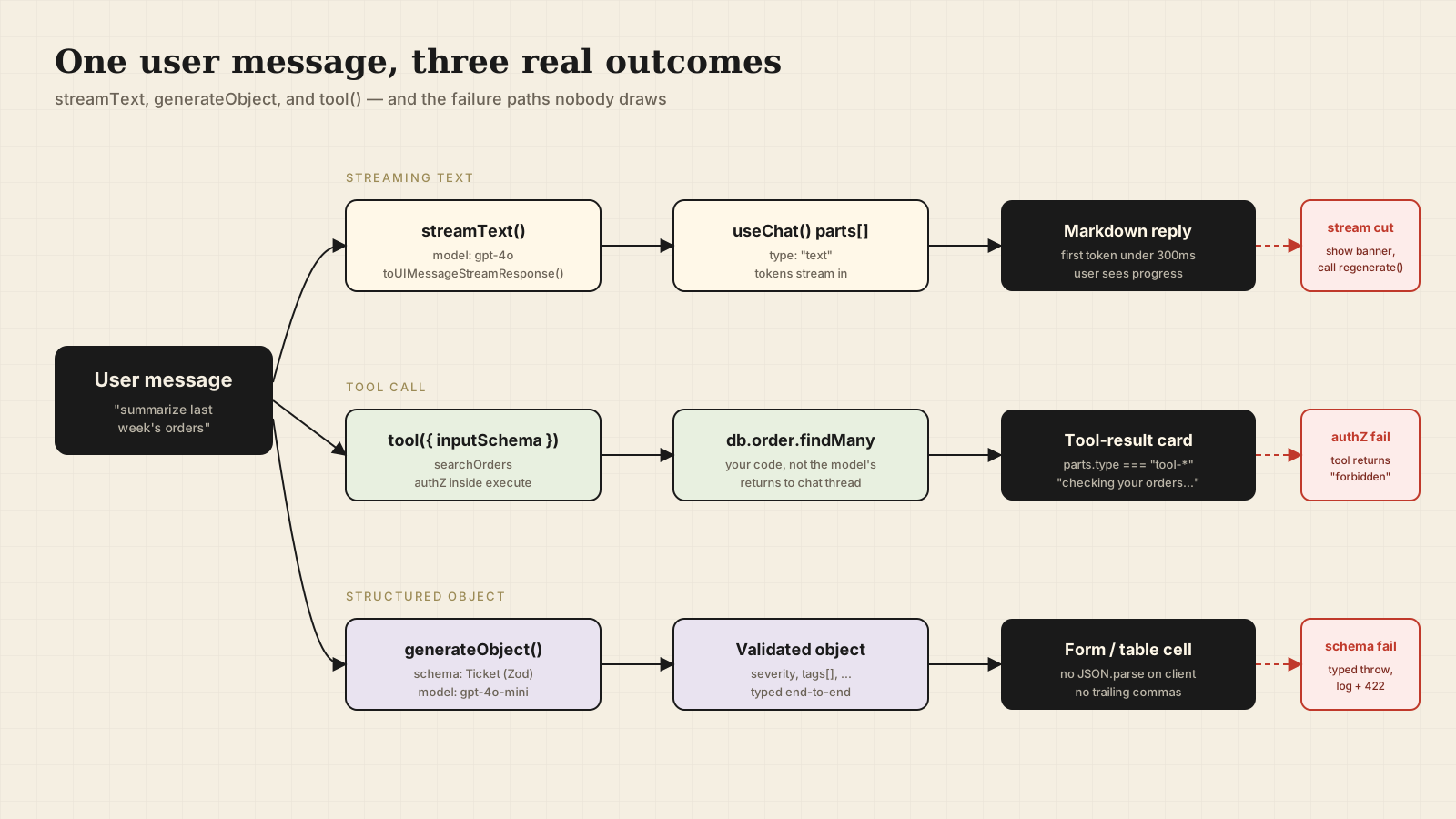
For chat, you want streamText. For "give me a structured object based on this input," you want generateObject. generateText is fine for one-shot prompts where you don't need streaming and don't need structure. streamObject is the streaming version of generateObject — useful when the object is large enough that you want to render fields as they arrive.
Streaming Chat: streamText On The Server, useChat On The Client
The minimal route handler is fewer lines than most form submission code in your codebase:
// app/api/chat/route.ts
import { streamText, convertToModelMessages } from "ai";
import { openai } from "@ai-sdk/openai";

export async function POST(req: Request) {
  const { messages } = await req.json();
  const result = streamText({
    model: openai("gpt-4o"),
    system: "You are a help assistant for a SaaS product. Be concise.",
    messages: convertToModelMessages(messages),
  });
  return result.toUIMessageStreamResponse();
}
toUIMessageStreamResponse returns a streaming Response in the format useChat understands, so you can drop it straight into a route handler. On the client:
"use client";
import { useState } from "react";
import { useChat } from "@ai-sdk/react";

export function Chat() {
  const [input, setInput] = useState("");
  const { messages, sendMessage, status } = useChat();

  return (
    <form
      onSubmit={(e) => {
        e.preventDefault();
        if (!input.trim()) return;
        sendMessage({ text: input });
        setInput("");
      }}
    >
      {messages.map((m) => (
        <div key={m.id} data-role={m.role}>
          {m.parts.map((p, i) => p.type === "text" ? <span key={i}>{p.text}</span> : null)}
        </div>
      ))}
      <input value={input} onChange={(e) => setInput(e.target.value)} disabled={status !== "ready"} />
    </form>
  );
}
Note m.parts instead of m.content. Modern useChat (from @ai-sdk/react, AI SDK v5) gives you a parts array because a single message can contain text, tool calls, tool results, and reasoning blocks all at once. If you only ever render m.content, you'll silently drop tool output. v5 also no longer manages input state for you — wire your own useState and call sendMessage on submit.
Structured Output Is The Most Underrated Feature
Half the AI features in a typical product are some flavor of "extract structured data from this input." generateObject makes this a one-liner:
import { generateObject } from "ai";
import { openai } from "@ai-sdk/openai";
import { z } from "zod";

const Ticket = z.object({
  title: z.string().max(120),
  severity: z.enum(["low", "medium", "high", "critical"]),
  tags: z.array(z.string()).max(8),
  needsHumanReview: z.boolean(),
});

const { object } = await generateObject({
  model: openai("gpt-4o-mini"),
  schema: Ticket,
  prompt: `Classify this support message:\n\n${body}`,
});
The SDK handles JSON schema generation from your Zod schema, sets the right model parameters for structured output where the provider supports it natively (OpenAI's structured outputs, Anthropic's tool-call coercion), parses the result, and validates against your schema. If the model can't produce a valid object after retries, it throws a typed error you can branch on. You don't have to think about JSON-mode flags or trailing commas.
The Zod 4 spelling matters here. Use z.email() and z.uuid() instead of z.string().email() / z.string().uuid() — they generate cleaner JSON schemas and the SDK passes them to the model with proper format hints.
Tool Calls With tool() And Zod
Tools are how you let the model trigger real code in your app — search the database, hit an internal API, send an email. The SDK's tool helper takes a Zod schema for the inputs and an execute function:
import { tool, streamText } from "ai";
import { z } from "zod";
import { openai } from "@ai-sdk/openai";

const searchOrders = tool({
  description: "Search a customer's orders by status or date range.",
  inputSchema: z.object({
    customerId: z.uuid(),
    status: z.enum(["pending", "shipped", "delivered", "refunded"]).optional(),
    sinceDays: z.number().int().min(1).max(365).optional(),
  }),
  execute: async ({ customerId, status, sinceDays }) => {
    return db.order.findMany({
      where: { customerId, status, createdAt: sinceDaysAgo(sinceDays) },
      take: 25,
    });
  },
});

const result = streamText({
  model: openai("gpt-4o"),
  tools: { searchOrders },
  messages,
});
A few things that aren't obvious from the README. The model can call multiple tools in sequence, and each tool result becomes part of the message thread the next step sees — so make sure your execute returns something the model can reason about, not a giant JSON blob. Permission checks belong inside execute, not in the prompt; the model is not your authorization layer. And on the client, you'll see tool calls and results flow through m.parts as tool-* parts, which is your hook to render a "checking your orders…" state instead of a blank gap.
Error States Are 80% Of The Real UI
The demo never shows you what happens when the model is overloaded, the user is offline, or your server returned a 500 because the database was down. The SDK gives you onError and an error field on useChat:
const { messages, error, regenerate, status } = useChat({
  onError: (err) => {
    console.error("chat failed", err);
    toast.error("Couldn't reach the assistant. Try again in a moment.");
  },
});
regenerate re-runs the last user turn. Show it as a "Retry" button when error is set. For partial-stream failures (the model started, then disconnected), the SDK delivers what it had — you'll usually want a small banner saying "response cut off" rather than discarding the half-message.
Provider Switching Is The Reason To Use This SDK
You probably don't pick one model forever. You start on OpenAI because the docs are good, then move classification work to a cheaper Haiku for cost, then route legal-tone copy to Claude because it's better at it. The SDK's provider abstraction means each handler stays the same:
import { gateway } from "@ai-sdk/gateway";
const model = gateway("openai/gpt-4o");
// or "anthropic/claude-sonnet-4.5", "google/gemini-2.5-flash"
The Vercel AI Gateway (or your own routing layer) lets you switch models at config time without redeploying handlers. This is what makes "we'll evaluate three models against our eval set this sprint" a couple of hours of work instead of a refactor.
Don't Put The Server Key In The Browser
Worth saying once because it still happens: provider keys (OPENAI_API_KEY, etc.) belong on the server side only. The route handler runs on the server. useChat POSTs to your handler. The browser never sees the key. If you find yourself trying to call openai(...) from a "use client" component, stop — you're about to leak credentials.
A One-Sentence Mental Model
The Vercel AI SDK is a thin, well-shaped layer that turns "call a model and stream the result" into one function call — the production work is everything around that call: structured output at the boundary, tool calls with real authorization, error states the user can recover from, and a provider abstraction you can flip without rewriting handlers.