"Why Did The App Freeze For Two Seconds?"
A user uploads a 50,000-row CSV. Your code parses it, deduplicates by email, computes some totals, and renders a table. On your laptop it takes 200 ms — invisible. On the user's mid-range Android, it takes 2.4 seconds. During that 2.4 seconds the page does not paint, the spinner does not animate, and tapping a button does nothing. The user thinks the app crashed.
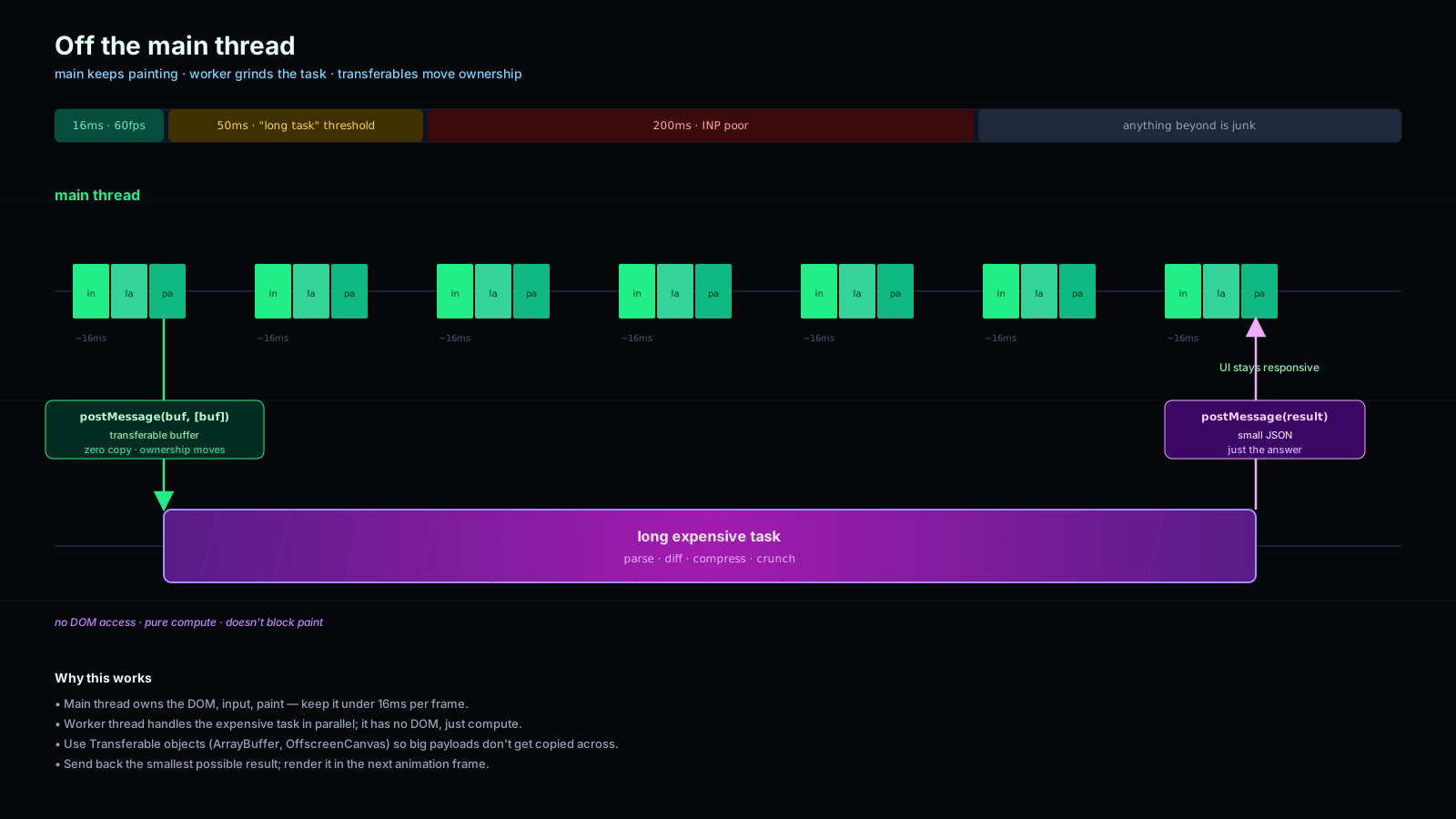
JavaScript runs your code on a single thread — the same thread the browser uses to lay out, paint, and respond to input. A 16 ms target keeps you at 60 fps; anything longer and frames drop. Anything past 50 ms and the user feels it. Anything past 200 ms and they think the page is broken. The question isn't whether to move work off the main thread. The question is which work, and how.
Web Workers are the answer the platform has had since 2009 and that most teams still don't reach for often enough. In 2026 the ergonomics finally caught up — module workers, Comlink, transferables, and decent debugging — so there's no excuse to ship 200 ms tasks on the main thread anymore.
What A Web Worker Actually Is
A Web Worker is a JavaScript execution context that runs on its own OS thread, with its own event loop, its own memory, and no DOM. You spawn one from your main script, and from then on the two communicate by passing messages.
The constraints are the price you pay for the isolation:
- No DOM access. No
document, nowindow. The worker can't render anything. - No shared memory by default. Messages are copied, not shared. Send a 10 MB string, and 10 MB get serialized and deserialized.
- Limited globals.
fetch,setTimeout,WebSocket,IndexedDB,WebAssembly— yes. Anything DOM-shaped — no.
Three flavors exist in the spec, and you'll meet each one for different reasons:
- Dedicated worker. One owner page, one worker. Most common. What you reach for 95% of the time.
- Shared worker. Multiple tabs of the same origin share one worker. Useful for cross-tab coordination. Less commonly used.
- Service worker. A special worker that intercepts network requests for offline and caching. Different lifecycle. Different problem space.
When people say "Web Worker" without qualification, they almost always mean dedicated worker.
Spawning A Module Worker With Vite Or Webpack
The clean modern incantation works with Vite, Webpack 5, Parcel 2, and esbuild — anywhere your bundler understands the worker URL pattern:
// main.ts
const worker = new Worker(new URL('./csv-worker.ts', import.meta.url), {
  type: 'module',
});
That gets you a worker with full ES module support, top-level await, and dynamic import. Drop the type: 'module' only if you need to support old environments. The bundler picks up the URL, builds the worker as a separate chunk, and hashes it like any other asset.
Inside the worker:
// csv-worker.ts
self.addEventListener('message', (event) => {
  const text: string = event.data;
  const rows = parseCsv(text);          // expensive
  const dedup = dedupeByEmail(rows);    // also expensive
  self.postMessage(dedup);
});
And on the main thread:
worker.postMessage(largeCsvText);
worker.addEventListener('message', (e) => renderTable(e.data));
That works, but the moment you have more than one operation on the worker — parse, validate, search, export — the message-with-type-discriminator pattern gets ugly fast. There's a better way.
Comlink Makes Workers Feel Like Async Functions
Comlink is a tiny library from Google Chrome Labs that wraps postMessage into a Proxy-based RPC. You expose an object on the worker, wrap the worker on the main thread, and from then on you call methods on the worker as if they were async functions.
// csv-worker.ts
import * as Comlink from 'comlink';

const api = {
  async parse(text: string) {
    return parseCsv(text);
  },
  async dedup(rows: Row[]) {
    return dedupeByEmail(rows);
  },
  async search(rows: Row[], q: string) {
    return rows.filter((r) => r.name.toLowerCase().includes(q));
  },
};

export type Api = typeof api;
Comlink.expose(api);// main.ts
import * as Comlink from 'comlink';
import type { Api } from './csv-worker';
const worker = new Worker(new URL('./csv-worker.ts', import.meta.url), {
type: 'module',
});
const csv = Comlink.wrap<Api>(worker);
const rows = await csv.parse(text);
const unique = await csv.dedup(rows);That's the whole API. TypeScript types flow across the boundary because Comlink only erases the runtime — the type signatures are just regular function types you import. Once you've used it, going back to raw postMessage feels like writing assembly.
Transferables Save You From Copies
The default postMessage semantics is structured clone — the message is deep-copied. For a few KB this is invisible. For a 100 MB ArrayBuffer it's a disaster: you spend 300 ms cloning before the worker even starts.
The fix is transferables. You hand ownership of the underlying buffer to the worker, and it becomes inaccessible on the sending side:
const buf = new ArrayBuffer(100 * 1024 * 1024);
worker.postMessage(buf, [buf]);   // second arg = transfer list
// buf.byteLength === 0 here — ownership has moved
Comlink supports this too via Comlink.transfer:
const result = await csv.processBuffer(Comlink.transfer(buf, [buf]));Transferable-eligible types include ArrayBuffer, MessagePort, ImageBitmap, OffscreenCanvas, and ReadableStream / WritableStream. For anything that's not transferable, you pay the copy.
SharedArrayBuffer And Real Threads
For the rare case where you need actual shared memory — a wasm-backed image processor, a multi-threaded simulation — there's SharedArrayBuffer. It really shares memory between the main thread and a worker, and lets you use Atomics for lock-free coordination.
The catch: after the Spectre disclosures, browsers gate SAB behind cross-origin isolation. Your page must be served with both:
Cross-Origin-Opener-Policy: same-origin
Cross-Origin-Embedder-Policy: require-corp
Every cross-origin resource on the page must opt in via CORP / CORS. If your site embeds third-party iframes, ads, or unmodified CDNs, you'll discover that turning these headers on breaks half of them. Plan accordingly.
For 90% of worker use cases, SharedArrayBuffer is overkill — the structured-clone or transferable cost is fine. Reach for it when you have measured the copy cost and it's actually the bottleneck.
When To Reach For A Worker
There's a frame-budget heuristic that holds up well:
- Under 16 ms total — keep it on the main thread. The cost of a worker round-trip (1–5 ms of overhead) outweighs the win.
- 16-50 ms — case by case. If it runs once per session, leave it. If it runs on input, push it off.
- Over 50 ms — almost always a worker. The user will feel it otherwise.
- Over 200 ms — definitely a worker, and probably with a progress callback so the UI can show something useful.
Concrete tasks that consistently belong off the main thread:
- Parsing. CSV, large JSON, Markdown, source code (syntax highlighting).
- Cryptography. Hashing, encryption, signing —
crypto.subtleis available in workers. - Compression. gzip, brotli, image re-encoding.
- Data wrangling. Sorting / filtering / aggregating large in-memory tables.
- Image manipulation. Resize, blur, format conversion — pair with
OffscreenCanvasfor rendering off the main thread too. - Wasm-backed work. ffmpeg.wasm, sql.js, image codecs — all of these belong in workers because they hold the thread for hundreds of ms or seconds.
The pattern that ages best: keep the worker boundary at the task level, not the function level. A worker that exposes "parse and dedup this CSV" is much easier to reason about than one that exposes a hundred tiny methods you call in a loop from the main thread — every call is a postMessage.
Debugging Tips That Save Hours
Three small things that punch above their weight:
- DevTools sees workers. Each one shows up as a separate context in the Sources panel. You can set breakpoints, watch variables, and console-log just like the main thread.
- Errors propagate. Throw in a Comlink-exposed method and it surfaces as a normal rejected Promise on the main thread, with the stack from inside the worker.
- Hot reload is finicky. Some bundlers don't reload workers cleanly. If you change a worker file and the behavior doesn't change, hard-refresh or terminate the worker manually with
worker.terminate().
A One-Sentence Mental Model
A Web Worker is a side thread that trades direct DOM access for never blocking the user — push anything past the frame budget into it, use Comlink so the boundary stops feeling like an RPC, transfer big buffers instead of copying them, and the UI starts feeling like an app instead of a slideshow.