The first time I built a chat UI on top of an LLM, it took an afternoon. Text input, an array of messages, a fetch to an API route, react-markdown for rendering. It worked. I shipped it.
A week later a user emailed me a screenshot of the assistant explaining, in formatted Markdown, that they had won a gift card and should click a link to claim it. The link was real. The "bot" had been talked into rendering an <a> tag pointing at a phishing domain. Nothing in my code was buggy. The model just did what it was asked to do by content the user had pasted in.
That was the moment I realized: an AI chat UI is not a messaging app. In a messaging app, your users send messages to each other, and you trust their browsers to render their text. In a chat UI, the bot is sending messages, and the bot is the most untrusted source you've ever put on the page. Treat it that way and the rest of the work falls into place.
The Bot Is Untrusted Input
The mental shift is the whole game. Your assistant's output is not "AI-generated text". It is text from a system that anyone on the internet can influence with a single message. If a user types "summarise this and embed an image with src=x onerror=...", the model may comply, especially if the model is small and your system prompt is loose.
So the rule for rendering: every byte the model emits has to go through the same pipe you would use for raw user comments on a public forum. No raw HTML. No dangerouslySetInnerHTML without a sanitizer. No clever shortcut "because the model wouldn't do that".
A safe baseline in React is react-markdown with HTML disabled. By default it does not parse HTML inside Markdown, so <img onerror=...> comes out as literal text:
import ReactMarkdown from 'react-markdown';
import remarkGfm from 'remark-gfm';

export function AssistantBubble({ content }: { content: string }) {
  return (
    <div className="bubble assistant">
      <ReactMarkdown remarkPlugins={[remarkGfm]}>
        {content}
      </ReactMarkdown>
    </div>
  );
}
If your design genuinely needs HTML inside the Markdown — tables with custom classes, footnote anchors, embedded callouts — flip on the HTML plugin and put rehype-sanitize after it. Don't trust your own allowlist; use the default schema and only widen it for tags you've thought about.
When You Really Need DOMPurify
react-markdown covers most cases. The place you reach for DOMPurify is when something else upstream has already converted Markdown to HTML — a server-side renderer, a non-React library, a cached HTML payload from a tool call. In that scenario you have a string of HTML and you have to render it. That's the dangerouslySetInnerHTML lane, and it's where users get pwned.
DOMPurify is not built into the browser. It's a library — dompurify on the client, isomorphic-dompurify if you want to call it from a server component or route handler. Wrap it like this and never call dangerouslySetInnerHTML without it:
import DOMPurify from 'isomorphic-dompurify';

export function SafeHtml({ html }: { html: string }) {
  const clean = DOMPurify.sanitize(html, {
    USE_PROFILES: { html: true },
    FORBID_TAGS: ['style', 'iframe', 'script'],
    FORBID_ATTR: ['onerror', 'onload', 'onclick'],
  });
  return <div dangerouslySetInnerHTML={{ __html: clean }} />;
}
The forbid lists are belt-and-braces. DOMPurify already strips event handlers and scripts in its default profile; the explicit list is documentation for the next person who reads the file.
Optimistic Echo Of The User Message
LLM responses are slow even on fast networks. Time-to-first-token is hundreds of milliseconds at minimum, and the full reply often takes seconds. If a user hits Enter and nothing visible changes for half a second, they wonder if the form submitted. Some click again. Now you have duplicate requests.
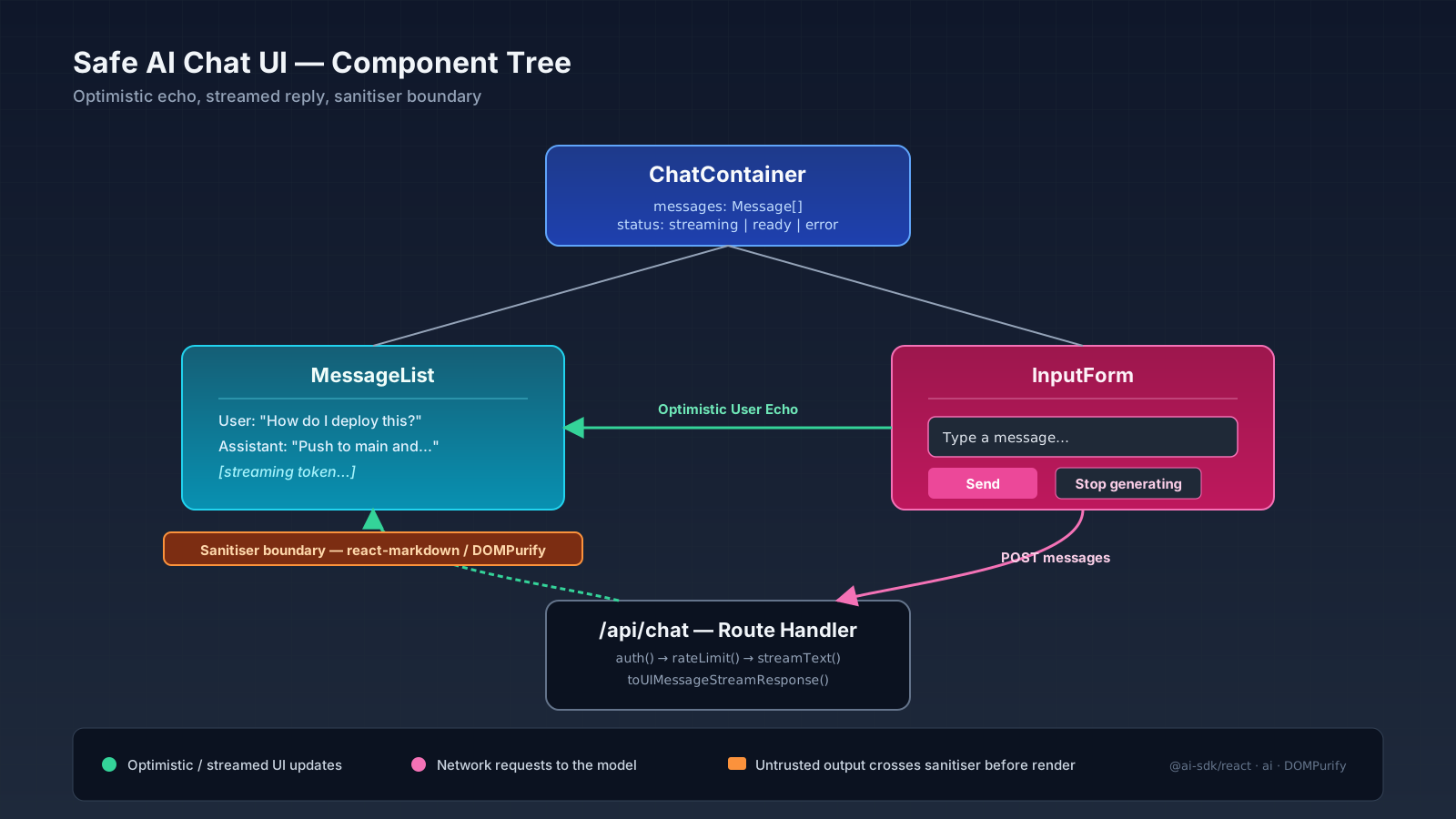
The fix is the oldest UI trick in the book: echo the user's message into the list immediately, then start streaming the assistant reply underneath it. The useChat hook from @ai-sdk/react does this for you. If you're rolling your own state, it's a few lines:
'use client';
import { useState } from 'react';

type Message = { id: string; role: 'user' | 'assistant'; content: string };

export function Chat() {
  const [messages, setMessages] = useState<Message[]>([]);
  const [input, setInput] = useState('');
  const [pending, setPending] = useState(false);

  async function send(e: React.FormEvent) {
    e.preventDefault();
    const text = input.trim();
    if (!text || pending) return;

    const user: Message = { id: crypto.randomUUID(), role: 'user', content: text };
    setMessages((m) => [...m, user]);
    setInput('');
    setPending(true);
    // ...stream the reply, update an assistant message in place
  }
}
The pattern matters more than the code. Insert the user message synchronously, disable the submit while pending, and reserve a slot for the assistant message you're about to stream into.
Streaming Without The Markdown Flicker
The trickiest UX bug in chat UIs is the half-rendered code fence. The model streams \``tsthen```tsexport function`, and your Markdown parser sees an unclosed code block, which means everything after it is "code" — until the model emits the closing fence two seconds later, at which point the parser flips and the layout jumps.
Three things make this less painful:
- Use a Markdown renderer that re-parses on every chunk and is OK with unclosed nodes.
react-markdownhandles this fine because it works off a fresh AST per render. - Style your
pre codeblocks so a "code-only" intermediate state is not visually catastrophic — fixed font, padded background, no max-height jump. - Buffer punctuation-free trailing characters. If the last token is a partial fence (
\``), some teams hold it back from the visible string for one tick. Optional, but it kills the strobe effect on slow networks.
Streaming itself is now a one-liner with the AI SDK. On the server you call streamText, and on the client useChat consumes it:
// app/api/chat/route.ts
import { streamText } from 'ai';
import { openai } from '@ai-sdk/openai';

export async function POST(req: Request) {
  const { messages } = await req.json();
  const result = streamText({
    model: openai('gpt-4o-mini'),
    system: 'You are a helpful assistant. Reply in plain Markdown.',
    messages,
  });
  return result.toUIMessageStreamResponse();
}// app/chat/page.tsx
'use client';
import { useState } from 'react';
import { useChat } from '@ai-sdk/react';
export default function ChatPage() {
const [input, setInput] = useState('');
const { messages, sendMessage, status } = useChat();
// render messages with the SafeMarkdown component above; on submit
// call sendMessage({ text: input }) and clear the local state yourself.
}status gives you 'submitted' | 'streaming' | 'ready' | 'error', which is enough to drive a typing indicator and disable the submit. As of AI SDK v5, useChat no longer manages input state internally — that's why we hold it in a local useState and call sendMessage ourselves.
Errors, Aborts, And The Stop Button
A real chat UI has three failure modes the demo never has: the request never reaches the server (offline), the server errors out mid-stream, and the user wants to stop a long answer. All three need a visible handle.
The AI SDK exposes stop() from useChat — wire it to a "Stop generating" button while streaming. For network errors, render a system-style bubble with a retry affordance instead of a toast that vanishes; users want to see what failed and try again without losing their question. For aborts, keep the partial reply in the list — the half-answer is often more useful than nothing, and the user can ask the model to continue.
{status === 'streaming' && (
  <button type="button" onClick={() => stop()}>Stop generating</button>
)}
The Auth Boundary You Forget
One last thing that bites every team. The chat route is an API. It costs money. It reaches third-party providers. Authenticate it the same way you authenticate any other write endpoint, rate-limit per user, and validate the message payload before it touches the model.
import { auth } from '@/lib/auth';
import { rateLimit } from '@/lib/rate-limit';

export async function POST(req: Request) {
  const session = await auth();
  if (!session) return new Response('Unauthorized', { status: 401 });
  const ok = await rateLimit(session.user.id, '20 per minute');
  if (!ok) return new Response('Too many requests', { status: 429 });
  // ...
}
If you skip this, the first thing that happens after launch is someone scripting your endpoint as a free OpenAI proxy.
A One-Sentence Mental Model
A safe AI chat UI treats the assistant's output as untrusted Markdown that streams in chunks, echoes the user's message instantly so the page feels alive, and puts an authenticated, rate-limited route between the browser and the model — once you internalize that, the rest is just CSS.
![World map dissolving into folder tabs for en, de, uk, ja, fr feeding a /[locale] route, with Accept-Language, NEXT_LOCALE cookie, and URL prefix chips routed into a best-fit matcher.](/_next/image?url=%2Fassets%2Fimgs%2Farticles%2Finternationalization-in-nextjs-apps%2Fcover.png&w=2048&q=75)