You start a new Next.js project. app/page.tsx, app/layout.tsx, maybe a components/ folder. Everything lives in eyeshot. You can refactor the whole codebase between sips of coffee.
Six months later, the same project has fifty-something routes, a components/ folder with eighty files where nobody knows which ones are still in use, three different fetch helpers that almost do the same thing, a lib/ folder that's become the junk drawer, and one terrified engineer whose first PR involves adding an import that turns out to break the build because a server-only module got pulled into the client bundle.
The problem isn't Next.js. The problem is that the App Router gives you a routing convention and stops there. It doesn't tell you where features go, where shared UI goes, where server-only code goes, or how to keep your imports honest. You have to decide all of that yourself, and the defaults that work at fifty files break at five hundred.
This is the version of those decisions I'd hand to a team starting from scratch - or to one staring at a codebase that's already past the point of polite refactoring.
The Two Instincts That Fight Each Other
When you sit down to organise a Next.js project, two instincts pull in opposite directions.
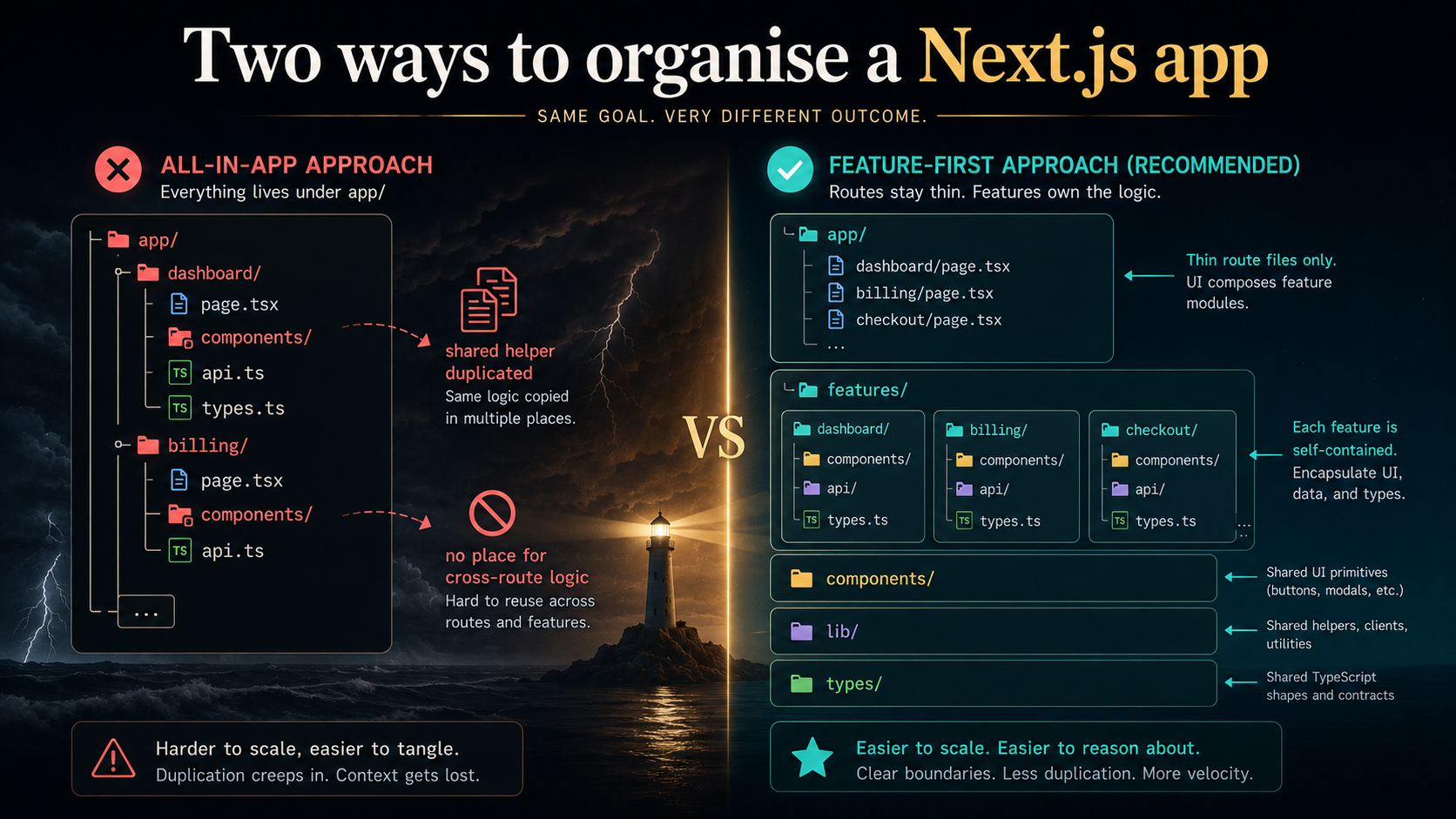
The first says "routes own everything." Your app/ folder already represents the URL structure. Why not put each page's code right next to its page.tsx? Dashboards under app/dashboard/, billing under app/billing/, including the data fetchers, types, and components each route needs. Co-location at its purest. You navigate the URL bar and you navigate the source tree at the same time.
The second says "features own everything." A page is just one entry point - but the actual logic of "checkout" or "search" or "billing" probably shows up across multiple URLs, multiple API endpoints, and a couple of background jobs. Pinning that logic to a single route means duplicating it when a second route needs it. Better to keep features in their own home and let routes be thin shells that wire them up.
Both instincts are right about something. The route-driven instinct is right that co-location matters - code that changes together should live together. The feature-driven instinct is right that the URL structure is a presentation concern, not the architecture. Pretending it's the architecture is what got the original 30k-line apps into trouble.
The working answer is to honour both at once.
Routes Own Routing. Features Own Logic.
Here's the rule the rest of the article unpacks.
app/ contains only routing concerns. Layouts, pages, route handlers, server actions tied to a single route, loading states, error boundaries. Anything that exists because Next.js needs a file at a specific path. Everything else gets out.
features/ (or modules/, or whatever you want to call it) owns domain logic. All the code that would still exist if you ripped Next.js out and rebuilt the UI in something else: data fetching, schemas, business rules, the components specific to one feature, the actions a feature exposes.
components/ is your design system. Buttons, inputs, modals, layout primitives - the stuff that has no idea what feature it's rendering for.
lib/ is small helpers, by topic. Not a junk drawer. Each file in lib/ should answer one question - lib/auth.ts, lib/db.ts, lib/dates.ts - not be the place things go when you can't think of a name.
types/ is the shared type registry, for shapes that cross feature boundaries.
If you internalise that one mapping - routes do routing, features do logic, components do UI, lib does helpers, types does shapes - most of the daily structural questions answer themselves.
What app/ Should Actually Contain
The hardest discipline in a growing Next.js codebase is keeping app/ thin. Every time someone adds a components/ folder under app/dashboard/, the slope tilts a little further toward chaos.
A healthy app/ folder, at any size, contains only:
app/
  layout.tsx                  ← root shell
  page.tsx                    ← landing
  globals.css
  loading.tsx                 ← global loading skeleton
  error.tsx                   ← global error boundary
  not-found.tsx               ← global 404

  (marketing)/                ← route group: marketing pages
    layout.tsx
    page.tsx
    pricing/page.tsx
    about/page.tsx

  (app)/                      ← route group: authenticated app
    layout.tsx
    dashboard/
      page.tsx
      loading.tsx
    billing/
      page.tsx
      [invoiceId]/page.tsx

  api/                        ← route handlers only
    webhooks/
      stripe/route.ts
Notice what's not there. No components/. No hooks/. No lib/. No utils.ts. No types/. The contents of each page.tsx are mostly imports from features/ and components/, plus a small amount of glue that does things like read params, call a server action, and return JSX.
A typical page file looks like this:
import { notFound } from "next/navigation";
import { getInvoice } from "@/features/billing/data";
import { InvoiceDetails } from "@/features/billing/components/InvoiceDetails";

export default async function InvoicePage({
  params,
}: {
  params: Promise<{ invoiceId: string }>;
}) {
  const { invoiceId } = await params;
  const invoice = await getInvoice(invoiceId);
  if (!invoice) notFound();
  return <InvoiceDetails invoice={invoice} />;
}
That's the whole route. Eight lines, two imports from the billing feature, one Next.js call. Adding a new field to invoices doesn't touch this file. Changing how billing renders doesn't touch this file. The route is a stable shell; the interesting code lives one level over.
This is sometimes called the thin-route rule. The temptation to violate it is constant - someone will always want to "just add a helper here, it's only used by this page" - but every helper that slips into app/ is a future thing you can't move without breaking a URL.
What A Feature Folder Looks Like Inside
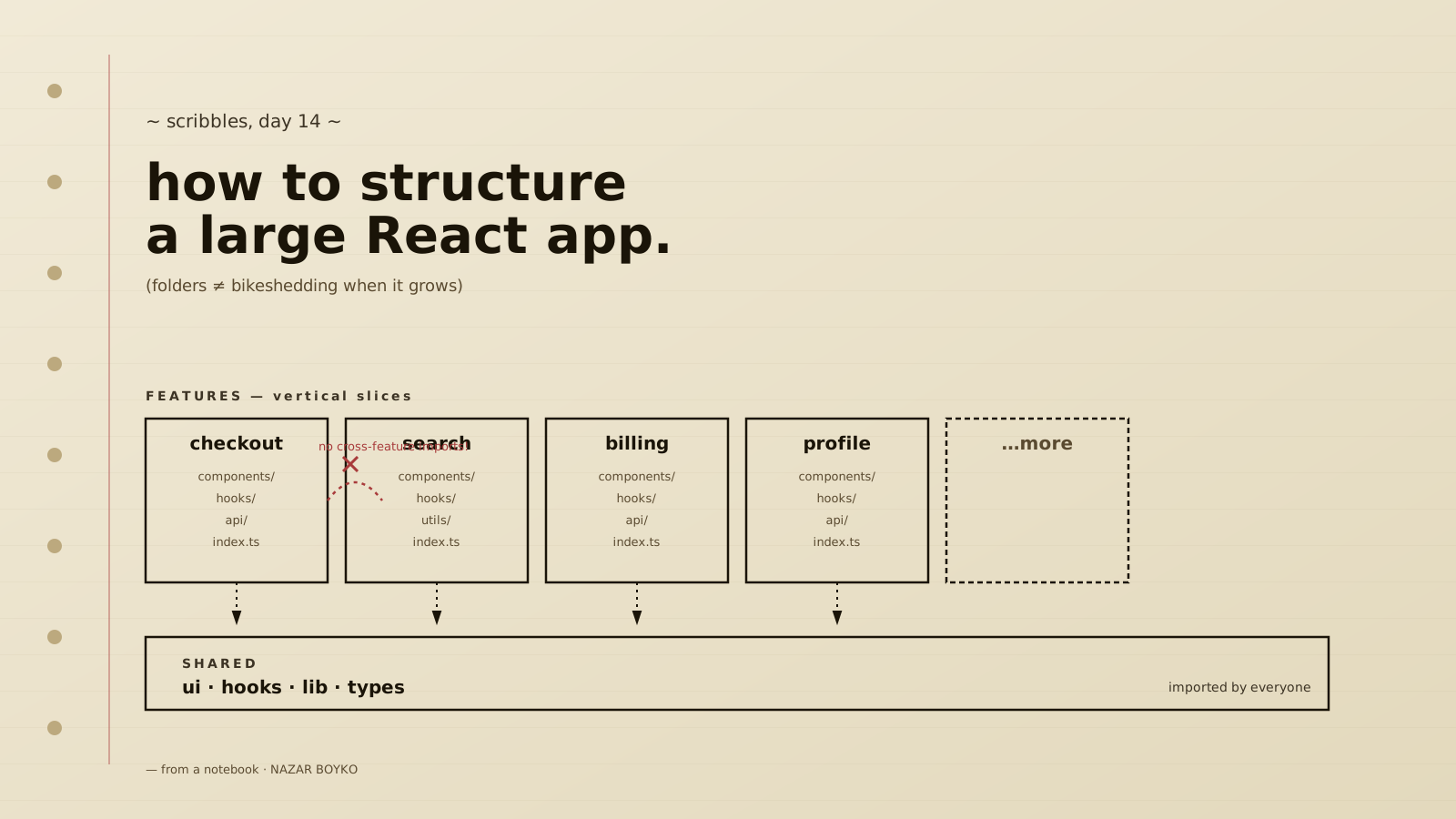
A feature folder is a self-contained unit. Everything specific to that feature lives inside it. From the outside, the feature has a small public API - usually one or two index.ts re-exports - and the internals are private detail.
features/billing/
  components/
    InvoiceDetails.tsx          ← used by app/billing/[invoiceId]/page.tsx
    InvoiceTable.tsx            ← used by app/billing/page.tsx
    LineItem.tsx                ← only used internally by InvoiceDetails
    LineItem.test.tsx
  actions/
    cancelInvoice.ts            ← "use server" action
    sendReminder.ts
  data/
    getInvoice.ts               ← server-only data access
    listInvoices.ts
    schema.ts                   ← Zod or similar
  hooks/
    useInvoiceFilters.ts        ← "use client" stateful UI logic
  utils/
    invoice-totals.ts           ← pure functions, easy to test
  types.ts                      ← Invoice, LineItem, InvoiceStatus
  index.ts                      ← public API
The index.ts is doing the load-bearing work here. It declares what the rest of the app is allowed to import from billing:
export { InvoiceDetails } from "./components/InvoiceDetails";
export { InvoiceTable } from "./components/InvoiceTable";
export { cancelInvoice, sendReminder } from "./actions";
export { getInvoice, listInvoices } from "./data";
export type { Invoice, LineItem, InvoiceStatus } from "./types";LineItem.tsx, invoice-totals.ts, and the Zod schema aren't exported. They're implementation detail. If features/dashboard/ needs to render a line item, that's a signal - either lift LineItem to the shared components/ folder, or have dashboard import the higher-level InvoiceDetails instead of reaching past the public API.
This boundary is the thing that lets the codebase scale. Without it, the moment someone imports features/billing/utils/invoice-totals.ts from features/dashboard/, you've created a hidden coupling that nobody sees until two months later when the billing team renames a function and dashboard breaks. With it, the import graph between features stays small and obvious.
A linter rule can enforce the boundary if you want it nailed down. Most teams don't bother at first and learn the discipline by code review. Whichever you pick, the goal is the same: features import from components/, lib/, types/, and from another feature's index.ts - never from a feature's internals.
The components/ Layer Is Smaller Than You Think
The mistake most teams make with components/ is treating it as a dumping ground. The fix is to be brutal about what qualifies.
Something belongs in the top-level components/ only if:
- It has no business logic - no API calls, no domain types in its props.
- It's used by at least two features (or has obvious potential to be).
- Its props would make sense to a designer with no idea what your app does.
That's it. Buttons, inputs, modals, table primitives, form fields, layout containers, icons. The UI vocabulary your app speaks. If a "BillingSummaryCard" is sitting in components/, it doesn't belong there - it's specific to billing, it knows about invoices, and it should live in features/billing/components/ like every other billing-aware component.
A components/ folder built on those three rules stays small. Forty files for a serious application, give or take. Anything bigger is usually a sign that feature-specific components leaked in.
components/
  ui/
    Button.tsx
    IconButton.tsx
    Input.tsx
    Select.tsx
    Checkbox.tsx
    Switch.tsx
    Modal.tsx
    Sheet.tsx
    Tabs.tsx
    Tooltip.tsx
  layout/
    Container.tsx
    Stack.tsx
    PageHeader.tsx
  data/
    Table.tsx
    Pagination.tsx
    EmptyState.tsx
  feedback/
    Toast.tsx
    Spinner.tsx
    ErrorMessage.tsx
If you adopt a component library like shadcn/ui or radix-based primitives, components/ui/ is where their generated files go. Your own additions slot into the same shape.
lib/ Is Helpers By Topic, Not A Junk Drawer
The single fastest way to wreck a codebase is to let lib/utils.ts exist. It starts at fifty lines, ends at two thousand, and contains five different things that should be five different files. Every team has had this utils.ts at some point. It always ends the same way.
The discipline is simple: lib/ is organised by topic, not by "stuff that's not a feature." Each file answers one question.
lib/
  auth.ts             ← session, getCurrentUser, requireAuth
  db.ts               ← the singleton database client + connection setup
  env.ts              ← validated env vars (Zod-checked at boot)
  http.ts             ← typed fetch wrappers, error mapping
  dates.ts            ← formatters, time-zone helpers
  logger.ts           ← the structured logger instance
  rate-limit.ts       ← shared rate-limit middleware
Two helpers you'll absolutely want, and won't regret early:
lib/env.ts - validate environment variables at startup. If STRIPE_SECRET_KEY is missing, you want to know during next dev, not the first time a webhook fires. A small Zod schema at module top level, parsed once, exported as a typed env object, is twenty lines of code that prevents a category of bugs.
import { z } from "zod";

const schema = z.object({
  DATABASE_URL: z.string().url(),
  STRIPE_SECRET_KEY: z.string().min(1),
  NEXT_PUBLIC_APP_URL: z.string().url(),
});

export const env = schema.parse(process.env);
lib/db.ts - your database client as a singleton, with the Next.js dev-server reload guard so hot reloads don't open new connections every time:
import { PrismaClient } from "@prisma/client";

const globalForPrisma = globalThis as unknown as {
  prisma: PrismaClient | undefined;
};

export const db = globalForPrisma.prisma ?? new PrismaClient();
if (process.env.NODE_ENV !== "production") globalForPrisma.prisma = db;
The exact ORM doesn't matter - the pattern is what counts. Mark a single source of truth, guard it from being instantiated twice in dev, and import db from one place across the codebase. Don't let teams reach for new PrismaClient() inside feature code.
types/ Holds The Shapes That Cross Boundaries
Most types belong inside a feature - Invoice is features/billing's problem. But some types are genuinely cross-cutting: UserId, ISODate, a branded OrgId, the PaginationInput your Table component takes, the Result<T, E> discriminated union you've decided to use everywhere.
Those go in types/. Importing them shouldn't pull in any runtime code - types/ files are pure type declarations.
export type UserId = string & { readonly __brand: "UserId" };
export type OrgId = string & { readonly __brand: "OrgId" };
export type InvoiceId = string & { readonly __brand: "InvoiceId" };

export const userId = (s: string) => s as UserId;
export const orgId = (s: string) => s as OrgId;
export const invoiceId = (s: string) => s as InvoiceId;
If types/ starts growing past a screen or two, that's a signal that some of its contents have outgrown the shared layer and should move into a feature (or a feature should be created to own them). The shared types layer is load-bearing in the architecture - keep it small enough to read end-to-end in a minute.
Server Actions And Route Handlers - Where They Live
This is where Next.js's specifics start mattering. Two ways to handle a mutation: a server action ("use server") or a route handler (app/api/.../route.ts). The rule of thumb that works:
Server actions - for mutations driven by your own UI (a form submit, a button click). They co-locate beautifully with components, they get free type inference, they integrate with revalidatePath / revalidateTag. Default to these for anything your app's own forms call.
Route handlers - for contracts with the outside world. Webhooks from Stripe, GitHub, Sentry. Mobile apps hitting your backend. Server-to-server APIs. Anything where a stable URL matters more than developer ergonomics.
Where they live:
- Server actions live in
features/{name}/actions/. They're feature logic; the component that calls them imports from@/features/billing/actions. They are not inapp/. - Route handlers live in
app/api/.... They're URL contracts;app/owns URL contracts. Each one is a thin shell that calls into a feature.
import { NextRequest, NextResponse } from "next/server";
import { handleStripeEvent } from "@/features/billing/webhooks";

export async function POST(req: NextRequest) {
  const signature = req.headers.get("stripe-signature");
  if (!signature) return new NextResponse("missing signature", { status: 400 });
  await handleStripeEvent(await req.text(), signature);
  return NextResponse.json({ received: true });
}"use server";
import { revalidatePath } from "next/cache";
import { requireAuth } from "@/lib/auth";
import { db } from "@/lib/db";
export async function cancelInvoice(invoiceId: string) {
const user = await requireAuth();
await db.invoice.update({
where: { id: invoiceId, orgId: user.orgId },
data: { status: "CANCELLED" },
});
revalidatePath(`/billing/${invoiceId}`);
}The route handler is six lines and a delegation. The server action is the actual logic. That separation - URLs in app/, logic in features/ - is the same shape as the thin-route rule for pages, applied to API endpoints.
The Server / Client Boundary Is Not A Folder
This catches people. There's no server/ and client/ folder split in a healthy Next.js codebase, because Server vs Client Components aren't an organisational concern - they're a per-file decision marked with "use client". Trying to enforce the split with folders gives you two Buttons and twenty if you need a server version, see the other folder comments.
The rule that actually works:
- Components are server by default. They live next to each other regardless of
"use client". - Push
"use client"as far down the tree as you can. A page should be a Server Component. A layout should be a Server Component. The little dropdown inside the layout's header is the file that gets"use client". - Co-locate the boundary with the interactivity. When
InvoiceDetails.tsxis a Server Component and one of its sub-components - say,InvoiceActionsMenu.tsx- needsuseState, the menu file declares"use client"andInvoiceDetailsimports it like any other component.
What you do need to enforce is the other boundary: server-only modules must never leak into client bundles. A file that imports lib/db.ts will pull Prisma (or your ORM) into the browser if a client component imports it. The fix is the server-only package - add import "server-only" at the top of any file that should never run in the browser, and Next.js will fail the build if a client component imports it. Sprinkle it on lib/db.ts, lib/auth.ts (the session-reading parts), and every features/*/data/*.ts file.
import "server-only";
import { PrismaClient } from "@prisma/client";
// ...
There's a matching client-only package for the reverse case - modules that only make sense in the browser (anything using window, document, localStorage). Most code doesn't need it, but it's there when you do.
This pair of imports is the single best thing you can do for safety in a large App Router codebase. They turn a runtime "oh no, you imported the database client into the browser bundle" into a build-time error.
Imports: The @/ Alias And Avoiding Path Soup
The default Next.js project ships with a @/* path alias mapped to the project root (or src/). Use it for everything that isn't a relative sibling.
// good
import { Button } from "@/components/ui/Button";
import { getInvoice } from "@/features/billing";
import { db } from "@/lib/db";

// bad
import { Button } from "../../../components/ui/Button";
import { getInvoice } from "../../features/billing";
The relative-path version makes refactoring hostile - moving a file becomes a chore because every relative path in it breaks. The @/ version is invariant to where the importing file lives.
A useful second alias if your project gets big: separate @/features/billing and @/features/billing/internal (rarely needed), or alias @/server to a server-only folder. Don't go overboard; one alias does the job for almost everyone.
Pair the alias with one rule: never import a feature's internals from outside the feature. Always import from the feature's index.ts. If you find yourself writing import { something } from "@/features/billing/utils/invoice-totals" from somewhere outside features/billing/, stop. Either lift the helper to lib/ (if it's generic) or expose it from the feature's public API (if it's feature-specific but shared) or rethink why two features need the same internal helper (often the answer is a missing shared module).
Middleware, Configuration, And The Files At The Root
A few files live at the project root and nowhere else. None of them need a folder.
middleware.ts- runs on the edge before requests hit your routes. Keep it small: auth checks, redirects, geo headers. Put any logic that's more than a few lines intolib/and call it from middleware.next.config.js- image domains, redirects, headers, experimental flags. Don't dump everything into one giant config - extract the bigger chunks (e.g.,redirects()) into separate files inconfig/and import them.tsconfig.json,tailwind.config.ts,postcss.config.js- leave them at the root..env.local,.env.example-.env.exampleshould be checked in and list every variable your app reads, with sensible placeholders.lib/env.tsvalidates them at boot.
If you have a lot of supporting scripts - DB seed, codegen, scheduled jobs - put them in scripts/ at the root, not in lib/ or src/. Scripts have a different runtime contract than app code and shouldn't be reachable through the @/ alias.
When To Split Into Packages
This is the question that keeps coming up once you cross a hundred or so engineers (or a few clearly-separate products sharing the same Next.js shell). The honest answer: don't split until you feel the friction of not splitting.
The friction looks like: two teams stepping on each other's PRs, a feature folder that's grown its own sub-feature folders, a shared component changing weekly because three features depend on it, build times getting painful even with incremental compilation.
When you do split, the destination is usually a Turborepo (or Nx) monorepo with packages like packages/billing, packages/dashboard, packages/ui, and apps/web as the Next.js shell that consumes them. The internal structure of each package is the same shape you already have for features - components, actions, data, types, an index.ts public API. You haven't changed the architecture; you've just promoted the feature boundary into a package boundary that the build system can enforce.
For most teams, that day is a long way off. Solo project, small team, dozens of engineers - features/ folders inside a single Next.js app work perfectly. The moment you're tempted to set up a monorepo because it "feels more enterprise," resist. The simpler shape will scale further than you expect.
A Short Tour Of The Wreckage
Some of the patterns that always end badly, all of which I've seen up close.
A components/ folder under app/. Once it exists, every PR adds to it. The first time someone needs that component from another route, you're now in the awkward "move the file and update twelve imports" situation that should never have started.
lib/utils.ts. The death of any sense of organisation. Every time you're tempted, ask what the file is for, name it that, and stop there. lib/dates.ts is fine. lib/utils.ts becomes a graveyard.
A god-feature folder. features/core/ or features/shared/ containing half the codebase. "Shared" isn't a feature. Push generic things into components/, lib/, or types/. Feature-specific things go in the feature they actually belong to.
Reaching into another feature's internals. import { foo } from "@/features/billing/utils/foo" from inside features/dashboard/. Six months later, billing renames or removes that helper and dashboard breaks. Always import from the feature's index.ts, even when it feels like extra ceremony.
Database client instantiated in feature code. new PrismaClient() inside features/billing/data/getInvoice.ts. Every request opens a new connection pool. The fix is one import { db } from "@/lib/db" line, but you have to enforce it because it's invisible until production starts dropping connections.
Forgetting import "server-only". Six weeks in, someone imports a server-only helper from a client component, the bundle balloons, and a secret env var ends up in the browser-shipped JavaScript. The pair of server-only and client-only packages costs nothing and prevents the worst class of accidents.
Server actions buried in app/. "use server" files scattered under route folders, calling into each other across URL boundaries. A year in, you can't tell which action is feature logic and which is route-specific. Lift them into features/ from the start.
A hooks/ folder at the top level. Hooks are part of components - they're either UI primitives (useDisclosure) that belong in components/ or feature-specific (useInvoiceFilters) that belong in the feature. A top-level hooks/ folder is the same anti-pattern as a top-level components/ that includes feature components: it groups by type instead of by purpose.
What Good Structure Actually Buys You
When the structure works, the things you stop having conversations about are the ones worth noticing. Where does this component go - not a discussion, it's whichever folder its purpose lives in. How do I add a new page - you create a thin file in app/ and import the feature it shows. Why is the bundle so big - you grep for server-only imports, you see the file the leak is from, you fix it. A new engineer asks where checkout's logic lives - one folder, one index.ts, here you go.
The structure isn't trying to be clever. It's trying to make the next change cheap. Routes do routing because Next.js is going to keep changing how routing works, and you want your URLs to be the only thing affected. Features do logic because logic survives every framework upgrade. Components do UI because designers think in primitives, not in domains. Helpers do helpers, types do types. None of it is novel. It just needs to be held to its own rules.
If you take one thing from this, take the thin-route rule. Every line of code that sneaks into app/ is a line you'll have to move later when the URL changes, or when a second route needs to use it, or when the team splits the codebase into packages. Keep app/ thin. Push everything else outward. The codebase you're building in two years will thank you for the discipline.