So, you've written a small Go program. main.go, a flag.StringVar, a flag.Parse, and a fmt.Println at the bottom. It works. You alias it in your shell, run it a few times, and feel pretty good about life.
Then a coworker asks if they can use it. You add a subcommand. The subcommand needs a config file. You start hand-rolling a YAML loader. Someone wants to override the config with an env var. Then a flag. Then they want completion. Then they want a Homebrew formula. Then you realize your tool has been running off go build on your laptop for three months and there's no Windows binary, no version string, no checksums, no changelog.
This is the gap I want to close: between "I wrote a Go script" and "this is a tool people install and trust." The fun part is that Go is unusually good at this once you know the right pieces. The boring parts (flags, help text, exit codes, cross-compilation) are mostly solved problems. You just have to pick the right tools and wire them in the right order.
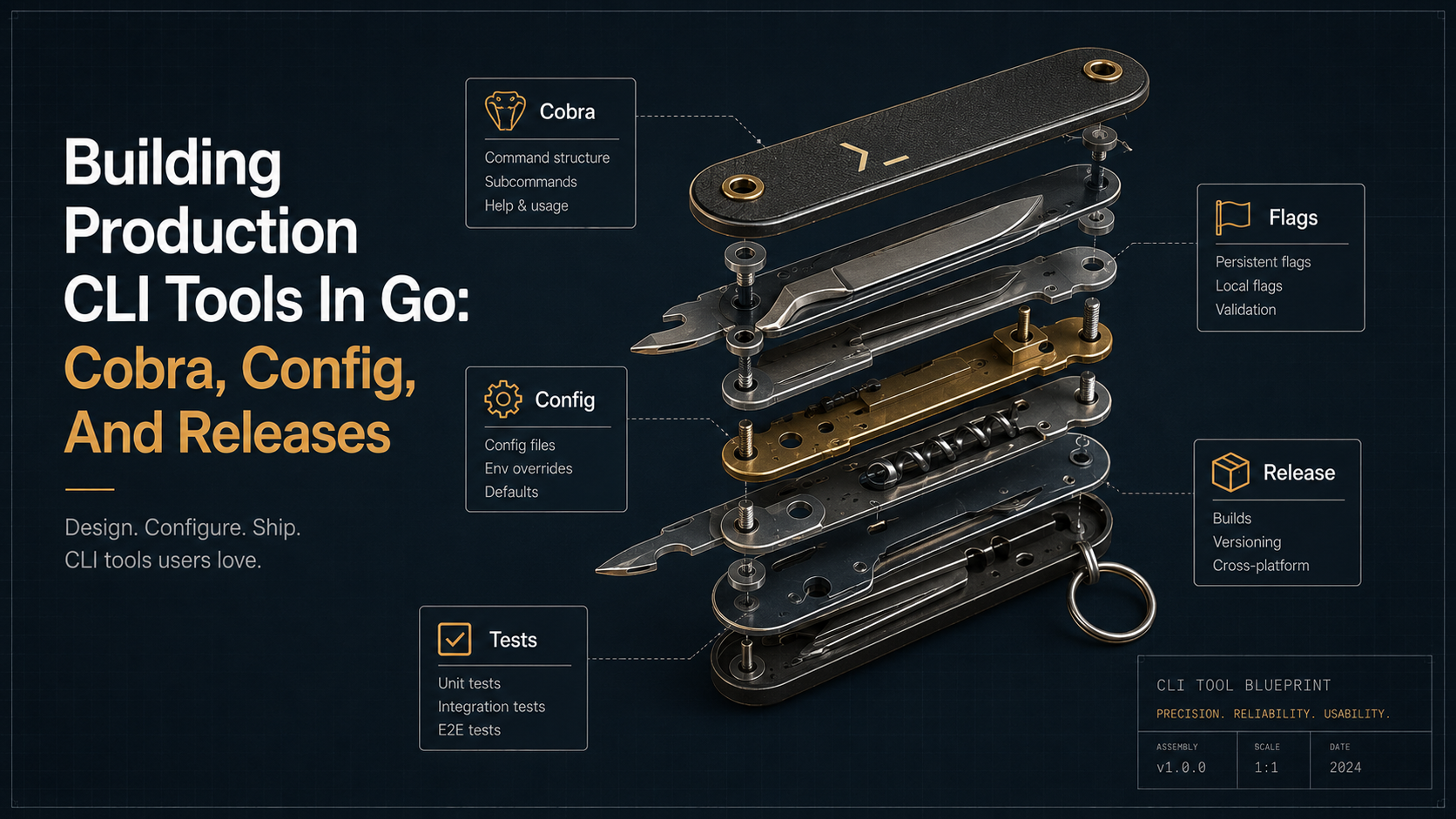
We'll walk through:
- a project layout that scales past one file,
- when stdlib
flagis plenty and when it stops being enough, - Cobra: command trees, persistent flags, args validation, and the small features people forget,
- Viper-style layered configuration (flag → env → file → default), and when to skip Viper entirely,
- UX details that separate a hobby CLI from a tool people actually keep installed,
- testing CLIs without losing your sanity,
- and finally, GoReleaser: the part that turns a binary into a real release.
By the end you should have a mental checklist for any new CLI you start in Go, and a pretty clear sense of which knobs matter and which ones you can leave at defaults.
Why Go is unusually good for CLIs
Worth saying out loud before we dive in: there's a reason so many infra tools (kubectl, terraform, gh, hugo, cosign, goreleaser itself) are written in Go. The combination is hard to beat.
Static binaries. No runtime, no pip install, no nvm. go build gives you one file you can drop anywhere. Cross-compilation is built in: GOOS=linux GOARCH=arm64 go build works the same on your Mac and on a CI runner. The standard library has HTTP, JSON, file I/O, and process control without third-party imports. Startup time is in single-digit milliseconds. Errors are values, which fits the "report something useful and exit non-zero" pattern CLIs need.
The flip side: Go won't hand you argparse for free. You'll either lean on stdlib flag or pull in a library. That's the next question.
Project structure that survives past 500 lines
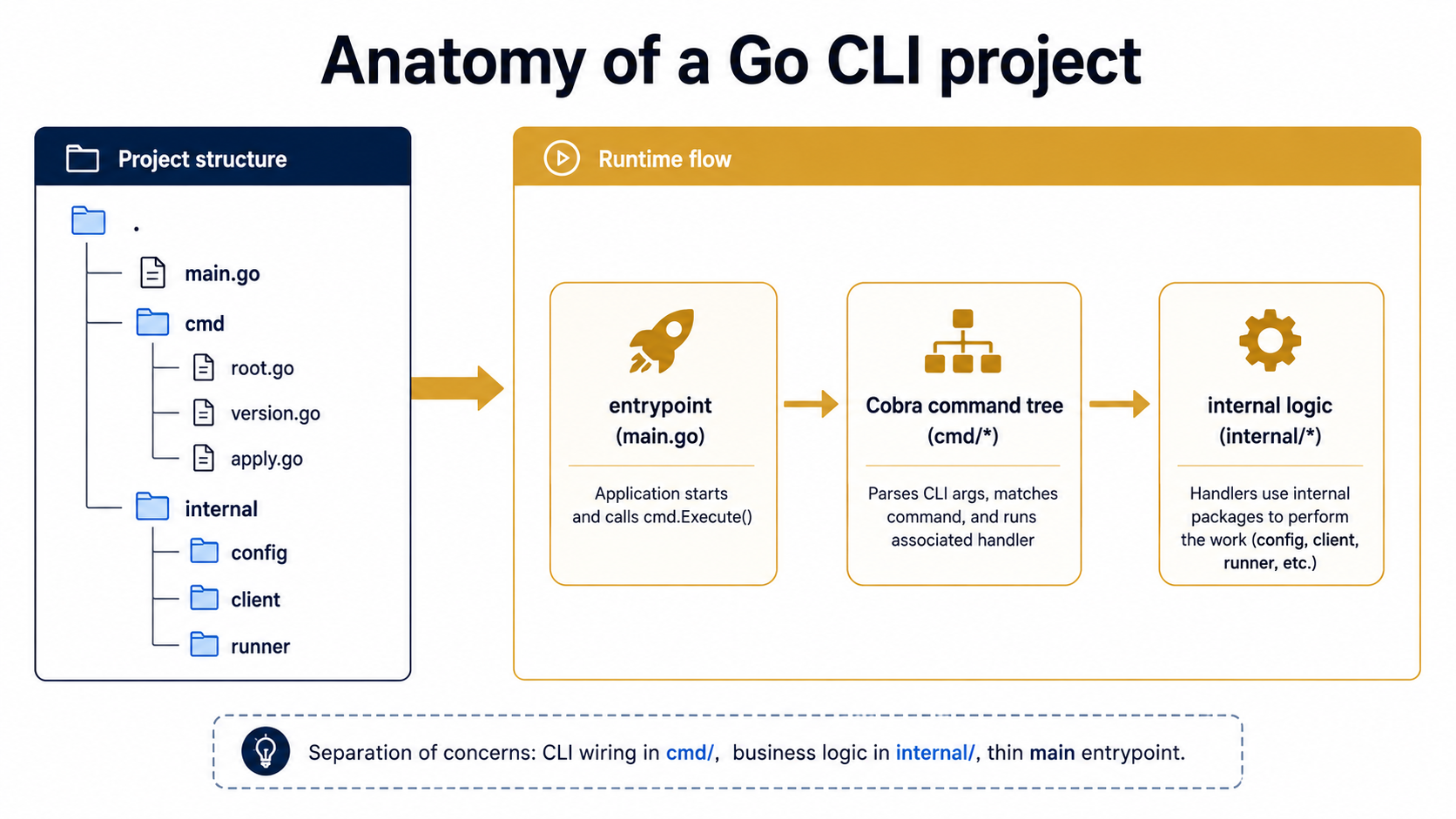
A main.go is fine for one command and one flag. The moment you add a subcommand, you want a real layout. The convention most serious Go CLIs converge on looks like this:
mytool/
├── go.mod
├── go.sum
├── main.go
├── cmd/
│   ├── root.go
│   ├── version.go
│   ├── apply.go
│   └── status.go
├── internal/
│   ├── config/
│   │   └── config.go
│   ├── client/
│   │   └── client.go
│   └── runner/
│       └── runner.go
└── .goreleaser.yaml
The pieces:
main.gois a one-screen entrypoint. It callscmd.Execute(). That's it.cmd/holds Cobra command definitions, one file per command (or per command group). Each file registers itself with the root command viainit().internal/holds the actual logic. Theinternal/folder is enforced by the Go toolchain, and nothing outside this module can import it, which keeps your "library surface" small and on-purpose.pkg/(optional) holds anything you genuinely want consumable as a library. Most CLIs don't need this. Don't create it preemptively.
The split between cmd/ and internal/ matters more than it looks. cmd/ should be thin: flag parsing, argument validation, maybe some output formatting. The interesting work belongs in internal/. When you can call your tool's behavior from a test without going through Cobra, you'll thank yourself.
main.go ends up looking dull:
package main

import "github.com/you/mytool/cmd"

func main() {
    cmd.Execute()
}
That's the whole file. Dull on purpose.
Stdlib flag is fine, until it isn't
Before you reach for Cobra, it's worth understanding what the standard library gives you. The flag package is small, fast, and shipped with Go itself.
package main

import (
    "flag"
    "fmt"
    "os"
)

func main() {
    var (
        addr    = flag.String("addr", ":8080", "address to bind")
        verbose = flag.Bool("v", false, "verbose output")
    )
    flag.Parse()

    if *verbose {
        fmt.Fprintf(os.Stderr, "listening on %s\n", *addr)
    }
    // ... actual work ...
}
It works. It generates -h help. It handles --addr=:9000, --addr :9000, and -addr :9000. For a single-purpose binary with a handful of flags, this is genuinely all you need.
Where stdlib flag stops keeping up:
- Subcommands.
flag.NewFlagSetlets you build them by hand, but it's annoying. You parseos.Args[1], dispatch, then parse the rest. Doable, but you'll write the same scaffolding every time. - Persistent flags across subcommands. No native concept.
- Required flags, mutually exclusive flags, args validation. Roll your own.
- Shell completion. Roll your own.
- Auto-generated help with sections. Roll your own.
The break point in practice is around the second subcommand. One subcommand, hand-roll it. Two or more, reach for Cobra.
Cobra: the actual command tree
Cobra (github.com/spf13/cobra) is the library most production Go CLIs use. It gives you a tree of Command structs, each with its own flags, args, and Run function. The tree mirrors the user's typed input. So mytool apply config --dry-run resolves to the apply command's config subcommand with the --dry-run flag set.
A minimal root looks like this:
package cmd

import (
    "fmt"
    "os"

    "github.com/spf13/cobra"
)

var rootCmd = &cobra.Command{
    Use:   "mytool",
    Short: "A small tool for doing the thing",
    Long: `mytool manages your widgets across environments.

It supports applying, inspecting, and rolling back widget configs.`,
}

func Execute() {
    if err := rootCmd.Execute(); err != nil {
        fmt.Fprintln(os.Stderr, err)
        os.Exit(1)
    }
}
A subcommand goes in its own file and registers itself in init():
package cmd

import (
    "fmt"

    "github.com/spf13/cobra"
)

var (
    version = "dev"
    commit  = "none"
    date    = "unknown"
)

var versionCmd = &cobra.Command{
    Use:   "version",
    Short: "Print the version",
    Run: func(cmd *cobra.Command, args []string) {
        fmt.Printf("mytool %s (commit %s, built %s)\n", version, commit, date)
    },
}

func init() {
    rootCmd.AddCommand(versionCmd)
}
Notice the package-level version, commit, date variables. These get filled in at build time by -ldflags, and GoReleaser will fill them automatically. We'll come back to that.
A few Cobra fields you'll lean on constantly:
Use: the one-liner usage string.Use: "apply [flags] FILE"shows up in help.Short: one-sentence summary shown in the parent's command list.Long: multi-paragraph help shown by--help.RunorRunE: the work. PreferRunEso you canreturn errcleanly.Args: argument validation. Cobra shipscobra.ExactArgs(1),cobra.MinimumNArgs(1),cobra.NoArgs,cobra.OnlyValidArgs, and friends.PreRunE: runs after args are validated but beforeRunE. Good for setting up clients, loading config, validating flag combinations.Example: anExample:block shows up in help and is one of the highest-leverage bits of UX you can add.
Here's a real subcommand with most of those wired in:
package cmd

import (
    "fmt"

    "github.com/spf13/cobra"

    "github.com/you/mytool/internal/runner"
)

var (
    applyDryRun bool
    applyForce  bool
)

var applyCmd = &cobra.Command{
    Use:   "apply [flags] FILE",
    Short: "Apply a widget config from a file",
    Long: `Apply reads a widget config and reconciles the target environment to match.

By default, apply will refuse to run against production unless --force is passed.`,
    Example: `  mytool apply widgets.yaml
  mytool apply --dry-run widgets.yaml
  mytool apply --force prod-widgets.yaml`,
    Args: cobra.ExactArgs(1),
    RunE: func(cmd *cobra.Command, args []string) error {
        path := args[0]
        opts := runner.ApplyOptions{
            DryRun: applyDryRun,
            Force:  applyForce,
        }
        return runner.Apply(cmd.Context(), path, opts)
    },
}

func init() {
    applyCmd.Flags().BoolVar(&applyDryRun, "dry-run", false, "show what would change without applying")
    applyCmd.Flags().BoolVar(&applyForce, "force", false, "allow apply against production targets")
    rootCmd.AddCommand(applyCmd)
}
Two details worth pointing out:
cmd.Context() returns a context.Context that Cobra will cancel when the process gets SIGINT or SIGTERM (you do this once on the root with rootCmd.SetContext(ctx) or use cobra.CheckErr). Pass this context down into internal/runner.Apply and your work cancels cleanly when someone hits Ctrl-C. Don't skip this. The difference between a CLI that cancels cleanly and one that strands resources is one context parameter.
The command file does flag binding, args validation, and one function call. The actual work lives in internal/runner. You can unit-test runner.Apply without ever touching Cobra.
Persistent flags: shared across the whole tree
Some flags belong on every command. --config, --verbose, --output, --profile. You define them once on the root:
var (
    cfgFile   string
    verbose   bool
    outputFmt string
)

var rootCmd = &cobra.Command{
    Use:   "mytool",
    Short: "A small tool for doing the thing",
}

func init() {
    rootCmd.PersistentFlags().StringVar(&cfgFile, "config", "", "path to config file (default: $HOME/.mytool.yaml)")
    rootCmd.PersistentFlags().BoolVarP(&verbose, "verbose", "v", false, "verbose output")
    rootCmd.PersistentFlags().StringVarP(&outputFmt, "output", "o", "text", "output format: text|json|yaml")
}
Persistent flags are inherited by every child command, recursively. mytool apply --verbose foo.yaml and mytool status --verbose both work without apply or status knowing the flag exists.
StringVarP (with the trailing P) takes both a long name and a short name. The convention is sensible single letters: -v for verbose, -o for output, -c for config. Don't get creative. -x for "execute" reads as "extra" to half your users.
Flag types, defaults, and the small ergonomic touches
Cobra exposes most types you'd reasonably want:
flags := cmd.Flags()

flags.StringVar(&name, "name", "default", "usage")
flags.IntVar(&count, "count", 1, "how many")
flags.BoolVar(&recursive, "recursive", false, "descend into subdirs")
flags.DurationVar(&timeout, "timeout", 30*time.Second, "request timeout")
flags.StringSliceVar(&tags, "tag", nil, "tag (repeatable)")
flags.StringToStringVar(&labels, "label", nil, "label as key=value")
A few small features that matter:
Required flags. Mark a flag required and Cobra refuses to run without it.
applyCmd.Flags().StringVar(&env, "env", "", "target environment")
applyCmd.MarkFlagRequired("env")
Mutually exclusive flags. Tell Cobra two flags can't both be set.
applyCmd.MarkFlagsMutuallyExclusive("dry-run", "force")Required together. Tell Cobra two flags must appear together.
applyCmd.MarkFlagsRequiredTogether("client-cert", "client-key")These look like trivia, but they're the difference between "the tool tells me I forgot something" and "the tool ran for 40 seconds, made half a change, then exploded because a flag was missing."
Deprecated flags. Don't just remove them; deprecate first.
flags.StringVar(&legacyAddr, "address", "", "DEPRECATED: use --addr")
flags.MarkDeprecated("address", "use --addr instead")
Cobra prints a warning, hides the flag from help, but still accepts it. Users who scripted against your old flag don't get a unknown flag error on Monday morning.
Arg validation: catch shape problems before work starts
The Args field on a cobra.Command takes a function with the signature func(cmd *Command, args []string) error. Cobra ships a bunch of ready-made ones:
Args: cobra.NoArgs,
Args: cobra.ExactArgs(2),
Args: cobra.MinimumNArgs(1),
Args: cobra.MaximumNArgs(3),
Args: cobra.RangeArgs(1, 3),
Args: cobra.OnlyValidArgs, // requires ValidArgs to be set
You can combine them with cobra.MatchAll:
Args: cobra.MatchAll(
    cobra.ExactArgs(1),
    func(cmd *cobra.Command, args []string) error {
        if !strings.HasSuffix(args[0], ".yaml") {
            return fmt.Errorf("file must be a .yaml")
        }
        return nil
    },
),
This lets your RunE assume the args are well-shaped. Validation lives in one place, errors are user-readable, and --help still shows the right usage.
Configuration: flag, env, file, default
Past a few flags, users start wanting a config file. They also want to override individual settings with an env var. And they want a CI flag to win over both. That's a four-layer precedence problem:
1. Command-line flag    (highest priority)
2. Environment variable
3. Config file          (yaml / toml / json)
4. Built-in default     (lowest priority)
This is the layering most production CLIs converge on. kubectl, terraform, gh, all do some version of it.
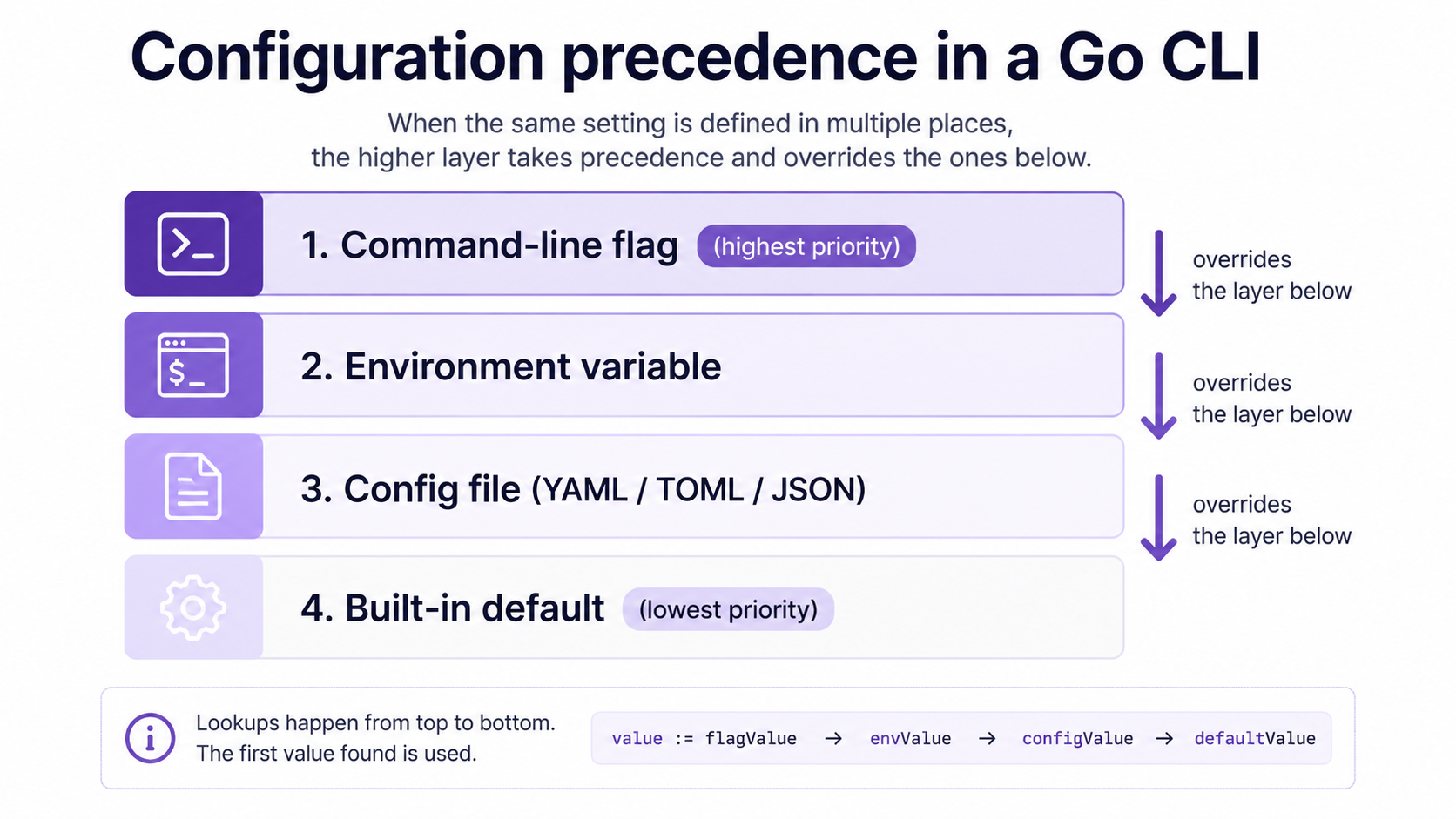
You have two reasonable choices for implementing it: Viper, or hand-rolled.
Option A: Viper
Viper (github.com/spf13/viper) is the obvious match for Cobra: same author, same era, designed to interop. It handles all four layers out of the box.
package config

import (
    "fmt"
    "strings"
    "time"

    "github.com/spf13/cobra"
    "github.com/spf13/viper"
)

type Config struct {
    Addr    string        `mapstructure:"addr"`
    Timeout time.Duration `mapstructure:"timeout"`
    Env     string        `mapstructure:"env"`
    Verbose bool          `mapstructure:"verbose"`
}

func Load(cmd *cobra.Command, cfgFile string) (*Config, error) {
    v := viper.New()

    // 4. Defaults.
    v.SetDefault("addr", ":8080")
    v.SetDefault("timeout", 30*time.Second)

    // 3. Config file.
    if cfgFile != "" {
        v.SetConfigFile(cfgFile)
    } else {
        v.SetConfigName(".mytool")
        v.SetConfigType("yaml")
        v.AddConfigPath("$HOME")
        v.AddConfigPath(".")
    }
    if err := v.ReadInConfig(); err != nil {
        if _, ok := err.(viper.ConfigFileNotFoundError); !ok {
            return nil, fmt.Errorf("read config: %w", err)
        }
    }

    // 2. Environment. MYTOOL_ADDR, MYTOOL_TIMEOUT, etc.
    v.SetEnvPrefix("MYTOOL")
    v.SetEnvKeyReplacer(strings.NewReplacer(".", "_", "-", "_"))
    v.AutomaticEnv()

    // 1. Flags (highest priority).
    if err := v.BindPFlags(cmd.Flags()); err != nil {
        return nil, fmt.Errorf("bind flags: %w", err)
    }
    if err := v.BindPFlags(cmd.PersistentFlags()); err != nil {
        return nil, fmt.Errorf("bind persistent flags: %w", err)
    }

    var cfg Config
    if err := v.Unmarshal(&cfg); err != nil {
        return nil, fmt.Errorf("unmarshal config: %w", err)
    }
    return &cfg, nil
}
The pieces that do real work:
SetDefaultsets the bottom layer. Defaults you put in code rather than asking the user to discover.AddConfigPath+SetConfigName+ReadInConfigcovers the file layer. Viper auto-detects.yaml,.toml,.json, and a few others.SetEnvPrefix("MYTOOL")+AutomaticEnvmakesMYTOOL_ADDRmap to theaddrkey. The replacer lets you haverequest.timeoutmap toMYTOOL_REQUEST_TIMEOUT.BindPFlagsplumbs Cobra flags as the highest-priority source. Flag values override env, file, and default.Unmarshalpopulates your typed struct viamapstructuretags.
Call config.Load(cmd, cfgFile) from PreRunE on the root command, stash the result somewhere your subcommands can read it, and every subcommand gets the same merged config without duplicating logic.
Option B: skip Viper
Viper is convenient but it pulls in a lot of dependencies and its API is broad. If you want a smaller surface, hand-roll it. A common minimal pattern:
package config

import (
    "errors"
    "os"
    "time"

    "gopkg.in/yaml.v3"
)

type Config struct {
    Addr    string        `yaml:"addr"`
    Timeout time.Duration `yaml:"timeout"`
    Env     string        `yaml:"env"`
}

func Load(path string) (*Config, error) {
    cfg := &Config{
        // defaults
        Addr:    ":8080",
        Timeout: 30 * time.Second,
    }

    if path != "" {
        b, err := os.ReadFile(path)
        if err != nil && !errors.Is(err, os.ErrNotExist) {
            return nil, err
        }
        if err == nil {
            if err := yaml.Unmarshal(b, cfg); err != nil {
                return nil, err
            }
        }
    }

    if v := os.Getenv("MYTOOL_ADDR"); v != "" {
        cfg.Addr = v
    }
    if v := os.Getenv("MYTOOL_ENV"); v != "" {
        cfg.Env = v
    }
    // ... etc.
    return cfg, nil
}
Then back in your Cobra command, after parsing flags, you do one last pass: if the flag was explicitly set, override the config value with it. cmd.Flags().Changed("addr") tells you whether the user actually passed --addr or whether Cobra is reporting the default.
cfg, err := config.Load(cfgFile)
if err != nil {
    return err
}
if cmd.Flags().Changed("addr") {
    cfg.Addr = addr // addr is the flag-bound variable
}
It's more code than Viper, but the dependency graph is yaml.v3 and that's it. For small tools, this is often the right call. For tools with twenty config keys, you'll regret not using Viper around key fifteen.
UX details that separate hobby CLIs from real ones
The boring parts. None of these are technically difficult; all of them are the difference between a tool people keep installed and one they uninstall after a week.
Version, with build info
Hardcoding version = "1.0.0" in a string literal is the wrong move. Use -ldflags and let your release pipeline fill it in.
package cmd

var (
    version = "dev"
    commit  = "none"
    date    = "unknown"
)
At build time:
go build \
  -ldflags "-X github.com/you/mytool/cmd.version=1.2.0 \
            -X github.com/you/mytool/cmd.commit=$(git rev-parse --short HEAD) \
            -X github.com/you/mytool/cmd.date=$(date -u +%Y-%m-%dT%H:%M:%SZ)" \
  -o mytool .
In a dev build the version is dev. In a real release the version, commit, and date are baked in. GoReleaser will do this for you automatically, which we'll get to.
Shell completion
Cobra generates shell completion for bash, zsh, fish, and PowerShell. You enable it with a single command:
package cmd

import (
    "os"

    "github.com/spf13/cobra"
)

var completionCmd = &cobra.Command{
    Use:   "completion [bash|zsh|fish|powershell]",
    Short: "Generate shell completion scripts",
    DisableFlagsInUseLine: true,
    ValidArgs: []string{"bash", "zsh", "fish", "powershell"},
    Args:      cobra.MatchAll(cobra.ExactArgs(1), cobra.OnlyValidArgs),
    RunE: func(cmd *cobra.Command, args []string) error {
        switch args[0] {
        case "bash":
            return rootCmd.GenBashCompletionV2(os.Stdout, true)
        case "zsh":
            return rootCmd.GenZshCompletion(os.Stdout)
        case "fish":
            return rootCmd.GenFishCompletion(os.Stdout, true)
        case "powershell":
            return rootCmd.GenPowerShellCompletionWithDesc(os.Stdout)
        }
        return nil
    },
}

func init() {
    rootCmd.AddCommand(completionCmd)
}
Users run mytool completion zsh > /usr/local/share/zsh/site-functions/_mytool once and tab-complete subcommands, flags, and (with a bit more work) flag values for the rest of time. This costs you about twenty lines and feels like magic.
You can take completion one step further by making specific flags or args completion-aware:
applyCmd.RegisterFlagCompletionFunc("env", func(cmd *cobra.Command, args []string, toComplete string) ([]string, cobra.ShellCompDirective) {
    return []string{"dev", "staging", "prod"}, cobra.ShellCompDirectiveNoFileComp
})
Now mytool apply --env <TAB> offers dev, staging, prod. This is a strong signal that your tool is being maintained by someone who cares.
Exit codes
UNIX convention: zero is success, non-zero is failure. Be specific about what each non-zero means, especially if scripts will read your tool's output.
package cmd

const (
    ExitOK         = 0
    ExitUsage      = 2  // bad CLI usage
    ExitConfig     = 3  // config load / validation failure
    ExitNetwork    = 4  // remote unreachable
    ExitConflict   = 5  // refused due to drift / conflict
    ExitInternal   = 70 // unexpected internal error
)
Cobra returns 1 by default when RunE returns a non-nil error. If you want finer control, set the exit code yourself and call os.Exit from Execute:
func Execute() {
    if err := rootCmd.Execute(); err != nil {
        var ee *runner.ExitError
        if errors.As(err, &ee) {
            os.Exit(ee.Code)
        }
        os.Exit(1)
    }
}
Where runner.ExitError is a custom error type that carries an exit code. The pattern is: deep code returns rich errors, cmd.Execute translates them to exit codes.
Output formatting: --output
Many real CLIs support --output text|json|yaml. Text for humans, JSON for scripts, YAML for kubectl-style ergonomics.
package output

import (
    "encoding/json"
    "fmt"
    "io"

    "gopkg.in/yaml.v3"
)

type Format string

const (
    FormatText Format = "text"
    FormatJSON Format = "json"
    FormatYAML Format = "yaml"
)

type Renderer interface {
    Render(v any) error
}

func New(format Format, w io.Writer) (Renderer, error) {
    switch format {
    case FormatText:
        return textRenderer{w: w}, nil
    case FormatJSON:
        return jsonRenderer{w: w}, nil
    case FormatYAML:
        return yamlRenderer{w: w}, nil
    default:
        return nil, fmt.Errorf("unknown output format: %s", format)
    }
}

type jsonRenderer struct{ w io.Writer }

func (r jsonRenderer) Render(v any) error {
    enc := json.NewEncoder(r.w)
    enc.SetIndent("", "  ")
    return enc.Encode(v)
}

type yamlRenderer struct{ w io.Writer }

func (r yamlRenderer) Render(v any) error {
    enc := yaml.NewEncoder(r.w)
    defer enc.Close()
    return enc.Encode(v)
}

type textRenderer struct{ w io.Writer }

func (r textRenderer) Render(v any) error {
    // domain-specific human formatting per type
    switch t := v.(type) {
    case fmt.Stringer:
        _, err := fmt.Fprintln(r.w, t.String())
        return err
    default:
        _, err := fmt.Fprintf(r.w, "%v\n", v)
        return err
    }
}
The pattern: subcommands always produce a typed value, then hand it to a Renderer chosen by the --output flag. You never sprinkle if outputFmt == "json" inside business logic.
Quiet, verbose, and stderr vs stdout
One rule: machine-readable output goes to stdout, everything else goes to stderr. That includes progress logs, warnings, prompts, and "loading..." messages. If a user pipes your tool to jq, only the JSON should land in the pipe.
fmt.Fprintln(os.Stderr, "loading config from", cfgFile) // stderr
enc.Encode(result)                                       // stdout
This is the single most-violated CLI rule in the wild, and getting it right makes your tool feel professional.
Help text
Cobra generates help automatically, but two small things make it much better:
- Write
Longdescriptions in full sentences. Help is documentation users read at the moment they need it most. - Always fill in
Example. One line of working invocation is worth ten lines of prose.
If you spot yourself writing the same help three times, you have a config or auth concept that belongs at the root, not in each subcommand.
Errors and silenced usage
Cobra's default behavior, when RunE returns an error, is to print the error and the full usage block. For a typo in a flag name, that's fine. For "remote server returned 503", it makes your tool look broken.
The fix:
var rootCmd = &cobra.Command{
    Use:   "mytool",
    Short: "...",
    SilenceUsage:  true,
    SilenceErrors: true,
}

func Execute() {
    if err := rootCmd.Execute(); err != nil {
        fmt.Fprintln(os.Stderr, "error:", err)
        os.Exit(1)
    }
}
SilenceUsage suppresses the usage dump on runtime errors. SilenceErrors lets you print the error yourself, with whatever prefix and formatting you want. Cobra will still print usage automatically for usage errors (unknown flag, wrong arg count), which is what you want.
Testing CLIs without losing your sanity
Two layers of tests, in order of importance:
1. Test the business logic, not the CLI. This is why we kept cmd/ thin. The interesting work lives in internal/runner, internal/client, etc. Test those with normal Go unit tests. No Cobra in the picture.
package runner

import (
    "context"
    "testing"
)

func TestApply_DryRun(t *testing.T) {
    ctx := context.Background()
    res, err := Apply(ctx, "testdata/widgets.yaml", ApplyOptions{DryRun: true})
    if err != nil {
        t.Fatalf("Apply: %v", err)
    }
    if !res.NoOp {
        t.Errorf("expected no-op in dry-run, got %+v", res)
    }
}
This is 90% of where your tests should live.
2. Smoke-test the command wiring. A small number of tests that drive Cobra end-to-end and check that flags, args, and exit codes hang together. Cobra makes this easy:
package cmd

import (
    "bytes"
    "strings"
    "testing"
)

func TestApply_RequiresFile(t *testing.T) {
    var stderr bytes.Buffer
    rootCmd.SetArgs([]string{"apply"}) // no FILE arg
    rootCmd.SetOut(&stderr)
    rootCmd.SetErr(&stderr)

    err := rootCmd.Execute()
    if err == nil {
        t.Fatalf("expected error, got nil")
    }
    if !strings.Contains(err.Error(), "accepts 1 arg") {
        t.Errorf("unexpected error: %v", err)
    }
}
Two warnings about this pattern:
- Cobra commands hold global state via package-level vars. Tests that run in parallel can stomp on each other. Either run these serially or refactor commands to be constructed by functions (
newApplyCmd() *cobra.Command) returning fresh instances per test. rootCmd.SetArgsmutates a package-level command. Reset it int.Cleanupif you want to be careful.
3. Golden-file tests for output. When you have --output json and --output text, a small "given this input, produce this output" suite catches accidental format breakage instantly. The pattern: snapshot the expected output in testdata/golden/*.txt, run the command, compare, and add a -update test flag that rewrites the golden file on demand.
flag.BoolVar(&update, "update", false, "update golden files")That's it. Run go test ./cmd/... -update after an intentional change, review the diff, commit.
Releases are the part everyone underestimates
So your binary works on your laptop. You're three flags away from git tag v0.1.0. The temptation is to call go build, upload the binary to a GitHub release, and call it a day.
Don't. Releases done by hand drift. Six months in you'll be missing a Windows build, your checksums won't match, and the install instructions in your README will reference a binary that doesn't exist on Linux/arm64. Use GoReleaser.
GoReleaser (goreleaser.com) is a release automation tool for Go. You write a .goreleaser.yaml, you run goreleaser release, and it produces cross-compiled binaries, archives, checksums, a GitHub release with a generated changelog, and optionally Homebrew/Scoop/Docker artifacts. It's the tool 80% of public Go CLIs use.
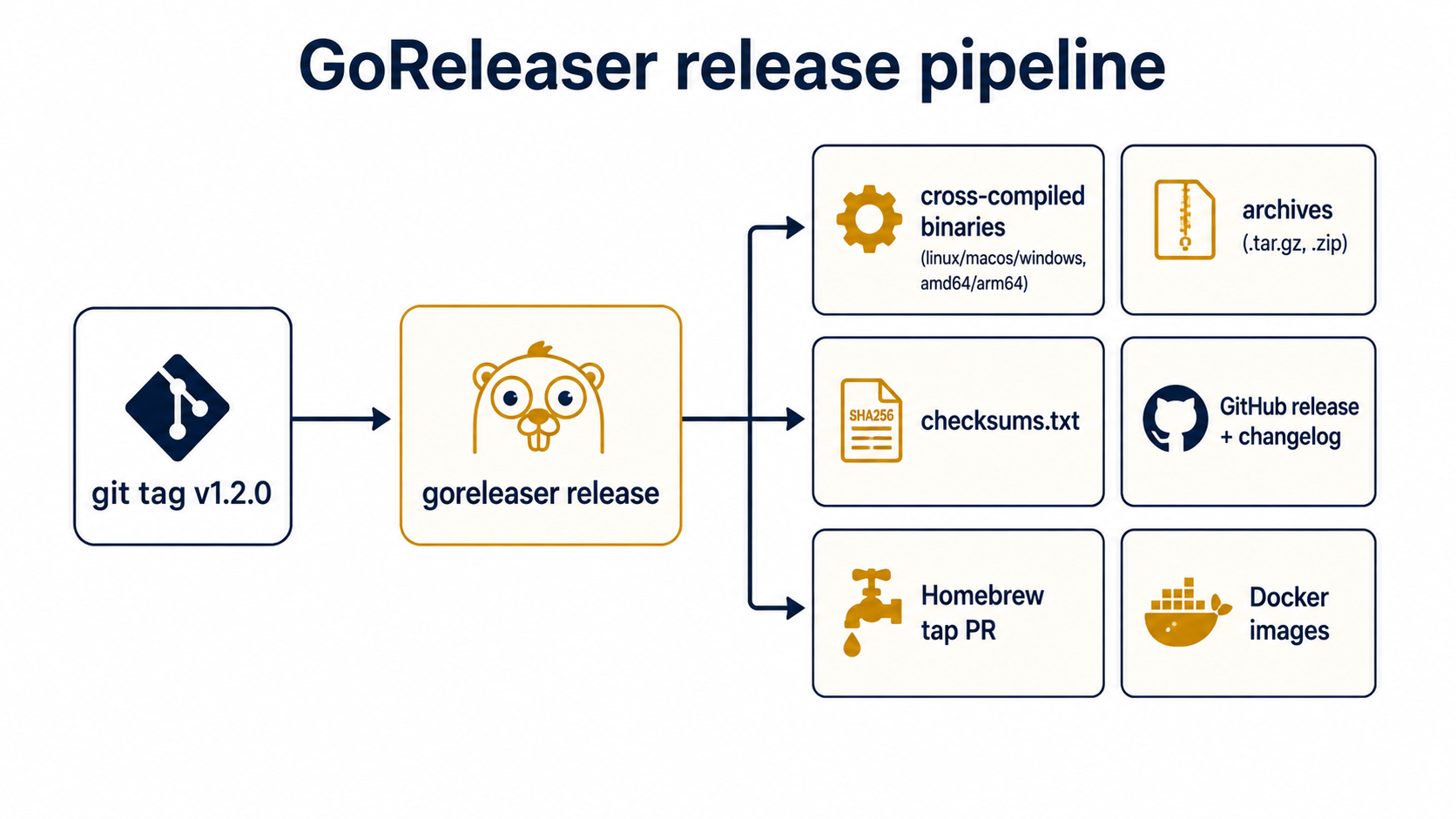
A minimal .goreleaser.yaml for a single-binary CLI:
version: 2

before:
  hooks:
    - go mod tidy

builds:
  - id: mytool
    main: ./
    binary: mytool
    env:
      - CGO_ENABLED=0
    goos:
      - linux
      - darwin
      - windows
    goarch:
      - amd64
      - arm64
    ldflags:
      - -s -w
      - -X github.com/you/mytool/cmd.version={{.Version}}
      - -X github.com/you/mytool/cmd.commit={{.Commit}}
      - -X github.com/you/mytool/cmd.date={{.Date}}

archives:
  - id: mytool
    name_template: "{{ .ProjectName }}_{{ .Version }}_{{ .Os }}_{{ .Arch }}"
    formats: [ tar.gz ]
    format_overrides:
      - goos: windows
        formats: [ zip ]

checksum:
  name_template: "checksums.txt"
  algorithm: sha256

snapshot:
  version_template: "{{ incpatch .Version }}-snapshot"

changelog:
  sort: asc
  filters:
    exclude:
      - "^docs:"
      - "^test:"
      - "^chore:"
What that buys you, one goreleaser release away:
- Six binaries:
linux/amd64,linux/arm64,darwin/amd64,darwin/arm64,windows/amd64,windows/arm64. - Each one packaged as a tar.gz (or zip on Windows) with a predictable name.
- A
checksums.txtwith SHA-256 for every artifact. - A GitHub release with a changelog auto-generated from commit messages, excluding
docs:,test:,chore:. - The
cmd.version/cmd.commit/cmd.datevars filled in via-ldflags, somytool versionreports the real release. - The
-s -wflags strip the binary, dropping size meaningfully.
CGO_ENABLED=0 is the small detail that matters. It produces a fully static binary. Without it, your Linux build links against glibc and won't run on Alpine. With it, your binary runs anywhere the kernel exists.
Local snapshots
Before tagging, you can run a dry-run with --snapshot:
goreleaser release --snapshot --cleanThis builds everything into ./dist/ without pushing to GitHub. Inspect the artifacts, run the binary, sanity-check the changelog. Then tag and run for real.
Releases from CI
In production you tag a commit, GitHub Actions runs GoReleaser, and the release appears within a minute or two. A minimal workflow:
name: release

on:
  push:
    tags:
      - "v*"

permissions:
  contents: write

jobs:
  release:
    runs-on: ubuntu-latest
    steps:
      - uses: actions/checkout@v4
        with:
          fetch-depth: 0
      - uses: actions/setup-go@v5
        with:
          go-version: stable
      - uses: goreleaser/goreleaser-action@v6
        with:
          version: latest
          args: release --clean
        env:
          GITHUB_TOKEN: ${{ secrets.GITHUB_TOKEN }}
fetch-depth: 0 matters: GoReleaser uses git history for the changelog and the version, so a shallow clone confuses it.
Homebrew, Scoop, and Docker
Once binaries are good, you can add distribution channels in the same config:
brews:
  - name: mytool
    repository:
      owner: you
      name: homebrew-tap
    homepage: "https://github.com/you/mytool"
    description: "A small tool for doing the thing"
    license: "MIT"
    test: |
      system "#{bin}/mytool version"

scoops:
  - name: mytool
    repository:
      owner: you
      name: scoop-bucket
    homepage: "https://github.com/you/mytool"

dockers:
  - image_templates:
      - "ghcr.io/you/mytool:{{ .Version }}-amd64"
    use: buildx
    build_flag_templates:
      - "--platform=linux/amd64"
    goarch: amd64
  - image_templates:
      - "ghcr.io/you/mytool:{{ .Version }}-arm64"
    use: buildx
    build_flag_templates:
      - "--platform=linux/arm64"
    goarch: arm64

docker_manifests:
  - name_template: "ghcr.io/you/mytool:{{ .Version }}"
    image_templates:
      - "ghcr.io/you/mytool:{{ .Version }}-amd64"
      - "ghcr.io/you/mytool:{{ .Version }}-arm64"
  - name_template: "ghcr.io/you/mytool:latest"
    image_templates:
      - "ghcr.io/you/mytool:{{ .Version }}-amd64"
      - "ghcr.io/you/mytool:{{ .Version }}-arm64"
For Homebrew you need a separate repo (homebrew-tap by convention) and a personal access token with permission to push to it. GoReleaser opens a PR (or pushes directly) to update the formula with the new version and SHA. Users brew install you/tap/mytool and they're done.
For Docker you'll typically also set up buildx in your CI workflow. The multi-arch manifest pattern above means docker pull ghcr.io/you/mytool:1.2.0 works on both Intel and ARM hosts.
Signing and supply chain
Once your tool gets used by other people, you'll want to think about supply chain. cosign-based signing is one extra block:
signs:
  - cmd: cosign
    args:
      - "sign-blob"
      - "--yes"
      - "--output-signature=${signature}"
      - "${artifact}"
    artifacts: checksum
That signs checksums.txt with cosign. Combined with the SHA-256s, users can verify both that the binary they downloaded matches the published checksum, and that the checksum file itself was signed by you (or by your CI's OIDC identity, in the keyless flow).
This is overkill for personal tools. It's table stakes for anything used by a company.
A small note on the boring parts
A lot of what makes a CLI feel good is invisible. Help text that uses real sentences. A --version that reports a commit. Exit codes that scripts can trust. Errors that go to stderr while data goes to stdout. A goreleaser release that produces every artifact your users expect on the first try.
Most of those are five-line decisions you make once. The cost is small. The compounding payoff (over the months you'll spend supporting the tool, the people you'll onboard onto it, the bug reports you won't get) is large.
Go is unusually well-suited to this whole stack. The standard library covers the bits you'd otherwise build, Cobra is the obvious choice for command trees, Viper handles config layering when you outgrow stdlib, and GoReleaser turns the act of shipping into a single tagged commit. Pick the pieces that match your tool's size, wire them in the order above, and you'll end up with something people install, trust, and quietly forget is yours: which, for a CLI tool, is the highest compliment there is.