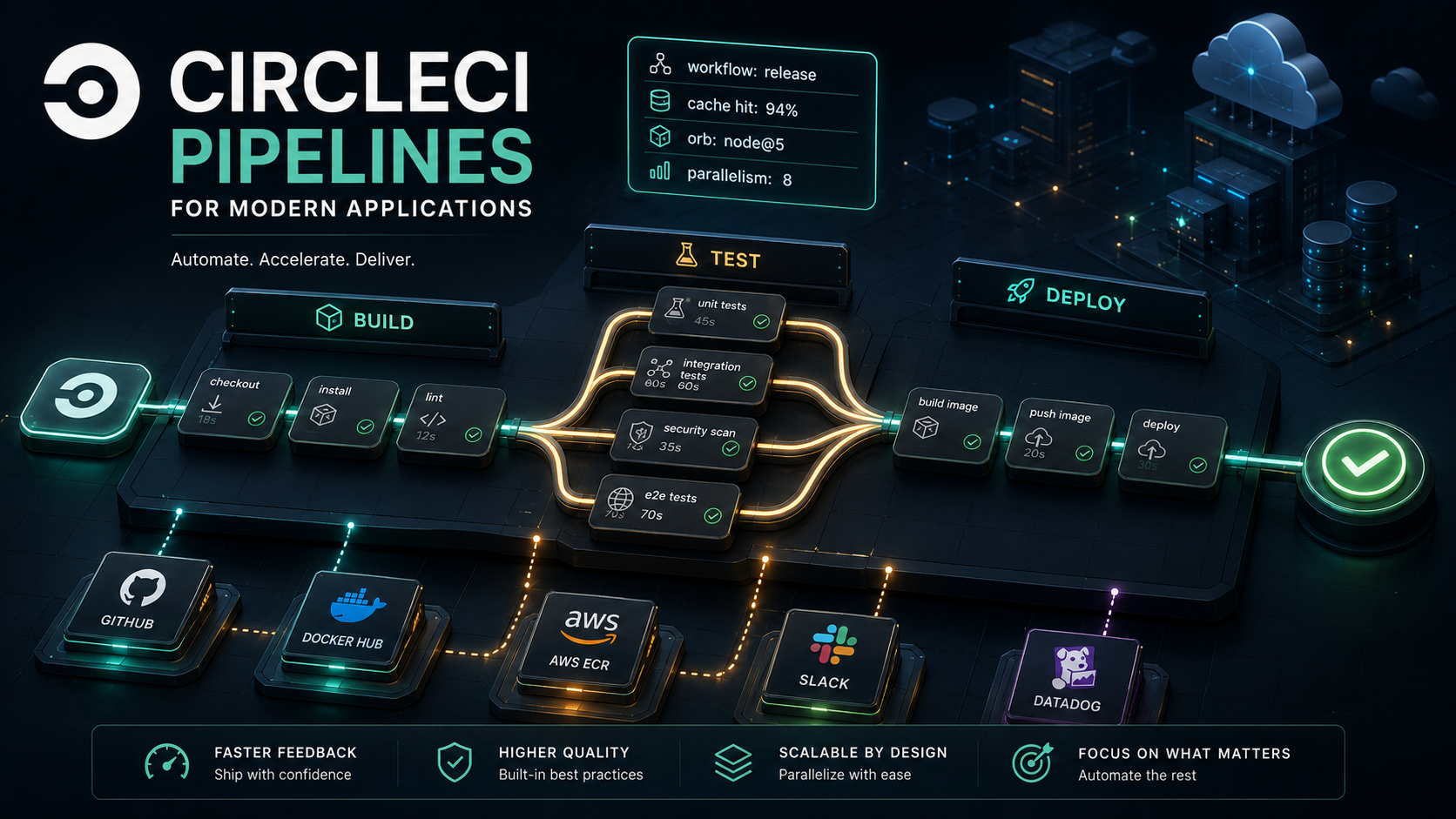
You open the project's .circleci/config.yml and the first thing you notice is how short it is. A dozen lines, a single jobs: block, one workflows: entry at the bottom. The pipeline runs in five minutes, the dashboard shows three little green nodes in a row, and you think: that's it? that's the whole thing? Two months later that same file is six hundred lines, every commit triggers seven jobs across three workflows, half the team is afraid to touch the YAML because they "don't really get how the caching keys work," and someone in code review keeps asking why the build artefacts disappear between jobs.
That arc isn't a CircleCI problem. It's what happens to every CI configuration once it grows past one service and one happy path. The thing CircleCI gets right, and what makes the YAML survivable once it gets complicated, is that it splits the work into four reusable concepts that compose cleanly: jobs, workflows, caches, and orbs. Most pipelines that feel out of control are tangled because somebody mixed those concerns or never learned where one ends and the next begins.
Let's walk through each piece, with real config snippets, and end at a setup that wouldn't make you flinch on a Friday afternoon.
The Mental Model In One Paragraph
A job is a single unit of work that runs in its own executor (a Docker container, a Linux VM, or a macOS VM) and is made of steps. A workflow is a graph of jobs: it decides which jobs run, in what order, on which branches, and with what dependencies between them. Caches are how jobs hand expensive precomputed state (downloaded packages, compiled binaries, Docker layers) across runs so the next pipeline doesn't redo work you already paid for. Orbs are versioned, reusable bundles of jobs, commands, and executors that you import like libraries so you don't keep reinventing "checkout, install Node, run tests" in every project. Keep those four in your head and the rest of CircleCI is basically configuration on top.
The other thing worth knowing up front: every config begins with version: 2.1. That number unlocks orbs, executors, commands, parameters, and reusable bits. If you ever see a config without it, you're looking at the old 2.0 style, workable but missing every reusability feature this article cares about.
Jobs Are Where The Work Actually Happens
A job is the smallest thing CircleCI can run. You give it an executor (the environment), a working directory (optional, sensible default), and an ordered list of steps. Each step is either a built-in (checkout, run, save_cache, restore_cache, store_test_results, store_artifacts, persist_to_workspace, attach_workspace) or a command exposed by an orb.
Here's a minimal but realistic test job for a Node project:
version: 2.1

executors:
  node:
    docker:
      - image: cimg/node:20.11
    working_directory: ~/app

jobs:
  test:
    executor: node
    steps:
      - checkout
      - restore_cache:
          keys:
            - v1-deps-{{ checksum "package-lock.json" }}
            - v1-deps-
      - run:
          name: Install dependencies
          command: npm ci
      - save_cache:
          key: v1-deps-{{ checksum "package-lock.json" }}
          paths:
            - node_modules
      - run:
          name: Lint
          command: npm run lint
      - run:
          name: Unit tests
          command: npm test -- --reporter=junit --reporter-options=output=./reports/junit.xml
      - store_test_results:
          path: reports
A few things are worth pointing out, because they're the parts that surprise people coming from GitHub Actions or Jenkins.
The executor block is just a named reusable environment. You define it once and any job can pick it up. That separation matters more than it looks, when you eventually add a build job that also needs Node, you reuse node: instead of redeclaring the image. When you have to bump from Node 20 to 22, you change it in one place.
Steps run sequentially inside the same container, which means everything one step produces (files in the working dir, installed deps, env vars set via BASH_ENV) is visible to the next step. That's not true between jobs, each job gets a fresh executor, so you'll need caches or workspaces to move things across.
store_test_results isn't a cosmetic step. It feeds CircleCI's test insights (flaky test detection, slowest tests, failure history), and once you've turned it on it tends to find issues that have been hiding in your suite for months.
Picking the right executor
Three real options matter day to day. docker: is the default: fastest startup, cheap, most jobs should live here. machine: gives you a full Linux VM, slower to spin up but lets you run Docker-in-Docker, mount loopback devices, and do anything a container can't (most commonly: build and test multi-container apps with docker-compose). macos: is for iOS and Mac-Catalyst builds, billed at a higher rate, and worth keeping isolated in a dedicated job so it doesn't slow your main pipeline.
You can also mix them in one workflow without ceremony, your build-and-test job can run in docker:, your integration job in machine:, and your package-mac-app job in macos:. The workflow doesn't care.
Steps that move data between jobs
This is the part people learn the third time they get bitten. A fresh executor means each job starts from a clean slate. There are two ways to move stuff:
A cache is keyed and shared across pipeline runs. It's how you avoid downloading node_modules on every build. Caches are content-addressable by key, immutable, and CircleCI keeps them around for a while.
A workspace is scoped to a single pipeline run, used to hand off files from an earlier job to a later one in the same workflow. Think "this build step produced a dist/ directory and the deploy step needs it." You persist_to_workspace in the producer and attach_workspace in the consumer.
jobs:
  build:
    executor: node
    steps:
      - checkout
      - run: npm ci
      - run: npm run build
      - persist_to_workspace:
          root: .
          paths:
            - dist
            - package.json
            - package-lock.json

  deploy:
    executor: node
    steps:
      - attach_workspace:
          at: .
      - run: npx wrangler deploy
Mixing the two up is one of the most common config bugs. Rough rule: if you're trying to skip work across pipeline runs, you want a cache. If you're trying to hand artefacts to another job in the same run, you want a workspace.
Workflows Are The Choreography
A workflow is a directed graph of jobs with rules attached: who runs in parallel, who depends on whom, what filters apply on branches and tags, and when (if ever) the pipeline should pause for a human.
The simplest useful workflow gates deploy on tests passing:
workflows:
  build-test-deploy:
    jobs:
      - lint
      - test:
          requires:
            - lint
      - build:
          requires:
            - test
      - deploy:
          requires:
            - build
          filters:
            branches:
              only: main
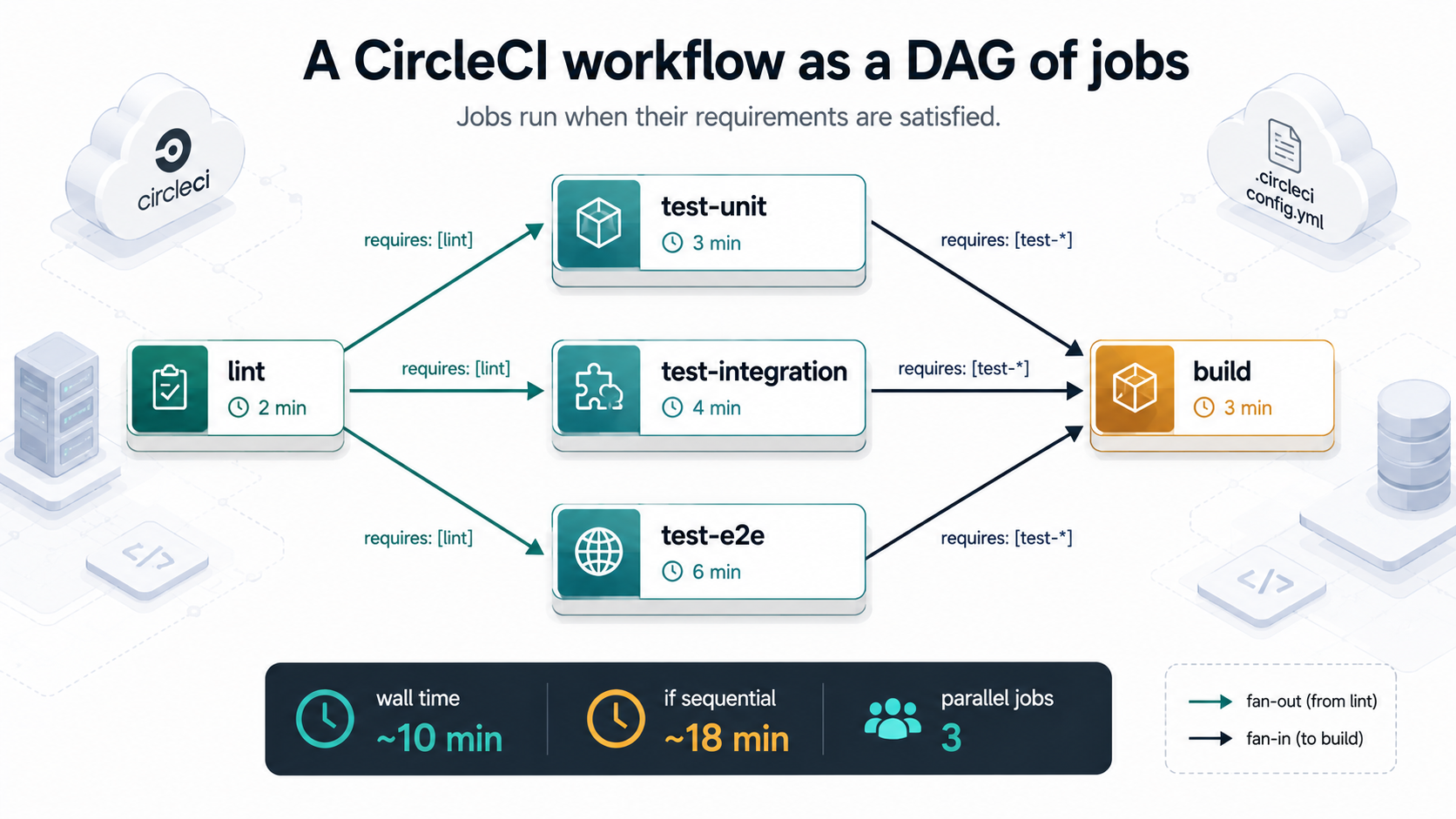
requires is the only piece of plumbing you need to express "don't run X until Y passes." If two jobs don't depend on each other, they run in parallel, by default. That parallelism is free and you should lean into it. A common shape is one fast lint job, several test jobs in parallel, then a single build that fans them in:
workflows:
  ci:
    jobs:
      - lint
      - test-unit:
          requires: [lint]
      - test-integration:
          requires: [lint]
      - test-e2e:
          requires: [lint]
      - build:
          requires:
            - test-unit
            - test-integration
            - test-e2e
Visually, that's a diamond. Lint runs first, three test jobs fan out and run in parallel, build fans them back in. The total wall time is roughly lint + max(unit, integration, e2e) + build, not the sum. For a service with a 90-second lint, a 6-minute unit suite, a 7-minute integration suite, and a 4-minute e2e, you're looking at ~10 minutes total instead of ~18.
Filters: branches, tags, and when not to run
Filters live on each job within a workflow. They take two keys, branches and tags, each accepting only or ignore patterns.
jobs:
  - deploy-staging:
      requires: [build]
      filters:
        branches:
          only: main

  - deploy-prod:
      requires: [build]
      filters:
        tags:
          only: /^v\d+\.\d+\.\d+$/
        branches:
          ignore: /.*/
That second job is the canonical "deploy on a release tag" pattern. The branch filter ignores everything, the tag filter matches semver, and the result is a job that only runs when somebody pushes a v1.2.3 tag, never on a branch commit, even if the tag points at a commit on main.
The subtle part is that CircleCI doesn't run tag-filtered jobs by default. If you only set filters.tags, the job won't run on branches or tags, you need the branches: ignore: /.*/ pattern to make explicit "this job is tag-only." This catches people who add a tags: only: ... filter and then can't figure out why their release pipeline never fires.
Approval gates and scheduled triggers
Two patterns worth knowing because you'll need them eventually.
An approval job pauses the workflow until a real human clicks a button in the CircleCI UI. It has type: approval and no steps:
workflows:
  release:
    jobs:
      - build
      - hold-for-prod:
          type: approval
          requires: [build]
      - deploy-prod:
          requires: [hold-for-prod]
Anyone with project write access can approve. The downstream job doesn't run until they do. Useful for prod deploys where you want CI to do the work but a human to commit to the moment.
Scheduled pipelines trigger workflows on cron rather than on push: nightly e2e suites, weekly dependency-update jobs, dawn-of-time npm audit runs. They're configured through the CircleCI UI or API on the project, not in the YAML itself (the old triggers: block inside workflows is deprecated). When the scheduled trigger fires, it submits a pipeline as if a fake user pushed a commit, and your workflows run according to their normal filter rules.
Caching: Where Pipelines Become Fast Or Painful
Caching is the single biggest lever for pipeline speed and the single biggest source of "why is this build acting weird" questions. The mechanics are simple; the strategy is where things go wrong.
A cache has a key (a string you compose) and paths (directories on disk to save). When you call save_cache, CircleCI stores those paths under that key. When you call restore_cache, it tries each provided key in order; the first match wins and unpacks the files.
- restore_cache:
    keys:
      - v1-deps-{{ checksum "package-lock.json" }}
      - v1-deps-
- run: npm ci
- save_cache:
    key: v1-deps-{{ checksum "package-lock.json" }}
    paths:
      - node_modules
Two ideas inside that snippet do all the work.
Caches are immutable per key. You cannot overwrite a cache by saving under the same key. So if you want a fresh cache when something changes (a lockfile, a Dockerfile, a go.sum), you bake the thing that changes into the key, usually via {{ checksum "..." }}. When package-lock.json changes, the new key won't match the old cache, npm ci will install everything fresh, and save_cache writes a new key. The old key stays around but stops being requested.
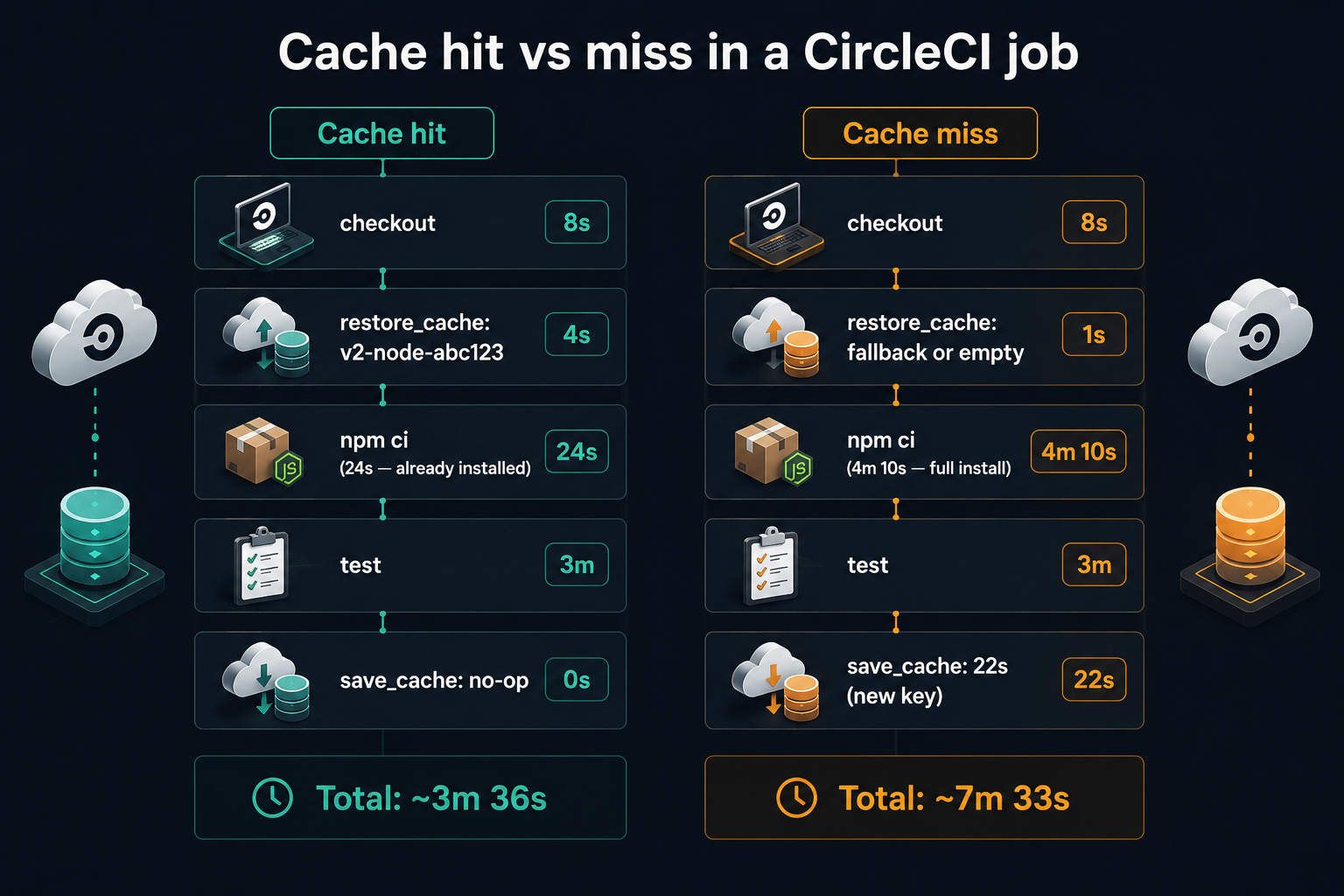
Restore tries keys in order, longest match wins, partial match is OK. Listing multiple keys is how you do "give me the cache for this exact lockfile if you have one, otherwise give me any recent cache so we have something to start with." That fallback matters, it's the difference between a 4-minute first install and a 25-second npm ci that just checksums what's already there.
A few patterns that pay off, organised by tool:
# Node - key off the lockfile
- restore_cache:
    keys:
      - v2-node-{{ arch }}-{{ checksum "package-lock.json" }}
      - v2-node-{{ arch }}-

# Python (pip) - key off requirements
- restore_cache:
    keys:
      - v1-pip-{{ checksum "requirements.txt" }}
      - v1-pip-

# Go modules
- restore_cache:
    keys:
      - v1-gomod-{{ checksum "go.sum" }}
      - v1-gomod-

# PHP (Composer)
- restore_cache:
    keys:
      - v1-composer-{{ checksum "composer.lock" }}
      - v1-composer-

# Java (Maven)
- restore_cache:
    keys:
      - v1-mvn-{{ checksum "pom.xml" }}
      - v1-mvn-
The v1- / v2- prefix is the small habit that saves you the day you intentionally need to bust the cache. Bumping the prefix is the safest "give me a clean start" lever, no cache key matches, every job repopulates, no surprises. Without it, "clear all caches" becomes a CircleCI UI hunt or, worse, a question on Slack about why builds went from 3 minutes to 11 overnight.
Docker layer caching
Docker builds get their own caching mechanism because regular caches don't help, docker build doesn't read or write node_modules. CircleCI exposes Docker Layer Caching (DLC) as a paid feature on machine: and remote_docker: executors. You turn it on at the executor level:
jobs:
  build-image:
    machine:
      image: ubuntu-2204:current
      docker_layer_caching: true
    steps:
      - checkout
      - run: docker build -t myorg/api:$CIRCLE_SHA1 .
With DLC, layers from previous builds stay warm, if your Dockerfile copies package.json and runs npm ci before copying the rest of the source, you get instant cache hits on the install layer as long as the lockfile didn't change. The pattern of copy lockfile, then install, then copy code is the single most impactful tweak you can make to a Dockerfile that lives in a CircleCI pipeline. Without it, every code change busts the install layer and you pay for npm ci on every build.
Orbs: The Bit That Saves Your Sanity
An orb is a versioned, importable bundle of CircleCI config. It can ship three things: executors (named environments), commands (reusable groups of steps), and jobs (whole job definitions you can drop into a workflow). You import an orb at the top of config.yml:
version: 2.1

orbs:
  node: circleci/node@5.3.0
  aws-cli: circleci/aws-cli@4.1.3
  slack: circleci/slack@4.13.3
After that, anything those orbs export shows up under a namespace. node/test, node/install-packages, aws-cli/setup, slack/notify, each is callable like any other step or job.
A pipeline that uses orbs heavily often looks startlingly short. Compare a hand-rolled Node job with one that delegates to the official orb:
test:
  docker:
    - image: cimg/node:20.11
  steps:
    - checkout
    - restore_cache:
        keys:
          - v1-deps-{{ checksum "package-lock.json" }}
    - run: npm ci
    - save_cache:
        key: v1-deps-{{ checksum "package-lock.json" }}
        paths: [node_modules]
- run: npm testtest:
executor: node/default
steps:
- checkout
- node/install-packages:
pkg-manager: npm
- run: npm testThe orb version handles the install-with-cache pattern in one call. If you ever switch from npm to pnpm, you change pkg-manager instead of rewriting four steps. If CircleCI improves the install logic next month (new cache strategy, better lockfile detection), you get the improvement by bumping the orb version.
When to use orbs (and when not to)
Use an orb when:
- You're doing something one of the certified orbs already does well, Node/Python/Go/Ruby setup, AWS/GCP CLI auth, Slack/Teams notifications, Docker buildx, sonar scans, browser-stack runs. The certified ones (under the
circleci/namespace) tend to be solid. - You have a pattern repeating across many internal projects, write a private orb, publish it under your org namespace, version it, and let every team consume it. This is how platform teams escape "every project has its own slightly-wrong CI config."
Avoid an orb when:
- It's an obscure third-party orb with a single contributor and no recent releases. Read the source before pinning a version.
- It hides behaviour you actually need to debug. An orb that wraps your test command and swallows the output isn't doing you any favours.
- You only need it once. A 12-line config doesn't need an orb dependency.
A subtle but important point: orbs are fully expanded into your config when a pipeline runs. You can see exactly what an orb does by clicking "Configuration" on a CircleCI job page, the compiled config shows up there, orb expansions and all. If something behaves weirdly, that view is your friend.
Writing a private orb (when one is warranted)
A minimal orb is a YAML file with the same sections you already know plus an orb_description:
version: 2.1
description: |
  Internal deploy helpers for example.com services.

orbs:
  aws-cli: circleci/aws-cli@4.1.3

executors:
  deploy-runner:
    docker:
      - image: cimg/python:3.12

commands:
  push-image-to-ecr:
    description: Build, tag, and push a Docker image to ECR.
    parameters:
      repo:
        type: string
      tag:
        type: string
        default: $CIRCLE_SHA1
    steps:
      - aws-cli/setup:
          role-arn: arn:aws:iam::123456789012:role/ci-deploy
      - run:
          name: Build and push
          command: |
            aws ecr get-login-password --region us-east-1 \
              | docker login --username AWS --password-stdin 123456789012.dkr.ecr.us-east-1.amazonaws.com
            docker build -t << parameters.repo >>:<< parameters.tag >> .
            docker push << parameters.repo >>:<< parameters.tag >>
Publish it (CircleCI CLI: circleci orb publish ...), and any project in your org can use it:
orbs:
  deploy: example-org/internal-deploy@1.0.0

jobs:
  release:
    executor: deploy/deploy-runner
    steps:
      - checkout
      - deploy/push-image-to-ecr:
          repo: 123456789012.dkr.ecr.us-east-1.amazonaws.com/api
The win is not "shorter config." The win is one place to fix things. When ECR moves to a new auth model, you update the orb, bump the version, and projects upgrade on their own schedule. Without an orb, you'd be opening 14 pull requests.
Putting It Together: A Realistic Pipeline
Here's a config that uses each of the four pieces in a way that resembles what production setups actually look like, a Node service that lints, tests in parallel, builds a Docker image, deploys to staging on main, and deploys to prod on a tag.
version: 2.1

orbs:
  node: circleci/node@5.3.0
  aws-cli: circleci/aws-cli@4.1.3
  slack: circleci/slack@4.13.3

executors:
  node-base:
    docker:
      - image: cimg/node:20.11
    working_directory: ~/app

  docker-builder:
    machine:
      image: ubuntu-2204:current
      docker_layer_caching: true

jobs:
  lint:
    executor: node-base
    steps:
      - checkout
      - node/install-packages:
          pkg-manager: npm
      - run: npm run lint

  test-unit:
    executor: node-base
    parallelism: 4
    steps:
      - checkout
      - node/install-packages:
          pkg-manager: npm
      - run:
          name: Run unit tests (split by timing)
          command: |
            TESTFILES=$(circleci tests glob "src/**/*.test.ts" \
              | circleci tests split --split-by=timings)
            npm test -- $TESTFILES --reporter=junit --reporter-options=output=./reports/junit.xml
      - store_test_results:
          path: reports

  test-integration:
    executor: docker-builder
    steps:
      - checkout
      - run: docker compose -f docker-compose.test.yml up --abort-on-container-exit

  build-image:
    executor: docker-builder
    steps:
      - checkout
      - run:
          name: Build and tag image
          command: |
            docker build -t myorg/api:$CIRCLE_SHA1 .
      - run:
          name: Save image to workspace
          command: docker save -o image.tar myorg/api:$CIRCLE_SHA1
      - persist_to_workspace:
          root: .
          paths:
            - image.tar

  deploy:
    executor: node-base
    parameters:
      env:
        type: enum
        enum: [staging, production]
    steps:
      - attach_workspace:
          at: .
      - aws-cli/setup:
          role-arn: arn:aws:iam::123456789012:role/ci-deploy
      - run:
          name: Push image to ECR
          command: |
            aws ecr get-login-password --region us-east-1 \
              | docker login --username AWS --password-stdin 123456789012.dkr.ecr.us-east-1.amazonaws.com
            docker load -i image.tar
            docker tag myorg/api:$CIRCLE_SHA1 \
              123456789012.dkr.ecr.us-east-1.amazonaws.com/api:<< parameters.env >>-$CIRCLE_SHA1
            docker push \
              123456789012.dkr.ecr.us-east-1.amazonaws.com/api:<< parameters.env >>-$CIRCLE_SHA1
      - slack/notify:
          event: pass
          custom: |
            {
              "text": "Deployed to << parameters.env >>: $CIRCLE_SHA1"
            }

workflows:
  ci:
    jobs:
      - lint
      - test-unit:
          requires: [lint]
      - test-integration:
          requires: [lint]
      - build-image:
          requires:
            - test-unit
            - test-integration
      - deploy:
          name: deploy-staging
          env: staging
          requires: [build-image]
          context: aws-staging
          filters:
            branches:
              only: main
      - hold-for-prod:
          type: approval
          requires: [build-image]
          filters:
            tags:
              only: /^v\d+\.\d+\.\d+$/
            branches:
              ignore: /.*/
      - deploy:
          name: deploy-prod
          env: production
          requires: [hold-for-prod]
          context: aws-production
          filters:
            tags:
              only: /^v\d+\.\d+\.\d+$/
            branches:
              ignore: /.*/
Every concept the article has covered shows up here once, doing something specific.
The executors (node-base, docker-builder) are declared once and referenced four times. When the team moves to Node 22, you change one line.
The orbs (node, aws-cli, slack) handle the install-with-caching, AWS auth, and Slack notification logic, none of which deserve to live in your config as raw bash.
The caching is implicit through the node/install-packages command and Docker Layer Caching on the builder executor. You're getting both layers of speedup without writing a single save_cache block.
The workflow has filters, requires, an approval gate, and the same job reused with different parameters for staging vs prod. A new engineer can read the workflows: block top to bottom and understand the deploy story without diving into the jobs.
The two context: values are the other CircleCI piece worth knowing: a context is an org-level named bag of environment variables (and secrets) that you grant specific workflows access to. aws-staging would hold the staging IAM role ARN and any staging-specific config; aws-production would hold the prod equivalent. Using contexts instead of project-level env vars makes secret rotation a one-place change and prevents your prod credentials from leaking into a PR build.
Power Tools You'll Reach For Eventually
A short tour of the features that aren't day-one essential but become essential the moment you need them.
Test splitting and parallelism. parallelism: 4 in a job tells CircleCI to spin up four containers running that job in parallel. circleci tests split (a built-in CLI available in any job) divides a list of test files across those containers, with --split-by=timings using historical test data to balance the slices so no single container is the bottleneck. A 12-minute test suite drops to 3-4 minutes for the cost of 3x more compute on that job, which is almost always a worthwhile trade for the developer-experience improvement on long suites.
Dynamic config / setup workflows. For monorepos where you only want to build the services that actually changed, CircleCI supports a setup workflow that runs first, generates a fresh config based on git diff, and uses the continuation orb to pass that generated config back to CircleCI for the rest of the run. You opt in by setting setup: true at the top of config.yml and adding the path-filtering orb (or rolling your own diff logic). It is more setup than most projects need, but for a monorepo with 30 services it's the difference between "every PR builds everything" and "every PR builds only what it touched."
Reusable commands and parameters. You can define commands: at the top level of your config and reuse them like orb commands. Combined with parameters: on a job (typed: string, boolean, integer, enum), you can express variation without duplicating job definitions. The deploy job in the example above uses this pattern, one job, two invocations, two environments.
Insights and test analytics. Once store_test_results is feeding CircleCI, the Insights page exposes flake rate, slowest tests, mean duration per job, and credits used. The flaky-test detection is the underrated one, it watches for tests that pass-fail-pass-fail without the test code changing and surfaces them as candidates for quarantine. Most teams find their five worst flaky tests within a week of turning it on.
when and unless conditions on steps. Steps can take a when: clause that runs them only under specific pipeline parameters or branch conditions. Useful for "only push the image when this isn't a fork PR" or "only run the security scan on the nightly schedule, not on every push."
A Closing Note On Config As Documentation
The config file ends up being one of the most-read pieces of code in your repo, even though nobody writes "fixes config" in their performance review. New engineers read it to understand the deploy story. Auditors read it to verify security gates. The on-call reads it at 2am to find the rollback path. Future-you reads it to remember why the prod job has that weird filter combo.
What makes CircleCI worth investing in isn't speed (every modern CI is roughly fast) and it isn't the dashboard (which is fine). It's that the four-piece mental model (jobs, workflows, caches, orbs) composes well enough that a 500-line config can still be read top to bottom and understood. Treat the .circleci/ directory like the rest of your codebase: small reusable pieces, named things, comments where the why isn't obvious. The pipelines that last are the ones somebody other than the original author can still change without flinching.
The team that figures that out doesn't have a faster CI. They have one nobody's afraid of.