You've added a new route under app/, you've got an async server component that needs data, and somewhere between should I use fetch, should I use unstable_cache, should I add revalidate, should I tag it, and why is this page rendering dynamically when I didn't ask it to, the simplicity Next.js promised you started to feel like a lie.
It isn't. The App Router really does have a small, consistent model for data fetching, there are just four levers, and once you know what each one does, every decision becomes a one-liner. The trick is that nobody hands you the four levers up front. The docs hand you a dozen pages of caching diagrams instead. Let's pull the levers apart, name them, and then walk through how they compose into the patterns you'll actually use: fetching on the server, caching the result, revalidating it on a timer, invalidating it on demand, and falling all the way back to dynamic when the page genuinely needs to be fresh on every request.
The Four Levers
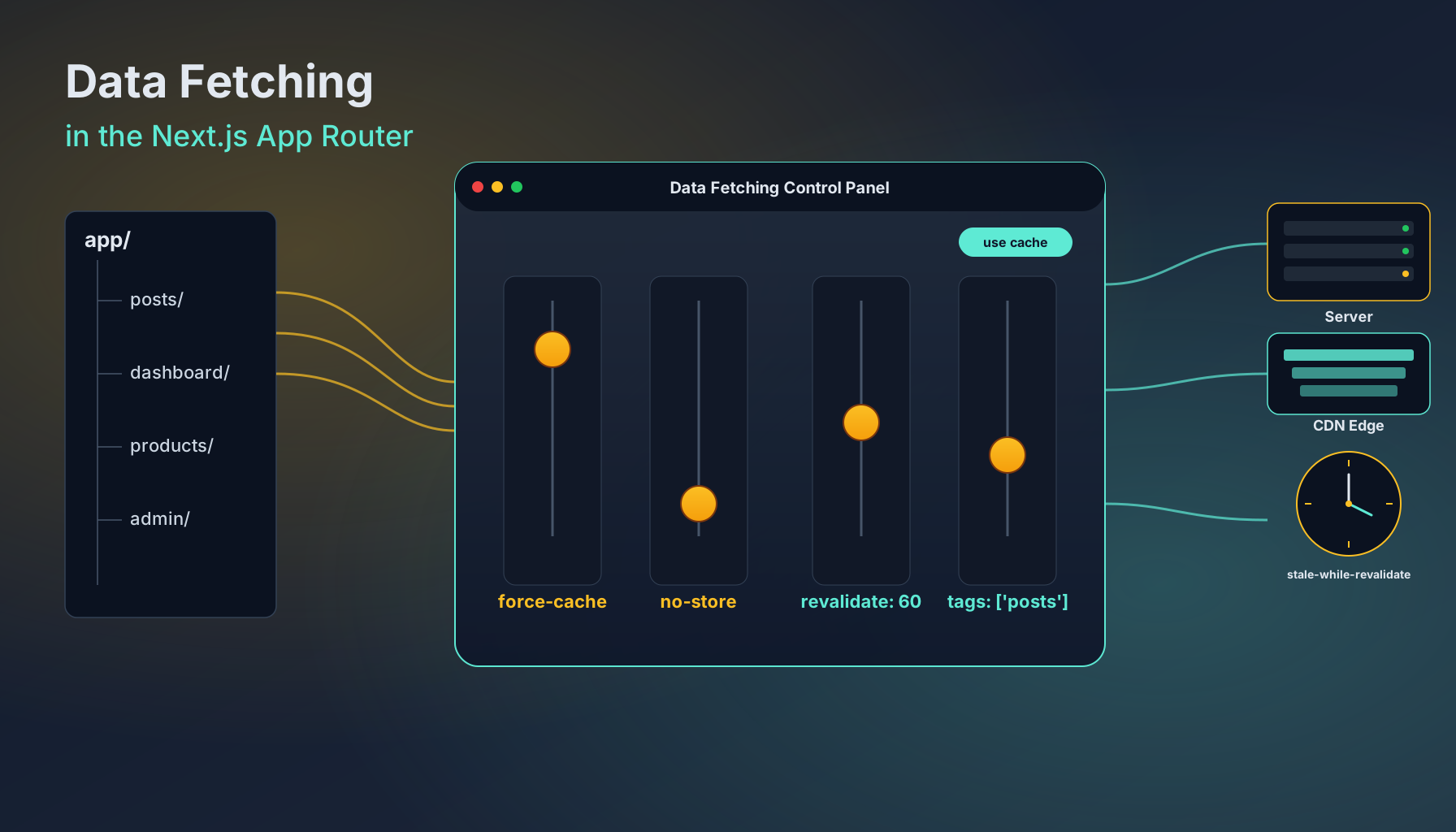
Every data fetch in an App Router app answers four questions, and Next.js gives you one knob for each.
- Where does the fetch run?: On the server, in a server component or route handler or server action; or on the client, in a
"use client"component withuseEffect/ a data library. Most of this article is about the first one, because the server is where the App Router actually wins. - Should the result be cached?:
cache: 'force-cache'says yes,cache: 'no-store'says no. There's also a "let me give you a TTL" option, which is the next lever. - When does the cached result go stale?:
next: { revalidate: 60 }says "after 60 seconds, regenerate it in the background".next: { tags: ['posts'] }says "let me invalidate this from elsewhere by name". - Does this fetch force the page to render dynamically?:
cache: 'no-store'does. Callingcookies(),headers(), or readingsearchParamsdoes. Otherwise the route stays static and the HTML gets served from the cache.
That's the whole model. Cover those four and there is no fifth thing waiting to surprise you. Let's go through each in detail.
Server Fetch In A Server Component
The default place to load data is inside an async server component. No hooks, no client state, no useEffect, just await.
type Post = { id: string; title: string; body: string };

async function getPosts(): Promise<Post[]> {
  const res = await fetch("https://api.example.com/posts");
  if (!res.ok) throw new Error("Failed to load posts");
  return res.json();
}

export default async function PostsPage() {
  const posts = await getPosts();
  return (
    <ul>
      {posts.map((p) => (
        <li key={p.id}>{p.title}</li>
      ))}
    </ul>
  );
}
This is the shape almost every server fetch will take. Notice what's not there: there's no getStaticProps, no getServerSideProps, no useEffect, no loading state. The component is async. It waits for the data. It renders the HTML on the server.
What it does have, hidden inside that fetch call, is a runtime contract. Next.js extends the global fetch with a second options shape: a cache directive that controls whether the response is stored, and a next object that controls how the stored copy ages. That extended fetch is the same primitive your server actions and route handlers use. Learn its options once and you've learned the whole data-fetching surface.
fetch(url, {
  // Standard fetch options:
  method: "GET",
  headers: { ... },

  // Cache directive — caches the response in the Data Cache.
  cache: "force-cache" | "no-store",

  // Revalidation behavior, only meaningful when caching:
  next: {
    revalidate: 60,           // seconds; or `false` for "never"
    tags: ["posts"],          // names you can later invalidate
  },
});
There's no third option. You don't pick between five caching strategies. You pick a cache directive, and if you cache, you pick how long it stays fresh and what you can invalidate it by. That's it.
Caching: What force-cache And no-store Actually Do
The Data Cache is a server-side, persistent key/value store keyed by the URL plus the fetch options. When you say cache: 'force-cache', Next.js looks that key up, returns the stored response if it has one, and only goes to the network on a miss. The cached entry survives across requests, across deployments (depending on your host, Vercel's Data Cache persists across deploys by default), and across the lifetime of your app.
When you say cache: 'no-store', Next.js skips the cache entirely. Every request goes to the network. The response is not stored. The route segment that contains this fetch is now marked dynamic, more on that in a moment.
async function getActiveSessions() {
  const res = await fetch("https://api.example.com/sessions", {
    cache: "no-store",
  });
  return res.json();
}

export default async function Dashboard() {
  const sessions = await getActiveSessions();
  return <SessionsTable rows={sessions} />;
}
The defaults moved around between Next.js versions, which is one of the main reasons people get confused. The pragmatic rule, which works across versions: be explicit. If you want the response cached, write cache: 'force-cache'. If you don't, write cache: 'no-store'. If you write neither, Next.js will pick something, sometimes the cached path, sometimes the uncached one, and which one it picks depends on the version, the rendering mode, and whether any other dynamic API was called in the same render. That's a lot of moving parts to leave implicit. The two extra words are worth it.
A pattern that holds up well: pick the directive at the call site, in a tiny wrapper function. Then every page that reads from that source has the same caching behavior automatically.
export async function getPost(id: string) {
  const res = await fetch(`https://api.example.com/posts/${id}`, {
    cache: "force-cache",
    next: { tags: ["posts", `post:${id}`] },
  });
  if (!res.ok) throw new Error("Post not found");
  return res.json();
}
Now getPost(id) has one consistent caching profile across the entire app. Five pages can call it; they all share the same cached entry; they all invalidate together.
Time-Based Revalidation
Most data isn't truly static, but most data also doesn't need to be fresh on every request. A blog post might change twice a week. A product page might update its stock count every minute. A leaderboard might refresh every five seconds. The pattern for all of these is the same: cache the response, but mark it stale after some number of seconds, and let Next.js regenerate it in the background the next time someone asks for it.
That's what next: { revalidate: N } does.
export async function getProduct(slug: string) {
  const res = await fetch(`https://api.example.com/products/${slug}`, {
    next: { revalidate: 60 }, // stale after 60s
  });
  return res.json();
}
The behavior under the hood is stale-while-revalidate. When a request comes in after the revalidate window has expired, Next.js still serves the stale cached response immediately, and kicks off a background fetch that replaces the cached entry for the next request. The user who triggered the regeneration doesn't pay for it, they get the cached page. The next user gets the fresh one.
This is the right default for content that has a natural cadence. Blog indexes, product catalogues, public dashboards, anything where "fresh within a minute or two" is good enough. The cost model is much closer to a static site than to a dynamic one, you're hitting the upstream API at most once every revalidate window per unique URL, not once per visitor.
Two things to remember about revalidate:
- The smallest number wins. If one fetch on the page says
revalidate: 60and another saysrevalidate: 3600, the whole route segment is treated as havingrevalidate: 60. The most aggressive value sets the segment's TTL. revalidate: 0is the same asno-store. It means don't cache at all. Useno-storedirectly, it's clearer about what's happening.
On-Demand Revalidation With Tags And Paths
Time-based revalidation is fine for "things that age slowly". It's not fine for "the editor just clicked publish and the new article needs to be live right now". For that you want to invalidate the cache explicitly, the moment the write happens. Two functions do this: revalidateTag and revalidatePath, both from next/cache.
The idea is that you attach tags to your cached fetches at read time:
export async function getPost(id: string) {
  return fetch(`https://api.example.com/posts/${id}`, {
    next: { tags: ["posts", `post:${id}`] },
  }).then((r) => r.json());
}

export async function listPosts() {
  return fetch("https://api.example.com/posts", {
    next: { tags: ["posts"] },
  }).then((r) => r.json());
}
Both functions tag their fetches with "posts". The single-post fetch additionally tags itself with post:${id}. Now, from a server action that handles the publish click, you invalidate by name:
"use server";

import { revalidateTag } from "next/cache";

export async function publishPost(id: string) {
  await fetch(`https://api.example.com/posts/${id}/publish`, { method: "POST" });

  // Invalidate every cached fetch tagged "posts" and the specific post.
  revalidateTag("posts");
  revalidateTag(`post:${id}`);
}
The next request to any page that reads through getPost or listPosts gets a cache miss, refetches from the upstream, and stores the fresh value. No timer. No "wait up to 60 seconds". The invalidation is immediate and surgical, only the tagged entries get wiped, everything else stays cached.
revalidatePath works on the same idea, except the unit of invalidation is the rendered route segment, not a tag. You'd reach for it when you've changed something that affects the page but the fetch tags are awkward to model.
"use server";

import { revalidatePath } from "next/cache";

export async function deleteComment(postId: string, commentId: string) {
  await db.comment.delete({ where: { id: commentId } });
  revalidatePath(`/posts/${postId}`);
}
A useful mental model: tags are for data, paths are for pages. If your write changes one piece of data that several pages might be reading, tag the data. If it changes the contents of one specific page in a way that's hard to express as data tags, invalidate the path. They compose, you can do both in the same action.
One important constraint: revalidateTag and revalidatePath must run outside a render. Server actions, route handlers, and webhooks are the natural places. Don't call them inside a server component during render, Next.js will throw, because you're trying to invalidate the cache while you're still using it.
When A Route Goes Dynamic
So far every example has been cacheable. But sometimes you genuinely need fresh-on-every-request data, the current user's session, a personalized greeting, anything keyed by a cookie or header. The moment your route touches one of those, Next.js stops trying to render it statically and switches into dynamic rendering for that segment.
There are four ways a route segment becomes dynamic:
import { cookies, headers } from "next/headers";

// 1. A fetch with cache: 'no-store'
await fetch("/api/me", { cache: "no-store" });

// 2. Reading cookies or headers in the request
const session = (await cookies()).get("session");
const ua = (await headers()).get("user-agent");

// 3. Reading the searchParams prop in a page
export default async function Page({ searchParams }) {
  const q = (await searchParams).q;
  // ...
}

// 4. Explicit opt-out, at the route segment level
export const dynamic = "force-dynamic";
You don't usually need to reach for export const dynamic = 'force-dynamic'. The first three are the common ways routes become dynamic, and they happen organically as soon as the page actually needs per-request data. The explicit flag is for the rare case where you've decided you want to skip the static path entirely regardless of what the page reads.
The flip side, when you want to make sure a page stays static even though you've called something that looks dynamic, is export const dynamic = 'force-static'. Use it sparingly, it'll cause Next.js to ignore the dynamic API call and fill in a placeholder. That's almost never what you actually want, but it's there for the cases where it is.
The thing to internalize is that dynamic rendering isn't a binary choice you make for the whole app. It's a property of a single route segment, inferred from what the components in that segment do. Two routes in the same app can have completely different rendering modes, and that's fine, it's the point of the App Router.
The Three Caches, Briefly
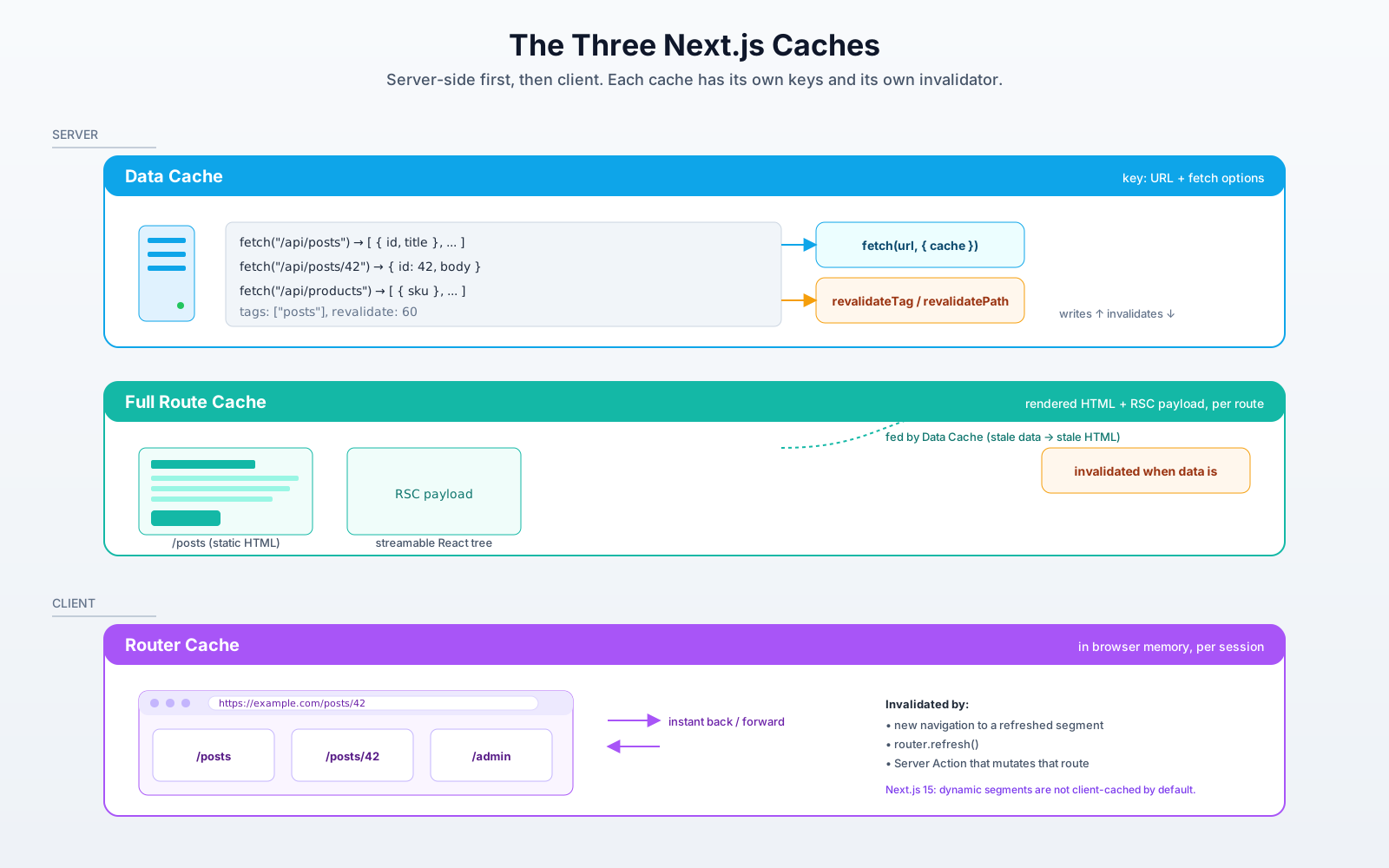
There's one more piece of vocabulary worth knowing, because the docs use it constantly: Next.js has three caches, not one, and they're independent.
- The Data Cache is the one we've been talking about. It lives on the server, it's keyed by URL + fetch options, and it's what
force-cachewrites into and whatrevalidateTag/revalidatePathwipe. - The Full Route Cache stores the rendered HTML and React Server Component payload for static routes. It's downstream of the Data Cache, when the Data Cache gives you stale data, the Full Route Cache is also stale, and Next.js will rebuild the route HTML on the next request.
- The Router Cache lives in the browser, in memory, and stores the RSC payload for routes the user has already visited so navigation between them feels instant. It's what makes "back" feel like an SPA. Its rules changed in Next.js 15, dynamic segments aren't cached on the client by default anymore, which removed a class of "I navigated back and saw old data" bugs.
You almost never interact with the Full Route Cache or the Router Cache directly. They follow from the Data Cache. The mental model is: get the Data Cache right, and the rest falls into place.
Avoiding Waterfalls: Parallel Fetches And Streaming
One last shape to keep in mind, because it's where the App Router's data-fetching story stops being about caching and starts being about how fast the page feels.
If your page needs three independent pieces of data, the worst thing you can do is await them sequentially:
export default async function Dashboard() {
  const user = await getUser();           // 120ms
  const projects = await getProjects();   // 180ms
  const activity = await getActivity();   // 90ms
  // Total: ~390ms before any HTML can render.
  return <DashboardShell user={user} projects={projects} activity={activity} />;
}
Three sequential awaits mean three sequential round-trips. Promise.all fixes it in one line:
export default async function Dashboard() {
  const [user, projects, activity] = await Promise.all([
    getUser(),
    getProjects(),
    getActivity(),
  ]);
  // Total: ~max(120, 180, 90) ≈ 180ms.
  return <DashboardShell user={user} projects={projects} activity={activity} />;
}
When the three pieces don't all need to be ready before you can render anything, the better move is to stream the slow ones. Put each slow part inside its own server component, wrap it in Suspense, and let the rest of the page render immediately:
import { Suspense } from "react";

export default function Dashboard() {
  return (
    <DashboardShell>
      <Suspense fallback={<UserSkeleton />}>
        <UserCard />
      </Suspense>
      <Suspense fallback={<ProjectsSkeleton />}>
        <ProjectsList />
      </Suspense>
      <Suspense fallback={<ActivitySkeleton />}>
        <ActivityFeed />
      </Suspense>
    </DashboardShell>
  );
}
Each of those child components is itself an async server component that does its own fetch. The shell renders instantly. Each section fills in as its data arrives. The user sees something useful at the first paint instead of staring at a spinner for the slowest piece of the page.
Streaming is independent of caching, you can stream cached fetches and uncached fetches alike. But it's the move that makes a dynamic dashboard feel as snappy as a static one, and it's worth reaching for the moment you've got more than one significant fetch on a page.
When To Cache, When Not To: A Short Decision Tree
Most pages fall into one of four buckets. If you're staring at a new route and can't decide what to do, run through this:
- Public, mostly-static content (marketing pages, blog posts, docs, product pages). Cache with
force-cache. Tag the fetches so admin actions can invalidate them. Norevalidateneeded unless you want a safety net. - Public, slowly-changing content (catalogues, leaderboards, "trending now" feeds). Cache with
next: { revalidate: N }whereNis the longest stale window you can tolerate. Tag them anyway so you can force a refresh on demand. - Personalized content (dashboards, account pages, anything that reads cookies). Don't try to cache the page. Use
cache: 'no-store'on the fetches that need per-user data, and let the route render dynamically. You can still cache non-personalized fetches inside the same page, only the personalized ones force dynamic. - Real-time or interactive content (chat, live scores, collaborative editing). Don't lean on Next.js caching here. Use a client component with a real-time transport, WebSocket, Server-Sent Events, polling with a data library, and treat the App Router as the shell that hosts it.
Most production apps end up with all four buckets in the same codebase. That's expected. The whole point of route-segment-level rendering modes is that each section of your app gets the strategy that fits it.
The Shape Of It
The App Router data fetching story sounds complicated because the docs describe every cache, every directive, every flag, every escape hatch. But strip it down and what you've got is four small decisions per fetch: where to run it, whether to cache it, when to invalidate it, and whether it forces the page dynamic. Most fetches answer those questions the same way every time, and you end up writing the same five lines of fetch config over and over until they fade into the background.
The teams that have the smoothest time with this don't memorize the diagrams. They settle on a convention, "every fetch goes through a wrapper in lib/, every wrapper picks an explicit cache directive, every cached wrapper tags its data, every mutation calls revalidateTag", and then they stop thinking about it. The caching just works because every read and every write follow the same shape. That's the version of the App Router that actually delivers on what it promises. Pick your levers once. Push them in the same direction across the app. Then go build the actual feature.