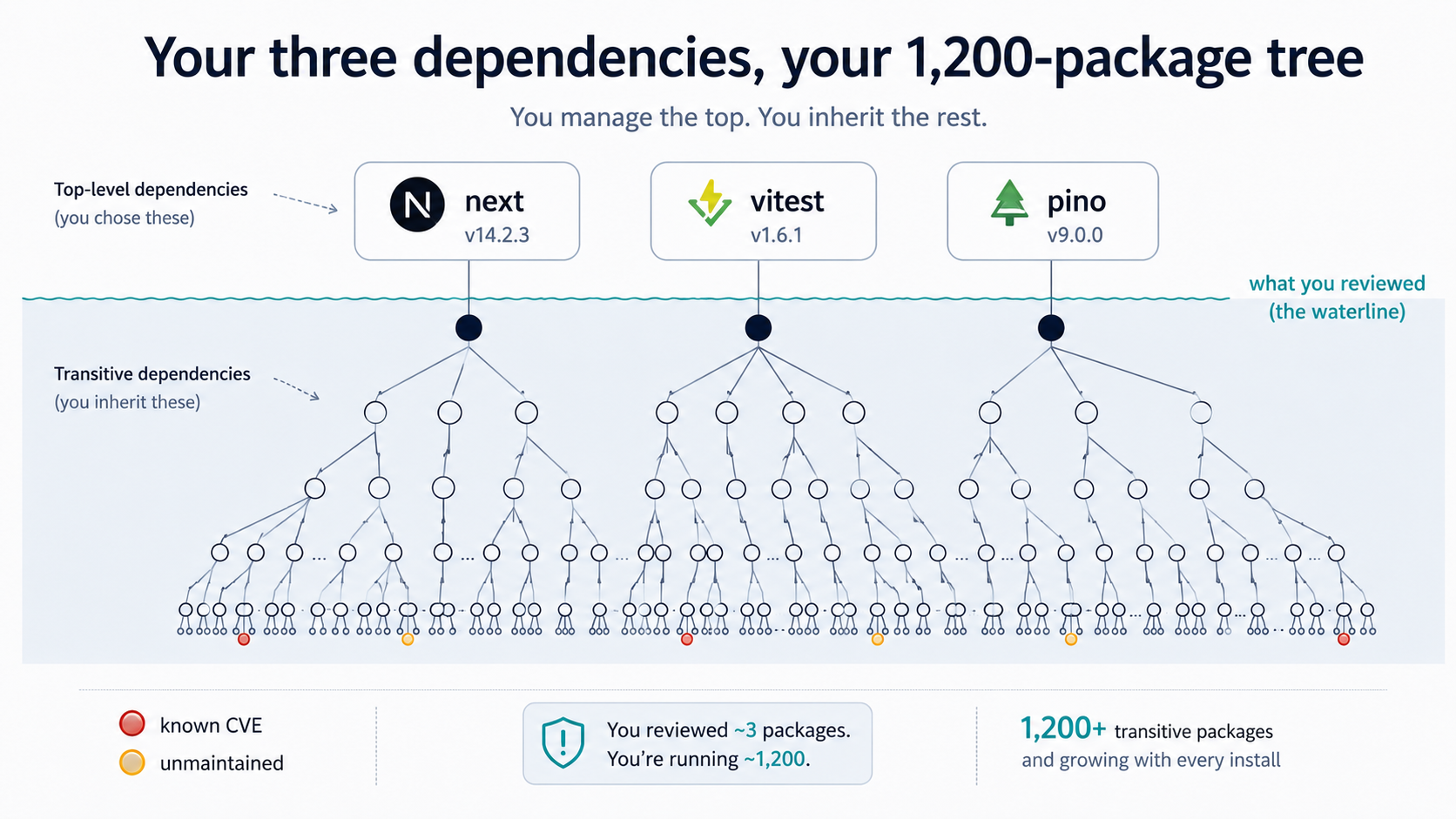
You run npm install on a fresh project. Three dependencies in package.json - a framework, a test runner, a logger. The install finishes, and your node_modules folder has 1,243 packages in it. Half of them you've never heard of. None of them you've read the source of. All of them are now executing inside your build, your tests, and (depending on what they do) your production process.
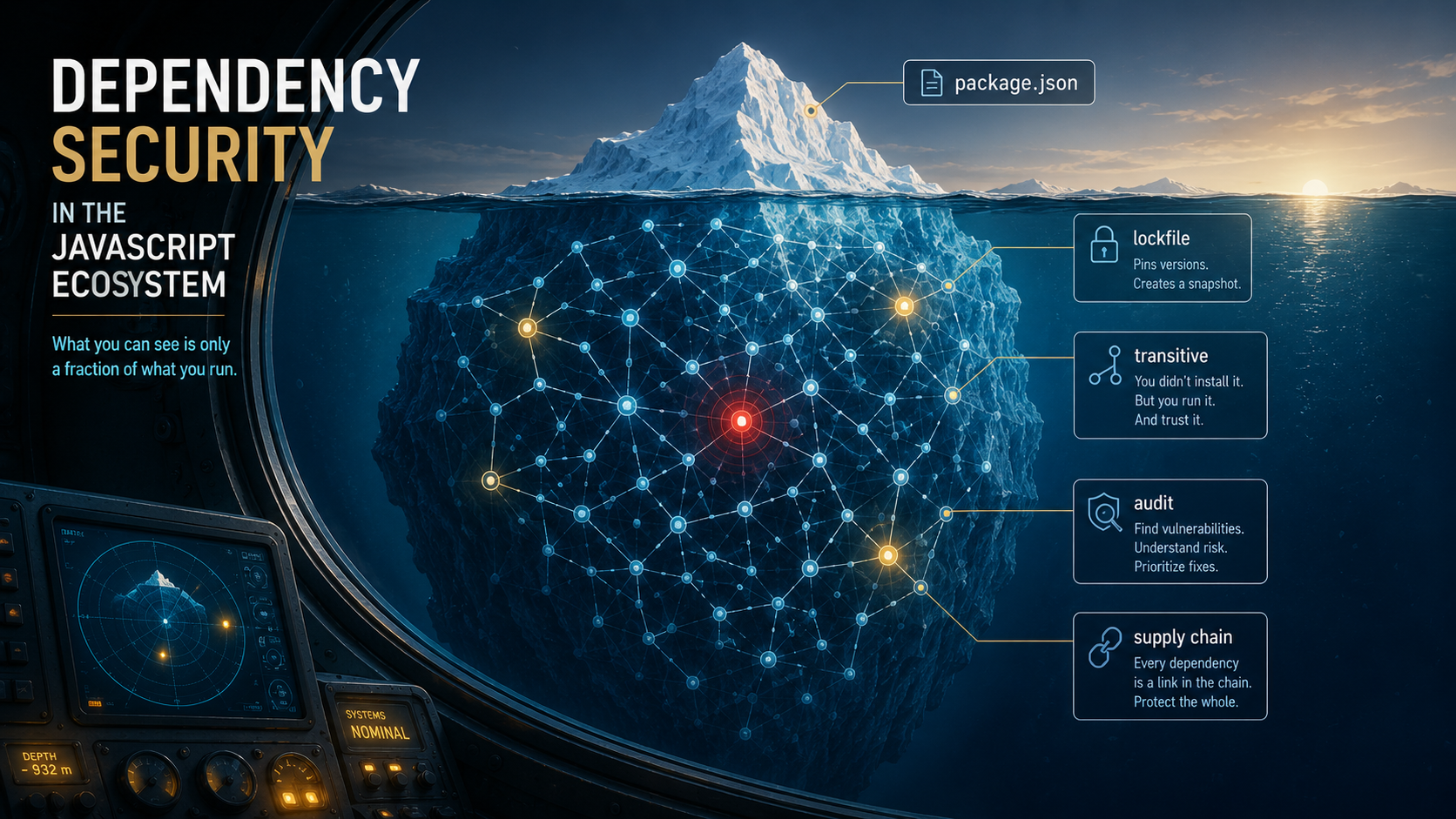
This is the deal you signed when you picked the JavaScript ecosystem. You get the world's biggest open-source pool - about three million packages on npm at the time of writing - and in exchange you get a dependency tree that nobody, including you, fully audits. The trust model is implicit and transitive: you trust your direct dependencies, who trust their direct dependencies, and so on down maybe twelve levels until you hit something maintained by one person in their spare time at 2am on a Thursday.
When that model fails, it doesn't fail quietly. It fails as a CVE that ships to two million projects in an hour. Or a malicious update that exfiltrates credentials before anyone notices the publish. Or a license-bomb where a maintainer wipes their own package as protest.
This piece is about the tools that try to keep that tree honest - npm audit, lockfiles, Dependabot, Renovate, Snyk - and the supply chain attacks they were built (and sometimes failed) to catch.
The shape of the problem
Most developers picture their dependencies as a flat list: the things in dependencies and devDependencies. Those are the direct dependencies. The actual surface area is the transitive tree - everything pulled in by those direct ones, then everything pulled in by those, recursively, until you hit packages with no dependencies of their own.
A typical web app today has somewhere between 800 and 2,000 unique packages in node_modules after a single install. Most of them are tiny - utility packages doing one thing each. That's the JS-ecosystem cultural choice: small modules, composed deeply. There's left-pad (yes, still around), is-odd, is-number, is-buffer. The famous joke is that is-array was downloaded a hundred million times a week before Array.isArray got into everyone's heads.
The trade-off is real. Each small package is easy to read in isolation - but the tree of them is impossible to audit by hand. If you sat down to read every file in node_modules for a medium-sized app, you'd spend a full work-week and remember almost none of it. So you don't read them. You trust.
That trust is what dependency-security tooling exists to monitor. It can't audit on your behalf, but it can answer two questions for you continuously: are any of the packages in your tree known to be vulnerable? and are any of them known to be doing something they shouldn't?
Lockfiles: not security, but the foundation
People sometimes call lockfiles a security tool. They're not, exactly. They're a determinism tool - and determinism is the floor that real security tooling stands on.
A package.json looks like this:
{
  "dependencies": {
    "express": "^4.18.0",
    "pino": "^9.0.0"
  }
}
That ^4.18.0 is not a version. It's a range - "anything from 4.18.0 up to but not including 5.0.0". On any given day, the latest matching version of express might be 4.18.2, 4.19.1, 4.21.0. If two engineers npm install a week apart, they can easily end up with different express versions, different transitive trees, and different behavior. Without a lockfile, your node_modules is non-deterministic.
The lockfile pins the exact version that was installed, and the exact version of every transitive dependency, and an integrity hash for each one. Here's a slice of what package-lock.json actually stores:
"node_modules/express": {
  "version": "4.21.2",
  "resolved": "https://registry.npmjs.org/express/-/express-4.21.2.tgz",
  "integrity": "sha512-...",
  "dependencies": {
    "accepts": "~1.3.8",
    "body-parser": "1.20.3"
  }
}
Three things matter here:
The version is exact - no ranges. The next person who runs npm ci gets exactly 4.21.2, even if 4.21.3 came out an hour ago.
The integrity is a Subresource Integrity hash (SRI) of the tarball. If the tarball on the registry was tampered with - same version number, different bytes - the install fails. This is the closest thing the npm registry has to "you got what you asked for".
The resolved URL is the canonical source. If a corporate mirror or a private registry serves a different file at the same name and version, the integrity hash catches it.
The reason this is the foundation for security is simple: every dependency-security tool you'll meet (npm audit, Snyk, GitHub Dependabot, Socket, Renovate) is reading either your package.json ranges, your lockfile, or both. If your tree drifts on every install - different versions, different shapes - none of the tools can give you a stable answer about what's actually deployed. Lockfile in, deterministic tree out, security tooling can do its job.
Two practical rules fall out of this:
Use npm ci in CI, not npm install. npm ci reads the lockfile and fails if it disagrees with package.json. npm install will helpfully update the lockfile to whatever it found today, which is the opposite of what you want in a reproducible pipeline.
Always commit the lockfile. Not committing it is the most common "I don't understand why prod broke and dev didn't" cause in Node.js work. Yarn's yarn.lock and pnpm's pnpm-lock.yaml are the equivalents and follow the same rule.
npm audit: the built-in alarm
The simplest dependency-security tool comes with npm itself. npm audit walks your installed tree, sends a manifest (just names + versions, not your code) to the npm registry's audit endpoint, and gets back a list of advisories that match.
A run looks like this:
# npm audit report

semver  <5.7.2
Severity: moderate
semver vulnerable to Regular Expression Denial of Service
https://github.com/advisories/GHSA-c2qf-rxjj-qqgw
fix available via `npm audit fix`
node_modules/some-dep/node_modules/semver
  some-dep  *
  Depends on vulnerable versions of semver
  node_modules/some-dep

1 moderate severity vulnerability

To address all issues, run:
  npm audit fix
Two useful things, one easy-to-misread thing.
The useful things: it pulls from a real advisory database (GitHub Advisory Database, which is the source of truth that GitHub Dependabot and npm both read), and it tells you the path through your tree - some-dep > semver - so you know which direct dependency to actually upgrade.
The easy-to-misread thing is the severity count at the bottom. A line like "42 vulnerabilities (3 critical, 12 high, 27 moderate)" sounds like 42 problems. In practice, a large chunk of any npm audit run is "vulnerability in a dev-only package that only affects an attacker who can already run your build" - for example, a ReDoS in a CLI flag parser that only runs at install time. The default severity model doesn't distinguish "your auth library has a remote code execution" from "your test runner's pretty-printer can be slowed down by a maliciously-crafted error message".
So the workflow is:
# 1. See the full report.
npm audit

# 2. For each finding, look at whether the affected package is in
#    `dependencies` or `devDependencies`, and what the call path is.
#    A high-severity finding in a devDependency that only runs in CI
#    is different from a moderate one in a production middleware.

# 3. Apply automatic fixes for the ones that have a non-breaking patch.
npm audit fix

# 4. For the rest, decide manually: bump a direct dep, replace the package,
#    or accept the risk with a comment in the PR explaining why.
npm audit fix --force   # only if you understand what major bumps it'll do
--force is the foot-gun. It happily upgrades direct dependencies across major-version boundaries to make a transitive advisory go away. That can ship a breaking change in your framework to fix a moderate-severity ReDoS in a logger. Read the diff before you commit it.
One last thing about npm audit: it's only as good as the database behind it. Vulnerabilities that have been discovered but not yet published to the GitHub Advisory Database won't appear. New zero-days in your tree won't appear until somebody files them. Audit is a floor, not a ceiling.
Dependabot and Renovate: keep the tree moving
The hardest part of dependency security is the boring part - staying current. Most CVEs that hit JS projects in production weren't unknown zero-days. They were six-month-old known vulnerabilities in packages the team never got around to upgrading.
Dependabot (built into GitHub) and Renovate (works on GitHub, GitLab, Bitbucket, self-hosted) solve this by opening pull requests automatically when a dependency has a new version. The configuration is a YAML file in the repo:
version: 2
updates:
  - package-ecosystem: "npm"
    directory: "/"
    schedule:
      interval: "weekly"
    open-pull-requests-limit: 10
    groups:
      eslint:
        patterns:
          - "eslint*"
          - "@typescript-eslint/*"
      types:
        patterns:
          - "@types/*"
A few things to call out from how this plays out in practice.
Grouping matters. Without it, a weekly schedule will fire ten separate PRs for ten ESLint plugins that all need to bump together, each one a slightly broken state until all are merged. The groups block lets you say "treat these as a single PR" so the tree moves together.
Security updates open immediately, version updates wait for the schedule. Dependabot has a separate channel for security updates that fires the moment an advisory is published, ignoring the weekly schedule. You don't need separate config for it - it's on by default.
Renovate is the more configurable cousin. If you outgrow Dependabot's options (you want auto-merge for low-risk patch bumps, you want a Monday-only schedule, you want different rules per package set), Renovate's renovate.json is much richer:
{
  "extends": ["config:base"],
  "schedule": ["before 9am on monday"],
  "packageRules": [
    {
      "matchUpdateTypes": ["patch"],
      "matchDepTypes": ["devDependencies"],
      "automerge": true,
      "automergeType": "branch"
    },
    {
      "matchPackagePatterns": ["^next$", "^react$", "^react-dom$"],
      "groupName": "next + react"
    }
  ]
}
Auto-merging patch updates of devDependencies on green CI is a common starting point - those are the lowest-risk bumps and they accumulate fastest. Auto-merging minor or major updates is something you do only after you trust your test suite, which is a separate conversation.
Snyk, Socket, and the third-party scanners
The native tooling (npm audit + Dependabot) covers known vulnerabilities. Third-party tools - Snyk, Socket, GitGuardian's dependency scanner, and a few others - extend that in two directions: more sources of advisories, and behavioral analysis of the packages themselves.
A Snyk CLI run reads similarly to npm audit:
$ snyk test
Testing /Users/me/app...

Tested 1243 dependencies for known issues, found 5 issues, 5 vulnerable paths.

✗ High severity vulnerability found in lodash.set
  Description: Prototype Pollution
  Info: https://snyk.io/vuln/SNYK-JS-LODASHSET-1320032
  Introduced through: some-orm@2.4.0 > lodash.set@4.3.2
  From: some-orm@2.4.0 > lodash.set@4.3.2
  Fix: Upgrade some-orm to 3.0.0
What Snyk adds over npm audit is mostly threefold. Its database overlaps with the GitHub Advisory Database but adds some Snyk-discovered findings that haven't been published upstream yet, so the window between "vuln found" and "vuln reported by your tool" can be shorter. It produces fix recommendations that may differ from npm audit fix - sometimes pointing at a different upgrade path through the tree. And it integrates with CI as a gate, so a PR introducing a high-severity vuln can fail the build rather than just warn.
Socket is a newer angle. Rather than asking "does this package have a known CVE?", it asks "is this package behaving suspiciously?" - does the install script make network calls, does the package read environment variables it shouldn't need, does a new version suddenly start pulling files from a different origin? It's the closest thing the ecosystem has to anomaly detection on dependencies, and it's particularly useful against attacks where the malicious version has no CVE yet because it was published two hours ago.
The honest framing on these tools is that they're complementary, not redundant. npm audit is free and built in. Dependabot is free for public repos and cheap for private. Snyk and Socket cost money but catch a different class of problem. A team that's serious about dependency security usually runs at least two of these - one for known CVEs, one for behavioral signals - because the two miss different things.
Supply chain attacks: what actually happens
All of this tooling exists because the JavaScript ecosystem has, over the years, been a steady source of supply chain attacks. Not theoretical ones - concrete, news-making, here's-what-happened ones. Three categories are worth understanding because they keep recurring with slight variations:
The hijacked maintainer. A long-trusted package changes hands - the original maintainer hands the keys to a new contributor, or has their npm account compromised. The new owner publishes a version that looks normal but contains code to exfiltrate environment variables, install a backdoor, or attack downstream consumers. The 2018 event-stream incident is the canonical example: the maintainer transferred ownership to a stranger who, in version 3.3.6, added code that targeted Bitcoin wallet apps further down the tree. Most consumers didn't notice for weeks. Auditing only the direct dependency wouldn't have helped - event-stream itself was old and stable; the attack was in a new transitive dependency it pulled in.
Typosquatting. Someone publishes crossenv (no hyphen) or electorn (typo of electron) - a name a developer might type by accident - with malicious payload. The package itself usually re-exports the real thing so basic use looks correct, while running a postinstall script that does the actual damage. npm has gotten more aggressive at takedowns, but typo packages still appear regularly. The mitigation isn't tooling - it's reading what you're installing, especially when you're copy-pasting an install command from a blog post.
The protestware / sabotage incident. A maintainer, frustrated with the ecosystem, the world, or specific consumers, sabotages their own package on purpose. colors and faker in early 2022 are the textbook case - the author replaced functional versions with infinite loops, breaking the build of every project that auto-resolved a fresh range. The node-ipc "protestware" later that year added code that would wipe filesystems on machines geolocated to certain countries. These attacks aren't exfiltrating data; they're functionally a DoS or worse against your own build. The defense is the same as for hijacks: don't auto-resolve to "latest", pin your lockfile, and have a way to react to "all our builds are broken since 9:14am UTC".
The common thread is that these attacks exploit the implicit trust in the transitive tree. None of them require breaking into the registry. They require gaining publish rights to a single package, deep in someone's node_modules, and waiting for the next install or auto-bump to propagate. The tools above mitigate this - Socket flags behavior changes, Snyk catches the published advisory once it's filed, Dependabot waits long enough that the truly fast-rotting malicious versions get caught and pulled before they reach your PR queue - but none of them eliminate the risk.
Defense in depth, for real teams
The practical posture for a normal-sized team isn't "audit every package" - nobody actually does that, and any honest blog post saying otherwise is bluffing. It's a layered routine that catches the common attacks and accepts some residual risk on the rare ones.
The layers that pay back the most for the effort:
Commit the lockfile, install with
npm ciin CI. You can't reason about security on a tree that changes shape between machines.Run
npm audit --omit=devin CI on every PR, fail on high or critical. The--omit=devmatters - your test runner having a ReDoS isn't a production risk; your auth middleware having one is.Wire up Dependabot or Renovate with grouping and an auto-merge rule for patch updates of devDependencies on green CI. This is the single biggest dependency-security lever most teams haven't pulled. Outdated packages are the most common attack vector, not zero-days.
For repos that handle anything sensitive, add a behavioral scanner. Snyk for known-CVE coverage with CI gating, Socket for behavioral anomalies, or one of the open-source equivalents. Even running one of them in "report only" mode for a quarter teaches you a lot about what's actually in your tree.
Resist
npm audit fix --forceas a habit. It's a useful tool when you've read what it's about to do. As a reflex, it ships major-version bumps to silence audit, which is how a "security upgrade" PR becomes a production outage.Keep the direct-dependency list small. Every package you adopt is a node in your tree that has its own tree. The 1,243 number at the top of this article isn't your sin - it's the sum of everyone's tree choices. You can't shrink other people's, but you can be choosier with yours, especially for utility code where a thirty-line in-house function would do.
The honest reality is that no team gets dependency security to zero, and the ones who pretend to are usually one transitive hijack away from a postmortem. What you can do is shrink the window between "the world knows this package is bad" and "your tree no longer contains it", and that window - measured in hours when the tools are wired up, weeks when they aren't - is the entire game.