It's a Tuesday afternoon. You shipped a new pricing page two hours ago. The checkout conversion graph just dropped 6%. Slack is starting to light up. Someone's typing "should we revert?" in the deploy channel. Another engineer is digging through the diff trying to figure out which of the eleven commits in this morning's release is the suspect. Someone else is asking if they can just deploy the previous build from a git tag, because that would at least put the old page back.
If you've been on a team for more than a year, you've lived this scene. The thing you ship looks fine in staging, behaves fine in your test account, sails through review, and then quietly torches a metric the minute real traffic hits it. The fix is usually obvious in hindsight, a copy change, a wrong default, an experiment that confused the cohort the design was built for, but in the moment, the only tools you have are "deploy again" or "revert." Both take ten to thirty minutes. Both feel like building a house just to change the lock.
Feature flags are how you escape that bind. They're the simplest piece of software infrastructure with the largest operational payoff: a remotely-controllable switch that gates a code path. A boolean (or a variant, or a JSON blob) that your code reads at runtime, evaluated against a rule set that lives outside your repo. You wrap the new pricing page in if (flags.pricingV2). You flip it off from a control panel. The old page is back in two seconds. You go fix the bug. Nobody redeploys.
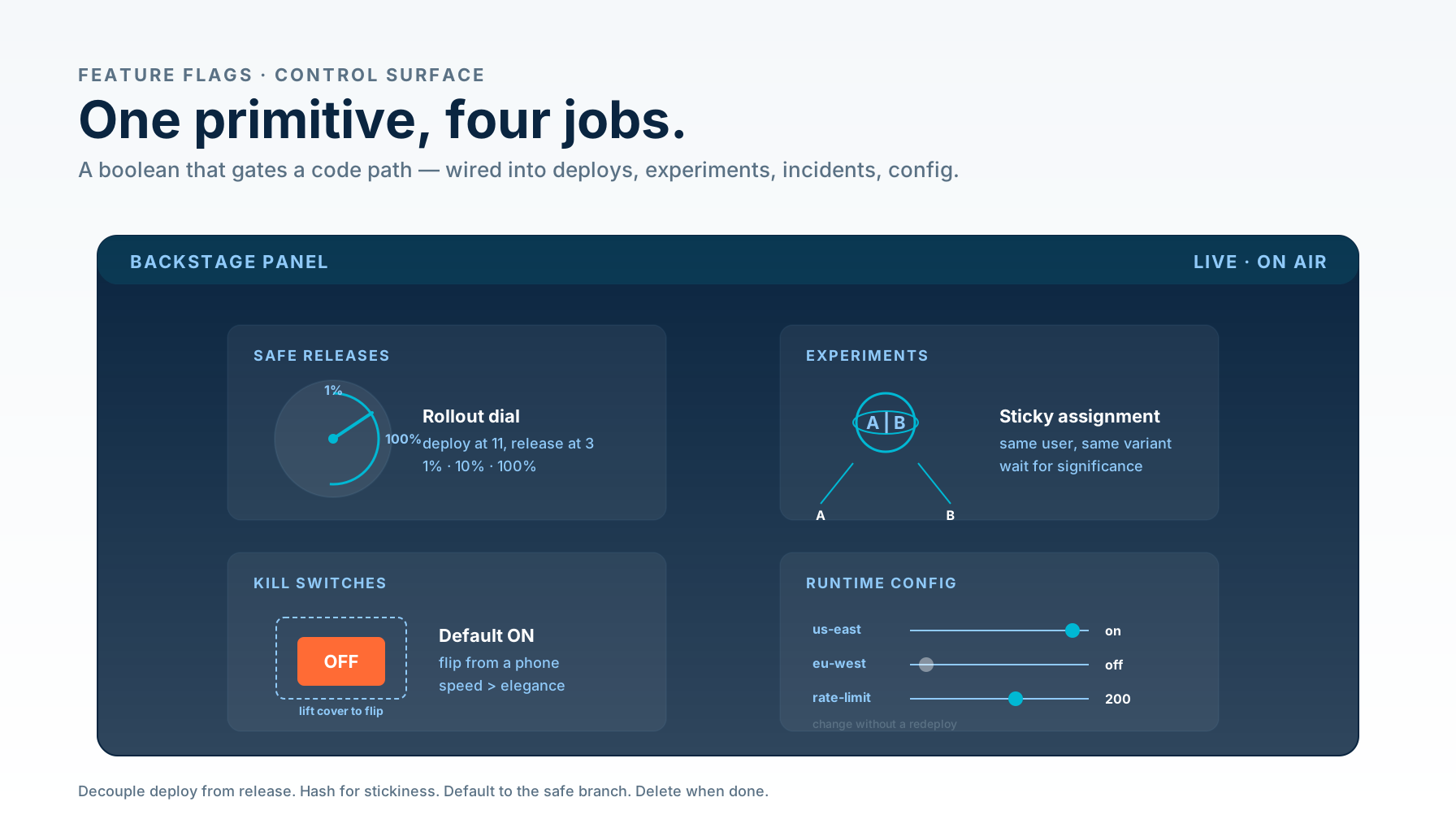
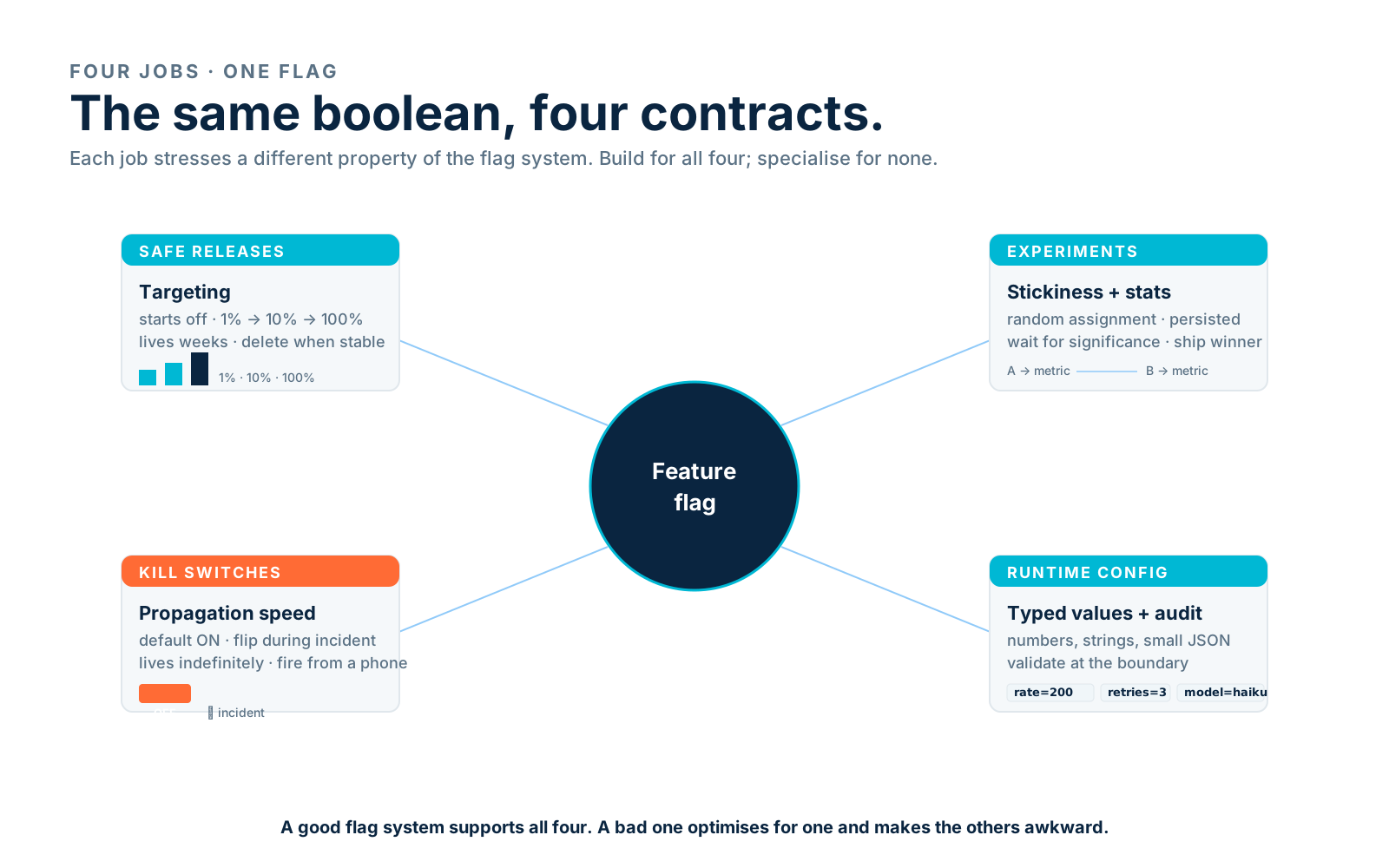
That sentence undersells the idea. A feature flag isn't just a faster revert. It's the same primitive doing four jobs at once, safe releases, experiments, kill switches, runtime config, and each job pulls the implementation in a slightly different direction. This piece walks through those four jobs, what they look like in real JavaScript and Node.js code, the targeting math that makes them feel reliable instead of random, where to put the flag state, the experiment trap most teams fall into, and how to keep the whole thing from drowning in flag debt three years in.
Decouple Deploy From Release
Before we get into the four jobs, one sentence about the central idea, because it makes everything else click. Deploy and release used to be the same event: code merges, deploy goes out, users see the change. Feature flags split that into two. Deploy is when the build goes live on your servers. Release is when a user's browser actually executes the new path. With flags, you deploy at 11am and release at 3pm, to 1% of users, then 10%, then 100%. Or you deploy on Monday and release in a controlled rollout on Thursday. Or you deploy code that's intentionally never released because you wanted to merge a half-finished feature behind a flag so it would stop diverging from main.
Once you internalise that split, the four jobs follow naturally. Each one is a different reason for keeping deploy and release separate.
The Four Jobs Behind The Same Primitive
A flag is a boolean. The four jobs are entirely about who controls it, how fast it changes, and what you do with the result. Conflating them is what makes most homegrown flag systems painful, you end up with one flag definition trying to serve four contradictory needs.
Safe releases. A flag protects a code path that isn't ready for everyone yet. It starts off. You flip it on for yourself, then for the dev team's accounts, then for 1% of customers, then for 10%, then everyone. The flag lives weeks to months. You delete it when the feature is stable.
Experiments. A flag (or, more accurately, a variant) randomly assigns each user to A or B and persists that assignment. You measure an outcome, conversion, retention, click-through, and let statistics decide which variant wins. The flag lives long enough to reach significance, then you ship the winner and delete the flag.
Kill switches. A flag protects a code path that is ready, but might misbehave. The default is on. You turn it off only when something breaks: a downstream API starts returning 500s, a slow query is melting the database, a vendor has an incident. The flag lives indefinitely, it's there because you might need it at 3am.
Runtime config. A flag carries a value (a number, a string, a small JSON object) that your code reads instead of pulling from environment variables. Rate limits, feature parameters, region-specific defaults. The "flag" isn't really a flag anymore, it's a config knob, but it sits in the same plumbing because it shares the requirement: change at runtime, no redeploy.
These four use different parts of the same flag system, but they have different needs. Safe releases want targeting. Experiments want assignment stickiness and analytics. Kill switches want propagation speed. Runtime config wants typed values and audit trails. A good flag system supports all four; a bad one optimises for one and makes the others awkward.
A Flag In Three Lines
The smallest possible flag in a Node.js service is a literal if on an environment variable:
const ENABLE_NEW_FLOW = process.env.ENABLE_NEW_FLOW === 'true';

export async function checkout(cart: Cart) {
  if (ENABLE_NEW_FLOW) {
    return newCheckout(cart);
  }
  return legacyCheckout(cart);
}
This works. It's a real feature flag. It does the central thing: lets you flip behavior without changing the codebase. But it has three limitations that push you toward something more.
First, you read the env var once at startup. To flip it you have to restart the process. On a busy service with rolling deploys, that's not zero downtime, and it's certainly not "flip in two seconds during an incident."
Second, it's all-or-nothing. You can't enable it for 5% of users, or for one tenant, or for everyone in us-east.
Third, you have one knob per binary. If your front-end and back-end need to agree on the same flag, you're now syncing two env vars on two separate deploys.
The fix to all three is the same: read the flag value at request time, from a place that can change while the process is running. That place can be a JSON file you re-read, a database row, a Redis key, or a third-party SDK that polls a control plane. They all share the shape:
type FlagContext = {
  userId?: string;
  tenantId?: string;
  region?: string;
};

export interface FlagSource {
  isEnabled(flagKey: string, context: FlagContext): boolean;
  getValue<T>(flagKey: string, defaultValue: T, context: FlagContext): T;
}
The contract is "give me a key plus a context, get me a value." Everything else, how it's stored, how it propagates, who edits it, is implementation detail. That detail matters, but it shouldn't be in the calling code. Every consumer in your codebase should look like this:
import { flags } from './flags';

export async function checkout(cart: Cart, user: User) {
  const ctx = { userId: user.id, tenantId: user.tenantId, region: user.region };
  if (flags.isEnabled('checkout.new-flow', ctx)) {
    return newCheckout(cart);
  }
  return legacyCheckout(cart);
}
Two things to notice. The flag key is namespaced (checkout.new-flow, not new_checkout). The context is passed in, it's not a global. Both make the system survive scale. We'll get to why in the targeting section.
Server-Side Or Client-Side Evaluation
You have a choice every time you add a flag: evaluate it on the server or in the browser. They look similar from inside a single component but they behave very differently in production.
Server-side evaluation means the server reads the flag, decides which branch to take, and sends a response that already reflects the decision. Either the response HTML is rendered with the chosen variant, or the JSON payload includes a variant: 'B' field, or the new endpoint returns one shape and the old endpoint returns another. The client has nothing to figure out, it just renders what came back.
Client-side evaluation means the server sends a generic response, the browser loads, the flag SDK initialises, the SDK fetches the variants for this user, and the component re-renders with the chosen branch. This is convenient for the engineer (you can flip flags inside React without round-tripping to the API team), but it has a problem the framework can't hide: the flicker. For a brief window, the user sees the default branch, then it changes. That window is somewhere between 50ms and 400ms depending on your provider's SDK and your network. It hurts CLS, it confuses users, and it's the single biggest reason teams give up on client-side flagging.
The clean rule, in practice:
- Server-side evaluation for anything that affects layout, navigation, or the first paint. Login forms, navigation entries, pricing displays, gated routes. Evaluate it on the server, bake the decision into the response, and never let the client see the default.
- Client-side evaluation for changes inside an already-rendered surface, copy variants on a button you'll click later, a toggle for a UI that only opens after interaction, an opt-in modal that fires on a scroll trigger. These don't have a flicker problem because the user isn't looking at the targeted element yet.
In a Node.js / Express service the server-side path is straightforward, you have the user's session, you call the flag function before responding:
import { Router } from 'express';
import { flags } from '../flags';

const router = Router();

router.get('/pricing', async (req, res) => {
  const ctx = {
    userId: req.user?.id,
    tenantId: req.user?.tenantId,
    region: req.region,
  };

  const variant = flags.getValue('pricing.layout', 'classic', ctx);
  const tiers = await loadTiers(variant);

  res.render('pricing', { tiers, variant });
});
In Next.js, the same idea lives inside getServerSideProps (or the App Router's server components, where flag evaluation happens before the HTML is streamed). The point is that by the time anything hits the wire, the decision is already made.
Targeting And Bucketing
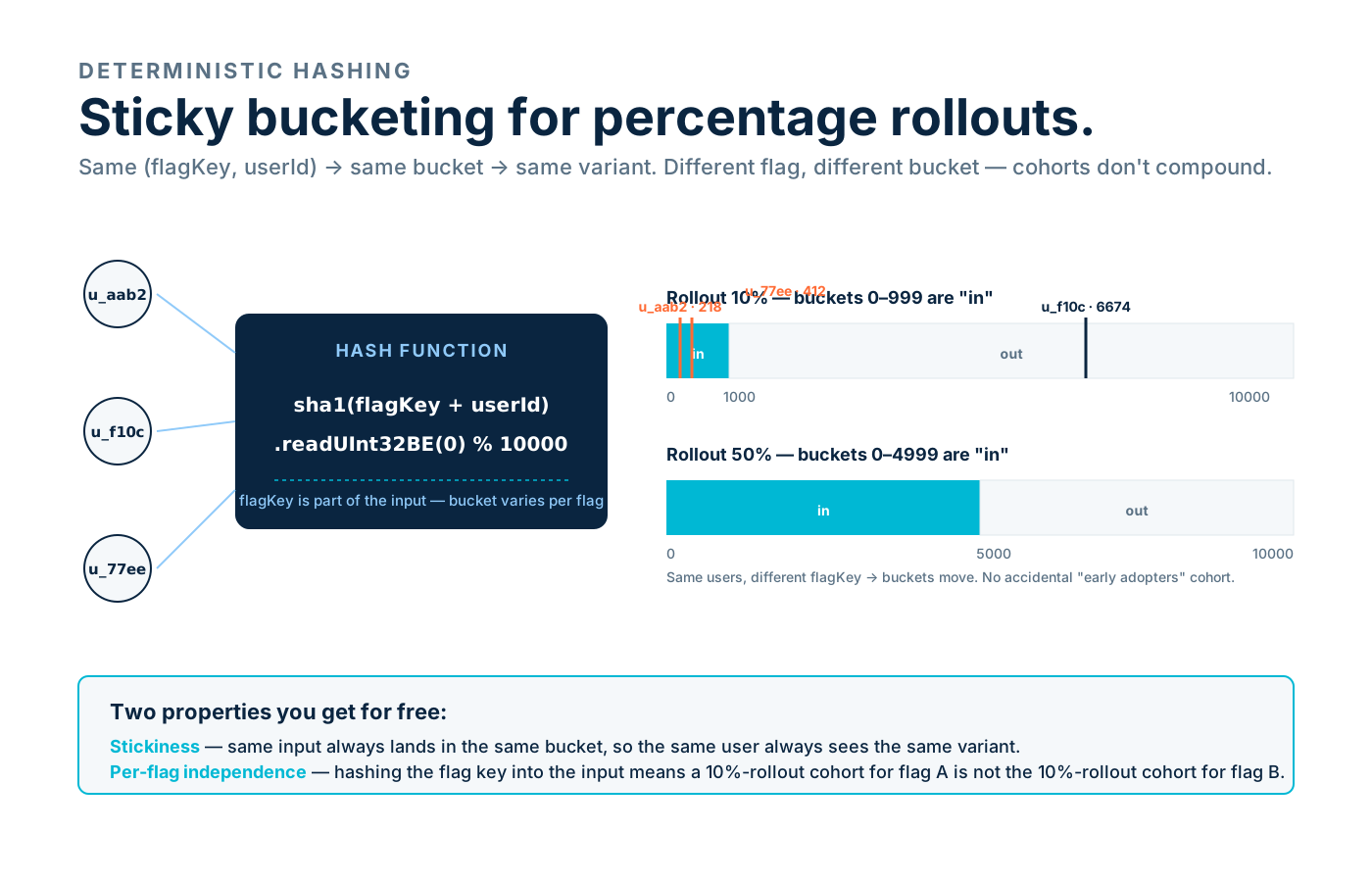
The reason you can't just use Math.random() < 0.1 for a 10% rollout is stickiness. If a user gets the new checkout on Tuesday and the old one on Wednesday and the new one on Thursday, you don't have a rollout, you have a chaos experiment. Same user, same context, has to get the same answer every time, or you can't measure anything and your support team will lose their minds.
The trick is deterministic hashing. You pick a stable identifier (usually userId, falling back to a session ID or a cookie for logged-out traffic), concatenate the flag key, hash the result, take the hash modulo a large bucket count, and compare to your rollout percentage.
import { createHash } from 'node:crypto';

const BUCKETS = 10_000;

export function bucket(flagKey: string, identifier: string): number {
  const hash = createHash('sha1').update(`${flagKey}:${identifier}`).digest();
  // Read the first 4 bytes as an unsigned integer.
  const n = hash.readUInt32BE(0);
  return n % BUCKETS;
}

export function inRollout(
  flagKey: string,
  identifier: string,
  percent: number, // 0–100
): boolean {
  return bucket(flagKey, identifier) < (BUCKETS * percent) / 100;
}
Two properties this gives you. First, stickiness: the same (flagKey, identifier) always lands in the same bucket, so the same user always sees the same variant. Second, independence between flags: hashing the flag key into the input means a user who's in the 10% rollout of flag A is not necessarily in the 10% rollout of flag B. If you hashed only the user ID, you'd accidentally create a cohort that gets every experiment first, and your data would slowly diverge from reality.
For targeting beyond percentage rollouts, "everyone in tenant X", "everyone in region eu-west", "internal staff accounts only", you layer rules on top. The order matters. The standard pattern is:
type Rule =
  | { type: 'tenant'; tenants: string[] }
  | { type: 'region'; regions: string[] }
  | { type: 'userIds'; userIds: string[] }
  | { type: 'rollout'; percent: number };

type FlagDefinition = {
  key: string;
  defaultValue: boolean;
  rules: Rule[]; // evaluated in order, first match wins
};

export function evaluate(def: FlagDefinition, ctx: FlagContext): boolean {
  for (const rule of def.rules) {
    if (rule.type === 'tenant' && ctx.tenantId && rule.tenants.includes(ctx.tenantId)) {
      return true;
    }
    if (rule.type === 'region' && ctx.region && rule.regions.includes(ctx.region)) {
      return true;
    }
    if (rule.type === 'userIds' && ctx.userId && rule.userIds.includes(ctx.userId)) {
      return true;
    }
    if (rule.type === 'rollout' && ctx.userId) {
      return inRollout(def.key, ctx.userId, rule.percent);
    }
  }
  return def.defaultValue;
}
Reading this top-to-bottom, the rules act like a routing table: targeted overrides come first ("turn this on for my account so I can test it"), then segment rules ("turn it on for these tenants"), then the percentage rollout. The percentage is the fallback, anyone who isn't named explicitly gets bucketed.
Where Flag State Lives
You have four reasonable choices for where the flag definitions actually live, and the right one depends on your team size, your reliability needs, and how much you're willing to operate.
Environment variables. Fine for one or two simple boolean flags in early-stage services. Don't scale past a handful, every flag is a deploy, the values are stringly-typed, there's no audit trail.
A JSON file in the repo. Slightly better. Flag definitions are version-controlled, code review applies, you can do typed rollouts. Still requires a deploy to flip, which kills three of the four jobs.
A database table or Redis key, with an internal admin UI. This is what most teams build when they first realise env vars aren't going to cut it. Works well at small-to-medium scale. The pieces are: a flags table, a small admin UI for editing values, an in-process cache that refreshes every 10-30 seconds, and a fallback to defaults if the cache is empty. The minimum viable version:
import { Pool } from 'pg';
import type { FlagDefinition, FlagSource, FlagContext } from './types';
import { evaluate } from './evaluate';

export class DbFlagSource implements FlagSource {
  private cache = new Map<string, FlagDefinition>();
  private lastRefresh = 0;
  private refreshIntervalMs = 15_000;

  constructor(private pool: Pool) {}

  private async refreshIfStale() {
    if (Date.now() - this.lastRefresh < this.refreshIntervalMs) return;
    const { rows } = await this.pool.query<FlagDefinition>(
      'SELECT key, default_value AS "defaultValue", rules FROM flags',
    );
    const next = new Map<string, FlagDefinition>();
    for (const row of rows) next.set(row.key, row);
    this.cache = next;
    this.lastRefresh = Date.now();
  }

  isEnabled(flagKey: string, context: FlagContext): boolean {
    // Don't await refresh on the hot path — fire-and-forget,
    // and serve from cache for this request. Eventually consistent
    // is fine for flags.
    void this.refreshIfStale();
    const def = this.cache.get(flagKey);
    if (!def) return false;
    return evaluate(def, context);
  }
}
Two things worth noticing. Refreshing the cache is asynchronous and detached from the request, flags are eventually consistent and that's fine. A flag flip propagates in 0-15 seconds, which is acceptable for safe releases and experiments, just barely acceptable for kill switches, and pointless to micro-optimise below that. And the function returns false for unknown keys. That's not a bug, it's a feature. An unknown key means "we haven't shipped this flag yet", and the safe answer is always "off."
A third-party provider. LaunchDarkly, GrowthBook (open source, can self-host), PostHog (also can self-host), Vercel Flags, Statsig, Unleash. These give you everything in the DB pattern plus a polished admin UI, percentage rollouts with stickiness baked in, experiment statistics, audit trails, and SDKs that handle the eventual-consistency dance for you. They cost money, sometimes a lot, depending on MAU, and they're another vendor in your SOC 2 vendor list. The trade is convenience versus control.
There's no universally correct answer. A two-engineer startup probably uses a hosted provider's free tier and stops thinking about it. A 300-engineer company that does experiments at scale probably has a flag system that started as a DB table and has been getting features for five years. The mistake is building your own and then trying to add experimentation analytics to it, because that part is genuinely hard and the math sneaks up on you.
Experiments Are Flags With An Outcome
The first three sections were about deciding which branch to run. Experiments add a second concern: measuring which branch was better.
The mechanical part of an experiment is the same as a percentage rollout, randomise users 50/50 between A and B, hash for stickiness, return the variant. The hard part is everything after. You need to:
- Log which variant each user saw, with a stable assignment ID.
- Log the outcome metric you care about (conversion, revenue, retention) tied to that same ID.
- Wait long enough to accumulate data, typically two to four weeks, depending on traffic.
- Run an actual statistical test, not just "B has a higher mean".
- Decide whether to ship the winner, ship neither, or run a follow-up.
The bit that bites most teams is step 4. With a few hundred conversions per variant, the natural noise is large enough that variant B can look like it's winning by 8% when it's actually identical to A. A two-sample z-test for proportions takes about five lines of TypeScript:
// Two-proportion z-test. Returns p-value (two-tailed).
export function pValue(
  successesA: number, trialsA: number,
  successesB: number, trialsB: number,
): number {
  const pA = successesA / trialsA;
  const pB = successesB / trialsB;
  const pPool = (successesA + successesB) / (trialsA + trialsB);
  const se = Math.sqrt(pPool * (1 - pPool) * (1 / trialsA + 1 / trialsB));
  if (se === 0) return 1;
  const z = (pB - pA) / se;
  // Standard normal CDF via the complementary error function.
  const phi = 0.5 * (1 + erf(z / Math.SQRT2));
  return 2 * (1 - Math.max(phi, 1 - phi));
}

// Numerical approximation of the error function (Abramowitz & Stegun 7.1.26).
function erf(x: number): number {
  const sign = Math.sign(x);
  const ax = Math.abs(x);
  const a1 = 0.254829592, a2 = -0.284496736, a3 = 1.421413741;
  const a4 = -1.453152027, a5 = 1.061405429, p = 0.3275911;
  const t = 1 / (1 + p * ax);
  const y =
    1 -
    (((((a5 * t + a4) * t) + a3) * t + a2) * t + a1) * t *
      Math.exp(-ax * ax);
  return sign * y;
}
You don't have to implement this yourself, every paid experimentation platform does it, and libraries like mathjs and simple-statistics have hypothesis-test helpers. The reason to know what's happening is so you don't accidentally call a result when p = 0.18. A p-value above 0.05 means you don't have enough evidence to distinguish B from A, full stop.
The other operational thing about experiments: assignment has to be sticky across surfaces. If the experiment is "new checkout button color", and the user sees the orange button on the marketing page (assigned in the browser) but the green button on the actual checkout page (assigned on the server, with a different SDK), you've polluted both arms of the experiment. The fix is to pick one place to assign, almost always the server, and pass the assignment down to the client in the response so the client never makes its own decision.
Kill Switches: When Speed Matters More Than Elegance
A kill switch is the boring, ugly cousin of the elegant safe-release flag. Its default is on. You wrap a feature you know works, around a downstream dependency you don't entirely trust, or around a code path that's been fine in tests but might cause a problem at scale.
import { flags } from './flags';

export async function getRecommendations(user: User): Promise<Product[]> {
  if (!flags.isEnabled('recommendations.live', { userId: user.id })) {
    return getStaticRecommendations(user);
  }
  try {
    return await mlService.recommend(user);
  } catch (err) {
    log.warn({ err, userId: user.id }, 'ml recommend failed, falling back');
    return getStaticRecommendations(user);
  }
}
The flag recommendations.live defaults to true. The fallback (getStaticRecommendations) is something dumb and reliable, a hardcoded list of top sellers, the user's recently-viewed items, anything that returns in 10ms without calling out. On a normal day, the flag is on and nobody thinks about it. On the day the ML service has an incident, an oncall engineer flips the flag in the admin UI, the next request reads the cached value, and the entire site starts serving the fallback instead of dying.
The properties a kill switch needs that a safe-release flag doesn't:
- Fast propagation. A 30-second cache is fine for a rollout; for a kill switch during an incident it can feel like an eternity. Either set a shorter TTL for kill-switch flags, or expose a "force refresh now" mechanism in your admin.
- Default-on safety. The default value if the flag system is down has to be
true, i.e. "keep doing the normal thing." Otherwise a flag-system outage creates the incident you were trying to protect against. - Easy to fire from a phone. The admin UI has to work on mobile. The single biggest predictor of how often a kill switch actually saves the day is whether the oncall engineer can flip it from the coffee shop without booting their laptop.
- No business logic on top. A kill switch is not the place to add user targeting or percentage rollout. It's a binary, global, fire-and-forget switch.
A pattern that's worth wiring in from the start: make kill switches a distinct namespace in your flag system. Calling them ks.recommendations, ks.fraud-check, ks.realtime-pricing means anyone looking at your dashboard can see at a glance which flags are protective versus which ones are rollouts or experiments. Mixing them all in flags.feature_recommendations_live is technically the same but operationally a disaster, nobody can tell at 3am which switches are safe to flip.
Config-As-Flag: The Slippery Slope
Once you have a flag system that returns typed values, people start using it for things that aren't really flags. Rate limits. Retry counts. The model name your AI service should call. The list of currencies you accept. A timeout in milliseconds. The boundary is fuzzy and that's part of the appeal, anything you might want to change without a deploy is a candidate.
import { flags } from './flags';

export async function ask(prompt: string, user: User) {
  const ctx = { userId: user.id, tenantId: user.tenantId };
  const model = flags.getValue('ai.model', 'claude-haiku-4-5', ctx);
  const maxTokens = flags.getValue('ai.max-tokens', 1024, ctx);
  const timeoutMs = flags.getValue('ai.timeout-ms', 30_000, ctx);

  return callClaude({ model, maxTokens, timeoutMs, prompt });
}
This is fine. It's actually great, you can roll out a new model to internal users first, raise the token cap for an enterprise tenant on request, drop the timeout for a slow region without redeploying. The catch is that the flag system was designed for boolean targeting decisions and you're using it for configuration. Two things drift quickly:
First, the schema gets fuzzy. ai.max-tokens should be an integer between 1 and 8192. The flag system probably accepts any string. Three months in, someone types "1024 " with a trailing space and the parser silently breaks. The fix is to validate values at the boundary, ideally with the same schema library you use for everything else:
import { z } from 'zod';
import { flags } from './flags';

const AiConfigSchema = z.object({
  model: z.enum(['claude-haiku-4-5', 'claude-sonnet-4-6', 'claude-opus-4-6']),
  maxTokens: z.number().int().min(1).max(8192),
  timeoutMs: z.number().int().min(1_000).max(120_000),
});

export function getAiConfig(ctx: FlagContext) {
  const raw = {
    model: flags.getValue('ai.model', 'claude-haiku-4-5', ctx),
    maxTokens: flags.getValue('ai.max-tokens', 1024, ctx),
    timeoutMs: flags.getValue('ai.timeout-ms', 30_000, ctx),
  };
  const result = AiConfigSchema.safeParse(raw);
  if (!result.success) {
    log.error({ raw, errors: result.error }, 'invalid ai config from flags');
    // Fall back to known-good defaults rather than propagating broken config.
    return {
      model: 'claude-haiku-4-5' as const,
      maxTokens: 1024,
      timeoutMs: 30_000,
    };
  }
  return result.data;
}
Second, the audit trail matters more than for plain feature flags. A toggle being on or off is easy to inspect. A timeout that mysteriously dropped from 30s to 5s in the middle of a Saturday outage is the kind of thing you need to be able to trace back to who changed what and when. If you're building your own system, get audit logging in before anyone starts using it for config, retrofitting it is painful. If you're on a hosted provider, this is usually free and worth turning on.
Flag Debt And When To Delete
The dirty secret of feature-flag systems is that the value comes from adding flags and the operational pain comes from never deleting them. Three years in, a healthy team has somewhere between 30 and 200 active flags. A team that didn't keep up has 800, half of which are at 100% rollout and have been forever, the other half referring to features that were either ripped out or fully shipped years ago.
Each stale flag is a small tax. The code has an extra if. The flag system has another row. New engineers ask which branch is the real one. Refactors get harder because nobody is sure if the dead path is actually dead. And every flag is a potential foot-gun: if someone flips an "on for 100%" flag back to "off" by mistake, you've just produced an outage in a code path nobody has touched in two years.
The discipline that works is treating flag deletion as part of the feature's definition of done. The check is one boolean: is this flag's "off" branch ever going to be needed again?
- Safe-release flag at 100% for two weeks. No. Delete it.
- Kill switch for the payment provider. Yes. Keep it.
- Experiment that ended six months ago. No. Delete it.
- Region-targeting flag that's been at "us-east only" since launch. Yes, but consider promoting it from a flag to a config value or a deployment topology.
A small linter pays for itself. Either grep the codebase weekly for flag keys with no matching definition (or no matching usage), or use one of the dependency-checker integrations most flag providers offer. Either way, write down somewhere, a doc, an oncall runbook, a tag on the flag itself, why each long-lived flag exists, so future-you can make the deletion call without reverse-engineering it.
// A tiny script that lists flag keys referenced in code but with no
// corresponding row in the flag store. Run it weekly in CI.
import { readFileSync } from 'node:fs';
import { execSync } from 'node:child_process';
import { allFlagDefinitions } from './source';

const FLAG_KEY_PATTERN = /flags\.(?:isEnabled|getValue)\(\s*['"`]([^'"`]+)['"`]/g;

function flagKeysInCode(): Set<string> {
  const files = execSync('git ls-files src', { encoding: 'utf8' })
    .trim()
    .split('\n')
    .filter((f) => f.endsWith('.ts') || f.endsWith('.tsx'));
  const keys = new Set<string>();
  for (const file of files) {
    const content = readFileSync(file, 'utf8');
    let match: RegExpExecArray | null;
    while ((match = FLAG_KEY_PATTERN.exec(content)) !== null) {
      keys.add(match[1]);
    }
  }
  return keys;
}

async function audit() {
  const inCode = flagKeysInCode();
  const defined = new Set((await allFlagDefinitions()).map((d) => d.key));

  const orphanedInCode = [...inCode].filter((k) => !defined.has(k));
  const unreferencedFlags = [...defined].filter((k) => !inCode.has(k));

  if (orphanedInCode.length) {
    console.warn('Flags referenced in code but not defined:', orphanedInCode);
  }
  if (unreferencedFlags.length) {
    console.warn('Flags defined but not referenced in code:', unreferencedFlags);
  }
}

audit();
This is intentionally rough, it doesn't catch flags whose keys are constructed at runtime, and it can't tell that a flag currently at 100% is structurally dead. But running it every week is enough to keep flag drift from compounding, and the unreferenced-flags list is exactly what you bring to the monthly "what can we delete" meeting.
The Real Win
Feature flags don't make your code better. They don't fix bad architecture, they don't make slow services fast, and they don't solve the underlying problem that some features are genuinely scary to ship. What they do is change the cost of being wrong. Before flags, "we got it wrong" meant an emergency deploy at 11pm and an apology to your users. After flags, it means a toggle flip and a calmer Slack channel.
That shift is the whole point. The four jobs, safe releases, experiments, kill switches, runtime config, are all variations on the same theme: keep the option to undo. If you build a flag system that supports those four jobs cleanly, hashes for stickiness, defaults to the safe branch when in doubt, and gets aggressively pruned every quarter, you'll spend a lot less of your career in the deploy channel at 11pm wondering which commit broke checkout. That alone is worth the if.