So your PM came back from a conference with the same news everyone else's PM came back with: the app needs AI. A chat thing. Or a summarize button. Or a "rewrite this for me" sidebar. The model doesn't really matter, what matters is that it ships next quarter and doesn't embarrass the team when a customer asks it something weird.
If your stack is Next.js, you've already won most of the integration battle. The Vercel AI SDK was built with the App Router in mind, and the two of them line up so cleanly that the first chat box can be working in twenty minutes. The interesting part isn't the first twenty minutes though, it's the next two weeks, when you have to decide where the AI calls live, how they stream, what touches your database, whether to run on the edge, and how to find out which model just answered a banking question with a poem.
This piece is about that next two weeks. We'll stay in Next.js the whole way, lean on the bits of the AI SDK that actually fit the App Router, and skip the parts that are well covered elsewhere.
Where AI Code Actually Lives In The App Router
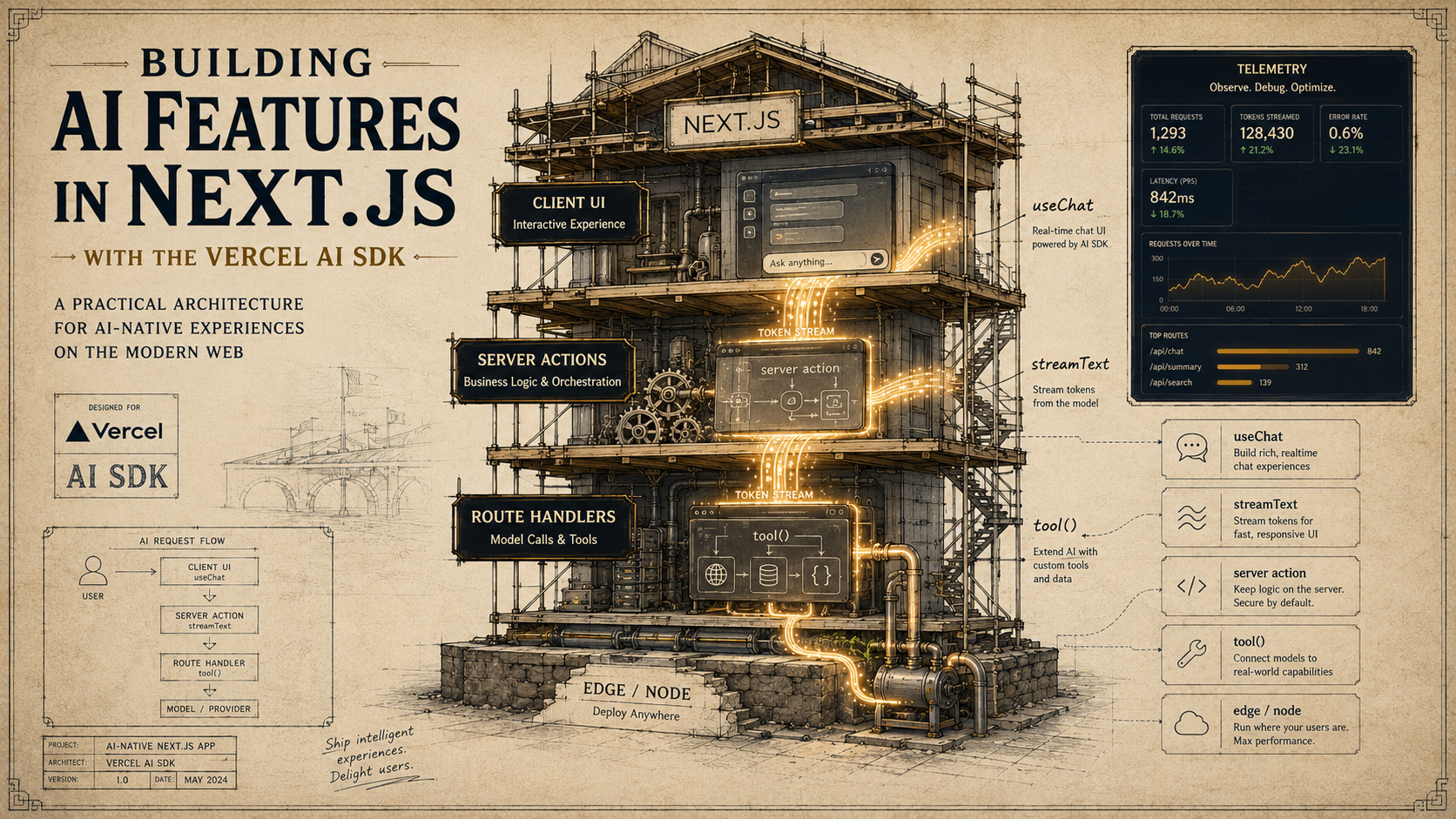
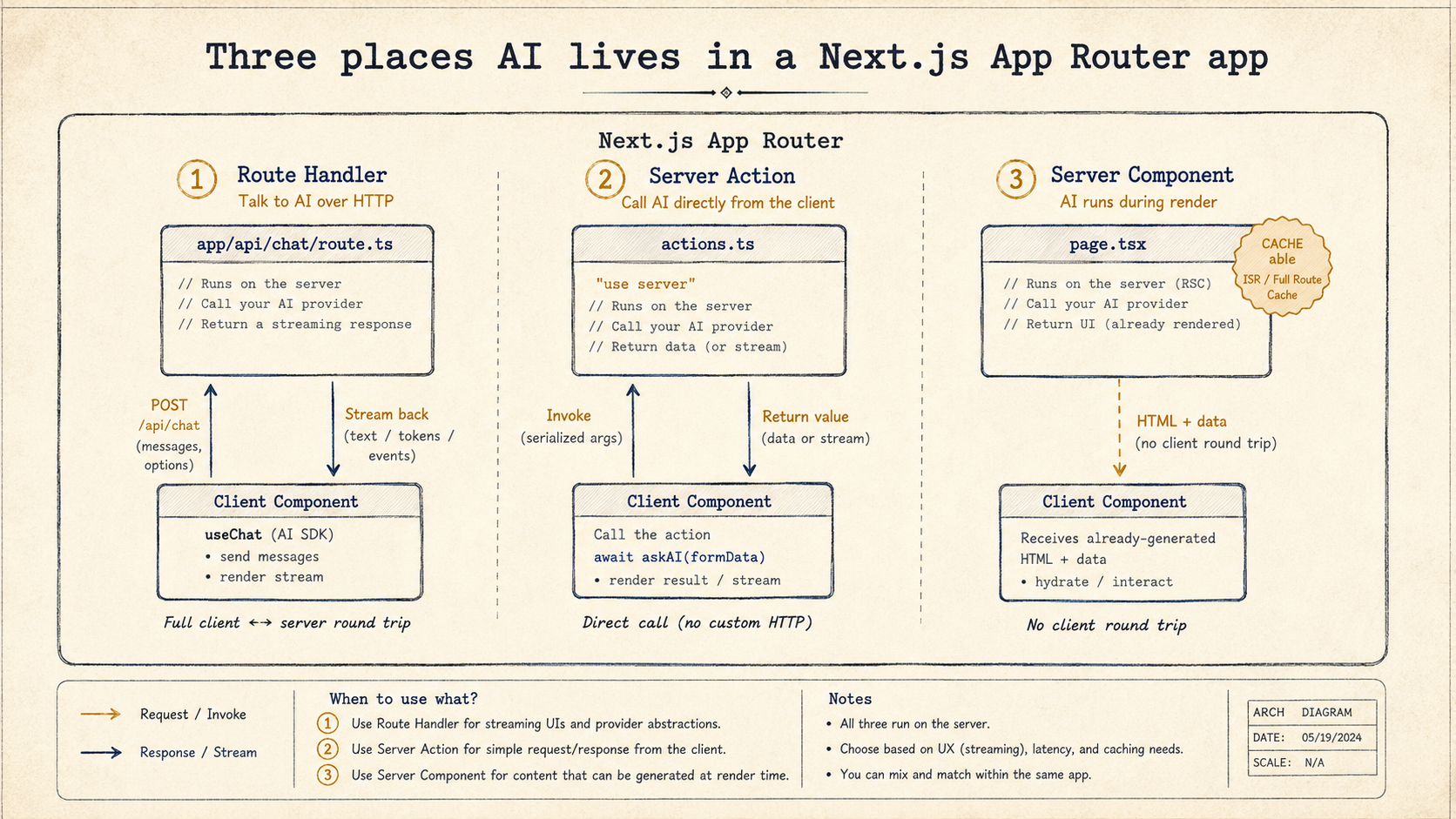
The first thing to get straight is which Next.js primitive runs your AI call. The App Router gives you three plausible options, and they're not interchangeable.
The first is a route handler at app/api/<thing>/route.ts. This is what you reach for when the client owns the lifecycle of the request, a chat UI that pushes user messages over time, a long-running streaming response that React subscribes to via useChat. Route handlers are also the right answer if a non-Next.js client (a mobile app, a webhook receiver, another service) might ever hit the endpoint.
The second is a server action, an async function exported from a "use server" module and called directly from a client component. This is the cleanest choice when the AI call is bound to a single user gesture, "summarize this", "rewrite that paragraph", "generate three taglines from this brief". You skip the JSON contract, you keep type safety end to end, and form submissions get progressive enhancement for free.
The third is doing the AI call inside a server component during render. Useful when the page literally is the AI output, a daily digest, a server-rendered insight, a description generated once per record. It feels weird the first time, but it's the cleanest pattern for "AI as content" because it composes with caching, revalidation, and streaming RSC chunks without you doing anything extra.
Most apps end up with all three. The same model call shape, just plugged into the primitive that fits the interaction.
The Chat Route, Briefly
Chat is the one place a route handler is almost always the right call, because the client side wants useChat, and useChat wants a Response that streams in the AI SDK's UI message format. The route is small:
import { streamText, convertToModelMessages } from "ai";
import { openai } from "@ai-sdk/openai";

export const runtime = "nodejs"; // see "Edge vs Node" below
export const maxDuration = 60;

export async function POST(req: Request) {
  const { messages } = await req.json();

  const result = streamText({
    model: openai("gpt-4o"),
    system: "You are a help assistant for a SaaS product. Be concise and link to docs when possible.",
    messages: convertToModelMessages(messages),
  });

  return result.toUIMessageStreamResponse();
}
maxDuration is the one Next.js-specific knob people forget. The default for Vercel functions is short, under a minute, and streamed AI calls hit that ceiling all the time. Bump it up to whatever your hosting plan allows; on Vercel, 60 works for the Hobby plan, longer durations are available on Pro and Enterprise tiers. If you don't set it and the model is slow, the stream just gets cut mid-sentence and your users see a half-finished message with no error.
On the client, useChat from @ai-sdk/react handles the rest. Don't replicate the full setup here, see the SDK patterns article for the chat UI walkthrough. What's worth saying here is that you should put the chat component in its own client component file ("use client" at the top) and import it from a server component page. That way the page itself can still be cached and stream from the server while the chat box hydrates only where it needs to.
Server Actions Are For "Do This Now"
Server actions are where the Next.js integration gets interesting, because most AI features aren't chat. They're one-shot generations triggered by a button or a form. "Rewrite this in a friendlier tone." "Generate three taglines." "Summarize this PDF." For those, a server action removes a whole layer of plumbing.
"use server";

import { generateText } from "ai";
import { openai } from "@ai-sdk/openai";
import { auth } from "@/lib/auth";

export async function rewrite(formData: FormData) {
  const session = await auth();
  if (!session?.user) {
    return { error: "Not signed in." };
  }

  const text = String(formData.get("text") ?? "").slice(0, 4000);
  if (!text) return { error: "Nothing to rewrite." };

  const { text: rewritten } = await generateText({
    model: openai("gpt-4o-mini"),
    system: "Rewrite the user's text in a warm, friendly tone. Keep it the same length. Do not add commentary.",
    prompt: text,
  });

  return { rewritten };
}
And the client side is just a form:
"use client";

import { useFormState, useFormStatus } from "react-dom";
import { rewrite } from "@/app/actions/rewrite";

export function RewriteForm() {
  const [state, action] = useFormState(rewrite, { rewritten: "", error: "" });

  return (
    <form action={action}>
      <textarea name="text" defaultValue="" />
      <SubmitButton />
      {state.error && <p className="text-red-500">{state.error}</p>}
      {state.rewritten && <pre>{state.rewritten}</pre>}
    </form>
  );
}

function SubmitButton() {
  const { pending } = useFormStatus();
  return <button disabled={pending}>{pending ? "Rewriting..." : "Rewrite"}</button>;
}
Notice what's absent. There's no API route, no JSON serialization on either side, no fetch call, no manual error type, no Zod schema sitting between the request and the handler. The form submits to the server action directly. The action runs on the server with full access to your auth, your database, your environment, and returns a typed value. If you add a field to the action's return shape, the client gets the type immediately. There's no contract drift because there's no contract, it's one function.
This pattern is hard to beat for "click a button and get a generation back." Use it whenever the AI call is bounded by a user gesture, doesn't need to be reused by anything outside this app, and doesn't need streaming.
Streaming From A Server Action
The catch with the previous pattern is that generateText blocks until the model is done. For a 200-token rewrite that's fine, the user clicks, waits a beat, sees the result. For anything longer, you want the tokens to appear as they're generated, the way they do in chat.
You can stream from a server action too. It's not the obvious move because the function-call shape doesn't feel "streamable," but the ai/rsc helpers wrap that gap.
"use server";

import { streamText } from "ai";
import { openai } from "@ai-sdk/openai";
import { createStreamableValue } from "ai/rsc";

export async function generateTagline(brief: string) {
  const stream = createStreamableValue("");

  (async () => {
    const { textStream } = streamText({
      model: openai("gpt-4o-mini"),
      system: "Write a single short tagline for the product described. No quotes, no commentary.",
      prompt: brief,
    });

    for await (const delta of textStream) {
      stream.update(delta);
    }
    stream.done();
  })();

  return { output: stream.value };
}
The IIFE on the inside is the key. The action returns immediately with a streamable value, while the inner async loop keeps feeding tokens to it in the background. On the client, you read the stream back:
"use client";

import { useState } from "react";
import { readStreamableValue } from "ai/rsc";
import { generateTagline } from "@/app/actions/generate-tagline";

export function TaglineButton({ brief }: { brief: string }) {
  const [tagline, setTagline] = useState("");
  const [running, setRunning] = useState(false);

  async function go() {
    setRunning(true);
    setTagline("");
    const { output } = await generateTagline(brief);
    for await (const delta of readStreamableValue(output)) {
      setTagline((prev) => `${prev}${delta ?? ""}`);
    }
    setRunning(false);
  }

  return (
    <div>
      <button onClick={go} disabled={running}>
        {running ? "Generating..." : "Generate tagline"}
      </button>
      <p>{tagline}</p>
    </div>
  );
}
You now have streaming generation, end-to-end type safety, no API route, and no manual response parsing. The cost is that this isn't useChat-shaped, you don't get message history, tool call rendering, or any of the UI ergonomics that the chat hook gives you. So the rule of thumb is: use route handler + useChat for chat, use server action + createStreamableValue for everything else that needs to stream.
Tools That Touch Your Database
Tool calls are where most production AI features earn their keep. The user asks something, the model decides it needs to look up an order, the SDK fires your execute function, and you return the data the model needs to actually answer.
The mechanics of tool() and Zod are covered in the SDK patterns article. The Next.js-specific thing worth saying is: the execute function runs on the server with the full context of whatever called it. If it ran inside a server action, the action's auth is still in scope. If it ran inside a route handler, you have to do the auth check yourself, and you have to do it before reaching the tool list, because once the model decides to call the tool, the tool runs with whatever permissions you gave it.
import { tool, streamText, convertToModelMessages } from "ai";
import { openai } from "@ai-sdk/openai";
import { z } from "zod";
import { auth } from "@/lib/auth";
import { db } from "@/lib/db";

export async function POST(req: Request) {
  const session = await auth();
  if (!session?.user) {
    return new Response("Unauthorized", { status: 401 });
  }

  const { messages } = await req.json();

  const result = streamText({
    model: openai("gpt-4o"),
    messages: convertToModelMessages(messages),
    tools: {
      getMyOrders: tool({
        description: "Look up the signed-in user's recent orders.",
        inputSchema: z.object({
          limit: z.number().int().min(1).max(20).default(5),
        }),
        execute: async ({ limit }) => {
          // session is captured from the request scope above
          return db.order.findMany({
            where: { userId: session.user.id },
            orderBy: { createdAt: "desc" },
            take: limit,
          });
        },
      }),
    },
  });

  return result.toUIMessageStreamResponse();
}
The thing to notice: nowhere does the tool take a userId argument. The model is never asked to pass one. The session.user.id is captured from the request scope and used inside the closure. Letting the model pass user IDs is one of the most common mistakes in early AI feature work, it means anyone who can talk to your model can ask for anyone's data. Scope the closure to the caller. Always.
Edge Or Node?
Next.js gives you two runtimes for server code: the edge runtime (V8 isolates, no Node APIs, deployed close to users) and the Node runtime (full Node.js, runs in the regular function pool). The AI SDK works on both, and the right choice is not "edge because it's faster."
Edge wins on cold start and proximity, your function starts in milliseconds and runs near the user. For a chat route where the first thing you do is hit an OpenAI server in us-east-1 anyway, the edge proximity barely matters because the model call dominates the latency budget. What edge costs you is more interesting: no access to Node-only libraries (some database drivers, some PDF parsers, some SDKs), no native modules, no filesystem.
The rule I'd use: if your route handler only talks to the model and maybe a fetch-based service, edge is fine. If it talks to a Postgres pool, a Redis client that needs TCP, a file processor, anything that uses native modules, go Node. You set this at the top of the route file:
export const runtime = "nodejs"; // or "edge"
export const maxDuration = 60;
Server actions are always Node (they can't run on the edge), so the question only matters for route handlers and middleware.
Caching, Or The Lack Of It
Next.js is aggressive about caching server work. The fetch cache, the data cache, the full route cache, they all kick in by default and you can spend an afternoon figuring out why your AI response is the same on every reload. The model call itself goes through a fetch to the provider under the hood, and fetch is what Next.js caches.
For AI calls you almost never want this. Same prompt, different time, different answer. The provider rate limits aside, you want the model to actually run. Two options:
export const dynamic = "force-dynamic"; // skip route cacheThat tells Next.js this whole route is per-request, which is what a chat or generation route should be anyway. The other lever is on the AI SDK call itself, by default the SDK doesn't cache, but if you're using a provider that goes through fetch with cache headers, you can explicitly mark the call as uncached using the fetch options or with provider-specific knobs. The simpler answer is force-dynamic at the route level and stop thinking about it.
The exception is server components that render AI-generated content as part of the page. There you want caching, a daily digest, a weekly summary, a product description that doesn't need to change on every page load. Use revalidate and let Next.js memoize the generation across requests:
import { generateText } from "ai";
import { openai } from "@ai-sdk/openai";

export const revalidate = 3600; // re-run hourly

export default async function Dashboard() {
  const { text } = await generateText({
    model: openai("gpt-4o-mini"),
    system: "Summarize today's key engineering metrics in three bullet points.",
    prompt: await buildPromptFromTodayMetrics(),
  });

  return <article>{text}</article>;
}
That's the cheapest possible "AI dashboard widget." The page renders, hits the model, caches the result for an hour, and serves the cached version to every subsequent request until the cache expires.
Observability You'll Actually Need
The thing nobody warns you about is that AI features are extremely hard to debug after the fact. A regular endpoint fails and you have a stack trace. An AI endpoint "fails" by giving a weird answer, and unless you logged the full input, the full output, the model name, the temperature, the tools that fired, and the tokens consumed, you have no way to reconstruct what happened. Two weeks in, a user complains, and you find yourself going "I have no idea what we said to them."
The AI SDK has a built-in hook for this. Every call that takes options also takes an experimental_telemetry block, and when you enable it, the SDK emits OpenTelemetry spans for the model call, every tool execution, and the full message history. From there you ship those spans to whatever observability tool you already have, Vercel's built-in observability, Langfuse, Helicone, your own OTLP endpoint.
const result = streamText({
  model: openai("gpt-4o"),
  messages: convertToModelMessages(messages),
  experimental_telemetry: {
    isEnabled: true,
    functionId: "chat-api-route",
    metadata: {
      userId: session.user.id,
      tier: session.user.tier,
    },
  },
});
The functionId is what you'll group on later, "show me all chat calls" vs "show me all rewrite-tagline calls". The metadata is per-call context that ends up on the span, so you can filter for a specific user when they file a ticket.
The wiring to an actual backend is a one-time setup. If you're on Vercel, the AI Observability dashboard picks up these spans automatically once you enable it on the project. If you want a third-party tool like Langfuse, you register an OTLP exporter once at the top of your app, typically in instrumentation.ts at the project root, which Next.js calls during boot, and the spans flow there.
export async function register() {
  if (process.env.NEXT_RUNTIME === "nodejs") {
    await import("./instrumentation-node");
  }
}
Then in instrumentation-node.ts you set up whatever OTLP exporter your provider documents. That file only loads in the Node runtime, edge functions get their own instrumentation hook, and most AI observability tooling only works under Node anyway, which is one more reason to prefer Node for route handlers that need real visibility.
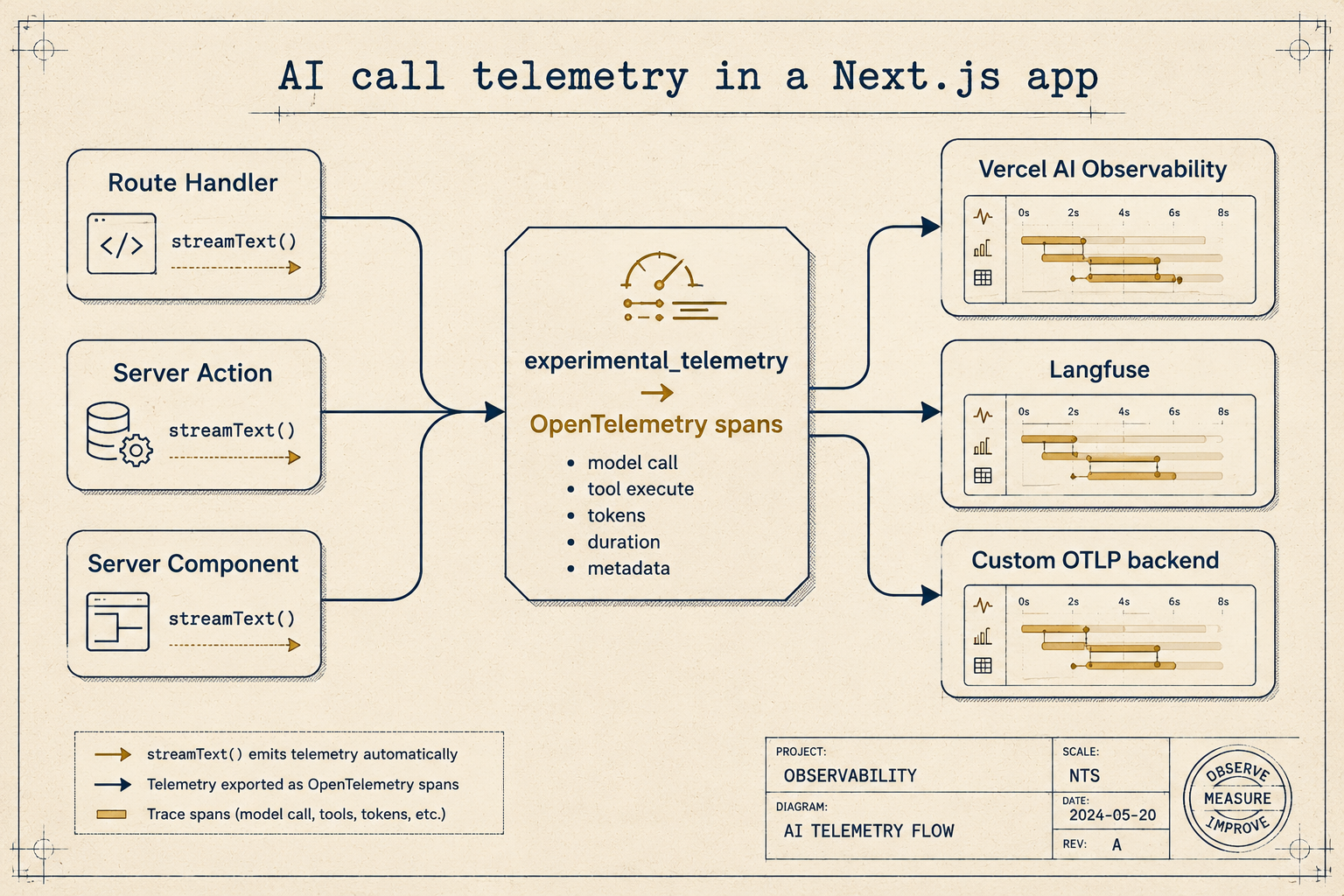
Once you have telemetry, the debugging workflow flips. Instead of "I have no idea what we said to them," it becomes "open the trace, see the messages array we sent, see the response, see which tools fired, see the tokens." A bad answer becomes a reproducible bug instead of a story.
The Pieces That Trip Everyone
A handful of small things waste a day each:
The first is streaming through middleware. If you write a Next.js middleware that buffers the response body, your stream stops streaming and starts arriving as a single blob at the end. Either skip middleware for AI routes or make sure your middleware passes the response through untouched. Authentication checks in middleware are fine, they happen before the response, but rewriting headers based on body content will collapse the stream.
The second is Set-Cookie on streaming responses. The cookie has to be on the response object before the stream starts. Once tokens are flowing, you can't add headers. If you need to set a cookie based on the AI call's outcome, do it after the stream completes via a follow-up request, or via the server action pattern (which can set cookies before returning the streamable value).
The third is client component boundaries. The AI hooks (useChat, useCompletion, readStreamableValue) all need to run in client components. The action that backs them runs on the server. If you import a hook from a server component, you'll get a "use client" boundary error that points at the wrong file. Always wrap the hook usage in a "use client" component and pass server-side data in as props.
The fourth, and the one I see most often: environment variables in the edge runtime. The edge runtime doesn't have process.env the way Node does. Most provider keys work because Next.js injects them at build time, but if you're reading custom env vars at runtime in an edge function, double-check they're being inlined. The symptom is undefined in production and "works on my machine" everywhere else.
The Shape Of A Sensible AI Feature
Pull all of this together and a feature's shape ends up looking the same most of the time. There's a server action or a route handler that owns the AI call. There's a thin client component that handles the interaction, usually a button, a form, or a chat input. There's auth at the entry, scoped tools that read from the database with the caller's permissions, telemetry on the model call, and force-dynamic or revalidate set appropriately for the route.
The Next.js side is doing what it always does, routing, rendering, caching, auth, and the AI SDK is doing what it does best, talking to whichever model you pointed it at and giving you back a stream or a structured value. The interesting design decisions are mostly about which primitive owns the call, where the auth check sits, and what gets cached.
If you start every new AI feature by asking those three questions, route handler or server action or server component? where does auth live? what's the cache shape?, you'll skip past the entire class of bugs that come from gluing AI calls onto endpoints that were never designed for them. The SDK handles the model part. Next.js handles the everything else. The work is making sure they're meeting in the right place.