So, you've been arguing about rebase versus merge in your team Slack channel again.
One person wants a linear history. Another person says rebase is dangerous. Someone else just hit "Squash and merge" in GitHub and walked away. By the time the thread dies, nobody changed their mind, and the next PR is going to start the same fight.
Here's the thing: both sides are right, just about different situations. Rebase is a great tool. Merge is a great tool. Using either one in the wrong place is what burns people. This post is the team guideline you can paste into your contributing doc: what rebase actually does, what merge actually does, where each one bites, and the small set of rules that keep your repo readable without anybody losing work.
What Rebase Actually Does
Forget for a second what people say rebase is. Look at what it does to the graph.
You have a feature branch with three commits, branched off main four commits ago. main has moved on since you branched.
                 A---B---C   feature
                /
   ...---X---Y---Z---W---V   main
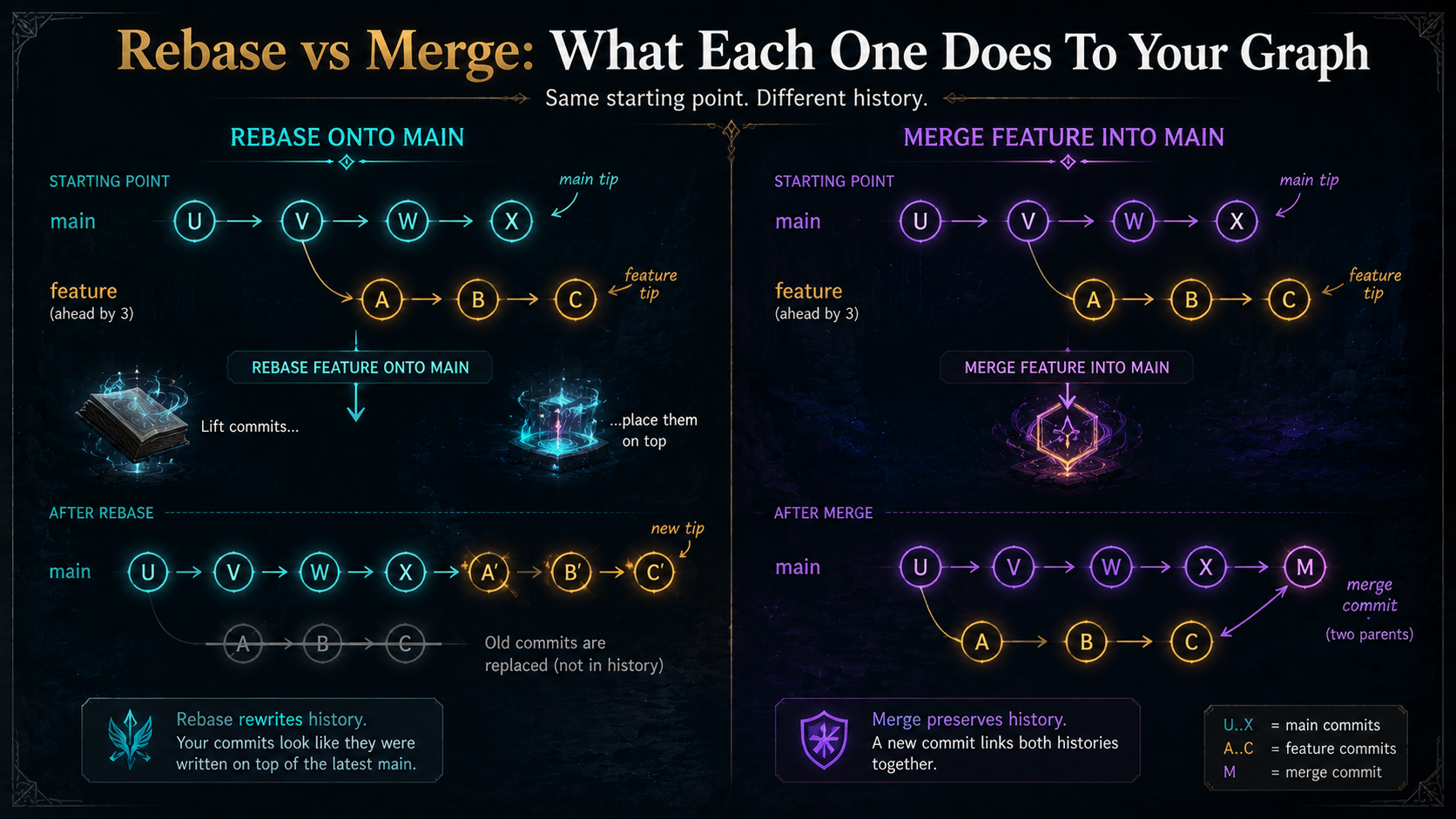
When you run git rebase main from feature, Git rewinds your three commits, fast-forwards your branch tip to V, and re-applies A, B, C one at a time on top.
                          A'--B'--C'   feature
                         /
   ...---X---Y---Z---W---V              main
Notice the prime marks. A', B', C' are new commits. They have the same author, the same message, the same tree (assuming no conflicts), but new SHAs. The originals (A, B, C) are unreachable now, and they live in your reflog for ninety days before getting garbage-collected.
That's the whole rebase. Take a series of commits, re-apply them somewhere else, with new identities.
What Merge Actually Does
Merge does not rewind anything. It writes one new commit that has two parents.
Same starting picture:
                 A---B---C   feature
                /
   ...---X---Y---Z---W---V   main
git merge feature from main creates:
                 A---B---C
                /         \
   ...---X---Y---Z---W---V---M   main
M is the merge commit. Its first parent is V (where main was). Its second parent is C (the tip of feature). The original commits, A, B, C, plus everything on main, keep their SHAs. Nothing is rewritten. The history is a graph, and the merge commit is what records that two lines of work joined.
There's also fast-forward merge, which is what happens when the target branch hasn't moved since you branched. In that case Git just slides the branch pointer forward and writes no merge commit at all. Visually identical to a rebase result, but for a different reason: there was simply nothing to reconcile.
The Trade-Off In One Sentence
Rebase trades a truthful graph for a readable one. Merge trades a readable graph for a truthful one.
Everything else is detail.
A truthful graph records what really happened: two people worked in parallel, their work joined at a known commit. A readable graph hides the parallelism and tells a story that pretends the work happened in one straight line. Both have value. The trick is knowing which one your team cares more about, and knowing which operations are safe on which kinds of branches.
The One Rule That Prevents Disasters
Everything else flows from this:
That's it. The rest of the guidelines exist to make this rule concrete.
When you rebase, you create new commits with new SHAs. If your teammate had pulled the old commits and started working on top of them, their branch now points at history that, from your perspective, no longer exists. They'll either resolve a hideous merge later, or accidentally reintroduce your "deleted" commits, or push and clobber your rewrite. None of those outcomes are fun.
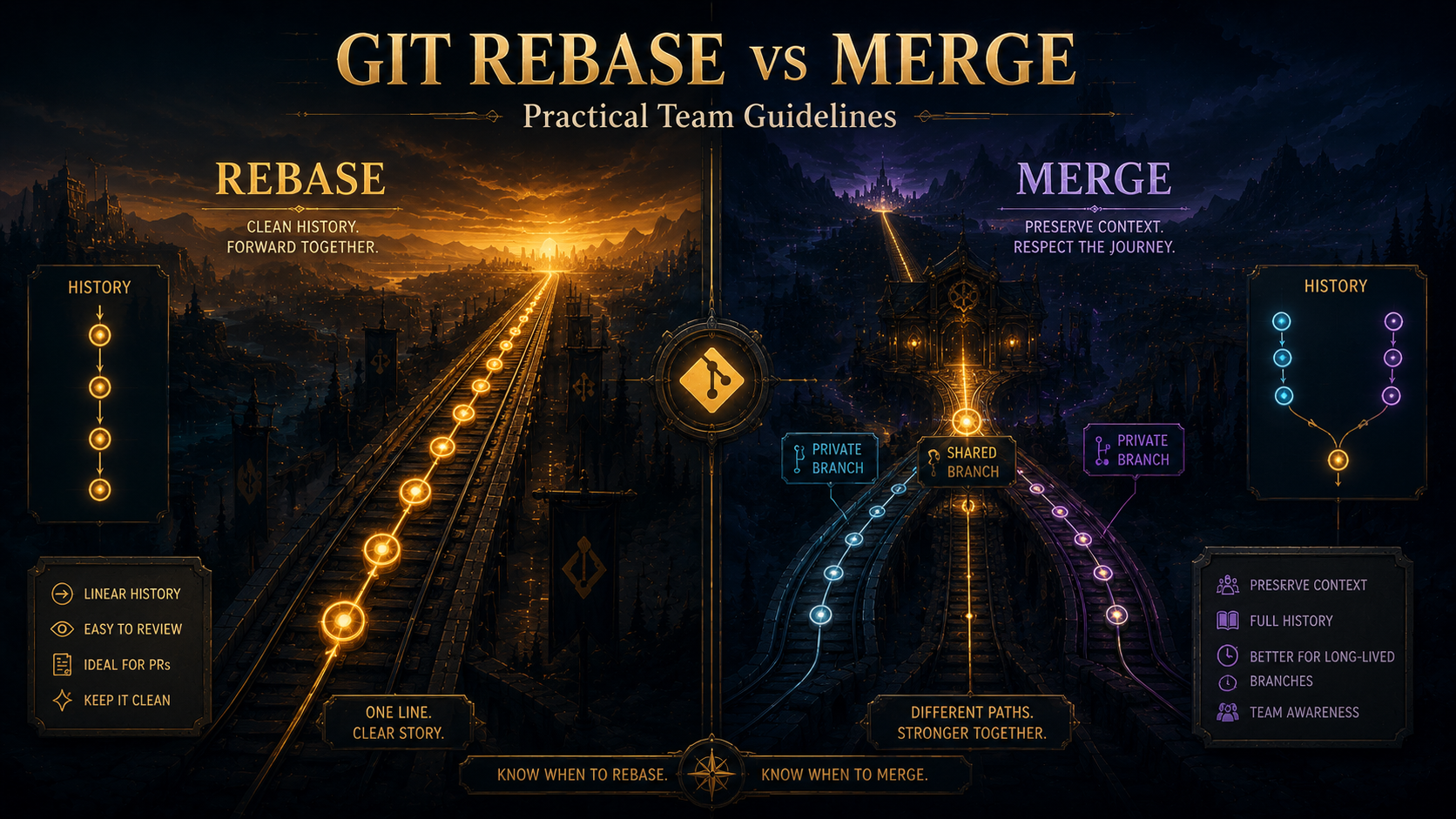
So: rebase is safe on private branches (only you have them) and dangerous on shared branches (anyone might have based work on them). That's the whole safety story.
Where Each Tool Belongs
Here's how this plays out in practice for a working team.
Use Rebase For Your Own Feature Branch Before Opening A PR
Your branch is private. You've made twelve "wip" and "fix" and "ok this time" commits. Before opening a PR, run an interactive rebase to clean them into a few logical commits.
# pull the latest main without merging it into your branch
git fetch origin

# rebase your feature onto the current main and clean up the commits
git rebase -i origin/main
In the editor, mark commits as pick, squash, fixup, or reword. You'll end up with a small set of commits that each make sense on their own. Future-you reviewing git blame will thank present-you.
Use Rebase To Keep Your Feature Branch Current
Long-running feature branches drift. main moves, conflicts pile up, and the longer you wait, the worse the eventual merge gets.
git fetch origin
git rebase origin/main
If you hit conflicts, fix them, git add the files, then git rebase --continue. If something goes wrong and you want out, git rebase --abort puts you exactly where you started.
This is strictly better than git merge main into your feature branch, which adds noise commits ("Merge branch 'main' into feature") that nobody learns anything from. Reviewers especially hate them, because they sandbag the diff with unrelated changes from main.
Use Merge When Integrating Into A Shared Branch
The PR is approved. CI is green. Now the change goes into main (or develop, or whatever your trunk is called). This is where merge wins.
The integration commit is meaningful information. It says: this set of commits, reviewed by these people, was integrated at this point in the timeline. A merge commit captures that. A rebase loses it.
Three flavors of "merge" exist in practice, and the choice between them is a team-policy decision more than a Git decision:
- Merge commit (
--no-ff): preserves every commit from the feature branch and records the integration with a merge commit. The graph shows your team's actual work pattern. Best when your individual commits are clean and meaningful. - Squash and merge: collapses the entire PR into a single commit on
main. The graph is dead-flat linear, andmain's history reads as "one commit per PR". Best when individual commits are messy and only the PR-level change matters forgit blame. - Rebase and merge: replays the PR's commits onto
mainlinearly, no merge commit. Cleanest of the three in terms of graph shape, but you lose the "this was a PR" marker. Best for tiny PRs where the commits are already clean.
GitHub, GitLab, and Bitbucket all let you configure which of these your team uses, or restrict it to one. Pick one per repo and stop arguing about it.
Never Rebase A Shared Branch
main, develop, release/*, and any branch your team pulls from: never rebase these. Ever. Not even to "clean up history" before a release. The cost of breaking everyone's local clones is much higher than the cost of a slightly noisier graph.
If you find yourself wanting to rewrite a shared branch, the answer is almost always a revert commit, not a rebase. git revert <bad-commit> creates a new commit that undoes the bad one and preserves history. It's the boring answer, and it's the right one.
The Three Rules That Cover 95% Of Cases
If your team has nothing in their contributing doc today, these three rules are the floor:
- Rebase your own branch before pushing, never after. Once you've pushed, treat it as if someone else might have pulled it. (If you really need to rebase a pushed branch, use
git push --force-with-lease, not--force. It refuses to overwrite work it didn't expect.) - Never rebase
main, release branches, or any branch tagged as "shared". Document the list explicitly so there's no ambiguity. - Pick one PR merge strategy and use it consistently. Squash, merge, or rebase. Fine to argue about which, but the worst outcome is "everyone picks their favorite per PR" and
main's history reads like a ransom note.
Most teams can write the rest of their Git policy on top of those three.
The "Squash And Merge" Question
Squash and merge gets a lot of hate online and a lot of love in real teams. The hate is mostly purity: "you're throwing away information!". The love is mostly practicality: "I don't care about your six 'wip' commits, I care about the change".
The honest answer: squash and merge is the right default for most product teams. Here's why.
When you git blame a line a year from now, you almost never want to see "wip: fix typo in test". You want to see the PR-level commit that explains why the change happened. Squash and merge gives you that for free. The full per-commit detail is still in the PR itself, on GitHub or GitLab, searchable, linkable, with the review thread attached. The git log is for the "what changed and why" summary; the PR is for the detail.
The cases where squash and merge is wrong are narrower than people think:
- Library or infrastructure projects where individual commits are themselves meaningful changes and you want bisect-friendly history. Use merge commits with clean individual commits.
- PRs that genuinely contain multiple distinct logical changes. Those should be multiple PRs, but if they're not, merge-commit preserves the structure.
- Open-source projects with contribution history attribution concerns. Squash collapses authorship metadata in some hosts; if that matters to you, don't squash.
Outside those cases, squash and merge is fine. It's not a moral failing.
Common Mistakes And How To Recover
A few specific situations where teams trip up.
"I rebased a branch I shouldn't have"
If you rebased and pushed a shared branch, the recovery path is:
# find the SHA you had before the rebase
git reflog

# reset back to it
git reset --hard <old-sha>

# push it back, force-with-lease so you don't clobber legitimate new work
git push --force-with-lease
Then tell the team. Anyone who pulled the rewritten branch needs to reset their local copy. The longer you wait to confess, the more recovery costs.
"Rebase produced a million conflicts and I just want to start over"
git rebase --abortYou're back where you started. No harm done. Rebase is famous for looking destructive while being one of the most recoverable operations in Git, thanks to the reflog and --abort.
"I did the rebase, fixed conflicts, but the result looks wrong"
# find the commit before you started the rebase
git reflog

# something like: HEAD@{5}: rebase (start): checkout origin/main

# go back to right before the rebase start
git reset --hard HEAD@{6}   # the entry just before the rebase start
Reflog is your safety net. It records every move HEAD makes, including aborted rebases, resets, and checkouts. Ninety days is plenty of time to undo almost anything.
"Force-pushed somebody else's commits into oblivion"
If --force-with-lease would have saved you and you used --force instead, you may have overwritten work. Check the remote's reflog if you have admin access, or ask the person who lost the work to push from their local branch (they probably still have it). The lesson is to always use --force-with-lease for any push that rewrites history. It's the same speed and refuses to clobber unexpected work.
A Team Policy Template
If you want something to paste into your contributing doc, this works:
GIT POLICY

Branches:
  - main: protected, no direct pushes, no force-pushes, ever.
  - release/*: protected, same rules as main.
  - feature/*, fix/*, chore/*: your branch, your rules, until you push it.

History on personal branches:
  - Rebase to keep up with main. Don't merge main in.
  - Interactive-rebase to clean commits before opening a PR.
  - Force-push only with --force-with-lease.

Integrating PRs into main:
  - Default: Squash and merge.
  - Exceptions: PRs that contain multiple genuinely distinct logical
    changes. Use Merge commit. (But consider splitting the PR first.)
  - Never: Rebase and merge for anything larger than 3 commits.

When in doubt:
  - Ask before rebasing anything anyone else has touched.
  - `git reflog` is your friend; nothing in Git is really gone for 90 days.
Adjust to taste. The point isn't this exact policy. It's having a policy, agreed in advance, instead of relitigating it on every PR.
The Honest Summary
Rebase and merge are not philosophies. They're tools that produce different graph shapes, and they have a single hard safety rule: don't rebase what someone else has based work on.
If you internalize that one rule, every other decision is just team preference: linear history or true graph, squash or merge, --no-ff or fast-forward. None of those choices will break your repo. The one that will break your repo is rewriting shared history.
Pick a policy. Write it down. Move on.