The first time I inherited a legacy JS app I made it worse. I went in with a clean architecture in my head, replaced a "messy" reducer in week two, and broke a feature nobody had tests for and three teams depended on. The PR was reverted. Trust took a month to come back.
Refactoring a legacy app is mostly not a code skill. It's a sequencing skill. The actual diff at the end can be dramatic; the work that lets the diff happen safely is patient, boring, and largely about building a net underneath the trapeze before you do anything fancy.
This is the playbook I'd hand my past self.
Resist The Urge To Rewrite
The siren song of a "clean rewrite" is real. The codebase is a mess, the bundler is from 2018, half the components reach into a global event bus, and somebody clearly used JSX at one point but not consistently. You can see the new version in your head. It would be so good.
The trouble is that almost every total rewrite I've seen — at three companies, across two continents, in projects from "a 12-week effort" to "a two-year effort" — ended in one of three ways: cancelled mid-flight after burning a year of engineering time, shipped buggy and immediately spawned a "stabilization quarter" that was actually a rewrite of the rewrite, or shipped and quietly maintained alongside the old app forever because nobody had time to migrate the long tail.
The Joel Spolsky essay about Netscape rewriting Navigator is over twenty-five years old and still depressingly relevant: the messy code is messy because of every bug fix and edge case it absorbed. Throw it out and you throw out the lessons.
Refactor. Don't rewrite. The rest of this article is how.
Step One: Build The Safety Net
Before you change anything, write characterization tests — sometimes called golden tests or pin-down tests. These are not "good tests." They are tests that capture what the code currently does, not what it should do. Their job is to scream when behavior changes, regardless of whether that behavior was correct.
In a JS app this often looks like:
import { render, screen } from "@testing-library/react";
import { CheckoutLegacy } from "./CheckoutLegacy.jsx";

test("legacy checkout: empty cart renders the upsell banner", () => {
  render(<CheckoutLegacy items={[]} />);
  expect(screen.getByText(/free shipping over/i)).toBeInTheDocument();
});

test("legacy checkout: tax calculation matches snapshot for fixture A", () => {
  const result = computeTotals(fixtureA);
  expect(result).toMatchInlineSnapshot();
});
For pure functions, snapshot every realistic input you can find in production logs. For UI, capture rendered output for a handful of fixture data shapes. The bar is not "this code is good." The bar is "if a refactor changes this output, I want to know."
This step is unglamorous and often takes longer than the actual refactor. It is also the difference between a refactor that ships and a refactor that gets reverted.
Step Two: Pick The Strangler Fig, Not The Bulldozer
Martin Fowler's strangler fig pattern, named after the tree that grows around its host until the host dies and rots away leaving only the fig, is the right metaphor for a JavaScript refactor.
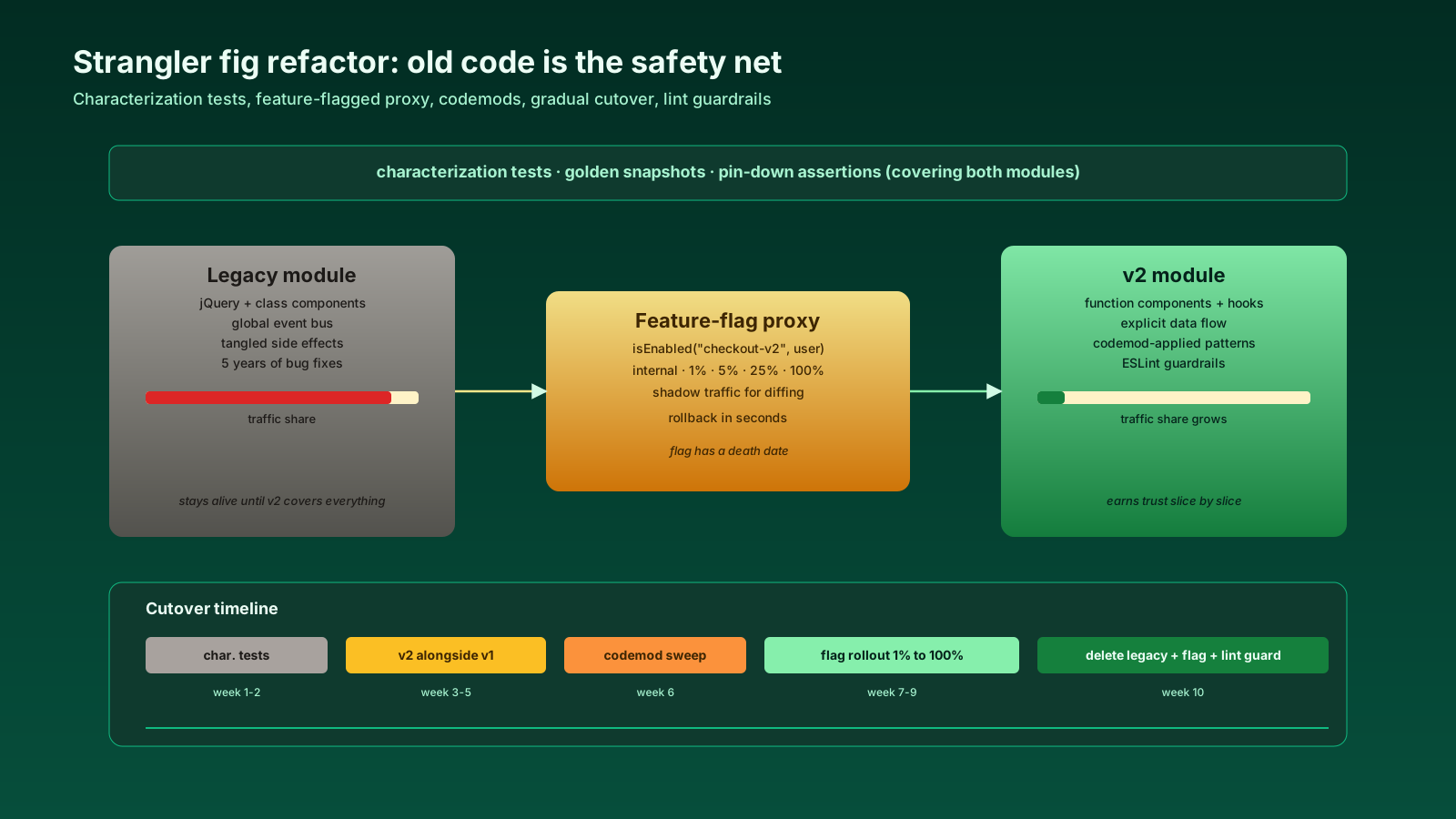
You don't replace the old code in place. You build the new code next to the old code, route some traffic to it, expand its responsibilities until it covers everything the old code did, and then delete the old code. At every point in the timeline, the app works.
In a frontend codebase that often looks like:
- Add a new module (
/checkout-v2) alongside the old one (/checkout). - Pick one route, one feature flag, or one user segment that goes through the new module.
- Verify, expand, repeat.
- When the old module has no callers left, delete it.
In a Node service it might be:
- Stand up the new handler at a new path.
- Put a thin proxy in front that routes a small percentage of traffic.
- Compare responses (shadow traffic) before fully cutting over.
The point is that the old code is the safety net while the new code earns trust. You never have a "big bang" deploy. There's no Friday at 4 PM that everyone dreads.
Step Three: Use Codemods For The Mechanical Stuff
A surprising amount of "refactor" work is mechanical. Rename a prop across 800 components. Replace componentDidMount with useEffect. Convert default exports to named exports. Strip PropTypes after migrating to TypeScript.
Doing this by hand is how you get tired and miss three call sites and break production. Use a codemod.
The toolchain in 2026:
- jscodeshift is the original (Facebook). Mature, well-documented, AST-based transforms in JavaScript. The official React codemods (
react-codemod) live here. - ts-morph is the friendlier wrapper around the TypeScript compiler API. If your codebase is TS, this is where you want to be — type-aware refactors are far easier here than in jscodeshift.
- putout is more of a linter-with-fixers but its plugin system is great for codifying team-specific rules.
- codemod.com (also known as Codemod Studio) gives you a hosted environment for writing and testing codemods, useful when you want non-engineers to be able to review the transformation.
A codemod is a contract: "given this AST shape, output this AST shape." Run it on the codebase. Eyeball the diff. Run the test suite. Commit. The diff might be 4,000 files, but every change came from one rule you can review in 50 lines.
Where codemods stop helping: anything that requires actual understanding of intent. A codemod can rename getUser to fetchUser everywhere. It cannot decide whether the function should be split into two.
Step Four: Feature Flags Are The Cutover Lever
A flag is the difference between "we deployed the new checkout" and "we shipped the new checkout." The deploy is technical. The ship is a decision you make on a Wednesday at 2 PM with a graph in front of you.
The pattern:
import { isEnabled } from "@/lib/flags";

export function Checkout(props) {
  if (isEnabled("checkout-v2", { user: props.user })) {
    return <CheckoutV2 {...props} />;
  }
  return <CheckoutLegacy {...props} />;
}
Start the flag at 0%. Internal users at 100% first. Then 1% of real traffic. Watch error rates and conversion. Bump to 5%. Bump to 25%. Hold for a day. Bump to 100%. Once it's been at 100% for a week with no regressions, delete the flag and the old code path in the same PR.
This sounds slow. It is slow. It is also the reason your refactor doesn't show up in a postmortem.
The honest version: every flag has a death date. Add a calendar reminder. Track outstanding flags as tech debt. A flag that lives forever is a fork in the codebase nobody owns.
Step Five: ESLint Rules As Guardrails
Once you've migrated a chunk of code to the new pattern, write a lint rule that prevents the old pattern from creeping back. ESLint custom rules with the no-restricted-syntax rule, no-restricted-imports, or a small custom rule plugin do this well.
// .eslintrc.js
{
  rules: {
    "no-restricted-imports": ["error", {
      paths: [
        { name: "../legacy-checkout/utils", message: "Use @/checkout-v2/utils instead." }
      ]
    }],
    "no-restricted-syntax": ["error", {
      selector: "CallExpression[callee.name='deprecatedThing']",
      message: "deprecatedThing is being removed. See migration guide."
    }]
  }
}
This is the reason your refactor doesn't decay. Three months later, when a new engineer reaches for the old utility because they didn't know there was a new one, the lint rule tells them. The team's institutional memory becomes a config file instead of a tribal warning passed in code review.
Step Six: Document The Why, Not The Diff
The PR description for a refactor should answer one question: why did the old code look the way it did? If you don't know, the refactor is premature. The codebase is the way it is because of pressures that may not be obvious from the code alone — a bug fix from 2021, a customer requirement that was never written down, a workaround for a third-party API that has since changed.
A short ADR (architecture decision record) at the top of the new module saves the next person — often you, six months later — from the same confusion you just untangled.
What "Safely" Actually Means
Safely doesn't mean "with no bugs." It means "if a bug ships, we can roll back fast, the blast radius is small, and we know within minutes." That requires:
- Characterization tests so you know when behavior changed.
- Strangler fig so the old code is still the safety net.
- Codemods so mechanical changes are reviewable as a single rule.
- Feature flags so 100% of users aren't on the new code on day one.
- Lint rules so the old patterns don't grow back.
- Honest documentation so future engineers don't repeat the original confusion.
None of this is fast. All of it is faster than rewriting twice.
The refactor that ships is the one that doesn't ask the team to hold its breath. Build the net first. Move one branch at a time. Trust the boring tools.