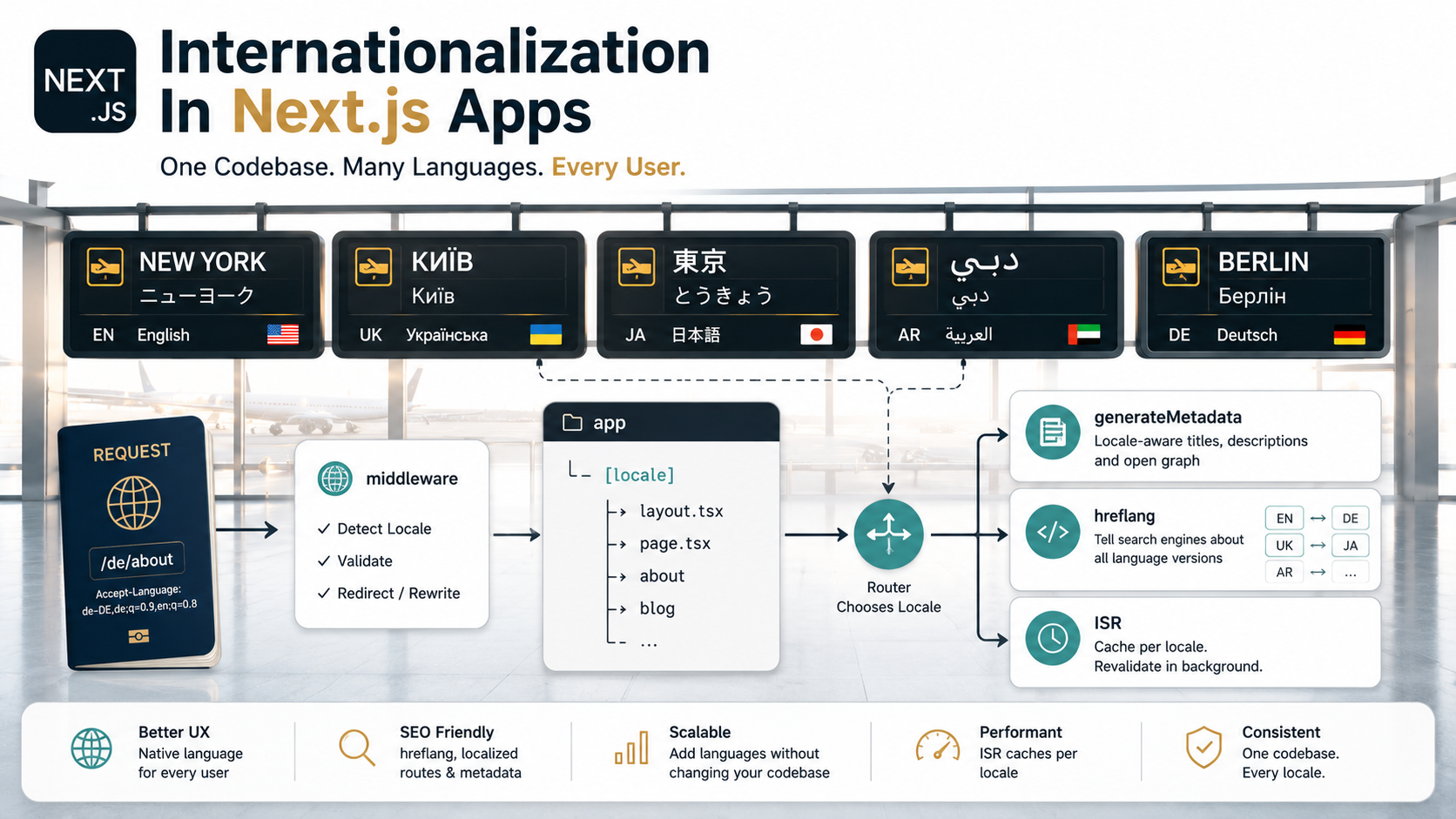
So your product is doing well in English, and someone in a planning meeting says the magic line: "we should launch in three more languages by Q3."
You nod. How hard could it be? Add a language switcher, swap some strings, ship it.
Then you actually sit down to do it in Next.js and a dozen weird questions show up at once. Where does the locale live, in the URL? In a cookie? Both? How does the middleware decide which language a fresh visitor sees? What happens to your beautiful static pages when every route suddenly has five variants? How do you keep generateMetadata from returning English titles on the German page? And why is Google indexing your French homepage as "duplicate content"?
Internationalization isn't really a "translate the strings" problem. It's a routing, caching, metadata, and request-pipeline problem, with translations sitting on top. Next.js gives you the pieces, but unlike Pages Router, the App Router doesn't ship a built-in i18n config. You assemble it yourself, and the order you assemble it in matters.
Let's walk through the whole thing.
The Two Worlds: Pages Router vs App Router
A quick orientation, because half the i18n tutorials on the internet describe a system that no longer applies to new apps.
In the Pages Router, Next.js had first-class i18n routing baked into next.config.js:
module.exports = {
  i18n: {
    locales: ["en", "uk", "de"],
    defaultLocale: "en",
    localeDetection: true,
  },
};
That single block gave you locale-prefixed URLs, automatic Accept-Language detection, and a locale prop available to every page. It was opinionated, simple, and worked.
In the App Router, that config block does nothing. The i18n key was never ported. The official guidance is to build i18n yourself using two primitives: a [locale] dynamic segment near the top of app/, and a middleware.ts that decides which locale a bare request should redirect to.
That sounds like a downgrade, but it's actually a deliberate trade. The App Router wants every request to fit a single mental model (segments, layouts, server components) and a magic i18n config block didn't fit that model. The cost is that you write a bit more code. The benefit is that nothing weird is happening behind your back. You can read the entire i18n flow by opening middleware.ts and app/[locale]/layout.tsx.
Everything below is App Router. If you're maintaining a Pages Router app, the built-in config still works, but the routing and caching considerations are quite different and most of this article won't apply directly.
The Anatomy Of An i18n-Aware App Router
Before any code, this is the directory shape you're aiming for:
app/
  [locale]/
    layout.tsx
    page.tsx
    blog/
      page.tsx
      [slug]/
        page.tsx
    pricing/
      page.tsx
  api/
    health/
      route.ts
middleware.ts
i18n/
  config.ts
  request.ts
  messages/
    en.json
    uk.json
    de.json
Three things to notice.
First, [locale] is the outermost dynamic segment under app/. Everything user-facing lives inside it. That way, every page automatically gets params.locale, and there is no route that "doesn't have a locale", except the API routes, which sit outside on purpose.
Second, api/ is intentionally not under [locale]. APIs are usually language-agnostic. Putting them under [locale] would force every fetch to embed /en/api/... and break clients that don't know the locale. Keep them flat; pass language as a query param or header if a specific endpoint genuinely needs it.
Third, the translation messages live as plain JSON. You can use TOML, YAML, or .po files instead (most libraries support all of them) but JSON is the path of least resistance: tooling everywhere, no parser surprises.
![Horizontal request-flow diagram: middleware reads Accept-Language, cookie, and URL, then routes into app/[locale]/layout.tsx which calls setRequestLocale; server components render with localized messages and generateMetadata emits hreflang alternates](/assets/imgs/articles/internationalization-in-next-js-apps/request-flow-for-an-i18n-aware-nextjs-app.png)
Routing: Why [locale] And Not Subdomains
There are three classic ways to route by language:
- Path-based:
example.com/en/pricing,example.com/uk/pricing. - Subdomain-based:
en.example.com/pricing,uk.example.com/pricing. - Domain-based:
example.comandexample.de.
For most apps, path-based is the right answer in Next.js, and it's what every i18n library in the ecosystem assumes. The reasons are practical: a single deployment serves all locales, your edge cache keys naturally include the path, hreflang is straightforward, and you don't have to touch DNS to add a language.
Subdomains and domains are real options when you have legal or brand reasons, say, a German entity that has to be example.de for compliance. Next.js can handle this via middleware that rewrites internally based on host, but you give up the cleanliness of one mental model and you'll be writing more middleware code. Start path-based unless someone hands you a non-technical reason to do otherwise.
So your URLs become:
example.com/en/        → English home
example.com/uk/        → Ukrainian home
example.com/en/blog/x  → English blog post
example.com/uk/blog/x  → Ukrainian blog post
The naked example.com/ either redirects to a detected locale, or serves a tiny "choose your language" page if you'd rather not redirect. The former is what most products do; the latter is more honest if your audience genuinely doesn't have a sensible default.
Locale Detection In Middleware
Here is where most i18n bugs are born. The middleware decides which locale to send someone to, and it has three signals to work with, in roughly this priority order:
- The URL. If the request is already at
/uk/..., you're done, that's the locale. - A cookie. If the user has previously chosen a locale via a switcher, honour it.
- The
Accept-Languageheader. A best-effort guess based on the browser's stated preferences.
A minimal middleware looks like this. The pattern below is the same one Next.js's own i18n guide uses, with negotiator reading the header and @formatjs/intl-localematcher matching it against your supported locales:
import { NextRequest, NextResponse } from "next/server";
import Negotiator from "negotiator";
import { match } from "@formatjs/intl-localematcher";

const LOCALES = ["en", "uk", "de"] as const;
const DEFAULT_LOCALE = "en";

function detectLocale(req: NextRequest): string {
  // 1. Explicit cookie wins
  const fromCookie = req.cookies.get("NEXT_LOCALE")?.value;
  if (fromCookie && LOCALES.includes(fromCookie as typeof LOCALES[number])) {
    return fromCookie;
  }

  // 2. Accept-Language negotiation
  const headers = { "accept-language": req.headers.get("accept-language") ?? "" };
  const languages = new Negotiator({ headers }).languages();
  try {
    return match(languages, LOCALES as unknown as string[], DEFAULT_LOCALE);
  } catch {
    return DEFAULT_LOCALE;
  }
}

export function middleware(req: NextRequest) {
  const { pathname } = req.nextUrl;

  // If the path already starts with a supported locale, do nothing.
  const hasLocale = LOCALES.some(
    (l) => pathname === `/${l}` || pathname.startsWith(`/${l}/`),
  );
  if (hasLocale) return NextResponse.next();

  const locale = detectLocale(req);
  const url = req.nextUrl.clone();
  url.pathname = `/${locale}${pathname === "/" ? "" : pathname}`;
  return NextResponse.redirect(url);
}

export const config = {
  // Skip API, Next internals, and static files
  matcher: ["/((?!api|_next|_vercel|.*\\..*).*)"],
};
A few things worth pointing out.
The matcher is doing real work. Without it, middleware runs on every static asset, every API call, every favicon request, that's both pointless and expensive. The negative lookahead in the regex excludes /api, /_next, /_vercel, and anything with a file extension. Most projects get this from the Next.js i18n example and never look at it again, which is fine.
The NEXT_LOCALE cookie name is a convention, not a Next.js-mandated key. Some libraries (next-intl) use the same name; others (next-i18next historically) used different ones. Pick a name in your own config and stick with it.
Redirecting on a missing locale is the standard choice, but it has a cost: the user sees an extra 307 round trip. If that's measurable for you, you can NextResponse.rewrite instead (internally serve the localized version without changing the URL) and only redirect when you genuinely want the canonical path to be locale-prefixed (which, for SEO reasons, you usually do).
Where Translations Actually Live
This is the part most "how to add i18n" tutorials get to first and the part that matters least. Once you have the routing and detection right, picking a translation library is largely a taste decision. The popular options in 2026:
next-intl: the most popular App Router-native choice. Built aroundsetRequestLocale,getTranslations, and a client provider. Static-rendering friendly.react-i18next: long-standing, framework-agnostic. Works fine with App Router but you provide more glue.react-intl/ FormatJS: strong ICU MessageFormat support, opinionated about pluralization and number formatting.lingui: uses macros to extract messages at build time. Compact runtime, nice DX once you accept the build-time step.
I'm going to use next-intl for the examples below because it's the one with the least friction in App Router and most of the official guides land on it. The patterns translate to the others, the names just change.
A next-intl setup has three files outside the messages themselves:
export const LOCALES = ["en", "uk", "de"] as const;
export type Locale = (typeof LOCALES)[number];
export const DEFAULT_LOCALE: Locale = "en";import { getRequestConfig } from "next-intl/server";
import { LOCALES, DEFAULT_LOCALE, type Locale } from "./config";
export default getRequestConfig(async ({ requestLocale }) => {
const requested = await requestLocale;
const locale: Locale =
requested && (LOCALES as readonly string[]).includes(requested)
? (requested as Locale)
: DEFAULT_LOCALE;
return {
locale,
messages: (await import(`./messages/${locale}.json`)).default,
};
});const withNextIntl = require("next-intl/plugin")("./i18n/request.ts");
module.exports = withNextIntl({
// your other Next.js config
});The request.ts file is where you say "for this request, here are the messages." next-intl reads it once per request and threads the result through the rest of the render. Your app/[locale]/layout.tsx then becomes:
import { NextIntlClientProvider } from "next-intl";
import { getMessages, setRequestLocale } from "next-intl/server";
import { notFound } from "next/navigation";
import { LOCALES, type Locale } from "@/i18n/config";

export function generateStaticParams() {
  return LOCALES.map((locale) => ({ locale }));
}

export default async function LocaleLayout({
  children,
  params,
}: {
  children: React.ReactNode;
  params: Promise<{ locale: string }>;
}) {
  const { locale } = await params;
  if (!(LOCALES as readonly string[]).includes(locale)) notFound();

  // Critical for static rendering — see the caching section below.
  setRequestLocale(locale as Locale);

  const messages = await getMessages();

  return (
    <html lang={locale}>
      <body>
        <NextIntlClientProvider locale={locale} messages={messages}>
          {children}
        </NextIntlClientProvider>
      </body>
    </html>
  );
}
Inside a server component, translation is a regular async call:
import { getTranslations, setRequestLocale } from "next-intl/server";

export default async function Home({
  params,
}: {
  params: Promise<{ locale: string }>;
}) {
  const { locale } = await params;
  setRequestLocale(locale);

  const t = await getTranslations("home");

  return (
    <main>
      <h1>{t("hero.title")}</h1>
      <p>{t("hero.subtitle")}</p>
    </main>
  );
}
Inside a client component, you use the hook form, which reads from the provider in the layout:
"use client";
import { useTranslations } from "next-intl";

export function SignupCta() {
  const t = useTranslations("home.signup");
  return <button>{t("cta")}</button>;
}
Two rules that save a lot of debugging time later:
Keep translations in server components by default. Only reach for useTranslations when the component genuinely needs to be a client component for other reasons (state, event handlers). Server-rendered translations are static-friendly, smaller in bundle terms, and easier to cache.
Namespace your keys by route or feature, not by component. home.hero.title ages well; HeroComponentV2Title does not.
Per-Locale Metadata And The hreflang Trap
This is the corner where i18n meets SEO and where invisible bugs love to hide.
Every locale needs its own <title>, <meta description>, Open Graph image, and (critically) <link rel="alternate" hreflang="..."> tags pointing at the other locales. Without hreflang, Google sees /en/pricing and /de/pricing as separate pages with very similar layouts and a real risk of being flagged as duplicate or thin content. With hreflang, it knows these are translations of each other and indexes them correctly per region.
Next.js exposes this through generateMetadata, which runs per route per locale:
import type { Metadata } from "next";
import { getTranslations } from "next-intl/server";
import { LOCALES } from "@/i18n/config";

export async function generateMetadata({
  params,
}: {
  params: Promise<{ locale: string }>;
}): Promise<Metadata> {
  const { locale } = await params;
  const t = await getTranslations({ locale, namespace: "pricing.meta" });

  const baseUrl = "https://example.com";
  const path = "/pricing";

  return {
    title: t("title"),
    description: t("description"),
    alternates: {
      canonical: `${baseUrl}/${locale}${path}`,
      languages: Object.fromEntries(
        LOCALES.map((l) => [l, `${baseUrl}/${l}${path}`]),
      ),
    },
    openGraph: {
      title: t("title"),
      description: t("description"),
      locale,
      alternateLocale: LOCALES.filter((l) => l !== locale),
      url: `${baseUrl}/${locale}${path}`,
    },
  };
}
The alternates.languages map is what Next.js turns into the hreflang tags. Add an "x-default" key pointing at your fallback URL if you want to be explicit about which locale search engines should use when the user's language doesn't match any of yours:
alternates: {
  languages: {
    en: `${baseUrl}/en${path}`,
    uk: `${baseUrl}/uk${path}`,
    de: `${baseUrl}/de${path}`,
    "x-default": `${baseUrl}/en${path}`,
  },
},
A couple of small things that bite people.
The <html lang> attribute matters too. Set it in your [locale]/layout.tsx to the active locale (<html lang={locale}>). Screen readers and translation tools both use it; getting it wrong means everything announces in the wrong voice.
Don't forget RTL languages. If you might add Arabic, Hebrew, Persian, or Urdu later, your layout should accept a dir attribute too: <html lang={locale} dir={isRtl(locale) ? "rtl" : "ltr"}>. Retrofitting RTL after the fact is painful, the CSS-logical-properties debt compounds fast.
Caching: How i18n Quietly Breaks Static Rendering
Here is where most Next.js i18n projects start losing performance without noticing.
The App Router will happily statically render app/[locale]/page.tsx for every locale you list in generateStaticParams. You get one HTML file per locale per route at build time, served from the edge, no server work at request time. This is the configuration you want.
But several i18n patterns silently opt your routes out of static rendering, turning them into per-request server work. The three usual suspects:
1. Reading headers() or cookies() in a server component. Both functions mark the route as dynamic. If your translation logic peeks at cookies() to pick a locale, you've just turned every page dynamic. The locale should come from params.locale and nothing else by the time you're inside the route, the middleware did the cookie/header work for you.
2. Forgetting setRequestLocale. In next-intl, calls like getTranslations() rely on an async context that's automatically populated when you opted into dynamic rendering, but for static rendering, you have to call setRequestLocale(locale) near the top of each layout and each page. Skip it and the route falls back to dynamic. The pattern is annoying enough that some teams write a small helper:
import { setRequestLocale } from "next-intl/server";
import { LOCALES, type Locale } from "./config";
import { notFound } from "next/navigation";

export function setLocale(raw: string): Locale {
  if (!(LOCALES as readonly string[]).includes(raw)) notFound();
  const locale = raw as Locale;
  setRequestLocale(locale);
  return locale;
}
And call const locale = setLocale(rawLocale); at the top of every page.
3. Generating dynamic OG images on the fly. If you use opengraph-image.tsx files and they read translations, they need the same setRequestLocale treatment, or they end up generating on every request.
To verify your routes are actually static, run next build and look at the route table. Static routes show with a ○ symbol; dynamic ones show with λ (or ƒ depending on your version). A correctly configured i18n app should show all marketing pages as static, multiplied by the number of locales.
Two extra notes on caching specifically.
Translations are usually fine to bundle. A 200 KB messages file across all locales is small compared to a single hero image. Don't over-engineer dynamic loading until you have evidence the bundle is the bottleneck. If you do split, split by route segment, not by component.
ISR plays nicely with i18n: if you're using revalidate = 3600 on a blog page, that revalidation happens per locale per slug. Be careful about the storage cost on Vercel or your own infra: a blog with 500 posts and 5 locales is 2,500 cache entries.
The Language Switcher
This is the one piece of client-side i18n you can't avoid. A button that, when clicked, takes the user to the same page in a different language and remembers the choice.
"use client";
import { useRouter, usePathname } from "next/navigation";
import { useLocale } from "next-intl";
import { LOCALES } from "@/i18n/config";

export function LanguageSwitcher() {
  const router = useRouter();
  const pathname = usePathname() ?? "/";
  const currentLocale = useLocale();

  function switchTo(next: string) {
    // Strip the existing locale prefix
    const stripped = pathname.replace(new RegExp(`^/${currentLocale}`), "") || "/";
    document.cookie = `NEXT_LOCALE=${next}; path=/; max-age=31536000; samesite=lax`;
    router.replace(`/${next}${stripped}`);
  }

  return (
    <select value={currentLocale} onChange={(e) => switchTo(e.target.value)}>
      {LOCALES.map((l) => (
        <option key={l} value={l}>
          {l.toUpperCase()}
        </option>
      ))}
    </select>
  );
}
Two details to keep honest.
The cookie write is what makes the choice sticky across visits. Without it, your middleware will keep falling back to Accept-Language next time and overriding the user's explicit pick. A year is the conventional max-age; SameSite=Lax is what you want unless you have a specific cross-site need.
Use router.replace, not router.push. Switching language isn't really a navigation event the user wants to remember in their history, they don't want the back button to take them to the previous language version.
A Few Things The Tutorials Don't Tell You
Some details that turn into bugs three months in:
Translating slugs is a separate problem. example.com/en/blog/why-i-love-typescript and example.com/de/blog/warum-ich-typescript-liebe is a legitimate goal, and next-intl calls these "pathnames" with first-class support. But once your slugs are localized, you need a way to map between them, your language switcher has to know that the German equivalent of the current English slug is that specific German slug. Most teams either keep slugs identical across locales (simplest) or maintain a small lookup table per route.
Pluralization is harder than it looks. Ukrainian has three plural forms. Arabic has six. The standard answer is ICU MessageFormat, which next-intl supports out of the box. If you ever find yourself writing count === 1 ? "1 item" : ${count} items`` you've already lost in any language with more than two plural forms.
Translation files want a workflow, not a habit. When designers and PMs start asking to tweak copy, you don't want them editing messages/uk.json directly in a PR. Tools like Crowdin, Lokalise, or Phrase plug into the JSON files via a CLI and give non-engineers a real editor. Pick one early, migrating later is cheap, not having one when you have 12 languages is expensive.
Date and number formatting is per-locale too. Intl.DateTimeFormat, Intl.NumberFormat, and Intl.RelativeTimeFormat are your friends and they're built into the browser and Node, no library needed. Pass the active locale and stop reaching for moment.
Test the redirect path, not just the rendered page. The most common i18n regression is the middleware sending a user into a redirect loop, / → /en → / if the URL detection misses a case. Add a smoke test that hits /, /en, /uk, and an unknown locale and asserts the expected status codes and final URLs.
When You Should Skip Next.js's i18n And Use A Subdomain Instead
Worth saying for completeness: not every product should live behind [locale]/. If the localized versions are very different, different products, different pricing, different brand voice, different legal entities, running them as separate Next.js deployments behind subdomains (uk.example.com, de.example.com) is sometimes the saner choice. Less middleware, fewer "is this string in the right namespace" bugs, and each team owns its own deployment.
The line I usually draw: if 80%+ of your content is genuinely a translation of the same content, path-based i18n in one app is correct. If you're maintaining substantially different products that happen to share a brand, split them.
The Shape To Aim For
If you take nothing else from this, take this shape:
Routing happens in middleware and [locale]/, that's it. No locale logic anywhere else.
Translations live in server components by default. Client components only when you have a real reason.
Every page calls setRequestLocale (or the equivalent in your library), and every page's generateMetadata emits localized title, description, and hreflang alternates.languages.
Your build output shows static pages for every locale of every marketing route, and the only dynamic routes are the ones that genuinely should be dynamic.
The language switcher writes a cookie and uses router.replace.
Get all five right and i18n stops being a feature your team dreads and starts being something users notice only when it works, which is the highest praise this kind of work ever gets.