The ORM you pick for a Next.js app matters more than it should.
In a long-running Node service the choice is mostly about ergonomics, you start one process, it holds a connection pool, you talk to it for weeks. The cost of a heavier ORM is paid once at boot and then amortised across every request for the next month.
Next.js doesn't work like that. Every server action, every server component on a serverless platform, every Edge route is a function that might be cold. Every cold instance opens its own database connections. Every megabyte of ORM ships with every deploy. And the App Router's mental model, await db.something() directly inside a server component, or inside a server action triggered by a <form>, pushes the database closer to the request path than any framework before it.
So the question of Prisma or Drizzle isn't a religious one. It's a question about how each of them behaves in a runtime where functions are cheap to spawn and expensive to keep warm, where the type checker is your only safety net between a form and a DELETE, and where one careless await inside a server component can fan out into a hundred database round trips per render.
This is the practical guide I wish I had the second time I deployed a Next.js app to Vercel and watched the database connection graph go vertical.
Why The Choice Gets Harder On Next.js
Both Prisma and Drizzle are excellent ORMs. On a long-lived Express server, you can pick either one, follow the docs, and ship. The differences that matter, bundle size, cold start cost, Edge runtime support, how the query engine talks to your database, are mostly invisible.
Next.js makes them visible.
A few things change at once when you move to the App Router on Vercel (or any serverless platform):
- Every request is potentially a cold start. Connection pools that live in the function instance die with the function instance. Two cold requests at the same moment open two pools.
- Server Components, Server Actions, and Route Handlers all run on the server. They share whatever you import. If you import
prismafrom a singleton file, every instance of every component on every page shares that one client, per function invocation. - The Edge runtime is real. Some routes deploy to V8 isolates instead of Node. Anything with a native dependency (and the old Prisma engine was a native dependency) is not invited.
- Hot reload in dev creates a new module graph per change. Without care, every save spawns a fresh ORM client, fresh pool, fresh native binary load. After ten saves your Postgres has ten leftover connections it isn't going to release until they time out.
These four facts shape every other decision in this article. They are also the source of every nasty production story involving Next.js and a database, "the deploy was fine for ten minutes then everything 500'd" is almost always one of them.
The Client Singleton You Cannot Skip
The single most important pattern in a Next.js + ORM stack is the client singleton. It looks trivial. It is trivial. People still ship without it.
The problem is hot reload. Next.js in dev recompiles modules constantly, and the global module cache for your db.ts file gets a new copy of the ORM client on every change. The old client doesn't get garbage-collected immediately, and its database connections stay open. Within an afternoon of editing you can hit Postgres' default max_connections (100 on most managed Postgres) and watch every query in dev hang.
The fix is to stash the client on globalThis in development, so the module cache reset doesn't lose the reference. In production, where modules aren't reloaded, you skip the trick.
Prisma:
import { PrismaClient } from '@prisma/client';

const globalForPrisma = globalThis as unknown as {
  prisma: PrismaClient | undefined;
};

export const prisma =
  globalForPrisma.prisma ??
  new PrismaClient({
    log: process.env.NODE_ENV === 'development' ? ['query', 'error', 'warn'] : ['error'],
  });

if (process.env.NODE_ENV !== 'production') {
  globalForPrisma.prisma = prisma;
}
Drizzle:
import { drizzle } from 'drizzle-orm/postgres-js';
import postgres from 'postgres';
import * as schema from './schema';

const globalForDb = globalThis as unknown as {
  pg: ReturnType<typeof postgres> | undefined;
};

const client =
  globalForDb.pg ??
  postgres(process.env.DATABASE_URL!, {
    max: 1, // see "Connection Pool Math" below
    prepare: false, // see "PgBouncer And Prepared Statements" below
  });

if (process.env.NODE_ENV !== 'production') {
  globalForDb.pg = client;
}

export const db = drizzle(client, { schema });
Two things to notice. First, you do not call prisma.$disconnect() or client.end() at the end of a request. The whole point of a long-lived pool is that it survives across requests in a warm instance. The framework will tear down the connection when the function instance dies; you don't need to help.
Second, that max: 1 on the Postgres client (and the equivalent connection_limit=1 in a Prisma URL) is not a typo. It is the only safe default in a serverless environment, and it is the next thing to understand.
Connection Pool Math
The default Prisma connection limit is num_cpus * 2 + 1. On a typical Vercel serverless function with a single vCPU, that's three connections per instance. Sounds reasonable, until you remember that "instance" means one concurrent function invocation.
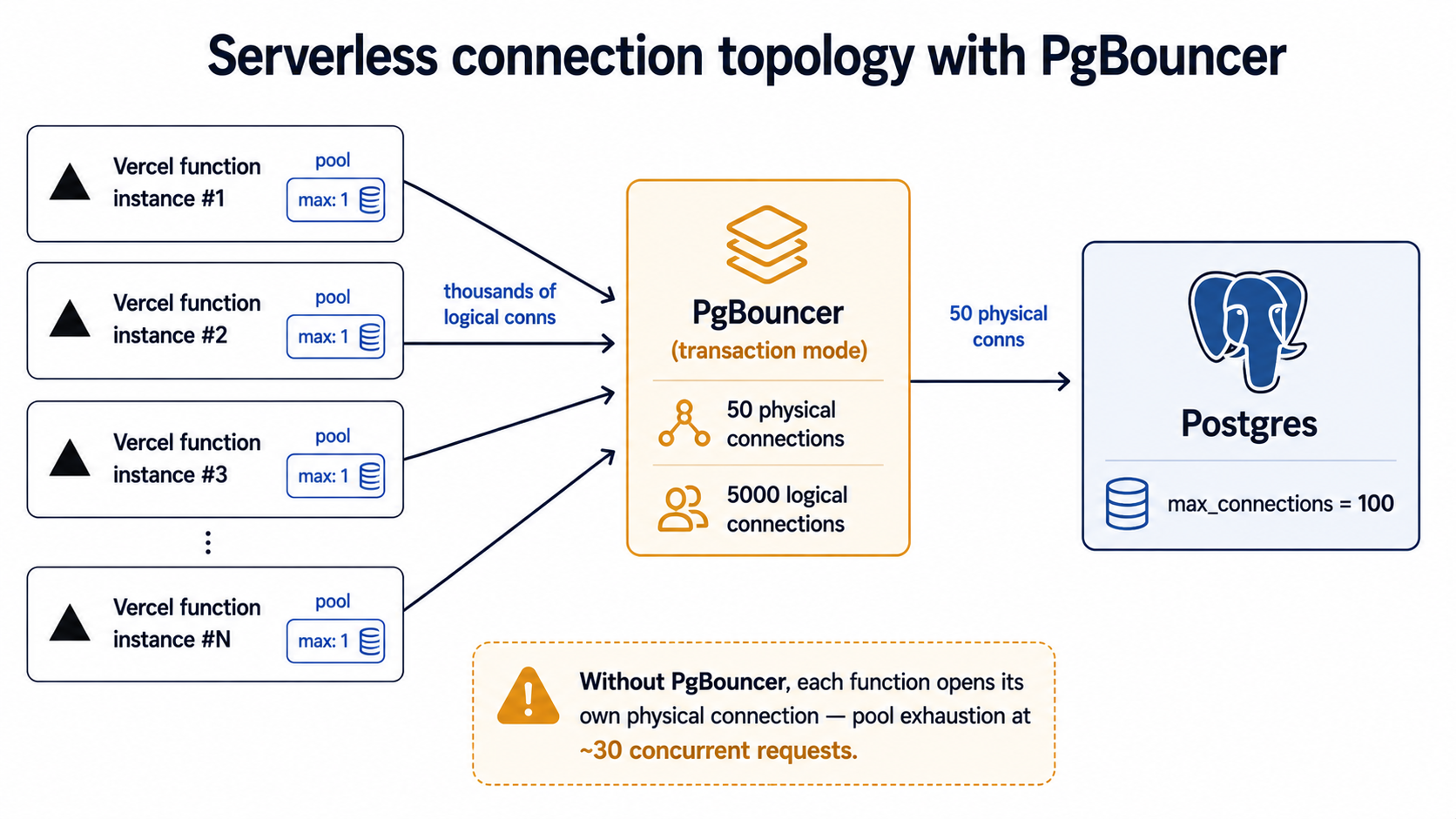
If your app gets 50 concurrent requests, Vercel spins up something like 50 function instances. Each one opens three Postgres connections on first query. That's 150 connections from a single endpoint. Your managed Postgres allows 100. The 51st request gets remaining connection slots are reserved, your error rate goes vertical, and you spend an hour wondering why nothing has changed in your code.
The fix is twofold:
- Set the pool size per instance to 1 (
connection_limit=1in the Prisma URL,max: 1inpostgres-js). Serverless function instances don't benefit from a pool, they handle one request, and they're either warm or gone. - Put a real connection pooler in front of Postgres. PgBouncer in transaction mode, or your provider's offering (Supabase Pooler, Neon's pooler endpoint, Vercel Postgres' pooled URL, AWS RDS Proxy). The pooler holds a small number of physical connections to the database and multiplexes thousands of logical connections from your functions on top of them.
Skip either step and you will hit the wall. There is no clever code that fixes a connection-pool budget that doesn't add up.
PgBouncer And Prepared Statements
Once you put PgBouncer in front, a second gotcha appears: PgBouncer in transaction mode doesn't preserve prepared statements between transactions. If your client tries to use a prepared statement that PgBouncer doesn't know about (because it was cached against a different physical connection), you get a confusing prepared statement "s_3" does not exist error in production.
Prisma handles this automatically when you use ?pgbouncer=true in the URL. Drizzle on postgres-js needs prepare: false in the client options (visible in the snippet above). Drizzle on node-postgres (pg) doesn't pipeline prepared statements by default, so the default is already safe. Drizzle on neon-http uses HTTP, not a long-lived connection, so the question doesn't apply.
This is exactly the kind of detail that bites you in production and never in development, because PgBouncer is rarely in the dev loop.
Server Actions Are Where Your Database Lives Now
Before the App Router, the question "where do I put my database calls?" had an obvious answer: in an API route or a getServerSideProps. The boundary between client and server was a network call.
Server Actions blur that boundary on purpose. A <form> posts to a server-only function, and you write the database call inline.
'use server';

import { revalidatePath } from 'next/cache';
import { redirect } from 'next/navigation';
import { prisma } from '@/lib/prisma';
import { auth } from '@/lib/auth';
import { z } from 'zod';

const schema = z.object({
  title: z.string().min(1).max(120).trim(),
  body: z.string().min(1).max(20000),
});

export async function createPost(formData: FormData) {
  const session = await auth();
  if (!session?.user) throw new Error('Not authenticated');

  const parsed = schema.parse({
    title: formData.get('title'),
    body: formData.get('body'),
  });

  const post = await prisma.post.create({
    data: { ...parsed, authorId: session.user.id },
  });

  revalidatePath('/posts');
  redirect(`/posts/${post.id}`);
}
Two rules to internalise.
Rule one: never import prisma or db from a client component. The file must be 'use server' or live under src/app/api/. Importing a database client into a client bundle is one of the few things that's caught at build time by Next.js, but it's still possible to leak the import transitively through a shared utility, and the error message you get is rarely the one you want.
Rule two: a server action is a server-side function with a side effect. It can throw, it can redirect(), it can revalidatePath() and revalidateTag(), it can return JSON. What it cannot do is be trusted as authenticated by virtue of running on the server. Every server action that mutates anything must check the session itself. auth() (NextAuth / Auth.js), clerkAuth(), or your own equivalent, but check it.
The auth() call before the parse() call is deliberate. If the user isn't logged in, you want to fail fast without even validating the input. That matters when input parsing is expensive, but more importantly it makes the security-relevant check the first visible line of every action.
Returning Errors The Client Can Use
Throwing inside a server action surfaces as a generic error on the client. For form submissions, you usually want to return field-level errors instead, that way useFormState (or useActionState in newer Next versions) can render them next to the right input.
type ActionResult<T = void> =
  | { ok: true; data: T }
  | { ok: false; fieldErrors?: Record<string, string[]>; message?: string };

export async function createPost(
  _prev: ActionResult,
  formData: FormData,
): Promise<ActionResult<{ id: string }>> {
  const session = await auth();
  if (!session?.user) {
    return { ok: false, message: 'Please sign in to post.' };
  }

  const parsed = schema.safeParse({
    title: formData.get('title'),
    body: formData.get('body'),
  });

  if (!parsed.success) {
    return { ok: false, fieldErrors: parsed.error.flatten().fieldErrors };
  }

  try {
    const post = await prisma.post.create({
      data: { ...parsed.data, authorId: session.user.id },
    });
    revalidatePath('/posts');
    return { ok: true, data: { id: post.id } };
  } catch (err) {
    return { ok: false, message: 'Could not save the post. Please retry.' };
  }
}
This shape, safeParse for input, a discriminated union for the return, gives you a server action that's pleasant to call from a client component without lying about whether things succeeded. It also makes the action testable in isolation; you can call it with a fake FormData and assert on the result without spinning up a request.
Validate At The Boundary, Not In The Query
The temptation in a typed ORM is to lean on the schema for validation. The database knows that title is varchar(120) NOT NULL. Why double-declare it?
Because the database tells you "constraint violation" after the round trip, in a string-typed exception, with no field-level information. By the time you parse the error and decide which input was bad, you've already spent a connection slot and a few milliseconds for nothing.
Zod (or Valibot, or whatever validator you like) at the action boundary catches the problem earlier and tells the user exactly which field is wrong.
The duplication you're worried about, having to declare the field shape twice, has a fix in both ecosystems.
Drizzle gives you drizzle-zod, which derives a Zod schema directly from your table definition:
import { pgTable, text, varchar, timestamp, uuid } from 'drizzle-orm/pg-core';
import { createInsertSchema, createSelectSchema } from 'drizzle-zod';
import { z } from 'zod';

export const posts = pgTable('posts', {
  id: uuid('id').primaryKey().defaultRandom(),
  authorId: uuid('author_id').notNull(),
  title: varchar('title', { length: 120 }).notNull(),
  body: text('body').notNull(),
  createdAt: timestamp('created_at').defaultNow().notNull(),
});

// Base schema derived from the table.
const baseInsert = createInsertSchema(posts);

// Tighten it for user input — drop server-managed fields, add UX rules.
export const createPostInput = baseInsert
  .pick({ title: true, body: true })
  .extend({
    title: z.string().min(1).max(120).trim(),
    body: z.string().min(1).max(20000),
  });
That pick().extend() pattern is the one to remember. The table is the source of truth for shape; the action input is the source of truth for user-facing rules (trimming, max length the user actually sees, etc.). They share types, they don't share concerns.
Prisma doesn't have a first-party equivalent. The community packages, zod-prisma, zod-prisma-types, prisma-zod-generator, generate Zod schemas from schema.prisma at the same time as the Prisma client. They work, but they're an extra generation step. In practice, most Prisma codebases declare the input schema by hand:
const createPostInput = z.object({
  title: z.string().min(1).max(120).trim(),
  body: z.string().min(1).max(20000),
});
That's not the worst trade. The Prisma client's input types (Prisma.PostCreateInput) give you compile-time safety on the output side, you can't pass a malformed object to create(). Zod gives you runtime safety on the input side. They're complementary, even if there's no auto-derivation.
The rule, regardless of ORM: parse before you query, never the other way around.
Transactions That Actually Roll Back
Most server actions are one query. Some aren't. Decrement inventory and create an order. Insert a user and seed their default workspace. Move a comment and update the count on both threads. These cannot be allowed to partially succeed.
Both ORMs handle transactions cleanly. The shape is slightly different.
Prisma, interactive transactions:
await prisma.$transaction(async (tx) => {
  const product = await tx.product.findUniqueOrThrow({
    where: { id: productId },
  });

  if (product.stock < qty) {
    throw new Error('Insufficient stock');
  }

  await tx.product.update({
    where: { id: productId },
    data: { stock: { decrement: qty } },
  });

  await tx.order.create({
    data: { productId, qty, userId },
  });
});
If the throw fires, both the update and the create roll back. The crucial thing: every database call inside must use the tx parameter, not the outer prisma. A call to prisma.something() inside the callback runs outside the transaction and will commit independently. That's the single most common transaction bug I see in Prisma code, and TypeScript can't catch it, both tx and prisma have the same type.
Drizzle:
await db.transaction(async (tx) => {
  const [product] = await tx
    .select()
    .from(products)
    .where(eq(products.id, productId))
    .for('update');

  if (!product || product.stock < qty) {
    throw new Error('Insufficient stock');
  }

  await tx
    .update(products)
    .set({ stock: sql`${products.stock} - ${qty}` })
    .where(eq(products.id, productId));

  await tx.insert(orders).values({ productId, qty, userId });
});
Same shape, same gotcha: use tx, not db. The advantage Drizzle gives you is .for('update'), explicit row locking, in the form SQL already has. Prisma's equivalent (SELECT ... FOR UPDATE) requires dropping into raw SQL via $queryRaw.
What "Transaction" Actually Buys You
Two things worth knowing.
First, the default isolation level on Postgres is READ COMMITTED. That means inside your transaction, you can see rows that other transactions committed after yours started. If you read stock, do business logic, then write, another transaction can have decremented stock between your read and your write. Your update will succeed but your read was based on stale data. This is the textbook lost-update bug.
The fixes, in order of how often you should reach for them:
- Atomic SQL.
UPDATE products SET stock = stock - ? WHERE id = ? AND stock >= ?. Then checkrowCount, if zero, you didn't have stock. This is the right answer 80% of the time. In Drizzle it's a singledb.update(...).set(...).where(...)with a compound where clause. In Prisma it'sawait prisma.product.updateMany({ where: { id, stock: { gte: qty } }, data: { stock: { decrement: qty } } })and then check the returnedcount. SELECT ... FOR UPDATEinside an explicit transaction (the.for('update')above). Locks the row until the transaction commits. Cheap when contention is rare, painful when it isn't.SERIALIZABLEisolation level. Postgres will detect the conflict and abort one transaction with a serialization error. You retry. Expensive and the retry logic has to live somewhere.
Server Actions are a great place to write atomic SQL, because the action is the natural unit of work. If you find yourself reaching for $transaction and then for FOR UPDATE inside a server action, ask whether the whole thing could collapse into one UPDATE ... WHERE.
Second, transactions hold connections. If you await a long external call (an email send, a webhook, a Stripe API roundtrip) inside a transaction, your connection is locked for the duration of that call. In a serverless setup with max: 1, that means the entire function instance is unavailable until the external call returns. Always do external side effects after the commit, even if it means accepting that the email might fail after the row exists.
Caching, revalidatePath, And The Stale Read After A Mutation
This is the Next.js part nobody warns you about until you ship.
The App Router caches aggressively by default. Server components fetch data, and Next remembers it. The fetch() function has a cache option that defaults to force-cache. Route segments are cached at the layout level. The Full Route Cache stores the entire HTML output of static segments. The Router Cache holds it in the browser between navigations.
ORM calls (prisma.post.findMany() or db.select().from(posts)) are not automatically cached. They run every time the surrounding component renders on the server. But the page that calls them might be cached, and the navigation back to that page after a mutation might serve the cached version from the browser.
The flow is: user creates a post via server action → action returns → router navigates → page renders from Router Cache (stale, doesn't include the new post) → user assumes the post wasn't saved → user clicks "submit" again → duplicate post.
The fix is calling revalidatePath('/posts') (or revalidateTag('posts')) inside the action before you return or redirect. That invalidates the cached segment so the next render hits your ORM fresh.
await prisma.post.create({ data: parsed });

revalidatePath('/posts');     // server-side cache for the list page
revalidatePath(`/posts/${post.id}`); // detail page, in case it was prerendered
redirect(`/posts/${post.id}`);
A few things to know:
revalidatePathonly works for routes that exist in the cache. Calling it for/posts/abc-123that was never visited is a no-op (cheap, not an error).revalidateTagis more flexible if you've tagged yourfetch()calls. With ORMs you mostly userevalidatePathbecause there's nofetchto tag, unless you wrap your queries withunstable_cache, which is a whole separate decision.- The browser's Router Cache is separate from the server's Data Cache.
revalidatePathclears the server side. The browser will pick up the fresh data on the next navigation, but arouter.back()might still show the stale one. This is improving across Next versions, check the current behaviour for the version you're on.
If your data really must be live (a chat message list, a stock ticker), opt out of caching with export const dynamic = 'force-dynamic' at the route level, or with noStore() (now unstable_noStore) inside the component. Don't reach for these by default, you're trading away the performance the App Router exists to give you.
Performance Shape: Prisma 7 vs Drizzle On Vercel
For most of 2023 and 2024, the performance answer was unambiguous: Drizzle was dramatically lighter than Prisma on every serverless metric. Bundle size, cold start, edge runtime support: Drizzle won them all by an order of magnitude. The reason was structural: Prisma shipped a Rust query engine binary alongside its JavaScript client. That binary added megabytes to the deployment and a few hundred milliseconds to a cold start.
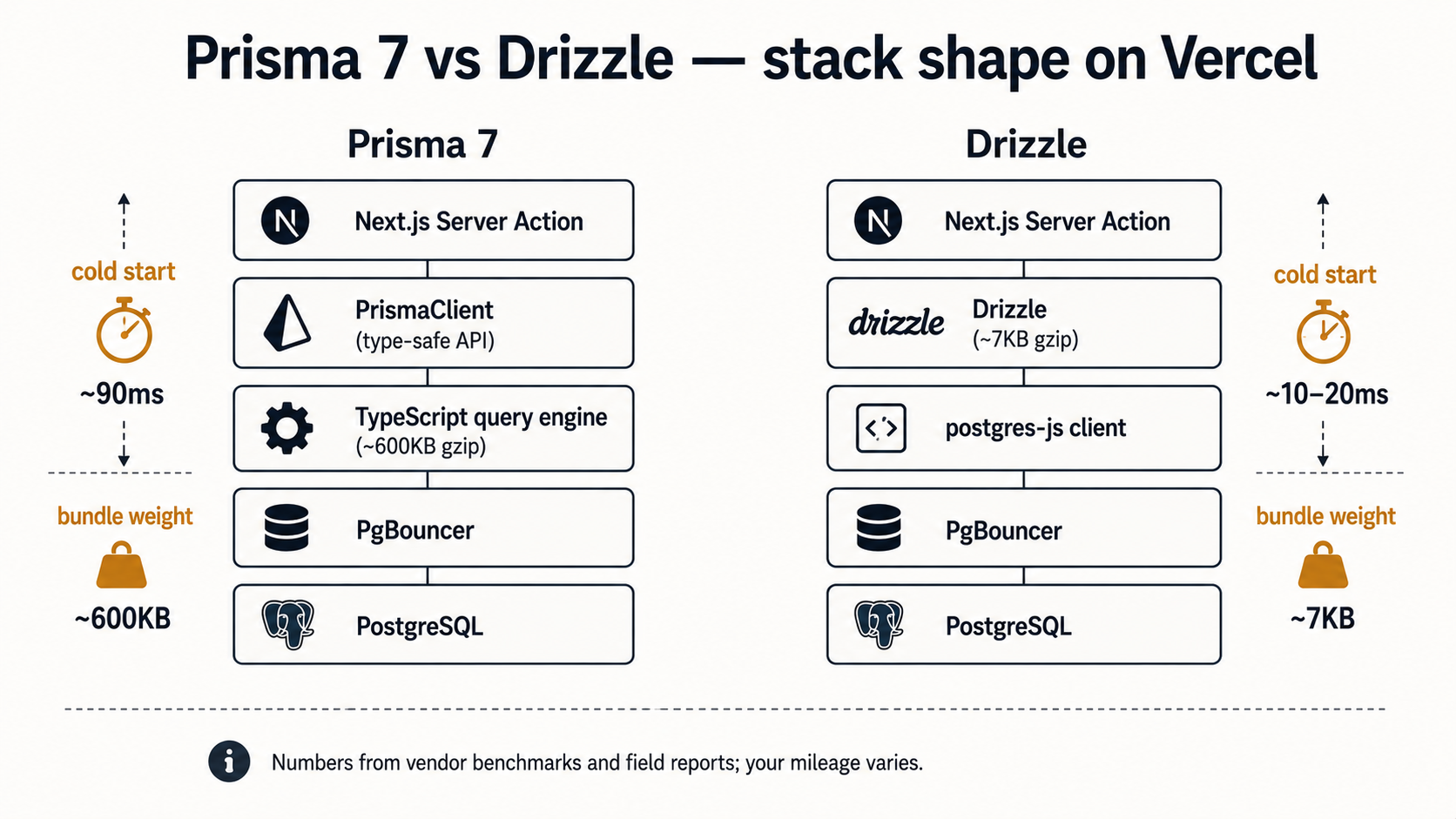
Prisma 7 changed the picture. The Rust query engine is gone, replaced with a TypeScript implementation. Per Prisma's own announcement, the bundle size dropped from around 14 MB (7 MB gzipped) to roughly 1.6 MB (600 KB gzipped), an 85-90% reduction. Query performance improved meaningfully too; their benchmarks cite a findMany over 25,000 rows going from 185 ms to 55 ms.
That's a real change, and it narrows the gap.
It does not erase it.
Drizzle still ships around 7 KB minified+gzipped of runtime. The cold-start delta between a 600 KB ORM and a 7 KB ORM is still measurable (typical reports put Drizzle cold starts in the 10-20 ms range vs Prisma 7's roughly 90 ms), and on the Edge runtime, where every byte loads on every cold instance, the gap is more felt than on a Node serverless function with a warm container nearby.
So the practical guide:
- You're on Vercel Edge Runtime, Cloudflare Workers, or any V8-isolate platform: Drizzle. The runtime model fits it natively; you don't need a special build mode or a data proxy.
- You're on Vercel Node serverless functions with a mostly-warm app: either works. Pick by developer experience, Prisma's
Prisma.PostCreateInputand itsinclude/selectshape are still the most ergonomic high-level API; Drizzle's SQL-shaped query builder is the most honest. - You're on a long-running Node container (Fargate, Cloud Run with min-instances, a VM): either works. The cold-start argument disappears almost entirely.
- Your team is "we know SQL, we like SQL, we want types": Drizzle.
- Your team is "we want to think in objects, the schema is a domain model, give us a great migration tool": Prisma.
There is no "the one to pick in 2026" answer. Both are good. The choice is a stack-fit decision, not a quality one.
Migrations On A Moving Deployment
Both ORMs ship a real migration tool. prisma migrate and drizzle-kit. Both can generate SQL from a schema diff, both can apply migrations in order, both can reset a dev database. The mechanics aren't surprising.
The discipline is.
Three rules that are easy to ignore until they bite you.
One: migrations must be additive across the deploy window. Vercel deploys are not atomic. There is a window, anywhere from seconds to minutes, when traffic is split between the old version and the new. If a migration drops a column and the new code stops reading it, the old code is still reading it during that window. You get 500s on the old version until traffic shifts.
The fix is a two-deploy dance for any destructive change:
- Deploy A: stop writing/reading the column in code. Don't drop it. Ship.
- Deploy B (later, after Deploy A is stable): drop the column.
Same shape for renames: add the new column, dual-write, backfill, switch reads, drop the old column. Each step is a separate deploy.
Two: never run a migration in your build step. It is tempting (and Prisma even encourages it for some setups) to run prisma migrate deploy as part of the Vercel build command. Don't. Two builds running in parallel can race against each other, and a failed migration can take down deploys for an entire team. Run migrations as a separate, explicit step, a CLI command, a CI job, a GitHub Action with a deploy lock, and only after a successful build. Drizzle's docs are clearer about this; Prisma's are more permissive.
Three: drizzle-kit push is dev-only. It diffs your schema against the live database and applies changes directly, without generating a migration file. Wonderful for prototyping. Catastrophic for production, because you lose the history of how the schema got to its current state and there's no rollback artifact. Use drizzle-kit generate in real environments, commit the SQL files, apply them with drizzle-kit migrate.
The Prisma equivalent, prisma db push, has the same dev-only caveat. Both tools mark it clearly in the docs. People still use it in production. Don't be those people.
A Pragmatic Closing
The thing that makes a Next.js + ORM stack scale isn't the ORM. It's the small set of patterns that surround it: the singleton, the pool sizing, the pooler in front, the server-side action that validates before it queries, the transaction that uses tx and not db, the revalidatePath after the mutation, the additive migration discipline.
Get those right and either Prisma or Drizzle holds up under real traffic. Get those wrong and no ORM saves you, you'll be debugging the same pool-exhaustion graph either way, just with different stack traces.
The choice between Prisma and Drizzle is the second-most-important decision you make about your database layer in a Next.js app. The most important one is everything in the list above.