The day a Laravel app stops being "my project" and becomes "the thing two thousand customers depend on," Log::info('here') stops being enough. You'll learn that lesson the first time someone in support says "a customer says it's broken, here's their email, can you tell me what happened" and your only tool is tail -f storage/logs/laravel.log across three servers.
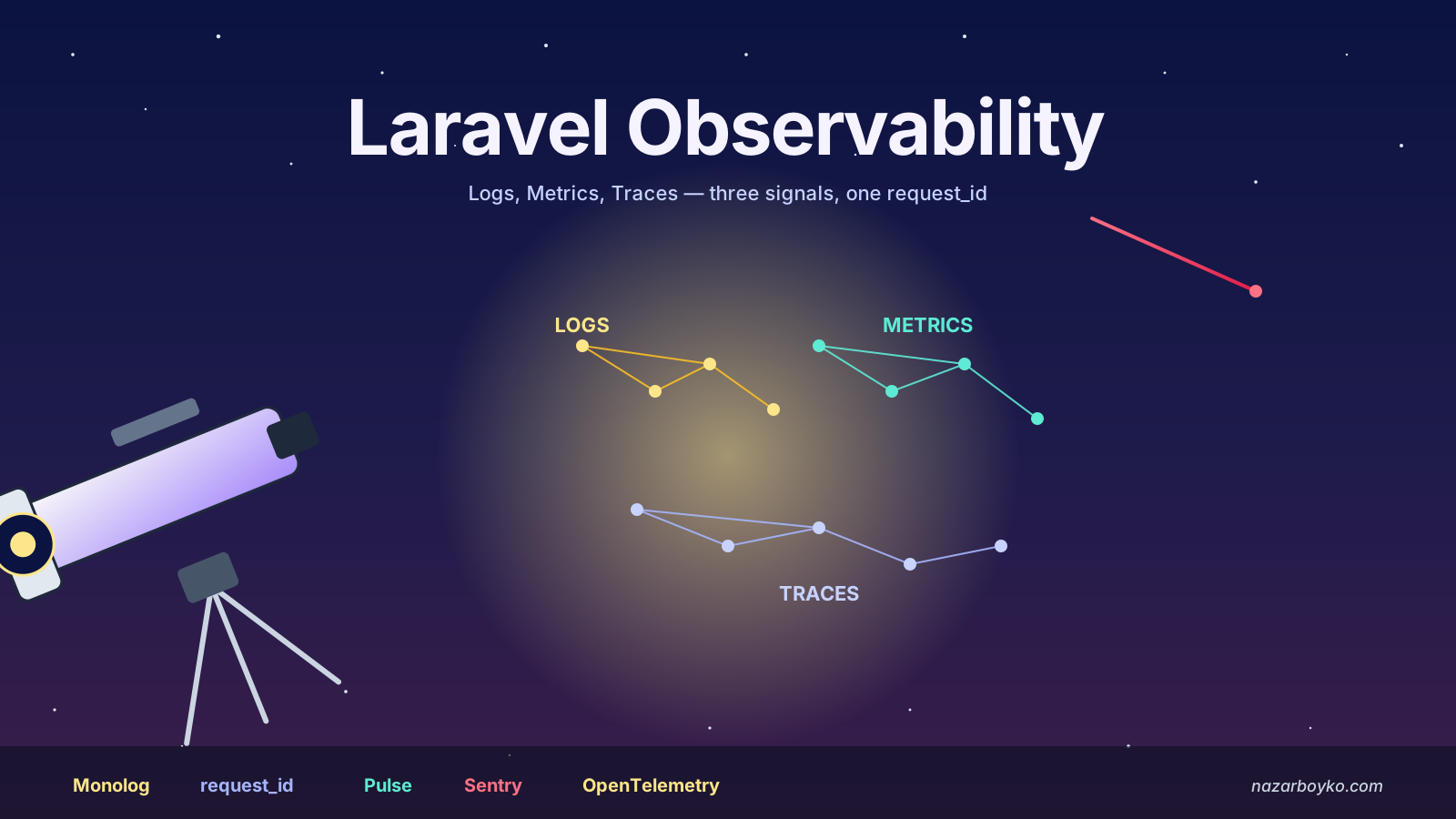
Observability isn't one feature. It's three signals — logs, metrics, traces — each answering a different question. Logs tell you what happened. Metrics tell you how often, how fast. Traces tell you where in the request the time went. Laravel ships strong logging, decent built-in metrics through Pulse, and excellent OpenTelemetry support if you wire it. The trick is knowing which signal you need before the incident, because hunting for the right tool at 2am is how outages get longer.
Channels Are The Right Mental Model For Logs
Laravel's config/logging.php lets you define channels — named loggers with their own formatters, levels, and destinations. The stack channel is special: it fans one log call out to several other channels at once.
The shape that holds up in production:
// config/logging.php
'channels' => [
    'stack' => [
        'driver' => 'stack',
        'channels' => ['daily', 'sentry', 'stderr'],
        'ignore_exceptions' => false,
    ],

    'daily' => [
        'driver' => 'daily',
        'path'   => storage_path('logs/laravel.log'),
        'level'  => env('LOG_LEVEL', 'debug'),
        'days'   => 14,
        'tap'    => [App\Logging\JsonFormatterTap::class],
    ],

    'stderr' => [
        'driver'    => 'monolog',
        'handler'   => Monolog\Handler\StreamHandler::class,
        'with'      => ['stream' => 'php://stderr'],
        'formatter' => Monolog\Formatter\JsonFormatter::class,
    ],

    'sentry' => [
        'driver' => 'sentry',
        'level'  => 'error',
    ],

    'slack' => [
        'driver'   => 'slack',
        'url'      => env('LOG_SLACK_WEBHOOK_URL'),
        'username' => 'Laravel',
        'level'    => 'critical',
    ],
],
The drivers worth knowing by name: single (one file, simple), daily (rotated daily, the default for most apps), slack (incoming webhook, paged at critical), papertrail, errorlog, syslog, stderr (essential when you run in containers), stack (fan-out), monolog (any Monolog handler), custom (your own factory). For containerized deploys, stderr is the single most important channel — your platform collects stdout/stderr and forwards it to wherever logs go. Writing to a file inside a container is almost always wrong.
Structured JSON, Not Strings
Plain-text logs were fine when one engineer grepped one file. The moment logs land in Loki, ELK, Datadog, or Axiom, they need structure — search, filter, and group only work on fields. The fix is a JSON formatter on every channel that goes off-host.
// app/Logging/JsonFormatterTap.php
namespace App\Logging;

use Monolog\Formatter\JsonFormatter;

class JsonFormatterTap
{
    public function __invoke($logger): void
    {
        foreach ($logger->getHandlers() as $handler) {
            $handler->setFormatter(new JsonFormatter(JsonFormatter::BATCH_MODE_NEWLINES, true));
        }
    }
}
Now every line is a JSON object — timestamp, level, message, channel, and whatever context you attached. Datadog, Loki, and Axiom can index those fields without a custom parser, and a human can still jq through them.
The other half of structured logging is what you put in the context. The rule that's never failed me: log the verbs, not the screenshots. Log::info('order.approved', ['order_id' => $id, 'approved_by' => $userId]) is searchable forever. Log::info("Approved order {$id} for user {$name} at {$time}") is a sentence in a ledger you can't query.
Request IDs Tie The Whole Story Together
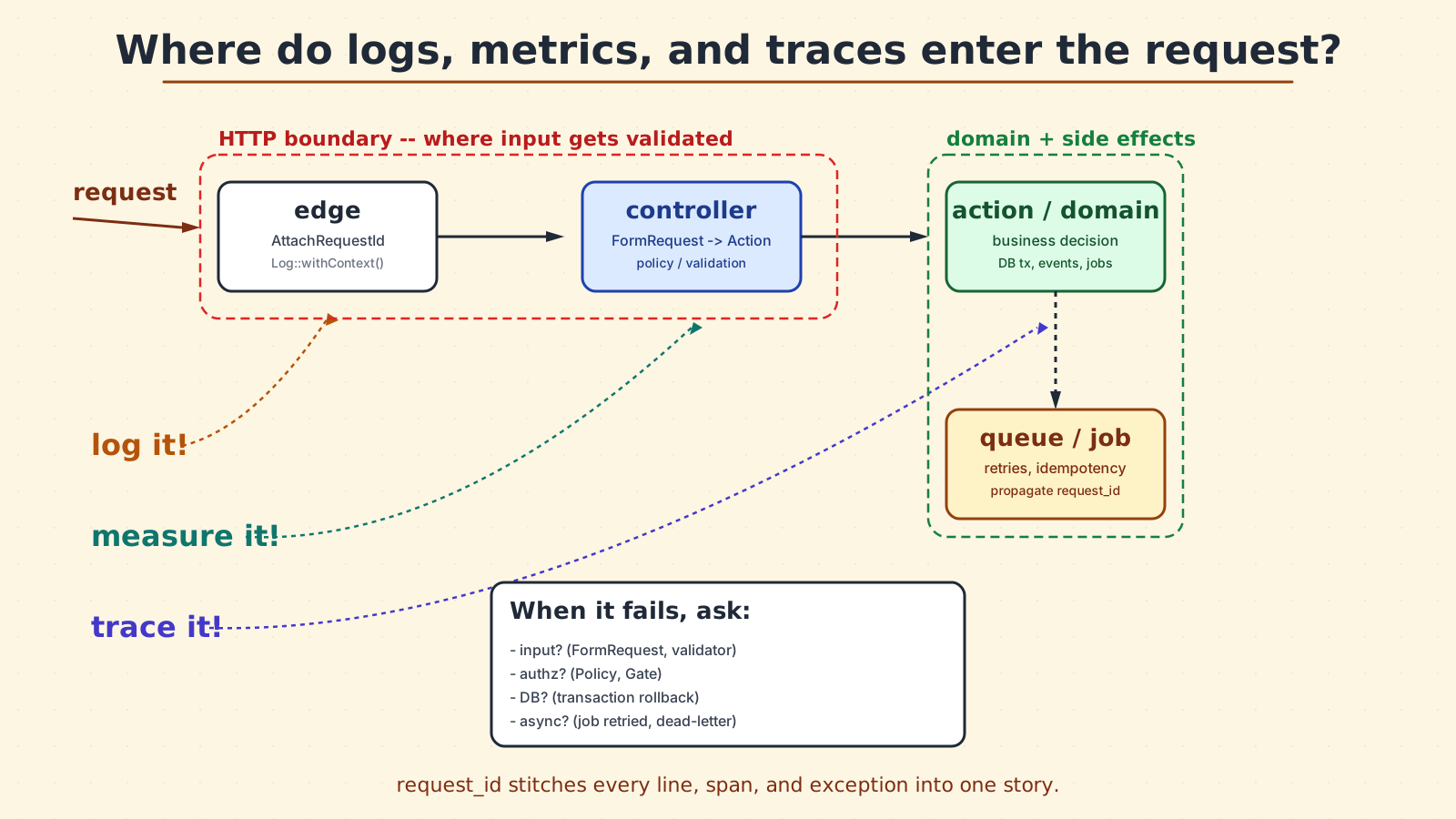
When a customer reports a bug at 14:32, you don't want to dig through a hundred unrelated log lines from that minute. You want the lines from their request. A request ID does exactly that — one identifier, attached at the edge, included in every log line for the rest of the request.
// app/Http/Middleware/AttachRequestId.php
namespace App\Http\Middleware;

use Closure;
use Illuminate\Http\Request;
use Illuminate\Support\Facades\Log;
use Illuminate\Support\Str;
use Symfony\Component\HttpFoundation\Response;

class AttachRequestId
{
    public function handle(Request $request, Closure $next): Response
    {
        $id = $request->headers->get('X-Request-Id') ?? (string) Str::uuid();

        Log::withContext([
            'request_id' => $id,
            'user_id'    => optional($request->user())->id,
            'path'       => $request->path(),
            'method'     => $request->method(),
        ]);

        $response = $next($request);
        $response->headers->set('X-Request-Id', $id);

        return $response;
    }
}
Wire it as a global middleware. Log::withContext([...]) attaches the values to every log record for the rest of the request lifecycle. The header round-trip means a load balancer or upstream service can pass an ID through, and your client sees the ID in the response — they can quote it in support tickets and you can find their exact session in seconds.
For queues, the equivalent is to push the request ID into the job payload (or use the withContext trait Laravel provides on jobs) so a job dispatched from a request stays in the same logical trace.
Sentry Is Where Exceptions Should Live
Reading exception messages out of laravel.log is something you stop doing the first day after Sentry is wired up. The sentry-laravel package adds:
- Automatic capture of every uncaught exception, with stack trace, request context, user info, and breadcrumbs.
- A
sentrylog channel (used in the stack above) soLog::error(...)pages out. - Performance monitoring — basic spans for HTTP, DB, queue, cache.
- Release tracking — every deploy ships its release tag, so an error that started yesterday is obvious.
// config/sentry.php (after composer require sentry/sentry-laravel)
return [
    'dsn'                  => env('SENTRY_LARAVEL_DSN'),
    'release'              => env('SENTRY_RELEASE'),
    'environment'          => env('APP_ENV'),
    'traces_sample_rate'   => 0.10,    // 10% of traces, raise per-route as needed
    'profiles_sample_rate' => 0.10,
    'send_default_pii'     => false,   // do NOT ship user data by default
];
The PII setting matters. Sentry will happily ship request bodies, headers, and cookies — including session tokens — if you let it. Leave send_default_pii off and explicitly Sentry::configureScope with the user ID and team ID you actually want to attach.
The Log::critical -> Slack -> on-call human chain is good for "wake somebody up" events. Sentry is for everything else — the long tail of "something broke for one user, fix it Monday."
OpenTelemetry For Real Distributed Traces
When the call path is "browser -> CDN -> Laravel API -> internal service -> third-party payment provider -> webhook back -> queue -> database -> webhook out," logs aren't enough. You need a trace — one waterfall view of the whole request, with each span's duration. That's what OpenTelemetry is for.
The PHP SDK has matured into something genuinely usable:
composer require open-telemetry/sdk \
                 open-telemetry/exporter-otlp \
                 open-telemetry/opentelemetry-auto-laravel
The opentelemetry-auto-laravel package instruments the framework automatically — controllers, jobs, HTTP client calls, Eloquent queries — and exports OTLP to whatever backend you point it at: Honeycomb, Tempo/Grafana, Datadog APM, Axiom, Lightstep, AWS X-Ray.
; OTel is configured via env, like the rest of the SDK
OTEL_SERVICE_NAME=app-api
OTEL_TRACES_EXPORTER=otlp
OTEL_EXPORTER_OTLP_ENDPOINT=https://api.honeycomb.io
OTEL_EXPORTER_OTLP_HEADERS=x-honeycomb-team=YOUR_KEY
OTEL_TRACES_SAMPLER=parentbased_traceidratio
OTEL_TRACES_SAMPLER_ARG=0.1
The wins are immediate: a slow endpoint stops being "the API is slow" and becomes "the third Eloquent query inside OrderResource::with('lineItems') is taking 800ms because of a missing index." That's the difference between a guess and a fix.
OTel and Sentry are not redundant — Sentry is for errors and breadcrumbs, OTel is for the request waterfall. Most teams that take observability seriously run both.
Pulse Is Excellent — With One Caveat
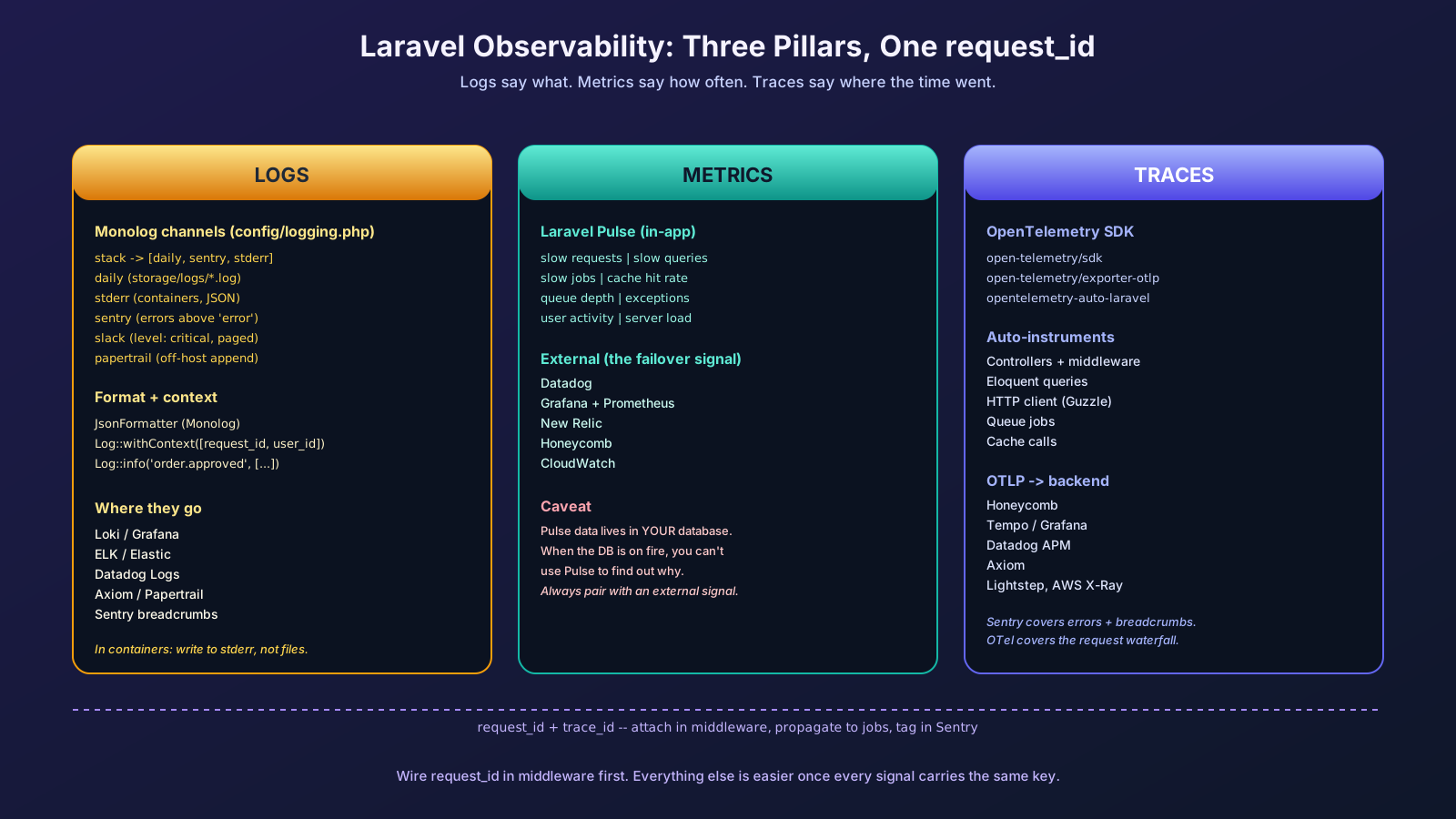
Laravel Pulse is the in-app metrics dashboard. Drop it in and you get cards for slow requests, slow jobs, slow queries, cache hit rates, exception counts, queue throughput, and per-user activity. The query for the data lives in your own database, so you don't pay an external bill for it.
composer require laravel/pulse
php artisan pulse:install
php artisan migrate
The win is obvious — you'll spot N+1 queries, hot endpoints, and slow jobs in the first ten minutes. Pulse is genuinely the cheapest "I can see what's happening" you'll ever install.
The caveat is also the obvious one: Pulse data lives in your database. The day your database is on fire is the exact day you can't get to Pulse to find out why. You need an external signal too — Sentry, Datadog, a Loki/Grafana stack, or even a basic Axiom log drain. Pulse is your home dashboard; it is not your alerting system.
The right pairing is Pulse for "what's our app doing right now," external metrics for "is the app even up," and Sentry for "what just broke."
Trace Correlation: Logs Find The Story, Traces Find The Cause
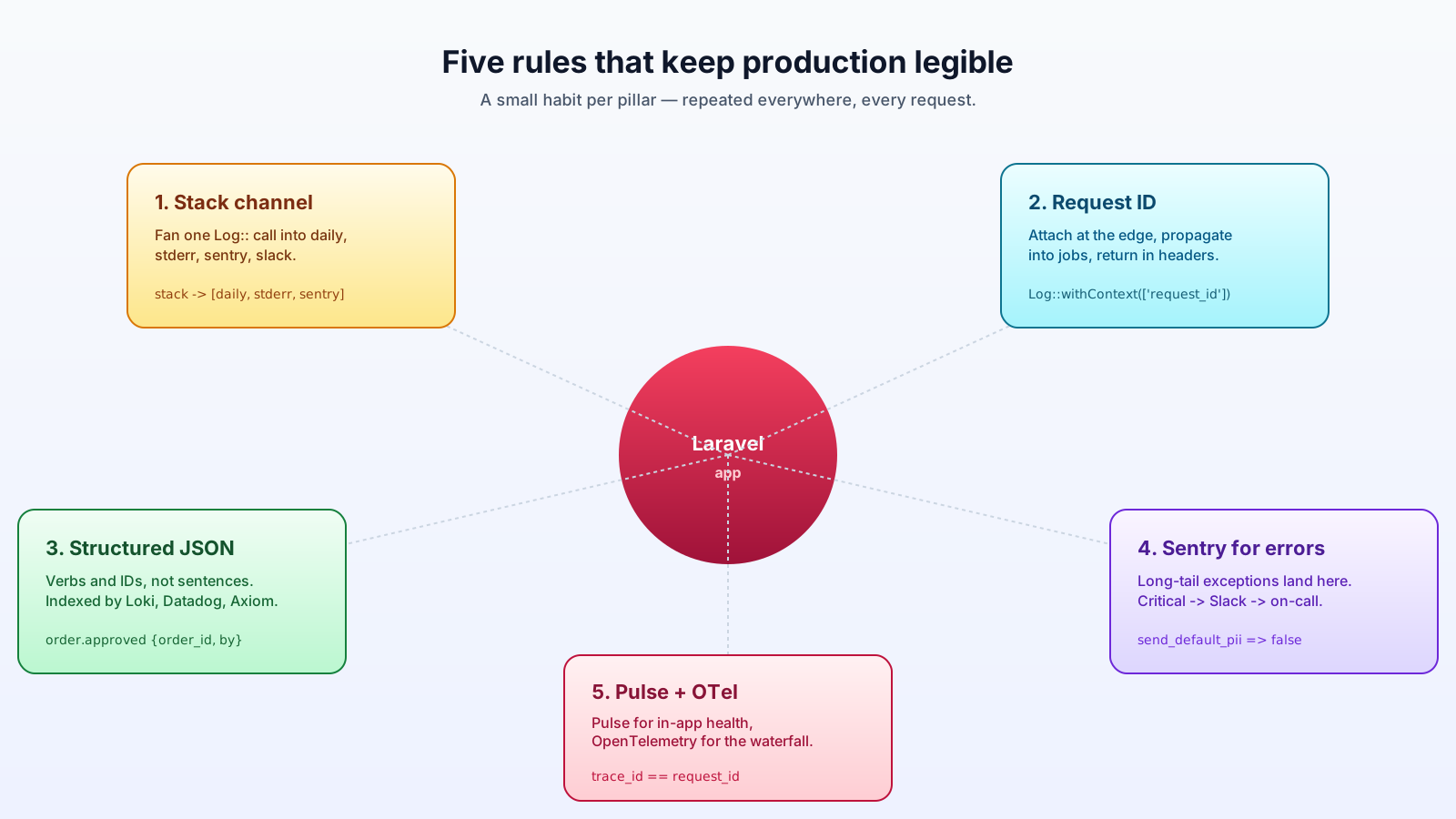
The single highest-value trick is making logs, traces, and errors all carry the same identifier. When an exception hits Sentry, click its request_id, find every log line and every span from that request. When a customer pastes a request ID, search Loki for it and read the full story.
The middleware above gives you request_id in logs. The OTel auto-instrumentation gives you a trace_id. Make sure both are attached to your log context, and Sentry's Sentry::configureScope(function ($scope) use ($id) { $scope->setTag('request_id', $id); }) ties the third corner. Then your three pillars query each other instead of being three separate world views.
What To Wire Now Vs. Later
A reasonable order for a team that's going from "no observability" to "calm production":
- Stack channel + JSON formatter + request-ID middleware. A weekend's work. Pays off the next bug report.
- Sentry. A morning's work. Cuts the time-to-diagnose for exceptions by an order of magnitude.
- Pulse. An afternoon. Tells you what's slow before customers do.
- External log drain (Axiom, Loki, Papertrail). Half a day. The day your servers are unreachable, you'll be glad logs already left.
- OpenTelemetry. A few days, end-to-end. Worth it once you have multiple services, slow endpoints with no obvious cause, or a third-party API you don't trust.
You don't need all five before launch. You do need a plan for how each one gets wired, because adding observability after a production fire is the most stressful version of doing it.
The shape of a healthy Laravel app at 2am isn't "everything works." It's "we know exactly what doesn't, on which request, for which user, in which span — and we can fix it before most customers notice."