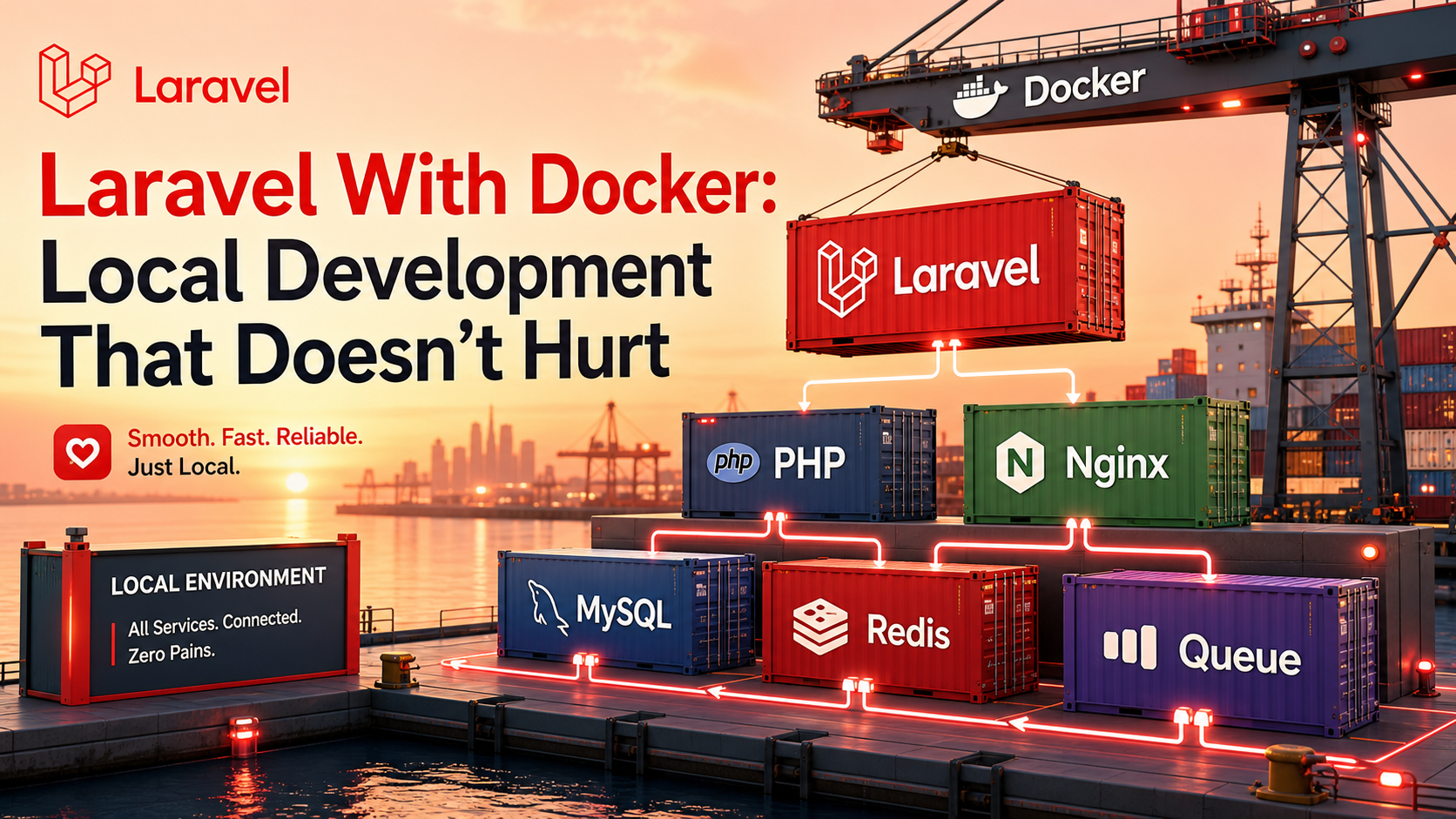
The reason most teams hate Docker for Laravel isn't Docker. It's that they bolted it onto a project halfway through, with three developers running three slightly different setups, and now nobody remembers why the queue worker container crashes on macOS but not on Linux. The cure isn't to drop Docker — it's to set it up once, deliberately, so the next person who clones the repo runs up and it just works.
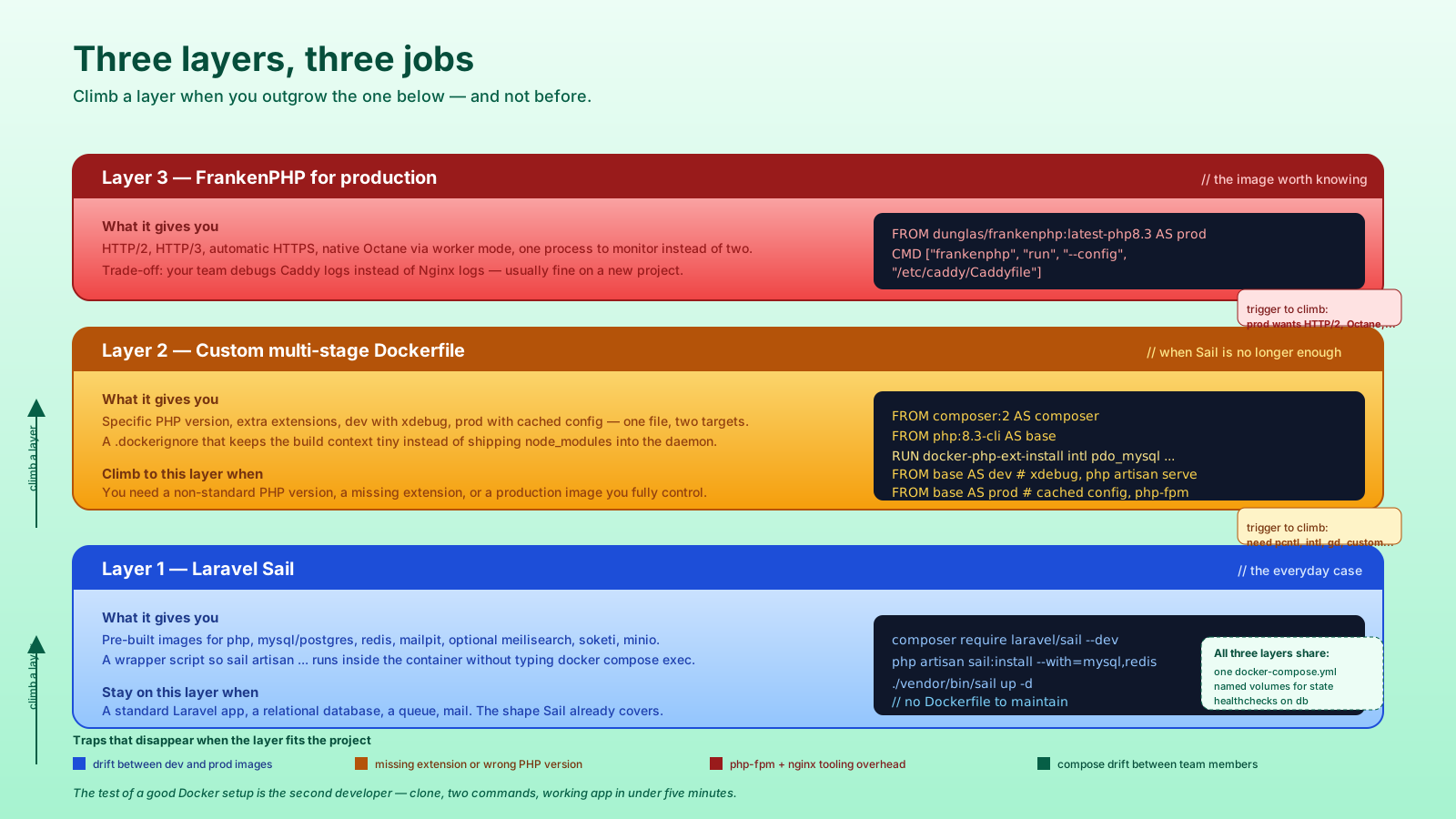
In 2026 that mostly means Laravel Sail for the everyday case, a thin custom Dockerfile when you outgrow Sail, and FrankenPHP when you need a production image that actually performs. Three layers, three jobs, and the one rule that saves the most pain: don't let the Docker setup drift from what you'll deploy.
Sail Is The Default; Use It
composer require laravel/sail --dev followed by php artisan sail:install gives you a docker-compose.yml with the services your project ticked: PHP, MySQL or Postgres, Redis, Mailpit, optionally Meilisearch, Soketi, MinIO, and a few others. Pre-built images, sane defaults, no Dockerfile to maintain.
composer require laravel/sail --dev
php artisan sail:install --with=mysql,redis,mailpit
./vendor/bin/sail up -d
./vendor/bin/sail artisan migrate
./vendor/bin/sail composer install
./vendor/bin/sail npm run dev
The wrapper proxies common commands into the app container, so sail artisan ... runs Artisan inside Docker without you typing docker compose exec app php artisan ... every time. Add an alias sail='./vendor/bin/sail' to your shell and the friction drops to almost nothing.
What Sail handles well: the standard Laravel app, a relational database, Redis, Mailpit for local mail testing, file uploads against MinIO, and the JS toolchain via the node binary inside the app image. For a typical CRUD app, you genuinely don't need anything more.
What Sail doesn't handle: a custom PHP extension that isn't already baked in, a non-standard PHP version, a sidecar container for a niche dependency, an unusual base image. The moment you need any of that, drop down a layer.
A Minimal docker-compose.yml That Stays Readable
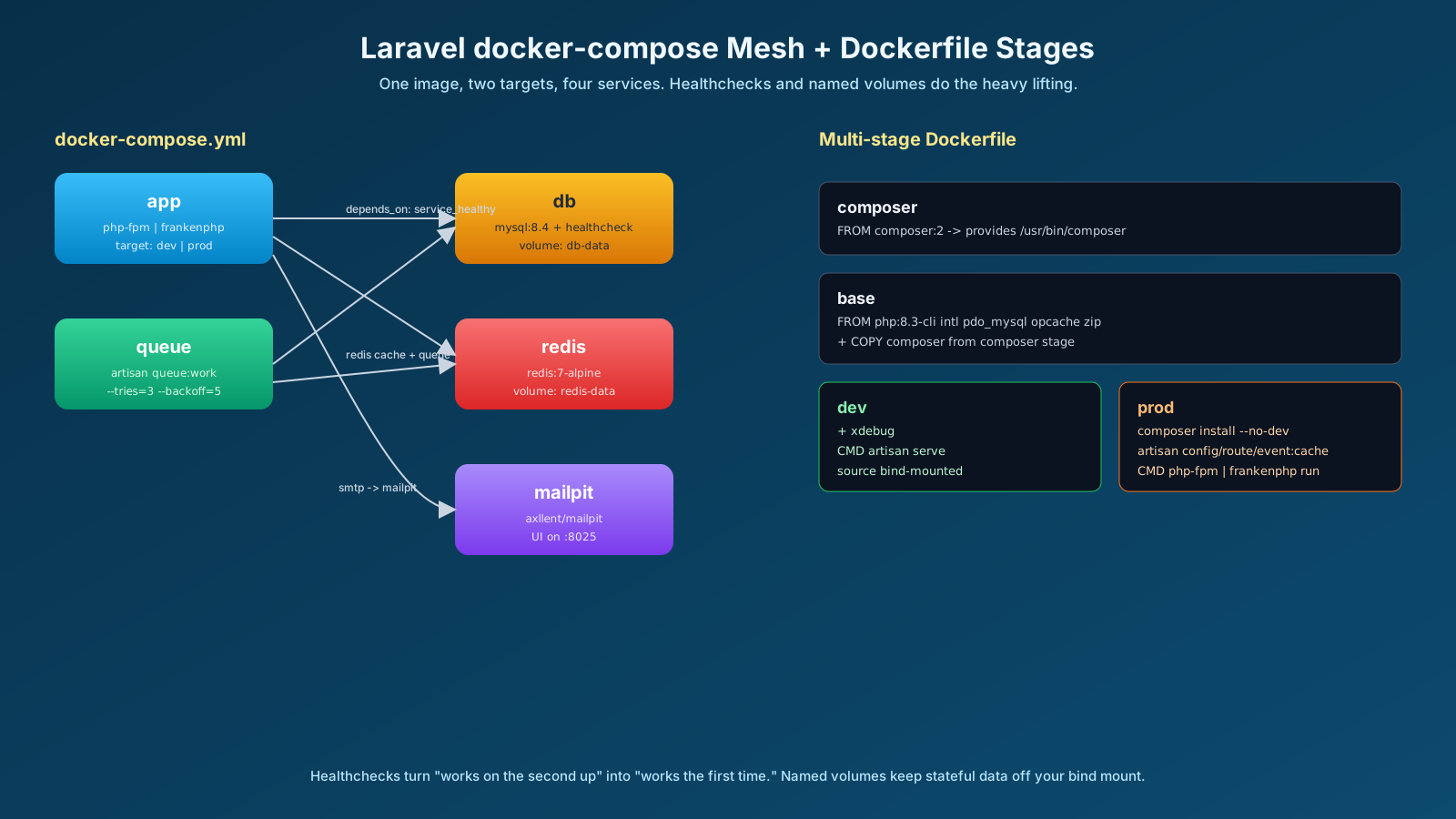
Whether Sail wrote it or you did, the shape that holds up has four services and one volume per stateful piece. More than that and somebody will check it in without telling the team.
# docker-compose.yml
services:
  app:
    build:
      context: .
      dockerfile: docker/app/Dockerfile
      target: dev
    ports:
      - "${APP_PORT:-8000}:8000"
    volumes:
      - .:/var/www/html
    environment:
      DB_HOST: db
      REDIS_HOST: redis
      MAIL_HOST: mailpit
    depends_on:
      db:
        condition: service_healthy
      redis:
        condition: service_started

  queue:
    build:
      context: .
      dockerfile: docker/app/Dockerfile
      target: dev
    command: php artisan queue:work --tries=3 --backoff=5
    volumes:
      - .:/var/www/html
    environment:
      DB_HOST: db
      REDIS_HOST: redis
    depends_on:
      - app

  db:
    image: mysql:8.4
    environment:
      MYSQL_DATABASE: laravel
      MYSQL_USER: laravel
      MYSQL_PASSWORD: secret
      MYSQL_ROOT_PASSWORD: secret
    volumes:
      - db-data:/var/lib/mysql
    healthcheck:
      test: ["CMD", "mysqladmin", "ping", "-h", "localhost"]
      interval: 5s
      retries: 10

  redis:
    image: redis:7-alpine
    volumes:
      - redis-data:/data

  mailpit:
    image: axllent/mailpit
    ports:
      - "8025:8025"   # web UI

volumes:
  db-data:
  redis-data:
A few things that pay off:
- Healthchecks.
depends_onwithcondition: service_healthymeans the app waits for the database to actually accept connections, not just for the container to start. That single line removes a class of "works on the secondup" bugs. - Named volumes. Bind-mounting your project into
/var/www/htmlis fine; bind-mounting MySQL's data dir is not — performance is awful on macOS and Windows, and the data tangles with your local file permissions. Always use a named volume for stateful services. - A separate queue container. One process per container. The web container runs
php-fpmorfrankenphp run; the queue container runsphp artisan queue:work. They share the image, not the responsibility.
When To Write Your Own Dockerfile
The day Sail isn't enough is the day you need either a specific PHP version, an extension that isn't bundled, or a production image you control. Multi-stage Dockerfiles are how you keep the dev image friendly and the production image lean.
# docker/app/Dockerfile
ARG PHP_VERSION=8.3

# --- composer stage: install deps once, share with both targets
FROM composer:2 AS composer

# --- base: the layer both dev and prod start from
FROM php:${PHP_VERSION}-cli AS base
RUN apt-get update && apt-get install -y \
      git unzip libicu-dev libpq-dev libzip-dev \
    && docker-php-ext-install intl pdo_mysql pdo_pgsql zip opcache \
    && rm -rf /var/lib/apt/lists/*
COPY --from=composer /usr/bin/composer /usr/bin/composer
WORKDIR /var/www/html

# --- dev: source mounted at runtime, no copy
FROM base AS dev
RUN pecl install xdebug && docker-php-ext-enable xdebug
CMD ["php", "artisan", "serve", "--host=0.0.0.0", "--port=8000"]

# --- prod: source copied in, deps installed without dev packages
FROM base AS prod
COPY composer.json composer.lock ./
RUN composer install --no-dev --no-interaction --prefer-dist --no-scripts
COPY . .
RUN composer dump-autoload --optimize \
    && php artisan config:cache \
    && php artisan route:cache \
    && php artisan event:cache \
    && php artisan view:cache
CMD ["php-fpm"]
Two things matter here. The target: dev and target: prod switches let one Dockerfile serve both purposes without two files drifting apart. And the .dockerignore next to it keeps the build context tiny:
.git
node_modules
vendor
storage/logs/*
storage/framework/cache/*
.env
*.md
.idea
.vscode
If you don't have a .dockerignore, every docker build ships your entire node_modules directory into the build daemon. That's the difference between a 2-second rebuild and a 90-second one.
FrankenPHP Is The Production Image Worth Knowing
The default php-fpm + Nginx setup is fine and well-understood. FrankenPHP — the modern PHP application server built on Caddy — is faster for most Laravel apps, simpler to run (one process, not two), supports Octane natively, and ships an official image: dunglas/frankenphp.
FROM dunglas/frankenphp:latest-php8.3 AS prod
WORKDIR /app
COPY --from=composer /usr/bin/composer /usr/bin/composer
COPY composer.* ./
RUN composer install --no-dev --no-interaction --prefer-dist --no-scripts
COPY . .
RUN composer dump-autoload --optimize \
    && php artisan config:cache \
    && php artisan route:cache \
    && php artisan event:cache \
    && php artisan view:cache
ENV SERVER_NAME=:8080
CMD ["frankenphp", "run", "--config", "/etc/caddy/Caddyfile"]
What you get: HTTP/2, HTTP/3, automatic HTTPS in deploys that need it, a built-in worker mode that effectively gives you Octane for free, and one process to monitor. The trade-off is tooling familiarity — your team needs to be okay debugging Caddy logs instead of Nginx logs. For a new project, that's usually fine.
You don't have to pick FrankenPHP. The point is to pick something concrete for production and run the same image (with target: prod) under docker compose locally at least sometimes — that's how you find out the cached config breaks before the deploy does.
The Surprises That Cost A Day
A few specific traps that have personally cost me hours:
- File permissions. On Linux, the default
phpuser inside a container has UID 1000; on macOS the host user is also UID 501. Files written by the container appear "owned by root" on the host, breaking your IDE. Fix it by passing--user "$(id -u):$(id -g)"in compose, or by settingWWWUSERandWWWGROUPlike Sail does. - macOS bind-mount latency.
composer installinside a bind-mountedvendordirectory is painfully slow on Mac. Either install dependencies inside the image (production-style) or use a named volume forvendorandnode_modulesand accept that you re-install on rebuild. - Stale config caches.
php artisan config:cacheat build time bakes the build-time env values into the image. Make sure.envis read at runtime in production, not at build, or your prod containers ship with someone's local Stripe key. - Queue container forgetting to restart on deploy. The queue worker holds the old code in memory until it gets
queue:restart. Build that into your deploy script, or the new feature ships and the queue still runs yesterday's version of the job. - Containers without a healthcheck. A queue worker that crashed five hours ago shows up as "Up 5 hours" in
docker psbecause Docker only watches the entry process. Add aHEALTHCHECKline, or your monitoring lies to you.
A Setup Your Team Will Actually Use
The test of a good Docker setup is the second developer. They clone the repo, run two commands, and have a working app — including the database, queue, mailbox, and any seed data. If that takes more than five minutes, the setup is too clever.
The shape that holds up: one docker-compose.yml, one multi-stage Dockerfile with a dev and prod target, one .dockerignore, a Makefile or composer script that wraps the half-dozen commands you actually run, and a one-line README that says make up. Everything else is the kind of optimization you can earn into later.
Local Docker that doesn't hurt is mostly a matter of agreeing on the shape early and staying boring on purpose.