The first time I watched a Laravel API survive a bot wave, the thing that did the work was twenty lines in bootstrap/app.php. No WAF, no Cloudflare rule, just a RateLimiter::for('api', ...) definition and the default throttle:api middleware doing exactly what it said on the tin. The database kept breathing because the framework refused to let the bots get to it.
Rate limiting in Laravel has the unusual property of being both very easy and very easy to do wrong. The defaults are fine for a demo. They are not fine for an API anyone actually uses. The differences between the two are small — they're about the key you bucket on, the headers you send back, and the fact that the limiter has to be on Redis the moment you have more than one web server.
What throttle:60,1 Actually Does
The shortest possible rate limiter is the one Laravel ships with: middleware on a route, like throttle:60,1. That means "60 requests per 1 minute, keyed by the authenticated user ID — or the IP if there's no user." Behind the scenes it increments a counter in your cache store, compares against the limit, and either lets the request through or returns a 429 Too Many Requests.
The framework also sets three response headers automatically:
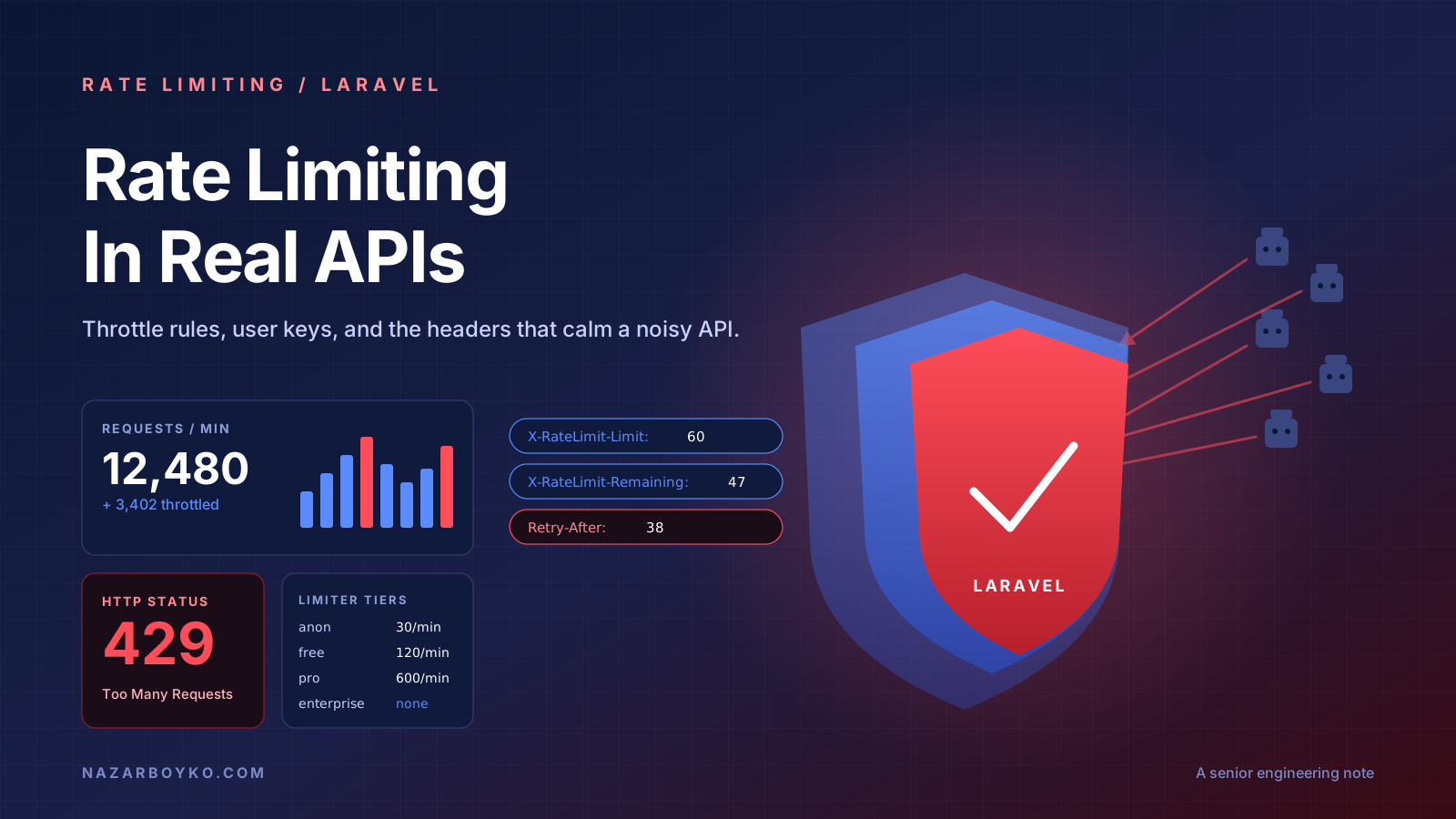
X-RateLimit-Limit:     60
X-RateLimit-Remaining: 47
Retry-After:           38
Clients that respect these (most SDKs do, most ad-hoc curl scripts don't) can self-throttle. The Retry-After value is in seconds when a request is rejected, and is the right thing to back off on.
That's the whole engine. Everything else is configuration.
The Modern Way: Named Limiters In bootstrap/app.php
In Laravel 11 the bootstrap moved from RouteServiceProvider to bootstrap/app.php. The recommended pattern is to define named limiters there using closures, then reference them from middleware:
// bootstrap/app.php
use Illuminate\Cache\RateLimiting\Limit;
use Illuminate\Http\Request;
use Illuminate\Support\Facades\RateLimiter;

return Application::configure(basePath: dirname(__DIR__))
    ->withRouting(
        api: __DIR__.'/../routes/api.php',
        // ...
    )
    ->withMiddleware(function (Middleware $middleware) {
        // global middleware tweaks
    })
    ->withProviders()
    ->booted(function () {
        RateLimiter::for('api', function (Request $request) {
            return Limit::perMinute(60)->by(
                optional($request->user())->id ?: $request->ip()
            );
        });

        RateLimiter::for('login', function (Request $request) {
            return [
                Limit::perMinute(5)->by($request->input('email')),
                Limit::perMinute(20)->by($request->ip()),
            ];
        });

        RateLimiter::for('uploads', function (Request $request) {
            return $request->user()?->isPro()
                ? Limit::perMinute(120)->by($request->user()->id)
                : Limit::perMinute(20)->by($request->user()->id);
        });
    })
    ->create();
A named limiter can return one Limit, an array of them (each one evaluated independently), or Limit::none() to opt-out. The by() argument is the bucket key — the thing the counter is namespaced to. Two limits in the same bucket are checked in AND, so the login limiter above lets you make 5 attempts on a given email and 20 from a given IP, whichever runs out first.
You then attach them by name from your routes:
// routes/api.php
Route::middleware(['auth:sanctum', 'throttle:api'])
    ->prefix('v1')
    ->group(function () {
        Route::apiResource('orders', OrderController::class);

        Route::post('uploads', UploadController::class)
            ->middleware('throttle:uploads');
    });

// routes/web.php
Route::post('login', LoginController::class)->middleware('throttle:login');
The Key Decision Is The Bucket Key
The single most common rate-limiter bug I see is bucketing on the wrong thing.
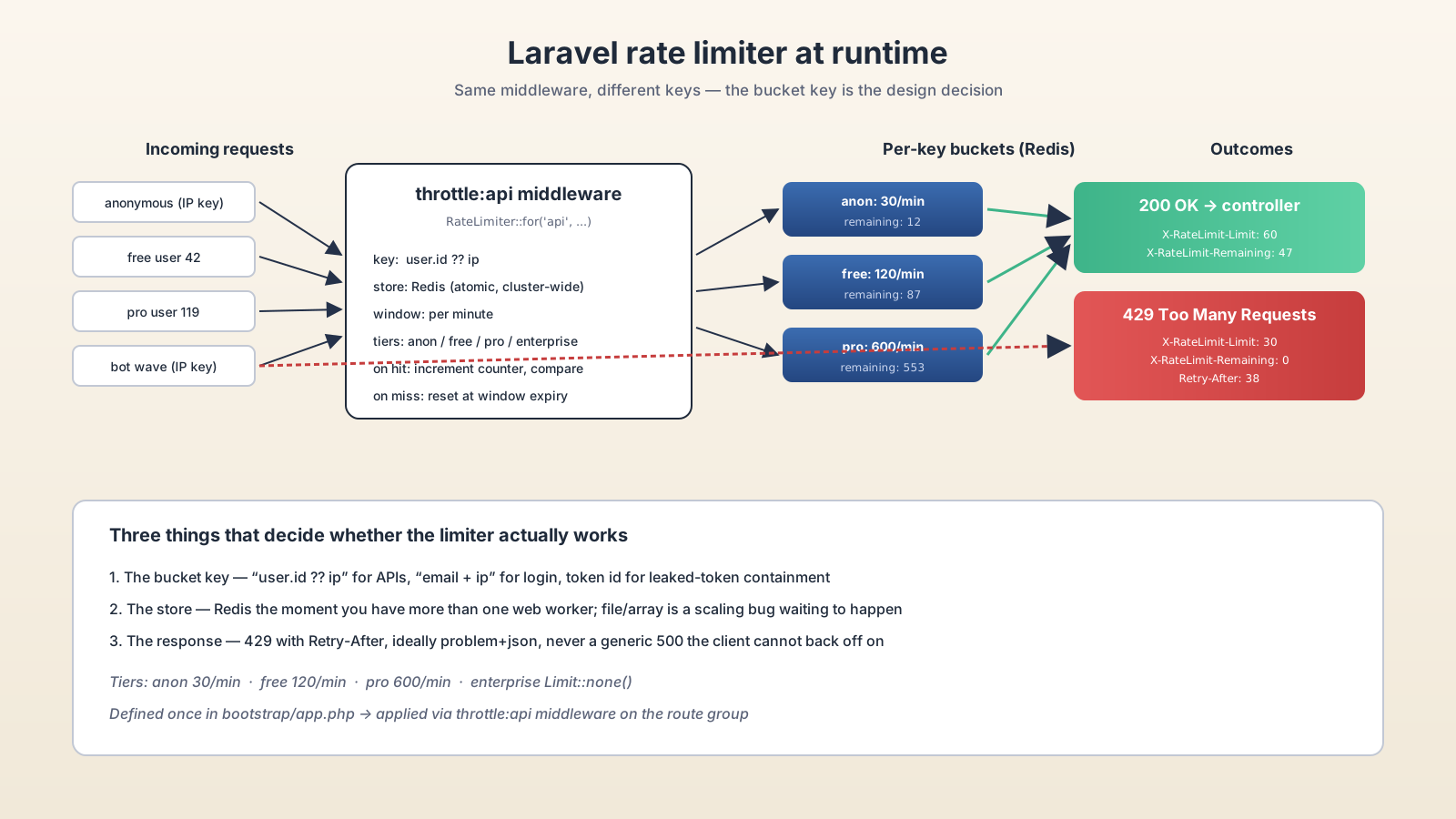
If you bucket on $request->ip() for an authenticated API, every user sitting behind the same corporate NAT shares one bucket — one noisy user starves the rest of the office. If you bucket on $request->user()->id for an anonymous endpoint, you get a null key and the whole limiter quietly collapses into a single shared bucket for every unauthenticated client.
The pattern that works:
->by(optional($request->user())?->id ?: $request->ip())For the user-and-IP-fallback case. If you want to be even stricter, key on a token ID for token-authenticated requests so a leaked token gets its own ceiling:
->by(
    $request->user()?->currentAccessToken()?->id
    ?? $request->user()?->id
    ?? $request->ip()
)
For login endpoints, the right key is the email being attempted (so an attacker can't spray a million emails from one IP) plus a separate IP-based limit (so an attacker can't try one email a million times from rotating accounts). The double-limit pattern in the example above handles both.
Per-Tier Limits For Real Products
Most real APIs don't have one limit. They have a tier system. Anonymous traffic gets a low ceiling, free accounts get a moderate one, paying customers get something they will not notice. The named-limiter pattern handles this cleanly:
RateLimiter::for('api', function (Request $request) {
    $user = $request->user();

    if (! $user) {
        return Limit::perMinute(30)->by($request->ip());
    }

    return match ($user->plan) {
        'enterprise' => Limit::none(),
        'pro'        => Limit::perMinute(600)->by($user->id),
        default      => Limit::perMinute(120)->by($user->id),
    };
});
Limit::none() is worth knowing about — it skips the limiter entirely for that request. Useful for enterprise contracts where you've negotiated unlimited access, or for internal service-to-service calls authenticated by a service account.
You can also override the response when the limit is hit. By default Laravel returns the JSON {"message": "Too Many Attempts."} with a 429. If you want a problem+json envelope or a Retry-After formatted as an HTTP date instead of seconds, attach a response callback:
RateLimiter::for('api', function (Request $request) {
    return Limit::perMinute(60)
        ->by($request->user()?->id ?: $request->ip())
        ->response(function (Request $request, array $headers) {
            return response()->json([
                'type'   => 'https://api.example.com/problems/rate-limited',
                'title'  => 'Too many requests',
                'status' => 429,
                'detail' => 'Slow down. Try again in '.$headers['Retry-After'].' seconds.',
            ], 429, $headers + ['Content-Type' => 'application/problem+json']);
        });
});
Redis Is Not Optional Once You Have More Than One Worker
The default cache.default driver in a fresh Laravel project is often file or database. For a rate limiter, that is a bug waiting to happen. The moment you scale to two web servers, each one keeps its own counter, and your effective limit doubles. Worse, if you're using array (which the default queue worker does in some setups), the counter resets on every request.
The fix is to point the cache and the rate-limiter store at Redis. Redis is fast, atomic across processes, and the right answer for distributed counters:
# .env
CACHE_STORE=redis
REDIS_CLIENT=phpredis// config/cache.php — make sure 'redis' is the default
'default' => env('CACHE_STORE', 'redis'),Once that's in place, every web node, every queue worker, every Octane process shares one bucket per key. That is the only configuration where the limit you set is the limit you actually enforce.
The Bigger Picture: Limits Below And Above Your App
A Laravel throttle middleware protects your app from your own users. It does not protect your app from a coordinated DDoS — that traffic never reaches PHP if your edge is doing its job. Real production rate limiting usually has three layers:
- Edge — Cloudflare, Fastly, AWS WAF. Drops obvious bad traffic before it hits your origin. The numbers here are coarse: "100 requests per second per IP, full stop."
- Reverse proxy — Nginx with
limit_req_zone, or a dedicated API gateway like Kong, Traefik. Catches abuse that slipped past the edge. - Application — Laravel's
RateLimiter. The fine-grained, per-user, per-tier, per-endpoint logic the upstream layers can't express because they don't know who the user is.
If you only have one layer, the application layer is the most valuable — it's the only one that knows the user is on a Pro plan, that the endpoint is /exports and exports are expensive, that this token has the orders:write scope and so should be allowed more writes than the read-only one.
Mistakes That Show Up In Code Review
A few patterns I push back on every time:
- Throttling write endpoints with the same limit as reads.
GET /ordersis cheap;POST /orderstriggers payment, inventory, email. They deserve different limits. - No limit on auth endpoints. Login, password reset, and signup are the highest-value abuse targets. They should be the most aggressively throttled routes in the whole app, with the dual email-plus-IP key.
- Returning a generic 500 instead of 429. If the limiter is doing its job, the response is a 429 with a
Retry-Afterheader. Generic errors break client retry logic and hide the real cause from your logs. - Forgetting to test it. A rate limiter that's never been exercised in CI is a rate limiter that's silently broken because someone changed the cache driver.
it('rate limits unauthenticated callers per IP', function () {
    Cache::flush(); // clear the limiter

    for ($i = 0; $i < 30; $i++) {
        $this->getJson('/api/v1/public/health')->assertOk();
    }

    $this->getJson('/api/v1/public/health')
        ->assertStatus(429)
        ->assertHeader('Retry-After');
});
A test like this catches the day someone "tidies up" bootstrap/app.php and accidentally removes the for('api', ...) definition.
A One-Sentence Mental Model
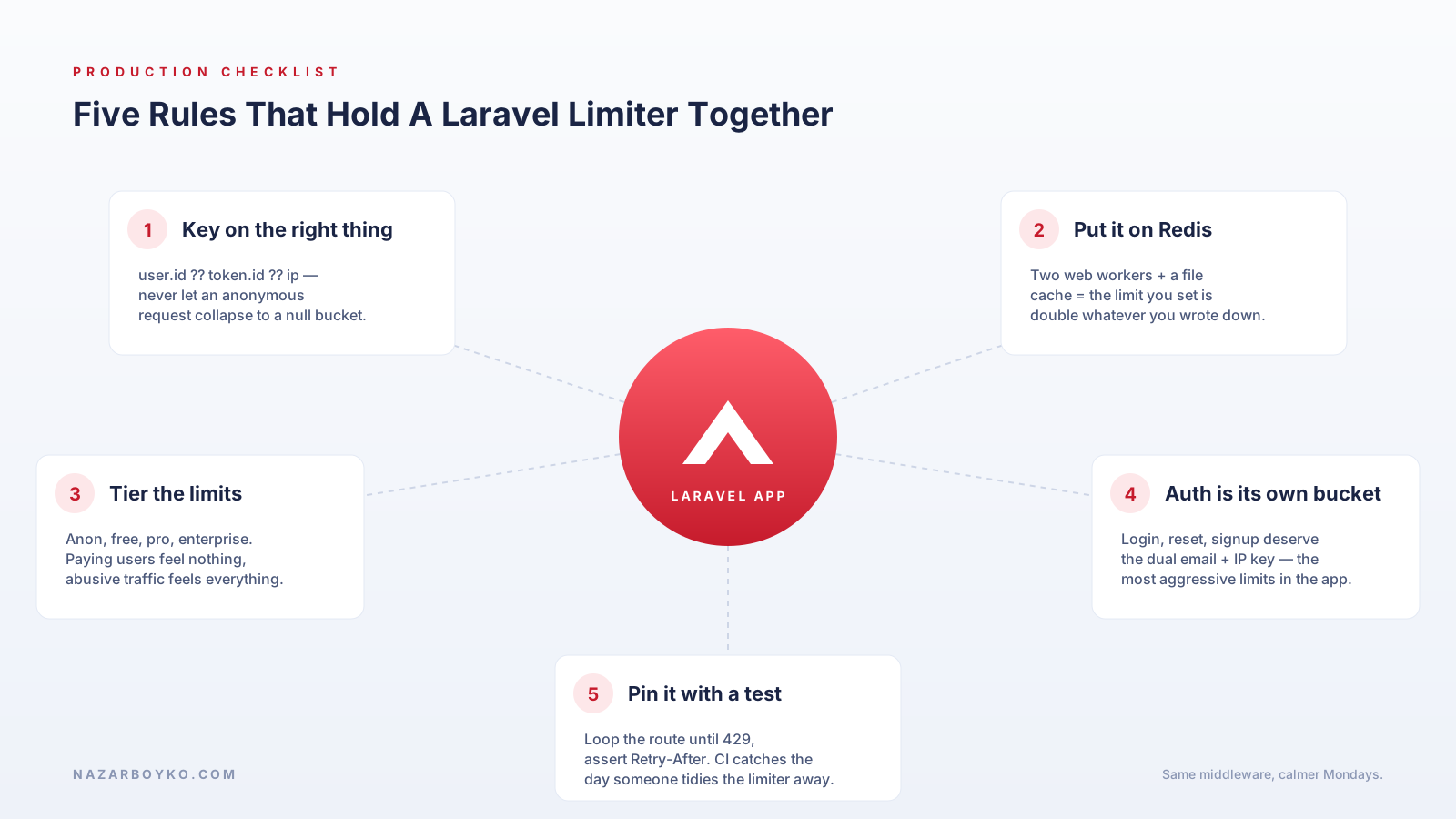
Rate limiting is a single named closure in bootstrap/app.php, keyed on the right thing (user.id ?? ip), backed by Redis the moment you have more than one worker, returning structured 429s with Retry-After — and tiered so paying customers feel nothing while abusive traffic feels everything.