You push a quick fix on a Friday afternoon. A .env file you did not realize was tracked sneaks in with the commit. By Saturday morning, an automated scanner has found your OpenAI key, spun up a hundred parallel jobs, and your billing dashboard is showing a four-digit number that was not there yesterday. You rotate the keys, you grep the history, you write a postmortem. The lesson is not "be more careful with .env files." The lesson is that environment variables are infrastructure, and you have to treat them that way.
Modern JavaScript apps lean on env vars for almost every meaningful piece of configuration: database URLs, third-party API keys, feature flags, regional toggles, build-time URLs that decide which backend the static bundle talks to. Most of these are sensitive in some way, and most of them have a way to leak that is not obvious until it does.
This is a tour of how to load them, how to separate the ones that ship to the browser from the ones that absolutely must not, and how to validate them at boot so a missing variable becomes a loud crash on deploy instead of a quiet 500 in production.
The Public Versus Private Boundary
In a Node-only backend, the question barely comes up. process.env.DATABASE_URL runs on the server. The string never leaves the process. You wire it up, you forget about it.
In a frontend bundler — Next.js, Vite, Remix, Astro — that intuition is dangerous. Your code compiles into JavaScript that ships to the browser. If you reference process.env.STRIPE_SECRET_KEY inside a React component that gets rendered on the client, the bundler statically replaces that expression with the literal string at build time, and your secret ends up sitting in a .js file that anyone can View Source on.
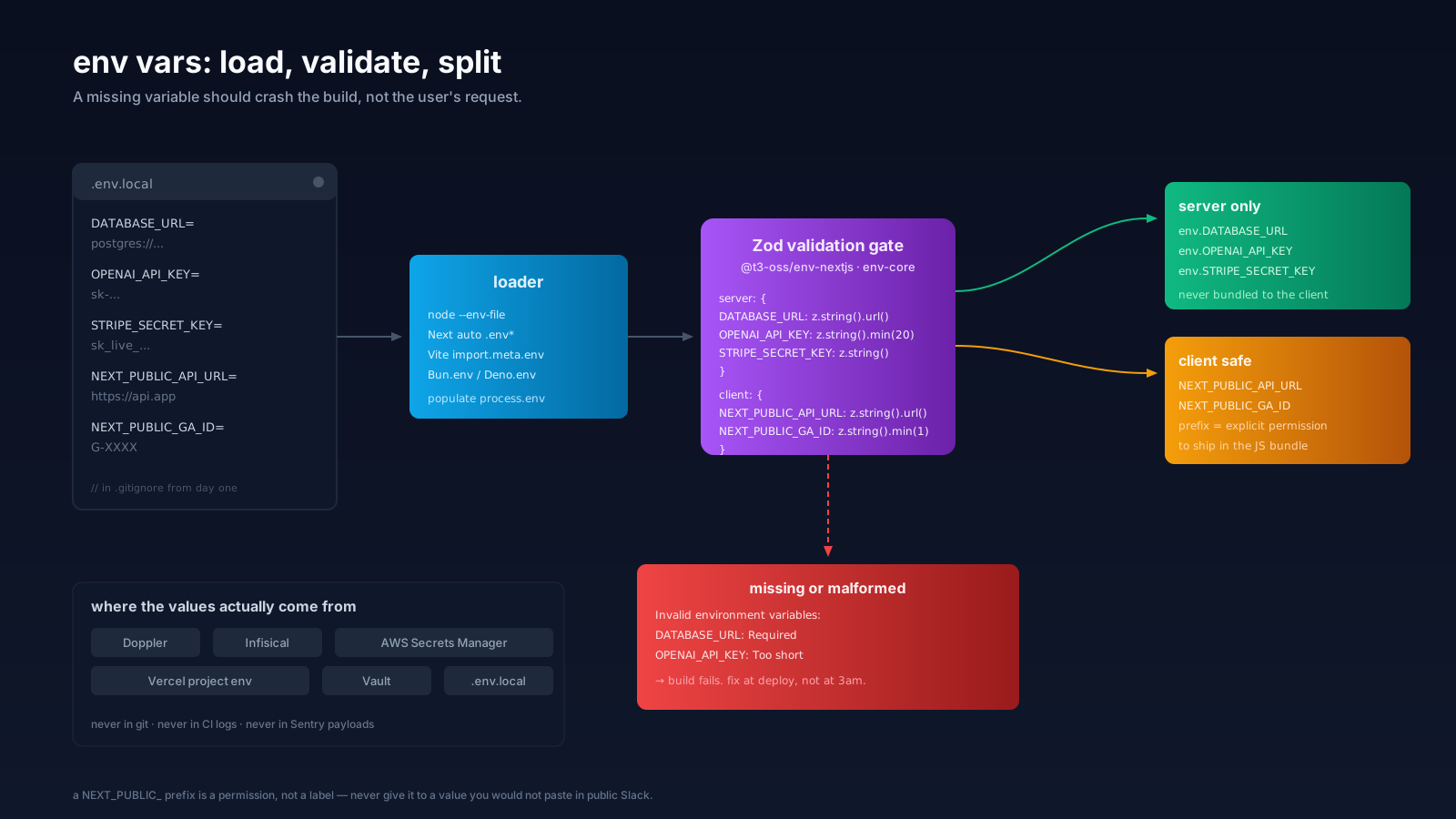
Every framework solved this with a prefix convention. Next.js exposes only variables that start with NEXT_PUBLIC_ to client code. Vite exposes only VITE_*. Create React App used REACT_APP_*. The rule is the same in all of them: the prefix is a marker that says "I am safe to publish." If a variable does not have the prefix, the bundler refuses to embed it on the client side.
The mistake is to treat the prefix as a label you sprinkle on. It is the opposite. The prefix is a permission. NEXT_PUBLIC_GA_ID is fine because Google Analytics IDs are public anyway. NEXT_PUBLIC_STRIPE_SECRET is a vulnerability with a typo's name. The day someone reaches for the prefix because "the build said the variable was undefined" is the day you ship a secret.
A useful rule of thumb: if you would not paste it into a public Slack channel, it does not get the public prefix.
How They Actually Get Loaded
The loading story has gotten better in the last two years.
Node 20.6 added --env-file=.env natively. You can run node --env-file=.env server.js and skip the dotenv package for simple cases. Node 20.12 / 21.7 added a --env-file-if-exists variant for cases where you want loading to be best-effort.
Next.js auto-loads .env, .env.local, .env.development, and .env.production in a documented order. You do not need dotenv in a Next app — and you should not add it, because Next's loader is the one that knows about the NEXT_PUBLIC_ boundary.
Vite does the same with its own ordering and the VITE_* prefix.
Bun reads env vars natively via Bun.env and auto-loads .env files without a flag.
Deno reads env vars via Deno.env.get('NAME') and uses an explicit permission flag (--allow-env) to control which variables a script can see — which is a different model and one of Deno's quiet wins.
The dotenv package is still common, especially for older Node services and CLI tools. It is fine. It just is not always required anymore. Pick the loader that is native to your runtime and stop fighting two of them.
The Type Safety Problem
process.env is a Record<string, string | undefined>. Every variable is potentially missing. Every variable is potentially the wrong shape. TypeScript will not save you, because it has no idea what is in your runtime environment.
This is how you ship a service that builds clean, deploys clean, runs clean for two days, and then crashes the first time a request hits a route that uses STRIPE_WEBHOOK_SECRET because nobody set it on the new staging environment. The error is undefined is not a function somewhere deep in a vendor SDK. The cause is a variable that should have been required and was not.
The fix is to validate env vars at boot, against a schema, and refuse to start if anything is wrong. Boot-time validation turns a silent runtime crash into a loud build-time failure, which is exactly the trade you want.
Validating With Zod And t3-env
@t3-oss/env-nextjs and @t3-oss/env-core are the canonical wrappers for this in the JS world. They take a Zod schema for server variables and another for client variables, plus a mapping from process.env, and give you back a strongly-typed env object that crashes loudly if anything is missing or malformed.
// src/env.ts
import { createEnv } from '@t3-oss/env-nextjs';
import { z } from 'zod';

export const env = createEnv({
  server: {
    DATABASE_URL: z.string().url(),
    OPENAI_API_KEY: z.string().min(20),
    STRIPE_SECRET_KEY: z.string().startsWith('sk_'),
    NODE_ENV: z.enum(['development', 'test', 'production']),
  },
  client: {
    NEXT_PUBLIC_ANALYTICS_ID: z.string().min(1),
    NEXT_PUBLIC_API_URL: z.string().url(),
  },
  runtimeEnv: {
    DATABASE_URL: process.env.DATABASE_URL,
    OPENAI_API_KEY: process.env.OPENAI_API_KEY,
    STRIPE_SECRET_KEY: process.env.STRIPE_SECRET_KEY,
    NODE_ENV: process.env.NODE_ENV,
    NEXT_PUBLIC_ANALYTICS_ID: process.env.NEXT_PUBLIC_ANALYTICS_ID,
    NEXT_PUBLIC_API_URL: process.env.NEXT_PUBLIC_API_URL,
  },
});
In code you import env instead of reaching into process.env:
import { env } from '@/env';

const stripe = new Stripe(env.STRIPE_SECRET_KEY);
const apiUrl = env.NEXT_PUBLIC_API_URL;
Three things that fall out of this for free.
env.DATABASE_URL is typed as string, not string | undefined. Your editor stops asking. Your null checks disappear.
If you accidentally try to read env.STRIPE_SECRET_KEY from a client component, the runtime guard throws — the secret never makes it into the bundle.
If a variable is missing on Vercel or your CI runner, the build itself fails with a readable error pointing at the schema. You find out at deploy time, not at the first paying user.
The same pattern works for Vite (@t3-oss/env-core), for non-Next Node services, and for Bun. The library is small. The discipline it enforces is the actual product.
Where The Secrets Should Actually Live
Validating the variables solves "is the value present and correct." It does not solve "where does the value come from in the first place." Three patterns, in increasing order of seriousness.
.env.local on each developer machine, copied from a shared .env.example that lives in the repo. This is fine for solo projects and small teams. The example file documents which variables exist, and the local file holds the actual values. .env.local is in .gitignore from day one.
A managed secret manager. Doppler, Infisical, AWS Secrets Manager, Google Secret Manager, HashiCorp Vault. You point your app at the manager, the manager injects the variables at runtime, and humans never see the raw values in a file. This is the right answer for any production environment with more than one engineer.
Platform-native env stores — Vercel project env, Netlify build env, Fly secrets, Railway variables. These are good for the platforms they live on, decent for small teams, and have one weakness worth knowing: rotating a secret means rotating it in every platform that has a copy. A central secret manager that those platforms read from is cleaner once you outgrow one runtime.
Across all three, the same rule holds: a secret should never appear in a git diff, in CI logs, in error messages, in a Sentry payload, or in the client bundle. Most leaks are not exotic — they are an console.log(env) in a route handler, a misconfigured logging library that prints request headers, or a secret pasted into a Slack thread to "unblock the deploy." The hardening is mostly about culture and a couple of pre-commit hooks.
A Few Habits That Catch The Last 10%
Validation and a secret manager solve most of the problem. A handful of small habits catch the rest.
Use a .env.example file in the repo with every variable name and a short comment, but with the values blanked out or replaced with placeholders. New contributors clone, copy it to .env.local, and ask only for the values that need real secrets.
Add a pre-commit hook that scans staged diffs for things that look like keys — sk_live_, xoxb-, AKIA-prefixed AWS access keys, long high-entropy strings. gitleaks and trufflehog both ship as pre-commit-friendly CLIs. Cheap insurance.
Never log process.env or env as a whole object. It is one of the easiest ways to leak secrets through your error tracker. Pick the specific values you need; treat the rest as opaque.
When you have to print a configuration summary at boot — useful for catching wrong-environment deploys — log only the keys, never the values. console.log('env keys:', Object.keys(env)) is fine. Anything more is asking for trouble.
Rotate keys you suspect have been exposed. Do not wait to "be sure." A leaked key in a private repo is still a leaked key the moment that repo gets shared with the wrong person, scraped by a misbehaved CI integration, or opened up for a contractor.
// at the top of your server entry
import { env } from '@/env';

if (env.NODE_ENV === 'production') {
  console.log('booting with env keys:', Object.keys(env));
}
None of this is exotic. All of it is what you will wish you had set up the day after the leak.
A One-Sentence Mental Model
Treat env vars like infrastructure: split public from private at the prefix, validate them at boot with a schema so a missing variable crashes the build instead of the user's request, and store the actual secrets in something that is not your repo.