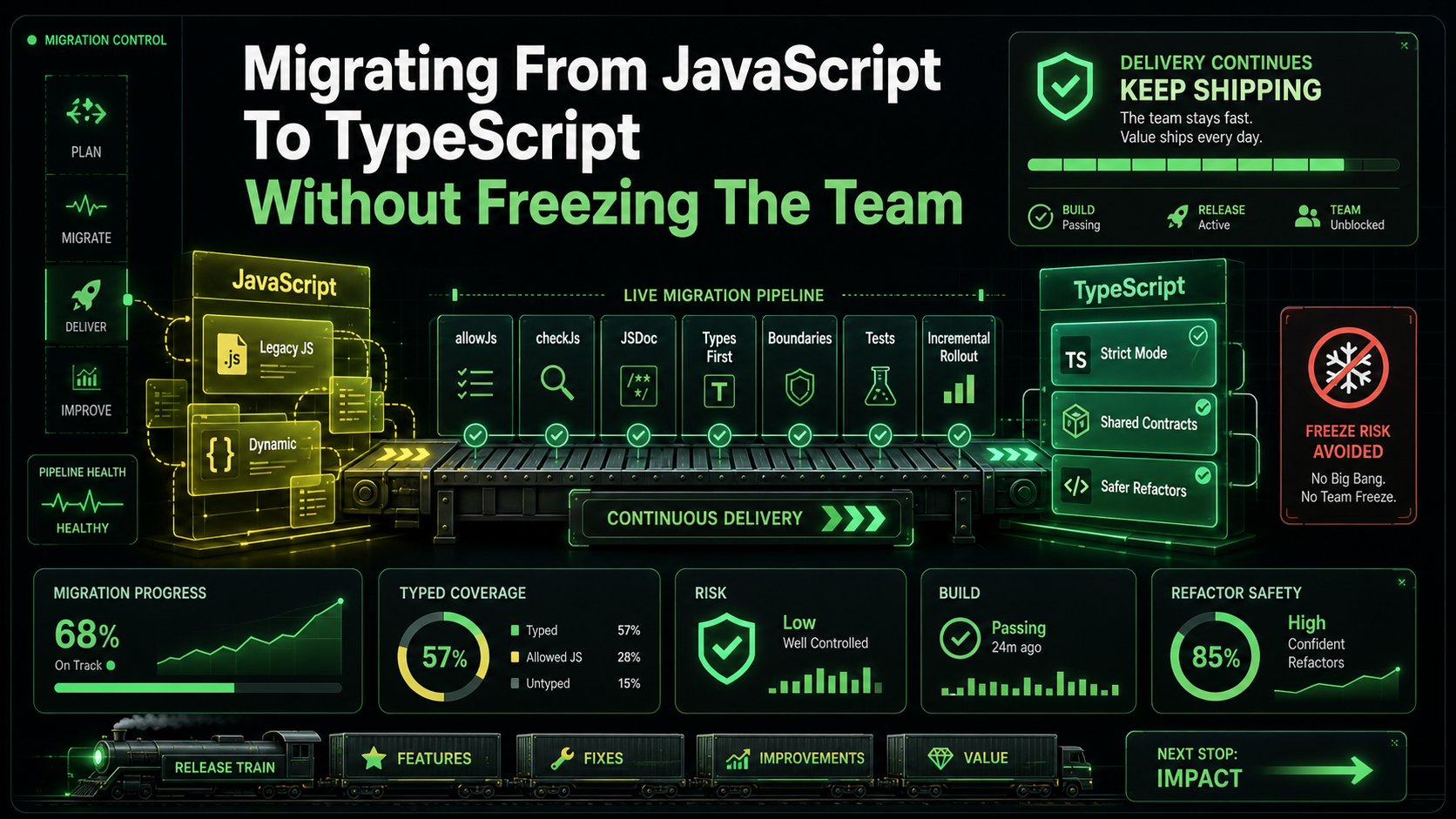
The first JavaScript-to-TypeScript migration I ran went badly. We declared a "TS migration sprint," paused feature work, opened a giant PR that touched 600 files, and after two weeks of merge conflicts and bikeshedding about the right noUncheckedIndexedAccess setting, the PR was abandoned. The CTO pulled the plug. We shipped features in JavaScript for another nine months before someone tried again.
The second migration, at a different company, went well. We never paused feature work. We never declared a sprint. We turned on allowJs, set up tsc --noEmit in CI, started adding // @ts-check to one file a week, and a year later we were on a fully strict TypeScript codebase that nobody had to fight to get there.
The difference wasn't the tooling. The tooling was nearly identical. The difference was sequencing — and the unspoken rule that the team should never have to choose between "the migration" and "the release."
The Migration Is Not A Sprint
If your migration plan has a start date and an end date and a list of files to convert in between, you're already in trouble. Real migrations are a slope, not a step. They run in parallel with feature work for months, sometimes a year or more. The codebase gets gradually more typed every week. Nothing dramatic happens.
The failure mode you're trying to avoid isn't "the migration takes too long." It's "the migration blocks shipping." The moment that happens, leadership starts asking pointed questions, the engineers who were against TS in the first place gain ammunition, and the migration ends up half-done and resented.
So the goal is the opposite: make the migration invisible to product. The first commit on Monday should be small. The fiftieth commit on Friday should also be small. By Christmas you should be most of the way there and nobody should have noticed.
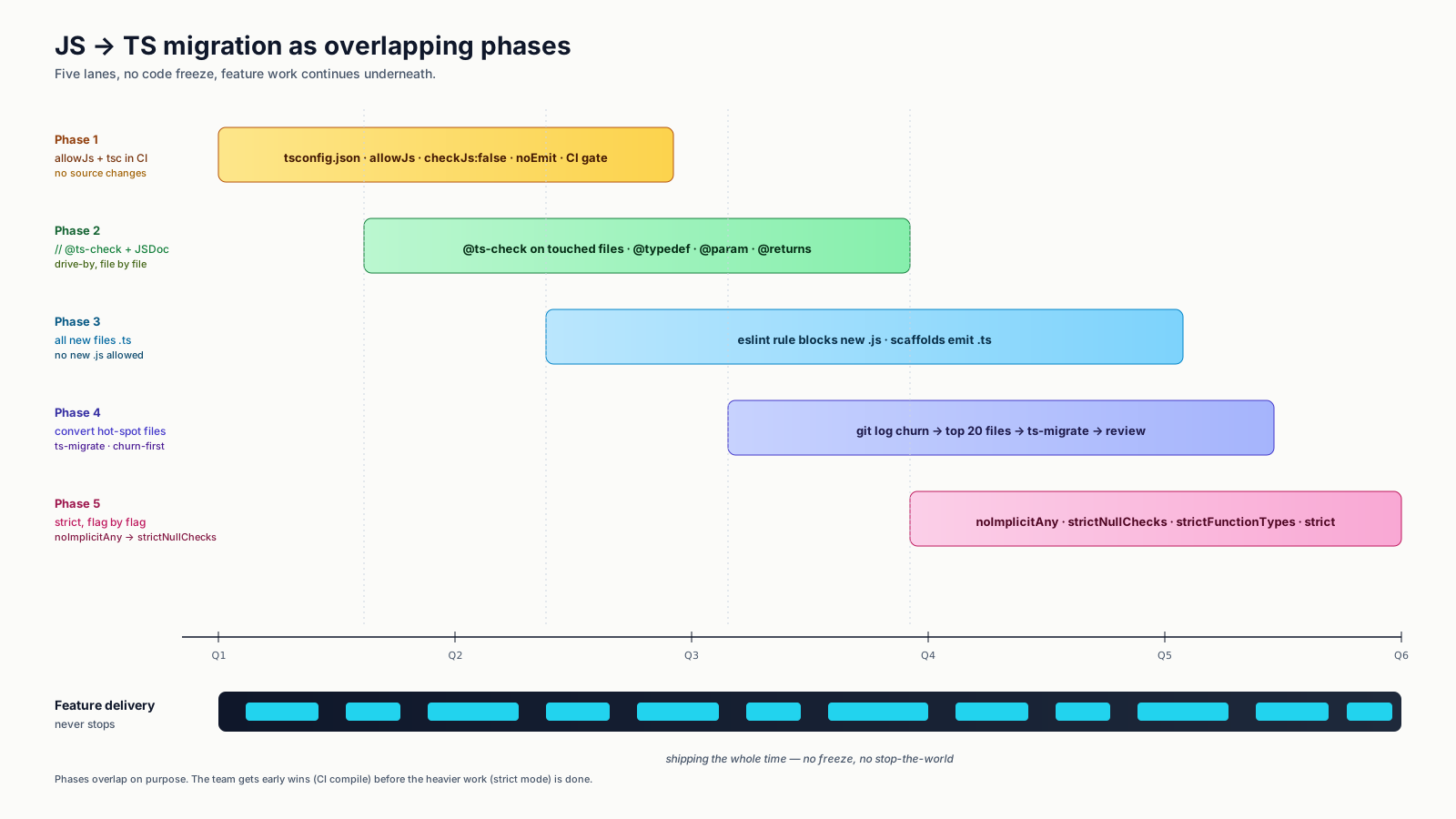
Step One: allowJs Plus checkJs And A tsconfig That Doesn't Yell Yet
You don't start by writing TypeScript. You start by getting the TypeScript compiler to understand your existing JavaScript.
// tsconfig.json
{
  "compilerOptions": {
    "target": "ES2022",
    "module": "ESNext",
    "moduleResolution": "Bundler",
    "allowJs": true,
    "checkJs": false,
    "noEmit": true,
    "strict": false,
    "esModuleInterop": true,
    "skipLibCheck": true,
    "isolatedModules": true,
    "jsx": "preserve"
  },
  "include": ["src/**/*"]
}
allowJs lets .js files participate in the project. checkJs: false means the compiler doesn't yet complain about untyped code. strict: false means even your future TypeScript files won't get the strictest checks yet. This config is intentionally permissive — its only job is to let tsc --noEmit run cleanly against your codebase today.
Add it to CI. The first run will probably fail because of one or two genuine type issues even at this loose setting (incompatible third-party types, a tsconfig glob that picks up tests it shouldn't, etc.). Fix those. Now you have a working baseline.
This part is invisible to the product team. You haven't changed any source files. You've just put a guard up.
Step Two: JSDoc For The Files You Don't Want To Touch Yet
The trick that made the second migration tractable: you can opt a single .js file into type checking by adding // @ts-check at the top, and you can add types via JSDoc without renaming the file to .ts.
// @ts-check

/**
 * @param {string} email
 * @param {{ subject: string; body: string }} message
 * @returns {Promise<{ id: string }>}
 */
export async function sendEmail(email, message) {
  // ...
}
The TypeScript compiler reads JSDoc as if it were native TS syntax. Your IDE gets autocomplete. The function signature is now type-checked. The file is still .js and your bundler doesn't know anything changed.
Why use JSDoc instead of converting to .ts? Three reasons:
- No rename means no diff in import paths, no Git history fragmentation, no risk of merge-conflict explosions in feature branches.
- You can do this gradually inside a feature PR. "While I was here, I added types to the file" doesn't require a separate migration ticket.
- Some files are easier to type than to convert. A 600-line
.jsfile with a tangled module shape is much easier to JSDoc one function at a time than to flip to.tsall at once and fight 200 type errors in one PR.
The pragmatic rule: every file someone is already touching for a feature should grow // @ts-check and JSDoc on the functions they're modifying. Drive-by typing.
Step Three: New Files Are TypeScript
The next rule you set, again invisibly to product: any new file in the codebase is .ts or .tsx. No exceptions. New endpoints, new components, new utility modules — they're all TS.
This is the rule that bends the curve. Even if zero existing files get migrated, the JavaScript surface area shrinks every week as new work goes into TS files. After six months a non-trivial fraction of the codebase is TS without anyone "doing a migration."
Lock it down with a lint rule:
// .eslintrc.js
{
  rules: {
    "no-restricted-syntax": ["error", {
      selector: "Program",
      message: "New files must be .ts or .tsx."
    }]
  }
}
// applied via overrides only to new file paths
The exact mechanism is less important than the social rule. Reviewers reject .js files in new code. People stop arguing about it within a month.
Step Four: Use ts-migrate Or Codemods For Bulk Conversion
When you want to convert files in bulk — a directory at a time, say — Airbnb's ts-migrate does most of the mechanical work. It renames .js to .ts, infers types where it can, and adds any (or // @ts-expect-error) anywhere it can't, leaving you a working but loosely-typed file you can tighten over time.
npx ts-migrate-full src/checkoutThe output is intentionally not pretty. The point is that the directory now compiles as TypeScript with no type errors, even if half the types are any. Now the long tail of "tighten this any" can happen as drive-by improvements over months.
ts-strictify is a related tool that helps you flip strict-mode flags on a per-file basis using // @ts-check and explicit pragmas, useful for the next phase.
For larger codebases, custom codemods written with ts-morph are usually better than ts-migrate alone. ts-morph gives you the TypeScript compiler API in a friendly wrapper — you can write a transform like "for every .js file in src/api, rename to .ts, add a Request and Response import, and convert the default export to a typed handler."
Step Five: Strict Mode, One Flag At A Time
"strict": true in tsconfig is shorthand for a bunch of flags: noImplicitAny, strictNullChecks, strictFunctionTypes, strictBindCallApply, strictPropertyInitialization, alwaysStrict, noImplicitThis, useUnknownInCatchVariables. Turning all of them on at once on a partially migrated codebase produces a mountain of errors and a demoralized team.
Turn them on one at a time, in roughly this order:
noImplicitAny— forces every parameter to have a type. Easiest to fix mechanically (most fixes areanyor a literal type from JSDoc).strictNullChecks— the big one. Surfaces every place you assumed something wasn'tnulland were wrong. This finds real bugs. Plan for it.strictFunctionTypes— narrower function-parameter variance. Usually a small number of fixes.strictPropertyInitialization— class properties must be initialized. Smaller scope in modern codebases (most of us don't write many classes anymore).useUnknownInCatchVariables—catchblocks now getunknown. Trivial fixes (if (e instanceof Error)).
Each flag is its own PR, its own announcement on Slack, its own week of "while you're in this file, please tighten the types here." None of them are a freeze.
Step Six: Module Augmentation For Third-Party Pain
Sooner or later you'll hit a library whose types are wrong, missing, or written when its API was different. The tool of last resort is module augmentation.
// types/legacy-lib.d.ts
declare module "legacy-lib" {
  export function thingThatLibraryForgotToType(input: string): Promise<number>;
}
This is also the right tool when you have a globally-attached window.featureFlags or similar. Don't reach for it casually — augmenting a library's types can hide real changes when the library updates — but for the two or three libraries every team has that just don't ship great types, it's the cleanest escape.
What Counts As "Done"
You'll know you're done when:
- All source files are
.tsor.tsx. "strict": trueis on with no overrides.- The number of
anyand// @ts-expect-errorcomments is small enough that a Slack message lists them all. - New engineers don't ask about the migration. They just write TypeScript.
That last bullet is the real signal. The migration is done when it stops being a topic. At the team I migrated successfully, that took fourteen months. At the one I did badly, it took the better part of three years and a second migration project on top of the first.
The One Rule
If I had to pick a single rule that distinguishes the migrations that succeed from the ones that fail, it's this: never make the migration the reason a feature can't ship. Every other technique in this article — JSDoc-first, drive-by typing, gradual strict flags, ts-migrate for bulk work — exists to keep that rule true. The migration is a side effect of normal feature work, not a project on top of it.
Get the rule right and the rest is just plumbing.