"We'll Just Do It In React"
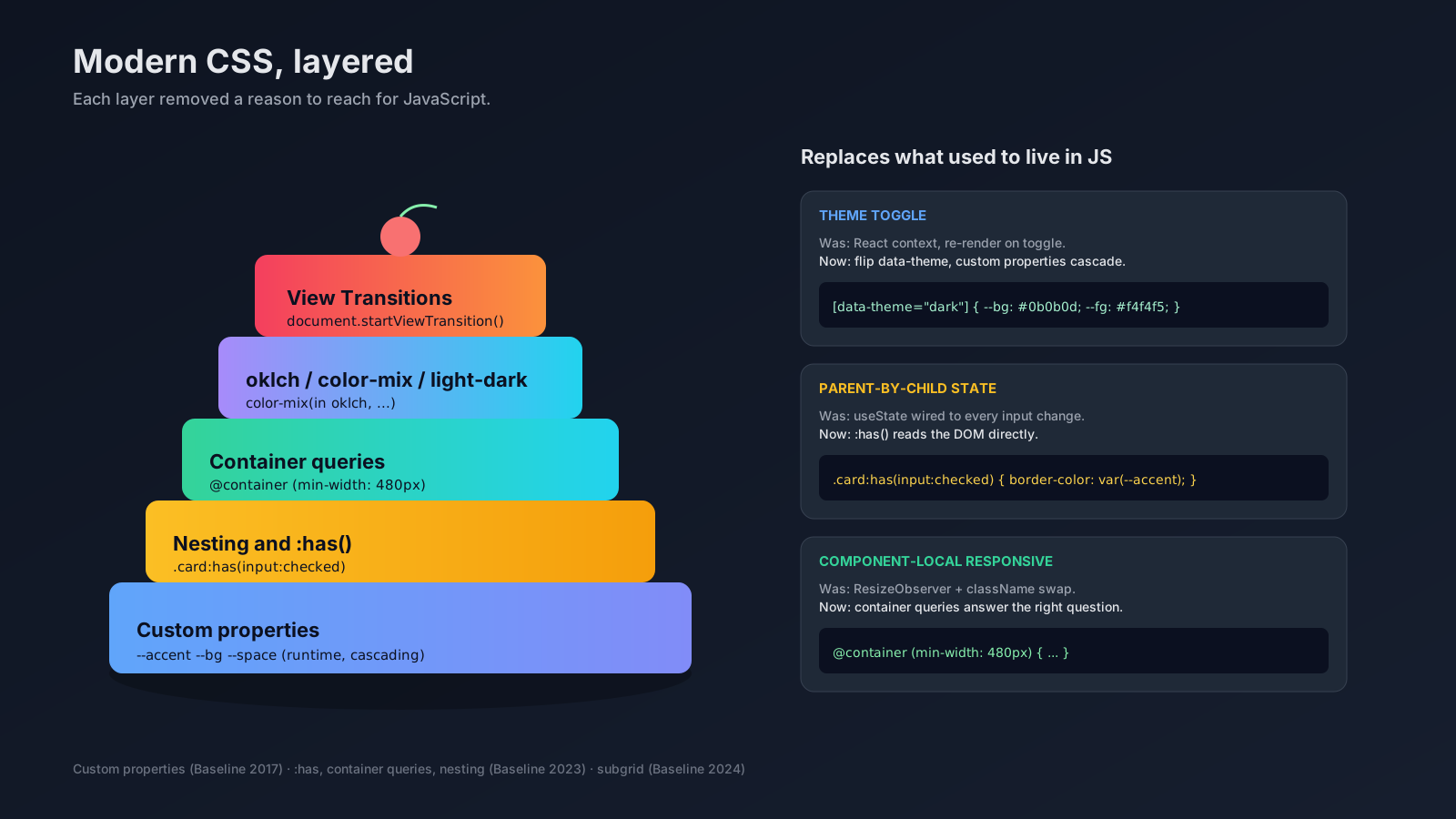
A few years ago, almost every "interactive" thing on the web ended up in JavaScript. Theme toggles? React context. Highlighting a card when one of its children was checked? useState. Reflowing a component when the sidebar collapsed? ResizeObserver. The browser had a layout engine, but we treated it like a static renderer and bolted real logic on top of it from JS.
Then between 2021 and 2024, CSS quietly caught up. Custom properties became a real API. Container queries shipped. :has() became a parent selector. Native nesting landed. The new color functions arrived. None of it was loud — there was no "CSS 2.0" — but the pile is big enough now that a lot of the JS you wrote three years ago is no longer pulling its weight.
If you write React or Vue all day and your CSS knowledge stopped at "flexbox plus some media queries," this is the catch-up.
Custom Properties Are Runtime State, Not Sass Variables
When teams first met --my-var they treated it as a Sass replacement. Pre-build constants. The interesting thing is that they are not constants — they are reactive state that lives in the DOM, scoped by the cascade, and you can change them at runtime.
:root {
  --bg: #ffffff;
  --fg: #111111;
  --accent: oklch(0.7 0.18 250);
}

[data-theme="dark"] {
  --bg: #0b0b0d;
  --fg: #f4f4f5;
}

.button {
  background: var(--accent);
  color: var(--fg);
  padding: calc(var(--space, 0.5rem) * 2);
}
Toggle data-theme on <html> and the entire tree recolors. No context provider, no re-render, no flash. You can also write the variable from JS — el.style.setProperty('--accent', 'oklch(0.6 0.2 30)') — which is the cleanest way to bridge user input into CSS without touching className strings.
The pattern that pays off in real apps: define design tokens (color, spacing, radius, shadow) as custom properties at :root, override them under data-attributes for theme/density variants, and consume them everywhere else. Your components stop knowing what "blue" is — they just consume --accent and the surrounding context decides.
:has() Is The Selector You've Been Asking For
:has() lets a parent style itself based on its descendants. It became Baseline in 2023 and is now safe to ship in production. The use cases are everywhere once you start looking:
/* Highlight a card if it contains a checked input. */
.card:has(input:checked) {
  border-color: var(--accent);
  background: color-mix(in oklch, var(--accent) 8%, var(--bg));
}

/* Hide the empty-state when the list has any item. */
.empty-state:has(+ ul li) {
  display: none;
}

/* Lay out the form differently when an error message is present. */
form:has(.error) {
  grid-template-columns: 1fr;
}
The third one is the one that ate a chunk of my JS. Before :has(), "show this layout when there's an error" meant a piece of state that read every field's validity, then a class on the form. Now it's a selector. The DOM is the source of truth.
Performance-wise, :has() is fine for normal app patterns. The browser scopes the selector aggressively. Where you should still be careful: very large lists where every row uses :has() against a deep ancestor.
Container Queries Make Components Actually Portable
Media queries ask "how big is the viewport?" Container queries ask "how big is the box this component is sitting in?" That's the question component design has been asking for ten years.
.profile {
  container-type: inline-size;
  container-name: profile;
}

.profile-card {
  display: grid;
  grid-template-columns: 1fr;
  gap: 0.5rem;
}

@container profile (min-width: 480px) {
  .profile-card {
    grid-template-columns: auto 1fr;
    gap: 1rem;
  }
}
Drop .profile-card into the main content area at 800px wide and it lays out horizontally. Drop the same component into a 320px sidebar and it stacks. No prop, no JS measurement, no ResizeObserver. The card is portable.
Container queries have been Baseline since 2023. The unit family — cqi, cqb, cqw, cqh — lets you size things relative to the container too, which is genuinely useful for fluid type at the component level.
Native Nesting Without A Preprocessor
You can nest in plain CSS now. No Sass, no PostCSS, no build step:
.card {
  padding: 1rem;
  border-radius: 0.75rem;

  & > h3 {
    font-size: 1.125rem;
    margin-block-end: 0.5rem;
  }

  &:hover {
    background: color-mix(in oklch, var(--accent) 6%, var(--bg));
  }

  @container (min-width: 480px) {
    padding: 1.5rem;
  }
}
Browser-native nesting has been Baseline since 2023. The & is required when you'd want it in Sass; otherwise it's the same shape. For most projects, this removes a real reason to keep a preprocessor in the build.
Modern Color Is Worth The Switch
oklch(), lch(), color-mix(), and light-dark() are not just new syntax — they fix real problems with hex and rgb.
:root {
  color-scheme: light dark;
  --accent: oklch(0.7 0.18 250);
  --accent-hover: oklch(from var(--accent) calc(l - 0.05) c h);
  --surface: light-dark(#ffffff, #0b0b0d);
  --text: light-dark(#111111, #f4f4f5);
}

.button:hover { background: var(--accent-hover); }
.divider { background: color-mix(in oklch, var(--text) 12%, transparent); }
oklch is perceptually uniform — bumping lightness gives you a predictable visual change instead of the muddy results you get nudging hex. color-mix replaces the "I need a 12% tint of the text color" math you used to do in Sass. light-dark lets you express both modes in one declaration once you've set color-scheme. All three are widely supported in modern browsers as of 2024.
View Transitions: One-Line Page Animations
document.startViewTransition() lets the browser animate between two states automatically. You change the DOM (route, list filter, expanded panel) inside a callback, and the browser captures before/after snapshots and tweens between them.
function navigate(path) {
  if (!document.startViewTransition) return goTo(path);
  document.startViewTransition(() => goTo(path));
}
You style the default crossfade with ::view-transition-old(root) and ::view-transition-new(root). Tag a specific element with view-transition-name: hero and it gets matched across the transition — the same element morphs from the old layout to the new one. Same-document is widely supported; cross-document View Transitions stable in Chrome 126+ extends the same idea to MPA navigation.
Most of what people built with Framer Motion route transitions now has a one-line CSS-native version. It's not a full replacement, but it's a strong first stop.
What This Means For Your JS
The honest framing: every modern CSS feature is one fewer reason to manage UI state in JavaScript. Theme toggles become a data-attribute flip. "Highlight the parent when a child is selected" becomes :has(). "Reflow the card when its container shrinks" becomes a container query. "Animate the route change" becomes startViewTransition.
Your JS doesn't disappear — business logic, data fetching, and complex interactions still belong there. But the styling and layout decisions that used to leak into React state can move back to where they belong, which keeps the React tree small and the renders predictable.
If you haven't written CSS seriously in two years, spend a weekend with this stuff. The browser is a much better partner than it used to be.