You've probably written MVVM without anyone telling you that's what you were doing. If you've used Vue, you have. If you've used Knockout, definitely. And if you've been writing React with hooks long enough that your components stopped looking like classes and started looking like little reactive engines, you're at least flirting with the idea.
MVVM is one of those patterns that gets explained badly because most explanations start with WPF and Silverlight, two technologies that no frontend developer in 2022 wants to read about. So let's skip the history detour and look at what MVVM actually is, what problem it solves, and how each major frontend framework either embraces it, ignores it, or quietly reinvents it under a different name.
The Three Pieces
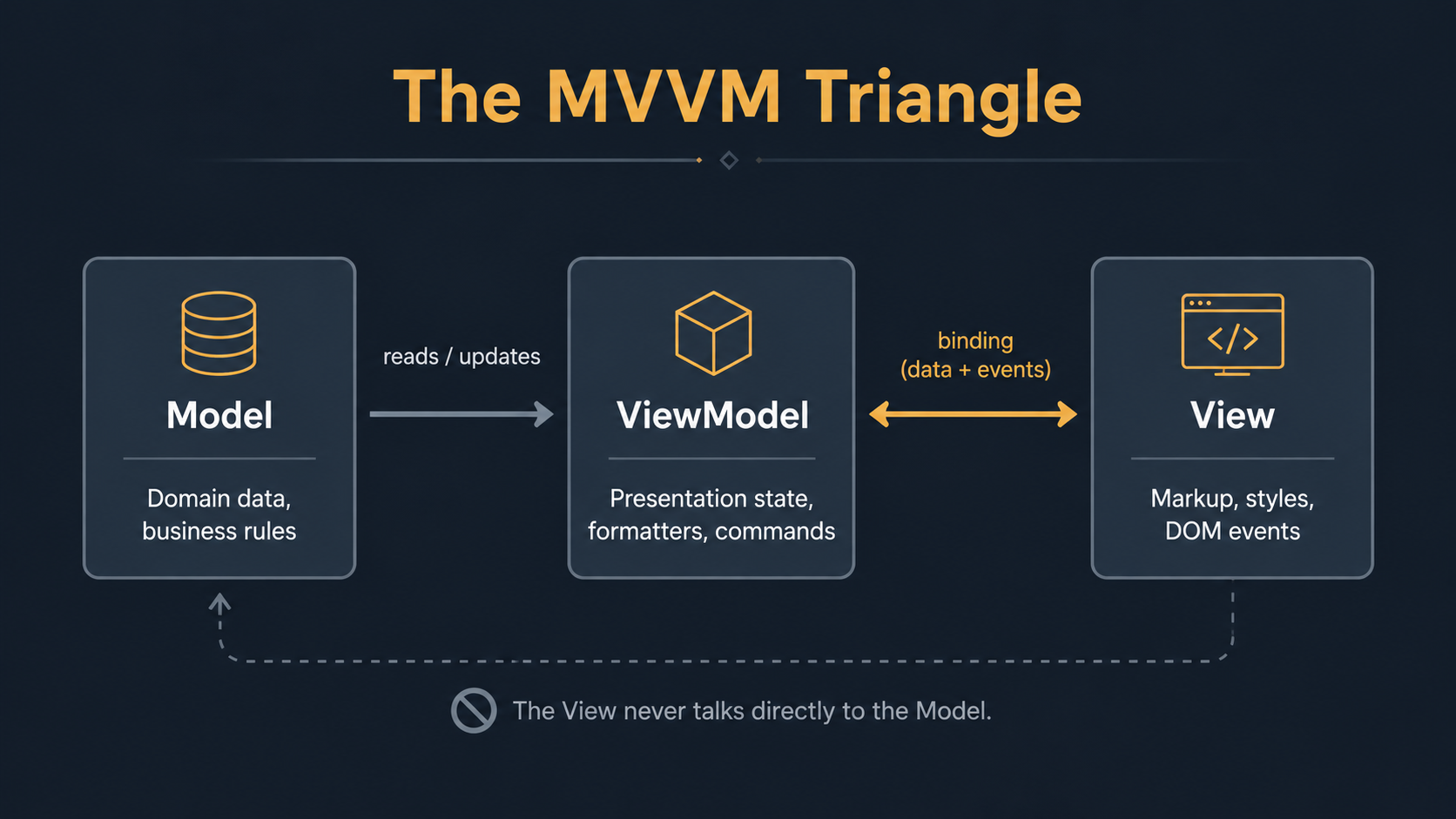
MVVM stands for Model, View, ViewModel. Three pieces, each with one job, with a very specific relationship between them.
The Model is your data. Plain objects, API responses, database rows, whatever shape your domain takes. The Model doesn't know that a UI exists. It doesn't know what a button is. You should be able to load, save, and validate it without ever rendering anything.
The View is what the user sees. Markup, styles, the tree of elements. The View doesn't make decisions. It doesn't know how to fetch data. It doesn't know what "checkout" means as a business concept. Its only job is to display whatever it's been told to display and forward user interactions outward.
The ViewModel sits between them. It takes Model data and reshapes it into something the View can render directly: formatted dates, computed totals, derived flags like isEligibleForDiscount. It also takes user input from the View and translates it back into Model changes. The ViewModel is where presentation logic lives. Not business rules; those belong to the Model. Not pixels; those belong to the View. Just the translation layer between them.
The cleanest way to picture it: the Model speaks in domain terms (order.lineItems[0].priceCents), the View speaks in pixels and DOM events, and the ViewModel speaks both languages.
State Binding Is The Whole Trick
If you take only one thing from this post, take this: the defining feature of MVVM is automatic state binding between the View and the ViewModel.
In MVC, the controller manually pushes data into the view and manually pulls events back out. You're constantly writing the wiring. In MVVM, you declare the wiring once and the framework keeps the two sides in sync. Type into a field, the ViewModel updates. Change a value in the ViewModel, the field updates. Add an item to a list, the rendered list grows. You don't write the update; you write the relationship.
That's why MVVM took off in framework cultures that prioritised reactive primitives. The pattern needs the binding machinery to feel natural. Without it, MVVM feels like extra ceremony for nothing.
MVVM In Vue
Vue is the framework that wears MVVM most openly. Evan You has talked publicly about Vue being inspired by MVVM and AngularJS, and the Composition API is essentially a clean-room MVVM implementation in JavaScript.
Watch what happens when you write the smallest meaningful Vue component:
<script setup>
import { ref, computed } from 'vue'

const firstName = ref('')
const lastName = ref('')

const fullName = computed(() => `${firstName.value} ${lastName.value}`.trim())
const isValid = computed(() => firstName.value.length > 0 && lastName.value.length > 0)
</script>

<template>
  <input v-model="firstName" placeholder="First name" />
  <input v-model="lastName" placeholder="Last name" />
  <p v-if="fullName">Hello, {{ fullName }}</p>
  <button :disabled="!isValid">Save</button>
</template>
The <script setup> block is your ViewModel. firstName and lastName are observable state. fullName and isValid are computed properties, the derived state that updates automatically when its dependencies change. The template is the View. v-model is the two-way binding contract: the input's value is bound to the ref, and any user typing flows back into the ref without you writing a single event handler.
If you imported a User class from somewhere, that would be your Model. The ViewModel might wrap it, expose flattened fields like firstName and lastName, and translate the Save button's click into a user.save() call. The View never touches User directly.
This is textbook MVVM. The only thing missing is the label.
MVVM In React
React is more interesting because React doesn't think of itself as MVVM. The official docs talk about components, state, props, and effects, never roles. But once you've internalised the pattern, you can see it sitting just under the surface.
A typical React component using hooks looks like this:
import { useState, useMemo } from 'react'

export function UserCard() {
  const [firstName, setFirstName] = useState('')
  const [lastName, setLastName] = useState('')

  const fullName = useMemo(
    () => `${firstName} ${lastName}`.trim(),
    [firstName, lastName]
  )
  const isValid = firstName.length > 0 && lastName.length > 0

  return (
    <>
      <input value={firstName} onChange={e => setFirstName(e.target.value)} placeholder="First name" />
      <input value={lastName} onChange={e => setLastName(e.target.value)} placeholder="Last name" />
      {fullName && <p>Hello, {fullName}</p>}
      <button disabled={!isValid}>Save</button>
    </>
  )
}
It's the same pattern, but the binding is one-way and explicit. React doesn't ship a v-model. You write value={firstName} to push state into the input, and onChange={e => setFirstName(e.target.value)} to pull changes back out. Two halves of the round trip, both visible in the code.
People debate whether this counts as MVVM. The honest answer: hooks-era React lets you build something that behaves like MVVM, but the framework doesn't enforce the structure. You can write a React component where the JSX, the state, and the API calls are all tangled together. That's not MVVM, that's just a component. You can also extract a custom hook called useUserForm that owns the state, the validation, and the save logic, and have your component consume it. That custom hook is your ViewModel. The JSX that calls it is your View. The User type that flows in and out is your Model.
import { useState, useMemo } from 'react'

export function useUserForm(initialUser) {
  const [firstName, setFirstName] = useState(initialUser?.firstName ?? '')
  const [lastName, setLastName] = useState(initialUser?.lastName ?? '')

  const fullName = useMemo(
    () => `${firstName} ${lastName}`.trim(),
    [firstName, lastName]
  )
  const isValid = firstName.length > 0 && lastName.length > 0

  function save() {
    return fetch('/api/users', {
      method: 'POST',
      body: JSON.stringify({ firstName, lastName }),
    })
  }

  return { firstName, setFirstName, lastName, setLastName, fullName, isValid, save }
}
Now your component is just a View. It calls the hook, renders the fields, wires the events. All the presentation logic lives somewhere else, where it can be tested without rendering anything. That's the MVVM payoff in React, and it shows up the moment your component grows past the trivial example.
MVVM In Angular
Angular has been doing MVVM-flavoured architecture since AngularJS, with an extra dose of dependency injection. A modern Angular component looks like this:
import { Component, signal, computed } from '@angular/core'
import { FormsModule } from '@angular/forms'

@Component({
  selector: 'app-user-card',
  standalone: true,
  imports: [FormsModule],
  template: `
    <input [(ngModel)]="firstName" placeholder="First name" />
    <input [(ngModel)]="lastName" placeholder="Last name" />
    <p *ngIf="fullName()">Hello, {{ fullName() }}</p>
    <button [disabled]="!isValid()">Save</button>
  `,
})
export class UserCardComponent {
  firstName = signal('')
  lastName = signal('')

  fullName = computed(() => `${this.firstName()} ${this.lastName()}`.trim())
  isValid = computed(() => this.firstName().length > 0 && this.lastName().length > 0)
}
The component class is the ViewModel. Signals are reactive state. Computed signals are derived state. The template is the View. [(ngModel)], affectionately known as banana-in-a-box, is two-way binding spelled out as half-property-binding ([ngModel]) and half-event-binding ((ngModelChange)).
Angular adds one more move that Vue and React don't have built in: services. If you wrote a UserService and injected it into the component, that service would own communication with the API and expose the User as observable state. The component then becomes a thin ViewModel that adapts service state for the template. That's MVVM with a fourth wheel: Model, ViewModel, View, plus a service layer that holds the Model so multiple components can share it.
Where The Pattern Came From
A short detour, because it explains why some frameworks lean into MVVM and others don't.
Knockout.js, released in 2010, is the JavaScript library that introduced most frontend developers to MVVM. It looked like this:
function UserViewModel() {
  this.firstName = ko.observable('')
  this.lastName = ko.observable('')

  this.fullName = ko.computed(() => `${this.firstName()} ${this.lastName()}`.trim())
  this.isValid = ko.computed(() => this.firstName().length > 0 && this.lastName().length > 0)
}

ko.applyBindings(new UserViewModel())<input data-bind="value: firstName" placeholder="First name" />
<input data-bind="value: lastName" placeholder="Last name" />
<p data-bind="visible: fullName, text: 'Hello, ' + fullName()"></p>
<button data-bind="enable: isValid">Save</button>If you squint, that's basically the Vue example with different syntax. Knockout proved that MVVM could work in the browser, and Vue picked up the baton with a more ergonomic template syntax. Angular went its own way with two-way binding from day one. React arrived later and deliberately refused to ship two-way binding, partly because the team wanted predictable one-way data flow and partly because two-way binding had earned a reputation for being hard to debug at scale.
That last point matters. The "M" in MVVM is conceptual, but reactive frameworks all converge on a similar dependency-tracking engine (observables, refs, signals, observable hooks), because that's what makes the binding feel automatic. The implementation differs; the principle doesn't.
What Goes Where, Practically
When MVVM starts working for you, it's usually because you've drawn three lines that you weren't drawing before.
Anything domain-shaped, a user has these fields, an order can be in these states, a coupon applies under these rules, goes in the Model. It's framework-agnostic. You can lift it into a Node service or a CLI without changing a line.
Anything presentation-shaped, this button is disabled when the form is invalid, this list shows only items the current user owns, this date renders in the user's locale, goes in the ViewModel. It depends on framework primitives (refs, signals, hooks, observables) but not on JSX or templates.
Anything pixel-shaped, the input is wide on desktop and full-width on mobile, the list scrolls, the modal animates in, goes in the View. It can read from the ViewModel and emit events back to it, but it never talks to the Model and never decides anything.
The reason this matters is that the three pieces have very different change frequencies. Designers redo the View constantly. Product changes the ViewModel often: let's also disable Save when the user is read-only, let's show a hint when the email is malformed. The Model changes least, because the underlying business doesn't pivot every sprint. Lining up the architecture with the change frequency is half of why MVVM has stuck around for two decades.
When MVVM Doesn't Fit
MVVM works best for forms, dashboards, editors, anywhere the user is steering the application by typing, clicking, and toggling, and the UI needs to react in real time. That's most line-of-business software, which is why the pattern was born in WPF where business apps lived.
It fits less well for content-heavy pages where the data flows mostly one direction: a marketing site, a blog, a docs portal. There's nothing wrong with using a ViewModel-shaped abstraction there, but you'll find the binding machinery doing very little because the user isn't really mutating anything.
It also fits less well for games, animation-heavy UIs, or anything where the state changes 60 times a second and the binding overhead becomes a bottleneck. There you want imperative control, not declarative reaction.
And it can become an anti-pattern if you treat the ViewModel as a dumping ground for everything that doesn't fit neatly elsewhere. A 4000-line ViewModel that owns API calls, validation, formatting, error handling, and feature flags is just a controller wearing a different hat. The discipline of the pattern is in keeping each layer narrow.
The Mental Model To Keep
Whatever framework you reach for, the question to ask is: where does my presentation state live, and how does it stay in sync with the View?
If the answer is "in a class field, kept in sync by data-bind attributes," you're doing MVVM in Knockout.
If the answer is "in a ref or computed, kept in sync by v-model and template interpolation," you're doing MVVM in Vue.
If the answer is "in a signal, kept in sync by [(ngModel)] and template expressions," you're doing MVVM in Angular.
If the answer is "in useState and a custom hook, kept in sync by props and event handlers I wrote myself," you're doing MVVM-shaped React, even if the docs never use the term.
The pattern is the same in all four. The framework only changes how much of the wiring you write yourself.