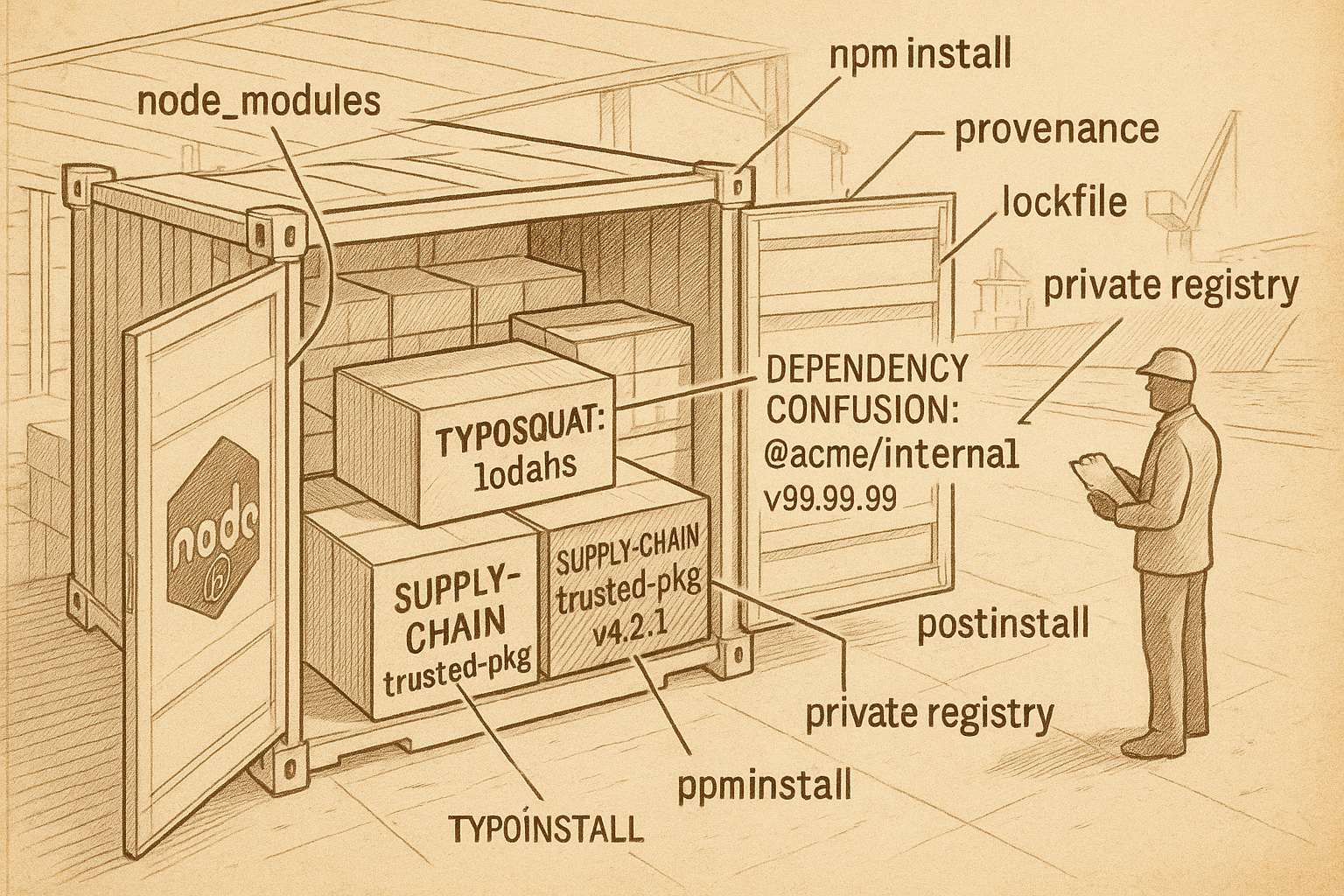
You spin up a fresh service. npm init -y, add Express, add a logger, add a validation library. Six direct dependencies. You run npm install. The terminal flashes by, the lockfile fills up, you check node_modules. Four hundred and twelve packages.
Most of those packages you have never read. Most of them you never will. Most of them are fine. But "most" is doing a lot of work in that sentence, because the path from your package.json to your production servers is a long supply chain, and every link in it is a thing somebody else maintains, somebody else publishes, and somebody else can compromise. The npm registry hosts more than three million packages. You don't need all of them to turn on you. You only need one.
The interesting thing about package security is that the actual attacks aren't clever in a technical sense. There's no zero-day CPU bug here. No fancy memory corruption. The attackers are using the boring mechanics of the package manager itself — name resolution, install scripts, version ranges, postinstall hooks — and trusting that your build pipeline will do exactly what it's supposed to do. The bug isn't in the code. The bug is that you ran code you didn't write, on a machine that mattered.
This piece walks through the three named attack surfaces that hit Node teams the most — dependency confusion, typosquatting, and supply-chain compromise of legitimate packages — with the real-world incidents that put each one on the map, and then the defensive stack that actually closes the door. The good news is that the door is closeable. The defenses are unglamorous, well-documented, and mostly already shipped in your package manager — you just have to turn them on.
Why npm Is The Soft Target
Before the attack walkthroughs, a quick honest framing of why this problem lives in JavaScript more than it lives in Go or Rust or even Python.
Node's culture is small modules, lots of them. The famous example is is-odd, which exists, has been downloaded hundreds of millions of times, and contains roughly two lines of code. That culture isn't wrong — it's the same factoring discipline that made Unix work — but it has a consequence. Every direct dependency you add brings in a graph of transitive dependencies, and those bring in their own graphs, and the average production Node service ends up with a node_modules folder that runs into the thousands.
You can read every commit in your own repo. You can probably skim the README of every direct dependency. You cannot read every line of two thousand transitive packages, and neither can anyone else. So you trust. You trust that express vetted its dependencies, and that those packages vetted theirs, and so on down. That trust is the entire foundation of the ecosystem, and it's also the surface attackers go after.
The second reason npm is a soft target is the install lifecycle. By default, npm runs scripts during installation — preinstall, install, postinstall. These run with whatever permissions your build user has. On a developer laptop, that's everything. On a CI runner, that's everything plus your secrets. On a server in production, that's everything plus your production database credentials. A malicious postinstall hook doesn't need to break anything clever. It just needs to read process.env, send it to a server, and exit cleanly.
Both of those things — graph size and install-time code execution — are intrinsic to the design. They aren't bugs. They're trade-offs that made the ecosystem productive, and they're the things attackers leverage.
Dependency Confusion
Dependency confusion is the most embarrassing of the three because it works against your own package, not someone else's. It was named and documented in February 2021 by Alex Birsan, who used it to land code execution in Apple, Microsoft, PayPal, Tesla, Yelp, and Uber — all in one research project — and was paid bug bounties by several of them. The mechanics are simpler than you'd expect.
Many companies use internal packages — modules named something like @acme/auth-helpers or acme-internal-logger that they publish to a private registry like Verdaccio, JFrog Artifactory, GitHub Packages, or a company-hosted npm proxy. These packages depend on each other and are consumed by internal services. They are not published to the public npm registry, because they contain proprietary code.
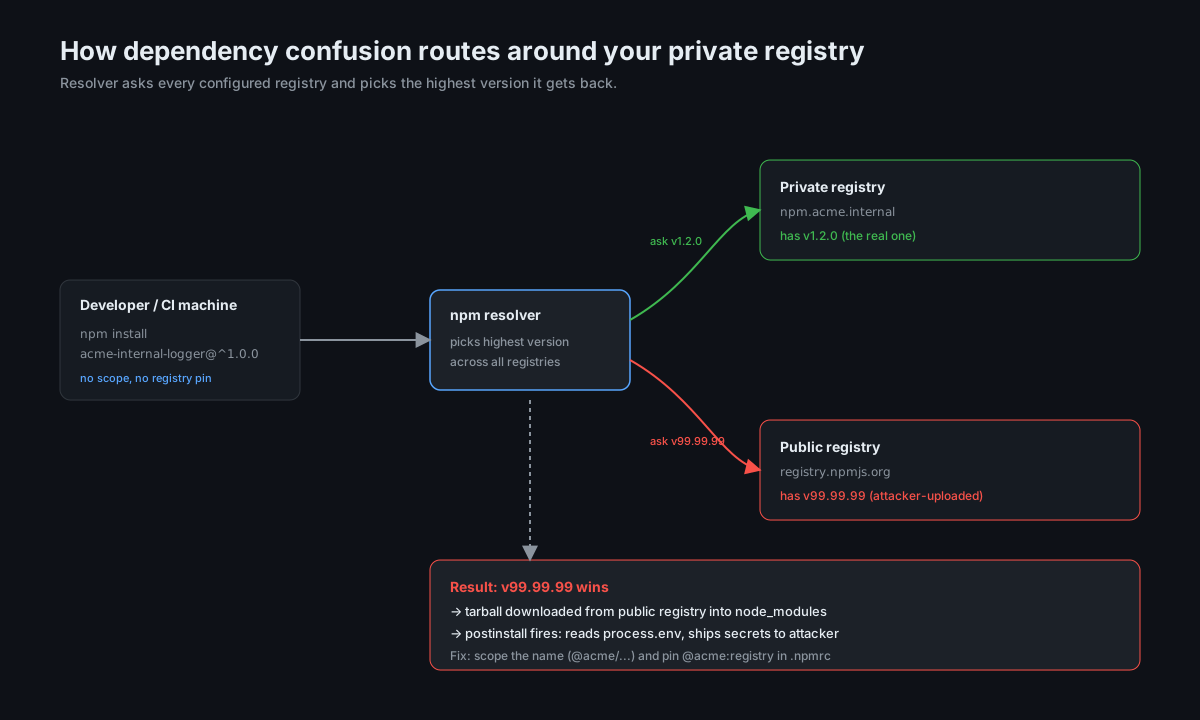
Here's the trap. If your package name is acme-internal-logger and nobody owns that name on public npm, anyone can create a public npm package with that name. And the default resolver behaviour, when given a package name and a version range, doesn't know which registry "should" serve that name. It asks all the registries it has configured, and if the public registry returns a higher version number than your private one, the public version wins.
So the attack flow is:
- Attacker reads your public GitHub repos, your job postings, your engineering blog, your leaked
package.jsonfragments in error messages — anywhere internal package names show up. - Attacker publishes a package with one of those names to public npm. Version
99.99.99. Contains a postinstall hook that exfiltrates environment variables. - Your CI pipeline runs
npm install. The resolver seesacme-internal-logger@^1.0.0in your lockfile, asks both registries, and picks the higher-versioned public one. - The postinstall fires. Your CI secrets — registry tokens, deploy keys, cloud credentials — are now on a server somewhere in Eastern Europe.
The brutal part of Birsan's work was that he didn't even need to guess. He found internal package names by scraping package.json files that companies had accidentally committed to public repos, often inside Docker images or sample apps. Some he found in JavaScript bundles that got served to browsers and still had references to internal packages in error messages. The information was already out there.
{
  "name": "acme-orders-service",
  "dependencies": {
    "express": "^4.18.0",
    "acme-internal-logger": "^1.2.0",
    "acme-auth-helpers": "^2.0.0"
  }
}
That package.json is a target list. Anyone who sees it can try to publish acme-internal-logger and acme-auth-helpers to public npm. If your registry config is wrong, you've handed them a way in.
The defense for dependency confusion isn't a single setting — it's a combination of three things you have to do together.
First, scope your internal packages. Move from acme-internal-logger to @acme/internal-logger. Scoped packages are first-class in npm and they're tied to an npm organisation. Once you own the @acme scope on public npm, nobody else can publish under it. Even if they could, your .npmrc can map @acme: to your private registry exclusively, and the resolver will not look elsewhere:
@acme:registry=https://npm.acme.internal/
//npm.acme.internal/:_authToken=${ACME_NPM_TOKEN}
registry=https://registry.npmjs.org/
With that config, anything starting with @acme/ is routed to your private registry. No question, no fallback, no ambiguity.
Second, claim the public names you can't change. If you have legacy internal packages you can't easily rename — too many services depend on them, too much rework, whatever — claim the public namespace anyway. Publish a stub package called acme-internal-logger to public npm under your own org, version 0.0.0-DO-NOT-USE, with a README that says "this is a placeholder to prevent dependency confusion; the real package is internal". This is what Microsoft, Google, and several others started doing publicly after Birsan's research. It's ugly but it works.
Third, lock your registry config in CI. Your CI runner should not have access to the public registry for scoped or internal names. Configure your CI's .npmrc to fail closed if a package can't be resolved from your private registry. This is the layer that catches the case where a developer adds a new internal package and forgets the scope.
Dependency confusion isn't subtle once you know about it. The reason it works is that almost nobody thinks about registry resolution as a security boundary — until it bites them.
Typosquatting
Typosquatting is the lowest-effort, highest-volume attack in the ecosystem. The attacker takes a popular package name and publishes a near-identical name with a small typo, hoping someone will type the wrong thing into npm install and not notice. There's no scraping, no infrastructure, no zero-day. Just a registry account and ten seconds of imagination.
A non-exhaustive list of the patterns:
- Character swap.
lodahsforlodash.expresforexpress.momnetformoment. - Punctuation drop.
cross-envis the real one.crossenv(no hyphen) was a real malicious package that got pulled in 2017 and dumped environment variables on install. So wasmongoseinstead ofmongoose. So wasnodemailer-jsinstead ofnodemailer. - Dot variation.
node.js-toolinstead ofnodejs-tool. The eye glides over the punctuation. - Lookalike Unicode. Less common but it happens — a Cyrillic
а(U+0430) that looks identical to a Latinain most fonts. npm has filters now that catch some of this, but homoglyph names still show up periodically. - Plural and tense variants.
requestsinstead ofrequest.eventemittersinstead ofeventemitter.
The crucial insight about typosquatting is that the install-time payload doesn't need to be sophisticated. It just needs to run once. A typical malicious typosquat ships a tiny index.js that does basically nothing — exports an empty object, or thinly wraps the real package's API — so that require() works and the build doesn't break. Meanwhile, a postinstall script in the same package collects environment variables, reads ~/.aws/credentials, walks the home directory looking for SSH keys, or installs a remote-access tool.
{
  "name": "crossenv",
  "version": "6.1.1",
  "description": "Run scripts that set and use environment variables across platforms",
  "main": "index.js",
  "scripts": {
    "postinstall": "node ./scripts/postinstall.js"
  }
}
The description is copied verbatim from the real cross-env package. The main works. The postinstall is what does the damage. Most developers who pulled it in didn't notice for weeks, because everything worked. The typosquat had been written to look indistinguishable from the genuine article at runtime. The only place the attack lived was in the install step that ran once and exited.
Typosquatting catches three groups of people consistently:
- Tutorials. Someone writes a blog post that includes a wrong package name. People follow the tutorial, copy-paste the install command, and get the squat. By the time the blog is corrected, the registry stats already show hundreds of installs.
- Auto-complete and AI suggestions. This one has gotten worse with code-completion tools. An AI assistant suggests
npm install reqests(one letter off) because it pattern-matched a similar package name from training data. The developer accepts the suggestion. The squat installs. - Developers in a hurry. Senior engineers paste install commands at 11pm. They don't read carefully. The typo is theirs.
The defenses for typosquatting are mechanical, not heroic.
Use lockfiles religiously. Once a package is in your lockfile, the resolver only fetches that specific name and version. New typo-installs only happen on the first install of a package. If you noticed the wrong name when reviewing the lockfile diff in a PR, you would catch the squat before it hit anyone else. The diff is the gate.
Review the lockfile. A package-lock.json diff is unreadable in the way that database migrations are unreadable: long, noisy, mostly mechanical. But the new top-level entries are short. When package-lock.json changes, look at the top of the diff for the names of newly added direct dependencies and make sure they match what your package.json says they should be. It's a thirty-second review.
Pin and check at install time. The npm install <pkg> form has a sister: npm install --save-exact <pkg>. Better: configure your team's .npmrc with save-exact=true so every new install pins to a specific version. This doesn't stop typosquats by itself, but it gives you a moment of friction during which to read what you just typed.
Use an allow-list policy if you can afford the overhead. Tools like socket.dev and Snyk score package risk at install time — checking maintainer history, install scripts, network calls in the source, lookalike names, and other signals — and can block a pull request that introduces something suspicious. This shifts the typosquat conversation from "did anyone notice?" to "did the bot notice?".
Disable install scripts on CI for untrusted environments. npm install --ignore-scripts disables preinstall, install, and postinstall hooks entirely. This breaks some legitimate packages (native module builds, for instance), so you can't just turn it on globally — but you can run it in security-sensitive contexts, like a separate fetch step before your real build. We'll come back to this in the defense section.
Typosquatting isn't going away. It's too cheap to attack, and there are too many similar-looking names for any registry to filter them all. What you can do is make sure typosquats fail at the gate, not in production.
Supply-Chain Compromise Of Legitimate Packages
This is the scariest of the three because the package you're installing is the one you actually intended to install. The name is right, the maintainer is right, the version range looks right. Something has changed in the package — either because the maintainer pushed a malicious update, or because their account was compromised, or because a new dependency was added downstream that has its own problems.
Three incidents are worth knowing because they're the templates the rest of the attacks copy.
event-stream, November 2018. event-stream was a popular utility package — millions of weekly downloads, simple stream helpers, written years earlier by a maintainer who had moved on to other things. A contributor offered to take over maintenance, was granted publish rights, and pushed a few benign updates. Then they added a new dependency, flatmap-stream, which they also controlled. flatmap-stream contained encrypted malicious code that activated only when event-stream was loaded inside the Copay Bitcoin wallet — it stole private keys from that specific application. The malicious version was live for over two months before anyone noticed, and only got caught because an unrelated developer ran a build with deprecation warnings turned on and spotted an odd npm install message.
The takeaway: maintainers move on. Long-tail packages with old codebases and one overworked author are a soft handover target. A "helpful new contributor" who shows up and offers to maintain is sometimes exactly what they look like, and sometimes exactly what they aren't.
ua-parser-js, October 2021. ua-parser-js is a popular user-agent parsing library used by millions of projects. An attacker compromised the maintainer's npm account (via credential stuffing, by all available reporting) and published three malicious versions in a few hours. The payload was a cryptocurrency miner plus password-stealing malware targeting Windows and Linux. The maintainer noticed quickly because the attacker hadn't updated the GitHub repository to match, and the deprecated versions were pulled within a day. But thousands of downloads happened in the window, and CISA — the U.S. cybersecurity agency — issued an advisory.
The takeaway: account compromise scales linearly with package popularity. A two-factor-less maintainer account for a package with 10 million weekly downloads is a much bigger problem than a similar account for a package with five hundred. npm now requires 2FA for high-impact maintainers, which is a real improvement, but the registry is still backfilling enforcement on older accounts.
node-ipc, March 2022. This one was different. The maintainer of node-ipc, a longstanding IPC utility, pushed an update that deliberately corrupted files on machines whose geo-IP looked like it was in Russia or Belarus. He was protesting the war in Ukraine. The malicious behaviour wasn't from a compromised account — it was from the legitimate maintainer pushing what's sometimes called "protestware". Within a day, packages depending on node-ipc (including some used by Vue.js tooling at the time) were transitively running the file-wipe code.
The takeaway: even uncompromised maintainers can push hostile updates. The trust model assumes the maintainer is acting in good faith forever. That assumption is doing a lot of work, and there is no purely technical way to enforce it.
What ties these three together is the shape of the trust chain. Every popular package eventually gets handed off, has its account targeted, or has its maintainer change their mind. The attack surface isn't a flaw in npm — it's the structure of "publish once, install everywhere".
So how do you defend against attacks where the correct package is the attack?
Pin transitive versions, not just direct ones. Your package.json lists direct dependencies; your lockfile pins everything else. This is the difference between "I trust express 4.x" and "I trust this exact tree of 412 packages with these exact hashes". Lockfiles are what take a moving graph and freeze it. If event-stream had been pinned at the version that existed before the takeover, the malicious version wouldn't have shipped to those teams.
Don't auto-update. Bots like Dependabot and Renovate are useful and dangerous. They open PRs for updates, which is helpful, but they encourage merging without reading. A weekly bulk-merge of dependency PRs is exactly the pipeline through which compromised versions reach production. Treat dependency PRs the way you treat any other code change — review the diff, look at the changelog, glance at the source for new install scripts. This sounds tedious. It is. It's also the work, because the entire trust delegation is now happening at PR-review time.
Use npm provenance. As of npm CLI 9.5 (released in early 2023), packages can be published with verifiable build provenance — cryptographic attestations that link a published version to a specific GitHub Actions workflow run. When you install a package with provenance, you can verify that it was built from a particular commit in a particular public repo. This doesn't solve everything (the maintainer can still push malicious code via a workflow), but it makes it much harder to push a malicious version through a compromised npm account without simultaneously compromising GitHub. Check provenance with npm audit signatures or look for the "provenance" badge on the npm web UI.
Watch maintainer transitions on critical packages. This is the one piece of advice that sounds like it can't possibly scale, and it doesn't, fully — but for the top tier of dependencies (the ones that, if compromised, would let an attacker into your most sensitive systems), it's worth knowing the maintainer. Subscribe to releases. Notice when ownership changes. Notice when a longtime author suddenly stops pushing for six months and a new name appears on a release. It is genuinely the kind of thing where a five-minute monthly skim catches things automated tools miss.
Run npm audit and act on the high-severity ones. npm audit queries the npm Advisory Database for known vulnerabilities in your installed packages. It's not a defence against zero-day supply-chain attacks — by definition, those aren't known yet — but it catches the long tail of post-disclosure CVEs in your transitive graph. Don't run it as a gate ("zero advisories or the build fails") because that creates noise fatigue; do run it as a signal you actually look at, and treat any high or critical finding as a thing to fix this sprint.
The deepest defense against supply-chain compromise is reducing the attack surface, which brings us to the layer underneath all of these incidents.
The Layer Underneath: Install Scripts
Every single one of the attacks above had the same final step. The malicious code ran during npm install. Not when you used the package. Not when your service started. During installation.
That's because npm packages can register preinstall, install, and postinstall scripts in package.json, which the package manager will dutifully execute as part of npm install. These scripts run with the permissions of whoever ran npm install — which on a developer laptop is everything, and on a CI runner is everything plus the secrets you've helpfully placed in environment variables.
The honest cost-benefit on install scripts is that most legitimate packages don't need them. They exist because some packages have real reasons — native modules need to build C++ code against the local Node headers, some packages download platform-specific binaries (Cypress, Playwright, Puppeteer all do this), some configure a system service. Those are real cases. But out of the thousands of packages in a typical install, only a small number actually need install scripts. The rest could disable them and nothing would change.
pnpm understood this earliest. By default, pnpm requires you to explicitly approve which packages can run install scripts via an onlyBuiltDependencies allow-list in package.json:
{
  "pnpm": {
    "onlyBuiltDependencies": [
      "cypress",
      "esbuild",
      "playwright-core",
      "sharp"
    ]
  }
}
Anything not on the list installs without running its hooks. The result is that even if a transitive dependency tries to ship a malicious postinstall, it never executes. This single setting closes the door on most of the install-time attack class.
npm itself supports a coarser version: npm install --ignore-scripts. It disables hooks globally. You can set it as a default in .npmrc:
ignore-scripts=trueThe cost is that packages which legitimately need to build (native modules, browser binaries) won't work. The workaround is a two-step install: ignore scripts during the bulk install, then re-run install with scripts enabled for a known allow-list. It's awkward, and the awkwardness is why most teams don't do it. But for CI specifically — where you control the environment and can codify exactly which packages need scripts — it's worth the friction.
Yarn (the classic v1) has --ignore-scripts and Yarn 2+ has a more sophisticated plugin system that can gate which scripts run by package. The common move there is to use the plugin-allow-scripts approach and explicitly list the packages allowed to run install code.
The general principle: install scripts are the largest single privilege escalation in the npm ecosystem, and almost nobody needs as many as they currently allow. Treat the question "which packages can run code on my CI runner during install?" as a security-relevant config, not a default-on.
Lockfiles Are A Security Tool, Not Just A Reproducibility Tool
Most teams treat package-lock.json and yarn.lock and pnpm-lock.yaml as reproducibility files — the things that make "works on my machine" also work on the CI runner. They are that, but in the context of supply-chain attacks they are also the strongest line of defense you already have shipped.
Three properties of a committed lockfile matter for security.
First, exact resolution. When the lockfile is present, the package manager doesn't ask the registry "what's the latest version that satisfies ^1.2.0?". It asks "give me exactly 1.2.4, with this tarball SHA". A new malicious version published yesterday is invisible until you regenerate the lockfile, which you only do when you explicitly run an update command. The lockfile pins time.
Second, integrity hashes. Modern lockfiles include cryptographic hashes of every package tarball. When the package manager downloads a tarball, it verifies the hash matches what the lockfile expects. If an attacker manages to replace the tarball on the registry — without rotating the version number — the hash mismatches and the install fails. This is the layer that protects against post-publish tarball tampering, including some categories of CDN compromise.
Third, diffability. Every update to a transitive dependency shows up in the lockfile diff. New top-level packages appear. New install scripts can be flagged by tooling. The lockfile is the only artifact that captures the full picture of what's about to ship — package.json doesn't, and node_modules is gitignored. If you don't review lockfile changes, you're not reviewing your supply chain.
The common mistakes around lockfiles:
- Not committing it. Some teams gitignore
package-lock.jsonbecause the diffs are noisy. This is a serious vulnerability. Commit the lockfile, every time. npm installin CI instead ofnpm ci.npm installwill update the lockfile if the dependency tree resolves to something different from what's pinned.npm ci("clean install") refuses to do that — it strictly installs from the lockfile, errors out if anything mismatches, and is much faster. Usenpm ciin CI, always. The same applies toyarn install --frozen-lockfile(yarn 1),yarn install --immutable(yarn 2+), andpnpm install --frozen-lockfile.- Auto-regenerating the lockfile on dependency PRs. Some bots regenerate the lockfile during their merge process, replacing the diff that humans were supposed to read with an opaque post-merge change. Configure your tooling to never regenerate the lockfile in a way that bypasses review.
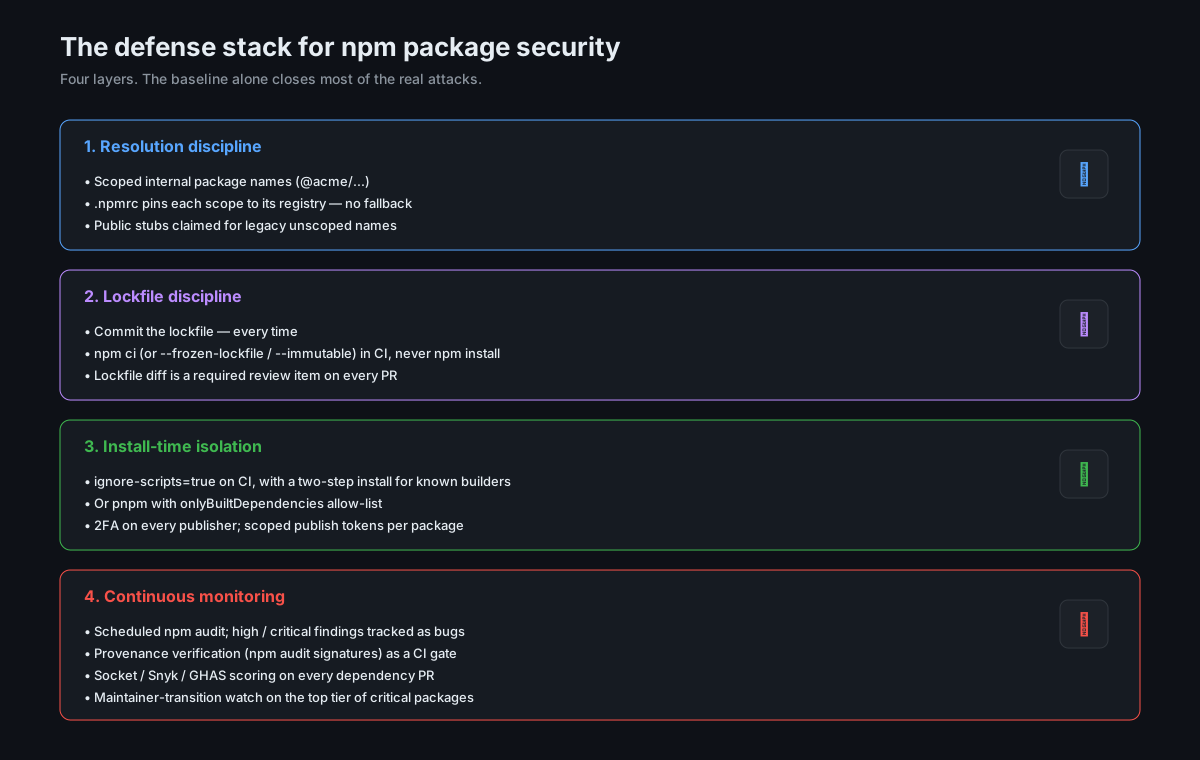
If you do nothing else from this article, do these three: commit the lockfile, run npm ci (not npm install) in CI, and treat lockfile diffs as code review.
Defenses, Stacked
The patterns above are mostly negative — "don't do this, watch out for that". A stacked picture of what positive defenses actually look like, in roughly increasing order of effort.
Baseline (every project should have).
- Lockfile committed,
npm ci(or equivalent) in CI. - Internal packages scoped (
@acme/...) and resolved exclusively from your private registry via.npmrc. - Public stubs claimed for legacy internal names that can't be renamed.
npm auditrun on a schedule (weekly is fine), high/critical findings tracked as bugs.
One step up (most production-grade projects should have).
ignore-scripts=truein CI's.npmrc, with an explicit two-step install for packages that need scripts.- Or migrate to
pnpmwithonlyBuiltDependenciesas the allow-list. - 2FA enforced on every npm publisher in your org. Separate publish-only tokens scoped per package.
- Lockfile diff is a required review item in PR templates.
More involved (security-sensitive projects, regulated environments, anything handling money or PHI).
- A private registry that mirrors public npm and lets you allow-list which public packages are even fetchable.
VerdaccioandJFrog Artifactoryboth support this. - Continuous monitoring tooling (Socket, Snyk, GitHub Advanced Security) that runs at PR time and flags risky packages.
- Provenance verification (
npm audit signatures) as a CI gate for packages that publish provenance. - Static analysis of installed packages — at minimum a check for new
postinstallhooks introduced by an update. - Maintainer-change monitoring for the top tier of critical dependencies. There's no off-the-shelf tool that's perfect for this, but
github.com/<repo>/releases.atomand a weekly review meeting will get you most of the value.
The thing to notice about that stack is that the baseline alone closes a startling fraction of real attacks. Lockfiles plus scoped internal packages plus a private registry plus 2FA on publishers stops every one of the three named incidents above, without buying any new tooling. The expensive defenses are useful, but they're not where the marginal risk lives — the marginal risk lives in the boring baseline that teams routinely skip.
What This Looks Like In An Honest Postmortem
If your team gets hit, the postmortem usually goes through the same beats. Knowing them helps both with prevention and with the response.
The trigger is almost never "an alert fired". It's "something looked weird". A developer noticed a strange entry in package-lock.json during code review. A CI job took longer than usual because a postinstall script was making outbound network calls. A security team's egress monitor flagged a connection to a host that wasn't on the allow-list. Sometimes it's a tweet from a maintainer saying "if you installed <package> between these times, you have a problem".
Then comes the scope question — what installed it, what ran it, what touched secrets? This is where having structured logs from your CI matters more than any single security control. If you can pull every npm install invocation in the last 30 days, with environment variables redacted but timestamps and runner identities intact, you can usually answer "which builds were exposed" in an hour. If you can't, you spend a week guessing.
Then containment. Rotate the secrets the runner had access to. Re-issue registry tokens, deploy keys, cloud credentials. Force-publish a clean version of any affected package. Pin the lockfile back to a known-good version. None of this is technically interesting, but the speed of it determines how bad the incident is.
Then the actual fix, which is usually one of three things: tighten registry configuration, add --ignore-scripts or onlyBuiltDependencies, or remove a dependency that was always sketchier than the team had reckoned with. The fix is rarely a new tool. It's almost always a thing the team had been planning to do "eventually".
The reason to walk through that is to internalise that the cost of an incident is dominated by the work you didn't do before the incident — the lockfile that wasn't reviewed, the audit log that wasn't structured, the scoped names that hadn't been migrated, the CI runner that had production credentials for no reason. The defenses in the previous section are mostly cheap. The aftermath of skipping them is not.
Closing
The npm ecosystem isn't insecure because of a flaw in the registry. It's insecure because the trust model — "your code runs my code at install time, transitively, from a graph I cannot fully audit" — is a hard problem that hasn't been solved by any popular package ecosystem. Go has had its own near-misses. Python had colors.py ship a sabotage update. PyPI has typosquats every week. The problem isn't JavaScript-specific. It's a property of how modern software gets built, on top of millions of packages from millions of authors.
What's specific to Node is that the surface area is the largest in the industry and the install lifecycle is the most permissive. Both of those make it the place attacks land first, and that's not going to change. What changes is whether your project is on the easy-target list or the hard-target list.
You don't need a security team to get off the easy-target list. You need to do four things: commit and review the lockfile, scope your internal packages and lock your registry config, disable install scripts for packages that don't need them, and pay attention when the dependency PR is for a maintainer-handoff version. That's most of it. The rest is iteration.
Your node_modules folder isn't going to get smaller. The question is whether you're treating it like infrastructure — with the same care you'd put into the rest of your stack — or whether you're treating it like a black box because it has been one for so long. Treat it like infrastructure. The bug you avoid this way is the one you wouldn't have seen coming anyway.