There's a quiet moment, about thirty seconds into a production deploy, where the application is half-rolled-out and the database is half-migrated. The new pods are starting to take traffic. The old pods are still draining the last few in-flight requests. And somewhere in between, a column has just been renamed.
If you've been on call long enough, you know exactly which kind of error shows up next. "Unknown column email_address" from a pod the deploy hasn't reached yet. Or "duplicate key" on a backfill nobody told the application about. Or worse: silent data drift, because two replicas wrote to a column that was supposed to be gone.
Most migration tutorials stop where the trouble starts. They show you how to write ALTER TABLE, mention "be careful in production," and move on. That's fine for a side project. In a real CI/CD pipeline, with multiple replicas, blue/green deploys, and a deploy frequency measured in hours rather than weeks, you need a model for how the migration runs, when it runs, who runs it, and what happens if it fails halfway through.
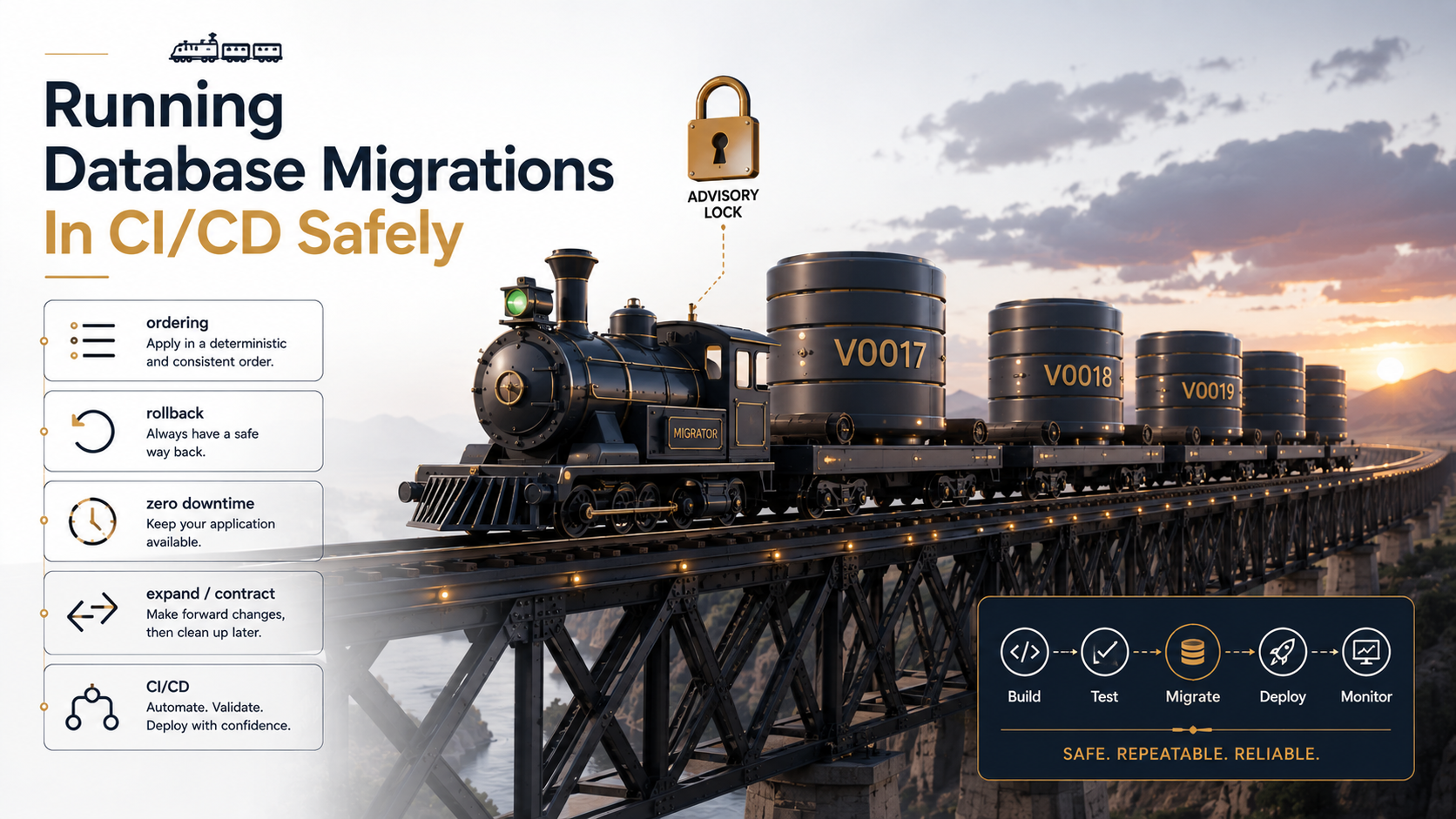
This piece is about that model. We'll start with the three things every migration runner already gives you (and the one thing they don't), walk through ordering and locking, sit with the uncomfortable truth about rollback, and finish with the expand/contract pattern that makes zero-downtime deploys boring instead of heroic.
What A Migration Runner Already Does For You
If you're using Flyway, Liquibase, Alembic, knex, Prisma Migrate, golang-migrate, Laravel migrations, Rails ActiveRecord::Migration, or any of the other mainstream tools, three things are already true and you don't need to re-invent them:
- Each migration has a version. Usually a timestamp prefix (
20260514_093212_add_user_email.sql) or a monotonic integer (V0042__add_user_email.sql). Order is defined by this version, not by file system order or alphabetical sorting in your head. - Applied migrations are tracked in a table. Flyway uses
flyway_schema_history. Alembic usesalembic_version. Knex usesknex_migrations. The runner consults this table to know what's already been applied, and skips those. - Each migration runs in a transaction where it can. PostgreSQL supports transactional DDL, which is wonderful. If a migration fails halfway, the schema rolls back. MySQL and most other engines auto-commit DDL, which means a partial migration leaves you stuck in the middle.
That's the floor. What none of these tools do, out of the box, is protect you from running the same migration twice from two CI runners at the same time, or from deploying application code that references a column the migration hasn't created yet. Those are your problem. Most of this article is about how to make them stop being a problem.
Ordering Is The Thing Nobody Tests
Here's a failure mode I've seen happen on three different teams:
A developer branches off main on Monday and adds a migration 20260513_120000_add_status_to_orders.sql. Another developer branches off main on Tuesday and adds 20260514_090000_add_priority_to_orders.sql. Both merge to main on Friday, in either order, because the second developer's PR happened to merge first. CI passes for both. The migrations run on staging. Everything looks fine.
Then a third developer, three weeks later, runs the migrations on a fresh environment for the first time. Now they run in timestamp order, not merge order, and the first migration was written against a schema that didn't exist yet, because the second developer's migration changed something the first one was relying on.
The bug isn't in the migrations. The bug is that "this migration ran successfully once" doesn't mean "this migration will run successfully on a fresh environment in correct timestamp order against the latest schema." Your CI pipeline needs to test that fresh-environment path on every PR.
The check that catches this is dumb and effective:
name: migrations / fresh database

on: [pull_request]

jobs:
  fresh-up:
    runs-on: ubuntu-latest
    services:
      postgres:
        image: postgres:16
        env:
          POSTGRES_PASSWORD: postgres
        ports: ["5432:5432"]
        options: >-
          --health-cmd "pg_isready -U postgres"
          --health-interval 5s --health-timeout 5s --health-retries 10
    steps:
      - uses: actions/checkout@v4
      - name: Apply every migration from zero
        run: |
          export DATABASE_URL=postgres://postgres:postgres@localhost:5432/postgres
          ./scripts/migrate up
      - name: Sanity-check the resulting schema
        run: ./scripts/schema-diff --expected db/schema.sql
That last line matters. Most teams check in a generated schema.sql (or structure.sql, Rails-style) and diff it against the live schema after the fresh-up run. If the diff isn't empty, the PR fails before it can ruin anyone's afternoon. Rails has had this built in for over a decade. Django can do it with manage.py sqlmigrate. Knex can do it via a custom script. Flyway has flyway info. Pick the equivalent in your toolchain and turn it on.
The Concurrent Runner Problem
CI/CD pipelines deploy from multiple agents. Kubernetes operators retry failed jobs. A frantic engineer kicks off migrate up manually because a deploy looked stuck. Whatever the cause, sooner or later two processes try to run the same migration at the same time.
What happens depends on your runner. Some lock the schema-history table and serialise correctly. Some don't. Even when they do, the deploy job that wraps the migration usually doesn't, and you can end up with the migration applied once but two CI jobs both reporting success and rolling forward to different application versions.
The clean fix in PostgreSQL is a session-level advisory lock taken before you touch anything. It's a 64-bit integer key the database treats as a global mutex, with no actual schema impact:
-- Pick any constant. Document it somewhere so two teams don't collide.
SELECT pg_advisory_lock(728491);

-- ... run migration runner here ...

SELECT pg_advisory_unlock(728491);
Or, even safer, pg_try_advisory_lock so a second runner exits gracefully instead of blocking:
SELECT pg_try_advisory_lock(728491);
-- Returns true if we got the lock, false if someone else holds it.
If the second runner gets false, it logs "another migration runner is active, skipping" and exits zero. The deploy proceeds. The migration runs once.
In MySQL, the equivalent is GET_LOCK('migrations', 30): same semantics, named lock, timeout in seconds. In SQL Server, it's sp_getapplock. Most production migration tools wrap this for you (Flyway uses it; Liquibase uses a DATABASECHANGELOGLOCK table; Prisma Migrate Deploy takes an advisory lock in Postgres), but verify yours actually does. The default for many homegrown shell-script runners is "no lock at all."
import { Client } from 'pg';

async function migrateWithLock() {
  const client = new Client({ connectionString: process.env.DATABASE_URL });
  await client.connect();

  const { rows } = await client.query('SELECT pg_try_advisory_lock($1) AS got', [728491]);
  if (!rows[0].got) {
    console.log('another migration runner is active, exiting cleanly');
    await client.end();
    process.exit(0);
  }

  try {
    await runPendingMigrations(client); // your runner here
  } finally {
    await client.query('SELECT pg_advisory_unlock($1)', [728491]);
    await client.end();
  }
}
The point isn't the exact code. Your migration tool probably already does this. The point is to check that it does before you assume.
When To Run The Migration
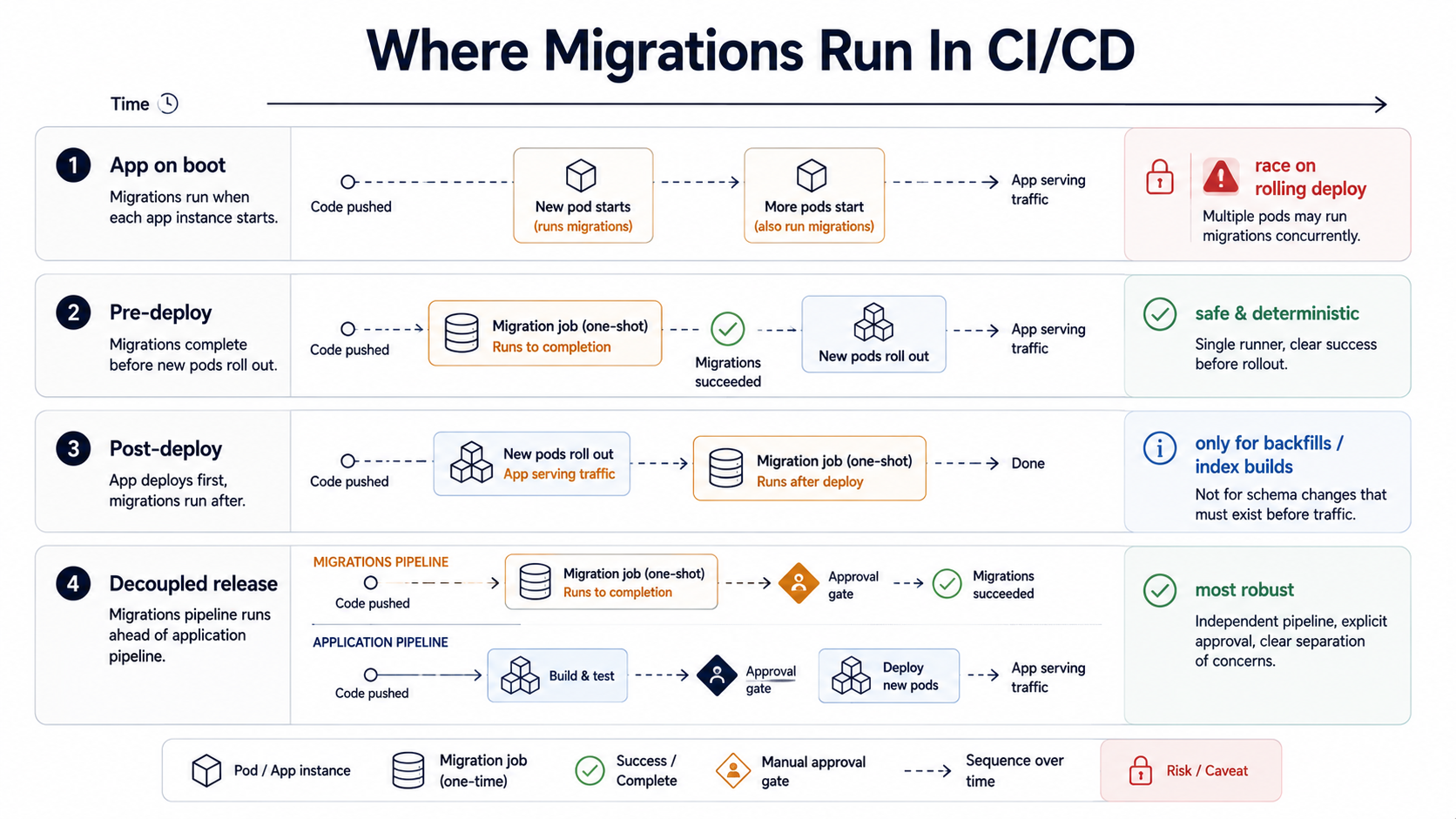
There are basically four places a migration can run in a CI/CD pipeline:
- Inside the application on boot. The app calls
migrate upbefore opening the HTTP port. Common in small Django and Rails apps. - As a pre-deploy step. Before any new pods come up, a one-shot job applies migrations against the database. The deploy waits for this job to succeed.
- As a post-deploy step. New pods come up first, migrations run after.
- Decoupled, separately released. Migrations ship in their own pipeline, on their own cadence, ahead of the application changes that depend on them.
Each one has a different failure mode, and the choice matters more than people give it credit for.
App-on-boot is the easiest to write and the most dangerous in production. With more than one replica, both replicas race for the same migration on rolling deploy. Some frameworks handle this with an advisory lock; many don't. The bigger issue is that it ties the migration's success to a single pod's startup: if the migration fails, that pod restarts, your readiness probe fails, the deploy stalls, and you have a half-migrated database with a deploy stuck mid-roll. Fine for hobby projects. Not fine for anything with a pager.
Pre-deploy is the default I'd reach for in most production systems. The pipeline runs migrate up as a Kubernetes Job (or its equivalent) before the new application version starts rolling out. If it fails, the new version never deploys, and the old version keeps running against the un-migrated schema, which it was working fine against five seconds ago, so this is a safe failure mode.
jobs:
  migrate:
    runs-on: ubuntu-latest
    environment: production
    steps:
      - uses: actions/checkout@v4
      - name: Run migrations
        run: ./scripts/migrate up
        env:
          DATABASE_URL: ${{ secrets.PROD_DATABASE_URL }}

  deploy:
    needs: migrate
    runs-on: ubuntu-latest
    steps:
      - name: Roll out new pods
        run: kubectl set image deployment/api api=ghcr.io/acme/api:${{ github.sha }}
The catch, and this is where the next two sections become important, is that the new application code can't depend on schema changes the current application code can't survive. Which means most non-trivial migrations have to be written in a way that's safe to run against both the old and the new application version at the same time. That's the expand/contract pattern, and it's coming up in a moment.
Post-deploy is rarer and only makes sense for a specific class of changes (backfills, index builds, denormalisations) where the new application code doesn't depend on the work being finished before it can serve traffic. We'll touch on this in the backfill section.
Decoupled releases ship migrations as their own deployable artifact, separate from the application. It's the most mature option and the one large teams eventually drift toward. Flyway and Liquibase are explicitly designed for this; both ship migration runners that aren't coupled to any application code at all. The migration gets its own pull request, its own review (often with a DBA), its own staging soak time, and its own blast radius.
The Uncomfortable Truth About Rollback
Every migration tool ships with a down migration. Every tutorial mentions it. And in production, you almost never run it.
There are three reasons.
The first is that down migrations lie about being safe. A down that drops a column irreversibly destroys whatever data the application wrote into that column during the few minutes the new version was live. A down that renames a column back wipes out the writes that went to the new name. The only time a down is truly safe is when the corresponding up was purely additive and unused, i.e., when the rollback is functionally a no-op because the new code never actually touched the new schema.
The second is that most production incidents that trigger a rollback are at the application layer, not the schema layer. The new code has a bug. You want to ship the old code, fast, while the new schema sits there harmless. Rolling the schema back as well, in the middle of a fire, is extra risk you don't need.
The third is that rolling forward is almost always faster and safer. If a migration left the database in a broken state, you write a new migration that fixes it. Forward fixes accumulate in version control like any other change. Down migrations rolled back in production usually don't, and the schema history table now disagrees with your code, and you have to dig yourself out.
So what's the rule of thumb?
The production rollback plan for a schema change is, in order:
- Roll back the application. If the migration was expand/contract-safe, the old code still works against the new schema. No data action needed.
- If a backfill went wrong, write a forward migration that corrects the data. Don't try to
downa backfill. - If the schema itself is wrong, write a forward migration that re-shapes it. Drop the bad column, add a better one, ship through expand/contract again.
That's it. Three options, all forward. The down file is for make test.
Zero Downtime: The Expand/Contract Pattern
Most of what makes migrations hard on a live system comes from one fact: during a rolling deploy, the old application and the new application are running against the same database at the same time. Anything you change in the schema has to be tolerable to both.
The pattern that handles this is older than CI/CD itself, and it goes by a few names: parallel change, blue/green schema, expand/contract. The shape is always the same: split a destructive change into a sequence of additive steps, each of which both versions of the application can handle.
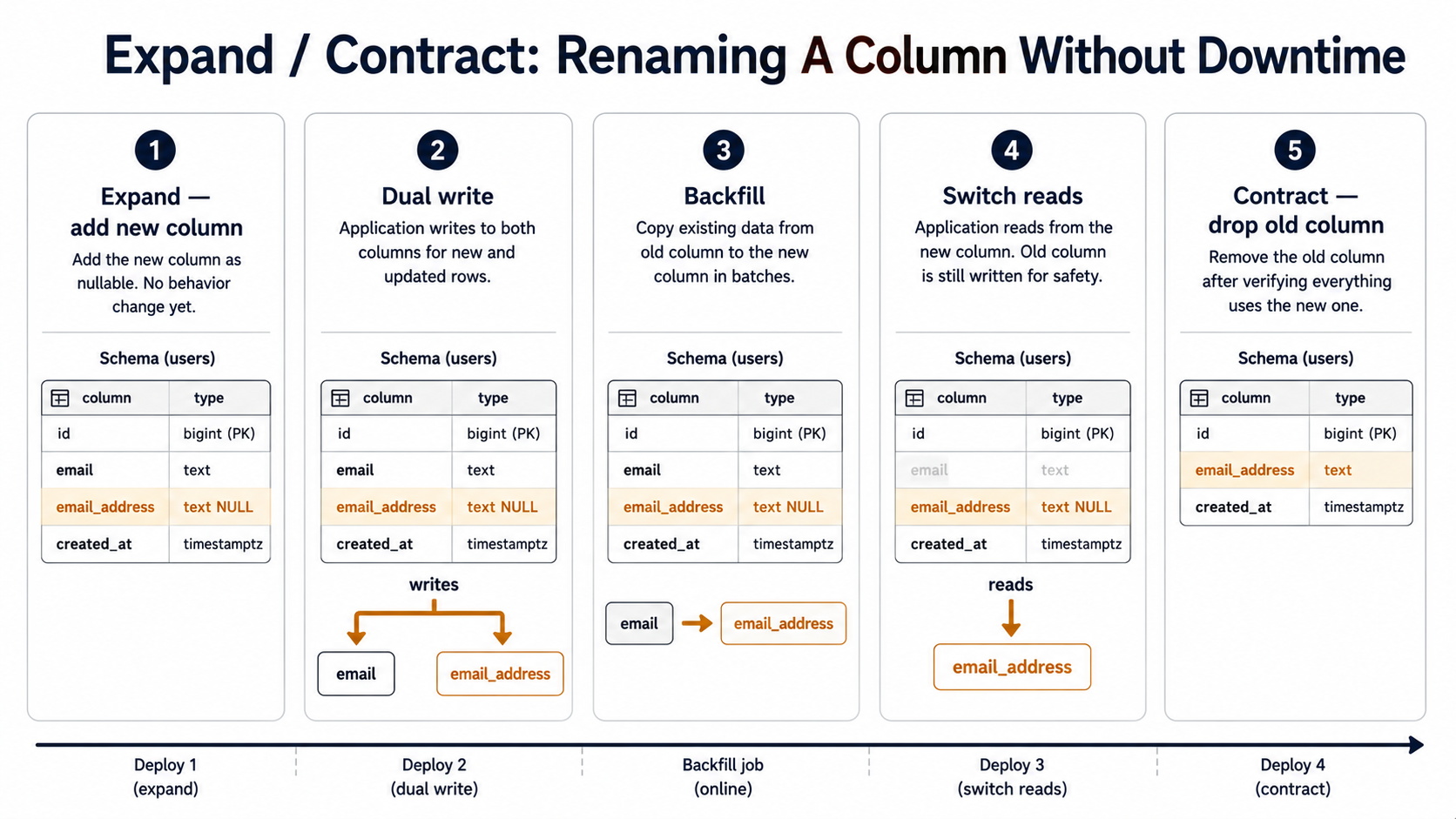
Let's walk through a concrete example. You want to rename users.email to users.email_address. Naive approach: write one migration that runs ALTER TABLE users RENAME COLUMN email TO email_address. Deploy. Watch the old pods explode for the next ninety seconds while they keep querying email.
The expand/contract version is four migrations and three deploys:
Migration 1, expand. Add email_address as a new nullable column. Do not touch email.
ALTER TABLE users
  ADD COLUMN email_address TEXT;
Deploy nothing yet. The schema has gained a column, no application code reads it, both old and new pods carry on with email.
Migration 2, dual-write at the application layer. Ship application code that, on every write to users, populates both email and email_address with the same value. Read still goes from email. Deploy this version.
async function updateEmail(userId: string, value: string) {
  await db.query(
    'UPDATE users SET email = $1, email_address = $1 WHERE id = $2',
    [value, userId],
  );
}
This is the safe step. Both old and new pods are now writing to email. New pods are additionally writing to email_address. Reads are unchanged.
Migration 3, backfill. Once every pod is on the dual-write code, run a migration that copies email into email_address for every existing row. For a large table, do it in batches so you don't lock the table for an hour.
-- For Postgres on a large table, this should be a background job or
-- a batched script, not one statement. Shown here as a single command
-- for clarity.
UPDATE users
   SET email_address = email
 WHERE email_address IS NULL;
Then add the NOT NULL constraint (in a separate migration if your engine doesn't support fast NOT NULL):
ALTER TABLE users
  ALTER COLUMN email_address SET NOT NULL;
In Postgres 12+, SET NOT NULL is fast as long as there's already a CHECK (email_address IS NOT NULL) NOT VALID constraint that's been VALIDATEd. On older engines you may need a different dance, but the principle is the same: the column is now populated, constrained, and trustworthy.
Migration 4, switch reads. Ship application code that reads from email_address instead of email. Stop writing to email. Deploy this version.
async function getEmail(userId: string): Promise<string> {
  const { rows } = await db.query(
    'SELECT email_address FROM users WHERE id = $1',
    [userId],
  );
  return rows[0].email_address;
}
At this point email is dead weight. Nothing reads it; nothing writes to it. But you do not drop it yet. You wait at least one deploy cycle, ideally a few days, to confirm nothing slipped through a code path you forgot about.
Migration 5, contract. When you're confident, drop the old column.
ALTER TABLE users
  DROP COLUMN email;
Five steps. Three deploys. One column rename. That feels absurd until you've watched a one-step rename take down production for forty minutes, and then it feels like a steal.
The same pattern handles every "destructive" change. Splitting a column? Expand into the two new columns, dual-write, backfill, switch reads, drop the old one. Changing a column type? Add a new column of the new type, dual-write with the conversion, backfill, switch reads, drop. Even outright deletions are safer this way: stop reading first, stop writing second, drop third.
What About Index Builds And Long-Running Statements
Some migrations are individually fine but block the table for too long to run on a live database. Two examples worth knowing.
CREATE INDEX on a large table locks the table against writes for the duration of the build. On a multi-million-row table that's minutes of write-blocking. The fix in Postgres is CREATE INDEX CONCURRENTLY, which builds the index without blocking writes, at the cost of taking longer and not being runnable inside a transaction.
-- This MUST run outside a transaction. Most migration tools have
-- a per-migration flag for this. In Flyway it's `executeInTransaction=false`.
-- In Alembic it's `op.execute('COMMIT')` followed by the CREATE INDEX CONCURRENTLY
-- (which is ugly but works).
CREATE INDEX CONCURRENTLY idx_orders_user_id ON orders (user_id);
MySQL 8 has ALGORITHM=INPLACE, LOCK=NONE for the same purpose on many index operations. Check your engine's docs: there's usually a way, and you don't want to find out the locking semantics during peak traffic.
Adding a NOT NULL column with a default is the other classic. On Postgres 11+ this is fast for most types because the default is stored in metadata; on older Postgres versions and on some MySQL configurations it rewrites every row. If you're not sure, do it in two steps: add the column nullable, backfill the default in batches, then add NOT NULL.
The general rule: any migration that takes more than a couple of seconds on production-sized data is a backfill in disguise. Treat it like one: batch it, throttle it, monitor it, and don't let your migration runner sit on it for an hour while the deploy timeout ticks down.
Testing Migrations In CI
Three things are worth testing in CI for every migration PR, and they catch most of the bugs you'll ever ship:
- Fresh-up. Apply every migration from an empty database. Already covered above.
- Up-then-down-then-up. Apply the new migration, roll it back, apply it again. This catches
downmigrations that don't actually undo whatupdid, and it surfaces idempotency bugs. - Compatibility with the previous application version. Spin up the current production application image, run the new migration against its database, and run a small smoke-test suite against the old application. If anything breaks, your migration isn't expand/contract-safe.
That third one is the unglamorous gem. It catches almost every "we deployed and the old pods started 500ing" incident, and it costs about twelve seconds of CI time:
jobs:
  prev-version-compat:
    runs-on: ubuntu-latest
    services:
      postgres:
        image: postgres:16
        env: { POSTGRES_PASSWORD: postgres }
        ports: ["5432:5432"]
    steps:
      - uses: actions/checkout@v4
      - name: Apply new migration on top of previous schema
        run: |
          # Boot the previous app image to establish its baseline schema
          docker run --rm --network host \
            -e DATABASE_URL=postgres://postgres:postgres@localhost:5432/postgres \
            ghcr.io/acme/api:${{ github.event.pull_request.base.sha }} \
            ./scripts/migrate up

          # Now apply the new migration from this PR
          ./scripts/migrate up

      - name: Run previous-version smoke tests against the migrated DB
        run: |
          docker run --rm --network host \
            -e DATABASE_URL=postgres://postgres:postgres@localhost:5432/postgres \
            ghcr.io/acme/api:${{ github.event.pull_request.base.sha }} \
            ./scripts/smoke-test
If you've never had a deploy break because old pods couldn't survive the new schema, you've either been lucky or you've been writing strictly additive migrations. This test forces you to keep doing the latter.
A Working Order Of Operations
If you take nothing else from this article, take the order. For any non-trivial schema change shipped through CI/CD:
- Decide the expand/contract sequence before you write a single line of SQL. Sketch the columns and the steps on paper. Count the deploys.
- Open one PR per step, not one PR for the whole sequence. Each PR has its own migration, its own application change (if any), its own deploy.
- The schema-changing PRs are additive only:
ADD COLUMN,ADD INDEX CONCURRENTLY,CREATE TABLE. Nothing destructive in the same deploy as application changes. - The destructive PR comes last, alone, after the application has been running on the new schema without using the old columns for at least one production deploy cycle.
- Every migration runs through the same gates: fresh-up test, up-down-up test, prev-version compatibility test, advisory lock, pre-deploy job, manual approval if the table is over some "expensive" threshold.
Migrations get a reputation for being scary because the failure modes are loud and the recoveries are slow. Most of that goes away once you stop treating them as one-step transformations and start treating them as small, additive, ordered changes that one of your peers could glance at and say "yeah, that's safe." That's the bar, not "clever," not "elegant," just boring enough to deploy on a Friday afternoon.