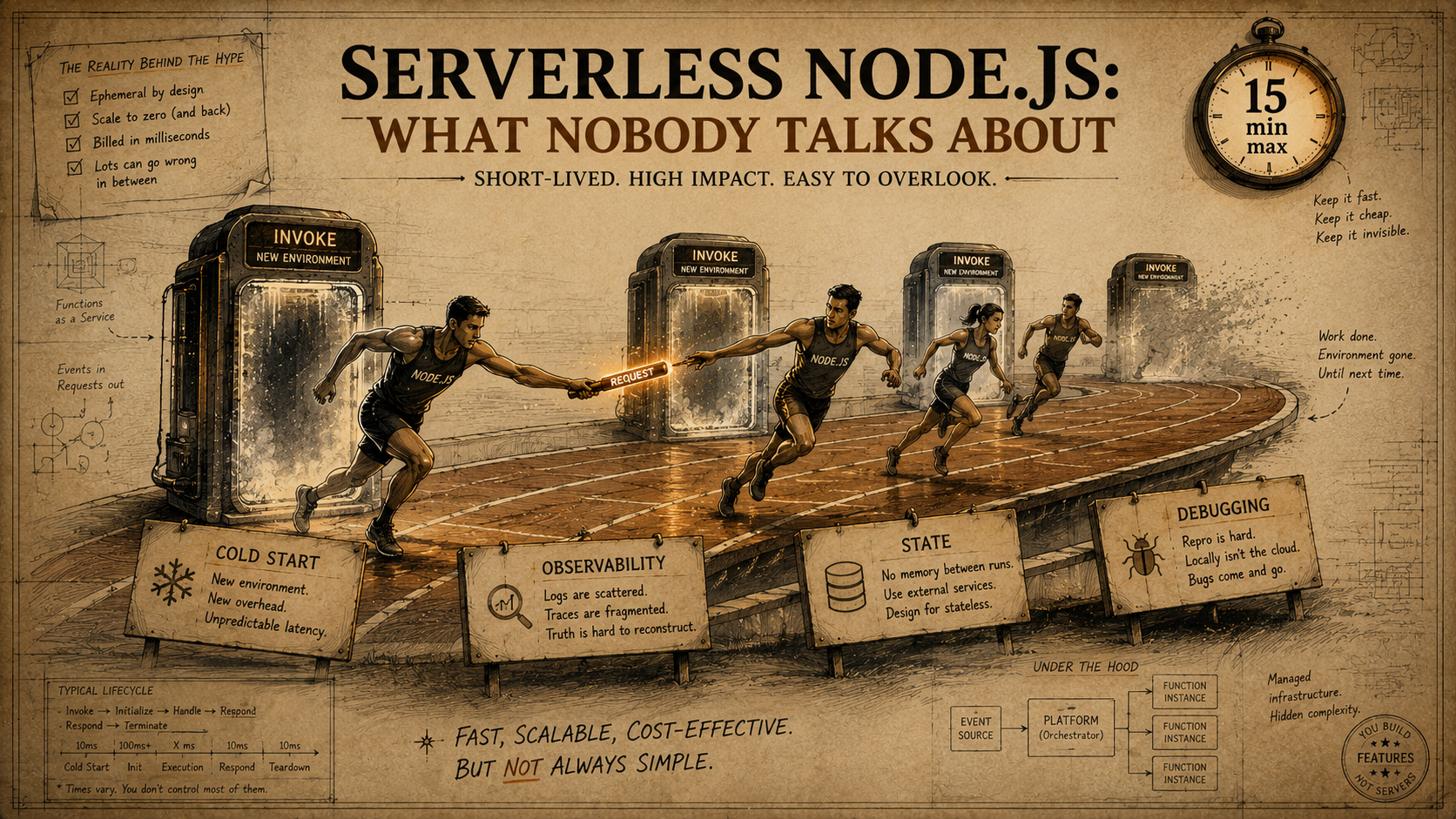
So you've shipped a few Lambdas, your serverless.yml has grown three pages long, and the bill is small enough that nobody on the team is asking questions. The marketing won. You're serverless now. And then, somewhere around month two, the weird stuff starts. A request that used to be 80ms is suddenly 4 seconds, but only sometimes. A user reports a bug that you can't reproduce, ever. Your logs show half a story. The frontend is showing stale data and you can't tell whether it's the CDN, the function, or the database connection — and you can't console.log your way out because the function is gone by the time you read the output.
There's a whole second curriculum to running Node on serverless that nobody puts in the tutorials. The intro pieces give you cold starts, connection pooling, and a pricing chart. The real day-30 problems — the ones that decide whether you stay on Lambda or sneak back to a $5 VPS at 2am on a Saturday — are about observability, state, and debugging in an environment that was designed to forget you. Let's walk through what those problems actually look like, why the standard advice misses, and what you can do about each one.
The Cold-Start Story You Were Told Is Half The Story
Cold starts get the headlines because they're the only serverless cost that's easy to measure. You see a number in CloudWatch. You can tweet about it. So most "serverless cold start" advice converges on the same three moves — bundle smaller, raise memory, turn on provisioned concurrency. Those help. They also miss the parts that actually decide your p99.
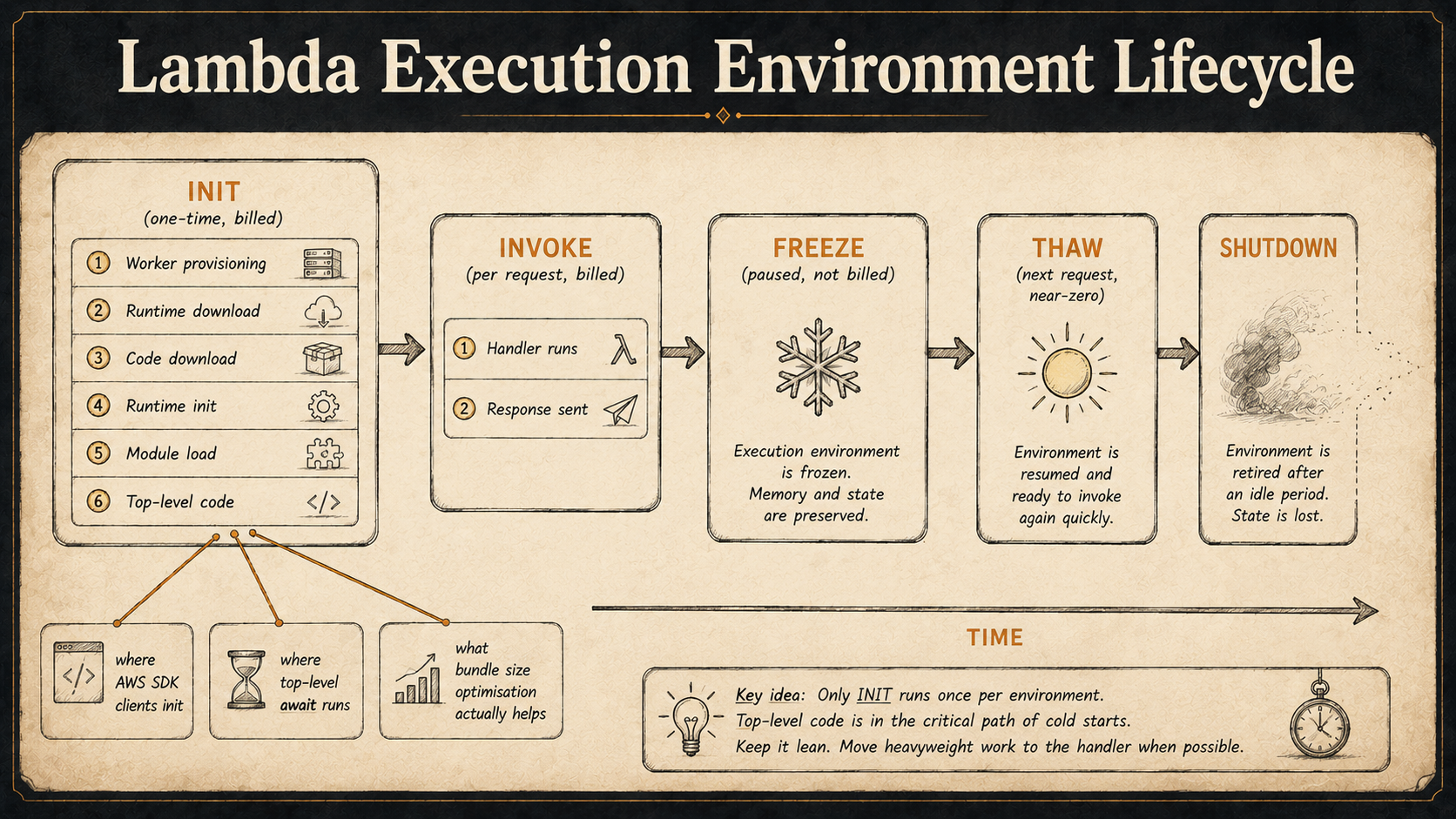
A Node.js Lambda cold start has more stages than the docs imply. AWS gives you two timers in the request log — Init Duration and Duration — but the real breakdown of what happens before your handler runs is roughly:
1. Worker provisioning      (Firecracker microVM spin-up, networking)
2. Runtime download         (Node.js runtime image pulled from cache)
3. Code download            (your zip or container layer fetched + unzipped)
4. Runtime init             (Node process starts, V8 initializes)
5. Module load              (every `import` / `require` in your handler graph)
6. Top-level code           (anything that runs outside the handler)
7. INIT phase ends, billed Init Duration stops here on AWS-managed runtimes
8. Handler invocation       (Duration starts)
Only steps 5, 6, and 7 are actually under your control with webpack / esbuild flags. Steps 1–4 are the platform's problem and don't care about your bundle size. So when you halve your bundle from 12 MB to 6 MB and your cold start drops by 40 ms, that's the upper bound — you've optimised the only part you own.
The interesting part is step 6. Top-level code is the silent killer of cold starts. Every new Pool({...}) at the top of a module, every import { initTelemetry } that does work on load, every SDK client constructor — they all run during INIT, and the runtime doesn't have your application's network ready yet for some of them. A common pattern that looks innocent:
import { S3Client } from '@aws-sdk/client-s3';
import { DynamoDBClient } from '@aws-sdk/client-dynamodb';
import { SecretsManagerClient, GetSecretValueCommand }
  from '@aws-sdk/client-secrets-manager';

const s3 = new S3Client({});
const ddb = new DynamoDBClient({});
const sm = new SecretsManagerClient({});

const dbPassword = await sm.send(
  new GetSecretValueCommand({ SecretId: 'app/prod/db' })
);

export const handler = async (event) => {
  // ...
};
That top-level await is a real feature in modern Node, and it runs inside INIT. So your cold start now includes a round-trip to Secrets Manager. On a warm container nobody notices — INIT runs once per environment. On a cold container, every user paying the cold-start tax also pays for that secret fetch, in serial, before the handler can even start. The fix isn't fancy. Move the secret fetch into a lazy, memoised function and call it from the handler. The first invocation eats the cost, every subsequent one gets the cached value.
let dbPasswordPromise: Promise<string> | null = null;

function getDbPassword(): Promise<string> {
  if (!dbPasswordPromise) {
    dbPasswordPromise = sm
      .send(new GetSecretValueCommand({ SecretId: 'app/prod/db' }))
      .then((r) => {
        if (!r.SecretString) throw new Error('No secret');
        return r.SecretString;
      });
  }
  return dbPasswordPromise;
}

export const handler = async (event) => {
  const password = await getDbPassword();
  // ...
};
Two things to notice. First, the cache is a module-level variable, which means it persists across invocations on the same container — exactly the lifecycle you want. Second, it caches the promise, not the resolved value, so if two invocations race during the same cold start they share one network call instead of issuing two.
The second under-discussed cold-start lever is provisioned concurrency, which everyone reaches for as a magic switch and then forgets that it has its own gotchas. Provisioned concurrency keeps N execution environments INITed and warm, ready to receive invocations with no INIT phase. Great. What it doesn't do:
- It doesn't help if your traffic spikes past N. Invocation N+1 still pays the cold start.
- It doesn't survive a code deploy without re-warming.
- It costs money continuously, which can erase the "pay-per-request" pitch of serverless.
- It doesn't help with the
INITphase of theRuntimeApiClientthat AWS uses for managed runtimes — that's already optimised away on a warm container, but provisioned concurrency doesn't pre-warm the handler's dynamic state (like a DB connection that gets reset by an idle-timeout while no traffic is flowing).
That last one is subtle and worth saying out loud. A provisioned-concurrency container that hasn't taken a request in 10 minutes might still have its pg.Pool connection open, but the database server might have already closed its side of the socket. So the next "warm" invocation does a TCP RST round-trip before any query runs. Provisioned concurrency keeps the Node process warm; it does not keep your external connections warm. The fix is a heartbeat or a validate query on connection checkout — same pattern you'd use on any long-running Node service.
The most useful framing I can give you is this: cold starts aren't one problem, they're a stack of independent latencies. The 60ms you save by bundling tightly and the 200ms you save by moving a secret fetch out of INIT are not the same kind of saving. Measure each one separately or you'll keep optimising the part that's already small.
Observability Is Designed To Be Wrong
The default observability story for Node on Lambda is "use CloudWatch Logs, you'll be fine." If you've ever tried to debug a real production incident with only CloudWatch Logs in front of you, you know that's not fine. It's barely a starting point. The reason isn't that CloudWatch is bad — it's that the serverless execution model breaks several assumptions that traditional Node logging libraries quietly rely on.
A typical Node service has one process, one log file (or stdout), and a request-scoped context (often via AsyncLocalStorage) that carries a request ID through every async hop. Logs from the same request land near each other in the file, in order. You read the file top-to-bottom and the story makes sense.
A Lambda function has N independent processes — one per concurrent execution environment — each writing to its own log stream. A request that touches three functions writes to three different log streams in three different log groups. The logs from one user action are scattered across that landscape, interleaved with thousands of other concurrent requests, with no inherent way to reconstruct the sequence.
This means every log line needs a correlation ID, and you have to add it yourself. The platform does not do this for you. The AWS request ID (context.awsRequestId) is unique per invocation, not per user request, so if your user request fans out into three Lambdas you get three different IDs. You need a higher-level trace ID that propagates from the entry point — usually API Gateway — and is logged on every line in every downstream function.
The pattern most teams converge on, after the second postmortem where they realise they can't find the relevant logs:
import { AsyncLocalStorage } from 'node:async_hooks';
import pino from 'pino';

interface RequestContext {
  traceId: string;
  userId?: string;
  awsRequestId: string;
}

const als = new AsyncLocalStorage<RequestContext>();

const base = pino({
  level: process.env.LOG_LEVEL ?? 'info',
  mixin: () => {
    const ctx = als.getStore();
    return ctx ? { ...ctx } : {};
  },
});

export const logger = base;
export const requestContext = als;import { requestContext, logger } from './logger';
export const handler = async (event, context) => {
const traceId = event.headers?.['x-trace-id'] ?? context.awsRequestId;
return requestContext.run(
{ traceId, awsRequestId: context.awsRequestId },
async () => {
logger.info({ path: event.rawPath }, 'request received');
const result = await doTheWork(event);
logger.info('request done');
return result;
}
);
};AsyncLocalStorage does work inside Lambda — it's a normal Node API and it propagates through await and most callback patterns. The catch is that it does not propagate across invocations. Each Lambda invocation gets a fresh ALS scope, so the traceId must be transmitted across the wire — via a request header, an event payload field, a queue message attribute — and re-established at the start of every function. There's no magic. If you forget to attach the trace ID to the SNS message your handler publishes, the downstream consumer's logs will be orphaned, and you'll find out three weeks later when an incident lands and the trail goes cold.
Distributed tracing exists to make this less painful, and there are three real options for Node on Lambda — none of which is a free win.
AWS X-Ray is the path of least resistance because it's built in. You add the aws-xray-sdk package, wrap your AWS SDK clients, and X-Ray starts producing service maps and per-segment timings. It also has gaps: the auto-instrumentation only covers AWS SDK calls and a handful of popular libraries (pg, mysql, http), so an HTTP call to a third-party API via undici or fetch doesn't get traced unless you manually open a subsegment. And the per-trace storage limits mean very large traces get sampled or truncated silently. You won't notice until the trace you need is the one that got dropped.
OpenTelemetry is the right long-term answer and a non-trivial short-term investment. The @opentelemetry/sdk-node package works in Lambda, but startup overhead is real — adding OTel auto-instrumentation to a 6 MB bundle can add 200–400 ms to cold start because the instrumentation modules all load and patch their targets during INIT. The current best-practice pattern is the AWS-distributed Lambda layer (AWS Distro for OpenTelemetry), which keeps the heavy SDK out of your bundle, but you still need to think carefully about which exporter you use (OTLP via HTTPS adds latency to invocations; UDP exporters drop spans under load).
Just structured logs with a trace ID, sent to a log aggregator that can join them. Boring, durable, low-overhead. Honeycomb, Datadog, Grafana Loki, and Axiom all support log-based tracing if your logs include enough context. This is the pragmatic floor — if you're not ready for X-Ray or OTel, getting structured JSON logs with traceId everywhere is more useful than half-configured tracing.
The thing nobody mentions when they tell you "serverless makes ops easier" is that it moves a category of operational work from "configure your monitoring stack once" to "design correlation into your application code on day one." That's not less work; it's earlier work. And if you skip it, the system becomes invisible exactly when you most need to see inside it.
State Quietly Lives Where You Didn't Put It
Lambda is sold as stateless, and at the level of "each request can hit any container" that's true. At the level of "your code can't keep state across invocations" it's false, and the gap between those two truths is where some of the funniest bugs live.
Here's the actual contract. A Lambda execution environment is a Node process. That process can stay alive for minutes or hours, serving thousands of invocations in sequence. Between invocations, the process is frozen — the event loop is paused, but the heap, the file system in /tmp, the open sockets, and any module-level state are preserved. When the next invocation arrives, the process thaws and your handler runs again with all that state intact. Eventually the platform decides the environment is idle or stale and shuts it down. You have no control over when.
This means a module-level variable acts as a per-container cache. People discover this by accident and then build on it on purpose. The well-known pattern is database connection reuse:
import { Pool } from 'pg';

let pool: Pool | null = null;

export function getPool(): Pool {
  if (!pool) {
    pool = new Pool({
      connectionString: process.env.DATABASE_URL,
      max: 1, // one connection per container
      idleTimeoutMillis: 60_000,
    });
  }
  return pool;
}
max: 1 is the unintuitive part. On a traditional server you'd want a pool of 10 or 20. On Lambda, each container runs one invocation at a time, and concurrency is achieved by spinning up more containers — each with its own pool. If you set max: 20 and you scale to 100 concurrent containers, you've just asked Postgres for 2000 connections, and Postgres is going to say no in an expensive way. The right shape is one connection per container or a connection proxy (RDS Proxy, PgBouncer) in front.
The less-known pattern is using the same module-level slot for anything that's expensive to construct. Authenticated HTTP clients, rate-limiter state, in-memory LRU caches for hot config, pre-compiled regex sets, JIT-warmed parsers. The platform gives you a free per-container cache, and ignoring it leaves performance on the table.
But here's where it gets dangerous. Module-level state is shared by every invocation on the same container, in sequence, even if those invocations belong to different users. If you accidentally write user-specific data into a module-level variable, the next invocation on the same container — which might be a different user's request — will see it.
The classic bug:
import { logger } from './logger';

let currentUser: string | undefined;

export const handler = async (event) => {
  currentUser = event.requestContext.authorizer?.userId;
  logger.info(`handling request for ${currentUser}`);
  return await doWork();
};
This works perfectly in a single-user test. In production, container A handles user 42, then user 99, then user 42 again. Between those, currentUser retains whatever the last invocation set. Now imagine doWork() reads currentUser somewhere deep in the call graph — maybe across an await that yields the event loop — and you've got a request-attribution bug that's almost impossible to reproduce locally.
The rule is simple to state and easy to forget: module-level state must be invocation-independent. Pools, clients, configuration, immutable lookup tables — yes. Anything tied to "this request" or "this user" — no. Always.
/tmp is the same trap with extra teeth. Every container gets up to 10 GB of ephemeral local disk under /tmp, and that disk persists across invocations on the same container. People use this to cache large model files, downloaded artifacts, or unzipped archives. It works. It also leaks across users if you write user-specific data and forget to delete it. Treat /tmp like a per-container cache, not a per-request scratchpad — and if you do need scratch, write to a per-invocation subdirectory and rm -rf it in a finally.
The bigger architectural shift is around things you can't keep in module-level state. Sessions, ongoing background work, scheduled retries, anything that has to outlive a single invocation. On a stateful server, you might keep these in memory with a timer; on Lambda, the timer doesn't run while the container is frozen, and the work disappears when the container shuts down. The right home for that state is outside the function — DynamoDB for session-like data, SQS for retry queues, EventBridge for scheduled triggers, S3 for blobs. Designing for that is a whole shift in how you decompose a Node application, and it's the part the "lift and shift to Lambda" playbooks usually skip.
Debugging Is The Part That Breaks You
The first time you sit down to debug a serverless bug that won't reproduce locally, you'll feel a specific kind of frustration. On a long-running Node service you'd attach a debugger, set a breakpoint, replay the request. On Lambda, the function is gone by the time you've finished typing. The whole feedback loop that you've built over years of working with Node — console.log, hit save, refresh, repeat — does not exist here. It's not bad-and-slow; it's a different shape.
The most common workflow that almost works is local emulation. AWS SAM, Serverless Framework offline mode, serverless-offline, the LocalStack project — they all let you run "a Lambda" on your laptop. They all lie in small ways that matter. Their differences from real Lambda include:
- Networking. Local emulators run inside your network. Real Lambdas run inside an AWS-managed VPC with specific egress paths, NAT gateways, and security groups. A function that works locally might time out in production trying to reach a private RDS instance because the VPC config isn't right.
- IAM. Local emulators usually run with your developer credentials, which have far more permissions than the function's execution role. The code that "works" locally throws
AccessDeniedin production because the role can't actually read that S3 bucket. - Concurrency model. Locally there's one process. In production there are N execution environments, and bugs that depend on shared module-level state across requests (see previous section) never trigger in single-process emulation.
- Cold start behaviour. Local emulators don't simulate cold starts, so anything that depends on INIT timing — race conditions between top-level promises and the first request — is invisible.
- Limits. Local emulators don't enforce the 6 MB synchronous response size, the 256 KB async response size, the 15-minute max execution, the 10 GB max memory, or the 1024 max file descriptors. Code that quietly violates these passes locally and fails in prod under load.
So the honest answer to "how do I debug this Lambda?" is: don't expect to reproduce it on your laptop. Build the function to leave good evidence, then read the evidence. That means:
Structured logging at every boundary. Every entry to the handler logs the input shape. Every exit logs the outcome. Every external call logs the URL, the status code, and the duration. When the bug shows up in production at 3am, you want the logs to read like a deposition transcript — what happened, when, in what order, with what data — not like a poem.
Correlation IDs everywhere. Already covered above. Doubled in importance for debugging. If you can't trace a single user request from the API Gateway access log through three Lambdas and out to DynamoDB by grepping a single ID, debugging will take ten times longer than it should.
A "replay" handler for asynchronous events. Production events that fail are often retried by the platform automatically (SQS DLQs, EventBridge retries). Build a tiny handler that takes a stringified event payload and re-runs your business logic against it, then you can grab the event from CloudWatch or the DLQ, paste it into a local invocation, and reproduce the bug deterministically. It's the closest thing serverless has to "run this test case again."
import { handler } from './handler';

async function main() {
  const eventJson = process.argv[2];
  if (!eventJson) {
    console.error('Usage: node replay.js <event.json>');
    process.exit(1);
  }
  const event = JSON.parse(eventJson);
  const fakeContext = {
    awsRequestId: 'replay-' + Date.now(),
    functionName: 'local-replay',
    invokedFunctionArn: 'arn:aws:lambda:local',
    getRemainingTimeInMillis: () => 60_000,
  } as any;
  const result = await handler(event, fakeContext, () => {});
  console.log(JSON.stringify(result, null, 2));
}

main().catch((err) => {
  console.error(err);
  process.exit(1);
});
Run it with node dist/replay.js "$(cat failing-event.json)". Imperfect — it still doesn't replicate the AWS-side networking or IAM — but it gets you most of the way for business-logic bugs.
Timeouts that are shorter than the platform timeout. Lambda kills your function at the configured timeout (default 3 seconds, max 15 minutes). When it does, you get one log line: Task timed out after N.NN seconds. No stack trace. No indication of where in the code it was stuck. The fix is to make your internal calls time out before the platform does, with informative errors. If your function has a 30-second platform timeout and your DB query has no timeout, a runaway query produces an uninformative platform kill. The same query with a 5-second statement timeout produces a real error you can read.
import { Pool } from 'pg';

export const pool = new Pool({
  connectionString: process.env.DATABASE_URL,
  max: 1,
  statement_timeout: 5_000,
  connectionTimeoutMillis: 2_000,
});
The statement_timeout and connectionTimeoutMillis settings turn invisible hangs into readable errors. Apply the same pattern to fetch calls — AbortSignal.timeout(3_000) is your friend — and to anything else that can block.
Synthetic canaries running in production. A small Lambda that exercises your real production endpoints every minute and logs the timings. When something starts to degrade, the canary catches it before users do. AWS has a managed product for this (CloudWatch Synthetics) but a 30-line custom canary works just as well for most teams.
The mental shift is from "I'll debug it when it breaks" to "I'll instrument it so I can debug it when it breaks." That feels excessive on day one. By month six it's the difference between resolving an incident in fifteen minutes and resolving it in three hours, and the difference between "we know what happened" and "we hope it doesn't happen again."
When You're Looking At The Wrong Architecture
There's one last thing worth saying, because it's the conversation that doesn't happen in any of the cold-start blog posts. Sometimes the answer to "my Lambda is slow / weird / hard to debug" isn't to optimise the Lambda. It's to notice you've built the wrong shape and move.
Lambda is brilliant for spiky, short, mostly-stateless workloads where each request is independent. HTTP APIs that serve a thousand requests per minute. Event-driven pipelines that fan out from queues. Scheduled jobs that run every five minutes for ten seconds. Workloads where the variable cost of a request matters more than the fixed cost of a server.
It is genuinely painful for steady high-throughput workloads where the request rate is constant. A service handling 1000 requests per second steadily, 24/7, will spend more on Lambda invocations than it would on three t3.medium instances behind an ALB — and the operational complexity of debugging the Lambda version is higher, not lower. Same for any workload with persistent connections (WebSockets are doable on API Gateway WebSocket APIs but the model is awkward), heavy CPU work that crosses the 15-minute boundary, or strong locality requirements between requests.
The honest test is: if you removed serverless from your stack, what would you replace it with? If the answer is "a small Fargate task" or "a $20/month VPS running PM2", you're probably not actually getting the serverless benefit. If the answer is "ten dedicated servers and an operations team", you are. Most production workloads are honest about which side of that line they fall on, and you can tell by looking at the bill and the on-call rotation.
None of the four problems above — cold starts, observability, state management, debugging — disappear by switching off Lambda. They become different problems. But they become visible problems, the kind your existing Node tooling can wrestle with. That's worth a lot when you're trying to ship and your tooling is fighting you.
Day 30 Looks Different From Day 1
The pitch for serverless is real. You ship faster, you don't manage machines, you scale to zero, you pay per request. None of that is a lie. What the pitch doesn't say is that the easy first month is followed by a different curriculum — one where you have to design observability into your application code instead of configuring it on your infrastructure, where module-level state becomes a sharp tool, where debugging means leaving evidence instead of attaching a debugger, and where the right answer is sometimes to use less Lambda, not more.
If you've already shipped, you don't have to redo it. Most of the patterns in this article retrofit cleanly — add a trace ID middleware, move secret fetches out of INIT, set statement timeouts, build a replay handler. Each one is a couple of hours. Each one pays off on the next incident. The point isn't to scare anyone off serverless — it's to make sure the second month feels like the first one promised.
Your Node code, by the way, is still your Node code. Most of what makes a service good — clean error handling, validated inputs, structured logging, sensible timeouts, idempotent handlers — was already best practice. Serverless just turns "best practice" into "the thing that prevents real outages." You're not learning a new craft. You're learning the parts of the old craft that used to be optional.