
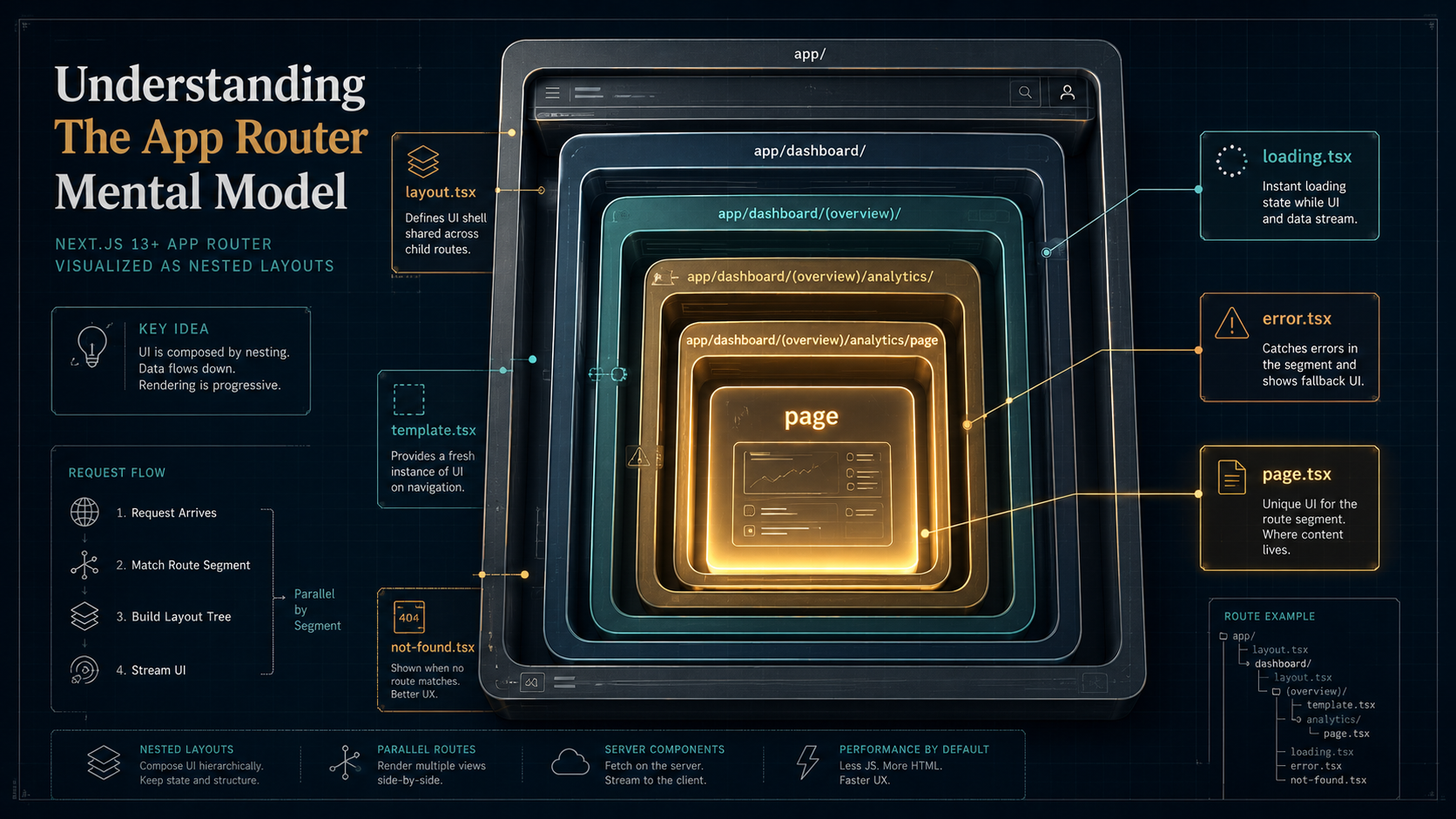
So you finally sit down to start a new project, run npx create-next-app@latest, and open the app/ folder. There's a page.tsx, a layout.tsx, maybe a loading.tsx if you picked the template. You squint at it.
Where do routes go? Why is layout.tsx not just imported like a regular component? What's the difference between loading.tsx and Suspense? Why does error.tsx need 'use client' but page.tsx doesn't? And what on earth is template.tsx for if it looks identical to layout.tsx?
The App Router isn't hard. It's just built around a small set of conventions you have to internalise once, and after that everything clicks. The problem is that most tutorials throw the conventions at you piecemeal, here's how routing works, here's how loading works, here's how errors work, without ever stepping back and saying "here's the one idea this whole system is built on."
Let's fix that. We'll start with the one idea, then walk every special file, then look at how nesting actually composes them at runtime. By the end you should be able to look at any app/ folder and predict exactly what URL serves what UI and what wraps what.
The One Idea: A URL Segment Is A Folder
That's it. That's the model.
Every folder under app/ is a route segment. The folder's name is the segment in the URL. Nesting folders nests segments. A folder doesn't become a route until you put a page.tsx (or route.ts) inside it, folders by themselves are just structure.
app/
  page.tsx                      → /
  about/
    page.tsx                    → /about
  blog/
    page.tsx                    → /blog
    [slug]/
      page.tsx                  → /blog/:slug
  dashboard/
    settings/
      page.tsx                  → /dashboard/settings
No router config. No <Route path="..."> declarations. The filesystem is the routing table. If you've used Next.js's old Pages Router this part isn't new, what's new is what each folder is allowed to contain.
Inside any folder you can drop any combination of a small set of special files. The names are reserved, Next.js looks for these exact filenames, and they each have a specific role. Anything else you put in a folder (components/, utils.ts, a stray helper.ts) is just regular code that doesn't take part in routing at all.
That's the whole framework. The rest is learning what each special file does and how they compose when folders nest.
The Six Special Files You Need To Know
There are more than six, but six are the ones that account for 99% of what you write. Let's go one by one.
page.tsx, the leaf
A page.tsx is what turns a folder into a routable URL. It's a React component that renders the actual page content for that segment.
export default function AboutPage() {
  return (
    <main>
      <h1>About Us</h1>
      <p>We make routing make sense.</p>
    </main>
  );
}
Two non-obvious things about page.tsx:
- It must be the default export. Named exports get ignored. This is true for every special file.
- It's a Server Component by default. No
'use client'at the top means this component runs on the server, ships zero JavaScript for itself, and canawaitdata directly in the function body.
That second point matters more than people realise. In the App Router, the default is server. You add 'use client' to opt out of server rendering for a particular file. This is the inverse of how every React tutorial since 2014 has worked, so the muscle memory fights you for a while.
layout.tsx, the wrapper that persists
A layout.tsx wraps its segment's page.tsx and all nested children. It must accept a children prop and render it somewhere.
export default function DashboardLayout({
  children,
}: {
  children: React.ReactNode;
}) {
  return (
    <div className="dashboard">
      <Sidebar />
      <main>{children}</main>
    </div>
  );
}
If you navigate from /dashboard/settings to /dashboard/billing, the DashboardLayout does not re-render. Its DOM, its state, its scroll position, all preserved. Only the children slot changes to the new page. This is the App Router's superpower for shells: persistent sidebars, persistent video players, persistent forms.
There's exactly one mandatory layout: the root one at app/layout.tsx. That file is the only place you're allowed to render <html> and <body>. Every page in your app is nested inside it, so it's where global providers, font setup, and the <head> defaults live.
import "./globals.css";

export default function RootLayout({
  children,
}: {
  children: React.ReactNode;
}) {
  return (
    <html lang="en">
      <body>
        <ThemeProvider>{children}</ThemeProvider>
      </body>
    </html>
  );
}
You can have as many nested layouts below that as you want. Each one wraps everything below it.
loading.tsx, automatic Suspense boundary
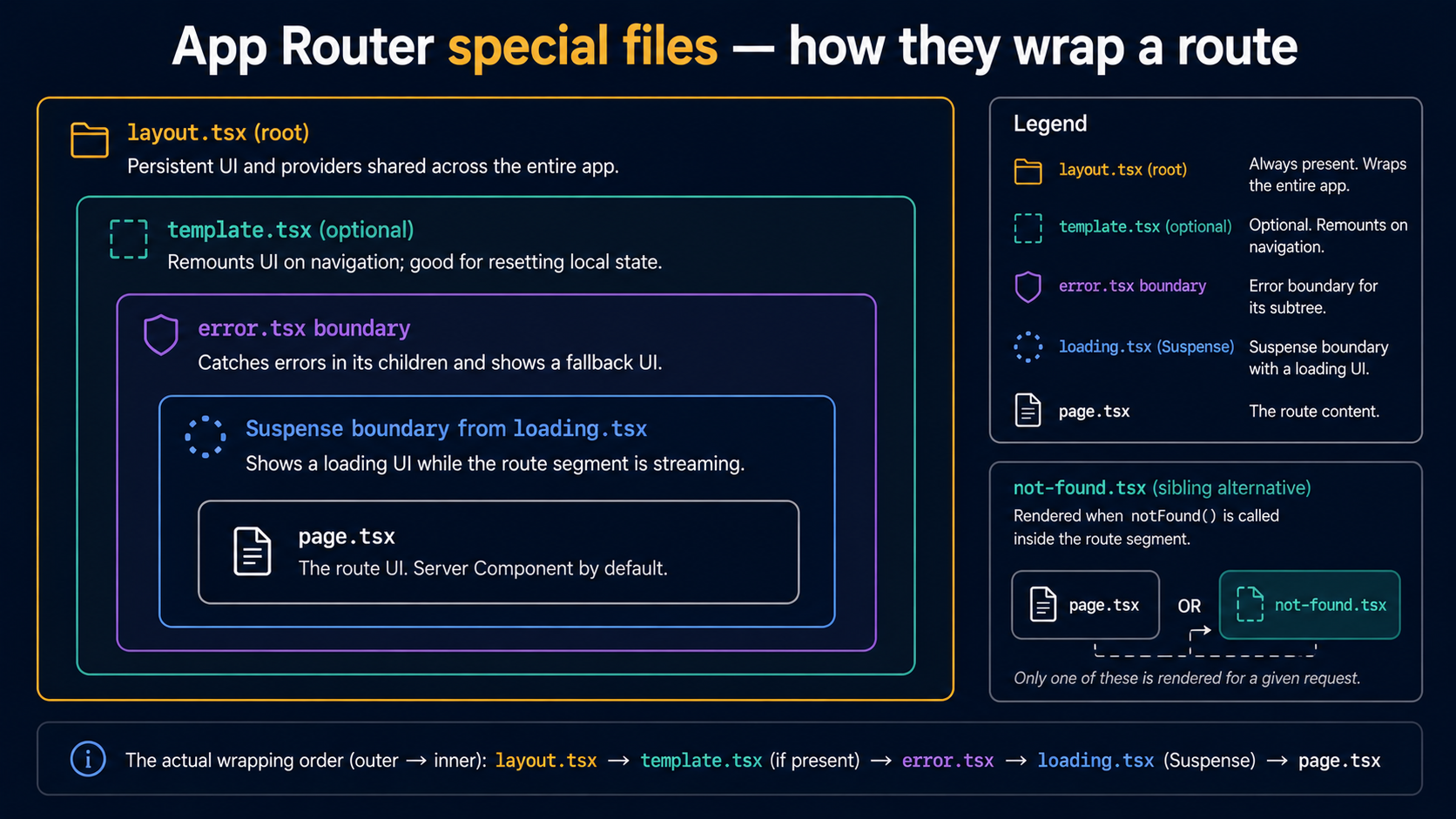
Drop a loading.tsx next to a page.tsx and Next.js automatically wraps your page in <Suspense> with this file as the fallback. While the page's server work is pending, data fetching, async components, the user sees loading.tsx instantly.
export default function Loading() {
  return <div className="skeleton">Loading dashboard…</div>;
}
You don't import Suspense. You don't wrap anything. You just create the file, and Next.js does the wiring at build time.
The boundary is scoped to the segment. If loading.tsx lives in app/dashboard/, only navigations to a dashboard route show this skeleton, and only while the dashboard's data is pending. Static parts of the page that were already streamed (the sidebar from the layout above) keep showing their real content.
This is one of those features that feels like nothing until you use it once, and then you can't go back. You're not writing loading state machines anymore; you're just declaring "here's what the empty version of this page looks like."
error.tsx, segment-scoped error boundary
If anything throws inside a segment, a page.tsx data fetch, a child server component, a client component during render, the nearest error.tsx catches it.
'use client';

import { useEffect } from "react";

export default function DashboardError({
  error,
  reset,
}: {
  error: Error & { digest?: string };
  reset: () => void;
}) {
  useEffect(() => {
    console.error(error);
  }, [error]);

  return (
    <div role="alert">
      <h2>Something broke loading the dashboard.</h2>
      <button onClick={() => reset()}>Try again</button>
    </div>
  );
}
Three things to know:
error.tsxmust be a Client Component. It has to be, error boundaries are a client-side React feature, and theresetcallback that re-renders the segment runs on the client.- It does not catch errors from its own layout. An
error.tsxis rendered inside the layout of its segment, so if the layout itself throws, this boundary never gets a chance. Errors from a layout bubble up to the parent segment'serror.tsx. - It does not catch 404s. A
notFound()call walks pasterror.tsxand looks fornot-found.tsxinstead. Different mental model: 404 isn't an error, it's a different kind of leaf.
template.tsx, the layout that doesn't persist
template.tsx looks identical to layout.tsx, same signature, accepts children, wraps its segment. The difference is what happens on navigation.
A layout.tsx instance is preserved across route changes inside its segment. State, refs, scroll, mounted effects, they survive.
A template.tsx instance is destroyed and re-created on every navigation. New instance, new state, useEffects fire again from scratch.
When do you actually want this? Three honest cases:
- A page-enter animation that should re-run every time the user lands on the route, not just the first time.
- A
useEffectanalytics call that should fire on each navigation, not only on mount. - A form whose entire state you want reset when the user navigates within the section.
'use client';

import { useEffect } from "react";
import { motion } from "framer-motion";

export default function OnboardingTemplate({
  children,
}: {
  children: React.ReactNode;
}) {
  useEffect(() => {
    track("onboarding_step_view");
  }, []);

  return (
    <motion.div
      initial={{ opacity: 0, y: 8 }}
      animate={{ opacity: 1, y: 0 }}
      transition={{ duration: 0.2 }}
    >
      {children}
    </motion.div>
  );
}
If you can't articulate why you need re-mounting, you don't need a template. Use layout.tsx. Templates are an escape hatch, not a default.
not-found.tsx, the 404 leaf
When your code (or Next.js's built-in routing) calls notFound(), the nearest not-found.tsx is rendered instead of page.tsx.
import Link from "next/link";

export default function PostNotFound() {
  return (
    <main>
      <h2>That post doesn't exist.</h2>
      <Link href="/blog">Back to all posts</Link>
    </main>
  );
}import { notFound } from "next/navigation";
export default async function PostPage({
params,
}: {
params: Promise<{ slug: string }>;
}) {
const { slug } = await params;
const post = await getPost(slug);
if (!post) notFound();
return <Article post={post} />;
}You can put a not-found.tsx in any segment. The closest one to the throwing component wins. The root app/not-found.tsx is the global fallback for unmatched URLs.
That's the six. There are a handful more for advanced cases, default.tsx for parallel routes, global-error.tsx to catch errors from the root layout itself, route.ts to define an API endpoint at a URL instead of a page, but if you understand these six, the rest are footnotes.
Nesting: How Layouts Compose
Here's where the system shines and where it confuses people. Take this folder:
app/
  layout.tsx                    ← root
  page.tsx                      ← /
  dashboard/
    layout.tsx                  ← /dashboard/*
    page.tsx                    ← /dashboard
    settings/
      layout.tsx                ← /dashboard/settings/*
      page.tsx                  ← /dashboard/settings
      profile/
        page.tsx                ← /dashboard/settings/profile
When you visit /dashboard/settings/profile, the rendered tree is:
<RootLayout>            (app/layout.tsx)
  <DashboardLayout>     (app/dashboard/layout.tsx)
    <SettingsLayout>    (app/dashboard/settings/layout.tsx)
      <ProfilePage />   (app/dashboard/settings/profile/page.tsx)
    </SettingsLayout>
  </DashboardLayout>
</RootLayout>
Every layout on the path from the root to the page is in the tree, in order. The children prop in each layout receives the next layer down, RootLayout's children is <DashboardLayout>..., DashboardLayout's children is <SettingsLayout>..., and so on.
Then navigate to /dashboard/settings. The tree becomes:
<RootLayout>
  <DashboardLayout>
    <SettingsLayout>
      <SettingsPage />
    </SettingsLayout>
  </DashboardLayout>
</RootLayout>RootLayout, DashboardLayout, and SettingsLayout all stay mounted. Only the inner page swaps. That's why "the sidebar stays put when you click around" works without any state management, the layout that owns the sidebar never unmounts.
Now navigate to /. Tree:
<RootLayout>
  <HomePage />
</RootLayout>
DashboardLayout and SettingsLayout unmount because they're no longer on the active route's path. Their state is gone. If the user navigates back to the dashboard, those layouts re-mount fresh.
The mental model is "every layout whose folder is an ancestor of the current page's folder is in the tree, in order, wrapping the page." Internalise that one sentence and nested routing becomes obvious.
Loading and error boundaries nest the same way
Same rule, with one tweak. A loading.tsx or error.tsx only activates for routes that descend from its segment. So:
app/
  dashboard/
    loading.tsx                 ← shown while any /dashboard/* page is loading
    error.tsx                   ← catches errors from any /dashboard/* page
    page.tsx
    billing/
      page.tsx
      loading.tsx               ← shown specifically while /dashboard/billing loads
When /dashboard/billing is navigating, Next.js picks the closest loading.tsx upwards. Here it's the one in billing/. If you remove that file, the dashboard/ one takes over for billing too.
This is why people end up with a "global skeleton" feel almost by accident: a single loading.tsx in app/ catches every navigation in the entire app. Move it deeper and only that subtree gets the skeleton. The closer the boundary, the less of the screen gets replaced, which is usually what you want, because the parts that don't need to change shouldn't flicker.
Route Groups: Folders That Don't Show Up In The URL
Sometimes you want to share a layout across some routes but not put them under a common URL prefix. That's what route groups are for: wrap a folder name in parentheses, and Next.js ignores it when building the URL.
app/
  (marketing)/
    layout.tsx
    page.tsx                    → /
    pricing/
      page.tsx                  → /pricing
    about/
      page.tsx                  → /about
  (app)/
    layout.tsx
    dashboard/
      page.tsx                  → /dashboard
    settings/
      page.tsx                  → /settings
Two different layouts, one for marketing pages, one for the authenticated app, sharing no URL prefix. The user sees /pricing and /dashboard as siblings; the codebase sees them as completely separate sections with separate shells.
The parentheses do nothing else. No magic, no isolation, no special rendering, just "don't count this folder in the URL." It's one of the smallest features of the App Router and one of the most useful once you spot a place for it.
Dynamic Segments: When The Folder Name Is Data
URL parts that change, a post slug, a user ID, are dynamic segments. They're folders with bracketed names.
app/
  blog/
    [slug]/
      page.tsx                  → /blog/:slug
  users/
    [id]/
      posts/
        [postId]/
          page.tsx              → /users/:id/posts/:postId
  docs/
    [...path]/
      page.tsx                  → /docs/anything/can/go/here
  shop/
    [[...filters]]/
      page.tsx                  → /shop OR /shop/red/large/etc
Three flavours:
[slug], exactly one segment.[...slug], catch-all, one or more segments, captured as an array.[[...slug]], optional catch-all, zero or more segments. Matches the parent path too.
Inside the page, the segment values arrive on params:
export default async function PostPage({
  params,
}: {
  params: Promise<{ slug: string }>;
}) {
  const { slug } = await params;
  // ...
}
In Next.js 15, params became async, you await it. In Next.js 14 it was a plain object. Both shapes work in current versions but new code should write the async form, because the sync form will eventually be removed.
Parallel Routes And Intercepting Routes (The Two Tricks)
These are the two features that make people go "wait, that's possible?" the first time they hear about them. You won't reach for them often. But they're real, and knowing they exist will save you from inventing your own version when you need one.
Parallel routes let one layout render multiple children at the same time, each driven by its own URL. You name a folder with an @ prefix and it shows up as a named prop on the parent layout.
app/
  dashboard/
    layout.tsx                  ← receives `children` + `@team` + `@analytics`
    page.tsx
    @team/
      page.tsx
    @analytics/
page.tsxexport default function DashboardLayout({
children,
team,
analytics,
}: {
children: React.ReactNode;
team: React.ReactNode;
analytics: React.ReactNode;
}) {
return (
<div className="grid grid-cols-3">
<section>{children}</section>
<aside>{team}</aside>
<aside>{analytics}</aside>
</div>
);
}Each slot has its own loading.tsx and error.tsx. They render independently. Useful for dashboards with multiple semi-independent panels, modal flows, or split views where each pane should be addressable by URL.
Intercepting routes let one route "borrow" another route's URL, usually to show it in a modal without leaving the current page. They use the (.), (..), and (...) prefixes to walk up the folder tree, similar to relative path syntax. Useful for that very specific pattern of "clicking a photo opens it as a modal, but copy-pasting the URL still shows the photo page directly."
If you find yourself wanting either of these without a clear reason, you probably don't need them. They're powerful and they have a cost, your folder structure starts to look like ASCII art.
The Render Tree Is Not The File Tree
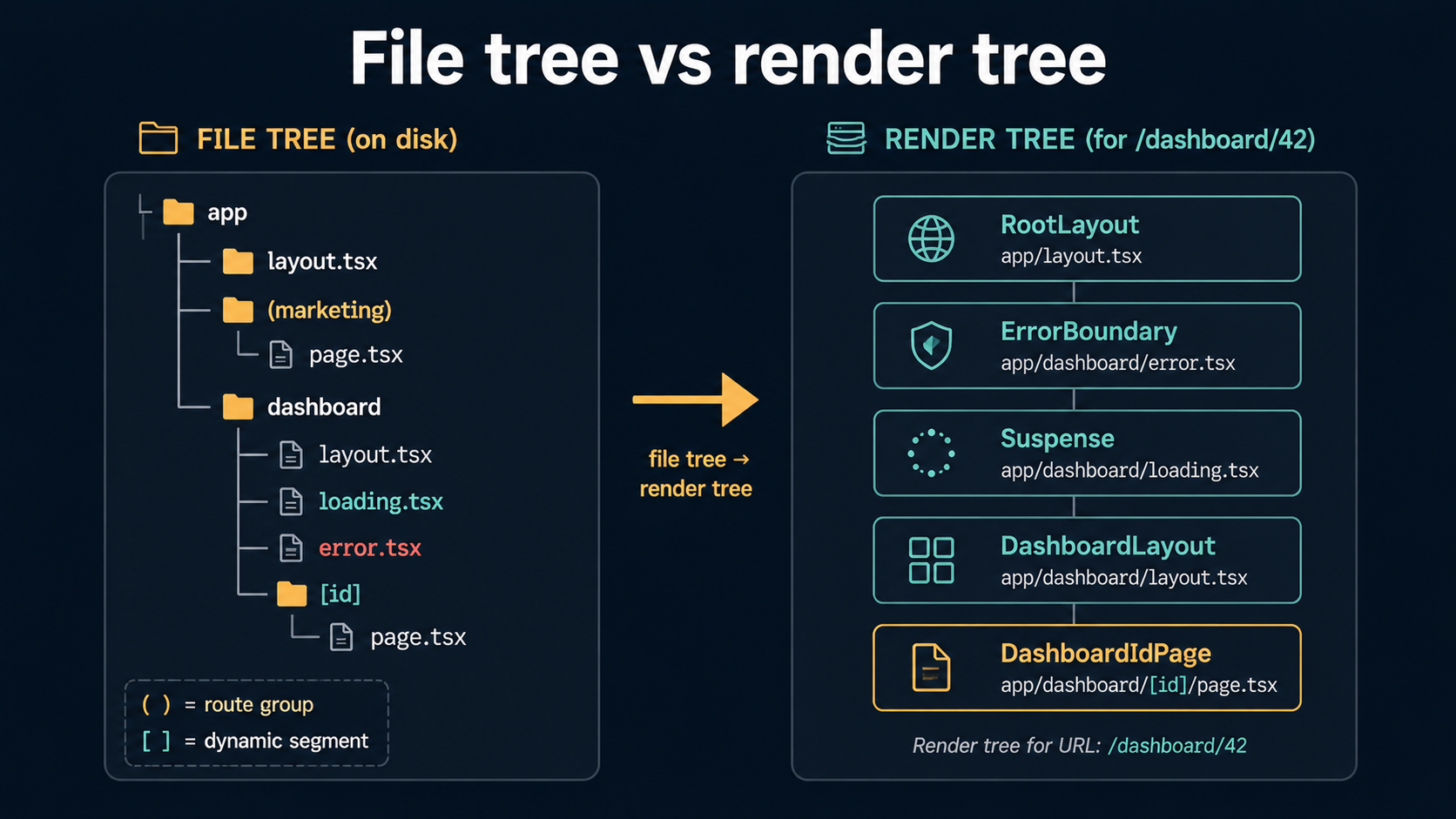
Here's the subtle thing nobody tells you upfront. There are two trees in your head when you work with the App Router, and they don't match.
The file tree is what you see in your editor. Folders inside folders, route groups in parentheses, dynamic segments in brackets, special files scattered around.
The render tree is what React actually renders at runtime. It's pure component nesting, RootLayout wrapping DashboardLayout wrapping SettingsLayout wrapping SettingsPage. Route groups don't appear in the render tree (they were just file organisation). Dynamic segments don't appear as separate nodes (they got resolved to values). loading.tsx and error.tsx are present, but as <Suspense> and error-boundary wrappers rather than visible components.
Most bugs that feel mysterious, "why is my layout state resetting?", "why is my Suspense boundary catching the wrong thing?", "why is this provider's value undefined?", come from confusing the two. The fix is to mentally translate the file tree into the render tree for the URL you're on, then look at the render tree and ask the question again.
A useful exercise: pick any URL in your app and on paper write out the exact JSX tree the App Router would produce. Layouts in order, page at the bottom, error and Suspense boundaries marked. If you can do that for any route in your app, you understand the model.
Server And Client Components: Where The Boundary Lives
Everything in the App Router is a Server Component by default. To make a file (and everything it imports) run on the client, you add 'use client' at the top.
'use client';

import { useState } from "react";

export default function InteractiveChart({ data }: { data: Point[] }) {
  const [hovered, setHovered] = useState<number | null>(null);
  // ...
}
The 'use client' directive marks a boundary, not a single component. Once a file declares it, that file and everything imported into it runs on the client. You cross from server to client by importing a client component from a server component, that's the common direction. Going the other way (importing a server component into a client component) doesn't work directly; you instead pass the server component as a child or prop.
Two practical rules that fall out of this:
- Push
'use client'as far down the tree as you can. A'use client'at the root of a page sends the whole page's JavaScript to the browser. Move it to the leaf that actually needs interactivity (a button, a form, a chart) and the rest stays server-rendered. - Pages and layouts can be Server Components. They usually should be. Fetch your data in the server component, render the structure server-side, hand off only the interactive bits to client components.
This isn't unique to the App Router, it's React Server Components doing their thing. But the App Router is the first place most people meet RSC for real, so the boundary work feels like an App Router thing even when it's really a React thing.
A Few Common Confusions
A short tour of the rakes you'll step on.
"My layout's state keeps resetting." Layouts persist across navigations within their segment subtree. If you navigate from /dashboard to /marketing, the dashboard layout unmounts because it's no longer on the active path. Use a route group or a higher-up shared layout to keep state across sections that should share it.
"My error.tsx doesn't catch this error." Three suspects: the error comes from the layout of the same segment (it has to bubble up, put the boundary in the parent), the error happens in a Client Component during a user event (then it's a normal React error boundary issue, not an App Router one), or the error is a notFound() call (which not-found.tsx handles, not error.tsx).
"My loading.tsx shows on full-page navigation but not on dynamic param changes." Going from /blog/post-a to /blog/post-b re-uses the [slug]/page.tsx instance unless data is pending. If you want a guaranteed skeleton on every navigation, wrap the data-fetching component in your own <Suspense> with a key tied to the slug.
"Why is my client provider not seeing the server data?" Server data passed as props is fine. Server context, however, doesn't reach client components, React Context is a client-only feature. The pattern is: fetch in the server component, pass the value as a prop into a client provider, then use that provider's context from any client descendant.
"params is now a Promise and my types broke." Yep, Next.js 15. Migrate to params: Promise<{ id: string }> and await it. The change is annoying in the short term and correct in the long term, it lets Next.js stream params alongside data.
What "Understanding The App Router" Actually Means
If someone hands you an app/ folder you've never seen and asks what URL serves what, you should be able to read it left to right and answer without running the app. That's the bar.
That means: knowing which folders are routes and which are organisation. Knowing which special files are in each folder and what they do. Being able to draw the render tree for any URL. Knowing which layouts persist when you navigate to a sibling, which remount, and why.
Once you have that, the parts that felt magical, automatic Suspense boundaries, persistent shells, parallel slots, intercepting routes for modals, stop feeling magical. They're just predictable consequences of "URL segment is a folder, folder has special files, special files compose by nesting."
Open any Next.js project right now and look at one route's folder. Read the special files. Predict the render tree before you scroll to the layout. You'll be surprised how fast it clicks once you stop treating the App Router as a list of features and start treating it as one small idea with consistent rules.


![World map dissolving into folder tabs for en, de, uk, ja, fr feeding a /[locale] route, with Accept-Language, NEXT_LOCALE cookie, and URL prefix chips routed into a best-fit matcher.](/_next/image?url=%2Fassets%2Fimgs%2Farticles%2Finternationalization-in-nextjs-apps%2Fcover.png&w=2048&q=75)



