The dream sounds simple:
Take a Jira ticket and create a pull request.But the real workflow is not simple.
A good engineer does much more than "write code". They read the ticket, clarify acceptance criteria, find the right part of the codebase, understand current behavior, write tests, make a small change, run checks, update docs, and explain the result.
If you want an AI agent to help with Jira-to-PR automation, you need to design that workflow explicitly.
Not as one giant prompt.
As an architecture.
The pipeline
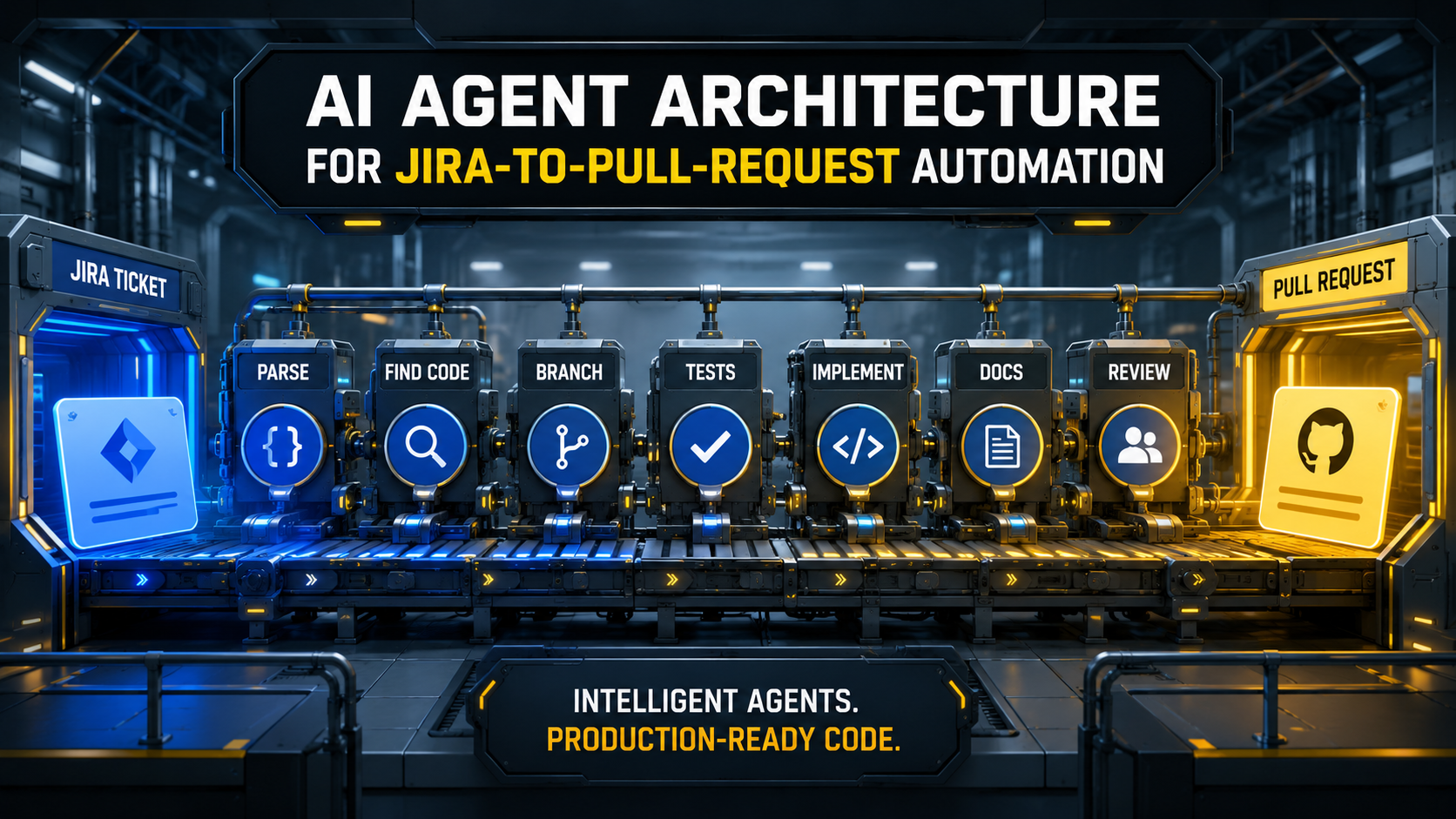
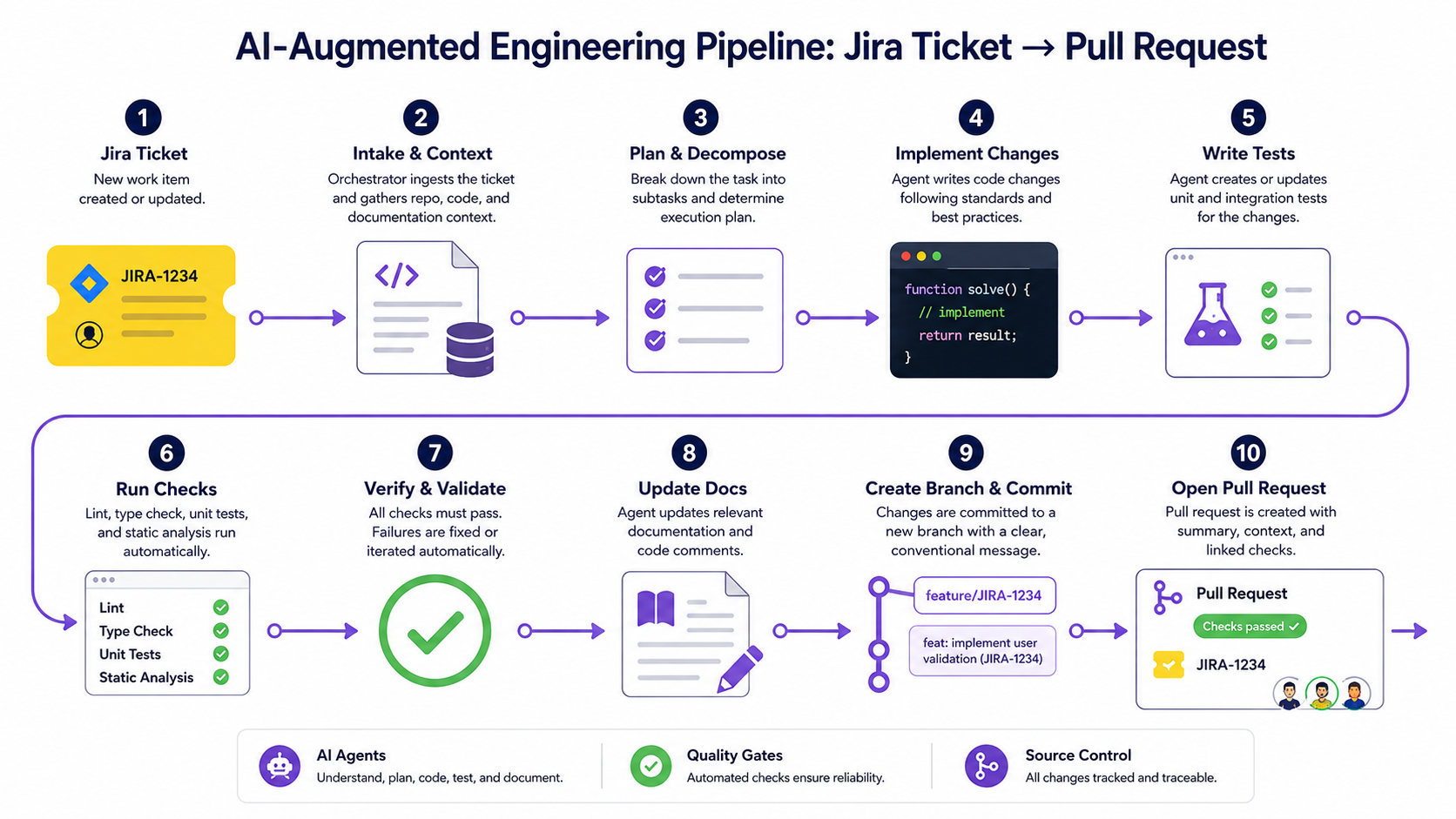
A practical Jira-to-PR workflow looks like this:
1. Pick Jira ticket
2. Parse acceptance criteria
3. Find related code
4. Create branch
5. Write failing test
6. Implement change
7. Run tests
8. Update docs
9. Generate PR description
10. Request human review
This is not only a sequence, it is a set of gates. The agent should not implement before it understands, it should not open a PR before checks run, and it should not claim success without evidence.
Step 1: Pick the right Jira ticket
Not every Jira ticket is a good automation candidate. Good candidates:
- clear acceptance criteria
- limited code area
- existing test patterns
- low product ambiguity
- no production data migration
- no major architecture decision
Bad candidates:
- vague product discovery tasks
- large rewrites
- unclear business rules
- payment or security-sensitive changes without review
- tasks requiring stakeholder decisions
A ticket selection query might look like this:
type JiraIssue = {
  key: string;
  title: string;
  description: string;
  labels: string[];
  storyPoints?: number;
  status: string;
};

function isGoodAgentCandidate(issue: JiraIssue): boolean {
  return (
    issue.status === "Ready for Development" &&
    issue.labels.includes("agent-ready") &&
    !issue.labels.includes("security-sensitive") &&
    (issue.storyPoints ?? 1) <= 3 &&
    issue.description.includes("Acceptance Criteria")
  );
}
The agent-ready label is important: it lets humans decide which tickets are safe for the workflow.
Step 2: Parse title, description, and acceptance criteria
The agent should convert the issue into a structured task. Example Jira text:
Title: Prevent duplicate weekly check-in reminders

Description:
Users sometimes receive a weekly check-in reminder after they already
submitted the weekly form.

Acceptance Criteria:
- If a user submitted the weekly form this week, do not send a reminder.
- If a user has not submitted the form, send reminder based on existing interval rules.
- Add regression test.
Structured form:
{
  "goal": "Prevent duplicate weekly check-in reminders after form submission",
  "acceptanceCriteria": [
    "Do not send reminder if user submitted weekly form this week",
    "Keep existing interval rules for users who did not submit",
    "Add regression test"
  ],
  "riskAreas": [
    "notification scheduling",
    "date/week boundary logic"
  ],
  "expectedArtifacts": [
    "code change",
    "test",
    "PR summary"
  ]
}
This structured representation becomes the workflow contract.
Step 3: Find related code
Code discovery is where many agents fail. They search one obvious term, open one file, and start editing. A better approach uses multiple search angles:
rg "weekly check" app tests routes database
rg "WeeklyCheckIn" app tests
rg "Reminder" app/Console app/Jobs app/Notifications tests
rg "submitted_at" app tests database
From those results, the agent should build a small map:
## Related Code Map

Entry point:
- app/Console/Commands/SendWeeklyCheckInReminders.php

Domain logic:
- app/Services/WeeklyReminderEligibility.php

Notification:
- app/Notifications/WeeklyCheckInReminder.php

Tests:
- tests/Feature/WeeklyCheckInReminderCommandTest.php
Then it should decide where the behavior belongs. If the code already has an eligibility service, change that. If the logic is buried in a command, consider extracting it only if the task scope allows it.
Step 4: Create a Git branch
Branch naming should be deterministic.
function createBranchName(issue: JiraIssue): string {
  const slug = issue.title
    .toLowerCase()
    .replace(/[^a-z0-9]+/g, "-")
    .replace(/^-|-$/g, "")
    .slice(0, 60);

  return `feature/${issue.key.toLowerCase()}-${slug}`;
}
Example:
feature/app-4821-prevent-duplicate-weekly-remindersThe agent should ask before pushing remote branches unless your policy already allows it.
Step 5: Write the failing test first
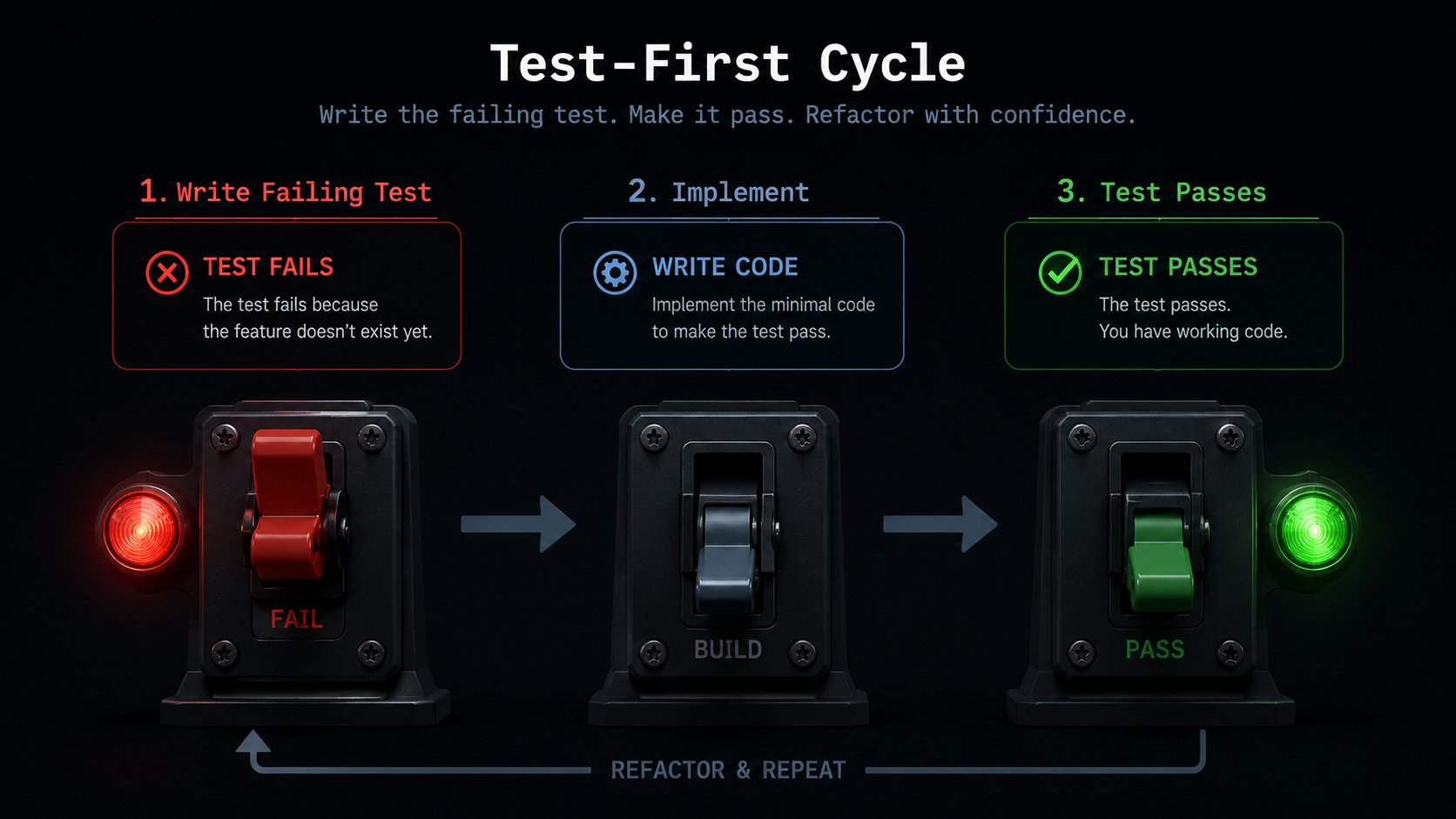
This is the most important quality gate. A Jira-to-PR agent should usually prove the bug before fixing it. Example Laravel test:
public function test_reminder_is_not_sent_after_user_submitted_weekly_form(): void
{
    Notification::fake();

    $user = User::factory()->create();

    WeeklyCheckInForm::factory()->for($user)->create([
        'submitted_at' => now(),
    ]);

    $this->artisan('cdp:send-weekly-check-in-reminders')
        ->assertExitCode(0);

    Notification::assertNotSentTo($user, WeeklyCheckInReminder::class);
}
Before implementation, the test should fail for the expected reason. That failure is useful, it proves the test is not decorative.
Step 6: Implement the smallest safe change
The agent should prefer small patches. Bad implementation style:
- rewrite the whole command
- rename unrelated classes
- change database schema unnecessarily
- introduce a new package
- modify multiple unrelated tests
Better implementation style:
final class WeeklyReminderEligibility
{
    public function canReceiveReminder(User $user, CarbonImmutable $now): bool
    {
        if ($this->hasSubmittedWeeklyForm($user, $now)) {
            return false;
        }

        return $this->passesReminderInterval($user, $now);
    }

    private function hasSubmittedWeeklyForm(User $user, CarbonImmutable $now): bool
    {
        return $user->weeklyCheckInForms()
            ->whereBetween('submitted_at', [
                $now->startOfWeek(),
                $now->endOfWeek(),
            ])
            ->exists();
    }

    private function passesReminderInterval(User $user, CarbonImmutable $now): bool
    {
        // Existing interval logic stays here.
        return true;
    }
}
This example is intentionally simple. In a real codebase, timezone and business week boundaries may require more careful handling, and the agent should call out that risk in its report.
Step 7: Run focused and related tests
One passing test is not enough. A good workflow runs checks in layers:
php artisan test --filter=WeeklyCheckInReminderCommandTest
php artisan test tests/Feature/Reminders
vendor/bin/phpstan analyse app/Services app/Console
Or for a Node.js project:
npm test -- weekly-reminders
npm run lint
npm run typecheck
The PR report should include the exact commands and their results.
## Checks Run
- `php artisan test --filter=WeeklyCheckInReminderCommandTest` ✅
- `php artisan test tests/Feature/Reminders` ✅
- `vendor/bin/phpstan analyse app/Services app/Console` ✅
Step 8: Update documentation
Docs are part of the workflow, not an afterthought. The agent should ask itself:
Did this change affect behavior that humans need to understand?If yes, update docs. Example:
## Weekly Check-In Reminder Rules

A reminder is not sent when the user has already submitted the weekly
check-in form for the current configured week.

Users who have not submitted the form continue to follow the existing
reminder interval rules.
Documentation can be internal: it does not always need to be public.
Step 9: Generate the PR description
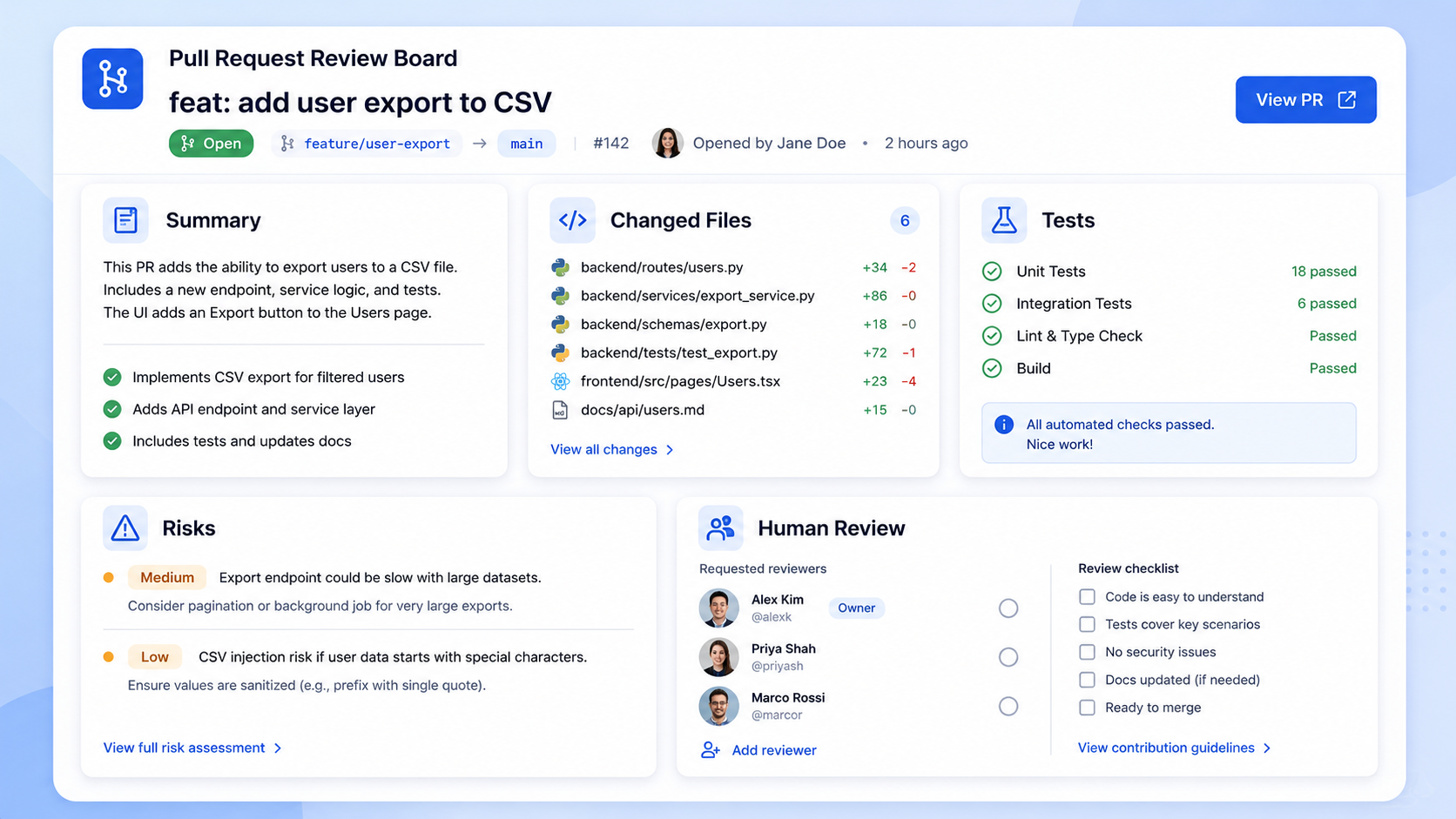
A good PR description should be boring and useful.
## Summary
Prevents duplicate weekly check-in reminders after a user has already
submitted the weekly form for the current week.

## What Changed
- Added submitted-form check to weekly reminder eligibility logic.
- Added regression test for submitted users.
- Updated reminder behavior documentation.

## Checks
- php artisan test --filter=WeeklyCheckInReminderCommandTest ✅
- php artisan test tests/Feature/Reminders ✅

## Risks / Review Notes
- Please verify week boundary behavior for users in non-default timezones.
- No database schema changes.
- No production commands were executed.
This saves review time because the reviewer can quickly see scope, proof, and risk in one place.
Step 10: Request human review
The agent should not merge its own work, at least not in most real engineering teams. A human review step protects several things at once:
- product intent
- hidden business rules
- architecture consistency
- security implications
- operational risk
The agent can prepare the PR, but the team owns the merge. That distinction keeps automation useful without making it reckless.
Safety checklist for Jira-to-PR agents
Before using this workflow in a real project, define these rules:
## Agent Safety Checklist

- [ ] Only tickets labeled `agent-ready` can be selected.
- [ ] Agent cannot access secrets.
- [ ] Agent cannot deploy.
- [ ] Agent cannot run destructive database commands.
- [ ] Agent must create or update tests for behavior changes.
- [ ] Agent must run required checks.
- [ ] Agent must produce a PR summary with risks.
- [ ] Human review is required before merge.
This checklist may feel strict. Good, it should: automation is only valuable when it is controlled.
Final thought
Jira-to-PR automation is not about replacing developers. It is about turning a repeatable engineering workflow into a controlled agent pipeline. The hard part is not making the model write code, the hard part is designing the gates around the code: task selection, context discovery, tests, permissions, docs, risk reporting, and human review. When those pieces are in place, AI agents can become a real productivity tool.
Not because they are autonomous. Because they are constrained.
Sources used
- Claude Code product page: https://www.anthropic.com/product/claude-code
- Claude Code permissions documentation: https://code.claude.com/docs/en/permissions
- Claude Code hooks documentation: https://code.claude.com/docs/en/hooks
- Anthropic tool use documentation: https://platform.claude.com/docs/en/agents-and-tools/tool-use/overview