AI agents sound mysterious.
People describe them like digital employees, autonomous developers, or tiny software engineers living inside your codebase.
That sounds exciting. It also creates bad expectations.
A more useful definition is much simpler:
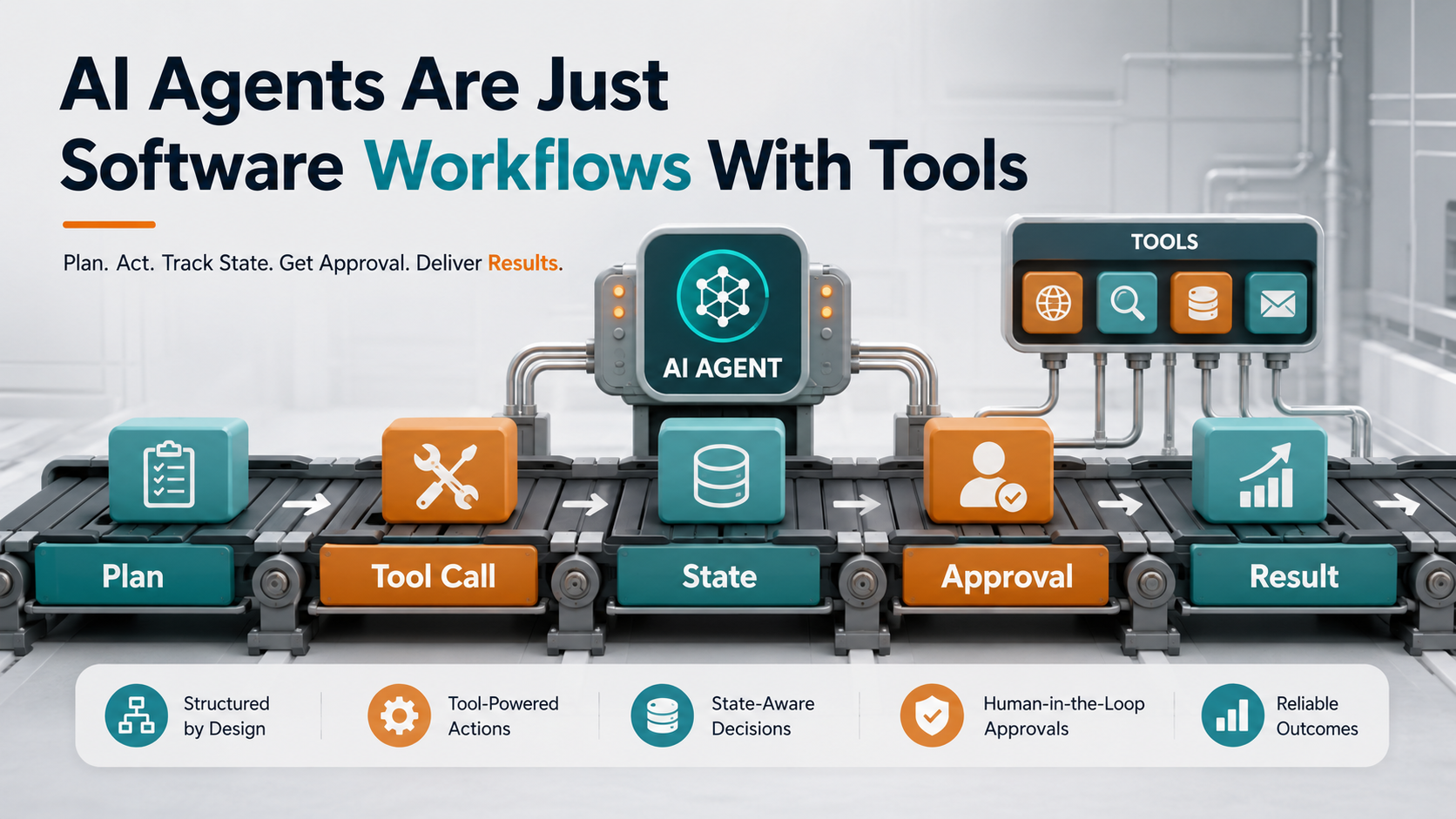
An AI agent is a software workflow where a model can decide the next step and call tools.
That is it.
Not magic. Not a replacement for engineering. Not a senior developer in a box.
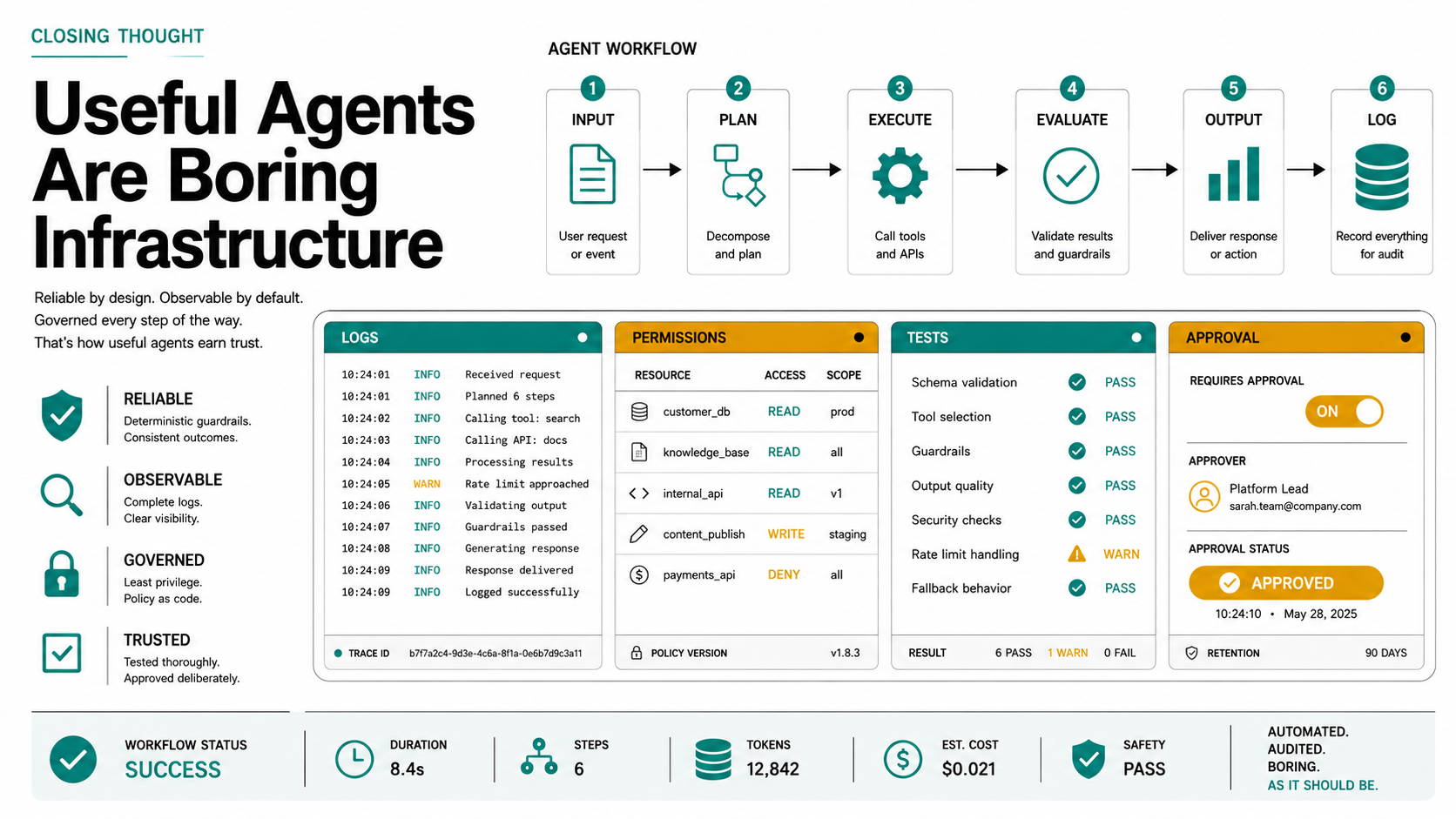
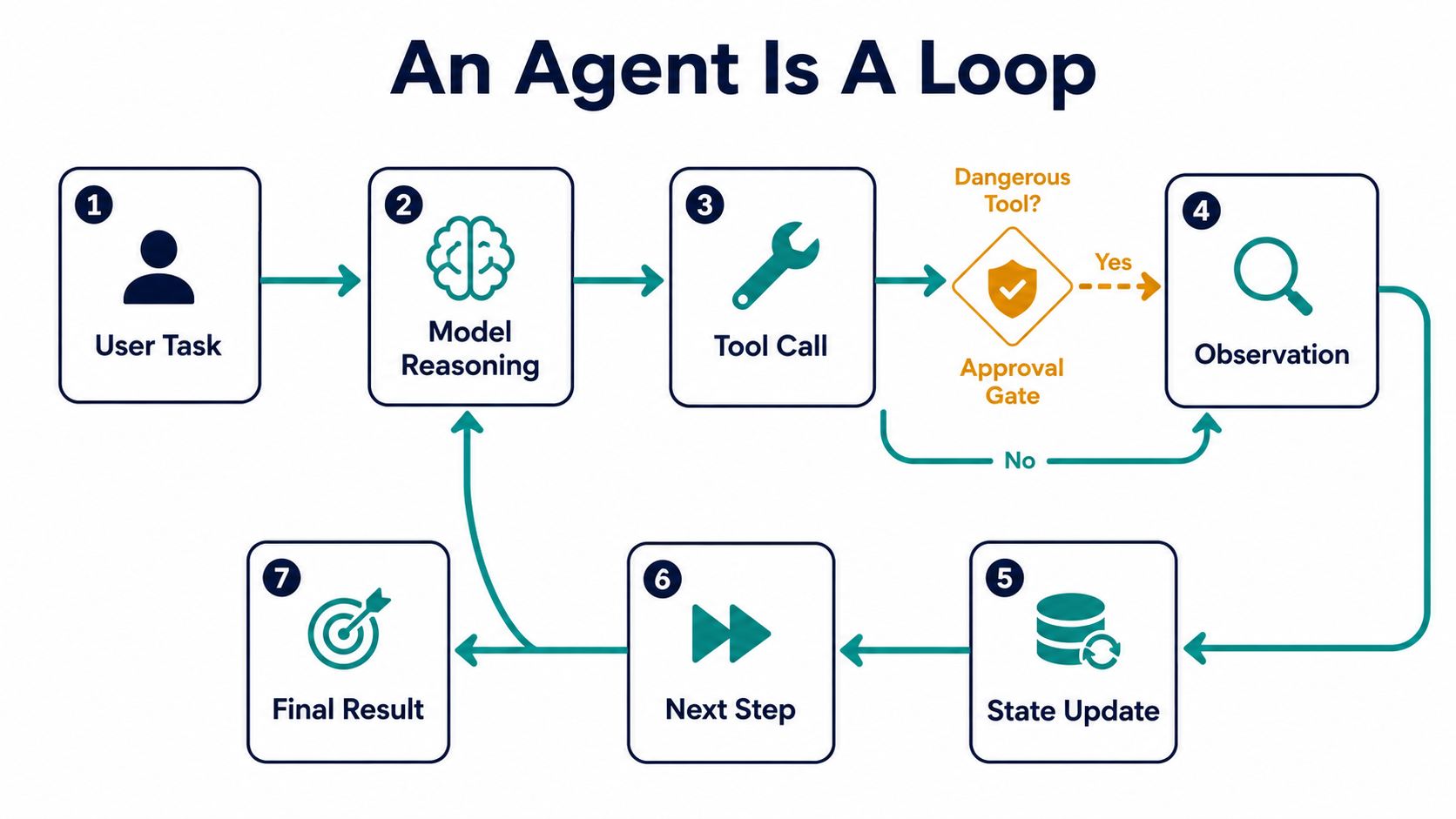
An agent is a loop.
It receives a task, reasons about the next action, calls a tool, observes the result, updates state, and continues until it reaches an answer or needs help.
For developers, this framing is important because it makes agents easier to design, debug, secure, and trust.
If an agent is a workflow, then we can ask normal engineering questions:
- What tools can it use?
- What permissions does it have?
- What state does it remember?
- What happens when a tool fails?
- What actions require approval?
- How do we log what happened?
- How do we test it?
- How do we stop it?
That is a much healthier way to think about AI agents.
A Normal Workflow vs An Agentic Workflow
A normal software workflow has fixed steps.
For example, a CI pipeline:
name: Tests

on:
  pull_request:

jobs:
  test:
    runs-on: ubuntu-latest

    steps:
      - uses: actions/checkout@v4
      - run: composer install
      - run: php artisan test
The workflow does not decide what to do next. It follows the file.
An agentic workflow is different.
It may decide:
The tests failed.
I should inspect the failing test output.
The failure mentions PaymentRetryService.
I should search for that class.
Now I should inspect recent changes.
Now I should suggest a fix.
That decision-making step is what makes it “agentic.”
But the agent still needs tools.
Without tools, it is just a chat model guessing.
With tools, it can do real work:
- read files,
- search the repository,
- run tests,
- query documentation,
- call APIs,
- create tickets,
- comment on pull requests,
- generate reports.
A useful agent is not “AI plus vibes.”
It is a controlled workflow with tool access.
The Basic Agent Loop
Most agents follow a loop like this:
while not task_done:
    context = load_context()
    next_action = model.decide(context)

    if next_action.requires_approval:
        ask_human_for_approval(next_action)

    result = run_tool(next_action)
    save_observation(result)

return final_answer()
Of course, real systems are more complex.
But this simple loop explains the core idea.
The model decides what action to take. The application controls what actions are possible.
That distinction matters.
The model should not have unlimited power. Your software defines the available tools and permission boundaries.
Example:
tools = [
    read_file,
    search_codebase,
    run_tests,
    create_pr_summary,
]
This agent can inspect and explain code.
But it cannot deploy production, delete a database, or merge a pull request.
That is good.
Tool Calling Means “The Model Requests An Action”
Tool calling is often described in a fancy way, but the idea is simple.
The model does not directly execute code. It asks your application to run a defined function.
For example:
def search_codebase(query: str) -> list[str]:
    """Search the repository for matching files and snippets."""
    ...
The model may request:
{
  "tool": "search_codebase",
  "arguments": {
    "query": "PaymentRetryService"
  }
}
Your application validates the request, runs the function, and returns the result.
This means tools are the contract between AI and your system.
Good tools are:
- narrow,
- predictable,
- logged,
- permission-aware,
- easy to test,
- safe by default.
Bad tools are:
- too powerful,
- vague,
- unlogged,
- able to mutate critical data without approval,
- hard to understand,
- allowed to access everything.
For example, this tool is dangerous:
def run_shell(command: str) -> str:
    return subprocess.check_output(command, shell=True).decode()
It can do anything.
This is safer:
def run_test_command(test_path: str) -> str:
    allowed_prefix = "tests/"

    if not test_path.startswith(allowed_prefix):
        raise ValueError("Only tests/ paths are allowed.")

    return subprocess.check_output(
        ["pytest", test_path],
        text=True,
    )
The second tool has a smaller scope.
Agents become safer when tools are boring.
Planning Is Not Magic
Planning usually means the model breaks a task into smaller steps.
For example:
Task:
Investigate why invoice reminders are duplicated.

Plan:
1. Find scheduled commands related to invoice reminders.
2. Find events that send invoice reminder emails.
3. Check queue retry behavior.
4. Look for idempotency keys or sent flags.
5. Summarize likely duplicate paths.
That is useful.
But it is not guaranteed to be correct.
The plan is based on available context. If the context is missing, the plan may be incomplete.
That is why good agents should revise plans after tool results.
Example:
Initial plan:
Check scheduled commands.

Observation:
There is also an InvoiceOverdue event listener.

Updated plan:
Compare scheduled reminder path and event listener path.
Check if both can run for the same invoice.
This is the main advantage of agents over one-shot prompts.
They can observe and adjust.
But they still need limits.
Memory And State Are Different
People often talk about “agent memory” as if it is one thing.
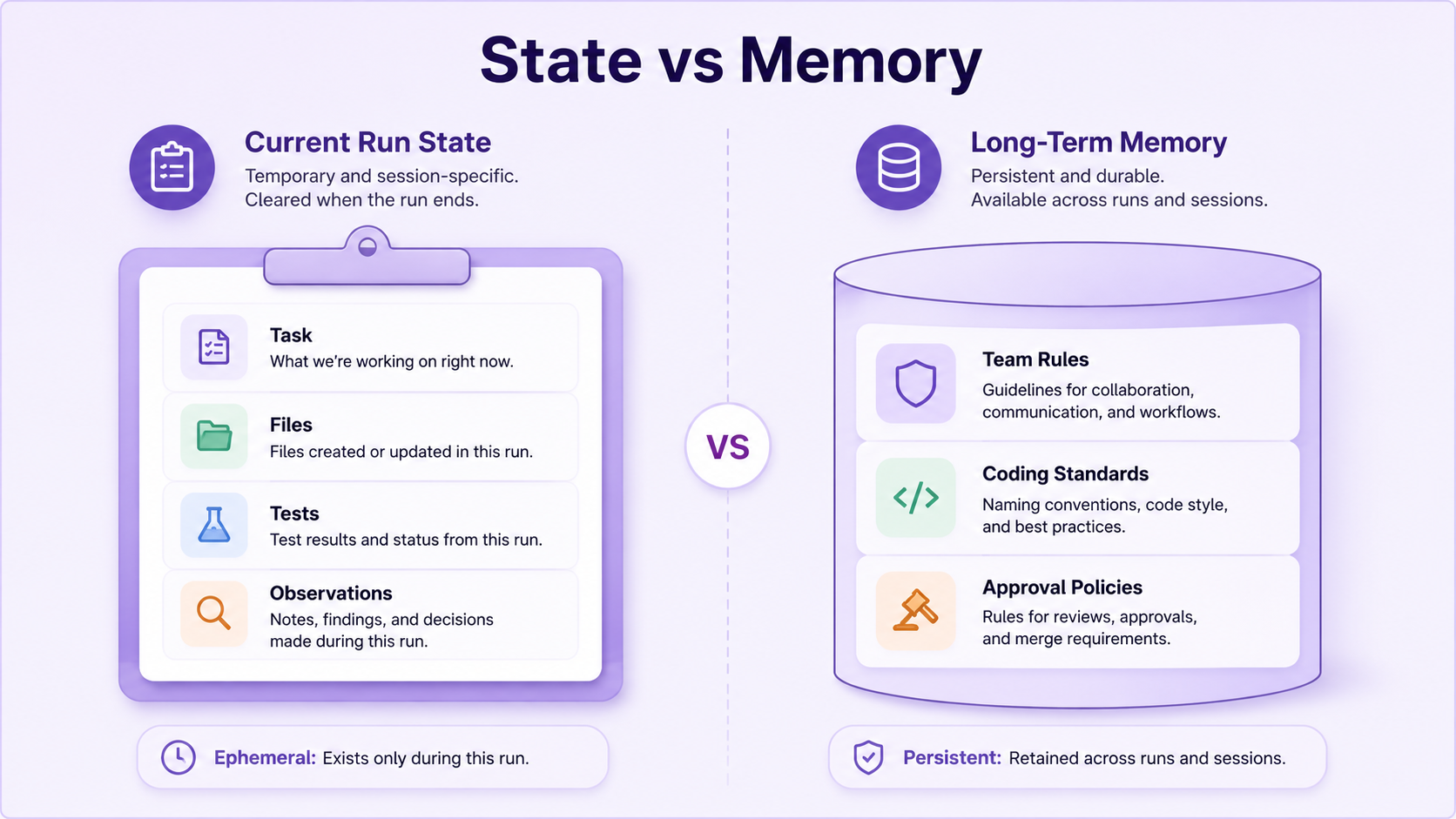
It is better to separate memory and state.
State is what the agent needs during the current run.
Example:
{
  "task": "Review PR #421",
  "files_changed": [
    "app/Services/CheckoutService.php",
    "database/migrations/2026_05_03_add_payment_attempts.php"
  ],
  "tests_run": [
    "CheckoutServiceTest",
    "PaymentAttemptMigrationTest"
  ],
  "risks_found": [
    "Migration adds nullable column without backfill"
  ]
}
Memory is information that persists across runs.
Example:
{
  "team_preferences": {
    "php_style": "prefer explicit DTOs for payment flows",
    "testing": "feature tests required for checkout changes",
    "security": "auth and payment changes need human approval"
  }
}
State helps the current task.
Memory helps future tasks.
Both need governance.
You do not want an agent remembering secrets, private customer data, or wrong assumptions forever.
Memory should be explicit, inspectable, and editable.
Permissions Are The Real Architecture
An agent is only as safe as its permissions.
A code review agent might need:
Allowed:
- read pull request diff,
- read changed files,
- run static analysis,
- write advisory comments.

Not allowed:
- push commits,
- approve pull request,
- merge pull request,
- access production secrets,
- modify CI settings.
A documentation agent might need:
Allowed:
- read README files,
- read ADRs,
- search internal docs,
- cite source documents.

Not allowed:
- read HR documents,
- read customer PII,
- edit production docs without review,
- answer without citations.
A developer implementation agent might need:
Allowed with approval:
- create branch,
- edit files,
- run tests,
- open pull request.

Not allowed:
- deploy production,
- rotate secrets,
- change billing configuration,
- merge its own PR.
This is why “just give the agent repo access” is not enough.
You need permission design.
Approval Gates Make Agents Useful
Approval gates are human checkpoints before risky actions.
Example risky actions:
- writing files,
- deleting files,
- running shell commands,
- creating migrations,
- editing auth logic,
- changing payment code,
- calling external APIs,
- opening pull requests,
- posting public comments,
- deploying.
An approval gate can be simple:
def require_approval(action: str, reason: str) -> bool:
    print(f"Agent wants to run: {action}")
    print(f"Reason: {reason}")

    decision = input("Approve? yes/no: ")

    return decision.lower() == "yes"
In production systems, approval gates can be more formal:
{
  "action": "create_pull_request",
  "risk": "medium",
  "requires_approval_from": ["repository_owner"],
  "reason": "Agent generated code changes in payment module"
}
Approval gates do not make agents weaker.
They make agents usable in real environments.
Treat Agents Like Workflow Executors
The safest mental model is:
Agent = workflow executor with reasoning + toolsThat means you design agents like you design background jobs, CI pipelines, and internal automation.
You define:
- input,
- allowed actions,
- timeout,
- retry behavior,
- logging,
- permissions,
- approval gates,
- failure modes,
- output format,
- monitoring.
For example, a PR review agent could be designed like this:
agent: pr-reviewer

input:
  - pull_request_number
  - diff
  - changed_files

tools:
  - read_file
  - run_static_analysis
  - search_codebase
  - post_advisory_comment

permissions:
  read:
    - repository
  write:
    - pull_request_comments

approval:
  required_for:
    - posting_high_severity_security_comment

output:
  - summary
  - risks
  - missing_tests
  - advisory_comments
This is not hype.
This is software architecture.
Where Agents Are Actually Useful
Agents are useful when a task has multiple steps and requires checking intermediate results.
Good examples:
- investigate a failing test,
- summarize a pull request,
- search a codebase for related behavior,
- generate internal documentation from source files,
- update docs after a small change,
- triage GitHub issues,
- compare API behavior before and after a refactor,
- review migrations for risk,
- find missing tests around changed files.
Poor examples:
- “build my whole app,”
- “rewrite the entire legacy system,”
- “make all architecture decisions,”
- “deploy this without review,”
- “decide security policy by yourself.”
Agents are best when the workflow is bounded.
A Developer Agent Example
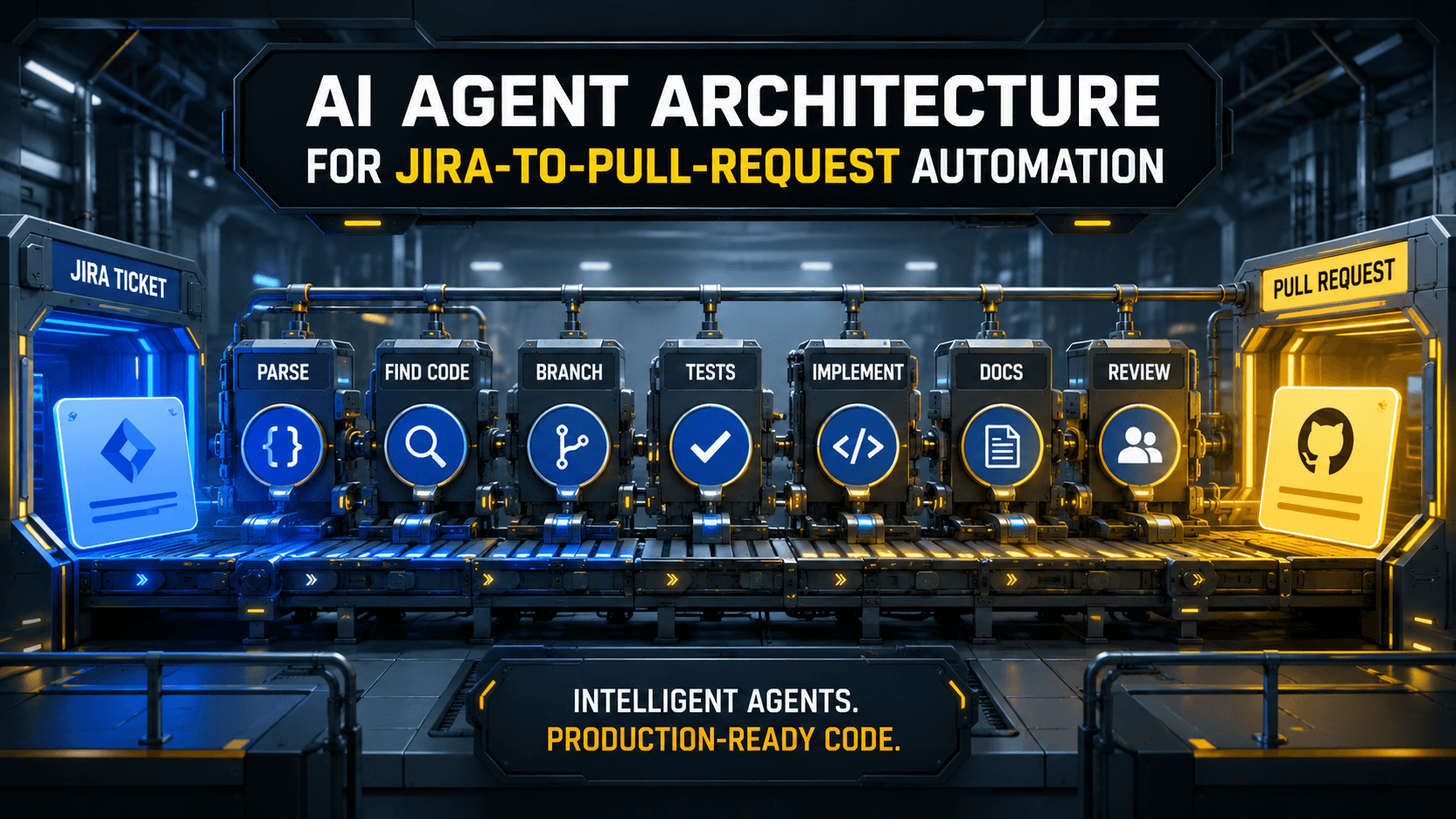
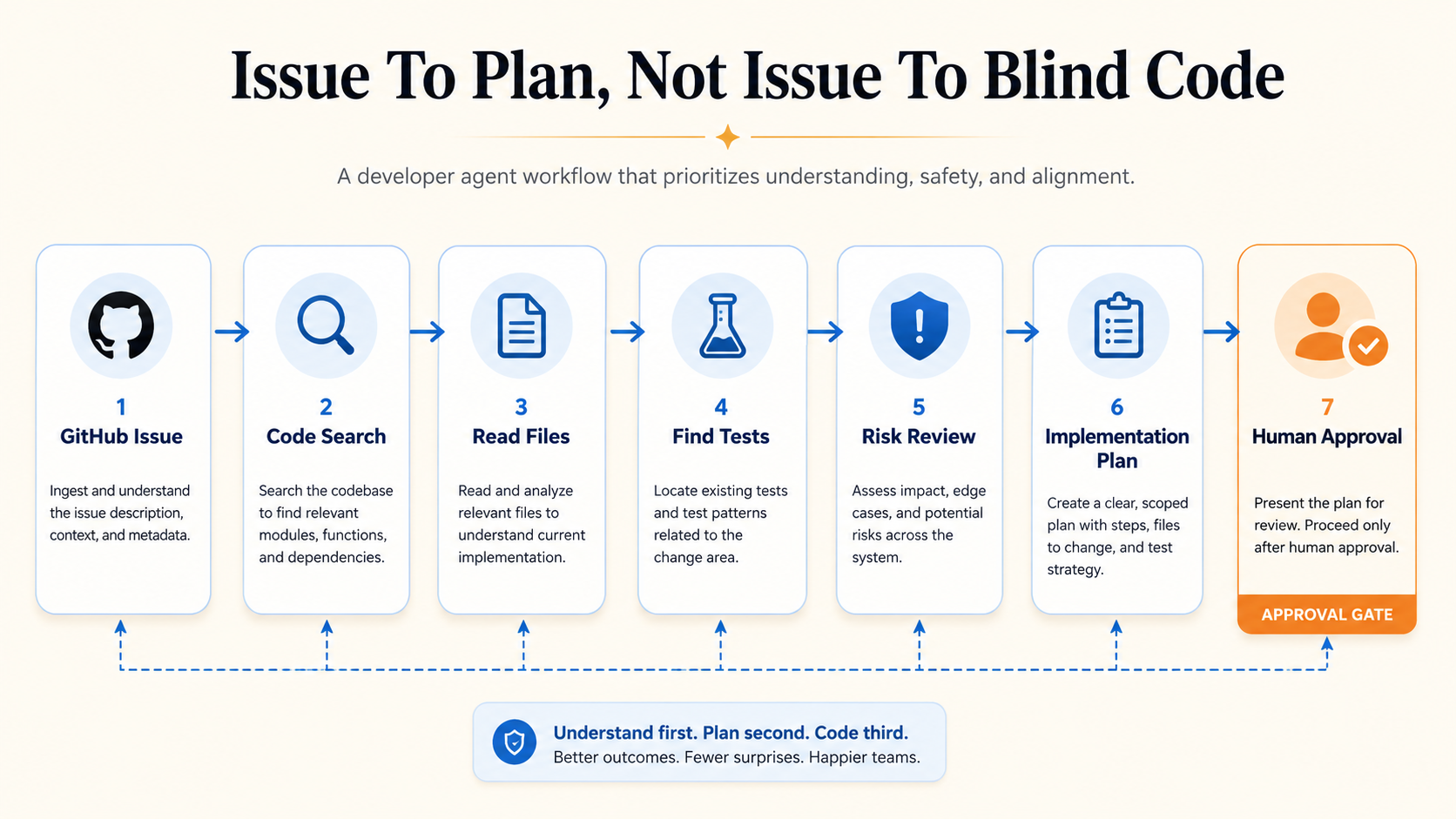
Imagine an agent that reviews a GitHub issue and creates an implementation plan.
Its workflow:
1. Read issue title and description.
2. Identify affected area.
3. Search repository for related files.
4. Read tests around that area.
5. Create a plan.
6. Suggest tests.
7. Ask for approval before editing files.
Pseudo-code:
class DeveloperAgent:
    def run(self, issue_number: int) -> str:
        issue = github.read_issue(issue_number)

        related_files = code.search(issue.title + " " + issue.body)

        context = code.read_files(related_files[:10])

        tests = code.search_tests_for_files(related_files)

        plan = model.generate(
            task="Create implementation plan",
            issue=issue,
            context=context,
            tests=tests,
            constraints=[
                "Do not edit files yet",
                "Preserve public APIs",
                "Suggest tests before implementation",
            ],
        )

        return plan
Notice what this agent does not do.
It does not immediately write code.
It first builds context.
That is the pattern you want.
How Agents Fail
Agents fail in predictable ways.
They use incomplete context.
They call the wrong tool.
They over-trust tool output.
They make assumptions.
They loop too long.
They produce a plan that sounds good but misses a critical file.
They change behavior without noticing.
They perform an action that should have required approval.
These are not mysterious AI failures. They are workflow design failures.
You reduce them with:
- smaller tools,
- better prompts,
- explicit state,
- approval gates,
- audit logs,
- tests,
- retry limits,
- clear outputs,
- human review.
Observability Matters
If an agent does something useful, you need to know how it got there.
Log:
- task input,
- tool calls,
- tool arguments,
- tool results,
- model decisions,
- approvals,
- final output,
- errors,
- duration.
For example:
{
  "agent_run_id": "run_123",
  "task": "review_pr",
  "pull_request": 421,
  "tool_calls": [
    {
      "tool": "read_diff",
      "duration_ms": 240
    },
    {
      "tool": "run_phpstan",
      "duration_ms": 12400
    },
    {
      "tool": "post_comment",
      "approved_by": "nazar"
    }
  ],
  "result": "completed"
}
This gives you auditability.
Without logs, you cannot debug the agent.
Final Thought
AI agents are not magical developers.
They are software workflows with a model inside the loop.
That is still powerful.
A workflow that can read, reason, search, call tools, update state, and ask for approval can save real engineering time.
But only if you design it like software.
Give it narrow tools. Give it permissions. Give it approval gates. Log what it does. Test the workflow. Start with advisory tasks before destructive tasks.
The less magical your agent architecture feels, the more useful it becomes.