Have you noticed how every AI product suddenly has an "agent" now?
Some of them are useful. Some are just a chatbot wearing a tiny productivity hat.
The practical truth is simpler: AI agents are workflows with tools. They plan, gather context, call tools, inspect results, remember useful information, and verify output. The magic feeling comes from orchestration, not from vibes.
Once you understand that, agents become much less mysterious and much more buildable.
An Agent Is A Loop, Not A Wizard
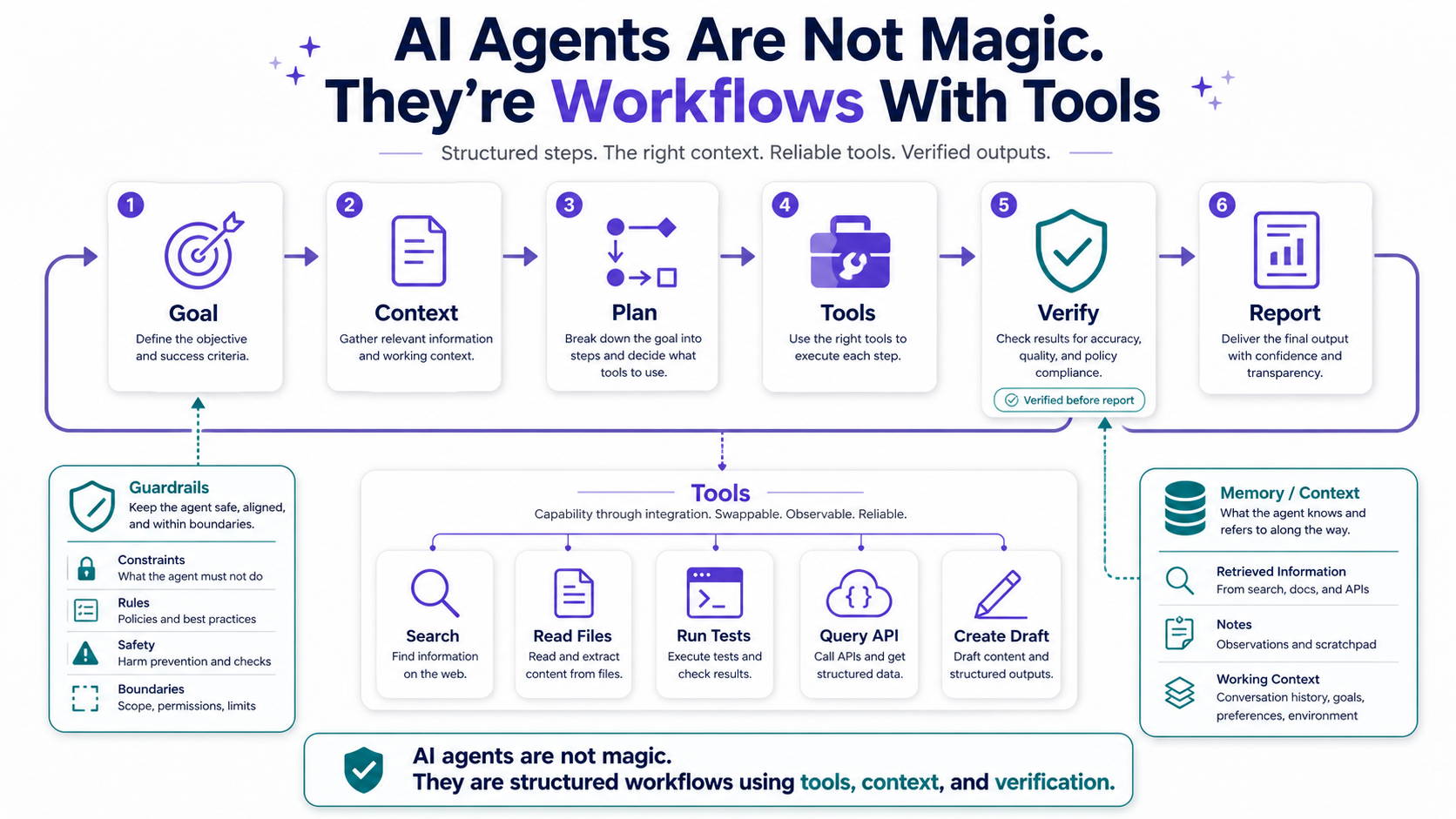
A basic AI agent usually follows a loop:
- Understand the goal. What is the user trying to accomplish?
- Gather context. What files, docs, tickets, messages, or records matter?
- Plan the work. What steps should happen, and in what order?
- Use tools. Search, read, write, call APIs, run tests, create drafts, or update systems.
- Verify the result. Check whether the output is correct and safe.
- Report back. Explain what changed, what failed, and what needs human review.
That's not magic. That's workflow automation with a language model in the reasoning layer.
Think of an agent like a junior teammate with access to company tools. If you give them no context, no checklist, no permissions, and no review process, you shouldn't be shocked when the result is messy.
Tools Are What Make Agents Useful
A language model without tools can talk. A language model with tools can act.
Tools are functions the agent can call: search a codebase, read a Jira ticket, query a database, run a test suite, open a pull request, send a message, or fetch documentation.
The tool layer is where agents move from "interesting answer" to "useful system."
Example Tool Shape
Here's a simplified PHP-style interface for a tool:
interface Tool
{
    public function name(): string;

    public function description(): string;

    /** @return array<string, mixed> */
    public function run(array $input): array;
}
The agent doesn't need direct access to everything. It needs carefully designed tools with clear inputs, outputs, and permissions.
A GitHub Search Tool
final class SearchPullRequests implements Tool
{
    public function run(array $input): array
    {
        return $this->github->searchPullRequests(
            query: $input['query'],
            limit: min($input['limit'] ?? 10, 25),
        );
    }
}
Notice the guardrail: even if the model asks for 500 results, the tool caps the limit. Tool design is security design.
Context Is The Difference Between Helpful And Dangerous
Agents fail when they operate with shallow context.
If you ask an agent to refactor payment logic without giving it the business rules, past incidents, tests, database constraints, and deployment risk, you're basically asking someone to repair an airplane after only seeing the seat map.
Context is the material the agent uses to make decisions.
Useful Context Sources
- Codebase files. The actual implementation matters more than assumptions.
- Documentation. Architecture notes, API docs, runbooks, and domain rules help reduce guessing.
- Issue tracker data. Tickets explain why a change exists.
- Previous pull requests. Similar changes reveal conventions and risks.
- Runtime signals. Logs, errors, metrics, and traces show reality.
A good agent architecture treats context gathering as a first-class step, not an afterthought.
Memory Is Not The Same As Context
People often mix up memory and context.
Context is what the agent needs right now. Memory is what the system keeps for future interactions.
Memory can be useful, but it can also become dangerous if it stores stale, sensitive, or incorrect information. A bad memory is like a sticky note on your monitor that says "the database password is probably still admin." Helpful? No. Terrifying? Yes.
Practical Memory Rules
- Store preferences, not secrets. Remember coding style, not credentials.
- Expire operational facts. Deployment details and system status change.
- Make memory inspectable. Users should know what the system remembers.
- Prefer source links. A remembered summary should point back to evidence when possible.
- Don't let memory override current facts. Fresh context beats old memory.
Agents become better when memory is deliberate instead of accidental.
Verification Is The Part Everyone Underestimates
The most important agent feature is not planning. It's verification.
An agent that can act but cannot verify is like a developer who pushes code without running tests because "it felt right." We've all met that energy. Let's not automate it.
Verification Layers
- Static checks. Type checks, linters, PHPStan, Psalm, ESLint, or similar tools.
- Automated tests. Unit, integration, feature, and regression tests.
- Policy checks. Sensitive files, database migrations, security rules, and permissions.
- Human review. Some actions should require approval before execution.
- Runtime monitoring. After deployment, logs and metrics confirm whether the change behaves.
The best agents don't ask you to trust them. They produce evidence.
A Practical Agent Workflow For Software Engineering
Let's make this concrete.
Imagine an agent assigned a ticket: "Add validation for failed payment retry flow."
A useful workflow might look like this:
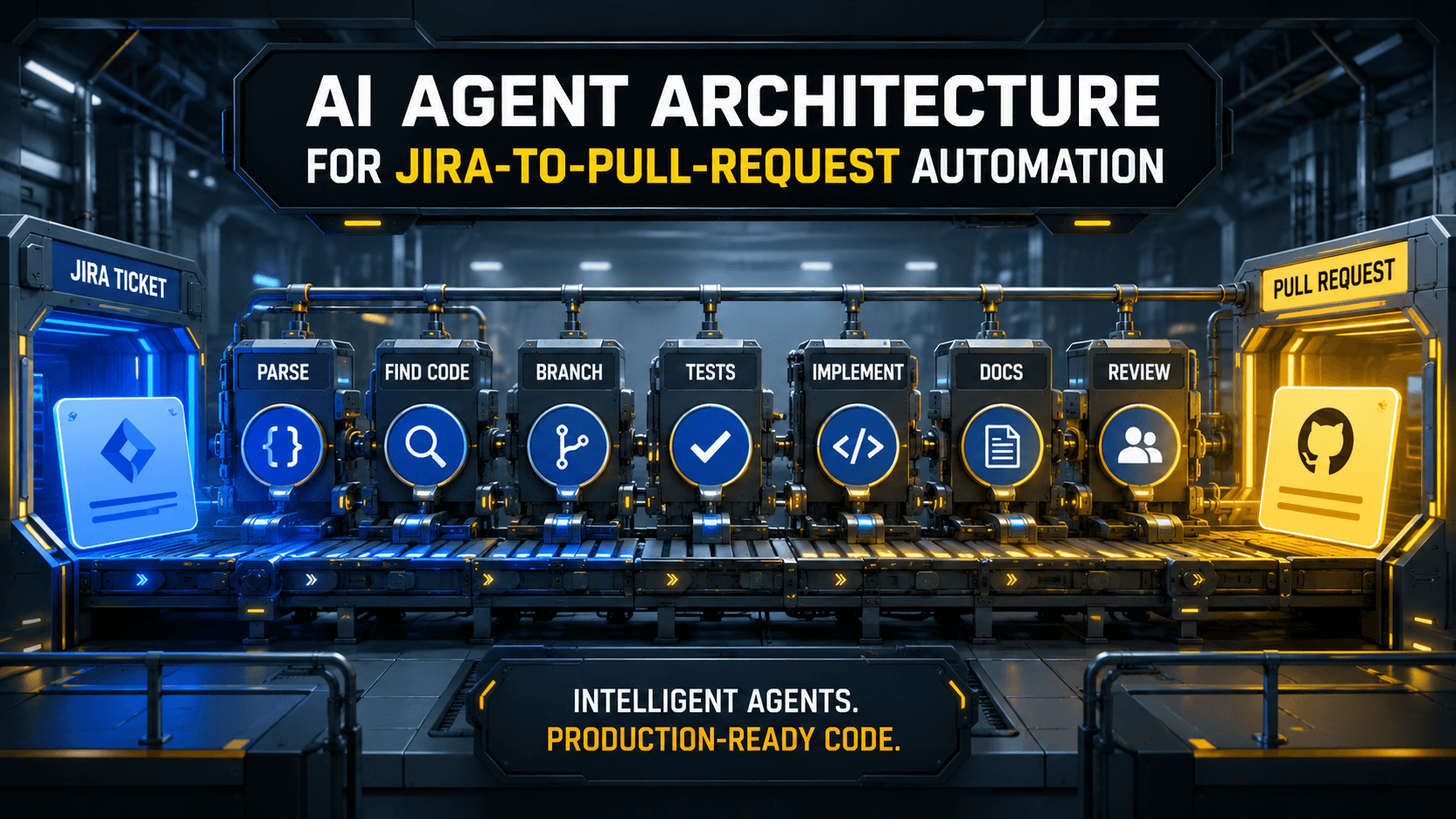
- Read the ticket. Extract acceptance criteria, linked bugs, and constraints.
- Find relevant code. Search payment retry services, controllers, jobs, tests, and config.
- Build a plan. Identify affected files and risk areas.
- Ask for missing information. Only when the missing detail blocks safe progress.
- Make a small change. Avoid giant diffs.
- Run checks. Tests, static analysis, and security review.
- Summarize evidence. What changed, why, and what passed.
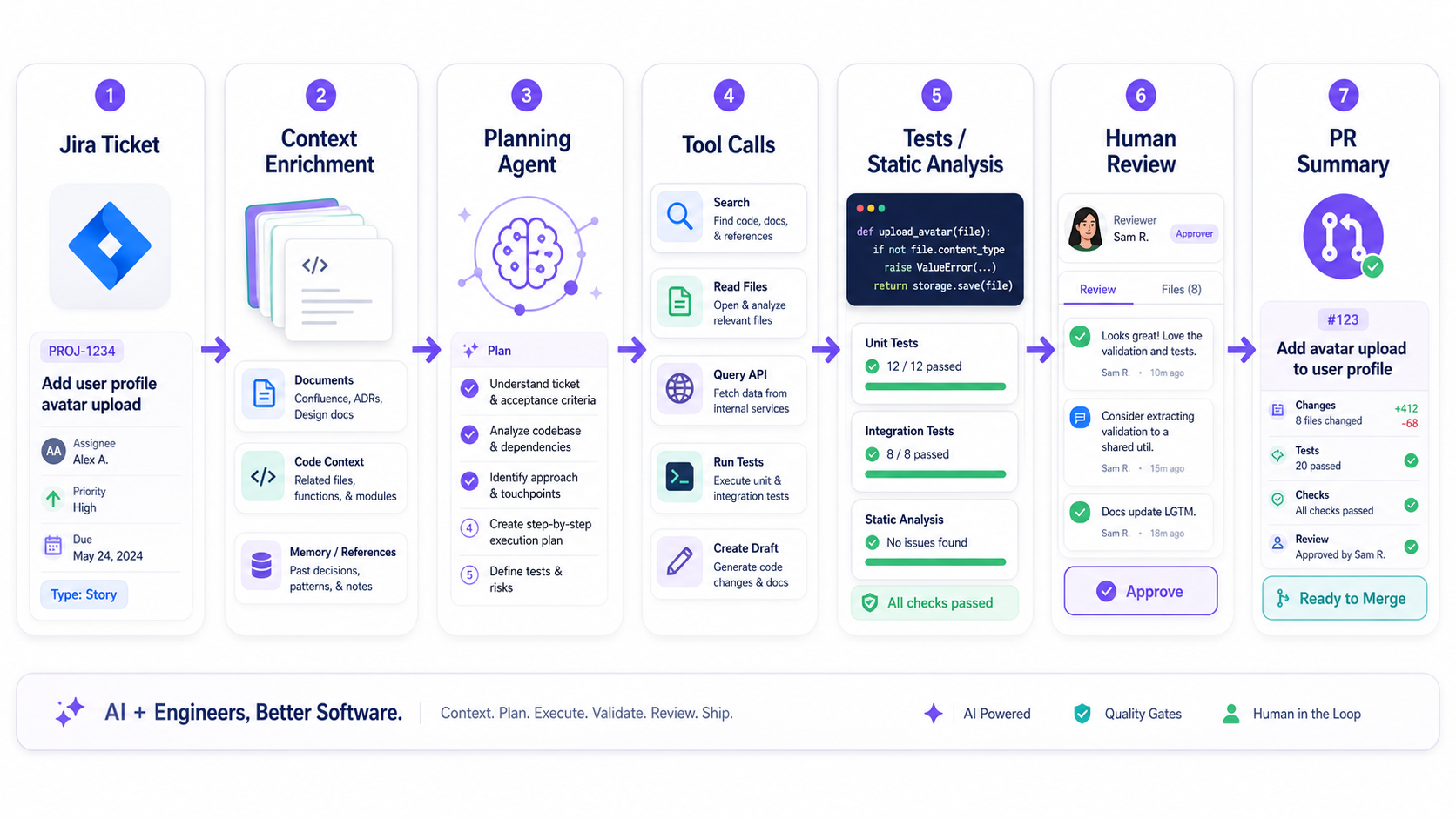
That's an agent. Not a miracle. A controlled workflow.
Common AI Agent Problems
- Too much permission. A tool that can do anything is a risk multiplier.
- No verification step. The agent produces output but no evidence.
- Weak context retrieval. The model guesses instead of reading the source.
- No human approval gates. Dangerous actions happen too easily.
- Unclear tool contracts. Messy inputs and outputs create messy behavior.
Most bad agents are not bad because the model is dumb. They're bad because the workflow is poorly designed.
Pro Tips
- Design tools like APIs. Clear names, strict schemas, permission limits, and predictable outputs.
- Keep plans visible. The user should understand what the agent intends to do.
- Require evidence. A serious agent should cite files, tests, logs, or tool results.
- Use small reversible actions. Big autonomous actions are harder to review and rollback.
- Separate read tools from write tools. Reading context and changing systems should have different permissions.
Final Tips
I've become much more optimistic about agents after I stopped expecting them to be magic. When you treat them like workflows, you naturally add the parts that make software reliable: inputs, constraints, tools, tests, logs, and review.
The next wave of useful AI systems won't just be smarter chat boxes. They'll be well-designed workflows where the model is one powerful component in a larger system.
Build the workflow first. Let the agent earn trust through evidence. Go automate carefully 👊