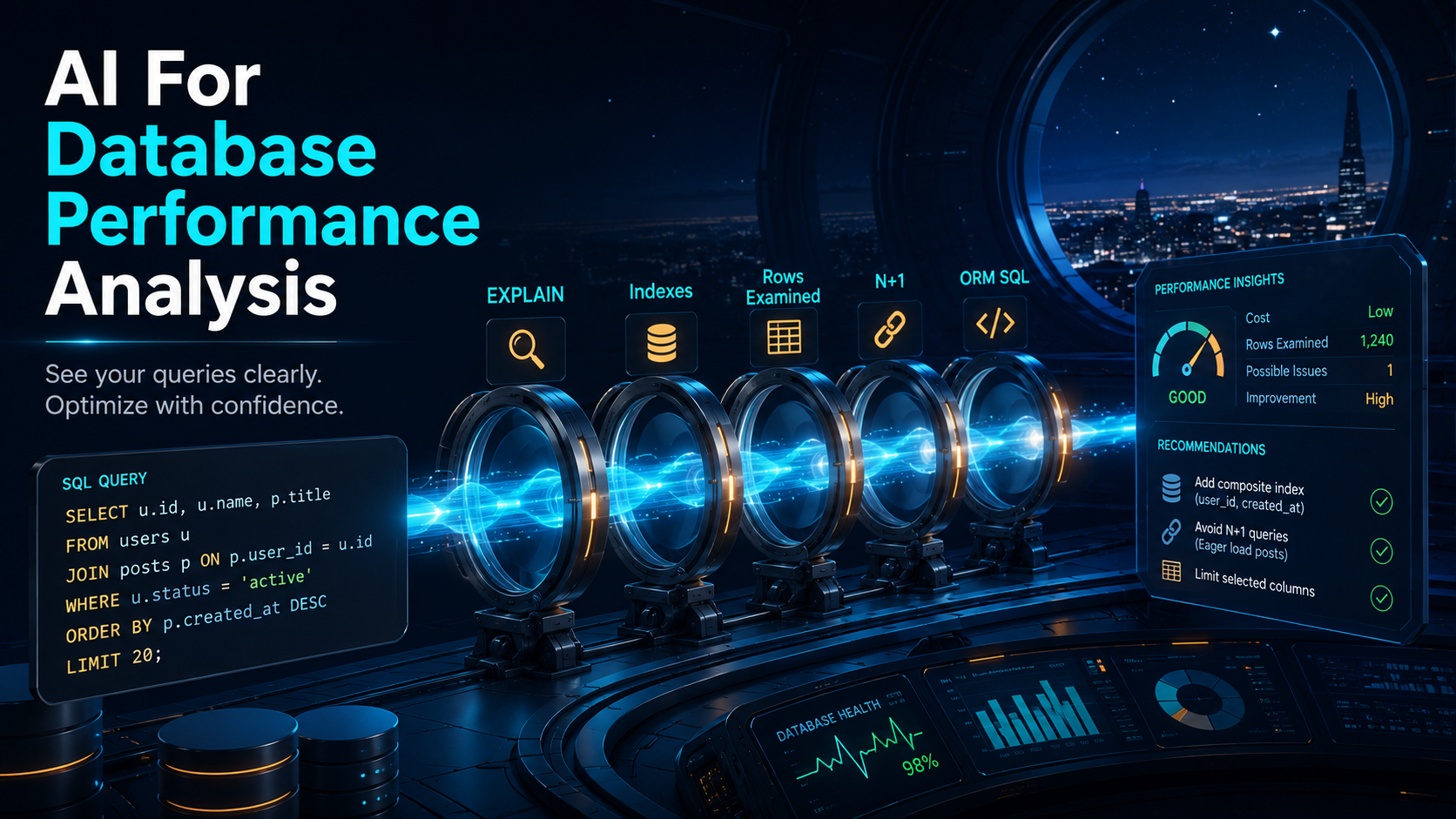
Database performance work is not about guessing — it's about evidence. You look at the query, check the schema, inspect indexes, run EXPLAIN, compare estimated rows with real behavior, look at ORM-generated SQL, and check whether the app is accidentally running the same query a thousand times. AI can help with all of that, but it can't replace the measuring.
It's worth being honest about what AI can't do for you here. It cannot know your production data distribution unless you provide it. It cannot safely choose indexes without understanding write volume, cardinality, query frequency, and deployment risk. It cannot replace measuring. What AI can do very well is help you reason — read a slow query and explain likely problems, translate an EXPLAIN plan into plain English, spot common index mistakes, detect possible N+1 patterns in ORM code, and suggest safer query rewrites alongside what to verify. That part is extremely useful, and the rest of this article is about how to lean on it without losing the rigor.
The best workflow is short:
Measure first.
Ask AI to explain.
Make a small change.
Measure again.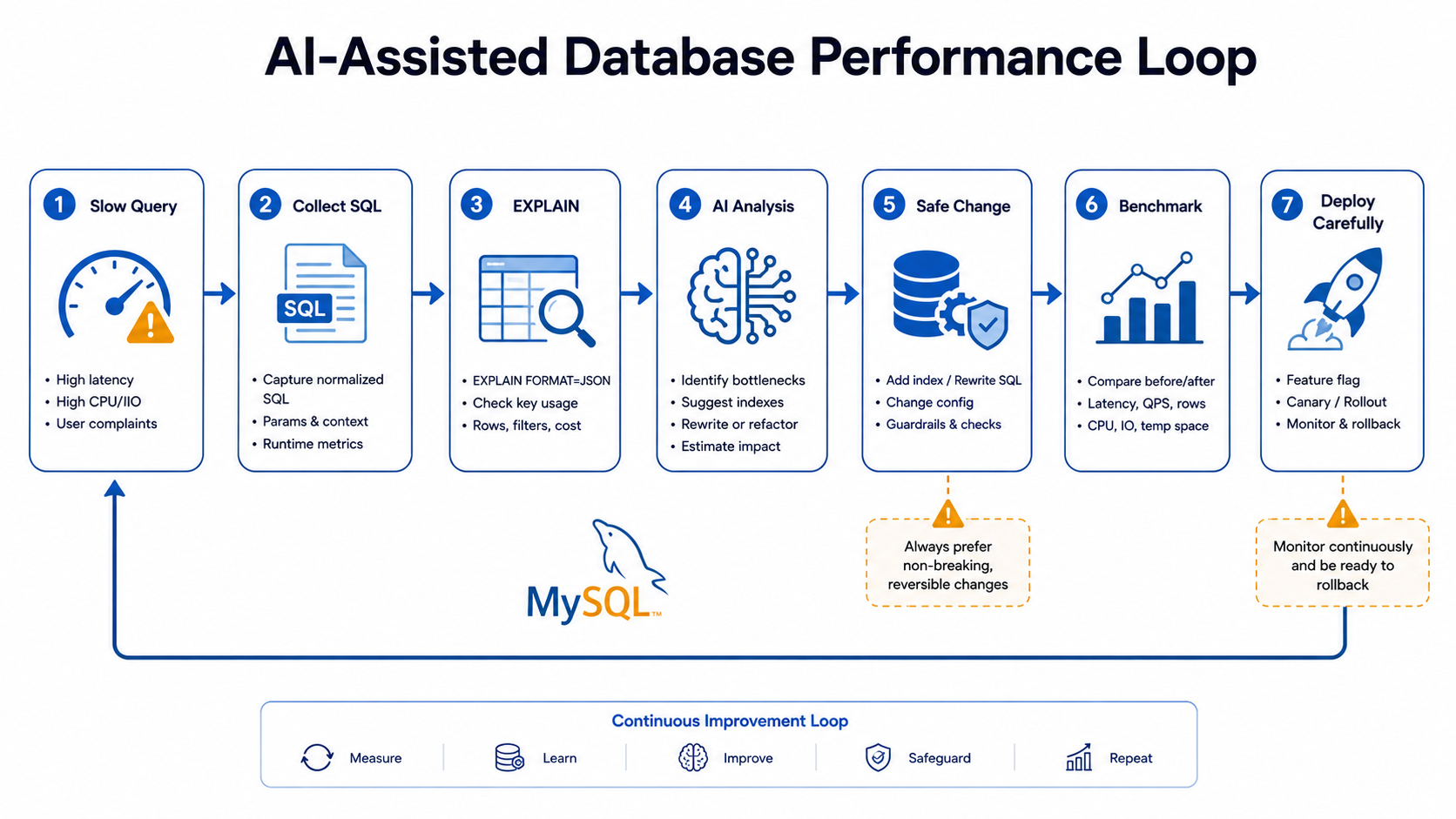
Start With The Real SQL
If your application uses an ORM, don't start with the ORM code — start with the SQL it generates. The PHP looks innocent; the generated SQL is what the database actually executes. For example, this Laravel code:
$orders = Order::query()
    ->where('status', 'paid')
    ->whereHas('customer', function ($query) {
        $query->where('country', 'US');
    })
    ->orderByDesc('created_at')
    ->limit(50)
    ->get();
May generate SQL like:
SELECT *
FROM orders
WHERE status = 'paid'
  AND EXISTS (
      SELECT *
      FROM customers
      WHERE customers.id = orders.customer_id
        AND country = 'US'
  )
ORDER BY created_at DESC
LIMIT 50;
Ask AI to review the SQL, not only the PHP. A good prompt gives it the context the database itself would care about:
Analyze this SQL query for performance.

Database: MySQL 8.x
Table sizes:
- orders: about 12 million rows
- customers: about 800k rows

Existing indexes:
orders:
- PRIMARY(id)
- INDEX(status)
- INDEX(customer_id)
- INDEX(created_at)

customers:
- PRIMARY(id)
- INDEX(country)

Query:
[paste SQL]

Please explain:
- likely access pattern,
- possible missing composite indexes,
- whether ORDER BY can use an index,
- whether the EXISTS subquery is likely expensive,
- what EXPLAIN fields I should inspect,
- safest first change.
Notice the context — table sizes and existing indexes matter. Without them, AI can only give you generic advice that may or may not match your data shape.
Use EXPLAIN As The Source Of Truth
In MySQL, EXPLAIN shows how the optimizer plans to execute a statement. It's the closest thing to ground truth you have without running the query. Take this:
EXPLAIN
SELECT *
FROM orders
WHERE customer_id = 42
  AND status = 'paid'
ORDER BY created_at DESC
LIMIT 20;
A possible output:
type: ref
key: customer_id
rows: 12000
Extra: Using where; Using filesort
That tells you MySQL may use the customer_id index, then filter by status, then sort. That might be okay for small result sets. It may be bad if one customer has many orders — the filesort cost grows with the number of rows the optimizer has to sort. A composite index can change that picture entirely:
CREATE INDEX idx_orders_customer_status_created
ON orders (customer_id, status, created_at);
Now the query can filter by customer, filter by status, and read rows already in created_at order — no filesort.
Ask AI to translate the plan for you:
Explain this MySQL EXPLAIN output in plain English.

Query:
[paste query]

EXPLAIN:
[paste output]

Please explain:
- which index is used,
- what `type` means,
- estimated rows,
- whether filesort appears,
- whether temporary table appears,
- what index might improve this,
- what trade-offs the index has.
AI is very helpful for turning EXPLAIN into something you can paste into a pull request or share with someone less familiar with the optimizer.
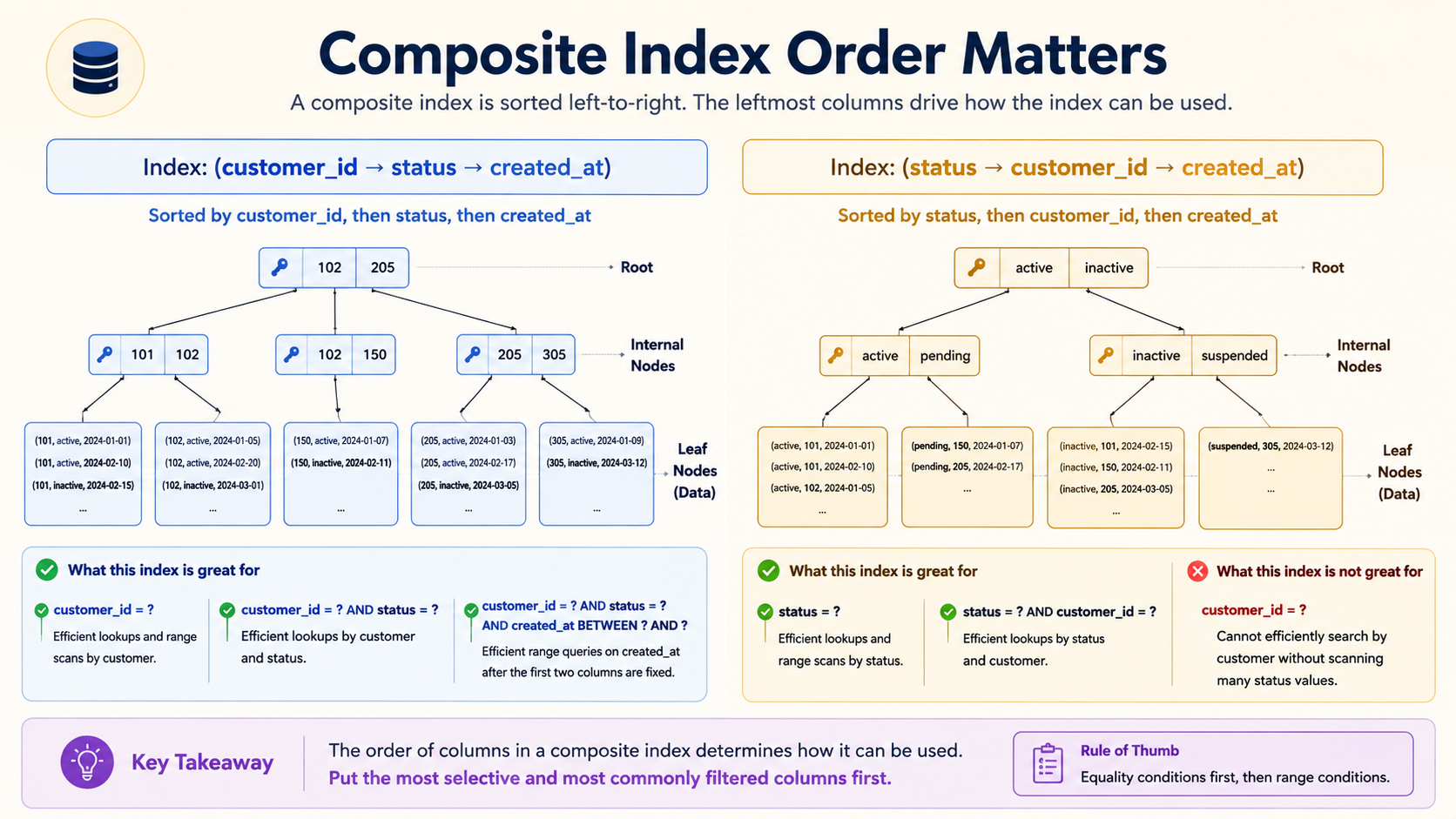
Composite Index Order Matters
One of the most common mistakes is creating indexes that look right but are not useful. Take this query:
SELECT *
FROM orders
WHERE customer_id = 42
  AND status = 'paid'
ORDER BY created_at DESC
LIMIT 20;
And these candidates:
CREATE INDEX idx_customer ON orders (customer_id);

CREATE INDEX idx_status ON orders (status);

CREATE INDEX idx_customer_status_created
ON orders (customer_id, status, created_at);

CREATE INDEX idx_status_customer_created
ON orders (status, customer_id, created_at);
Which one is best? It depends on data distribution, but (customer_id, status, created_at) is often a strong candidate for this exact query because customer_id is filtered by equality, status is filtered by equality, and created_at supports ordering after the equality filters — three columns in the order the query actually consumes them.
A useful prompt:
Compare these indexes for this query.

Query:
[paste query]

Indexes:
[paste indexes]

Explain:
- which index matches the WHERE clause best,
- which index can help ORDER BY,
- how equality columns affect index order,
- whether low-cardinality columns like status should lead,
- what data distribution could change the answer,
- which index you would test first and why.
The phrase "what data distribution could change the answer" is the important one. A status like paid may match 90% of the table, or it may match 5%. That changes index usefulness completely — and AI can't know it unless you tell it.
AI Can Help Detect Missing Indexes
Imagine this query:
SELECT *
FROM subscriptions
WHERE user_id = 123
  AND status = 'active'
  AND canceled_at IS NULL
ORDER BY created_at DESC;
With these existing indexes:
PRIMARY KEY (id)
INDEX(status)
INDEX(user_id)
AI may suggest testing:
CREATE INDEX idx_subscriptions_user_status_canceled_created
ON subscriptions (user_id, status, canceled_at, created_at);
But don't blindly add it. Indexes aren't free — they speed up reads, slow down writes, and consume storage. Ask AI to think about the trade-off out loud:
Evaluate this potential index.

Table: subscriptions
Query frequency: high, customer dashboard
Write volume: medium
Existing indexes:
[paste indexes]

Proposed index:
[paste index]

Please explain:
- why it may help,
- whether column order makes sense,
- write overhead,
- storage overhead,
- whether it overlaps existing indexes,
- whether a shorter index may be enough,
- how to validate using EXPLAIN before and after.
A four-column index that helps one endpoint but slows every write to that table is not always a win.
ORM-Generated SQL Can Be The Real Problem
Sometimes the slow query is not one query — it's many. The classic shape is something like this:
$invoices = Invoice::query()
    ->where('status', 'overdue')
    ->limit(100)
    ->get();

return $invoices->map(fn (Invoice $invoice) => [
    'id' => $invoice->id,
    'customer_email' => $invoice->customer->email,
    'plan' => $invoice->subscription->plan->name,
]);
Which can trigger:
1 query for invoices
100 queries for customers
100 queries for subscriptions
100 queries for plans
The fix is eager loading (and, ideally, partial column selection so you don't pay to hydrate fields you'll throw away):
$invoices = Invoice::query()
    ->with([
        'customer:id,email',
        'subscription.plan:id,name',
    ])
    ->where('status', 'overdue')
    ->limit(100)
    ->get();
The prompt that surfaces this pattern reliably:
Analyze this Laravel code for ORM-generated database performance issues.

Look for:
- N+1 queries,
- missing eager loading,
- loading too many columns,
- unbounded result sets,
- pagination problems,
- relationship access inside loops,
- API resources that trigger lazy loading.

Suggest safer changes and explain memory trade-offs.
The memory trade-off matters. Eager loading large object graphs can also be expensive, and a list endpoint that pulls 10,000 rows shouldn't also hydrate every related entity.
Doctrine N+1 Example
The same pattern in Doctrine looks like this:
$orders = $orderRepository->findBy(['status' => OrderStatus::Paid]);

foreach ($orders as $order) {
    $email = $order->getCustomer()->getEmail();
    $plan = $order->getSubscription()->getPlan()->getName();
}
A possible fix using a single fetch-join:
$orders = $entityManager->createQueryBuilder()
    ->select('o', 'c', 's', 'p')
    ->from(Order::class, 'o')
    ->join('o.customer', 'c')
    ->join('o.subscription', 's')
    ->join('s.plan', 'p')
    ->where('o.status = :status')
    ->setParameter('status', OrderStatus::Paid)
    ->setMaxResults(100)
    ->getQuery()
    ->getResult();
Useful Doctrine prompt:
Review this Doctrine code for N+1 and hydration cost.

Please explain:
- which associations may lazy-load,
- how many queries may run,
- whether join fetching is appropriate,
- whether pagination is safe with joins,
- whether partial selects or DTO queries would be better,
- how to test or profile the result.
AI can suggest options, but you must validate with your profiler — the join may be cheaper in queries and more expensive in hydration, depending on the size of each row.
Safer Query Changes
Don't ask AI to "optimize everything" — ask for the safest first change. The "make this query faster" prompt invites the model to invent restructurings that change behavior. The constrained version is much more useful:
Suggest the safest first performance improvement for this query.

Constraints:
- Response shape must not change.
- Authorization behavior must not change.
- No caching in this task.
- Prefer query/index changes over architecture changes.
- Explain how to verify improvement.
- Mention possible regressions.
For example, changing:
WHERE DATE(created_at) = '2026-05-03'to:
WHERE created_at >= '2026-05-03 00:00:00'
  AND created_at <  '2026-05-04 00:00:00'
is usually safer than redesigning the whole reporting system. It preserves behavior while making an index on created_at actually usable — DATE(created_at) is a function on the column, which defeats the index.
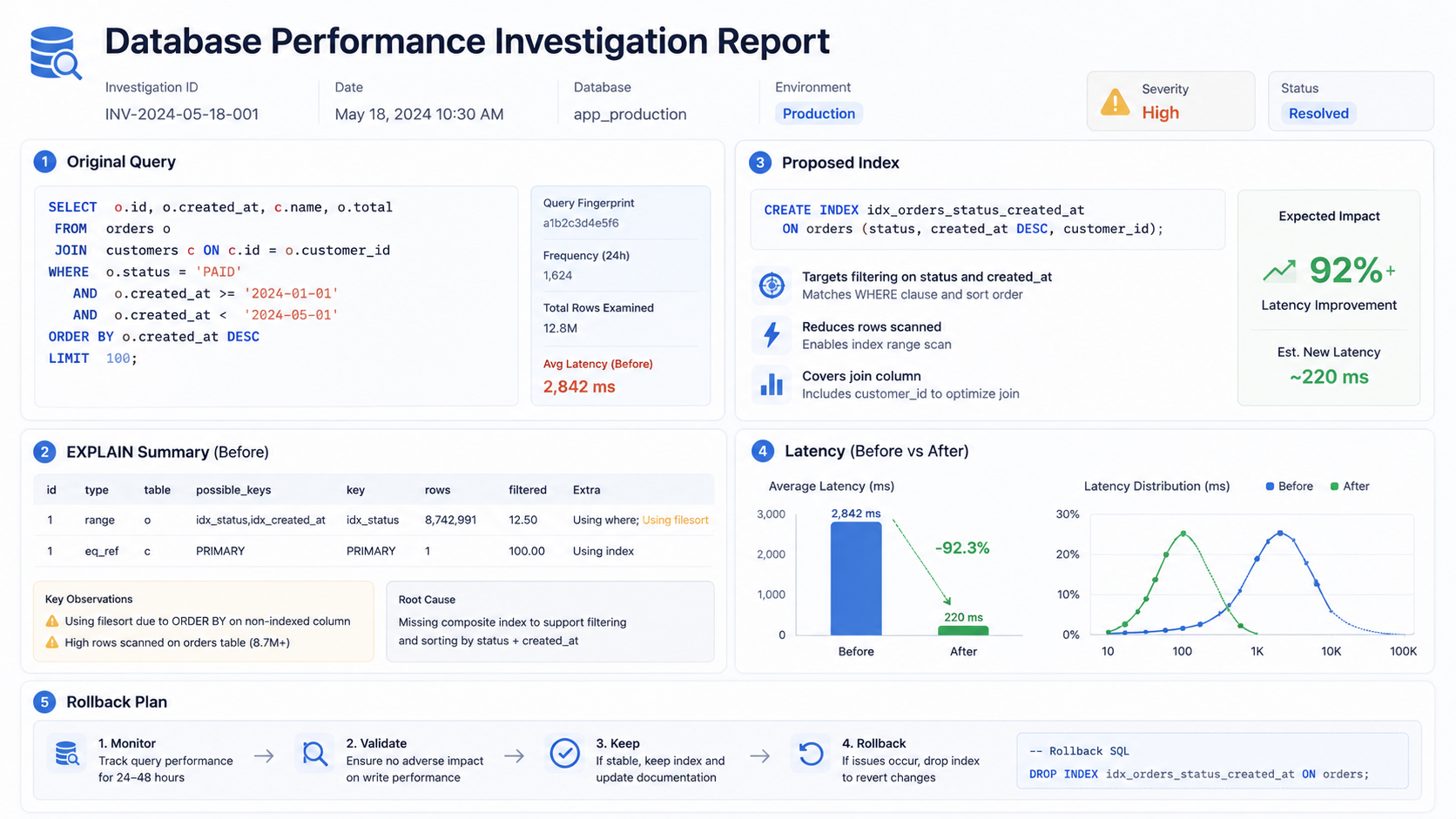
Use AI To Write Performance Investigation Notes
An underrated use: ask AI to summarize the investigation, not just suggest the fix. The note becomes the artifact you share in the pull request, the ticket, or the post-mortem.
Create a database performance investigation note.

Include:
- original query,
- symptoms,
- table sizes,
- current indexes,
- EXPLAIN summary,
- suspected bottleneck,
- proposed change,
- validation plan,
- rollback plan,
- open questions.
A typical output reads something like:
## Suspected Bottleneck

The query filters by `customer_id` and `status`, but MySQL currently uses only
the `customer_id` index and performs a filesort for `created_at`.

## Proposed Change

Test a composite index on `(customer_id, status, created_at)`.

## Validation

Compare `EXPLAIN` before and after.
Measure p95 latency for the customer orders endpoint.
Check write latency on order creation.
That's practical engineering documentation — short, specific, with a defined verification path.
A Practical Prompt Template
Save this prompt — it's the one that gets the most useful answer back, every time:
Act as a senior database performance reviewer.

Database:
[MySQL/PostgreSQL/etc.]

Query:
[paste SQL]

ORM code:
[paste code if relevant]

Table sizes:
[paste approximate row counts]

Existing indexes:
[paste indexes]

EXPLAIN output:
[paste EXPLAIN]

Context:
- endpoint/job/report name,
- query frequency,
- expected result size,
- write volume,
- latency symptoms.

Please provide:
1. Plain-English explanation of current execution.
2. Likely bottlenecks.
3. Missing or ineffective indexes.
4. ORM issues such as N+1 queries.
5. Safest first change.
6. Trade-offs and risks.
7. How to validate before and after.
8. What not to change yet.
This gives AI enough context to be useful without forcing it to invent the missing parts.
What AI Often Misses
AI doesn't see the production reality of your database. The things you still have to bring to the table:
- skewed data distribution,
- outdated table statistics,
- lock behavior during migrations,
- write amplification from indexes,
- production-only query patterns,
- hot partitions,
- replication lag,
- transaction isolation issues,
- query plan changes after data grows,
- ORM behavior triggered by serializers.
So don't stop at AI analysis. Validate. Run EXPLAIN ANALYZE when supported, check slow query logs, use application tracing, and measure before and after — the model can suggest, but the database has to confirm.
Final Thoughts
AI can make database performance work easier. It can explain queries, read plans, compare indexes, detect ORM mistakes, and write investigation notes that hold up in code review. But the work still needs evidence, and the best workflow is boring and reliable:
Collect real SQL.
Collect EXPLAIN.
Provide indexes and table sizes.
Ask AI to reason.
Make the smallest safe change.
Measure again.
That's how you avoid random "optimization." AI is not the database optimizer — it's your assistant for understanding what the optimizer is doing and what you should test next. That's already very valuable.