
A user typed "trail running shoes" into our search bar last spring. The app returned nothing. The database had thousands of products. One was literally called "lightweight trail runners". The keyword index didn't know that "shoes" and "runners" were the same thing, and our customer didn't know they should reword the query. They just left.
That's the moment most teams realise their search is broken. Not when it returns wrong results, but when it returns no results for a query a human would have answered in a second. Keyword search is great at spelling and exact tokens. It is hopeless at meaning. AI-powered search — vector embeddings plus an honest hybrid strategy — is what fixes the gap, and you can run the whole thing inside a single Postgres database that you probably already have.
What An Embedding Actually Is
An embedding is a function that takes a piece of text and returns an array of numbers. OpenAI's text-embedding-3-small returns 1536 of them; text-embedding-3-large returns 3072. Each number is a coordinate in a high-dimensional space, and the trick is that the coordinates aren't random. The model has been trained so that texts with similar meanings end up close together in that space, and texts with different meanings end up far apart.
import { embed } from 'ai';
import { openai } from '@ai-sdk/openai';

const { embedding } = await embed({
  model: openai.embedding('text-embedding-3-small'),
  value: 'lightweight trail runners',
});
// embedding: number[] of length 1536
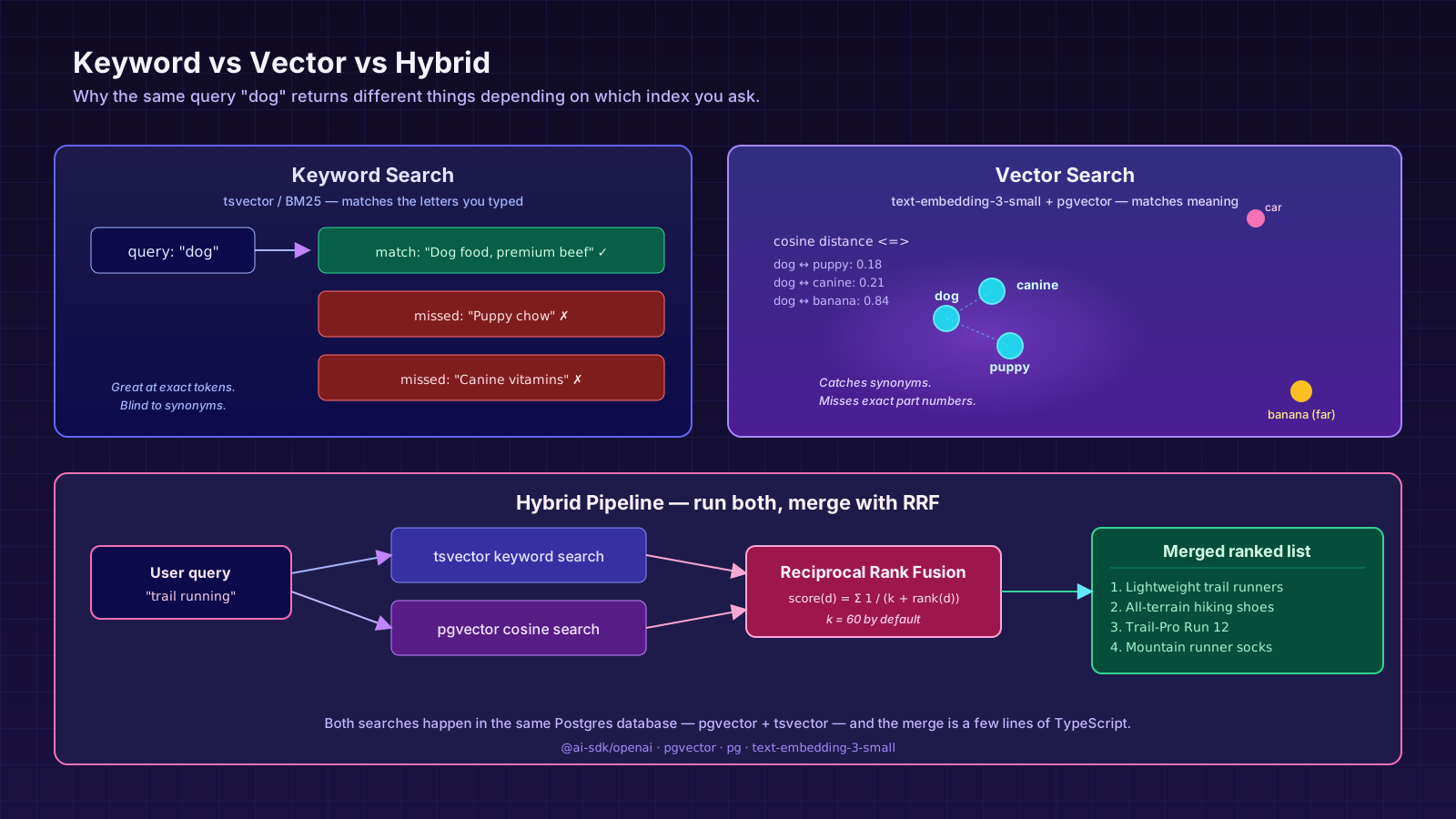
"Trail running shoes" lives near "lightweight trail runners". "Banana" lives nowhere near either. Once your data is in this space, search becomes geometry: take the query's vector and find the documents closest to it.
pgvector — Same Database, New Index Type
You don't need a separate vector database to start. The pgvector extension gives Postgres a vector column type and operators for cosine, inner product, and L2 distance. If your app already runs on Postgres, you're an ALTER TABLE away from semantic search.
CREATE EXTENSION IF NOT EXISTS vector;

ALTER TABLE products
  ADD COLUMN embedding vector(1536);

CREATE INDEX products_embedding_idx
  ON products USING hnsw (embedding vector_cosine_ops);
The HNSW index gives you approximate nearest-neighbour search with millisecond latency on millions of rows. It is the index you want for production. The older ivfflat index works but needs more tuning and rebuilds.
Indexing is just an embed-and-store call:
import { embed } from 'ai';
import { openai } from '@ai-sdk/openai';
import { pool } from './db';

export async function indexProduct(p: { id: string; name: string; description: string }) {
  const { embedding } = await embed({
    model: openai.embedding('text-embedding-3-small'),
    value: `${p.name}\n\n${p.description}`,
  });
  await pool.query(
    `UPDATE products
        SET embedding = $1
      WHERE id = $2`,
    [`[${embedding.join(',')}]`, p.id],
  );
}
Two small but load-bearing details. First, format matters: pgvector expects the literal string [0.012,-0.045,...], not a JSON array. Second, you almost always want to embed a combined representation of the document — name plus description plus tags — not just one field. The embedding is a summary of meaning; give the model enough context to summarise.
Searching Is A One-Liner
Querying is the same operation in reverse: embed the user's input, ask Postgres for the nearest vectors. The cosine-distance operator <=> returns a smaller number for closer matches, so you ORDER BY it ascending.
export async function semanticSearch(query: string, limit = 10) {
  const { embedding } = await embed({
    model: openai.embedding('text-embedding-3-small'),
    value: query,
  });
  const { rows } = await pool.query(
    `SELECT id, name, description,
            1 - (embedding <=> $1) AS similarity
       FROM products
      WHERE embedding IS NOT NULL
      ORDER BY embedding <=> $1
      LIMIT $2`,
    [`[${embedding.join(',')}]`, limit],
  );
  return rows;
}
similarity is between 0 and 1; values above ~0.55 are usually meaningful, below ~0.30 are usually noise. Don't hard-code those thresholds — measure on your own data.
Where Vector Search Falls On Its Face
Embeddings are not magic. Two failure modes show up in production within a week:
The first is exact tokens. A user searches for SKU-99812X or iPhone 15 Pro Max 256GB. Vector search cheerfully returns the kind of thing they asked for — phones, accessories — but not the exact product, because embeddings have been trained to ignore surface details in favour of meaning. The fix is not to throw a better embedding model at it. The fix is keyword search, which is excellent at exactly this.
The second is short queries. A query like "fan" can mean a desk fan, a ceiling fan, a sports fan, or a band fan. The embedding picks one direction in the space and pulls back results from that direction; the other meanings get nothing. Adding even one more word ("desk fan", "fan engine cooling") usually fixes it. In a UI, that's a place where suggested completions earn their keep.
Hybrid Search Is The Real Answer
Production search systems run keyword and vector in parallel and merge the results. Postgres has full-text search built in via tsvector, so you can do this entirely inside one database. The merge step is usually Reciprocal Rank Fusion — for each candidate, sum 1 / (k + rank) across the rankings it appears in, with k = 60 as a reasonable default.
type Hit = { id: string; rank: number };

function rrf(rankings: Hit[][], k = 60) {
  const scores = new Map<string, number>();
  for (const list of rankings) {
    for (const hit of list) {
      scores.set(hit.id, (scores.get(hit.id) ?? 0) + 1 / (k + hit.rank));
    }
  }
  return [...scores.entries()]
    .sort(([, a], [, b]) => b - a)
    .map(([id, score]) => ({ id, score }));
}

export async function hybridSearch(q: string) {
  const [vector, keyword] = await Promise.all([semanticSearch(q, 25), keywordSearch(q, 25)]);
  return rrf([
    vector.map((r, i) => ({ id: r.id, rank: i })),
    keyword.map((r, i) => ({ id: r.id, rank: i })),
  ]);
}
keywordSearch here is just a tsvector @@ plainto_tsquery query in Postgres — no third-party service needed unless your scale demands one. The RRF merge gives you a single ranked list that handles both "iPhone 15 Pro" and "phone for someone who hates Android" without you having to guess which kind of query it was.
Cost, Latency, And The Quiet Failure Mode
A few things that bite teams once this is in production.
Embedding calls are not free. text-embedding-3-small is cheap per call but adds up if you re-embed on every write. Embed at write time, not read time. Re-embed only when the source text changes — diff name + description against what you stored last and skip if equal.
Latency budgets matter. The embed() call adds 50–200 ms to every search request, which is fine for a results page but painful for an autocomplete dropdown. For autocomplete, lean on keyword search alone, or embed the query once and cache it for the user's session.
The quiet failure mode is stale embeddings. You change the description of a product, forget to re-embed it, and now its vector reflects the old text. Searches that should match it don't. Add the embed step to whatever code path updates the document, or build a small backfill that scans for embedding-less rows nightly.
When To Reach For A Dedicated Vector DB
Pinecone, Weaviate, Qdrant, Turbopuffer, and friends exist for a reason. If you're embedding tens of millions of documents, need sub-10 ms search at high QPS, want metadata filtering at query time without writing SQL, or need to share an index across services, a dedicated vector DB earns its keep. Below that, pgvector with HNSW is shockingly capable and removes a whole class of operational problems — backups, transactions, joins, access control — that you'd otherwise rebuild on a vector-only platform.
The migration path from pgvector to Pinecone is straightforward when the time comes. The migration path from "we built a separate vector service on day one" to "we don't need it anymore" is much rarer.
A One-Sentence Mental Model
Keyword search matches the letters a user typed, vector search matches the meaning behind them, and hybrid search runs both and lets your ranker decide — and inside Postgres with pgvector and tsvector, you get all three without leaving the database your app already lives in.