Engineering teams want internal AI assistants. They want to ask questions like:
How does this service work?
Where is the runbook for payment failures?
Which document explains our retry policy?
What changed in the architecture after the last incident?
A custom RAG system can answer those questions, but building one from scratch takes work — you need ingestion, chunking, embeddings, vector storage, retrieval, reranking, prompt augmentation, citations, permissions, monitoring, and evaluation. That's a whole platform, not a feature.
Amazon Bedrock Knowledge Bases gives teams a managed way to build RAG on AWS. It can connect foundation models to company data sources, retrieve relevant information, and generate grounded answers. For teams already using AWS, it can dramatically reduce the amount of custom infrastructure needed — but that doesn't mean it solves every problem automatically. You still need good data, permissions, evaluation, and thoughtful design. What it gives you is a strong starting point.
What Is Amazon Bedrock Knowledge Bases?
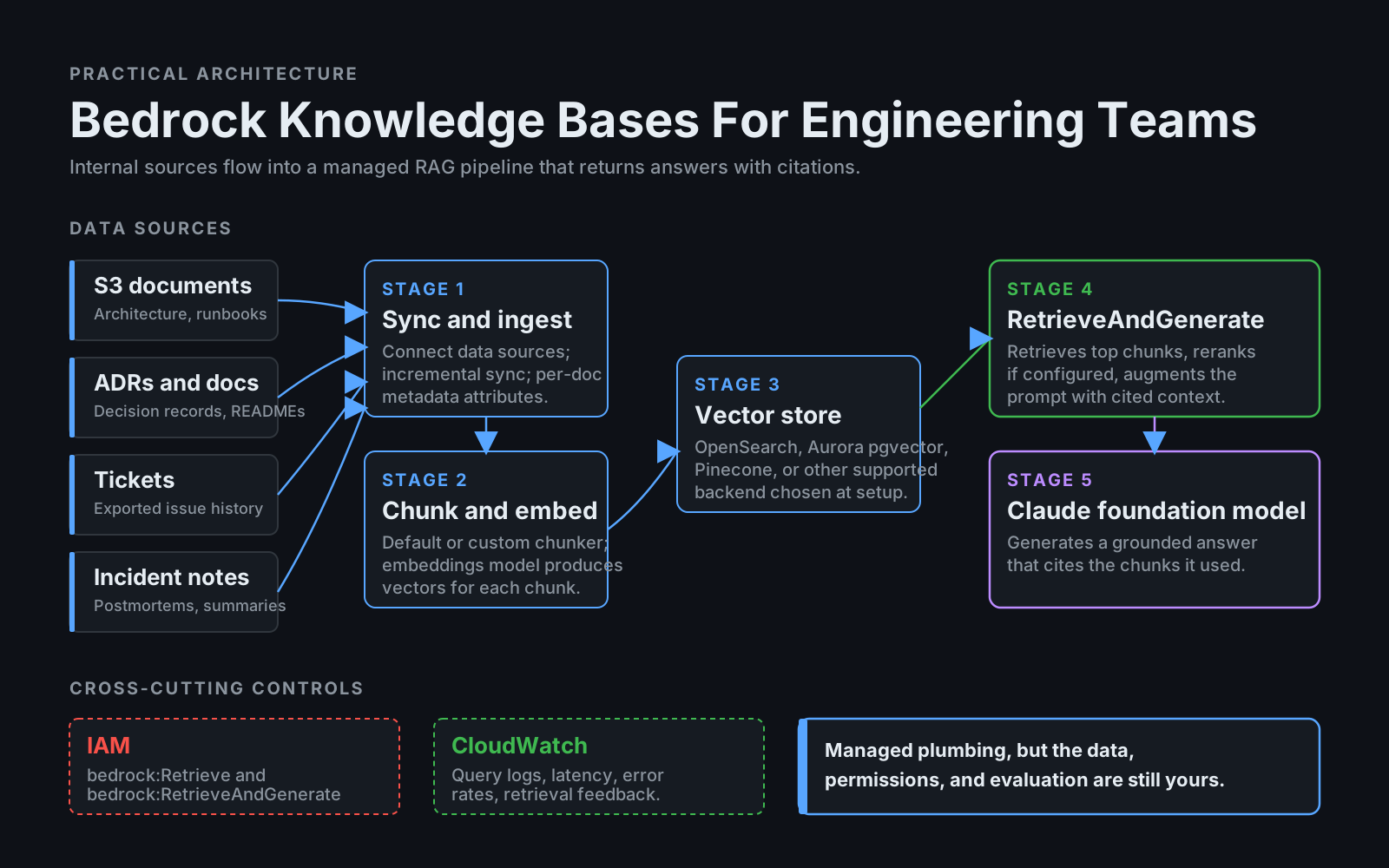
Amazon Bedrock Knowledge Bases is a managed RAG capability inside Amazon Bedrock. In practical terms, it helps you connect private data sources, ingest and chunk documents, create embeddings, store vectors, retrieve relevant chunks, connect that retrieved context to a foundation model, and generate a grounded response — all without writing the entire pipeline yourself.
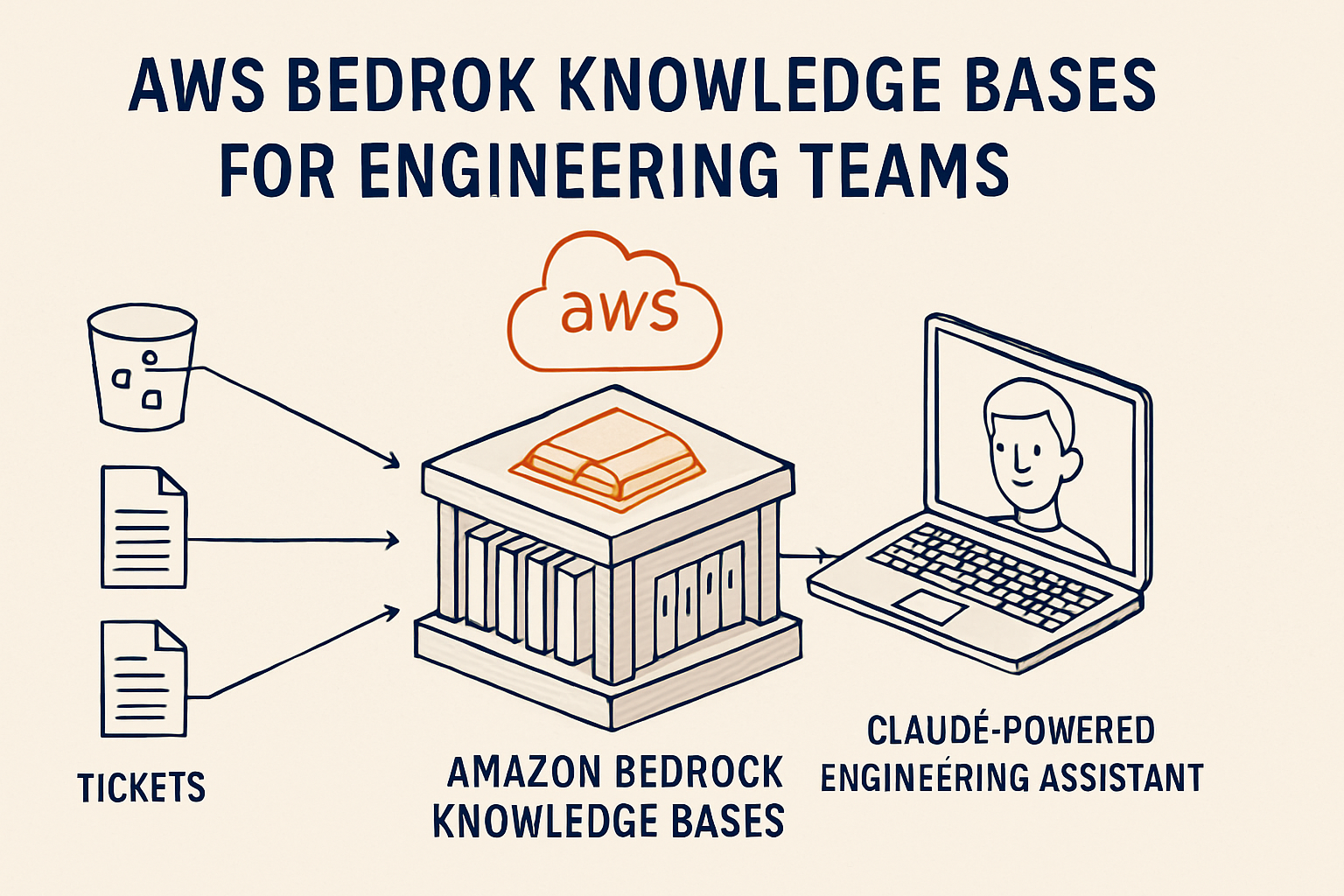
For an engineering team, this means an internal assistant becomes a configuration problem instead of an infrastructure project. The high-level flow looks like this:
Internal docs / S3 / supported data sources
    ↓
Knowledge Base ingestion
    ↓
Chunking and embeddings
    ↓
Vector store
    ↓
Retrieve relevant chunks
    ↓
Claude or another foundation model
    ↓
Answer with supporting sources
This is especially useful when your data already lives in AWS — the boundaries you already enforce (IAM, VPC, account isolation) extend naturally to the assistant.
What Can You Put Into A Knowledge Base?
For engineering use cases, common sources are architecture docs, runbooks, ADRs, API documentation, service ownership docs, incident summaries, deployment guides, internal support docs, exported ticket data, and repository documentation. Raw source code is more complex — code search often benefits from custom chunking by symbols, methods, classes, and paths, so a generic chunker tends to fragment it badly. You can still include code-related documentation, generated summaries, or selected code files, but treat chunking quality as a real concern, not an afterthought.
A strong first dataset:
docs/
runbooks/
architecture-decisions/
incident-summaries/
service-catalog/
README files
Avoid starting with everything. A smaller clean knowledge base almost always performs better than a huge noisy one — noise drags down retrieval quality faster than missing documents do.
Managed RAG vs Fully Custom RAG
With a custom RAG pipeline, you build each piece yourself:
Crawler → Chunker → Embedding Job → Vector DB → Retriever → Reranker → Prompt Builder → Answer GeneratorWith Bedrock Knowledge Bases, AWS manages much of the ingestion and retrieval pipeline for you. That's useful when your team wants to focus on the product experience instead of maintaining RAG plumbing — but custom systems still have advantages.
Custom RAG may be a better fit when you need very specialized code chunking, custom ranking logic, complex permission models, advanced evaluation tooling, multi-vector retrieval, unusual data sources, or deep integration with internal developer tools. Bedrock Knowledge Bases may be better when you want faster AWS-native setup, managed ingestion, integration with Bedrock-hosted models, IAM-based governance, less custom infrastructure, and an enterprise-friendly deployment that already lives inside AWS.
The decision isn't ideological — it's about operational fit. If you're already in AWS and your governance team is going to require IAM-scoped access anyway, managed RAG removes a lot of yak shaving. If you have unusual data or extreme retrieval requirements, the custom path is worth its weight.
Example Engineering Assistant Flow
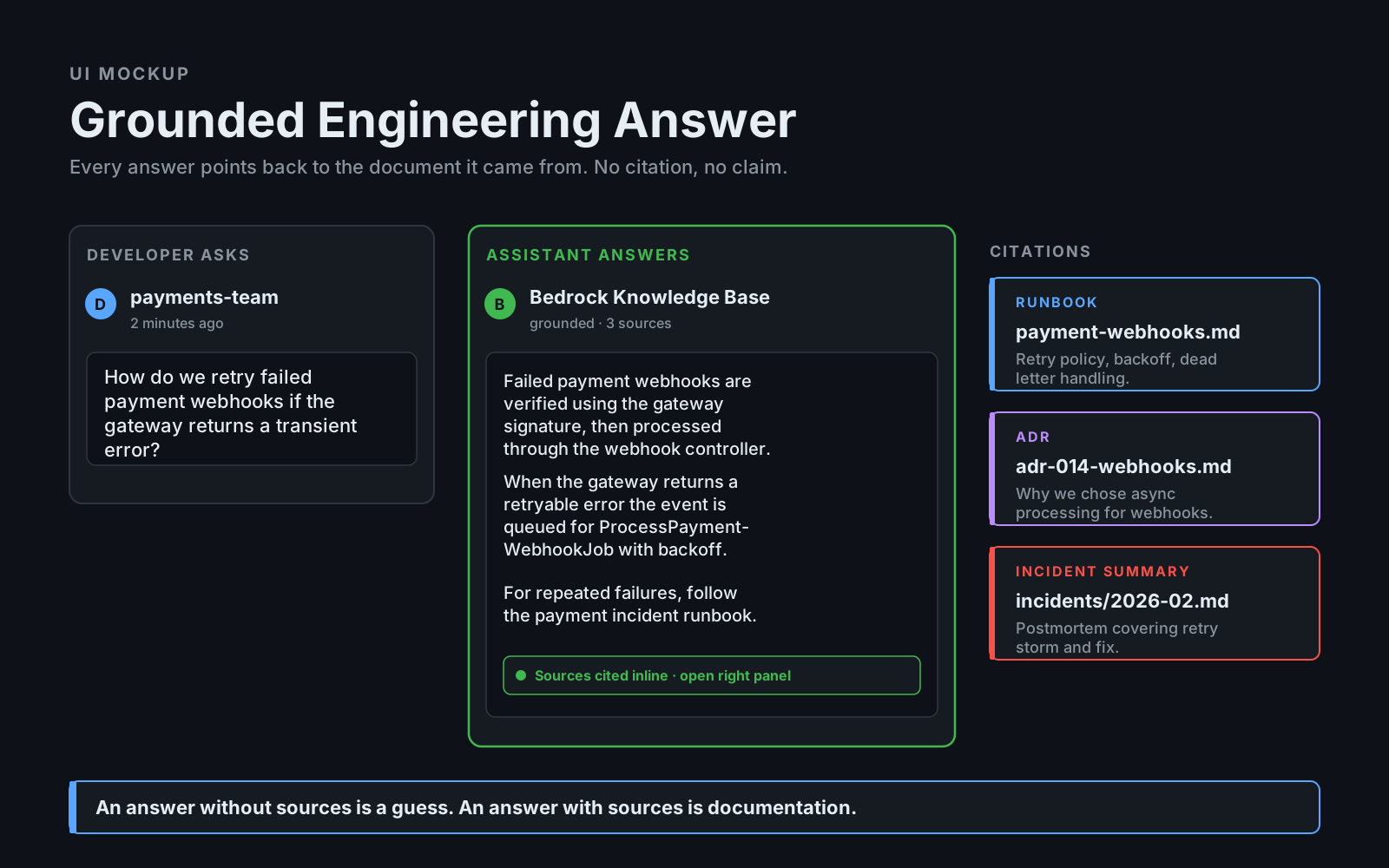
Imagine an internal assistant that takes a developer question, searches the Bedrock Knowledge Base, retrieves the runbook, the payment architecture doc, and the incident summary, and then generates an answer with sources:
Developer:
How do I handle failed payment webhooks?

Assistant:
Searches the Bedrock Knowledge Base.
Retrieves runbook, payment architecture doc, and incident summary.
Generates answer with sources.
The response should look like this:
Failed payment webhooks should be verified using the gateway signature,
then processed through PaymentWebhookController. If the gateway returns a
retryable error, the event is stored and retried by ProcessPaymentWebhookJob.
For repeated failures, follow the payment incident runbook.

Sources:
- runbooks/payment-webhooks.md
- docs/architecture/payments.md
- incidents/2026-02-payment-webhook-retries.md
The citations matter. Without sources, developers won't trust the answer — and an answer without trust gets ignored, which is worse than no assistant at all.
Using Claude Models Through Bedrock
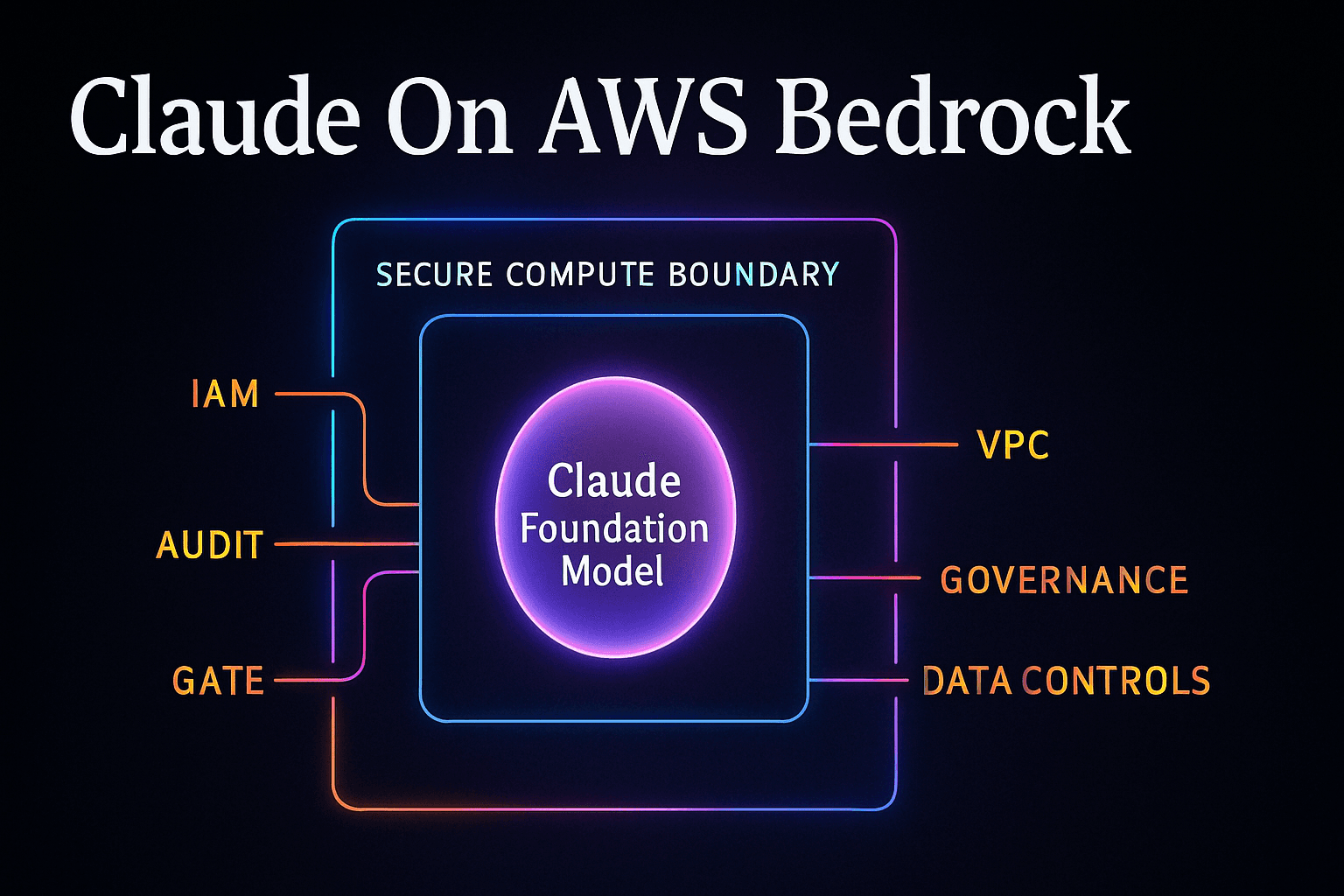
Amazon Bedrock provides access to multiple foundation model providers, including Anthropic Claude models, depending on region and model access settings. For enterprise teams, using Claude through Bedrock can be attractive because access is managed through AWS, IAM controls can govern who can invoke models, usage fits into AWS billing and governance, infrastructure boundaries align with company policy, and Bedrock integrates naturally with other AWS services you already use.
A simplified Python example using the AWS SDK shape:
import boto3
import json

bedrock = boto3.client("bedrock-runtime", region_name="us-east-1")

response = bedrock.invoke_model(
    modelId="anthropic.claude-sonnet-4-5-20250929-v1:0",
    body=json.dumps({
        "anthropic_version": "bedrock-2023-05-31",
        "max_tokens": 1000,
        "messages": [
            {
                "role": "user",
                "content": "Explain our payment retry policy using the retrieved context."
            }
        ],
    }),
)

payload = json.loads(response["body"].read())
print(payload)
Model IDs and availability change over time, so always check your AWS region and Bedrock model access page before implementing. The example above uses the Sonnet 4.5 ID; if you're using regional inference profiles you'd prefix with the region (us.anthropic.claude-sonnet-4-5-20250929-v1:0), and the surrounding code stays the same.
IAM And Access Control
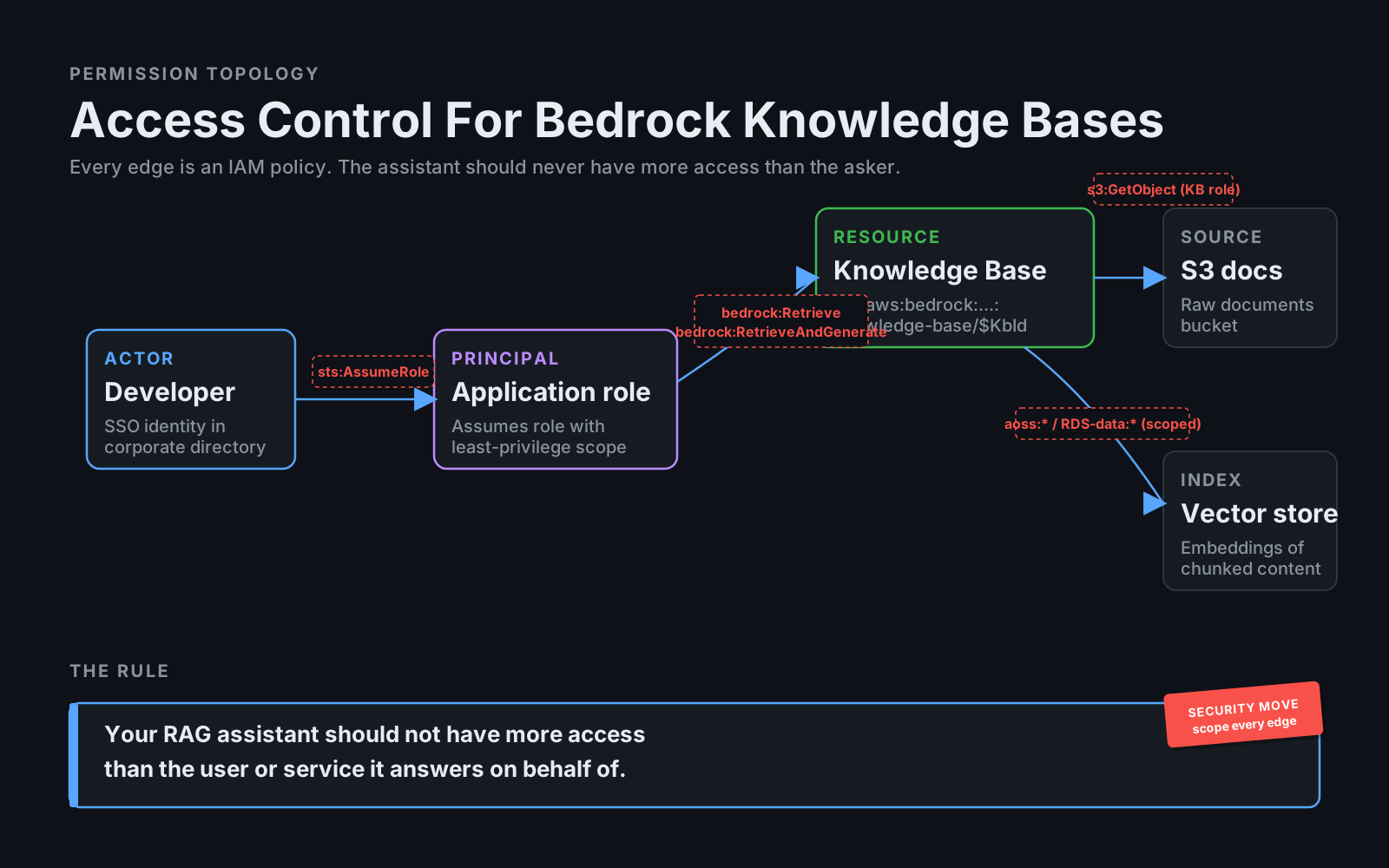
IAM is one of the main reasons teams choose Bedrock. You can control who can create knowledge bases, who can invoke models, which roles can access Bedrock, which services can read source data, and which applications can query the knowledge base. The granularity is the point — every interaction with the assistant flows through identities and policies you already audit.
A simplified IAM idea:
{
  "Effect": "Allow",
  "Action": [
    "bedrock:Retrieve",
    "bedrock:RetrieveAndGenerate"
  ],
  "Resource": [
    "arn:aws:bedrock:us-east-1:123456789012:knowledge-base/*"
  ]
}
Don't copy this blindly into production. Real policies should be scoped to exact resources and roles — and AWS's own examples typically scope bedrock:Retrieve to a specific knowledge-base ARN while letting bedrock:RetrieveAndGenerate use a wildcard. The important idea is straightforward:
Your RAG assistant should not have more access than the user or service needs.If a developer can't access a document directly, the AI assistant shouldn't reveal it through retrieval either. Otherwise the assistant becomes a permission-bypass tool, and that's a security incident waiting to happen.
Connecting Internal Data Sources
A knowledge base is only useful if the data is useful. Before connecting sources, clean them — and ask the questions that everybody skips because they feel boring:
Which documents are current?
Which are deprecated?
Which contain secrets?
Which contain customer data?
Which teams own them?
Which documents should be searchable by everyone?
Which documents require restricted access?
The temptation is always to index the entire company drive and let the assistant figure it out. The result is predictable: irrelevant or contradictory chunks dominate retrieval, and the assistant confidently quotes a 2019 ADR that's been superseded twice.
A better idea:
Start with approved engineering docs, runbooks, ADRs, and service catalog.
Add more sources after evaluation.
Create metadata where possible — Knowledge Bases support metadata attributes per document and can use them to filter retrieval:
{
  "source_type": "runbook",
  "service": "payments",
  "owner": "billing-platform",
  "environment": "production",
  "updated_at": "2026-04-10",
  "access_level": "engineering"
}
Metadata improves filtering, citations, and trust. It's also the only practical way to keep stale docs from polluting answers without manually deleting them — you let updated_at and access_level do the gating.
Building RAG Without A Fully Custom Pipeline
A custom RAG pipeline gives control, but also responsibility. Bedrock Knowledge Bases can handle most of the common RAG tasks for you, which lets the team's energy go to the parts that actually differentiate the assistant.
A practical path:
1. Choose a narrow internal use case.
2. Select clean source documents.
3. Create a knowledge base.
4. Configure data source sync.
5. Choose embedding/vector store setup.
6. Test retrieval with known questions.
7. Use Retrieve or RetrieveAndGenerate.
8. Add user-facing citations.
9. Monitor quality and feedback.
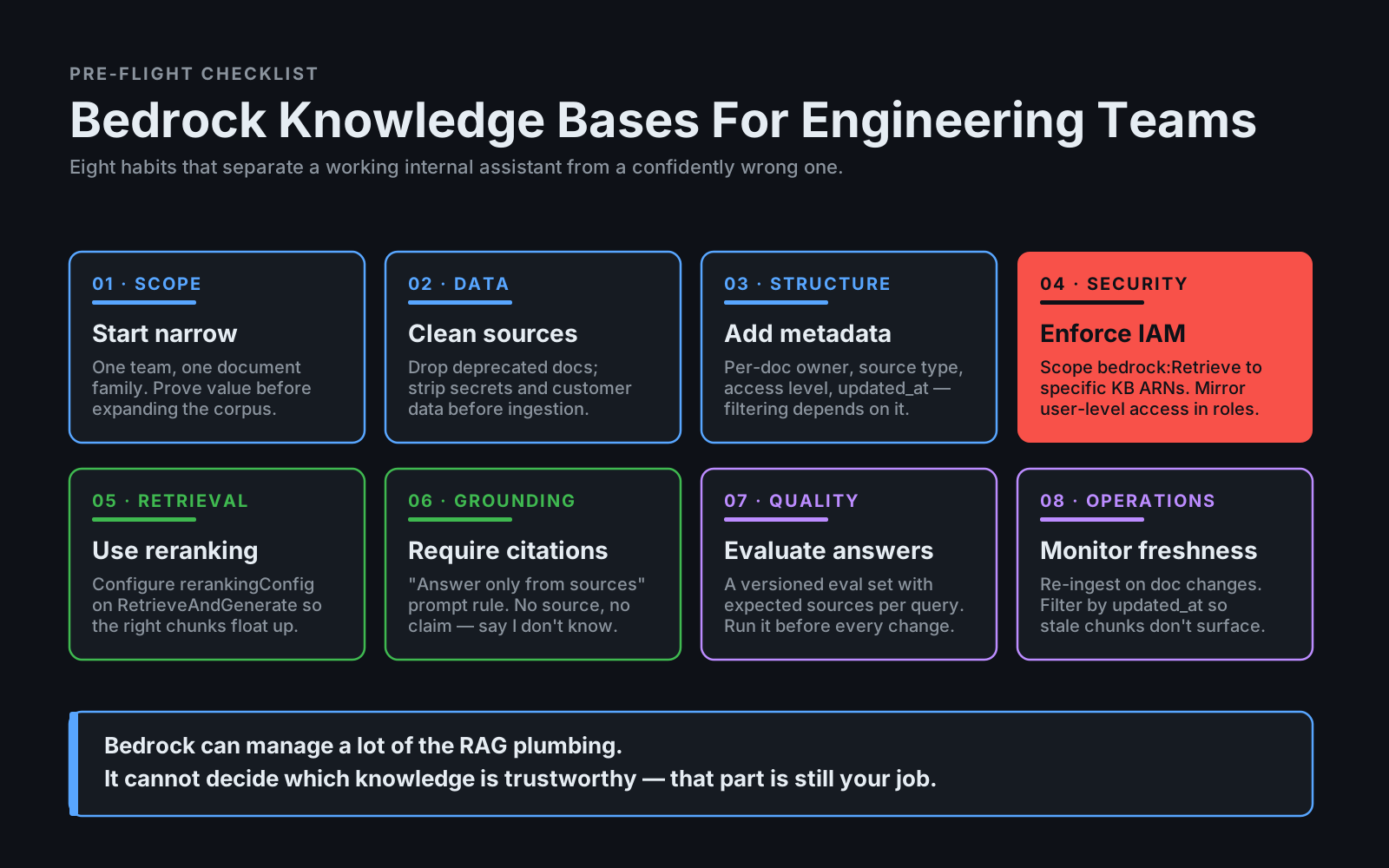
Start with a small assistant — "Ask questions about payment runbooks and architecture docs" — not "Ask anything about the entire company." Scope makes quality easier, and a narrow assistant that works builds the trust you need to expand later.
Retrieval And Reranking
Bedrock Knowledge Bases supports retrieval workflows, and AWS has added reranking capabilities (a rerankingConfiguration field on RetrieveAndGenerate) to improve result relevance. Reranking matters because the first retrieved chunks are not always the best chunks — vector search optimizes for semantic similarity, which is close to relevance but not identical to it.
For engineering docs, many pages can sound similar:
payment retries,
payment failures,
payment webhooks,
payment reconciliation,
payment notifications
A reranker reorders candidate chunks based on the actual question, so the chunk that says "retrying failed webhooks" floats above the chunk that says "retrying failed payments in general."
Example:
Question:
How do we retry failed payment webhooks?

Initial retrieval:
- Payment retry policy
- Payment webhook runbook
- Invoice email retry notes
- Payment reconciliation docs

Reranked:
1. Payment webhook runbook
2. Payment retry policy
3. Payment reconciliation docs
Better context leads to better answers. The model is only as smart as the chunks you give it, and the wrong chunks produce confident, wrong answers.
Source Citations And Grounding
For engineering teams, citations are not a nice extra — they're required. The assistant should say:
I found this in runbooks/payment-webhooks.md.Not:
Usually, payment webhooks are retried with exponential backoff.Maybe that's true. Maybe it's not your system. The whole point of an internal assistant is that it knows your system, and a sourceless answer is indistinguishable from a generic LLM answer.
Prompt rule:
Answer only using retrieved sources.
Cite source documents.
If the answer is not supported, say you do not know.
This reduces hallucinations and increases trust. It also makes the assistant useful in code review, incident response, and onboarding — three places where "I don't know" is a perfectly acceptable answer and "I made something up" is a fireable one.
When Bedrock Is Better Than A Custom Stack
Bedrock Knowledge Bases may be a strong fit when your company is already AWS-heavy, your data sources are in AWS, IAM governance is important, you want managed RAG infrastructure, you want to use Bedrock-hosted models, your team doesn't want to maintain vector ingestion pipelines, your compliance teams prefer AWS boundaries, or you need a fast internal prototype with enterprise controls.
It may not be the best fit when you need highly specialized code retrieval, your data sources are unusual, you need complex tenant-specific retrieval logic, you need full control over ranking, you already have a mature search platform, or your latency and cost requirements demand custom optimization.
There's no single right answer — but there is usually a right first move. If you're staring at "should we build RAG ourselves?" and you're already in AWS, Bedrock is the cheapest experiment. If the experiment hits a wall, you've still learned which parts of the pipeline matter most for your use case.
Common Mistakes
Indexing Too Much Too Early
More documents can make retrieval worse, not better. Start narrow, prove value, then expand — the same discipline that applies to any system you're putting in front of users.
Ignoring Metadata
Metadata isn't a nice-to-have — it's what makes filtering, citations, and evaluation work. Skipping it now means rebuilding retrieval later when "filter by owner" becomes a hard requirement.
No Evaluation Set
You need a small set of test questions with expected sources, kept under version control:
[
  {
    "question": "How are failed payment webhooks retried?",
    "expected_sources": [
      "runbooks/payment-webhooks.md",
      "docs/payments/retry-policy.md"
    ]
  }
]
Without one, you have no way to detect regression when you change chunking, swap embeddings, or update the source corpus.
No Access Control Review
RAG can leak documents through answers — the LLM happily quotes from any chunk that survives retrieval, regardless of who's asking. Review permissions carefully, scope IAM to the smallest set of knowledge bases each role actually needs, and treat the assistant as a data-access surface, not a chatbot.
No Freshness Strategy
Outdated docs are dangerous because they look authoritative. Add updated_at and document ownership to every source, and either filter on freshness at query time or schedule re-ingestion when documents change.
Final Thoughts
Amazon Bedrock Knowledge Bases can help engineering teams build internal AI assistants faster. It gives you managed RAG capabilities inside the AWS ecosystem, with model access, retrieval, and enterprise governance patterns that many teams already understand — and that's not a small thing when you're trying to ship something past the security review.
But quality still depends on engineering discipline. Use clean sources. Add metadata. Enforce permissions. Require citations. Evaluate retrieval. Start with a narrow use case. Bedrock can manage a lot of the RAG plumbing — it cannot decide which knowledge is trustworthy.
That part is still your job.