So, you've inherited an AWS account.
There are 47 EC2 instances. There are six VPCs, three of which seem to do the same thing. There's a security group called temp-debug-2023 that lets 0.0.0.0/0 reach port 5432. Nobody can tell you why. The person who set it up left two years ago, and the runbook is a Google Doc that hasn't been updated since the move from Heroku.
This is the moment most teams discover infrastructure as code.
Not because they read an article about it. Because they're trying to recreate the staging environment for the third time this quarter and they keep clicking the wrong button.
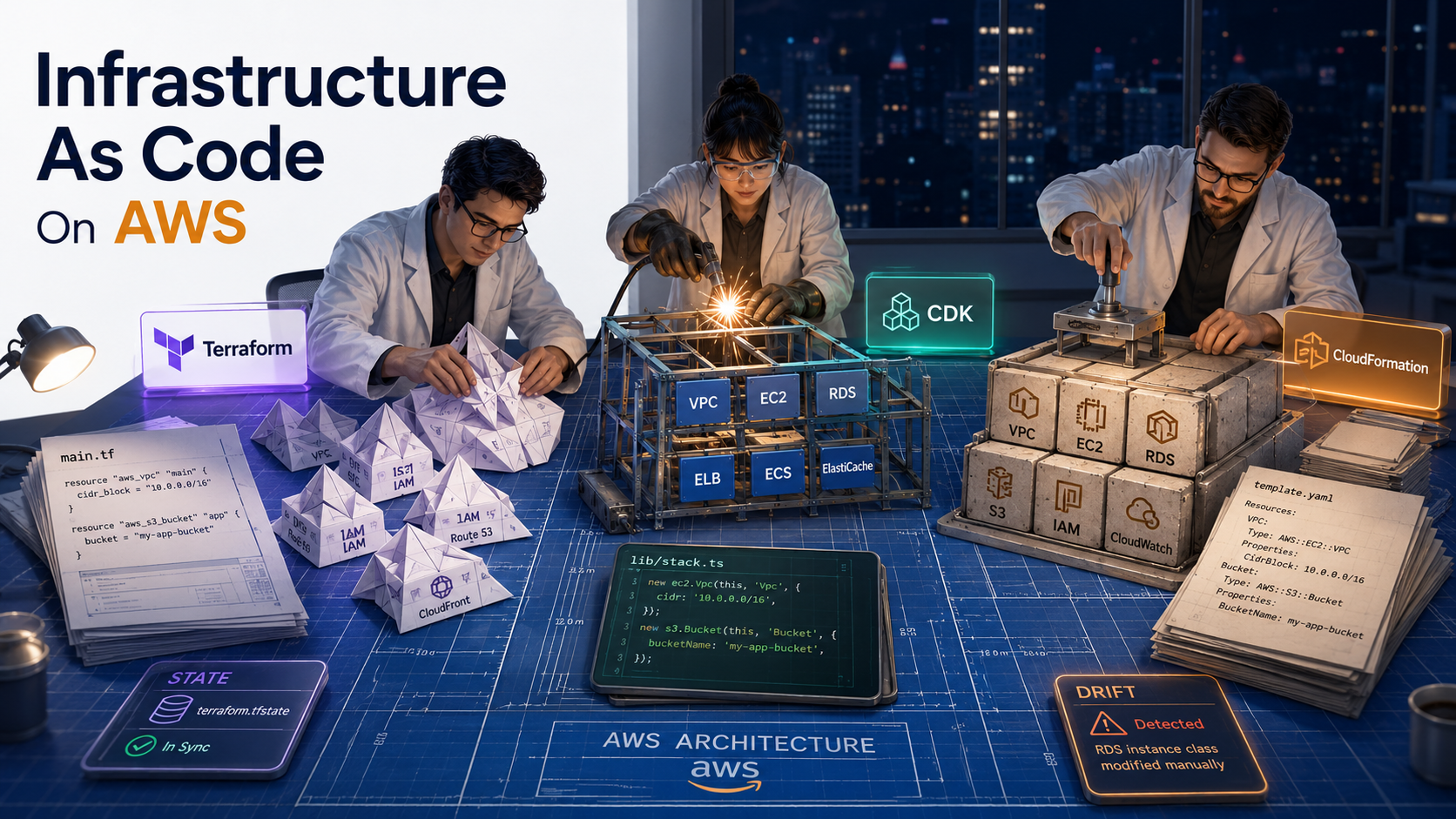
IaC is a simple idea with a complicated middle. The idea: describe what your cloud should look like in a text file, check the text file into git, and let a tool reconcile reality with the file. The complicated middle: on AWS specifically, you have three serious tools that all do this slightly differently: CloudFormation, Terraform, and the CDK. And they disagree about state, blast radius, drift, and what "the source of truth" even means.
This article is the tour you take before you pick one. It's also the tour you take when the tool you already picked is biting you and you want to know whether the grass is greener somewhere else.
What "infrastructure as code" actually means
Before any tool, get the mental model right.
Your AWS account is a giant pile of resources. Each one has a configuration. An EC2 instance has a type, an AMI, a subnet, a security group list. An S3 bucket has a name, a region, a versioning flag, a lifecycle policy. A Lambda function has a runtime, a memory size, an IAM role, a code package.
Without IaC, the configuration lives in the console. You click around. You change a setting. AWS remembers, but nobody else does. If you want to make the same change in another account, you remember what you clicked. If you forget, you guess.
With IaC, the configuration lives in a file. You describe the desired state declaratively, like "I want an S3 bucket named acme-uploads-prod, with versioning on, in us-east-1". A tool figures out the API calls to get there. If the bucket doesn't exist, it creates it. If it exists but has versioning off, the tool turns versioning on. If you delete the resource from the file and run the tool again, the tool deletes the bucket.
That last sentence is where careers end. We'll come back to it.
The two properties you actually get from IaC:
Reproducibility. You can build the same environment twice. Staging, production, a feature branch's preview environment, a recovery environment in another region. The file is the recipe, and the recipe runs the same way every time.
Auditability. Every change to the environment is a commit. You see who changed what, when, and why. The git history is the change log. Nobody has to ask "who opened port 22 on the bastion?". git blame says.
Everything else (collaboration, code review, automated testing) is downstream of these two.
The three tools you'll actually meet on AWS
Let's name them honestly.
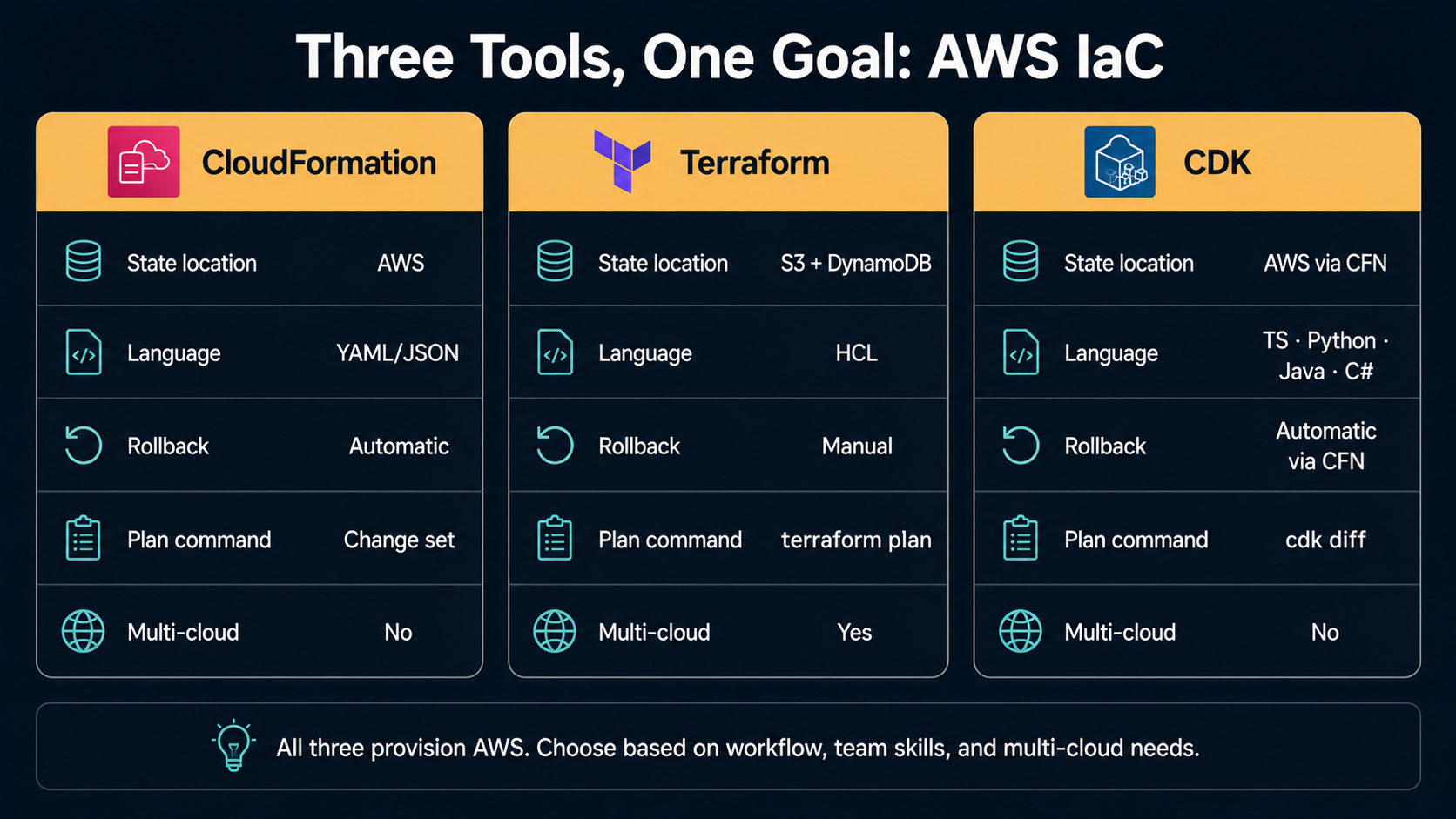
CloudFormation is the AWS-native one. It's been around since 2011. You write a YAML or JSON template that describes resources, you submit it to the CloudFormation service, AWS provisions the resources, and AWS tracks the state for you. No external state file. No third-party dependency. Comes with rollback-on-failure built in.
Terraform is the multi-cloud one, originally from HashiCorp. You write HCL (HashiCorp Configuration Language), Terraform talks to AWS APIs directly, and it stores state in a file (locally or in S3 or in Terraform Cloud). It works with hundreds of providers, not just AWS. The same tool deploys to GCP, Azure, GitHub, Datadog, Cloudflare, you name it.
CDK (AWS Cloud Development Kit) lets you write infrastructure in a real programming language: TypeScript, Python, Java, C#, Go. You define resources as objects with methods and constructors, the CDK synthesises that program down to a CloudFormation template, and it submits that template to CloudFormation. So CDK is, under the hood, a CloudFormation frontend. You get loops, conditionals, abstractions, and real testing, at the cost of a tool that compiles your code before deploying anything.
All three work. None is "best". They make different trade-offs and the right one for your team depends on what you optimise for.
CloudFormation: the boring one that doesn't break
CloudFormation templates look like this:
AWSTemplateFormatVersion: "2010-09-09"
Resources:
  UploadsBucket:
    Type: AWS::S3::Bucket
    Properties:
      BucketName: acme-uploads-prod
      VersioningConfiguration:
        Status: Enabled
      PublicAccessBlockConfiguration:
        BlockPublicAcls: true
        BlockPublicPolicy: true
        IgnorePublicAcls: true
        RestrictPublicBuckets: true
You submit it to CloudFormation as a stack, a named collection of resources that gets created, updated, or deleted as a unit. The CLI looks like this:
aws cloudformation deploy \
  --stack-name acme-uploads \
  --template-file bucket.yaml \
  --capabilities CAPABILITY_NAMED_IAM
A few things to understand before you commit to CloudFormation.
State lives in AWS. There's no terraform.tfstate file. The stack tracks its own resources, and you can list, describe, or delete a stack via the CloudFormation API. This means you don't have to set up state storage, locking, or remote backends. It's all handled.
Rollback is automatic. If a deploy fails partway through, CloudFormation rolls back to the previous good state by default. You can disable it, but most teams want it on. This is the single feature most often missed by Terraform users when they try Terraform after CloudFormation.
Change sets are how you see what will happen. Before applying a change, you can generate a change set that shows which resources will be added, modified, or replaced. This is the closest CloudFormation equivalent to terraform plan.
aws cloudformation create-change-set \
  --stack-name acme-uploads \
  --template-body file://bucket.yaml \
  --change-set-name preview-2026-05-17
The pain is the language. YAML and JSON templates are verbose. There's no real abstraction. You can use parameters and mappings, you can reference outputs from other stacks, you can nest stacks, but you can't write a function. Trying to write a for-loop in CloudFormation pure-YAML is a rite of passage that ends in Fn::ForEach (added in 2023, still awkward) or giving up and switching to CDK.
The other pain is drift detection. It exists. aws cloudformation detect-stack-drift will compare the stack's known state to live AWS state, but it's slow, covers a subset of properties, and you have to run it explicitly. It's a fire alarm, not a smoke detector.
CloudFormation is the right tool when you want zero extra moving parts, you live entirely on AWS, and you don't mind that templates are bulky. It's also the right tool if your org has compliance requirements that prefer AWS-native services everywhere.
Terraform: the multi-cloud workhorse
Same bucket in Terraform:
terraform {
  required_providers {
    aws = {
      source  = "hashicorp/aws"
      version = "~> 5.0"
    }
  }
  backend "s3" {
    bucket = "acme-tfstate"
    key    = "uploads/terraform.tfstate"
    region = "us-east-1"
  }
}

provider "aws" {
  region = "us-east-1"
}

resource "aws_s3_bucket" "uploads" {
  bucket = "acme-uploads-prod"
}

resource "aws_s3_bucket_versioning" "uploads" {
  bucket = aws_s3_bucket.uploads.id
  versioning_configuration {
    status = "Enabled"
  }
}

resource "aws_s3_bucket_public_access_block" "uploads" {
  bucket                  = aws_s3_bucket.uploads.id
  block_public_acls       = true
  block_public_policy     = true
  ignore_public_acls      = true
  restrict_public_buckets = true
}
You run two commands and that's it:
terraform init
terraform plan -out=tfplan
terraform apply tfplan
Things to understand about Terraform.
The state file is the source of truth. Terraform maintains its own JSON file describing every resource it manages: its real-world ID, its current attributes, and dependency relationships. When you run plan, Terraform compares this file to your .tf configuration and to live API responses. When you run apply, it makes API calls and updates the file.
This state file is precious. Lose it and Terraform doesn't know what it owns anymore. Corrupt it and you can get into refresh loops. Two people running apply simultaneously can race and produce a state that doesn't match reality. That's why production Terraform almost always uses a remote backend. S3 plus DynamoDB for locking is the standard pattern:
terraform {
  backend "s3" {
    bucket         = "acme-tfstate"
    key            = "prod/terraform.tfstate"
    region         = "us-east-1"
    dynamodb_table = "tfstate-locks"
    encrypt        = true
  }
}
The plan is excellent. terraform plan produces a clear, color-coded diff of what will change. Green for adds, yellow for updates, red for deletes, magenta for replacements. The output is good enough that "show me the plan in the PR" is a normal code review pattern.
Modules are real reusability. A Terraform module is a directory of .tf files with inputs (variables) and outputs (outputs) that you can consume from another configuration. The public registry has thousands. You can write your own, version them, and pin to a specific version per consumer.
module "vpc" {
  source  = "terraform-aws-modules/vpc/aws"
  version = "5.5.1"

  name = "acme-prod"
  cidr = "10.0.0.0/16"

  azs             = ["us-east-1a", "us-east-1b", "us-east-1c"]
  private_subnets = ["10.0.1.0/24", "10.0.2.0/24", "10.0.3.0/24"]
  public_subnets  = ["10.0.101.0/24", "10.0.102.0/24", "10.0.103.0/24"]

  enable_nat_gateway = true
  single_nat_gateway = true
}
There's no automatic rollback. If a Terraform apply fails halfway, you're left with whatever got created plus a state file that knows about it. You either fix the config and re-apply, or run terraform destroy on the partial mess. This trips people coming from CloudFormation.
The pain is the state file. Almost every Terraform horror story is a state-file horror story. Two pipelines applying at once. A terraform state rm run on the wrong resource. A migration from local to remote backend that loses track of half the stack. The tool is excellent, the model is sound, but the file is a single point of failure and you have to treat it like one.
Terraform is the right tool when you have multi-cloud needs, when you want a strong plan/apply workflow, when you value the module ecosystem, or when your team already speaks HCL fluently.
CDK: when you want a real language
The CDK lets you write the same bucket as a TypeScript class:
import { Stack, StackProps, RemovalPolicy } from "aws-cdk-lib";
import { Bucket, BlockPublicAccess, BucketEncryption } from "aws-cdk-lib/aws-s3";
import { Construct } from "constructs";

export class UploadsStack extends Stack {
  constructor(scope: Construct, id: string, props?: StackProps) {
    super(scope, id, props);

    new Bucket(this, "Uploads", {
      bucketName: "acme-uploads-prod",
      versioned: true,
      blockPublicAccess: BlockPublicAccess.BLOCK_ALL,
      encryption: BucketEncryption.S3_MANAGED,
      removalPolicy: RemovalPolicy.RETAIN,
    });
  }
}
And the equivalent in Python:
from aws_cdk import Stack, RemovalPolicy
from aws_cdk.aws_s3 import Bucket, BlockPublicAccess, BucketEncryption
from constructs import Construct


class UploadsStack(Stack):
    def __init__(self, scope: Construct, construct_id: str, **kwargs) -> None:
        super().__init__(scope, construct_id, **kwargs)

        Bucket(
            self,
            "Uploads",
            bucket_name="acme-uploads-prod",
            versioned=True,
            block_public_access=BlockPublicAccess.BLOCK_ALL,
            encryption=BucketEncryption.S3_MANAGED,
            removal_policy=RemovalPolicy.RETAIN,
        )
Deploy with the CDK CLI:
cdk synth   # synthesises to CloudFormation
cdk diff    # shows what will change
cdk deploy  # applies
What's actually happening here.
The CDK is a CloudFormation generator. When you run cdk synth, it produces a CloudFormation template in cdk.out/. When you run cdk deploy, it submits that template to CloudFormation. So CDK is CloudFormation, with a real programming language as the frontend. Same state model, same rollback semantics, same change sets under the hood.
This has two big consequences. First, you inherit CloudFormation's strengths (state in AWS, automatic rollback, native to the platform) and its limits (slower deploys than Terraform, the same per-account resource limits, the same edge cases). Second, you can mix CDK with raw CloudFormation freely. A CDK stack can import an existing CloudFormation stack's outputs, and you can drop into raw template syntax with CfnResource when the CDK abstraction is missing something.
The L1/L2/L3 distinction matters. CDK constructs come in three layers. L1 (e.g., CfnBucket) is a one-to-one mapping of CloudFormation properties: verbose, complete, no opinions. L2 (e.g., Bucket) is a hand-written wrapper that picks sensible defaults and exposes a friendlier API, what you'd actually use in most code. L3 (sometimes called patterns) bundles multiple resources behind one construct. ApplicationLoadBalancedFargateService provisions an ALB, an ECS service, a task definition, security groups, and target groups in a single line. Powerful, but you should know what's inside before you reach for it.
Tests are real. You can unit-test a CDK stack with the framework's assertions library:
import { App } from "aws-cdk-lib";
import { Template } from "aws-cdk-lib/assertions";
import { UploadsStack } from "../lib/uploads-stack";

test("uploads bucket blocks public access", () => {
  const app = new App();
  const stack = new UploadsStack(app, "TestUploads");
  const template = Template.fromStack(stack);

  template.hasResourceProperties("AWS::S3::Bucket", {
    PublicAccessBlockConfiguration: {
      BlockPublicAcls: true,
      BlockPublicPolicy: true,
      IgnorePublicAcls: true,
      RestrictPublicBuckets: true,
    },
  });
});
This is a kind of feedback loop neither Terraform nor raw CloudFormation gives you naturally. Assertions run in milliseconds against the synthesised template, no AWS API calls needed.
The pain is the indirection. When CDK does something surprising, you have to trace it through the synthesised template, then back through the construct source, and sometimes into the underlying CFN type. The L2 defaults are opinionated. Bucket adds a deletion policy, a key for encryption, sometimes a bucket policy, and those defaults matter. New users often discover them only when production deletes don't actually delete anything because RemovalPolicy.RETAIN was the default.
CDK is the right tool when your team is already strong in TypeScript or Python and resents YAML, when you want real testing, or when you have repeated infrastructure patterns that benefit from real abstraction (a MicroserviceStack you instantiate per service, with sensible per-environment knobs).
State and drift: where the real complexity lives
Every IaC tool has the same hard problem.
The configuration file says one thing. The real cloud says another. Something has to bridge the gap, and that something is state. It's where the tool remembers "this aws_s3_bucket.uploads resource maps to the real bucket with ID acme-uploads-prod, and last I checked, its versioning was enabled."
The disagreement between the configuration and the state and the real cloud is called drift.
Drift has three flavours and they bite differently.
Config drift. Someone edits the .tf file or the CDK code, but doesn't deploy. The repo and the cloud disagree, but state and cloud agree. This is harmless until someone else deploys an unrelated change and the unrelated change suddenly carries the pending one along.
Out-of-band drift. Someone changes a resource in the AWS console or via the CLI, bypassing IaC entirely. The cloud and the configuration disagree, and the state file is now wrong because it still has the old values. Next deploy, the tool tries to "correct" the manual change, and either succeeds (silently reverting somebody's fix) or fails (if AWS rejects the round-trip).
State drift. The state file is wrong about reality even though nobody touched anything, usually because a previous apply was interrupted, or because someone manually edited the state, or because a tool bug. This is the worst kind because the tool is confidently lying to you.
Most teams don't think about drift until they have an incident. Then they think about nothing else for a week.
How drift creeps in even with discipline
There are six common ways drift sneaks in:
Console fixes during incidents. Pager goes off at 3am. You SSH in, you scale up the autoscaling group, you increase the RDS read replica count, you patch the security group. Tuesday morning, the next IaC deploy reverts everything.
AWS-side automation. Many AWS services modify your resources on your behalf. Autoscaling changes desired capacity, RDS rotates passwords, ECS updates task definitions on deploy, ACM rotates certificates. The IaC tool sees the change as drift even though it's expected.
Cross-team resources. Team A's Terraform creates a VPC. Team B's CloudFormation creates a subnet in that VPC. Team A modifies the VPC and breaks Team B. Nobody saw the dependency.
Forgotten outputs. A resource gets created outside IaC for a quick experiment. It runs for two years. Then the IaC tool can't see it, doesn't know it depends on a shared resource, and a refactor breaks it.
Provider/version upgrades. A new Terraform AWS provider version reads a property differently. Say, it starts including a previously-implicit default in the state file. Your plan now shows a "change" that's actually a no-op. You apply anyway, and the no-op trips some other resource's lifecycle hook.
The intentional kind. A new product feature requires manual coordination with AWS support, and the IaC tool can't model it yet. You configure it by hand. Now you have a known-drifted resource and a Jira ticket nobody's going to do.
Detecting drift on purpose
Each tool has a story for this, with very different ergonomics.
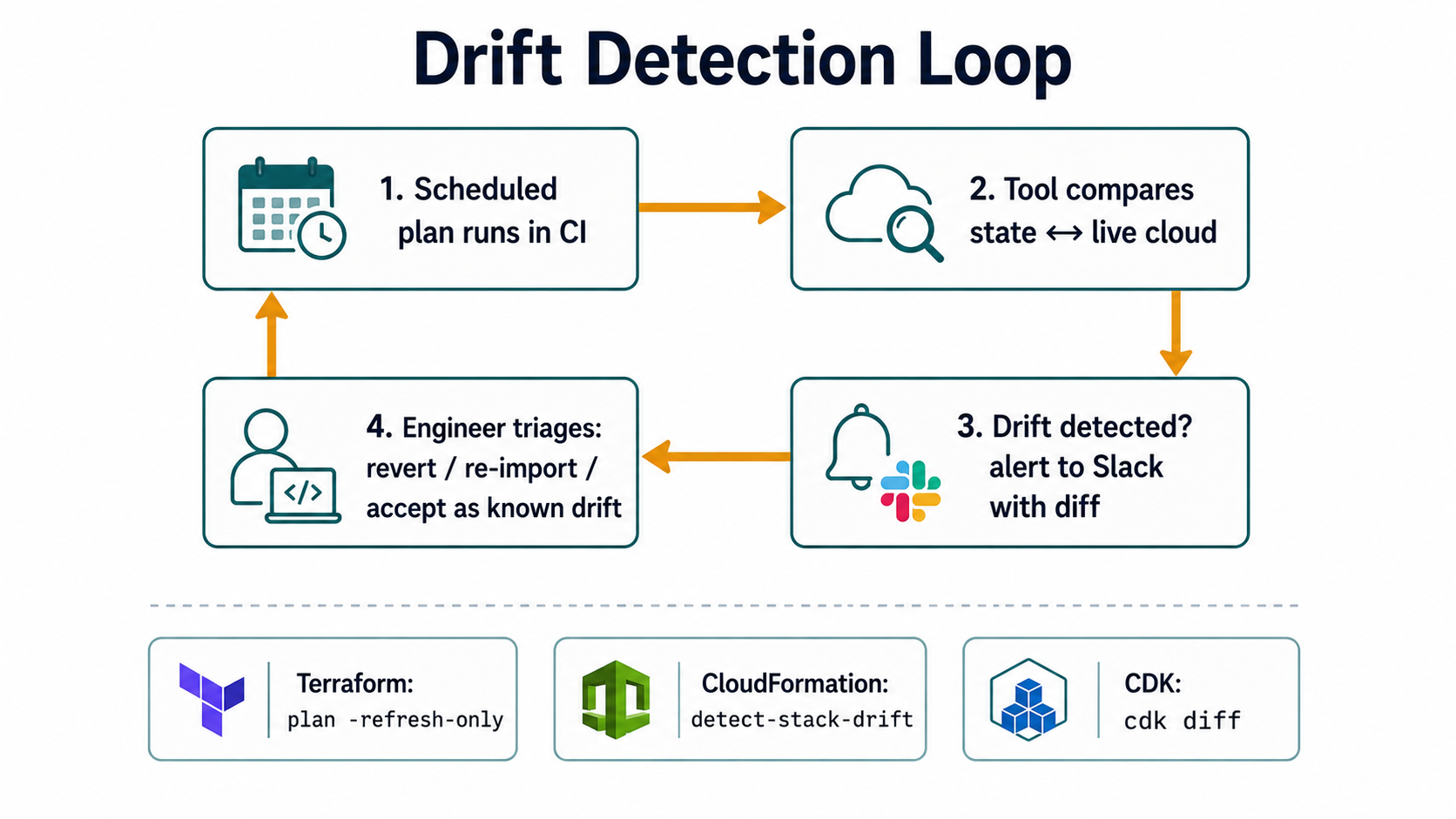
Terraform has terraform plan itself. Running plan with no changes shows you drift in the state. You can also use terraform plan -refresh-only to do nothing but refresh state from live AWS. There are open-source tools (driftctl, archived but still useful as a reference; commercial alternatives like Spacelift, Env0, and Terraform Cloud's drift detection) that run scheduled plans across all workspaces and alert when a no-change plan starts showing changes.
# Refresh state without applying, fail loudly on drift
terraform plan -refresh-only -detailed-exitcode
# exit code 2 = drift detected, 0 = no drift, 1 = error
CloudFormation has a native detect-stack-drift API:
aws cloudformation detect-stack-drift --stack-name acme-uploads
# returns a StackDriftDetectionId

aws cloudformation describe-stack-drift-detection-status \
  --stack-drift-detection-id <id>

aws cloudformation describe-stack-resource-drifts \
  --stack-name acme-uploads
Its coverage is partial. AWS publishes a list of which resource types and which properties are checked. Some teams wire this into a scheduled Lambda that runs across all stacks daily and posts to Slack when any stack drifts.
CDK inherits the CloudFormation drift detection (since CDK is CloudFormation). You run the same detect-stack-drift calls. There's also cdk diff against a deployed stack, which compares the synthesised template to what's actually deployed.
Closing the drift loop
Detecting drift is necessary. Doing something useful about it is harder. Three options, in order of brutality:
Re-import. If the live resource is correct and the IaC is wrong, update the IaC to match. With Terraform, terraform import or import blocks (added in 1.5) bring an existing resource under management. With CloudFormation and CDK, you can import existing resources into a stack via the console or import-stacks-to-stack-set.
Revert. If the IaC is correct and the live resource is wrong, apply IaC and let the world snap back. This is the default and it's the right default most of the time.
Mark as known drift. If the live resource is intentionally different (a manual customer-support fix, a temporary patch), add a lifecycle block in Terraform to ignore changes to specific attributes, or remove that property from the CloudFormation template / CDK construct, or split the resource into a separate manually-managed stack.
resource "aws_db_instance" "primary" {
  identifier        = "acme-prod"
  engine            = "postgres"
  instance_class    = "db.r6g.large"
  allocated_storage = 100

  lifecycle {
    ignore_changes = [
      # RDS auto-grows storage when it hits high water mark; don't fight it
      allocated_storage,
      # password is rotated by Secrets Manager
      password,
    ]
  }
}
ignore_changes is a foot-gun used wisely. It tells the tool "I know this drifts, I'm fine with it, stop bothering me about it." Use it for properties that legitimately change out-of-band. Don't use it as a duct-tape fix for bugs you should investigate.
Picking between the three (without a holy war)
Here's the honest version, with no marketing.
Choose CloudFormation when:
- You're 100% on AWS and want zero external dependencies.
- You're working in a heavily regulated environment that prefers AWS-native tooling.
- You're managing a relatively small surface area where the YAML verbosity is bearable.
- You need StackSets for cross-account deployments (Terraform has alternatives but they're more work).
Choose Terraform when:
- You touch more than one cloud.
- You value the plan/apply workflow and the strength of the public module registry.
- Your team is already comfortable with HCL.
- You want a single tool across AWS, Datadog, GitHub, Cloudflare, Vault, and the dozen other providers you'll inevitably acquire.
Choose CDK when:
- Your team is strong in TypeScript, Python, Java, or C#.
- You want real abstraction, real tests, and real IDE support.
- You're building a self-service platform where teams instantiate a
ServiceStackand let it do the right thing. - You're staying on AWS and you don't want to learn HCL.
You don't have to pick just one. Many large orgs run all three: CloudFormation for AWS Service Catalog products and AWS-managed addons (Control Tower, Landing Zone), Terraform for cross-cloud and ecosystem integrations, CDK for application teams who want to write infrastructure in their own language. The cost of the polyglot estate is real, but in big enough orgs it's the lesser evil.
What you should not do is mix tools on the same resource. Terraform managing the VPC and CloudFormation managing subnets in that VPC is a perfectly reasonable boundary. Terraform managing the VPC and also CloudFormation occasionally tweaking the same VPC is how you wake up to a 2am page about a CIDR that doesn't exist anymore.
Patterns that work in production
A few patterns hold up across all three tools.
One stack per environment, not one stack for all environments. Don't try to be clever with conditionals (if env == "prod" then ...) to share a template across staging and production. Duplicate the stack definition per environment, parameterise the values, and let staging be a separate failure domain. When a deploy blows up, you want it to blow up in staging only.
Keep stateful resources in their own stacks. Databases, S3 buckets, EBS volumes, anything that holds data. Put the application's stateless resources (ECS services, ALBs, Lambdas) in a separate stack that depends on the data stack via outputs/data sources. This makes the data stack rarely-changed and rarely-redeployed, which is what you want for things that hold customer data. It also lets you blow away the application stack and recreate it without touching the database.
Pin every version. The Terraform CLI version, the Terraform provider versions, the CDK CLI version, the CDK library version, the CloudFormation template format. Floating versions ruin reproducibility. The same apply from two months ago might produce different results today because a provider added a new default attribute.
terraform {
  required_version = "~> 1.7"
  required_providers {
    aws = {
      source  = "hashicorp/aws"
      version = "~> 5.30"
    }
  }
}
Plans go through code review. Whatever tool you use, the deploy plan should be visible in the pull request. Terraform Cloud does this natively; for vanilla Terraform you wire terraform plan into CI and post the output to the PR. For CloudFormation you generate a change set and link to it. For CDK you run cdk diff and paste the output. The reviewer is looking for accidental deletions, role permissions broader than expected, and resources moving between subnets.
Deploys run from CI, not from laptops. Once anyone deploys from their machine, you lose audit trail, you have race conditions, and you have credentials sprinkled across the team. Put the deploy in CI, give CI an OIDC-federated IAM role, and never hand out long-lived AWS keys.
Tag everything, automatically. Resources without tags become orphans. Cost-allocate by tag, owner-track by tag, and use the IaC tool's default-tag mechanism so you don't have to remember on each resource:
provider "aws" {
  region = "us-east-1"
  default_tags {
    tags = {
      Environment = var.environment
      Service     = var.service_name
      ManagedBy   = "terraform"
      Repo        = "github.com/acme/infra"
    }
  }
}import { App, Tags } from "aws-cdk-lib";
const app = new App();
Tags.of(app).add("Environment", process.env.ENV ?? "dev");
Tags.of(app).add("Service", "uploads");
Tags.of(app).add("ManagedBy", "cdk");
Tags.of(app).add("Repo", "github.com/acme/uploads-stack");The ManagedBy tag is especially useful: it tells the next engineer which tool owns the resource so they don't open the wrong file.
The mistakes that cost real money
Every team that runs IaC at scale eventually hits a version of these.
The accidental deletion. Somebody removes a resource from the config thinking they're cleaning up. The next deploy issues a DELETE. The resource was a production S3 bucket with three years of customer uploads. There was no RemovalPolicy.RETAIN, no prevent_destroy, and no MFA-delete on the bucket. It's gone.
The fix is to set the right deletion guards on stateful resources, before you ever need them:
resource "aws_s3_bucket" "uploads" {
  bucket = "acme-uploads-prod"

  lifecycle {
    prevent_destroy = true
  }
}new Bucket(this, "Uploads", {
bucketName: "acme-uploads-prod",
removalPolicy: RemovalPolicy.RETAIN,
autoDeleteObjects: false,
});Resources:
UploadsBucket:
Type: AWS::S3::Bucket
DeletionPolicy: Retain
UpdateReplacePolicy: Retain
Properties:
BucketName: acme-uploads-prodThe cross-stack output trap. Stack A exports an output. Stack B imports it. Stack A wants to change the exported value, but it can't, because Stack B (and probably Stack C and D) are using it. You get "Cannot delete export ... in use by ..." and you're stuck. The fix is to design exports to be stable identifiers (ARNs of long-lived resources, not properties that might change). When you do need to refactor, plan a careful migration: change consumers to a new export first, then remove the old one.
The implicit replacement. You change one innocent property, say, an RDS instance's db_subnet_group_name. The provider documents this as ForceNew: true, which means Terraform will replace the database to make the change. Replace means create-new-then-delete-old. Your data is gone. Every apply, read the plan. Look for # forces replacement lines. Treat them as deploy-blockers until you understand why.
The IAM permission scope creep. The IAM role used by your IaC tool starts narrow. Over time, someone needs to add an EFS resource, then an MQ broker, then a Glue job, and each time the answer is to grant another *:* permission. A year in, the deploy role has admin access to everything. The fix is to scope by service from day one, and to use service-control policies at the org level to prevent the deploy role from ever touching IAM users, billing, or organisation settings.
Where this is heading
The interesting frontier right now is on the policy-as-code side, using tools like Open Policy Agent, Checkov, or AWS Config Rules to fail builds that introduce non-compliant infrastructure before they ever deploy. Encryption-at-rest enforced, public S3 buckets blocked, IAM wildcards rejected. This is becoming standard in regulated industries and it's how the IaC tool stops being just a deployment tool and starts being a policy enforcement point.
The other frontier is convergence. CDK started as AWS-only; CDKTF (CDK for Terraform) and CDK8s extended the model to Terraform providers and Kubernetes. Pulumi went further and built a multi-cloud IaC tool with real-language definitions from day one. The line between "Terraform with HCL" and "CDK with TypeScript" is going to blur over the next few years.
For most teams, none of this matters yet. What matters is picking one of the three, getting the basic hygiene right (remote state, locks, drift detection, deletion protection, default tags, CI deploys), and resisting the urge to be clever before you have a working baseline.
The honest summary
Infrastructure as code on AWS is not three competing tools. It's three different views of the same problem: how do you make a giant pile of cloud resources reproducible and reviewable when the resources themselves keep changing out from under you?
CloudFormation answers "let AWS track it for you." Terraform answers "keep your own state and your own plan." CDK answers "write it in a real language and let CloudFormation handle the rest."
All three answers are valid. None of them eliminates drift, because drift comes from humans and incidents and AWS itself, not from the tool. What a good IaC setup gives you is the ability to notice drift, decide what to do about it, and snap reality back to the file when reality is wrong.
That ability is the entire payoff. Get it working once and you stop being afraid of your cloud account.