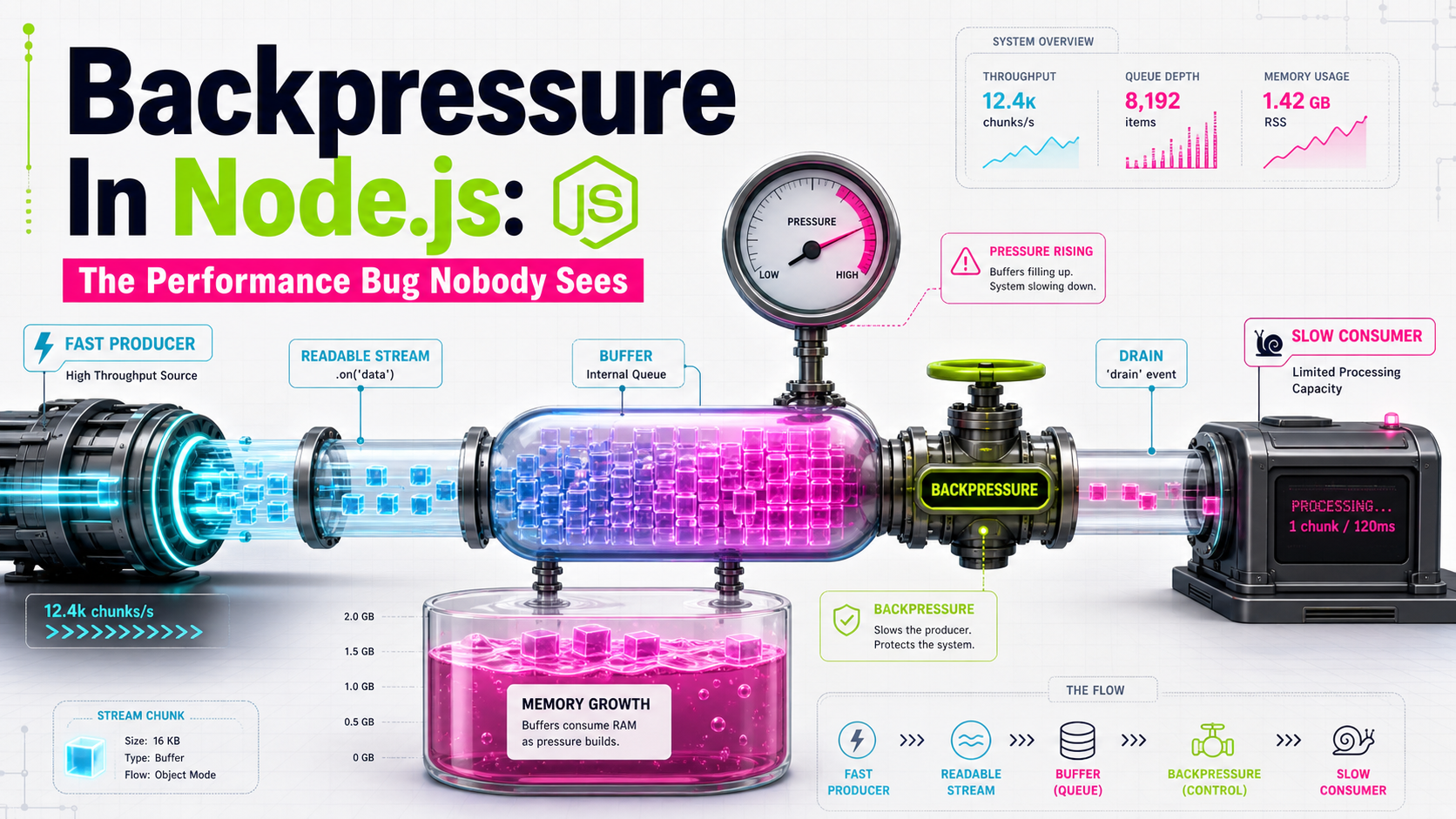
There's a class of Node bug that doesn't show up on dashboards. The endpoint returns 200. Latency looks fine. Error rates are flat. But the pod's RSS grows over hours, gets OOM-killed at 3 a.m., restarts cleanly, and the cycle repeats every few days. Nobody screams because nobody loses a request — they just lose a process.
That's almost always backpressure that nobody thought about. A producer somewhere is faster than its consumer, the data piles up in an internal buffer, and the buffer is just RAM under a different name. The fix is usually one line. The bug, until you spot the pattern, is invisible.
This article walks through where backpressure shows up, how Node's stream APIs handle it, and the few places where you have to handle it yourself.
The One-Sentence Definition
Backpressure is the signal a slow consumer sends to a fast producer that says "wait." Node's streams have it built in — Writable.write() returns false when the internal buffer is full, and a well-behaved producer pauses until 'drain' fires. The bug is when that signal is ignored.
The classic ignored-signal pattern looks like this:
// looks fine, leaks memory
src.on('data', (chunk) => {
  dest.write(chunk);  // return value ignored
});
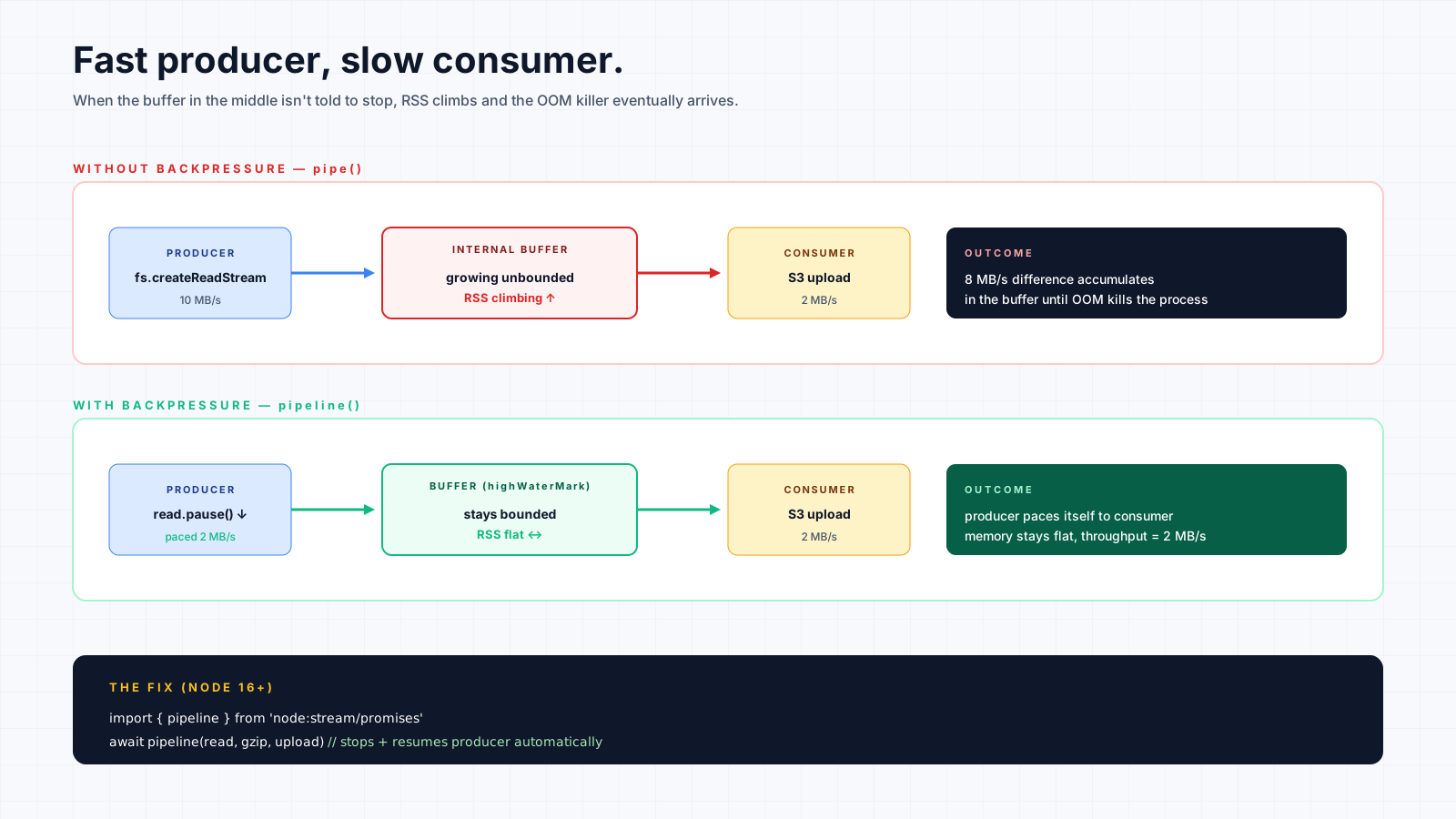
If dest is slower than src, every chunk piles into dest's internal buffer. Memory grows. Nothing crashes immediately. Then one day, the file is large enough that the process dies.
What highWaterMark Actually Is
Every stream has a highWaterMark — the buffer threshold that decides when .write() returns false. Defaults:
- Byte streams: 16 KB
- Object mode: 16 objects
When the buffer is below the high water mark, .write() returns true and you can keep going. When it's above, .write() returns false and you should wait for 'drain'. The runtime doesn't enforce this — it just tells you. If you ignore the signal, the buffer keeps growing past the mark, and you've now traded RAM for "fast."
You can tune highWaterMark if you have specific reasons (large objects, slow IO), but the default is usually fine. The actual bug is almost never the wrong threshold; it's the producer not honoring the signal.
Why pipeline() Is The Right Default
Manual .write() checks are easy to get wrong. pipeline() from node:stream/promises handles the whole dance for you: it propagates backpressure between every segment, cleans up on error, and returns a promise that resolves when the last byte lands.
import { pipeline } from 'node:stream/promises';
import { createReadStream } from 'node:fs';
import { parse } from 'csv-parse';
import { writeRowsToDb } from './writer.js';

await pipeline(
  createReadStream('events.csv'),
  parse({ columns: true }),
  writeRowsToDb(),
);
If writeRowsToDb is the slowest segment, parse slows down. When parse slows down, the file read slows down. When the file read slows down, the disk doesn't get hammered for nothing. Memory stays flat through the whole import.
The same code with .pipe() looks identical and behaves identically until one segment errors — and then .pipe() leaves the others running, hanging on file descriptors and DB connections. pipeline always cleans up. There's no upside to .pipe() in new code.
The Async Iterator Trap
Consuming a Readable with for await...of looks like the cleanest possible code:
for await (const chunk of readable) {
  await process(chunk);
}
This handles backpressure perfectly if process actually awaits its work. The stream is paused while your loop body is running because the iterator only pulls the next chunk when the current iteration ends.
The trap is fire-and-forget inside the loop:
// silently broken
for await (const chunk of readable) {
  process(chunk);  // returns a promise, not awaited
}
Now the loop iterates as fast as the stream produces, dispatching unbounded process calls. If process is database writes, you've just queued ten thousand pending queries. If process is HTTP requests, you've just opened ten thousand connections. The loop looks like it has backpressure. It doesn't.
The fix is await on every async call inside the loop. If you genuinely want concurrency, use a bounded worker like p-limit or batch with Promise.all over fixed-size chunks.
Express Responses Have Backpressure Too
The res object is a Writable. If you're streaming a large download to a slow client, res.write() can return false. Most handlers never notice because most responses are small. The moment you build something like a CSV export or a log download, you do notice — usually as memory growth on the server when the client is on hotel wifi.
import { pipeline } from 'node:stream/promises';

export async function exportLogs(req, res) {
  res.setHeader('Content-Type', 'text/csv');
  await pipeline(db.logs.cursor(req.query), formatCsv(), res);
}
pipeline honors backpressure on the res end. If the client stops reading, the DB cursor stops being consumed, the cursor stops fetching from Postgres, and your server holds one row's worth of memory instead of the whole result set.
Skip the pipeline and you're back to manual .write() checks plus a 'close' handler to abort the cursor when the client disconnects. Doable, but it's the same code pipeline already wrote.
Manual pause And resume For Custom Producers
Sometimes the producer isn't a stream at all. A queue consumer pulling from BullMQ, a websocket pumping events, a child process emitting JSON lines. When you can't compose with pipeline, you have to throttle by hand:
import { Readable } from 'node:stream';

const upstream = new Readable({ objectMode: true, read() {} });

queueClient.on('message', (msg) => {
  if (!upstream.push(msg)) {
    queueClient.pause();  // upstream is full, stop the queue
  }
});

upstream.on('drain', () => queueClient.resume());

// later, pipe upstream into your consumer
await pipeline(upstream, processBatch(), dropSink());
The pattern: when push returns false, pause whatever is producing. When 'drain' fires on the Readable you wrapped, resume. This is the manual version of what pipeline does between stream segments, and it's the right shape any time you adapt a non-stream source into a stream pipeline.
Where To Look When You Suspect Backpressure
If a process leaks memory under load and you don't see a clear retained-object cause, walk through every place data flows in:
- HTTP body parsing — bodies bigger than the buffer should be streamed.
- File reads — large files should never use
readFile. - Database cursors —
findAllreturns everything; cursors stream. - Queue consumers — concurrency limits matter; unbounded fan-out is the same bug.
- Outbound HTTP —
res.bodyfromfetchis a stream; treat it like one.
The smoking gun is "RSS climbs as work progresses, never plateaus, drops on idle." That's a producer outpacing a consumer through a buffer that has nowhere to spill except RAM.
A One-Sentence Mental Model
Backpressure is the polite signal "slow down" — pipeline propagates it for you, async iterators only honor it if you actually await, and any time you wire a non-stream source into the system, you owe it a pause when the buffer fills 👊