So, you've shipped a service to AWS, traffic is flowing, customers are happy, and now you have to deploy a new version.
If the answer in your head is "I'll just stop the old container and start the new one," this article is for you.
Because that approach works exactly until the day it doesn't. The day a new container crashes on boot. The day the health check passes but the app is broken. The day a 30-second restart turns into a 9-minute outage because the container registry was slow. The day a deploy goes out at 5:47 PM on a Friday and the rollback button on your dashboard does nothing useful.
Deployment strategy is one of those topics that feels boring until production teaches you why it isn't.
Let's talk about the two strategies AWS gives you out of the box on ECS, rolling deployments and blue-green deployments, and how to actually wire them up with ALB and CodeDeploy in a way you'd trust to run unattended.
What "deployment strategy" actually means
Before we get to ECS specifics, let's name the thing.
A deployment strategy is a contract about how traffic moves from version N to version N+1. That's it. Everything else, the dashboards, the alerts, the runbooks, exists to support that one transition.
You have roughly four families to choose from in the real world:
- Recreate. Stop all the old, start all the new. Causes downtime. Fine for batch jobs and dev environments. Not fine for anything customer-facing.
- Rolling. Replace instances a few at a time. The default on ECS, EKS, Kubernetes, and most platforms. Zero downtime in theory, brittle in practice.
- Blue-green. Stand up the new version alongside the old, then flip traffic from old to new in one move. Easy rollback because the old version is still warm.
- Canary. Flip a small percentage of traffic to the new version first, watch it, then flip the rest. A controlled subset of blue-green, and on AWS it lives inside the same CodeDeploy flow.
You'll see "blue-green" and "canary" used almost interchangeably in AWS docs, because CodeDeploy treats canary as a traffic-shifting config on top of the blue-green deployment model. The model is "two environments side by side." The config is "how fast you shift traffic between them."
This article focuses on rolling and blue-green because that's where ECS makes you pick a side. Once you've got blue-green working, canary is just a different value in one CodeDeploy field.
Rolling deployments: the default that bites you
When you create an ECS service and don't specify a deployment controller, you get ECS as the controller, which is rolling. Here's the relevant slice of a task definition + service:
{
  "serviceName": "checkout-api",
  "cluster": "prod",
  "taskDefinition": "checkout-api:42",
  "desiredCount": 6,
  "deploymentController": { "type": "ECS" },
  "deploymentConfiguration": {
    "minimumHealthyPercent": 100,
    "maximumPercent": 200,
    "deploymentCircuitBreaker": {
      "enable": true,
      "rollback": true
    }
  },
  "loadBalancers": [
    {
      "targetGroupArn": "arn:aws:elasticloadbalancing:...:targetgroup/checkout-tg/...",
      "containerName": "checkout",
      "containerPort": 8080
    }
  ]
}
The two numbers that decide how a rolling deploy actually plays out are minimumHealthyPercent and maximumPercent. They're the levers. Everything else is decoration.
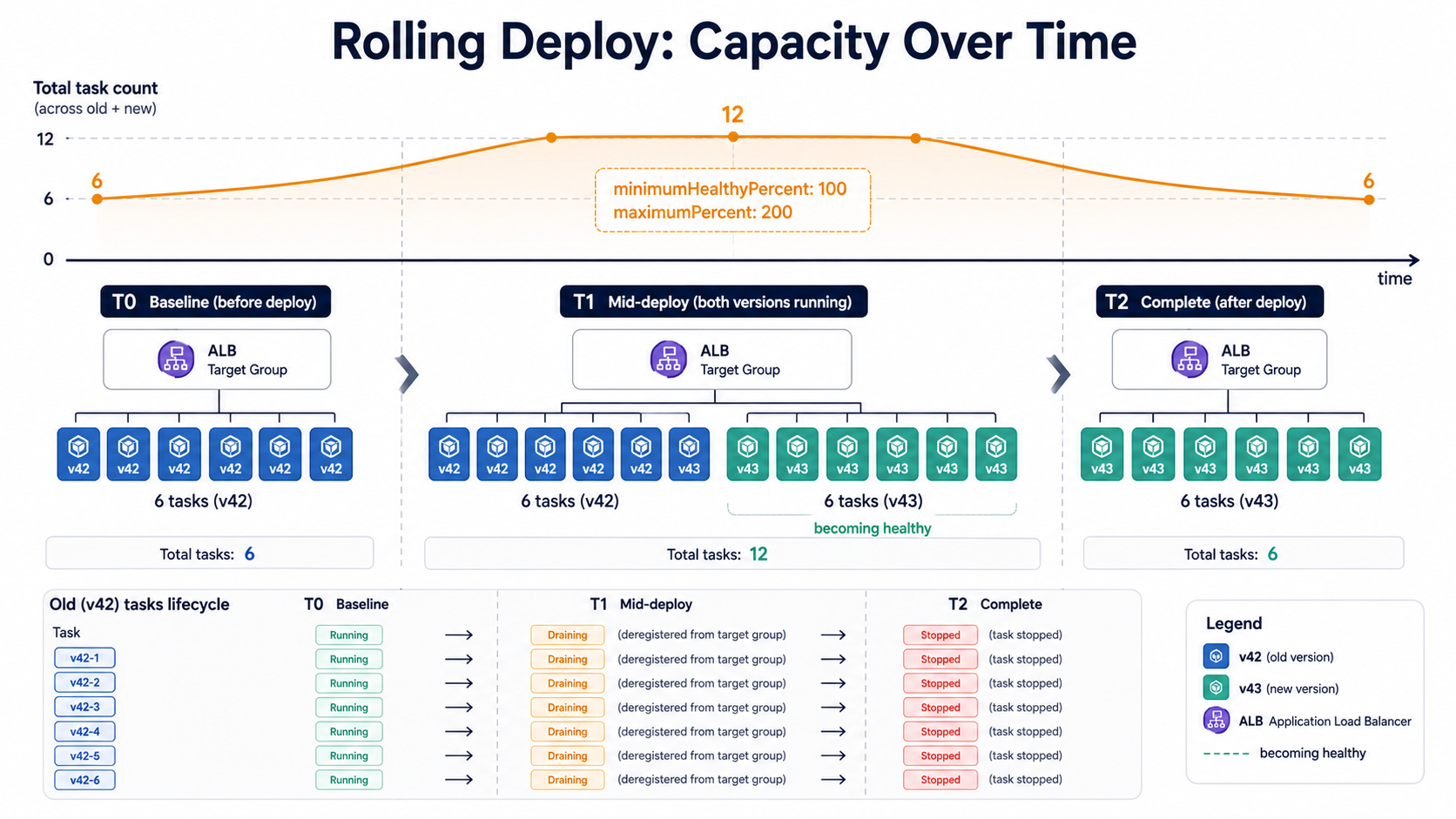
Say you have 6 desired tasks, minimumHealthyPercent: 100, and maximumPercent: 200. The deploy looks like this:
- ECS launches up to 6 new tasks while keeping all 6 old ones running. You're temporarily at 12 tasks.
- As each new task passes its ALB health check, ECS deregisters one old task from the target group.
- The old task stays in
DRAININGfor the duration of the target group'sderegistration_delay.timeout_seconds(default 300s, five minutes). - Once draining finishes, ECS stops the old task and removes it.
- Repeat until all old tasks are gone.
If you set minimumHealthyPercent: 50 and maximumPercent: 100, the math reverses, ECS stops 3 old tasks first, launches 3 new ones, waits for them to be healthy, then does the other 3. Cheaper, slower, and during the deploy you have half the capacity. Fine for off-peak deploys; risky during a traffic spike.
The thing nobody tells you about rolling deployments is that every assumption you make about "version N is gone" is wrong for about five minutes. During that draining window:
- The old task is still receiving in-flight requests.
- The old task is still holding open WebSocket connections (and the ALB will not drain those; it just waits the timeout, then kills them).
- The old task is still writing to your database, your queue, your cache, with the old schema, the old serialization, the old assumptions.
If your new version writes a new column to the orders table and your old version reads orders without knowing about that column, you have a five-minute window where two versions are both writing. That's fine if both versions are backwards-compatible. It's a corruption incident if they're not.
This is the most underrated rule in any rolling-deploy world:
The circuit breaker is doing real work
That deploymentCircuitBreaker block in the service definition matters more than its name suggests. With enable: true, rollback: true, ECS watches the new tasks during deployment. If enough new tasks fail to launch or fail health checks, ECS marks the deployment as failed and automatically rolls back to the previous task definition. The exact threshold is 0.5 × desired_count, with a floor of 3 and a ceiling of 200, so a 6-task service trips after 3 bad tasks and a 200-task service trips after 100.
Without the circuit breaker, a deploy with a broken Dockerfile will sit there forever launching, failing, and restarting tasks. You'll come back from lunch to a cluster trying to start its 800th broken container while your customers stare at error pages because the healthy old tasks have already been replaced.
Enable the circuit breaker on every production ECS service. It's a one-line config and it saves you from yourself.
Rolling's biggest weakness: it can't roll back fast
Here's the catch. The circuit breaker rolls back during a deploy. After a deploy is "complete", meaning all old tasks have been drained and stopped, the old version is gone. The container images might still be in ECR, but the running tasks are gone. To get back to version N, ECS has to launch all-new tasks from the old task definition, wait for them to be healthy, drain the new-now-bad ones, and stop them.
In practice that's another full deploy cycle, anywhere from 3 to 15 minutes depending on your image size, app startup time, and how patient your health checks are.
Three to fifteen minutes is a long time to be down.
That's the gap blue-green is designed to close.
Blue-green: keep the old one warm
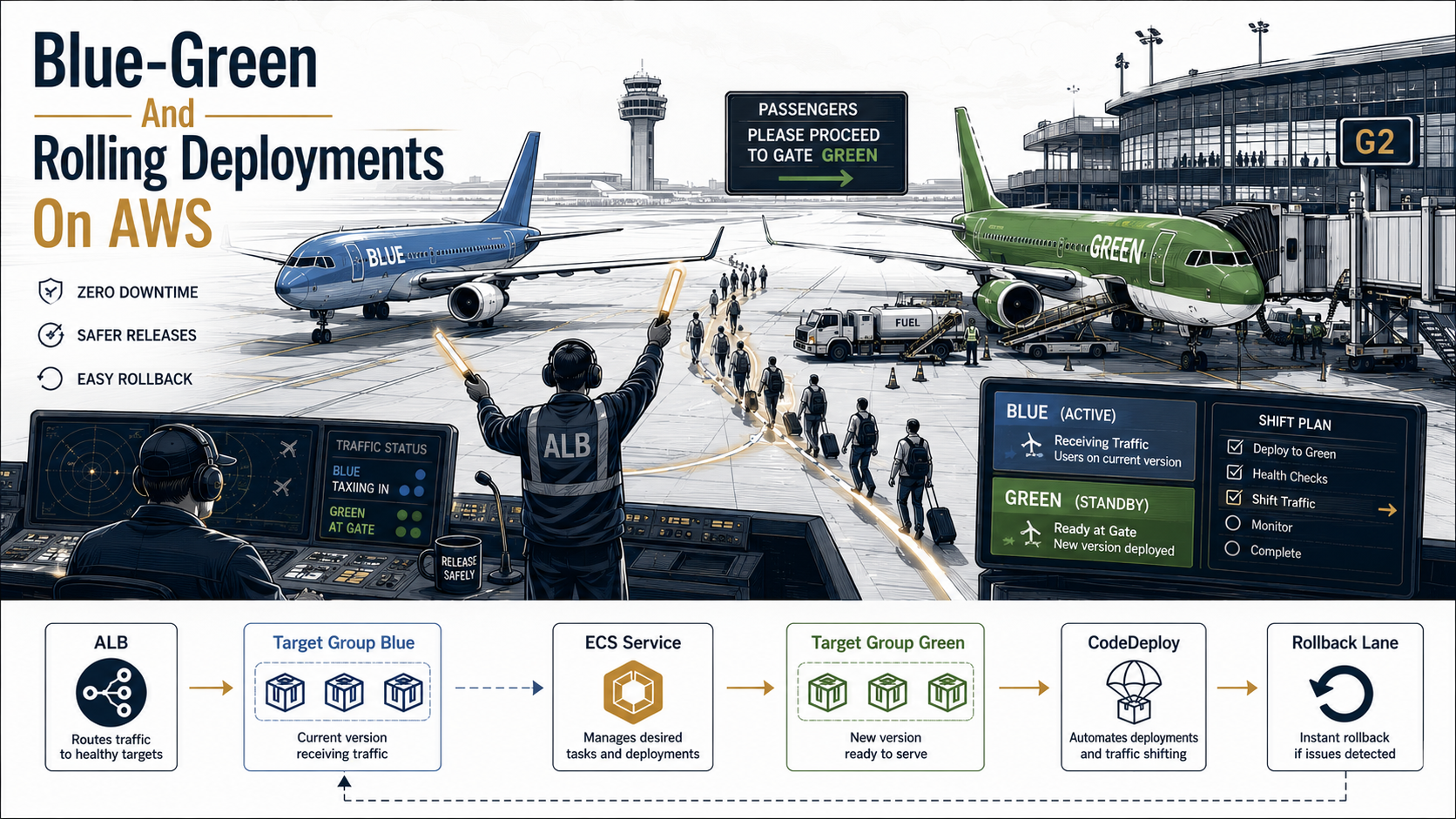
The mental model for blue-green is simple. You have two environments, blue and green. Blue is currently serving traffic. You deploy the new version to green. You wait. You verify. Then you flip traffic from blue to green in one ALB listener change. If green misbehaves, you flip back.
On AWS, ECS blue-green deployments are managed by CodeDeploy, not by ECS directly. To opt in, you change the deployment controller in your service:
{
  "serviceName": "checkout-api",
  "cluster": "prod",
  "taskDefinition": "checkout-api:42",
  "desiredCount": 6,
  "deploymentController": { "type": "CODE_DEPLOY" },
  "loadBalancers": [
    {
      "targetGroupArn": "arn:aws:...:targetgroup/checkout-blue/...",
      "containerName": "checkout",
      "containerPort": 8080
    }
  ]
}
Two important things change once deploymentController.type is CODE_DEPLOY:
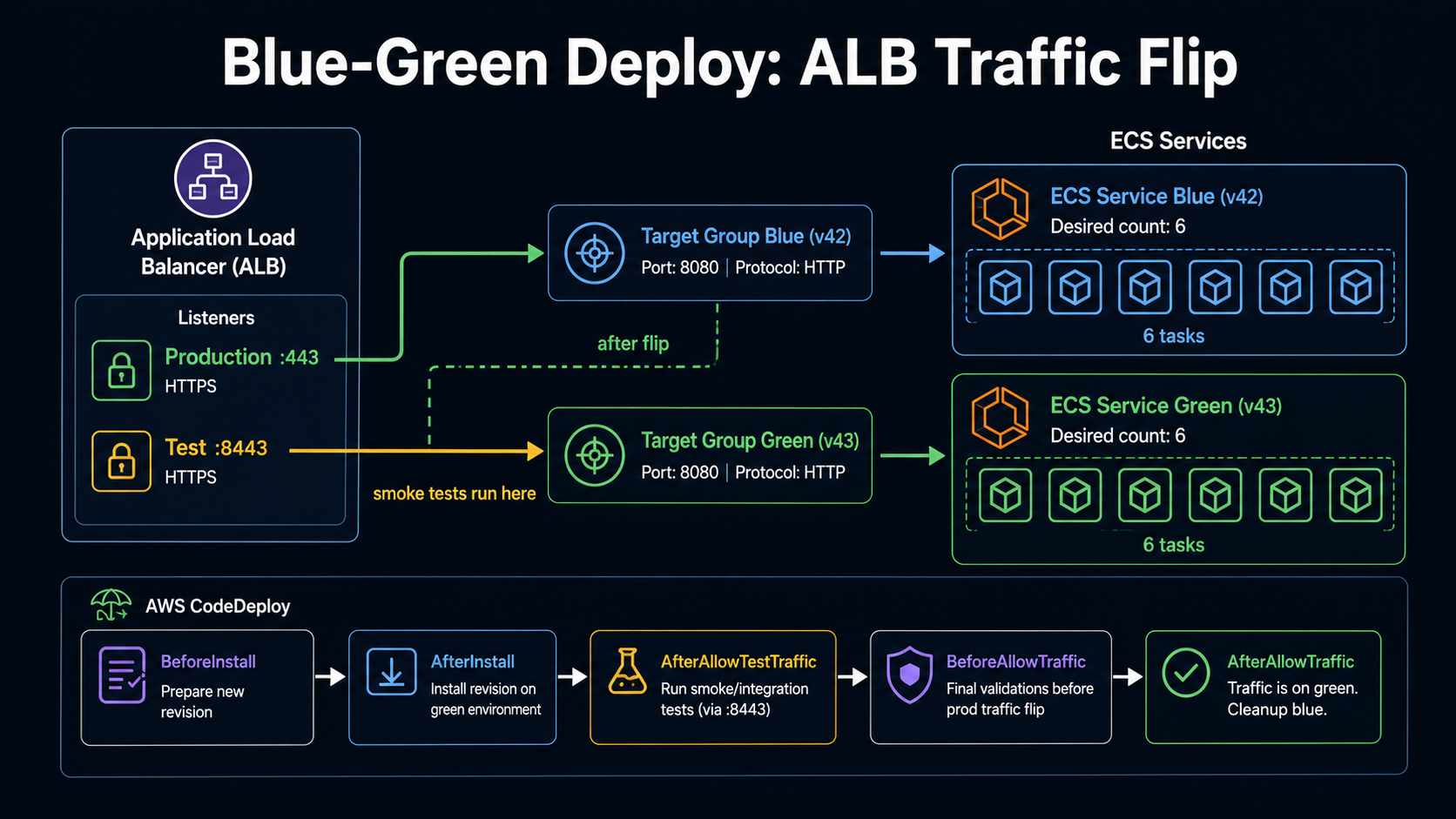
- You need two target groups behind the same ALB, one for blue, one for green. The service definition only mentions blue, because that's where it starts. CodeDeploy registers tasks into the other one during deploys.
- You need two listeners (or one listener with two rules): a production listener on port 443 and a test listener on a port like 8443. The test listener routes to whatever target group is "not currently production," so you can hit the new version with a curl before flipping real traffic.
The CodeDeploy application + deployment group glue them together. Here's the AppSpec file CodeDeploy reads on every deploy:
version: 0.0
Resources:
  - TargetService:
      Type: AWS::ECS::Service
      Properties:
        TaskDefinition: "arn:aws:ecs:us-east-1:123456789012:task-definition/checkout-api:43"
        LoadBalancerInfo:
          ContainerName: "checkout"
          ContainerPort: 8080
        PlatformVersion: "LATEST"
Hooks:
  - BeforeInstall: "arn:aws:lambda:us-east-1:123456789012:function:codedeploy-before-install"
  - AfterInstall: "arn:aws:lambda:us-east-1:123456789012:function:codedeploy-after-install"
  - AfterAllowTestTraffic: "arn:aws:lambda:us-east-1:123456789012:function:smoke-tests"
  - BeforeAllowTraffic: "arn:aws:lambda:us-east-1:123456789012:function:codedeploy-before-traffic"
  - AfterAllowTraffic: "arn:aws:lambda:us-east-1:123456789012:function:codedeploy-after-traffic"
Five hooks, and they fire in that order. Each one points at a Lambda function, CodeDeploy invokes the Lambda, the Lambda runs whatever you want (smoke tests, cache warming, a Slack ping, a manual approval gate), and replies with Succeeded or Failed. If any hook returns Failed, the deployment fails and CodeDeploy starts rolling back.
The two hooks that earn the most rent here are AfterAllowTestTraffic and AfterAllowTraffic.
AfterAllowTestTraffic fires after the new tasks are live and reachable via the test listener (port 8443), but before any real customer traffic touches them. This is your last clean checkpoint. Run a battery of smoke tests against https://checkout.internal:8443/healthz, /v1/orders/preview, whatever exercises your critical paths. If any fail, return Failed and CodeDeploy aborts the deploy before your customers see it.
AfterAllowTraffic fires after the flip. Use this for cache warming, sending a deploy event to your APM, or kicking off a synthetic monitoring run.
Traffic-shifting configurations
The flip itself has three flavors, controlled by the deployment group's deployment configuration:
CodeDeployDefault.ECSAllAtOnce, flip 100% of traffic to green in one move. Fastest deploy, riskiest. Use it in non-prod.CodeDeployDefault.ECSLinear10PercentEvery1Minutes, shift 10% of traffic per minute, taking 10 minutes total. The classic "linear" shape.CodeDeployDefault.ECSCanary10Percent5Minutes, shift 10% to green, wait 5 minutes watching alarms, then shift the remaining 90%. The classic "canary" shape.
You can also define custom configurations, e.g., 1% for 3 minutes, then 10% for 5 minutes, then 100%. But the three defaults cover most cases. Pick canary for high-risk changes (schema-related, payment-related, auth-related), pick linear for steady rollouts, pick all-at-once when you've already validated the build in staging and trust your test suite.
The original tasks stick around
This is the headline feature of blue-green. After the flip, CodeDeploy doesn't immediately kill the old tasks. It keeps them running for a configurable window, the termination wait time, default 1 hour, configurable up to 2 days. During that window, the old tasks are deregistered from the production listener but still alive on the cluster. You can flip back in seconds:
aws deploy stop-deployment \
  --deployment-id d-ABCDEFGHI \
  --auto-rollback-enabled \
  --region us-east-1
That single command does what a from-scratch rolling rollback would take 15 minutes to do: it flips the production listener back to blue, where the old tasks are still warm, still healthy, still serving in microseconds.
The trade-off is cost. For the duration of the termination wait time, you're paying for double the compute. On a 6-task service with 1 vCPU per task on Fargate, that's roughly an extra $0.05/hour during the window. On a 60-task service with 4 vCPU per task, it's more like $20/hour. Not free, but cheap insurance.
What ALB does during the swap
Both deployment strategies lean on the same ALB primitives, and understanding those primitives is what separates "I configured CodeDeploy" from "I'd debug this at 3am."
The ALB tracks the health of every target in every target group via active health checks. Defaults:
- HealthCheckPath:
/ - HealthCheckIntervalSeconds: 30
- HealthyThresholdCount: 5 (5 consecutive successful checks before a target is considered healthy)
- UnhealthyThresholdCount: 2 (2 consecutive failures before it's considered unhealthy)
With defaults, a brand-new task waits 30 × 5 = 150 seconds after registration before the ALB will route traffic to it. That's two and a half minutes per task, multiplied by however many tasks you're rolling.
Three defaults to almost always change:
HealthCheckPath, point this at a real/healthzendpoint that checks the things that actually need to work. A 200 from/because Express returned its default response is not a health check.HealthCheckIntervalSecondsto 10 or 15. Faster detection, faster deploys.HealthyThresholdCountto 2 or 3. Five consecutive successful checks is overkill for most apps; the cost is more flapping if your healthz is flaky.
The other ALB knob that bites people is deregistration_delay.timeout_seconds. When ECS deregisters an old task from the target group, the ALB stops sending it new requests immediately. But existing requests keep flowing for up to this many seconds (default 300). After that, the ALB hard-closes the connection regardless of whether the request finished.
If your app does anything that takes longer than a few seconds, long-polling, file uploads, server-sent events, sync database migrations, you need to set this higher. If your app is a fast REST API, you can set it to 30 to make deploys snappier.
aws elbv2 modify-target-group-attributes \
  --target-group-arn arn:aws:...:targetgroup/checkout-blue/... \
  --attributes Key=deregistration_delay.timeout_seconds,Value=30
The rollback strategy you should actually have
A rollback "strategy" that's just "click the rollback button in the console" is not a strategy. It's a hope.
A real rollback strategy answers four questions, in order:
- What signal tells you to roll back?
- Who decides?
- What command actually runs?
- What stays broken after the rollback, and who cleans it up?
Let's walk through each one in the AWS context.
1. The signal
The signal should be automatic for the common cases and human-judged for the edge cases. Automatic signals on AWS are CloudWatch alarms attached to the CodeDeploy deployment group:
aws deploy update-deployment-group \
  --application-name checkout-api \
  --current-deployment-group-name checkout-api-prod \
  --alarm-configuration enabled=true,alarms="[\
    {name=checkout-5xx-rate},\
    {name=checkout-p99-latency},\
    {name=checkout-error-budget-burn}\
  ]" \
  --auto-rollback-configuration enabled=true,events="[DEPLOYMENT_FAILURE,DEPLOYMENT_STOP_ON_ALARM]"
If any of those alarms goes into ALARM state during the deployment, CodeDeploy stops the rollout and starts rolling back to the previous version. No human in the loop. This is the path most deploys should take.
Pick the alarms that genuinely indicate user-visible damage:
- HTTP 5xx rate above your normal noise floor (e.g., > 1% over 1 minute).
- P99 latency above your SLO budget (e.g., > 800ms over 2 minutes).
- Error budget burn rate above 2x (if you have SLOs configured).
Don't attach an alarm for "CPU > 80%". CPU spiking during a deploy is normal, new tasks JIT-compile, fill caches, warm up. You'll roll back deploys that were actually fine.
2. The human gate
Some changes can't be judged by alarms. A pricing logic change might be functionally correct (no errors, fast responses) but charging customers twice. A search ranking change might tank conversion. For those, you want a human in the loop.
The pattern: in the AfterAllowTestTraffic Lambda, post to a Slack channel with two buttons, Approve and Reject, and block on a response with a timeout (say, 15 minutes). If approved, the Lambda returns Succeeded and the flip proceeds. If rejected or timed out, it returns Failed and CodeDeploy aborts.
import boto3
import requests

codedeploy = boto3.client("codedeploy")

def lambda_handler(event, context):
    deployment_id = event["DeploymentId"]
    lifecycle_event_hook_execution_id = event["LifecycleEventHookExecutionId"]

    # Post a message with Approve/Reject buttons to Slack.
    # In a real implementation this would persist the deployment_id
    # against the message timestamp and a separate Lambda would receive
    # the button click via an API Gateway webhook, then call
    # put_lifecycle_event_hook_execution_status with the result.
    requests.post(
        "https://slack.com/api/chat.postMessage",
        headers={"Authorization": f"Bearer {SLACK_TOKEN}"},
        json={
            "channel": "#deploys",
            "text": f"Deploy {deployment_id} is at the test-traffic stage. Approve?",
            # ... interactive elements omitted for brevity
        },
    )

    # Return immediately. The webhook Lambda is responsible for the final status.
    # This Lambda only kicks off the approval flow.
    return {"statusCode": 200}


def report_status(deployment_id, hook_execution_id, status):
    """Called by the webhook Lambda once the user clicks Approve or Reject."""
    codedeploy.put_lifecycle_event_hook_execution_status(
        deploymentId=deployment_id,
        lifecycleEventHookExecutionId=hook_execution_id,
        status=status,  # "Succeeded" or "Failed"
    )
The put_lifecycle_event_hook_execution_status call is the API you'll want bookmarked, it's how a hook reports a result asynchronously. CodeDeploy will wait up to 1 hour by default for a hook to return a result (configurable per hook).
3. The command
The rollback command depends on which controller you're using. With CodeDeploy:
# Roll back a specific in-progress deployment.
aws deploy stop-deployment \
  --deployment-id d-ABCDEFGHI \
  --auto-rollback-enabled \
  --region us-east-1
If the deploy has already completed and you're in the termination wait window, you trigger a new deployment of the old task definition revision:
aws deploy create-deployment \
  --application-name checkout-api \
  --deployment-group-name checkout-api-prod \
  --revision revisionType=AppSpecContent,appSpecContent='{
    "content": "... appspec referencing checkout-api:42 ..."
  }' \
  --region us-east-1
With the plain ECS rolling controller:
aws ecs update-service \
  --cluster prod \
  --service checkout-api \
  --task-definition checkout-api:42 \
  --force-new-deployment \
  --region us-east-1
--force-new-deployment is the key, without it, ECS sees you "updating" to the current task definition and does nothing. With it, ECS treats it as a full deploy and rolls the cluster back.
The pattern: tag the previous task definition revision somewhere durable (Slack, Linear, a small DynamoDB table) at the start of every deploy. Before the new deploy, know the exact ARN you'd roll back to. Don't go hunting for it during an incident.
4. What stays broken
Rollback is reversing the code, not reversing its side effects.
If your new code sent an email, the email is sent. If it published a Kafka event, the event is in the topic. If it migrated a database column from INT to BIGINT, the column is still BIGINT. If it wrote to S3, the file is in S3.
Plan rollback like a chess move. Three things to keep in mind on every deploy:
- Schema migrations should always be expand-then-contract. Add the new column or table in deploy A. Have deploy A write to both old and new. Deploy B reads from the new only. Deploy C (later, after you're confident) drops the old column. At any point in this chain, the previous version is still valid. Never do a destructive migration in the same deploy as the code that needs it.
- Outbound events should be idempotent. If a customer order is processed twice, once before rollback, once after, your downstream systems should handle the duplicate without billing twice.
- Feature flags are a faster rollback than a CodeDeploy rollback. If you have LaunchDarkly, Statsig, or a homegrown flag service, the first thing you reach for is the flag, not the deploy. Flipping a flag is one HTTP call; rolling back a deploy is 5-15 minutes of risk.
Rolling vs blue-green: when to use which
There's no universally right answer, and anyone who says "always use blue-green" is selling you something. The choice depends on three things: cost tolerance, downtime tolerance, and rollback urgency.
| Factor | Pick rolling when... | Pick blue-green when... |
|---|---|---|
| Cost during deploy | Doubling capacity for a deploy is genuinely painful | You can afford the brief 2x cost (or termination wait time is short) |
| Rollback speed | A 5-15 minute rollback is acceptable | You need < 1 minute rollback |
| Cluster size | Small (1-5 tasks), overhead of two target groups is annoying | Medium or large, savings from fast rollback dwarf the setup cost |
| State + schema | Migrations are already expand-then-contract | Hard cutover schemas (rare, and a code smell) |
| Validation | Health check is sufficient | You want a smoke-test gate before any real traffic |
| Team size | Solo dev, ops-as-side-quest | Dedicated platform team or on-call rotation |
A rough heuristic: if the service handles real money or real customer-visible flows, blue-green is worth the setup. If it's an internal dashboard or a background worker, rolling is probably fine.
You can also mix them per service. Your payment service and your checkout API run blue-green. Your image resizer and your CSV exporter run rolling. Nothing forces a whole cluster onto one strategy.
A few things I'd build into every deploy from day one
If you're setting up an ECS service from scratch today, this is the baseline I'd push for, regardless of which strategy you pick:
- The deployment circuit breaker enabled, with automatic rollback on.
- A real
/healthzendpoint that checks downstream dependencies the app actually depends on, but not optional integrations. - ALB health check interval at 10-15 seconds, healthy threshold at 2.
- Deregistration delay tuned to your longest legitimate request (30 seconds for a fast API, higher for long-running endpoints).
- CloudWatch alarms attached to the deployment for 5xx rate and P99 latency.
- Previous task definition ARN written to a known, durable location at the start of every deploy.
- A
rollback.shin the repo that takes a deployment ID or a task definition ARN and does the right thing, no clicking through the console, no copy-paste from a runbook at 3am. - Schema changes that are expand-then-contract, always.
Get those eight things in place and the difference between rolling and blue-green becomes a tactical choice instead of a load-bearing one. Your deploys will be boring. That's the whole point.
Boring deploys are how you sleep through the night.