
So you've been asked to build the new dashboard. Not a marketing site, not a single screen. The actual SaaS shell. Sidebar, top bar, ten routes, three roles, charts, settings, billing. The kind of thing that starts as one folder called dashboard/ and a week later has sprouted nested layouts, an auth.ts file, three context providers, and an opinion about how loading skeletons should feel.
You open Next.js and immediately face the question every team faces at this point: how do you compose all of this without painting yourself into a corner? Layouts are a great idea until you have five of them and can't remember which one owns the sidebar. Auth is straightforward until permissions creep in and now every page wants to know "can this user even see this?" Charts feel solved by any of the popular libraries until you realise three of them are client-only and your data lives on the server.
This is the article I wish I'd had the second time I built one of these. Not "here's a starter template"; those go stale in three months. Instead, a walk through the decisions that actually shape the shell, and the Next.js mechanics that pay off when you make them well.
We'll assume the App Router throughout, TypeScript, and a backend that exposes data either through Next.js Server Actions / Route Handlers or a separate API. If your stack is different, the shapes still apply; only the imports change.
Start With The Layout Tree, Not The Pages
The instinct on day one is to start building screens. Resist for an hour. The layout tree is the load-bearing wall of the whole dashboard; if it's wrong, you'll be fighting it for the next year.
A typical SaaS shell has three distinct visual contexts:
- Public marketing pages: landing, pricing, about. No auth, different header, different footer, different fonts even.
- Auth flow: login, signup, password reset. Centred card on a clean background, no nav, often no footer.
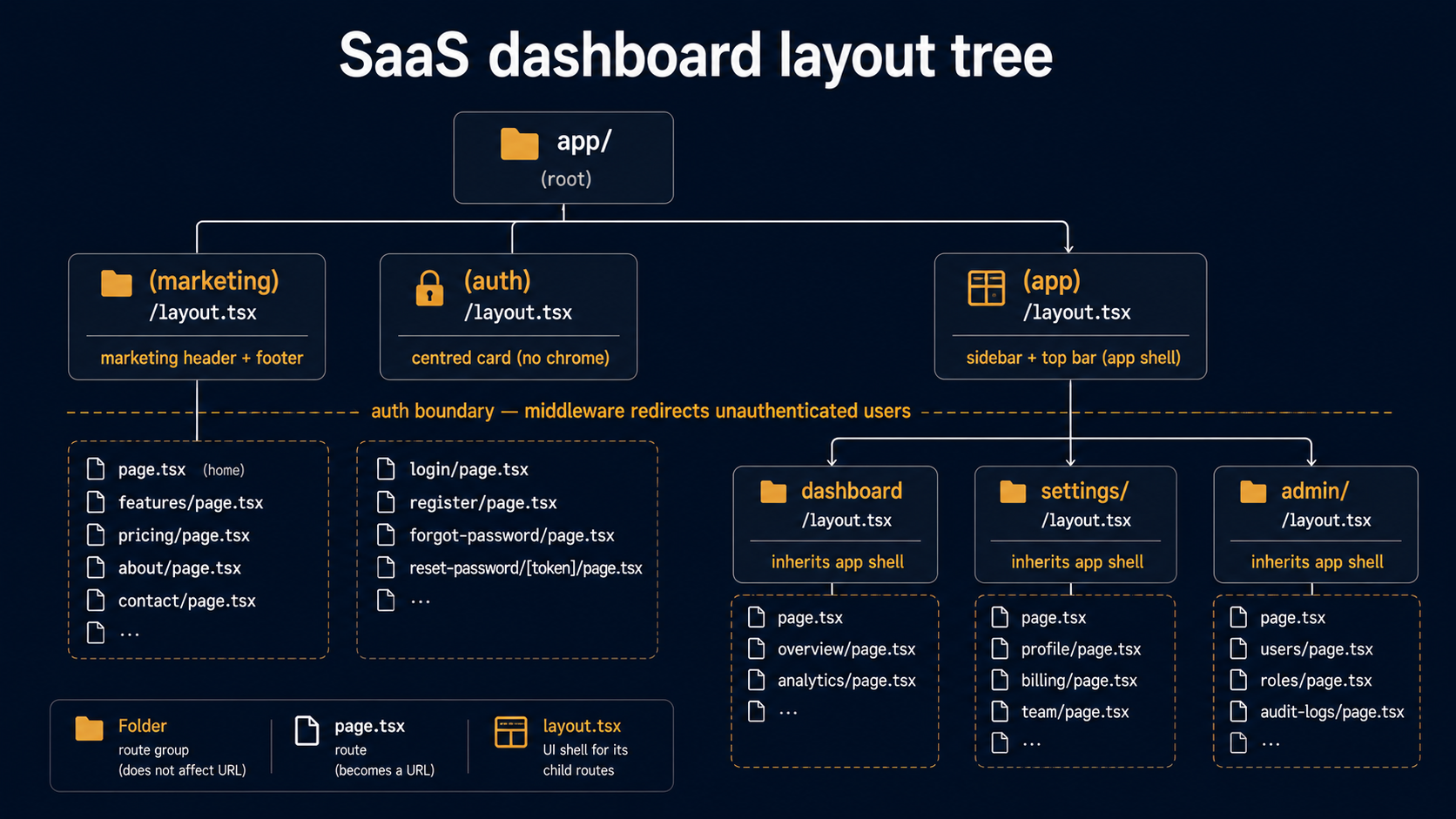
- The app itself: sidebar + top bar + content area, every route behind auth, three or four sub-shells inside it (settings, billing, admin).
The mistake is to put all of this under one app/layout.tsx and start branching on the URL inside the layout. Route groups exist exactly to solve this without URL prefixes:
app/
  layout.tsx                ← root only: <html>, <body>, global providers
  (marketing)/
    layout.tsx              ← marketing shell
    page.tsx                → /
    pricing/page.tsx        → /pricing
  (auth)/
    layout.tsx              ← centred card shell
    login/page.tsx          → /login
    signup/page.tsx         → /signup
  (app)/
    layout.tsx              ← sidebar + top bar (auth required)
    dashboard/page.tsx      → /dashboard
    settings/
      layout.tsx            ← settings sub-shell
      page.tsx              → /settings
      team/page.tsx         → /settings/team
      billing/page.tsx      → /settings/billing
    admin/
      layout.tsx            ← admin sub-shell (permission gated)
      page.tsx              → /admin
Three parenthesised folders, three independent shells, no URL pollution. Users see /pricing, /login, and /dashboard as siblings; the codebase sees them as completely separate sections. The (app)/layout.tsx is the one that owns the sidebar and top bar, every page below it inherits the shell for free.
The reason this matters more than it looks: layouts in the App Router persist. When the user clicks from /dashboard to /settings/billing, the (app)/layout.tsx does not re-render. Its sidebar state, its scroll position, its mounted analytics: all preserved. If you stack everything under one root layout with conditional rendering, you lose that property and end up reinventing it with state libraries.
Sketch the layout tree on paper before you write a single page. Three shells, the sub-shells inside the app shell, the boundary where auth starts. That sketch is the architecture document for the dashboard.
The Auth Gate: Middleware Plus A Server Helper
Next.js gives you two places to check auth, and you want both, for different reasons.
Middleware runs on the edge before any route handler renders. It's where you stop unauthenticated users from ever seeing the inside of /dashboard. Cheap, fast, redirects instantly. But it runs on a stripped-down runtime, no Node APIs, limited libraries, so it's best for the bouncer-at-the-door check, not for "is this user allowed to see this specific resource."
import { NextResponse } from "next/server";
import type { NextRequest } from "next/server";

const PROTECTED = ["/dashboard", "/settings", "/admin"];

export function middleware(req: NextRequest) {
  const path = req.nextUrl.pathname;
  if (!PROTECTED.some((p) => path === p || path.startsWith(p + "/"))) {
    return NextResponse.next();
  }
  const session = req.cookies.get("session")?.value;
  if (!session) {
    const url = req.nextUrl.clone();
    url.pathname = "/login";
    url.searchParams.set("from", path);
    return NextResponse.redirect(url);
  }
  return NextResponse.next();
}

export const config = {
  matcher: ["/dashboard/:path*", "/settings/:path*", "/admin/:path*"],
};
That's the bouncer. It only looks at "is there a session cookie." It doesn't decode the cookie, doesn't hit the database, doesn't check roles. Anything beyond that gets too expensive for middleware and you start paying for it on every page load.
The deeper check happens in a server helper you call from layouts and pages. This is where you actually load the user and decide what they can see.
import { cookies } from "next/headers";
import { redirect } from "next/navigation";
import { cache } from "react";

export type SessionUser = {
  id: string;
  email: string;
  role: "owner" | "admin" | "member";
  orgId: string;
};

export const getSessionUser = cache(async (): Promise<SessionUser | null> => {
  const token = (await cookies()).get("session")?.value;
  if (!token) return null;
  return await loadUserFromToken(token);
});

export async function requireUser(): Promise<SessionUser> {
  const user = await getSessionUser();
  if (!user) redirect("/login");
  return user;
}
Two non-obvious touches here. First, cache() from React deduplicates the call across a single request: if your layout, page, and three nested server components all call getSessionUser(), the actual token lookup happens once. Second, requireUser() uses redirect() from next/navigation, which throws a special error that Next.js catches and turns into a real HTTP redirect. You can call it from any server component and the page never renders.
Now your (app)/layout.tsx becomes the second line of defence:
import { requireUser } from "@/lib/auth";
import { Sidebar } from "@/components/sidebar";
import { TopBar } from "@/components/top-bar";

export default async function AppLayout({
  children,
}: {
  children: React.ReactNode;
}) {
  const user = await requireUser();

  return (
    <div className="app-shell">
      <Sidebar user={user} />
      <div className="app-main">
        <TopBar user={user} />
        <main className="app-content">{children}</main>
      </div>
    </div>
  );
}
The middleware caught users without a cookie. The layout catches users with an expired or tampered cookie, requireUser() returns null if loadUserFromToken rejects it, and the redirect fires. Two layers, neither of them duplicated work, both of them necessary.
Permissions: A Single can() Function Beats A Hundred Conditionals
Auth says "is this person logged in." Permissions say "is this person allowed to do this thing." They get tangled together in dashboards because the same page often handles both, and the worst version of this is what you'll write the first time: a if (user.role === 'admin' || ...) check sprinkled across forty components.
Centralise it. One function, one source of truth.
import type { SessionUser } from "./auth";

type Action =
  | "billing:read"
  | "billing:write"
  | "team:invite"
  | "team:remove"
  | "admin:access";

const RULES: Record<SessionUser["role"], Action[]> = {
  owner: ["billing:read", "billing:write", "team:invite", "team:remove", "admin:access"],
  admin: ["billing:read", "team:invite", "team:remove", "admin:access"],
  member: [],
};

export function can(user: SessionUser, action: Action): boolean {
  return RULES[user.role].includes(action);
}
It's a flat dictionary, not a class hierarchy, not a policy engine, not a YAML file. Boring on purpose. When a designer asks "can a member invite teammates?" you read one line and answer.
Then your require helpers compose:
import { forbidden } from "next/navigation";
import { can } from "./permissions";

export async function requirePermission(action: Action): Promise<SessionUser> {
  const user = await requireUser();
  if (!can(user, action)) forbidden();
  return user;
}
forbidden() is the App Router's 403 equivalent of notFound(), it walks up the tree looking for a forbidden.tsx file and renders that instead. Drop one at the root of your (app) group and every permission failure gets the same friendly page without you wiring it manually. One caveat worth knowing: forbidden() is currently experimental and lives behind the experimental.authInterrupts flag in next.config.js, so you opt in explicitly until it stabilises. If you don't want the experimental dependency, you can substitute notFound() or render a custom 403 component for now and switch over once it lands as stable.
In a server component:
import { requirePermission } from "@/lib/auth";

export default async function AdminPage() {
  const user = await requirePermission("admin:access");
  // user is guaranteed to have admin access here
  return <AdminDashboard user={user} />;
}
In a client component (where you can't call server helpers directly), pass can(user, "billing:write") as a prop and let the client read it as a plain boolean. Never reimplement the rules on the client, the client's job is to display the result, not to recompute it.
The other temptation here is to hide every disallowed button. Sometimes that's right; sometimes it's worse. A user who sees a greyed-out "Invite teammate" button and a tooltip saying "Only admins can do this" learns something about your product. A user who sees nothing wonders if the feature exists at all. Default to visible-but-disabled for high-value actions; default to hidden for low-value clutter.
Server Data: Fetch In The Component That Renders It
The biggest mindset shift coming from a Pages Router or a React SPA is that data fetching belongs inside the component that uses it, in a Server Component, with a plain await. No useEffect, no SWR, no React Query for the read path. Just:
import { requireUser } from "@/lib/auth";
import { getRecentActivity } from "@/lib/data/activity";
import { getMetrics } from "@/lib/data/metrics";
import { ActivityList } from "./activity-list";
import { MetricsCards } from "./metrics-cards";

export default async function DashboardPage() {
  const user = await requireUser();
  const [activity, metrics] = await Promise.all([
    getRecentActivity(user.orgId),
    getMetrics(user.orgId),
  ]);

  return (
    <>
      <MetricsCards data={metrics} />
      <ActivityList items={activity} />
    </>
  );
}
Two things to notice. First, the data calls run in parallel via Promise.all, if you await them sequentially the page waits for the slowest one twice over. Second, the components receive plain data as props. They don't fetch, don't know about the API, don't care whether the data came from a database, a third-party service, or a cached file. They render.
This is the cleanest split you can build: the route component is your data boundary, the leaf components are pure rendering. Test the leaves with fixtures; test the route by checking what it passes down.
For data that mutates, Server Actions are the App Router-native answer. A form that updates a setting, a button that fires off a delete, both can call a server function directly with no API route in between.
"use server";

import { requirePermission } from "@/lib/auth";
import { revalidatePath } from "next/cache";
import { z } from "zod";

const InviteSchema = z.object({
  email: z.string().email(),
  role: z.enum(["admin", "member"]),
});

export async function inviteTeammate(formData: FormData) {
  const user = await requirePermission("team:invite");
  const parsed = InviteSchema.safeParse({
    email: formData.get("email"),
    role: formData.get("role"),
  });
  if (!parsed.success) {
    return { ok: false, error: "Invalid input" };
  }
  await createInvitation({ orgId: user.orgId, ...parsed.data });
  revalidatePath("/settings/team");
  return { ok: true };
}
The "use server" directive at the top of the file marks every export as a server function callable from the client. The form on the page calls it like a regular function; Next.js wires up the fetch under the hood. revalidatePath invalidates any cached data for that route, so the next render sees the new invitation.
Validate every input. Server actions are public endpoints with nicer syntax, anyone on the internet can POST to them with arbitrary form data. Zod (or your validator of choice) at the door is non-negotiable.
Loading States That Don't Flicker
Most dashboards feel slow not because they are slow but because their loading states are bad. A spinner that flashes for 80ms feels worse than nothing. A skeleton that mismatches the final layout causes a perceived jump on every navigation. A whole-page spinner replaces a working sidebar with a blank screen, going from useful UI to no UI feels like a regression even if the wait is short.
The App Router gives you the tools; you have to use them well.
loading.tsx is segment-scoped. If you put one at app/(app)/loading.tsx, every navigation inside the app shell shows it. If you put one at app/(app)/settings/loading.tsx, only navigations into settings show it. Closer is better, the parts that don't need to change should not flicker.
import { MetricsCardsSkeleton } from "./metrics-cards";
import { ActivityListSkeleton } from "./activity-list";

export default function DashboardLoading() {
  return (
    <>
      <MetricsCardsSkeleton />
      <ActivityListSkeleton />
    </>
  );
}
Notice the skeletons are co-located with the real components. That's how you keep them in sync, every time you change the real layout, the skeleton sits right next to it and the diff is obvious. A skeleton that lives in a separate loading/ folder will drift within a sprint.
Suspense lets you stream partial pages. If one widget on the dashboard is slow, you don't have to make the whole page wait for it. Wrap the slow component in <Suspense> with a fallback, and the rest of the page renders immediately while that one widget shows its skeleton.
import { Suspense } from "react";

export default async function DashboardPage() {
  return (
    <>
      <FastMetricsCards />
      <Suspense fallback={<SlowChartSkeleton />}>
        <SlowChart />
      </Suspense>
    </>
  );
}

async function SlowChart() {
  const data = await fetchExpensiveTimeseries();
  return <Chart data={data} />;
}
The <SlowChart /> is itself an async server component. While its data is pending, the surrounding page is already on the screen and interactive. The skeleton sits in its slot until the data resolves, then swaps in. The user perceives a fast page that finishes filling in, not a slow page that holds everything hostage.
The mental rule: everything that can render now, should render now. Don't await data at the top of a page if you can await it inside a Suspense-wrapped child.
One more loading-related habit that pays off: when a slow operation completes and reveals data, fade or transition it in over 150-200ms. An instant pop from skeleton to real content feels jarring; a tiny crossfade reads as "yep, it loaded." This is a CSS detail, not a Next.js feature, but it's worth the four lines.
Charts: Server-Render The Frame, Client-Render The Interaction
Charts are where the server/client boundary actually starts to bite. Most chart libraries, Recharts, Chart.js, ApexCharts, Tremor, are client components. They use useEffect, they measure DOM size, they animate. None of that works on the server.
The naive move is to make the whole page that contains a chart a Client Component. Don't. You lose data fetching, you ship a lot of JavaScript, and you forfeit the streaming benefits we just talked about.
The right pattern: a server component fetches the data, formats it into the exact shape the chart wants, and renders a small client wrapper that takes that data as props.
import { getRevenueByDay } from "@/lib/data/metrics";
import { RevenueChartClient } from "./revenue-chart.client";

export async function RevenueChart({ orgId }: { orgId: string }) {
  const points = await getRevenueByDay(orgId, { days: 30 });
  // Transform DB rows to the chart-friendly shape on the server,
  // so the client receives only what it needs.
  const data = points.map((p) => ({
    date: p.day.toISOString(),
    value: p.totalCents / 100,
  }));
  return <RevenueChartClient data={data} />;
}"use client";
import { LineChart, Line, XAxis, YAxis, Tooltip, ResponsiveContainer } from "recharts";
type Point = { date: string; value: number };
export function RevenueChartClient({ data }: { data: Point[] }) {
return (
<ResponsiveContainer width="100%" height={240}>
<LineChart data={data}>
<XAxis dataKey="date" />
<YAxis />
<Tooltip />
<Line type="monotone" dataKey="value" />
</LineChart>
</ResponsiveContainer>
);
}The server file is async, fetches data, and returns the client component with props. The client file is a thin renderer. The JavaScript that ships to the browser is just revenue-chart.client.tsx plus the chart library: none of the data layer, none of the server helpers, none of the auth code.
If your chart needs interactivity that requires fresh data (a date-range picker that re-fetches), use a Server Action to load new points and pass them down. Avoid building a client-side API client for what could be a one-line server function.
Settings, Billing, Admin: Sub-Shells With Their Own Layouts
The dashboard isn't one screen, it's a small forest of related screens. Settings has its own sidebar of tabs (Profile, Team, Billing, Integrations). Admin has a different sidebar (Users, Organizations, Audit Log). Each of these is a sub-shell, and each gets its own layout.tsx.
import { SettingsNav } from "./settings-nav";

export default function SettingsLayout({
  children,
}: {
  children: React.ReactNode;
}) {
  return (
    <div className="settings-shell">
      <SettingsNav />
      <div className="settings-content">{children}</div>
    </div>
  );
}import { requirePermission } from "@/lib/auth";
import { AdminNav } from "./admin-nav";
export default async function AdminLayout({
children,
}: {
children: React.ReactNode;
}) {
await requirePermission("admin:access");
return (
<div className="admin-shell">
<AdminNav />
<div className="admin-content">{children}</div>
</div>
);
}The admin sub-shell does its permission check at the layout level, every page below it is protected by definition. Members who navigate to /admin/anything hit forbidden() before any sub-page even tries to render. Centralised. One check guards the entire branch.
When the user navigates between settings tabs, say /settings/profile to /settings/team, the SettingsLayout doesn't remount. Its SettingsNav keeps its state, the sidebar stays put, only the content swaps. That's the persistent-shell benefit again, applied at a deeper level.
Error Boundaries: One Per Layer, Each With A Purpose
Errors will happen. A third-party API will time out. A query will hit a stale schema. A bug in your own code will throw an unexpected null. Without error boundaries the user sees Next.js's default error page, which is fine for development and bad for production.
Each layout gets a sibling error.tsx. They cascade like layouts do, the closest boundary catches.
"use client";

import { useEffect } from "react";

export default function DashboardError({
  error,
  reset,
}: {
  error: Error & { digest?: string };
  reset: () => void;
}) {
  useEffect(() => {
    // Send to your error tracker
    console.error("Dashboard error:", error);
  }, [error]);

  return (
    <div className="error-card">
      <h2>We couldn't load your dashboard.</h2>
      <p>This is on us. Try again in a moment.</p>
      <button onClick={() => reset()}>Retry</button>
    </div>
  );
}
Three things worth noting. The file is "use client", error boundaries are a client-side React feature. The reset() callback re-renders the segment, so the user has a way out without a full reload. And critically: error.tsx does not catch errors thrown from its own layout. If (app)/layout.tsx itself throws, the boundary in (app)/dashboard/error.tsx won't see it. You'd need an error.tsx one level up, at (app)/error.tsx, to catch layout-level errors.
The pattern that works: one error.tsx at (app)/, one at each sub-shell (settings/error.tsx, admin/error.tsx), and maybe one at the page level for screens with especially fragile data. Don't sprinkle them everywhere, too many and you can't tell which one fired.
Caching: Choose Per Route, Not Per App
Caching in the App Router is its own essay, but for a dashboard the rules of thumb are short.
Dashboard data is almost always per-user and time-sensitive: you don't want to serve last week's metrics to today's user. The default for routes that read user data is to opt out of caching, and you do that by either calling cookies()/headers() (which marks the route as dynamic automatically) or explicitly disabling caching on your fetch calls.
import { cache } from "react";
import { getSessionUser } from "../auth";

export const getMetrics = cache(async (orgId: string) => {
  // No `next: { revalidate: ... }` — we want fresh data every request.
  const res = await fetch(`${process.env.API_URL}/orgs/${orgId}/metrics`, {
    cache: "no-store",
    headers: { Authorization: `Bearer ${process.env.API_TOKEN}` },
  });
  if (!res.ok) throw new Error(`Failed to load metrics: ${res.status}`);
  return res.json();
});
The React cache() here is request-scoped, not cross-request. It dedupes calls within one render, if your page and three components all call getMetrics(orgId), the fetch happens once for that request. It does not serve cached data to the next user. That's exactly what you want for dashboard data.
For data that genuinely is stable per organisation (feature flags, plan tier, branding), you can opt back into revalidation:
const res = await fetch(url, { next: { revalidate: 300 } });Five-minute cache, cleared by revalidatePath or revalidateTag when a Server Action updates the underlying resource. Most dashboards have one or two of these and the rest is dynamic per-request. Default to dynamic; opt into caching deliberately, route by route, with a comment explaining why.
Forms, Mutations, And The Refresh Loop
Settings pages are mostly forms. Profile, team management, billing details, integration toggles. Every one of these is a chance to either feel snappy or feel like a 2009 admin panel that reloads the whole page on save.
The App Router-native flow is: form posts to a Server Action, action mutates the data, calls revalidatePath, the page re-renders with fresh data. No client-side state management for the form result, the page itself is the result.
import { requireUser } from "@/lib/auth";
import { updateProfile } from "./actions";

export default async function ProfilePage() {
  const user = await requireUser();

  return (
    <form action={updateProfile}>
      <label>
        Display name
        <input name="displayName" defaultValue={user.email} />
      </label>
      <button type="submit">Save</button>
    </form>
  );
}"use server";
import { requireUser } from "@/lib/auth";
import { revalidatePath } from "next/cache";
export async function updateProfile(formData: FormData) {
const user = await requireUser();
const displayName = String(formData.get("displayName") || "").trim();
if (!displayName) return;
await db.user.update({ where: { id: user.id }, data: { displayName } });
revalidatePath("/settings/profile");
}Two things this gets you that are easy to miss. The form action prop accepts a server function directly, no onSubmit, no fetch, no useState. And revalidatePath invalidates the route's data so the next render reflects the change.
For richer UX (disabled submit during pending, success toast, error display), pair this with useFormStatus and useActionState on the client:
"use client";

import { useActionState } from "react";
import { useFormStatus } from "react-dom";
import { updateProfile } from "./actions";

function SubmitButton() {
  const { pending } = useFormStatus();
  return (
    <button type="submit" disabled={pending}>
      {pending ? "Saving..." : "Save"}
    </button>
  );
}

export function ProfileForm({ initial }: { initial: { displayName: string } }) {
  const [state, formAction] = useActionState(updateProfile, { ok: false });
  return (
    <form action={formAction}>
      <input name="displayName" defaultValue={initial.displayName} />
      <SubmitButton />
      {state.ok && <p className="ok">Saved.</p>}
    </form>
  );
}
The progressive enhancement is real here: without JavaScript, the form still submits and the page reloads with new data. With JavaScript, you get the pending state and the inline confirmation. The same Server Action serves both worlds.
Observability: You'll Want It Sooner Than You Think
Two things to wire up in the first week, before you have so much code that adding them feels like a project.
Structured logging. Every Server Action and route handler should log start/end with a request ID, user ID, action name, and elapsed time. Plain console.log with a JSON payload is fine to start; ship logs to whatever your stack provides (Vercel Logs, Datadog, Better Stack, pick one). When a user reports "I clicked Save and nothing happened," the difference between five minutes and two hours of investigation is whether you have a log line saying "updateProfile started for user abc123, finished in 480ms with error 'duplicate email'".
Error tracking. Wire an error tracker (Sentry has good Next.js docs, plenty of alternatives exist) into both the server side and the client side. The error.tsx files become the place where client errors get reported; server actions and route handlers get instrumented by the SDK automatically.
You don't need to be clever about either of these. The cost of installing them is one afternoon. The cost of not having them is every production incident taking three times as long.
A Short Tour Of Mistakes I've Watched Teams Make
A handful of patterns that look fine on day one and cost weeks on day ninety.
Putting everything under app/dashboard/ with no route groups. Works fine until you need to add /billing outside the dashboard shell or /admin with a different layout. Then you're either nesting things weirdly or refactoring half the routes. Use route groups from day one even if you only have two shells.
Storing the current user in a client-side context. Tempting because then every component can read it. Wrong because now you have two sources of truth (the server's view of the user, the client's view) and they drift the moment the user is updated in a Server Action. Pass the user as props from the layout to client components that need it. Re-fetch from the server on permission-sensitive actions.
Calling Server Actions from useEffect. Server Actions are for mutations, things triggered by user intent. If you find yourself wanting to call one in an effect to load data, you actually want a Server Component (for data that's read once per page) or a Route Handler / fetch (for data that needs to refresh on a schedule).
Rolling your own session. Don't, on a SaaS dashboard. You'll spend weeks on token refresh, CSRF, secure-cookie flags, session revocation, and you'll still get something subtly wrong. Use one of the well-supported libraries (Auth.js, Clerk, Lucia, Better Auth, landscape changes, evaluate at the time you're building) and spend that engineering on the parts of the dashboard your users actually pay for.
Ignoring CSRF on Server Actions. Server Actions are POST endpoints and they're public. Next.js handles a lot of this for you when the action is invoked through a form on the same origin, but if you ever expose actions in unusual ways (embedded widgets, third-party integrations), read the framework's current guidance on CSRF rather than assuming the defaults cover your case.
Skipping the empty state. Every list in a dashboard has three states: loading, empty, full. Loading you've now thought about. Empty often gets forgotten until someone signs up with a fresh account and sees a page that says "Recent activity" followed by nothing. Design the empty state at the same time as the full state, it's the first impression every new user gets.
What "Building A SaaS Dashboard" Actually Means
If you take one thing away, it's that the dashboard is the layout tree plus the auth boundary plus the data-fetching pattern, and everything else is variations on those three. The pages are interchangeable. The features churn. The shell is what stays.
Next.js's App Router is, more than anything, a way to express that shell as code that the framework can optimise. Layouts are persistent shells. Suspense boundaries are streaming hints. Server Components are "where the data lives." Server Actions are "where the writes go." Auth helpers thread through all of it as plain async functions. Once you stop treating these as separate features and start treating them as one coordinated way of describing a logged-in product, the whole thing gets quieter.
Open the dashboard you're building, or the one you're about to build, and draw the layout tree on paper. Mark where auth starts. Mark where each Suspense boundary will sit. Decide which one or two routes need their own error.tsx. That sketch is more of the dashboard than the first ten pages of code will be. Build it well once, and the next ten features land in hours.