The Demo Versus The Operations Room
The first version of a real-time dashboard takes a day. You open new WebSocket(url), push some JSON every second, and watch numbers tick up on screen. Everyone says "nice." You ship it.
Then a customer leaves the dashboard open on a TV in their operations room over the weekend. Monday morning the numbers are frozen, the page is half-grey, and the support ticket says "your product is broken." Nothing actually crashed. The socket dropped during a deploy on Saturday, the tab was throttled, no one was watching, and your reconnect logic was a setTimeout that never fired because the tab was suspended.
That gap — between the demo and the operations room — is where most of the engineering on real-time dashboards actually lives. The chart library is the easy part. The connection lifecycle is the work.
Pick Your Transport Honestly
Before any code, decide what shape of traffic you actually have. The choice between native WebSockets, socket.io, SSE, or a managed real-time platform is not a taste question — they have different failure modes.
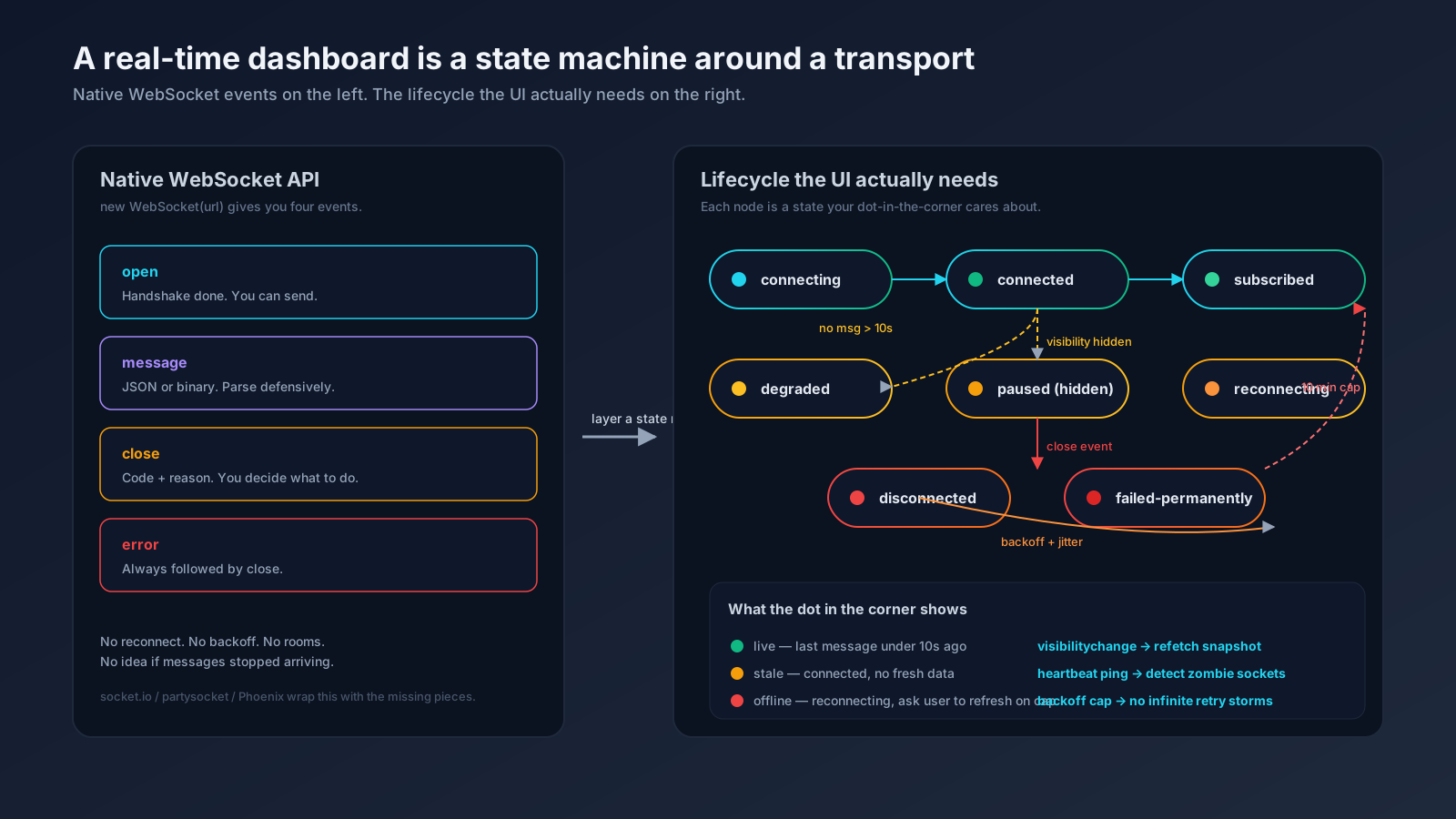
Native WebSocket is the smallest possible API. You get open, message, close, error, and send. No reconnect, no rooms, no fallback. That's a feature when you want a tight binary protocol and a downside when you want broadcast semantics. Pair it with permessage-deflate if you're sending JSON and the server supports it — compression on chatty dashboard traffic is usually a clean win.
Socket.io v4 is the pragmatic default for most teams. You get namespaces, rooms, automatic reconnection with exponential backoff, transport fallback to long-polling on hostile networks, and an acknowledgement mechanism for request-response over the same socket. Cost: a heavier client and a non-WebSocket wire protocol that some load balancers handle badly.
partysocket is a small reconnecting client from the PartyKit team that wraps the native API and gives you the missing pieces — backoff, jitter, message queueing while disconnected — without the rest of the socket.io baggage. Phoenix Channels (Elixir) is the reference for "I want presence and rooms baked in." Pusher, Ably, Liveblocks, Convex, and Supabase Realtime are managed platforms that take the connection problem off your plate entirely.
Pick based on what you don't want to maintain. There is no neutral default.
The Connection Lifecycle Is The Whole Game
A dashboard socket has more states than connected and disconnected. The honest list is closer to: connecting, connected, subscribed-to-room, degraded (connected but messages haven't arrived in N seconds), disconnected, reconnecting, failed-permanently, and paused-by-tab-visibility.
Almost every "the dashboard froze" bug I have shipped a fix for was the gap between two of those states being invisible to the UI. The user thinks they are looking at live data. The socket is technically open. The server stopped sending updates because their session expired five minutes ago. Nobody knows.
Surface the state in the UI. A small dot in the corner — green for live, amber for stale (>10s with no update), red for disconnected — is the cheapest, most useful thing you can add. Users forgive missing data when they are told the data is missing.
Reconnect With Backoff, Jitter, And A Cap
A naive reconnect is the textbook mistake. socket.onclose = () => setTimeout(connect, 1000) is fine until your server has a five-minute outage. Then a thousand dashboards reconnect every second in lockstep, the load balancer sheds traffic, and your outage gets worse.
Exponential backoff with jitter is the standard answer: 1s, 2s, 4s, 8s, capped at 30s, plus a random factor of ±50%. The jitter is the important part — without it every client retries on the same beat. Cap the total duration too; after, say, 10 minutes of failed reconnects, stop trying and ask the user to refresh. A dashboard that retries forever in a sleeping tab is a memory leak with a heartbeat.
function connect(url: string, onMessage: (data: unknown) => void) {
  let attempt = 0;
  let stopped = false;

  const open = () => {
    if (stopped) return;
    const ws = new WebSocket(url);
    ws.addEventListener('open', () => { attempt = 0; });
    ws.addEventListener('message', (e) => onMessage(JSON.parse(e.data)));
    ws.addEventListener('close', () => {
      if (stopped) return;
      const delay = Math.min(30_000, 1000 * 2 ** attempt) * (0.5 + Math.random());
      attempt++;
      setTimeout(open, delay);
    });
  };

  open();
  return () => { stopped = true; };
}
That is roughly what partysocket and socket.io give you out of the box. Reach for them rather than reimplementing this in every app.
Stale Tabs, Throttled Timers, And visibilitychange
Modern browsers aggressively throttle background tabs. setInterval, setTimeout, and rAF all slow down or pause. WebSocket connections survive but message-handler scheduling can be delayed for minutes. Then the user switches back to the tab and sees a five-minute-old chart for half a second before it catches up.
Two cheap interventions. First, listen for document.visibilitychange. When the tab becomes visible after being hidden, force a fresh fetch of the dashboard's current state — don't trust the queued WebSocket replay. Second, on the same event, send a "still here" message to the server so it can prune stale subscriptions on its side.
document.addEventListener('visibilitychange', () => {
  if (document.visibilityState === 'visible') {
    refetchSnapshot();
    socket.send(JSON.stringify({ type: 'resume' }));
  }
});
This is the difference between "the dashboard updates correctly when I come back from lunch" and a support ticket about phantom data.
Bridging The Socket Into React
In React, the question is always "where does the socket live?" The wrong answers are: in a component (it gets recreated on rerender), in a useEffect without proper cleanup (you leak connections on hot reload and on route change), and in module-scope (it opens before the user has authenticated).
The shape that holds up: open the socket in a top-level provider that mounts after auth, expose it via context, and let components subscribe to slices via a hook backed by useSyncExternalStore. That hook is purpose-built for "external mutable source feeding React state" and avoids the tearing issues you get from naive useState + listener patterns.
function useChannel<T>(channel: string, parse: (data: unknown) => T) {
  const socket = useSocket();
  return useSyncExternalStore(
    (cb) => socket.subscribe(channel, cb),
    () => parse(socket.snapshot(channel)),
    () => parse(socket.snapshot(channel)),
  );
}
For data fetching alongside the socket, TanStack Query plus queryClient.setQueryData from inside the message handler gives you a single cache where snapshot fetches and live updates land in the same place. That keeps optimistic updates, refetch-on-focus, and the live stream consistent — there's only one source of dashboard truth.
Bridging The Socket Into Vue
In Vue 3, the picture is similar but the primitives are nicer. A composable that opens the socket in onMounted, closes it in onScopeDispose, and exposes a shallowRef per channel is plenty. Pinia is good for cross-route shared state if your dashboard spans multiple pages. VueUse's useWebSocket is a reasonable starting point if you want backoff, heartbeats, and lifecycle handling for free — but read the source, because the moment you need anything custom you will inherit its assumptions.
The same visibilitychange and stale-data discipline applies. Vue's reactivity does not save you from a socket that has been open for nine hours and quietly stopped sending data.
Don't Render Every Message
A dashboard that receives 200 messages per second and re-renders the chart on each one will pin a CPU and look smooth for about ninety seconds before the fan kicks on. The right pattern is to coalesce.
Buffer incoming messages into a ref or a local array, and flush them on a requestAnimationFrame or a 100ms interval. Render once per flush. For high-cardinality time-series, downsample on the way in: keep the last N points at full resolution, average everything older into buckets. Libraries like uPlot are built around this exact pattern and will out-perform a generic React chart by an order of magnitude on streaming data.
The user cannot tell the difference between 60fps and 600 messages per second. Their laptop fan can.
What I Actually Reach For
For a typical SaaS dashboard with five to twenty live widgets and a few hundred concurrent users, my default stack is socket.io on the server, the socket.io client wrapped in a React or Vue provider, TanStack Query for the data layer, and uPlot or Recharts for the rendering. For an "everything must be open-ended and edge-deployed" project, PartyKit plus partysocket is a delight. For "I do not want to maintain a socket server at all," Ably or Pusher are honest answers and worth the bill.
The framing that survives every project: a real-time dashboard is a state machine wrapped around a transport, with rendering at the end. Get the state machine right and the rest is a styling exercise. Get it wrong and no chart library will save you on the Monday morning ticket.