"Just Put It On Lambda"
Someone in the standup says it. Someone else nods. A week later you've got a Lambda function, a Vercel project, an api/ folder full of mysterious handlers, and a new bill line called "Aurora Data API" that nobody can explain.
Serverless is genuinely great for some workloads. It is also routinely sold as a universal solution to a problem you might not have. The honest version: serverless trades operational simplicity for a different set of constraints — cold starts, connection pooling, statelessness, observability, and pricing models that punish certain shapes of traffic.
This article is the practical map of where serverless Node.js wins, where it bites, and where a $5 VPS quietly outperforms it.
What Counts As "Serverless Node.js" Anyway
Four ecosystems get lumped together and they are not the same:
- AWS Lambda. Real Node.js (currently up to Node 22 supported). Real
node_modules. Real cold starts measured in hundreds of milliseconds. The default for serious AWS workloads. - Vercel Functions. Lambdas under the hood, with a much nicer DX. Same constraints, same model. Edge Functions are a separate thing — those run on a different runtime.
- Netlify Functions. Same story as Vercel — Lambda-backed, opinionated DX.
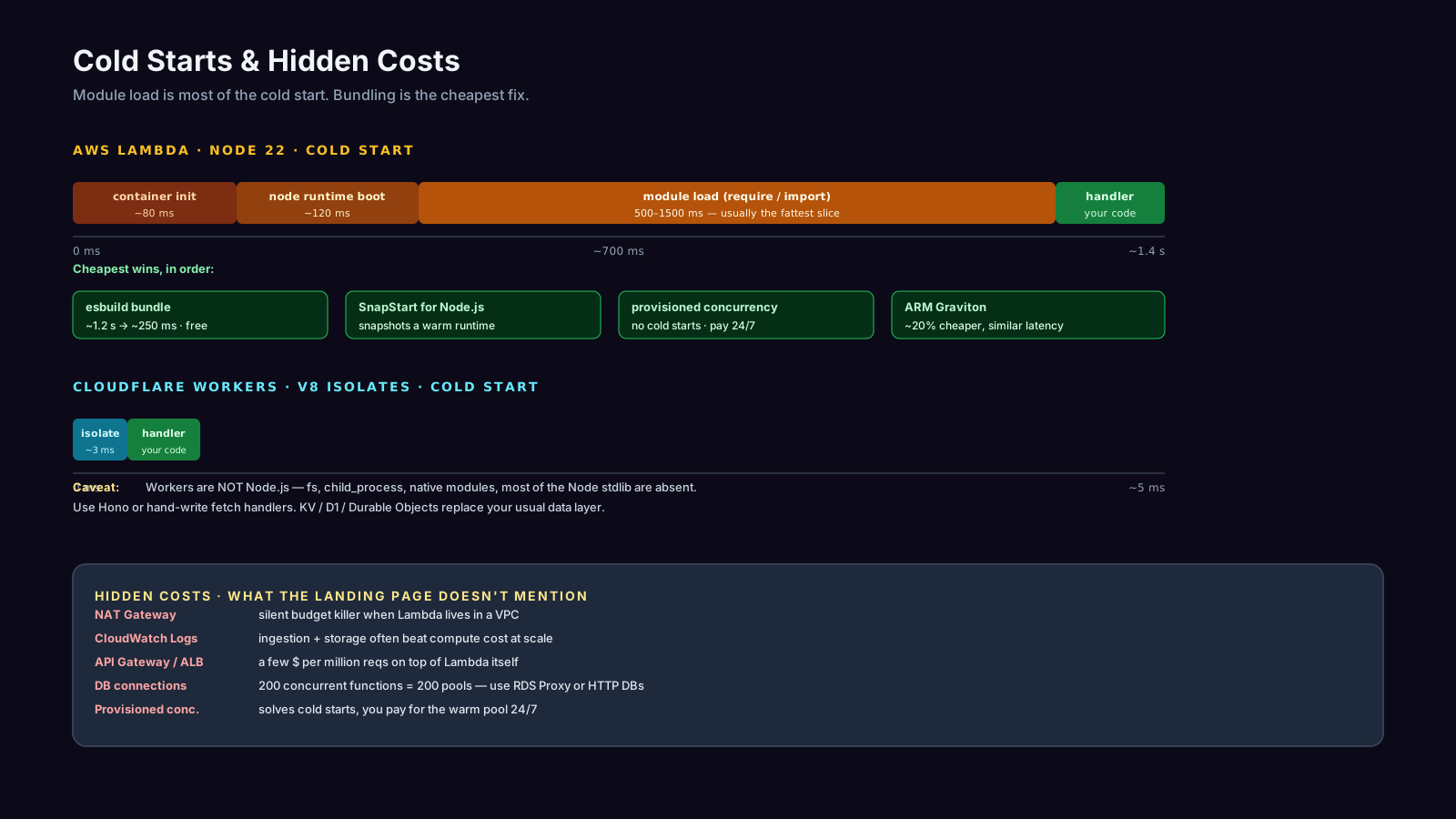
- Cloudflare Workers. Not Node.js. They run on V8 isolates with a Worker-style API (Fetch handler, KV, Durable Objects). Many Node APIs are absent or polyfilled. Cold starts are dramatically faster — measured in single-digit milliseconds — because there is no Node runtime to boot.
That last distinction matters more than people admit. "I'll port my Express app to Cloudflare Workers" is a rewrite, not a deploy. Frameworks like Hono smooth the differences, but fs, child_process, native modules, and most things that assume a real OS will not work.
A Real Lambda Handler
Here's a typical Node 22 Lambda for an HTTP API:
import type { APIGatewayProxyHandlerV2 } from 'aws-lambda';
import { z } from 'zod';
import { db } from './db';

const Body = z.object({ email: z.string().email() });

export const handler: APIGatewayProxyHandlerV2 = async (event) => {
  const body = Body.parse(JSON.parse(event.body ?? '{}'));
  const user = await db.user.create({ data: body });
  return {
    statusCode: 201,
    body: JSON.stringify(user),
    headers: { 'content-type': 'application/json' },
  };
};
Two non-obvious details. The db import is at module scope on purpose — that runs once per cold start and then survives across warm invocations of the same container. Anything you can hoist out of the handler saves milliseconds on every warm hit. And JSON.parse(event.body) is mandatory because API Gateway sends bodies as strings.
Cold Starts: Where The Time Actually Goes
A cold start in Node.js Lambda is roughly: container init → Node startup → module load → handler execution. The dominant cost is module load. Unbundled node_modules with deep dependency trees can spend 500–1500 ms just require-ing files.
The fix is bundling. esbuild can collapse your handler and dependencies into one file:
esbuild src/handler.ts \
  --bundle \
  --platform=node \
  --target=node22 \
  --minify \
  --format=esm \
  --outfile=dist/handler.mjs \
  --external:aws-sdk
A bundled handler frequently goes from 1.2s cold to 250ms cold. That's the single biggest performance win available, and it's free.
Other levers in order of usefulness:
- Provisioned concurrency. You pre-warm N containers. No cold starts in the warm pool. You also pay for them whether they handle traffic or not.
- Smaller deployment artifacts. Fewer files to load, faster cold start. Tree-shake aggressively.
- ARM (Graviton). ~20% cheaper, comparable or faster for most Node workloads. There's almost never a reason to pick x86 for a new function.
- Lambda SnapStart — not yet for Node. AWS's snapshotting feature is currently Java-, Python-, and .NET-only. If/when it extends to the Node runtime it'll be a major win for latency-sensitive APIs; for now, bundling + provisioned concurrency + ARM are the levers you actually have.
The Database Connection Problem
A Lambda container handles one request at a time. Scale to 200 concurrent requests, you get 200 containers, each opening database connections. Postgres caps out around a few hundred connections, MySQL similar. Your "scalable" function takes down the database it depends on.
Three sane fixes:
- A connection proxy in front of the DB. RDS Proxy for Aurora/Postgres, PgBouncer if you self-host. The function opens a connection to the proxy; the proxy multiplexes onto a small pool to the database.
- HTTP-based databases. Neon, PlanetScale, Supabase, Upstash Redis — all expose HTTP/edge endpoints that look like a normal API call. No persistent socket, no connection limits, plays nicely with serverless and edge.
- Avoid per-request DB calls in latency-critical paths. Cache aggressively in DynamoDB, KV, or a CDN.
Reusing a Prisma client at module scope is good, but it doesn't solve the "200 functions, 200 pools" problem. The proxy or the HTTP-API pattern does.
Pricing: Where The Cheap Math Stops Being Cheap
Lambda's pricing is roughly: $0.20 per million requests + per-GB-second of execution. For low traffic that's basically free. For sustained 1000+ RPS at 200ms average, it gets expensive — often more expensive than a couple of always-on $40/month VMs.
Hidden costs that surprise people:
- API Gateway / ALB. A few dollars per million requests on top of Lambda itself. Not free.
- CloudWatch Logs. Lambda logs everything by default. At scale, log storage and ingestion can outpace compute cost.
- Cross-AZ data transfer. Lambda to RDS in a different AZ adds up. So does Lambda to S3 if you're not careful.
- NAT Gateway. Putting a Lambda in a VPC so it can reach RDS routes outbound traffic through a NAT Gateway. NAT Gateways are billed per GB and per hour. They are the silent budget killer.
- Provisioned concurrency. Solves cold starts, but you pay for the warm pool 24/7. If you're paying for 50 warm containers, you're approximately running 50 small servers.
The honest break-even point: if your service runs at steady, predictable load above ~30% utilization, a couple of $5–$40/month VPSes (or an always-on container on Fly.io, Render, Railway) will usually be cheaper, faster, and easier to debug than serverless.
When Serverless Is Genuinely The Right Answer
Use serverless deliberately when:
- Traffic is spiky and idle. A function called 10 times an hour costs basically nothing on Lambda and would be embarrassing on a VPS.
- Workloads are event-driven. S3 uploads, SQS messages, EventBridge schedules — Lambda integrates cleanly with the AWS event mesh.
- You don't want to operate anything. The whole pitch is "no servers." If that frees a small team to ship a product, that's real.
- Edge proximity matters. Cloudflare Workers and Vercel Edge get you sub-50ms responses globally without managing regions yourself — provided your data layer also lives at the edge.
Statelessness Is A Constraint, Not A Feature
You cannot rely on in-memory state across invocations. The Map you populated in the last request might be there next time, or might not. WebSocket connections, long-polling, server-sent events — Lambda technically supports them via API Gateway WebSocket APIs, but it is not the natural shape.
For anything stateful at scale (real-time multiplayer, collaborative editors, persistent connections to thousands of clients), serverless is fighting the model. A long-running Node process behind an ALB is the right answer.
A One-Sentence Mental Model
Serverless Node.js is brilliant for spiky, event-driven, low-utilization workloads — and quietly more expensive than a small VPS once your traffic flattens out, your cold starts matter, or your database pool runs out of patience.