RAG sounds complicated until you translate it into normal engineering language. RAG just means Retrieval-Augmented Generation, and in practice it boils down to one habit:
Before asking the model to answer, search your own knowledge first.
Then give the most relevant results to the model as context.
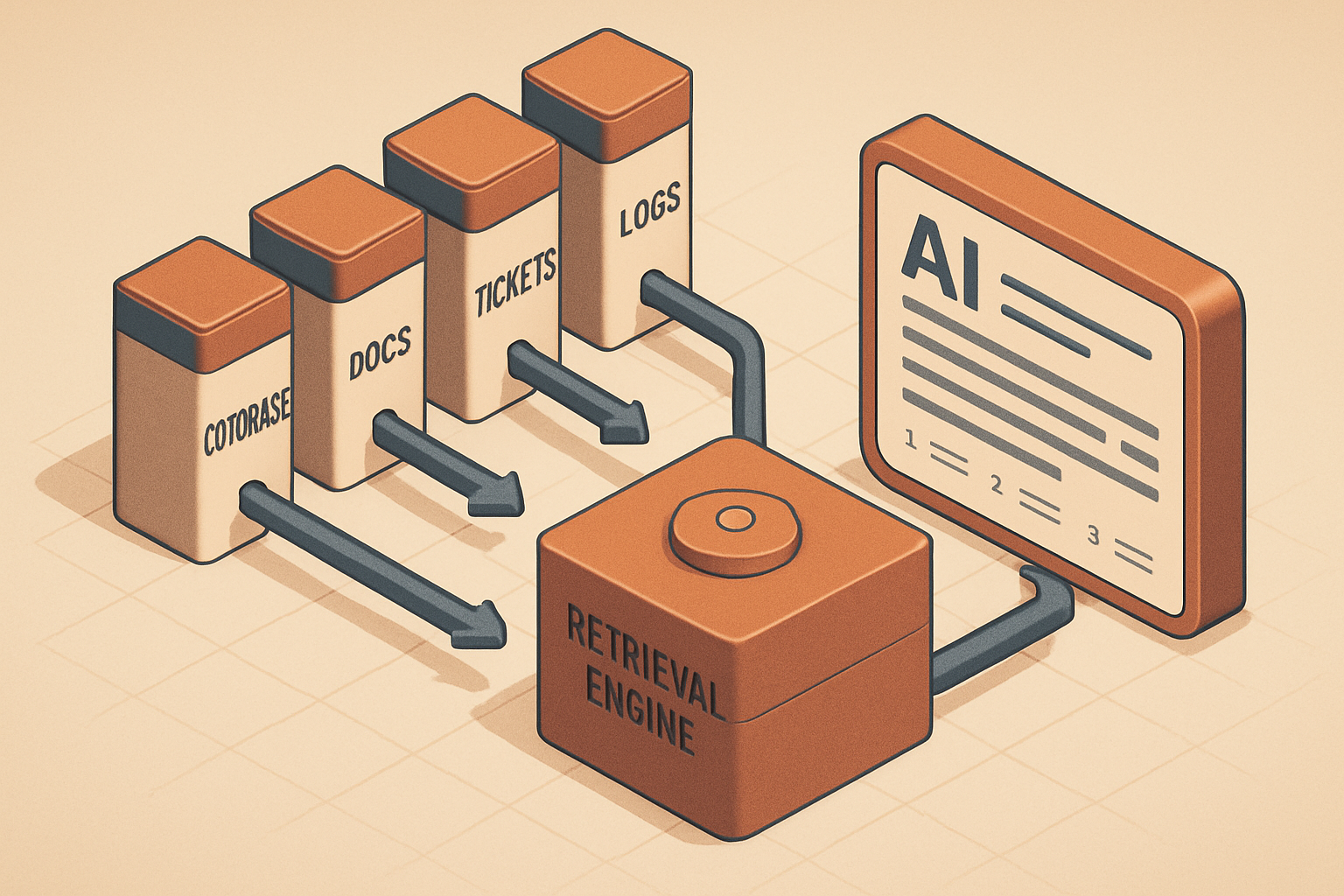
That's it. The reason this matters for engineering teams is that the most important knowledge is almost never sitting in one place — it's scattered across code, README files, architecture decision records, pull requests, Jira tickets, incident notes, runbooks, logs, Slack threads, API docs, and database migration notes. A general-purpose LLM doesn't automatically know your internal system, and a RAG system is what lets it answer with your actual information instead of plausible-sounding generalities.
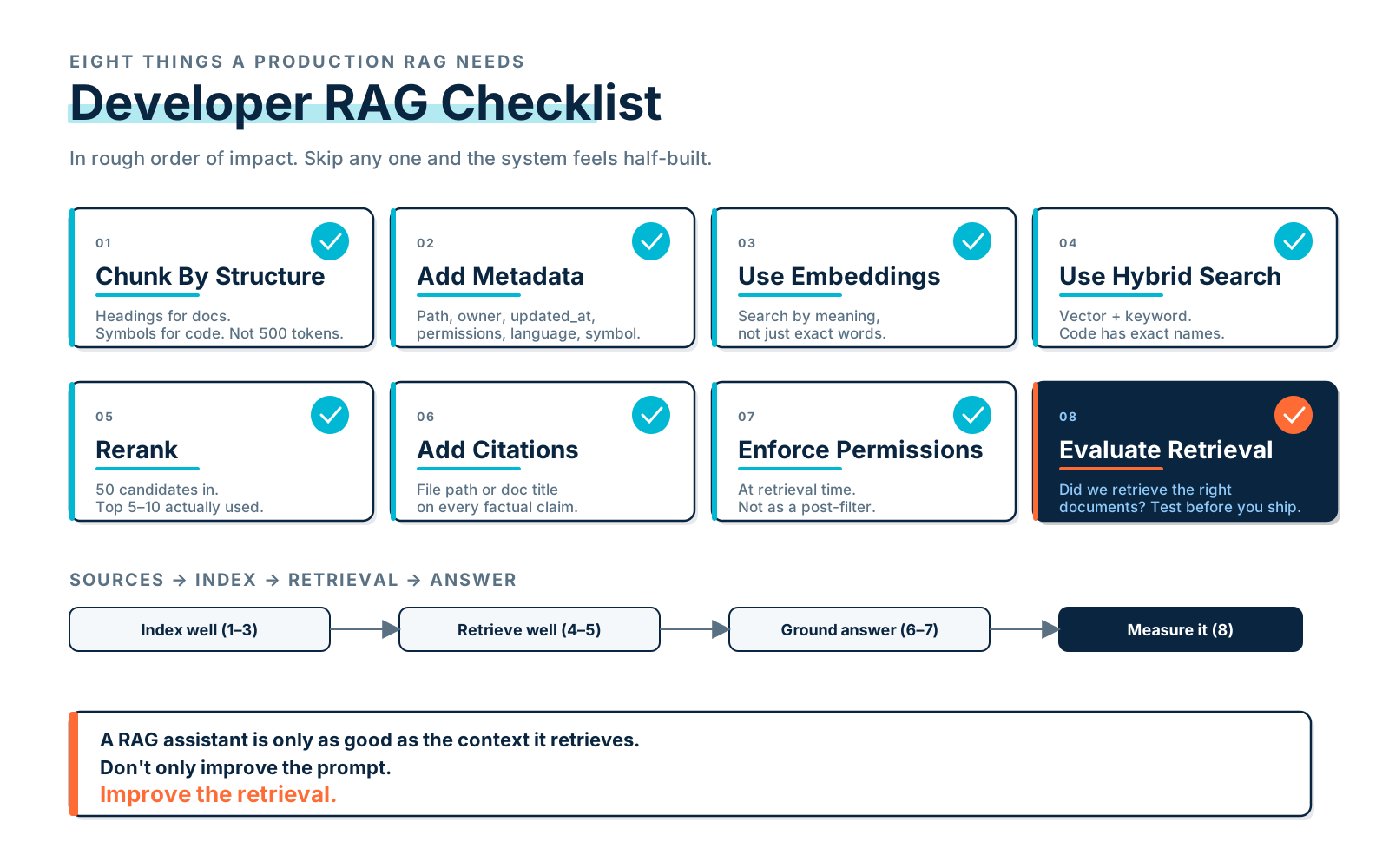
But a good RAG system is not just "put documents into a vector database." That's the beginner version. A production-quality RAG system needs chunking, metadata, embeddings, vector search, keyword search, reranking, prompt augmentation, source citations, permissions, freshness checks, and evaluation — and the goal isn't to make the model sound smart. The goal is to make it grounded.
Why Developers Need RAG
Imagine a developer asks:
How does subscription cancellation work in our system?A generic model might answer with a generic shape — "subscription cancellation usually involves updating status, stopping billing, and sending confirmation emails." That may be true in the abstract, but it's not your system. A RAG assistant can search internal sources and answer with the version that's actually true:
In this codebase, subscription cancellation starts in SubscriptionController,
then calls SubscriptionService::cancel. Immediate cancellation calls the billing
gateway, updates subscriptions.status, dispatches SubscriptionCanceled, and queues
CancellationEmail. The scheduled command CancelExpiredTrialsCommand also uses the
same service.
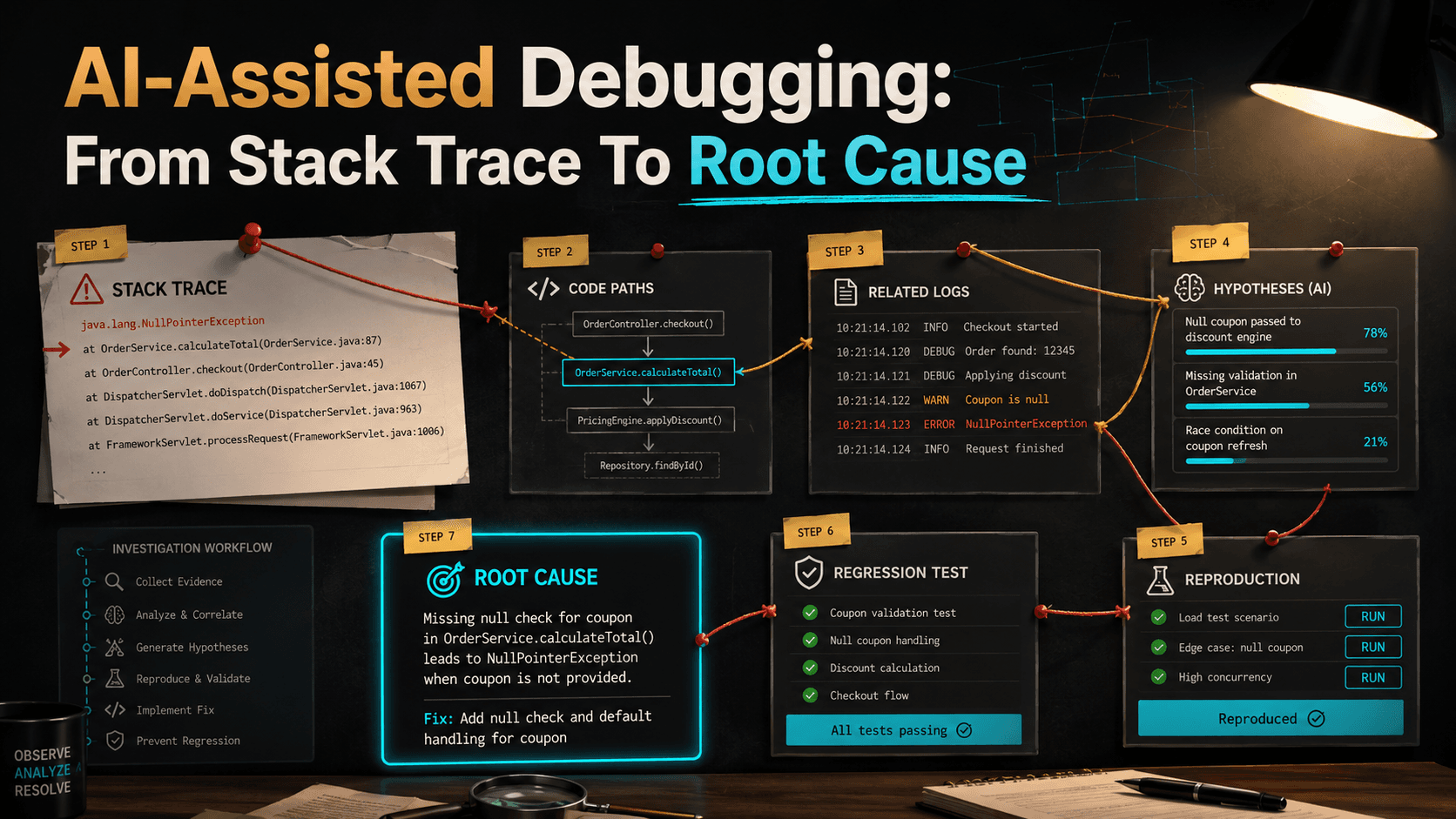
That's useful — the answer is grounded in your code and docs, not in the average shape of "subscription cancellation" across the open internet. The same pattern helps with onboarding, debugging, incident response, legacy code exploration, architecture discovery, finding owners, understanding old tickets, connecting logs to code, generating documentation, and answering "why was this built this way?"
The Basic RAG Flow
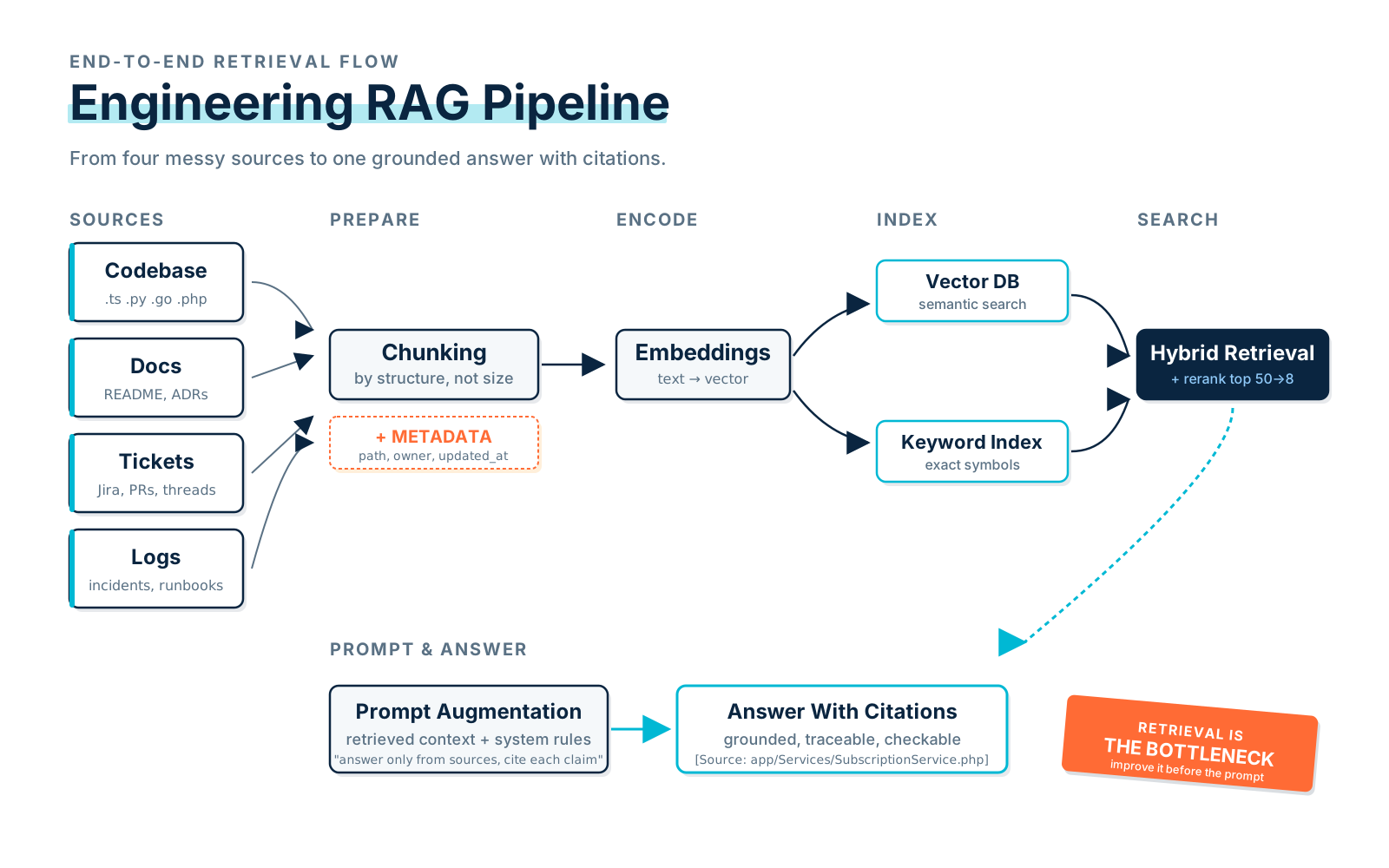
A simple RAG flow looks like this:
User question:
"Why do invoice reminders sometimes send twice?"

Step 1: Search internal data.
Step 2: Retrieve relevant code, docs, tickets, and logs.
Step 3: Rerank results.
Step 4: Put best snippets into the prompt.
Step 5: Ask the model to answer using only those sources.
Step 6: Return answer with citations.
In pseudo-code:
def answer_question(question: str, user: User) -> Answer:
    results = retrieve(
        query=question,
        user=user,
        sources=["code", "docs", "tickets", "logs"],
        limit=20,
    )

    ranked_results = rerank(question, results)

    context = build_context(ranked_results[:8])

    response = llm.generate(
        system="""
        You are an engineering assistant.
        Answer using only the provided context.
        Cite sources.
        If the answer is not in the context, say so.
        """,
        user_question=question,
        context=context,
    )

    return response
That's the core idea. Everything else in this article is about improving quality, safety, and reliability of each step.
Chunking Code Is Different From Chunking Docs
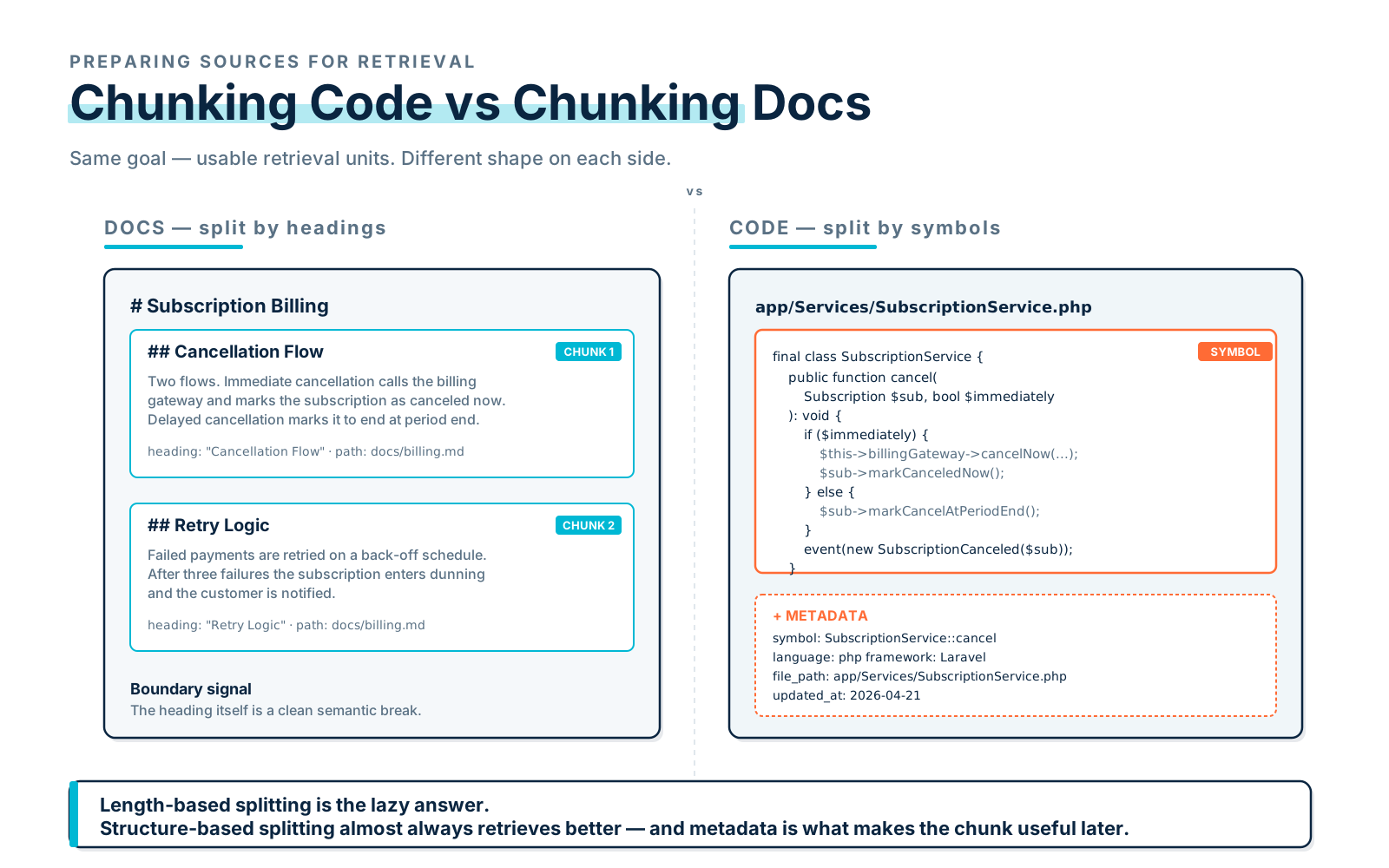
Chunking means splitting source material into smaller pieces before indexing. For documentation, you can often chunk by headings — a heading is a natural semantic boundary, and the title itself becomes useful metadata:
# Subscription Billing

## Cancellation Flow

...

## Retry Logic

...
A good documentation chunk ends up looking like this:
Title: Subscription Billing / Cancellation Flow
Content: The cancellation flow starts when...
Metadata:
- source_type: docs
- path: docs/subscriptions.md
- heading: Cancellation Flow
- updated_at: 2026-04-12
Code is different. If you split code every 500 tokens blindly, you can easily separate a method from its class name, its imports, its comments, or related types — and now retrieval is fishing fragments out of context. Better code chunking preserves structure: class, method, function, route definition, migration, interface, config block, test case. Each one is a unit that makes sense on its own.
Here's an example chunk in PHP:
final class SubscriptionService
{
    public function cancel(Subscription $subscription, bool $immediately): void
    {
        if ($immediately) {
            $this->billingGateway->cancelNow($subscription->gateway_id);
            $subscription->markCanceledNow();
        } else {
            $subscription->markCancelAtPeriodEnd();
        }

        event(new SubscriptionCanceled($subscription));
    }
}
And the metadata you store alongside it:
{
  "source_type": "code",
  "language": "php",
  "file_path": "app/Services/SubscriptionService.php",
  "symbol": "SubscriptionService::cancel",
  "framework": "Laravel",
  "updated_at": "2026-04-21"
}
That metadata is not optional — it's what lets you filter retrieval, generate citations, and debug bad answers later. Without it, every chunk is just a floating string and you're flying blind.
Embeddings In Plain English
Embeddings turn text into vectors, and a vector is just a list of numbers that represents meaning. Very simplified:
"invoice reminder job"
→ [0.12, -0.44, 0.91, ...]
Similar meanings should have nearby vectors, which means you can search by meaning instead of by exact words. So a query like "Why are customers receiving duplicate payment emails?" can retrieve InvoiceReminderService, SendInvoiceRemindersCommand, and InvoiceOverdueListener even if none of them contain the literal phrase "duplicate payment emails."
But embeddings are not magic. They can absolutely retrieve content that's semantically nearby and still wrong — for example, a query about "payment retry emails" might pull back "password reset emails" if both mention retries and email delivery. That's why metadata, keyword search, and reranking exist; embeddings are one signal in a larger system, not the system itself.
Vector Databases
A vector database stores embeddings and lets you search by similarity. Popular choices include managed cloud services, open-source vector databases, and vector extensions for relational databases — the specifics matter less than the shape, which is usually some variation of:
{
  "id": "chunk_123",
  "embedding": [0.12, -0.44, 0.91],
  "text": "SubscriptionService::cancel...",
  "metadata": {
    "source_type": "code",
    "file_path": "app/Services/SubscriptionService.php",
    "symbol": "cancel",
    "updated_at": "2026-04-21"
  }
}
A search looks like:
query_embedding = embed("How does subscription cancellation work?")

matches = vector_db.search(
    vector=query_embedding,
    top_k=20,
    filter={
        "source_type": ["code", "docs"],
        "user_can_access": True,
    },
)
That filter is doing real work. You don't want a developer retrieving documents they're not allowed to see, and "the embedding was close" is not an access policy. Permissions belong inside the retrieval call, not bolted on after the fact.
Retrieval Is Where Many RAG Apps Fail
A bad RAG system usually fails before the model ever speaks. It retrieves the wrong context, the model dutifully tries to answer using that bad context, and the output is either confidently wrong or vaguely useless. A typical bad-retrieval result looks like this:
User asks:
"How does subscription cancellation work?"

Retrieved:
- Stripe webhook retry policy
- Old 2021 subscription migration
- Marketing copy about subscription pricing
- A closed ticket about email wording
The model now has irrelevant context, and there's no good answer hiding in there to be found. A better retrieval system combines vector search, keyword search, metadata filters, recency filters, source priority, and reranking. For engineering RAG specifically, hybrid search — vector plus keyword — is usually better than pure vector search, because code has exact names that exist nowhere else on the internet.
If a user asks "What does CancelExpiredTrialsCommand do?", the embedding might understand the meaning, but a keyword index can land directly on the symbol with no ambiguity. Pure vector search will get you semantically close. Hybrid search gets you the actual file.
Reranking
Initial retrieval typically returns 20–50 candidate chunks, and most of them are noise. Reranking is the step that sorts them again using a model that compares the query against each result more carefully than the first-pass embedding similarity could.
Initial retrieval:
50 chunks

Reranker:
Scores each chunk for relevance

Final context:
Top 5–10 chunks
In code that looks like:
candidates = hybrid_search(question, top_k=50)

ranked = reranker.rank(
    query=question,
    documents=candidates,
)

context_chunks = ranked[:8]
Reranking is especially useful when your knowledge base contains many similar-looking documents — five different SubscriptionService files across services, three years of cancellation tickets, a dozen runbooks that all mention billing. The first pass casts a wide net; the reranker is what actually picks.
Prompt Augmentation
Prompt augmentation is just the technical name for adding the retrieved context into the model's prompt. The shape is usually something like:
System:
You are an engineering assistant.
Answer only using the provided sources.
Cite sources by file path or document title.
If the answer is not available, say you do not know.

Context:
[Source 1: app/Services/SubscriptionService.php]
...

[Source 2: docs/billing.md]
...

User:
How does subscription cancellation work?
This is where grounding happens — but it's also where teams overcorrect. More context is not always better. Dumping fifty chunks into the prompt distracts the model, mixes in conflicting sources, increases cost and latency, and makes citations almost unusable because the model has too much to cite from. A good RAG system is selective; a bad one is verbose.
Source Citations
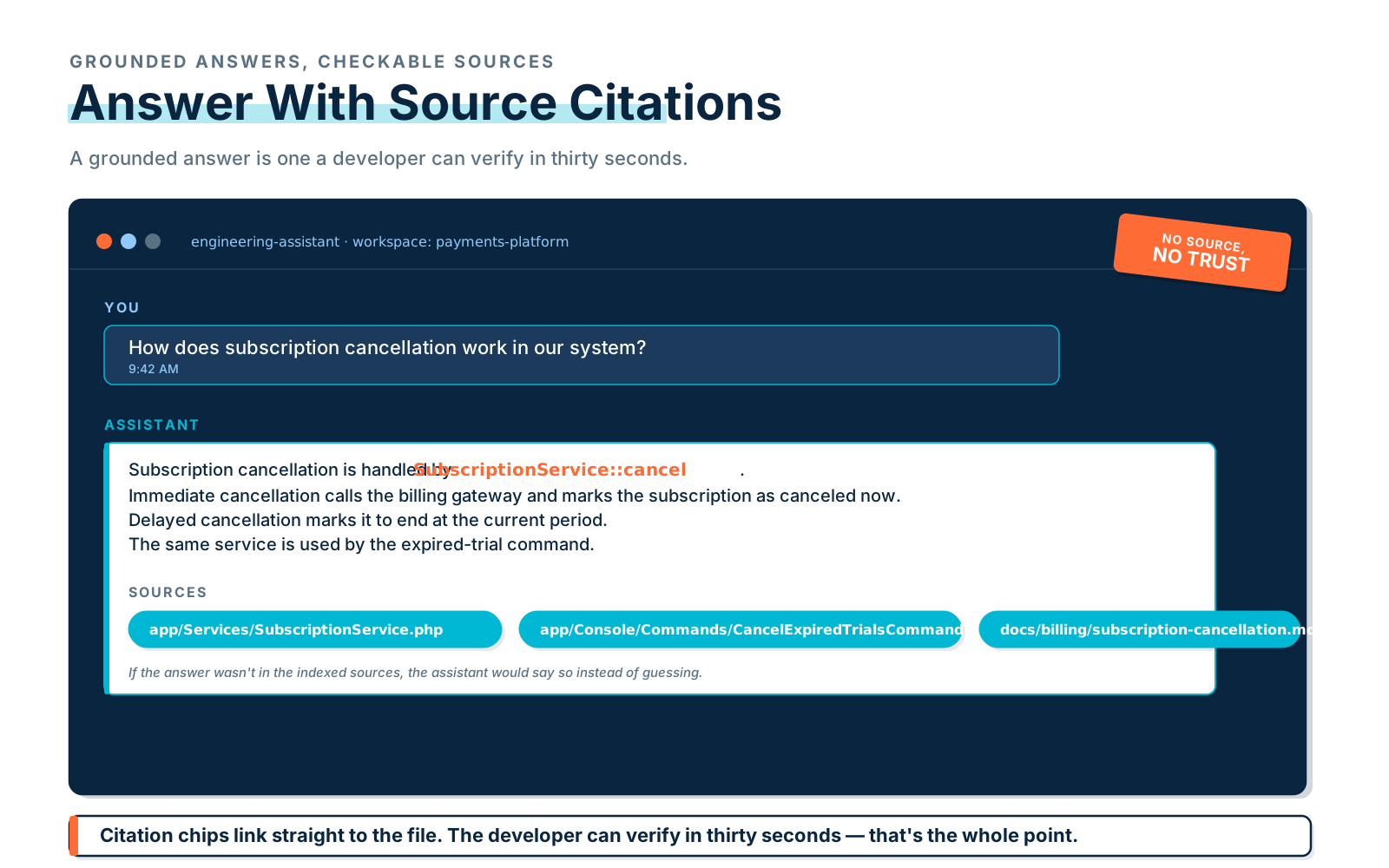
Engineering teams need citations. Without them, a developer can't verify the answer, and an unverifiable answer is just a guess in a confident voice. Compare these two:
Subscription cancellation is handled by SubscriptionService::cancel.
Immediate cancellation calls the billing gateway and marks the subscription as
canceled now. Delayed cancellation marks it to end at the current period. The
same service is used by the expired trial command.

Sources:
- app/Services/SubscriptionService.php
- app/Console/Commands/CancelExpiredTrialsCommand.php
- docs/billing/subscription-cancellation.md
versus:
The system probably cancels subscriptions through a service layer.The first one is checkable in thirty seconds. The second one is unfalsifiable. Bake the rule into your prompt:
Always cite the source path or document title for factual claims.
If no source supports the answer, say so.
No source, no trust.
Logs In RAG
Logs are tempting to throw into a RAG system — they describe what really happened, after all — but they're also noisy, large, and often sensitive. You usually shouldn't index all of them. Better patterns: index incident summaries instead of raw logs, retrieve recent logs through a controlled tool when actually needed, summarize before adding to context, redact sensitive fields, restrict access by role, and always include a time window so a single question can't accidentally pull six months of traffic.
A safe log retrieval tool looks something like this:
def search_error_logs(
    service: str,
    error_code: str,
    start_time: datetime,
    end_time: datetime,
    user: User,
) -> list[LogEvent]:
    if not user.has_role("engineer"):
        raise PermissionError("Only engineers can search logs.")

    if (end_time - start_time).days > 7:
        raise ValueError("Log search window is too large.")

    return log_client.search(
        service=service,
        error_code=error_code,
        start_time=start_time,
        end_time=end_time,
        fields=["timestamp", "service", "error_code", "message", "trace_id"],
    )
The principle is simple: don't expose everything. A retrieval tool that can pull arbitrary log lines from any service over any time range is a privacy and cost incident waiting to happen.
Common RAG Mistakes
The most common mistakes are very predictable, and you'll see most of them in any RAG system that was rushed to production.
Bad Chunking
Chunks are too large, too small, or split in the wrong place. The fix is to chunk by structure — docs by headings, code by symbols, tickets by title/body/comments, logs by incident or session or time window. Length-based splitting is the lazy answer; structure-based splitting almost always retrieves better.
No Metadata
Without metadata, you can't filter, you can't cite well, and you can't debug a bad answer when it happens. The bare minimum is source_type, path, owner, updated_at, permissions, language, service, and symbol — and most of those should be derivable automatically from the source.
Pure Vector Search Only
Pure vector search misses exact code names. If your developers ever search for CancelExpiredTrialsCommand or INVOICE_REMINDER_FAILED, you need a keyword index alongside the vector index. Hybrid search isn't optional for engineering RAG — it's the default.
No Reranking
Initial retrieval is noisy by design (top_k=20 or 50). Without a reranker, those noisy chunks go straight into the prompt and the model has to do the filtering itself, which it does poorly. A reranker is one of the cheapest quality wins available.
No Citations
No citations means no trust, and no trust means developers stop using the system after the first wrong answer. Always cite, every time, in a format the developer can click on.
No Permissions
RAG systems can leak data badly if retrieval ignores access control — someone in support retrieves engineering-only docs, an external contractor retrieves an internal incident report, etc. Apply permissions before retrieval or at retrieval time, not as a post-filter on the answer (by then the model has already seen the data).
No Evaluation Set
If you don't test your RAG system, you don't know whether it works — and "looks fine in demos" is not testing. Build a small evaluation set of real questions with expected source documents, and run it on every retrieval-side change.
A Practical Evaluation Set
A useful eval set is small, real, and cited. Something like:
[
  {
    "question": "How does subscription cancellation work?",
    "expected_sources": [
      "app/Services/SubscriptionService.php",
      "docs/billing/subscription-cancellation.md"
    ]
  },
  {
    "question": "Which job sends invoice reminder emails?",
    "expected_sources": [
      "app/Jobs/SendInvoiceReminderJob.php",
      "app/Console/Commands/SendInvoiceRemindersCommand.php"
    ]
  }
]
Evaluate retrieval before you evaluate answers. The first question should always be: did we retrieve the right documents? If retrieval is bad, answer quality has nowhere to go but bad — there's no amount of prompt engineering that fixes a missing source.
Final Thoughts
RAG for developers is not just semantic search. It's a system for grounding AI in your real engineering knowledge — and the strongest systems combine good chunking, rich metadata, embeddings, hybrid search, reranking, prompt augmentation, citations, access control, and evaluation, in roughly that order of importance.
Start small. Index your code, docs, and runbooks first. Add tickets later, be careful with logs, add source citations from day one, and build an evaluation set before you have anyone depending on the answers. A RAG assistant is only as good as the context it retrieves — so don't just improve the prompt. Improve the retrieval.