You've shipped a Next.js app. It works in development. It deploys. The first page load is fast — server-rendered HTML, instant paint. Then your console fills with red:
Hydration failed because the initial UI does not match what was rendered on the server.The text on screen flickers. The component re-renders. Sometimes the page works anyway; sometimes it falls apart in subtle ways. Welcome to hydration mismatches — the most confusing class of React errors, and one of the most consistent painkillers once you understand what's happening.
This article is the practical guide. What hydration actually is, the small set of patterns that break it, and the targeted fixes that don't require disabling SSR.
What Hydration Actually Is
Server-side rendering produces HTML. The browser receives that HTML and paints it immediately — fast first render, no JavaScript needed for the initial paint. So far, this is just a server-rendered web page.
Then React loads. It walks the existing DOM and attaches event handlers, refs, and state to the elements that are already there. This is hydration: turning static HTML back into a live React app, without re-creating the DOM. The whole point is to skip the cost of rebuilding the page on the client.
For this to work, React has to be able to assume something important: the HTML the server produced and the JSX the client renders on first pass match exactly. Same elements, same order, same text. If they don't, React has no way to safely "attach" — the tree it expects doesn't match what's there.
SERVER renders:    <p>Hello, Ann</p>
CLIENT renders:    <p>Hello, Bob</p>
                   ↑
                   mismatch — React can't safely hydrate
When this happens in React 18+, you get the warning, and React falls back to discarding the server HTML and re-rendering on the client. You lose the SSR benefit for that subtree, you get a flicker, and your console is unhappy.
The Five Patterns That Break Hydration
Almost every mismatch I've debugged falls into one of these.
1. Date / Time Differences
function Timestamp() {
  return <span>{new Date().toLocaleString()}</span>;
}
The server renders this at one moment, the client renders it milliseconds later. Different strings. Mismatch.
2. Random Values
function Greeting() {
  const greetings = ['Hi', 'Hello', 'Hey'];
  return <p>{greetings[Math.floor(Math.random() * 3)]}</p>;
}
Server picks one randomly, client picks another. Mismatch.
3. window / document / Browser APIs
function MobileBanner() {
  return window.innerWidth < 768 ? <p>Mobile</p> : null;
}
The server has no window (it'd actually crash before SSR even ran in this case, but the pattern includes safer reads of localStorage, navigator.userAgent, etc.). Whatever the server "decided" doesn't match what the client measures.
4. User-Specific State From The Browser
function ThemeToggle() {
  const stored = localStorage.getItem('theme') || 'light';
  return <button data-theme={stored}>Toggle</button>;
}
Server can't read localStorage. Defaults to 'light'. Client reads 'dark'. Mismatch.
5. Non-Deterministic Server Rendering
function Welcome() {
  const userName = req.cookies.name || 'Guest';   // depends on request
  return <p>Welcome, {userName}</p>;
}
This can be fine if your framework re-renders per-request and your client receives the same data. The problem is when the client doesn't have the same source of truth (the cookie, the auth header) at hydration time and renders a generic value.
The Targeted Fixes
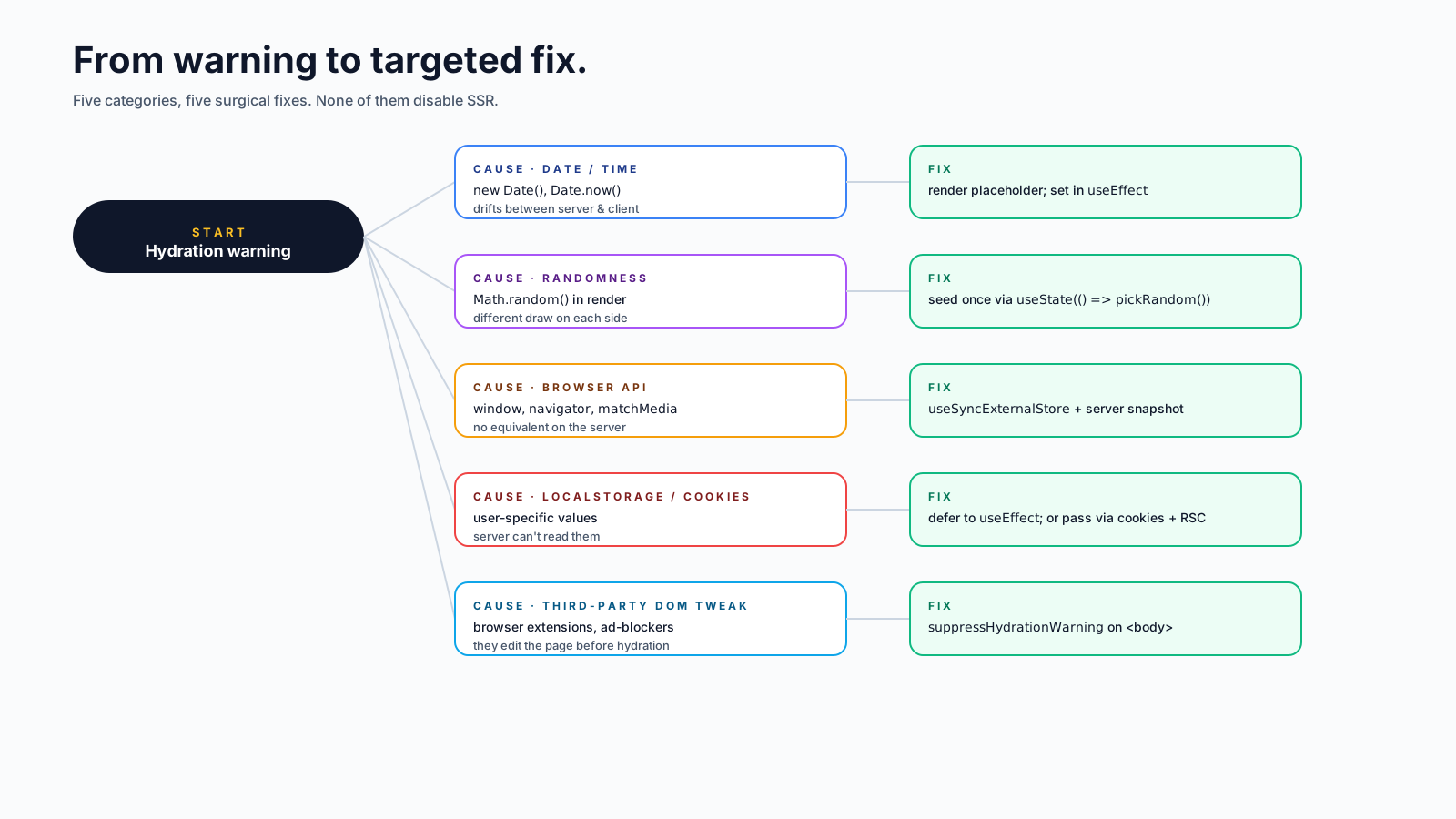
The goal is to fix the mismatch without disabling SSR for the whole component, since that defeats the point. Five techniques, in order of "smallest hammer first":
Fix A: Render Client-Only Values In useEffect
For values that are genuinely browser-only, accept that the server renders a placeholder and the client fills in the real value after mount:
function Timestamp() {
  const [now, setNow] = useState(null);

  useEffect(() => {
    setNow(new Date().toLocaleString());
  }, []);

  return <span>{now ?? 'Loading…'}</span>;
}
Server renders "Loading…". Client hydrates with "Loading…". After hydration, useEffect runs and sets the real date. No mismatch — both sides agree on the initial render.
Fix B: suppressHydrationWarning — But Only For Truly Local Diffs
<time suppressHydrationWarning>{new Date().toISOString()}</time>This is the explicit "I know this won't match, please don't warn" escape hatch. It's only for the immediate text content of a single element, and it's a sledgehammer — use sparingly. Reserve it for things like timestamps where the diff is genuinely cosmetic and you'd rather not split the component.
Fix C: dynamic Import With ssr: false (Next.js)
For an entire component that fundamentally can't render on the server (a chart that uses Canvas measurements, an editor with a window dependency), opt it out of SSR:
import dynamic from 'next/dynamic';

const Chart = dynamic(() => import('./Chart'), { ssr: false });

function Page() {
  return <Chart data={data} />;
}
The chart only renders on the client. The server emits a placeholder. The trade-off is real — the user sees nothing for that component until JS loads — so use this for components that can't possibly render server-side.
Fix D: useSyncExternalStore For Browser State
For values from external stores (theme, online status, viewport size), useSyncExternalStore lets you provide separate snapshots for server and client:
function useOnlineStatus() {
  return useSyncExternalStore(
    (cb) => {
      window.addEventListener('online', cb);
      window.addEventListener('offline', cb);
      return () => {
        window.removeEventListener('online', cb);
        window.removeEventListener('offline', cb);
      };
    },
    () => navigator.onLine,    // client snapshot
    () => true                 // server snapshot — pick a sensible default
  );
}
The third argument is the SSR snapshot. The server uses that; the client uses the real one. Hydration matches because both sides initially render the same value.
Fix E: A Mounted Flag
The classic "render twice" pattern, when nothing else fits:
function Page() {
  const [mounted, setMounted] = useState(false);
  useEffect(() => setMounted(true), []);

  if (!mounted) return null;     // server + first hydration: nothing
  return <ClientOnlyThing />;
}
Crude but reliable. Server renders nothing, client renders nothing on first pass, then useEffect flips the flag and the component appears. Same effect as Fix C, just inline. Use when you can't reach for a framework dynamic-import helper.
Debugging The Mismatch
When the warning appears, it usually points at the offending text but not always the offending cause. The triage I run:
- Read the diff. React 18+ tells you what was on the server vs the client. That's usually enough to spot the category.
- Check for
Date,Math.random,window,localStorage,navigatorin the rendered subtree. These cover ~80% of cases. - Toggle network throttling. Slow networks expose race conditions where the client-side code reads from a store before the SSR HTML's data has settled.
- Check the
<html lang>attribute. A locale mismatch can cause every text node to differ. - Check third-party scripts. Browser extensions sometimes inject elements between SSR and hydration. The
suppressHydrationWarningon<body>or<html>is the conventional workaround.
Browser extensions are the most overlooked cause. Ad blockers, password managers, dark-mode extensions, accessibility tools — they sometimes mutate the DOM before hydration. The fix isn't on your end; the warning is just noise. If a hydration warning shows up only in production with no obvious trigger, ask the user to disable extensions and try again.
Things People Try That Don't Work
- Wrapping everything in
useEffect. Defeats SSR entirely. If you do this for the whole app, you've made a CSR app with a slower-to-paint first load. - Disabling SSR globally. Same problem.
- Suppressing all hydration warnings. Hides real bugs. Don't.
- Forcing a re-render after mount. Doesn't help — hydration already happened, and you've added an extra render.
A Production Pattern That Holds Up
The shape that scales:
- Make the SSR render deterministic. Same input, same output. Resist any temptation to read browser state during render.
- Defer browser-only values to
useEffectwith a sensible placeholder. - Use
useSyncExternalStorefor any external store that's read during render. - Put
dynamic({ ssr: false })around components that genuinely can't render server-side. - Suppress hydration warnings only when you know what you're suppressing — usually a single text node like a timestamp.
Hydration mismatches stop being scary once you can name them. The five patterns above account for almost every one I've debugged in production. Once you know the categories, the fix takes two lines, the warning disappears, and SSR keeps doing its job.