There are two kinds of state in a React app, and they have almost nothing in common with each other. The first is client state — things the user is doing right now: a draft message, a selected tab, an open menu. You own it. It exists nowhere else. The second is server state — a copy of data that lives on a server somewhere. You don't own it. You're just displaying a snapshot, and that snapshot can go stale at any moment.
The mistake that keeps showing up in every codebase is treating these as the same thing. Once you see them as different, a whole class of bugs disappears.
What Makes Server State Hard
When you put a useState next to a useEffect and call it a day, here's what you're not handling:
- Staleness. The user is on a screen for ten minutes. The server changes. Your screen is now lying.
- Cancellation. A search box fires three requests, they return out of order, the wrong one wins.
- Deduplication. Two components ask for
/meat the same time. Two requests hit the network. Same answer. Twice. - Caching. Navigate away and back. Refetch. The user stares at a spinner for data they had two seconds ago.
- Refetching. The user comes back from another tab. The data is hours old. No one tells you.
- Mutations and invalidation. You PATCH a user. The list of users still shows the old name until refresh.
- Loading and error states across components. The header avatar and the sidebar menu both want to know "is the user loaded?"
You can solve every one of these with useState + useEffect. People do it. It takes hundreds of lines of fragile code, and it's almost always wrong somewhere subtle. The right move is to admit this is a solved problem and use a library that already solved it.
The Hand-Rolled Version, So You See What You're Replacing
function UserProfile({ id }) {
  const [user, setUser] = useState(null);
  const [loading, setLoading] = useState(true);
  const [error, setError] = useState(null);

  useEffect(() => {
    setLoading(true);
    setError(null);

    let cancelled = false;
    fetch(`/api/users/${id}`)
      .then(r => r.ok ? r.json() : Promise.reject(new Error(r.statusText)))
      .then(data => { if (!cancelled) setUser(data); })
      .catch(err => { if (!cancelled) setError(err); })
      .finally(() => { if (!cancelled) setLoading(false); });

    return () => { cancelled = true; };
  }, [id]);

  if (loading) return <Spinner />;
  if (error) return <Error error={error} />;
  return <Profile user={user} />;
}
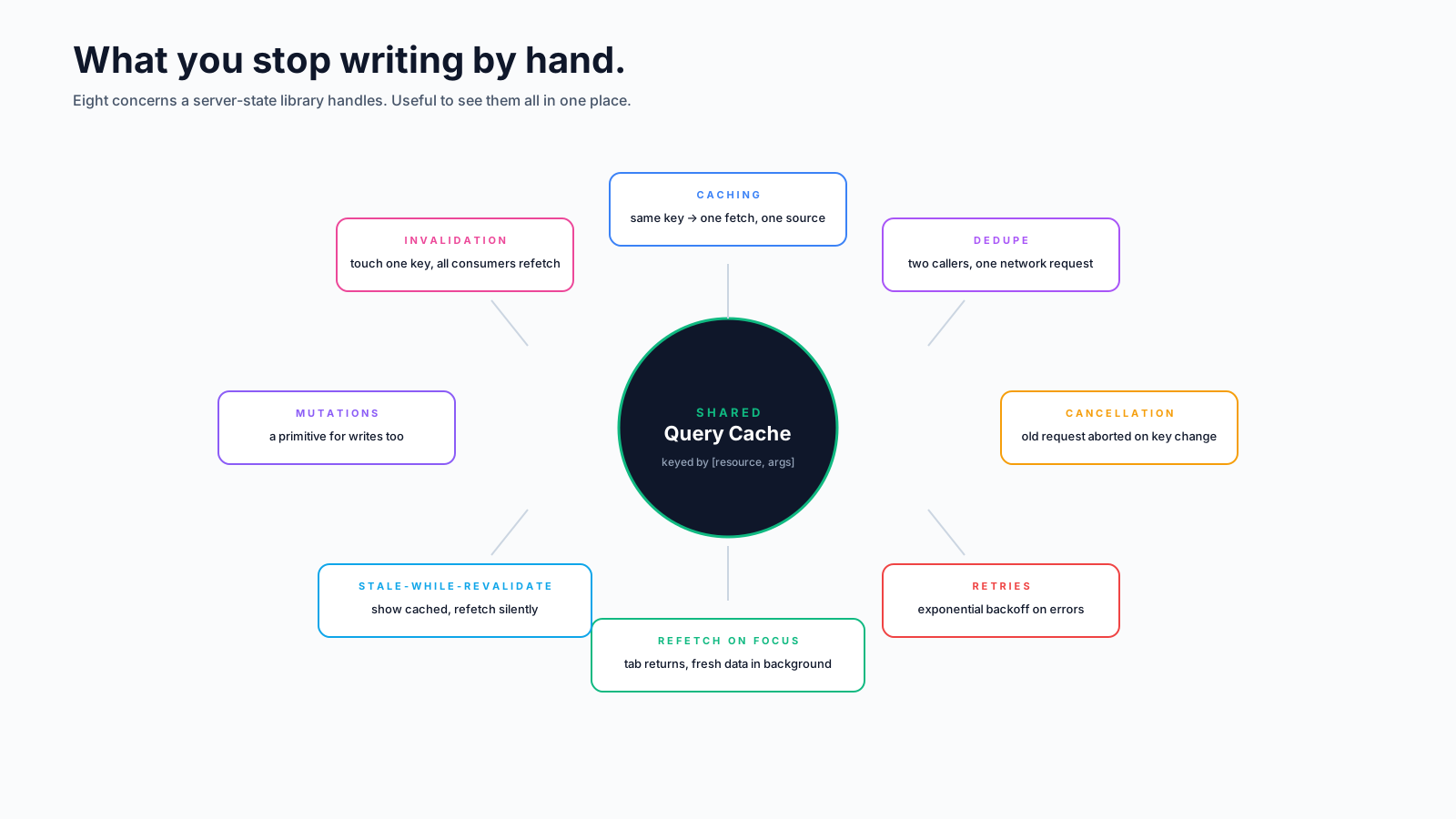
Twenty lines. It handles cancellation. It doesn't handle: deduplication, caching across screens, retry, refetch on focus, refetch on reconnect, mutation invalidation, loading-state sharing, or stale-while-revalidate. Those each take another twenty lines. And every fetch in your app needs them.
What A Server-State Library Gives You
import { useQuery } from '@tanstack/react-query';

function UserProfile({ id }) {
  const { data, isLoading, error } = useQuery({
    queryKey: ['user', id],
    queryFn: ({ signal }) =>
      fetch(`/api/users/${id}`, { signal }).then(r => r.json()),
  });

  if (isLoading) return <Spinner />;
  if (error) return <Error error={error} />;
  return <Profile user={data} />;
}
Same component, ten lines instead of twenty, and now you get:
- Caching by
queryKey. Mount the same component twice, one fetch. Navigate away and back, served from cache, refetched in the background. - Cancellation — when the key changes (or the component unmounts), the in-flight request is aborted. Note the
signaldestructured fromqueryFn's argument and forwarded tofetch— that's the bit that actually wires up cancellation; without it, the request still completes in the background. - Refetch on focus / reconnect — when the user comes back to the tab, fresh data fetches in the background.
- Stale-while-revalidate — the user sees the cached data instantly while the new data loads.
- Retries with exponential backoff on network errors.
- A single source of truth — everywhere in the app that asks for
['user', 1]reads from the same cache entry.
You did not write any of this. You don't have to test it. You don't have to maintain it.
Mutations And Invalidation
The other half of server state is changing it. Most libraries have a matching primitive:
import { useMutation, useQueryClient } from '@tanstack/react-query';

function EditName({ user }) {
  const qc = useQueryClient();
  const update = useMutation({
    mutationFn: (name) =>
      fetch(`/api/users/${user.id}`, {
        method: 'PATCH',
        body: JSON.stringify({ name }),
      }).then(r => r.json()),
    onSuccess: () => {
      qc.invalidateQueries({ queryKey: ['user', user.id] });
      qc.invalidateQueries({ queryKey: ['users'] });
    },
  });

  return (
    <button onClick={() => update.mutate('New Name')}>
      {update.isPending ? 'Saving…' : 'Save'}
    </button>
  );
}
After a successful PATCH, invalidateQueries marks the matching cache entries as stale. Any component currently rendering them refetches in the background. The header avatar, the user list, the profile page — they all update without you wiring anything up. This is the part that's almost impossible to do correctly by hand.
For optimistic updates (where you want the UI to reflect the change before the server confirms), there's onMutate with rollback in onError. We'll cover that pattern in a separate article.
"But It's Just One Endpoint…"
The useState + useEffect shape is genuinely fine for the case of exactly one fetch on mount, never updated again, never shared, never refetched, never invalidated. There aren't many such fetches in real apps. The moment a second component needs the same data, or the user can edit it, or the screen lives long enough to go stale, you've crossed the line into server-state territory.
The "it's just one endpoint, I don't need a library" reasoning is how a codebase ends up with twelve different ad-hoc caching schemes, each with its own bugs. Pick one server-state library, use it everywhere, and stop reinventing.
Picking A Library
The three serious options in 2026:
- TanStack Query (formerly React Query). Framework-agnostic, the most popular by a wide margin. Best documentation. The one I default to.
- SWR. From Vercel. Lighter API, slightly more opinionated. Great if you're on Next.js and like the simpler surface.
- RTK Query. Part of Redux Toolkit. Best fit if you're already using Redux for client state and want one mental model.
They all solve the same problems. The differences are mostly API shape and ecosystem. Pick one, learn it deeply, and move on.
The Mental Shift
The reason this article exists isn't to sell you a library — it's to convince you that "data fetched from a server" needs different mental models than "values the user typed into the form". Once you see them as different categories, you'll stop using the same hooks for both.
The smallest version of the rule: useState is for things you own. Server data is something you're borrowing. Borrow it through a library that knows how to keep the copy fresh, and you'll spend that week debugging features instead of stale data.