You've opened a fresh JavaScript project this year and felt it, even if you didn't say it out loud.
You ran npm init. Then you reached for TypeScript, so npm install -D typescript. Then for a bundler, so npm install -D vite or webpack or esbuild or tsup, depending on which week of which year you got into the habit. Then a test runner, vitest or jest. Then maybe a watcher, a ts-node replacement, a dotenv parser, a fast SQLite driver. By the time you wrote a single line of business logic, you had a package.json taller than your actual codebase and a node_modules directory the size of a small country.
This is the part that Bun is trying to delete.
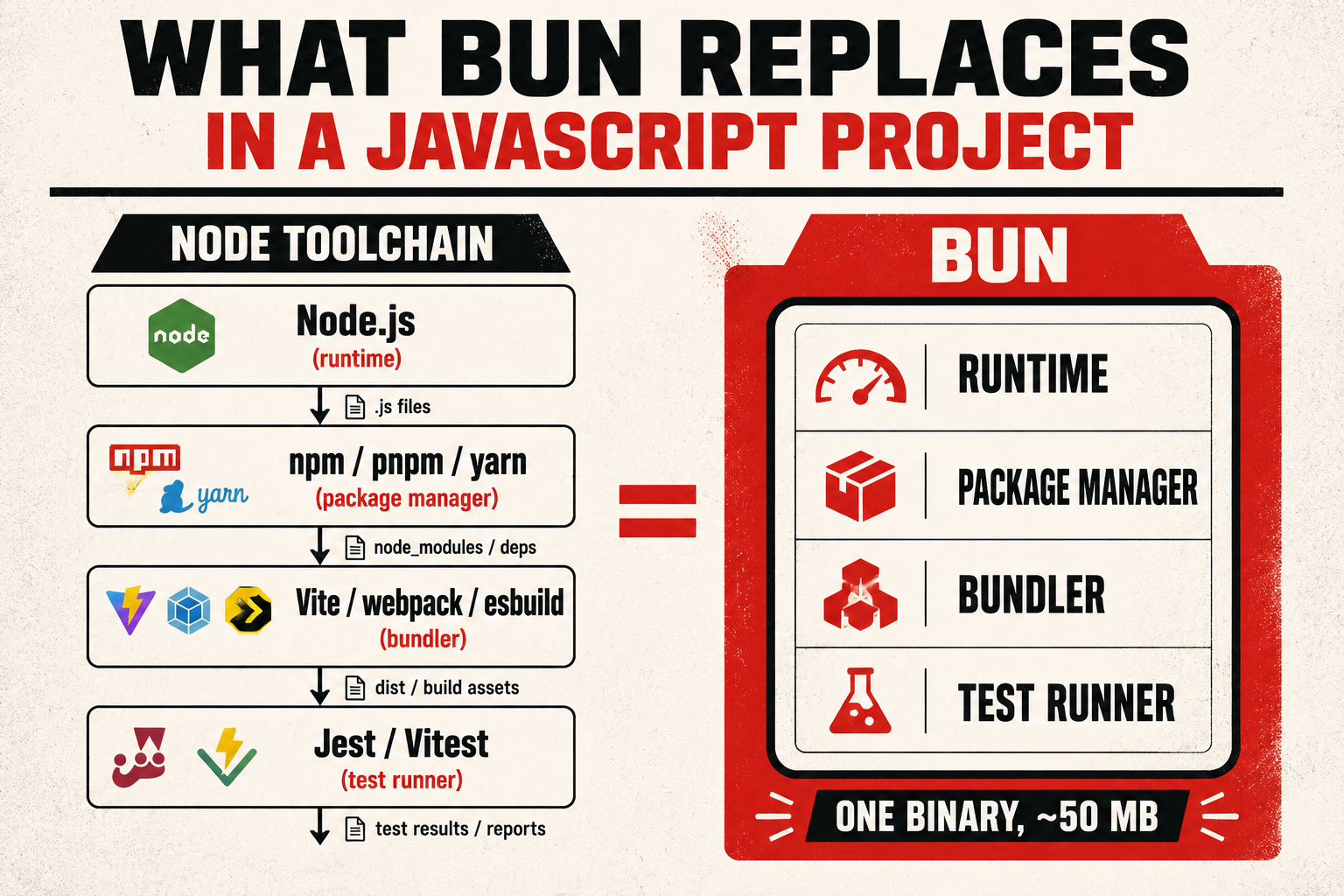
Bun isn't just a faster Node. That framing undersells what it's doing. Bun is an attempt to ship one binary that replaces the stack of tools we've been gluing together for a decade: runtime, package manager, bundler, test runner, transpiler. And the promise is to make every one of them at least as fast as the dedicated tool it's replacing. Sometimes faster, sometimes by a wild margin, sometimes by less than the demo videos suggest. Let's go through what it actually does, what it shines at, and where the Node compatibility story still earns its paycheck.
What Bun actually is
Strip the marketing, and Bun is four things in one binary.
It's a JavaScript runtime, like Node. You write bun run server.ts and it executes the file. Under the hood it uses JavaScriptCore (Safari's engine, written in C++) instead of V8 (Chrome's engine, also written in C++). The runtime layer is written in Zig, a low-level systems language, which is part of why startup and a lot of built-in operations are quick. It implements a chunk of Node's API surface (fs, path, http, most of node:* modules), so a Node program often runs without changes.
It's a package manager. bun install reads your package.json, resolves the dependency tree, and writes node_modules: same layout, similar package-lock.json-ish lockfile (a text-based bun.lock by default since Bun 1.2, with the older binary bun.lockb still supported for projects that haven't migrated), same install surface for downstream tools. It's the part of Bun that's most production-ready, because it's the part with the smallest surface area: read manifests, fetch tarballs, link files.
It's a bundler. bun build ./src/index.ts --outdir ./dist walks your import graph, resolves and bundles modules, optionally minifies, and emits output. Same conceptual job as esbuild or Vite's underlying bundler, with slightly different choices around plugins and tree-shaking, but the same destination.
It's a test runner. bun test discovers *.test.ts files, runs them, prints a Jest-shaped report. The matcher API (expect(x).toBe(y)) is intentionally close to Jest's so test migrations don't require a rewrite of every assertion.
That's the elevator pitch. The interesting part is that the binary is a few dozen megabytes, starts in single-digit milliseconds, and ships with a lot of "we already wrote this for you" APIs that Node leaves to userland.
The runtime, and where speed actually comes from
The headline number you hear about Bun is that it starts fast. That's true, and it's worth understanding why before you decide whether it matters for your project.
A Node process pays a startup cost: V8 initializes, the runtime loads its bootstrap modules, the CommonJS / ESM loader gets wired up, and then your script runs. For a long-running server, that cost is amortized over months of uptime and is basically invisible. For a CLI tool, a test runner, or a serverless function that spins up cold per request, it's the dominant cost.
Bun lowers that fixed cost. Because JavaScriptCore initializes quickly, because a lot of the runtime is precompiled into the binary, and because Bun's module loader is written in Zig (no JavaScript bootstrap), the startup overhead is small enough that you stop thinking about it.
# Roughly what you'll see on a typical machine for an empty script.
$ time node -e "console.log('hi')"
hi

real    0m0.058s

$ time bun -e "console.log('hi')"
hi

real    0m0.010s
The exact numbers vary by machine, by Node version, by how warm your disk cache is. The order-of-magnitude difference is consistent enough that you'll notice it once you start running a hundred small test files in CI, or a CLI that boots and exits on every keystroke.
Once the runtime is running, the speed picture gets more nuanced. JavaScriptCore is a serious engine. It powers Safari, it runs millions of pages a day, and on a lot of benchmarks it's competitive with V8. But V8 has had the lion's share of server-side JavaScript investment for fifteen years. For tight numeric loops, for long-running JIT-heavy workloads, Node will sometimes win, sometimes by a small margin, sometimes by enough to matter. Run a benchmark on your actual workload before you commit to a runtime switch on a hot service.
Where Bun's runtime wins on more than startup is in the built-in APIs. A lot of things you'd reach for a userland package for in Node are inside Bun's binary, written in Zig, and faster than the JavaScript equivalents:
// Bun.file: a lazy file handle. Reading is a stream; no buffer until you need one.
const file = Bun.file("./data.json");
const text = await file.text();      // read as string
const json = await file.json();      // parse to JSON
const bytes = await file.arrayBuffer();

// Bun.write: writes anything to anywhere.
await Bun.write("./out.json", JSON.stringify({ ok: true }));
await Bun.write("./copy.json", file); // file-to-file copy, kernel-level if possible// Bun.password: argon2 / bcrypt without a native module install.
const hash = await Bun.password.hash("hunter2");
const ok = await Bun.password.verify("hunter2", hash);// bun:sqlite: SQLite, no native binding, no setup.
import { Database } from "bun:sqlite";
const db = new Database("./app.db");
db.run("CREATE TABLE IF NOT EXISTS users (id INTEGER, name TEXT)");
db.run("INSERT INTO users VALUES (?, ?)", [1, "Ada"]);
const row = db.query("SELECT name FROM users WHERE id = ?").get(1);// Bun.serve: an HTTP server that also speaks WebSockets, built in.
Bun.serve({
port: 3000,
fetch(req) {
if (new URL(req.url).pathname === "/ws") {
return undefined; // handled by websocket below
}
return new Response("hi");
},
websocket: {
open(ws) { ws.send("welcome"); },
message(ws, data) { ws.send(`echo: ${data}`); },
},
});None of these APIs are exotic. They're the boring things every backend reaches for: a file API, a password hasher, a SQLite driver, an HTTP server. The difference is that Bun ships them in the runtime, so you don't add a dependency, you don't worry about a native build step on a different architecture, and you don't pay the bridge cost between JavaScript and a native addon.
You can write a small backend that has zero dependencies in package.json. That's the thing to notice, not the raw speed numbers in any single benchmark.
The package manager, which is the easiest win
bun install is the part of Bun that I'd happily recommend to a team that hasn't decided about the runtime yet. It does the same job as npm or pnpm: it reads your package.json, resolves the tree, writes node_modules. The output is compatible with whatever you run after it. You can bun install and then node server.js and nothing will know the difference.
What it gets you, mostly, is speed. On a cold install of a typical Node project, you'll see something like:
$ time npm install
# 30s to 60s on a real-world project, depending on dependencies and network

$ time bun install
# 2s to 8s on the same project, same network
The speed comes from a few choices stacked: parallel downloads, a fast lockfile that's quick to read and write, and a global cache that hard-links into node_modules instead of copying files. On a CI machine that does a fresh install on every job, the cumulative wall-clock saving is significant. On a developer laptop, you stop noticing the install.
The lockfile is bun.lock by default since Bun 1.2, a text-based JSONC file you can read and diff like any other config. Older projects may still carry the legacy binary bun.lockb; you can migrate with bun install --save-text-lockfile --frozen-lockfile --lockfile-only and delete the binary file. The default-text choice was a direct response to teams disliking opaque lockfile diffs in code review. If you've been holding off on Bun for that reason, the reason is gone.
Workspaces work the way you'd expect, with the same "workspaces" field in package.json you've been using:
{
  "name": "my-monorepo",
  "private": true,
  "workspaces": ["packages/*", "apps/*"]
}bun install # installs everything, links workspaces
cd packages/utils && bun add lodash # add to one workspace (bun add --filter is not supported yet)
bun run --filter '@my/*' build # run build in matching workspacesThe --filter flag works on bun install, bun outdated, and bun run. It does not yet work on bun add, so to add a dependency to a specific workspace you still cd into it. If you've been doing this with pnpm, the muscle memory transfers in a day. If you've been doing it with Lerna or a hand-rolled npm setup, this is a quiet upgrade.
The test runner
bun test is the part of Bun that surprises people most when they try it on a real project.
The matcher API is intentionally Jest-shaped:
import { describe, it, expect } from "bun:test";
import { sum } from "./sum";

describe("sum", () => {
  it("adds two numbers", () => {
    expect(sum(2, 3)).toBe(5);
  });

  it("handles negatives", () => {
    expect(sum(-1, 1)).toBe(0);
  });
});
You can also drop the imports. describe, it, expect, and test are globals during bun test, the same way they are with Jest's globals mode. That's intentional, because most Jest test files don't import them. A lot of existing test files run without changes.
What you notice when you switch is the wall-clock difference. A test suite that takes 30 seconds with Jest often takes 2 to 5 seconds with bun test on the same machine. The reasons stack: the runtime starts faster (no V8 spin-up per worker), TypeScript and JSX are transpiled by Bun's built-in transformer (no ts-jest or babel-jest indirection), and the runner is written in Zig with parallel file execution out of the box.
Snapshot tests, mock functions (mock(fn), spyOn(obj, "method")), timer mocks, and watch mode (bun test --watch) all work the way you'd expect. The list of things that don't work is shorter than it used to be, but worth knowing before you migrate a large Jest suite:
- Some Jest plugins (custom reporters, custom matchers shipped as
expect.extend) work only partially. - Snapshot serializers that depend on Jest internals may need rewrites.
- Mock module loading (
jest.mock("./db")) has its Bun equivalent (mock.module("./db", () => ({...}))), but the semantics around hoisting and partial mocks differ in subtle ways.
For a fresh project, just write bun test files from day one and you won't notice the gaps. For a migration of an existing Jest suite with 1000+ tests, expect to spend a day on the edge cases.
The bundler
bun build is the part of Bun that's competing most directly with mature tools: esbuild, swc, Vite. The bar is high here because esbuild has been around since 2020 and the Vite ecosystem is deep.
For a basic browser bundle:
bun build ./src/index.ts \
  --outdir ./dist \
  --target browser \
  --minify
For a Node-targeted bundle:
bun build ./src/server.ts \
  --outdir ./dist \
  --target node \
  --external '@aws-sdk/*'
Or as a JavaScript API, which is what you'd use inside a build script:
await Bun.build({
  entrypoints: ["./src/index.ts"],
  outdir: "./dist",
  target: "browser",
  minify: true,
  splitting: true,
  format: "esm",
});
It supports TypeScript natively (no tsc needed for the transpile step, though tsc --noEmit is still useful for type-checking), JSX, CSS imports, asset imports, code splitting, and a plugin API that looks a lot like esbuild's. For 80% of projects, it'll bundle the same code the same way as esbuild, sometimes a little faster.
Where it isn't yet the obvious choice is for projects that lean heavily on a specific framework's bundler ecosystem. If you're using Vite's plugin ecosystem (Vue's SFC plugin, Astro's integrations, SvelteKit's adapters), those plugins live in Vite's plugin API and don't run unchanged on Bun's bundler. You can stay on Vite for the bundle step and still use Bun as the runtime. That's a fine split, and a lot of teams do exactly that.
For a single-page React app, an internal tool, a library you're publishing to npm, or a backend bundle, bun build is enough.
Where Node compatibility still matters
Now the part that gets quieter coverage. Bun aims to be a Node-compatible runtime, and most of the time it is. But "most of the time" is doing work in that sentence, and the surface area of Node's API is enormous.
Here's the honest picture of where you'll still hit friction, and what to do about it.
Native modules. Anything that ships compiled C/C++ addons through node-gyp is in the gray zone. The popular ones (better-sqlite3, sharp, bcrypt) have been a moving target. Some work, some have Bun-native alternatives (you don't need better-sqlite3 if you have bun:sqlite; you don't need bcrypt if you have Bun.password). Some, like sharp for image processing, work or don't work depending on the version of Bun and the version of the module. Before you commit, run your package.json through bun install and try to start the app. The failures show up at startup, not in subtle ways later.
node: modules with deep V8 specifics. A few corners of Node's stdlib reach into V8 internals: v8, vm, parts of worker_threads, advanced inspector APIs. Bun implements the common cases, but the deeper you go, the more you'll find rough edges. If your code uses worker_threads for CPU-bound work, test it under Bun explicitly; don't assume the parallelism characteristics are the same. Bun has its own Worker API, similar but not identical.
Streams. Node's Stream class has decades of accumulated behavior: backpressure, object mode, internal buffering quirks. Bun implements the standard ReadableStream / WritableStream (the Web Streams API) natively and faster than Node, and it implements Node's stream module on top of that. For 95% of stream usage, this is fine. For libraries that depend on specific internal events or specific buffering thresholds, behavior can drift.
Cluster mode. Node's cluster module, the thing that forks workers to handle traffic on multiple cores, works in Bun, but the model is different enough that you should test load distribution if you rely on it. A lot of Node deployments use cluster indirectly through pm2 or a similar process manager; those generally work, but with pm2's own quirks under Bun.
Profiling and observability. Node's profiling story is mature: --inspect, Chrome DevTools, clinic.js, 0x, flamegraphs, the works. Bun has a profiler (bun --inspect) and supports the V8 inspector protocol, which means Chrome DevTools sort of works. But the tooling around production performance investigation, things like APM agents like New Relic, Datadog, Sentry, has had years to mature on Node. Some agents support Bun officially, some support it experimentally, some don't yet. If your production observability depends on a specific agent, check its Bun support before you switch a hot service.
Framework ecosystem. Next.js, NestJS, Remix, Fastify, Express: all of these have shipped Bun compatibility, with varying degrees of "production-ready." Next.js in particular has had a back-and-forth where some versions worked beautifully and others had bundler-side issues that surfaced under Bun's runtime. The state moves fast. The right move is to spin up a small reproduction with your actual framework version and check the open issues before committing.
npm packages that hard-code Node internals. Some packages reach for process.binding(...), undocumented Node APIs, or version-specific behaviors. They tend to break in ways that are confusing to debug, with error messages from inside the package and no clear "this is a Bun thing" signal. The fix is usually swapping to a more conservative alternative.
The pattern across all of these: the failure mode isn't "Bun crashes." It's "Bun runs, but a corner of the stack behaves slightly differently, and the difference matters in production." Which is exactly why you don't promote Bun to production on a critical service the same week you discover it. Run it in CI first. Run it for one non-critical service. Watch your error rates. Then decide.
Where Bun is a great fit today
Skipping the editorializing, here's where teams I've seen adopt Bun without regret:
- CLI tools. Startup time matters. Single-binary distribution matters (
bun build --compile). You're writing TypeScript and you want it to feel like a Rust binary in user experience. - CI test runs. Even if production is still Node, running tests under
bun testcuts CI minutes by a lot for free. It's the lowest-risk way to introduce Bun. - Internal backends and APIs. Anything where you control the deployment, the dependencies are mainstream, and you can swap to a Bun-native alternative for the one or two packages that don't play well. The HTTP server, password hashing, and SQLite story is genuinely nicer than Node's userland equivalents.
- Monorepo package management.
bun installis just faster, with no behavioral cost. You can use it for the install step and stay on Node for runtime if you're not ready to commit. - Greenfield projects. A new project written for Bun from day one can shed the configuration tax: no Vite config, no Jest config, no
ts-node/tsxwrapper, nodotenvpackage. Thepackage.jsonstays small.
Where I'd be more cautious:
- Hot production services with deep observability requirements. Until your APM agent officially supports Bun, the cost of an outage where you can't see what's happening outweighs the install speedup.
- Apps that depend on a specific framework's deep bundler plugin ecosystem (Astro integrations, certain Vite-only plugins). Use Vite for the build, Bun for the runtime, or wait until the plugin ecosystem catches up.
- Code that leans on Node-specific
worker_threadspatterns for CPU-bound parallelism. Worker behavior is similar but not identical. Test before you assume.
How to actually try it
The lowest-risk entry point is your test suite. You're not changing production. You're not changing dependencies. You're not changing how the app runs in CI for deploy. Just how it runs in CI for npm test.
# Install Bun globally.
curl -fsSL https://bun.sh/install | bash

# Or via npm, which is mildly ironic but works:
npm install -g bun

# Verify.
bun --version
Then, in your project:
# Run your existing Jest tests under Bun.
bun test
For a project that uses Jest's globals mode and doesn't reach for Jest plugins, this usually works on the first try. For a project that uses ts-jest with a custom config, you'll need to remove a few transformer settings and let Bun's built-in TypeScript handling do the work. For a project that uses esoteric Jest features, you'll learn quickly which ones don't translate.
If your tests pass and your CI time drops, you've already justified the install. The runtime, the bundler, and the package manager become incremental decisions after that.
The takeaway
Bun isn't a replacement for thinking carefully about your stack. It's a real attempt to consolidate a stack that grew tools the way old houses grow extensions, one at a time, each making sense in isolation, none of them designed together. The wins are concrete: install time, test runtime, fewer dependencies, fewer config files, a runtime with batteries included.
The caveat is also concrete: Node has fifteen years of production hardening behind it, an ecosystem that assumes its quirks, and a profiling and observability story that you don't appreciate until you need it at 3am. Bun is catching up fast, but "catching up" means there are still corners where you'll feel the difference.
Use it where the wins are obvious and the risk is small: CLIs, tests, internal tools, greenfield projects. Watch it carefully for the spots where it isn't ready yet, like your specific framework version, your specific observability agent, your worker-thread patterns. And don't treat the choice as binary. A lot of teams in 2026 ship a project with bun install doing the install, Vite doing the build, Node running production, and bun test running CI. That's not a betrayal of either runtime. That's just using the right tool for each step.
You already do that with every other part of your toolchain. Bun gives you one more knob to turn.