
The first version of file upload in any Node service is app.post('/upload', multer().single('file'), saveToDisk). It works in dev, ships to production, and runs fine until someone uploads a 4 GB video, or someone POSTs a .exe renamed to .png, or someone discovers that the disk path includes the user's filename and starts uploading ../../../etc/passwd.
Uploads are a small endpoint with a long list of failure modes: memory blowups, MIME spoofing, malware delivery, storage quotas, slow clients holding sockets, and the awkward fact that every file is also untrusted user input.
The good news is that the fixes don't require clever code. They require deciding a few things up front and saying no to the convenient defaults.
Where The Bytes Go: Memory, Disk, Or Straight To Storage
Multer's two storage modes are also the architectural choice:
memoryStorage()— file lives inreq.file.buffer. Easy to process, but the entire file sits in RAM. Fine for 100 KB avatars, terrible for anything larger.diskStorage()— file goes to a temp directory. Doesn't blow memory but writes through the local disk, which is wasted IO if the next step is uploading to S3.
The third option — and the one that scales — is to skip your server entirely:
- S3 presigned URLs — your API issues a short-lived URL, the browser PUTs the file directly to S3, and your server only sees a metadata callback.
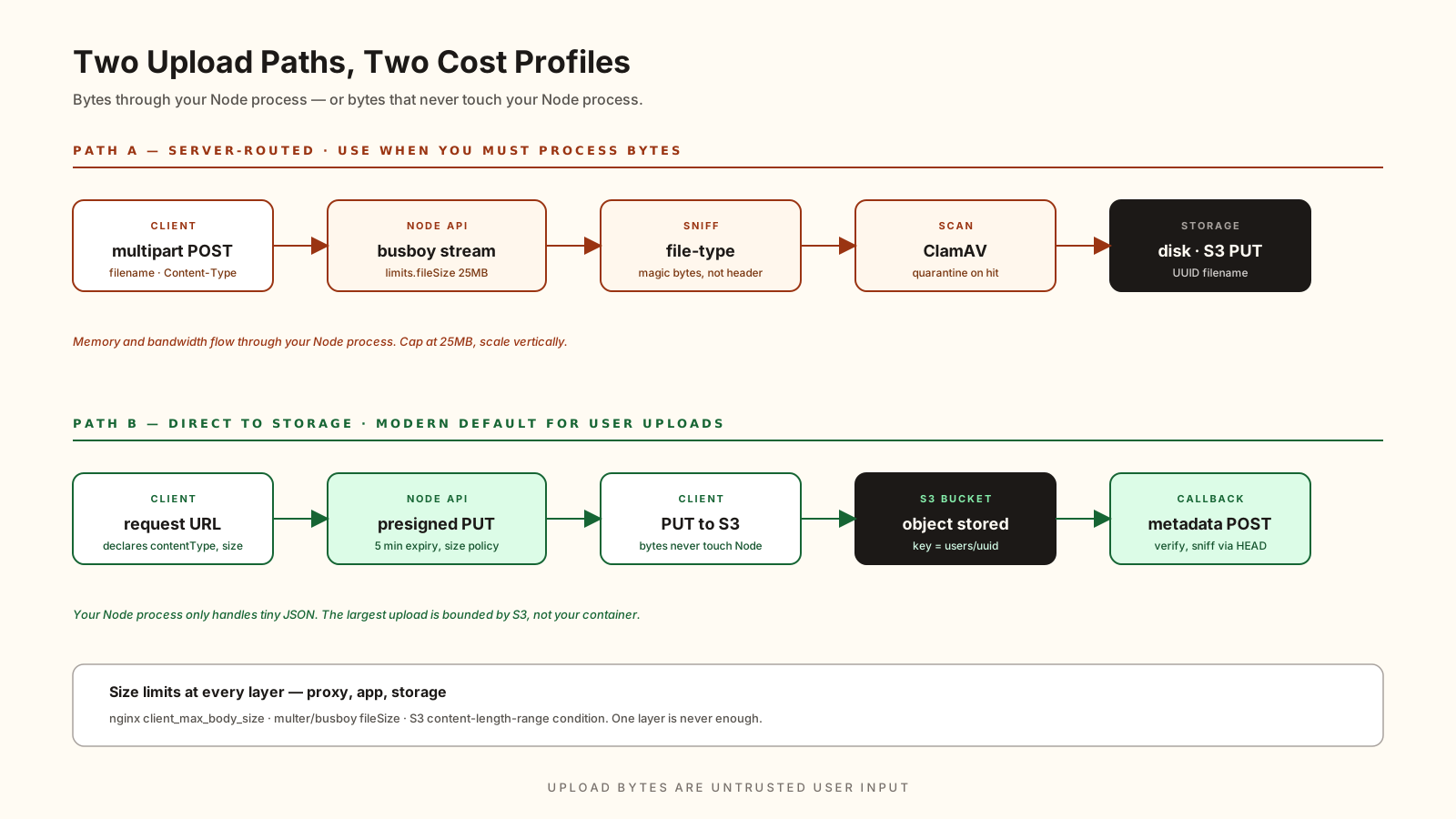
That last pattern is the modern default for anything user-facing. The upload bandwidth never touches your Node process. The server stays small. The largest upload is bounded by S3's limits, not your container's memory.
import { S3Client, PutObjectCommand } from '@aws-sdk/client-s3';
import { getSignedUrl } from '@aws-sdk/s3-request-presigner';

const s3 = new S3Client({ region: 'us-east-1' });

export async function getUploadUrl(req, res) {
  const key = `uploads/${req.user.id}/${crypto.randomUUID()}`;
  const command = new PutObjectCommand({
    Bucket: 'my-app-uploads',
    Key: key,
    ContentType: req.body.contentType,
  });
  const url = await getSignedUrl(s3, command, { expiresIn: 60 * 5 });
  res.json({ url, key });
}
The browser uses that URL once, the file lands in S3, and your API handles only the metadata. You still need to validate that callback — the client could lie about what it uploaded — but you've moved the heavy lifting off your servers.
When You Do Receive The File, Stream It
If the upload genuinely has to flow through your Node process — image transformation, PDF parsing, something the client can't do — use busboy directly or multer in disk mode. Don't buffer.
import busboy from 'busboy';
import { pipeline } from 'node:stream/promises';
import { createWriteStream } from 'node:fs';

export function uploadStream(req, res) {
  const bb = busboy({
    headers: req.headers,
    limits: { fileSize: 10 * 1024 * 1024, files: 1 },
  });

  bb.on('file', async (_name, file, info) => {
    const tmp = `/tmp/${crypto.randomUUID()}`;
    try {
      await pipeline(file, createWriteStream(tmp));
      // file is on disk, info.mimeType is what the client claimed
      res.json({ ok: true, mimeType: info.mimeType });
    } catch (err) {
      res.status(500).json({ error: 'upload_failed' });
    }
  });

  req.pipe(bb);
}
The limits.fileSize is the most important option on this page. Without it, a slow trickle of bytes can hold a connection open as long as the client is willing to keep typing.
The Content-Type Header Is A Suggestion
Browsers send Content-Type: image/png. Attackers send whatever they want. You cannot trust the header — you have to inspect the actual file bytes. That's called MIME sniffing, and the standard library for it is file-type:
import { fileTypeFromBuffer } from 'file-type';

const allowed = new Set(['image/png', 'image/jpeg', 'image/webp']);

export async function validateImage(buf: Buffer) {
  const detected = await fileTypeFromBuffer(buf);
  if (!detected) throw new Error('unknown_type');
  if (!allowed.has(detected.mime)) throw new Error('disallowed_type');
  return detected;
}
This catches the classic "rename evil.exe to cute.png" trick. The bytes don't lie — magic numbers at the start of the file say what it actually is.
For very large files where you can't load the whole thing, file-type can also work on a stream — read the first ~4 KB, sniff, then continue or abort.
Filenames Are Untrusted Strings
The filename a client sends is user input. Treat it like any other string:
- Never use it as a filesystem path. Generate your own with
crypto.randomUUID()and store the original name as metadata. - Strip directory separators if you're going to display it.
path.basename(name)gives you the file part without..traversal. - Limit length and character set if you're storing it in a database column with a length constraint.
const safeName = path.basename(originalName).replace(/[^\w.\-]/g, '_').slice(0, 200);This is small, but the alternative is a path traversal vulnerability that turns a write endpoint into arbitrary file overwrite.
Malware Scanning Is A Real Concern If Files Are Shared
If users upload files that other users will download — attachments in a help desk app, profile pictures, shared documents — you have a malware distribution problem unless you scan. The standard open-source option is ClamAV running as a daemon, called from Node via clamav.js or by streaming to its socket:
import NodeClam from 'clamscan';

const clam = await new NodeClam().init({
  clamdscan: { host: 'clamav', port: 3310 },
});

export async function scanFile(path: string) {
  const { isInfected, viruses } = await clam.isInfected(path);
  if (isInfected) throw new Error(`infected: ${viruses.join(',')}`);
}
This is one of those things that sounds optional until the day a customer's antivirus flags a download from your app and your sales team has to explain it. Run the scan, quarantine the bad ones, log the rest.
Size Limits At Every Layer
A single file size limit anywhere is not enough. Reverse proxy, multer/busboy, and your storage backend should all have one:
- Nginx / load balancer:
client_max_body_size 25m; - Multer / busboy:
limits: { fileSize: 25 * 1024 * 1024 } - S3 presigned URL:
Conditions: [['content-length-range', 0, 25 * 1024 * 1024]]for POST policies.
If only the application enforces it, an attacker who finds a way past it gets an unbounded upload. Belt and suspenders is the correct answer.
A One-Sentence Mental Model
Upload bytes are untrusted user input that also costs memory and disk — bound them with size limits, sniff the actual MIME, generate your own filenames, and push the upload directly to object storage with a presigned URL whenever you can 👊