Most developers meet AI coding tools in the same way.
They open a prompt, ask for a function, paste the generated code, and hope it works.
That can be useful for small tasks. But for senior developers, this is not the most interesting part of Claude Code.
The real value is not “generate me code.” The real value is “help me understand this system before I change it.”
That difference matters a lot.
A senior engineer is rarely paid only to write syntax. You are paid to reduce risk, understand trade-offs, protect business behavior, review changes, and move the system forward without breaking production. In a real codebase, the hardest question is often not “how do I write this method?” It is “what will this method accidentally break?”
That is where Claude Code becomes more like a codebase partner than a code generator.
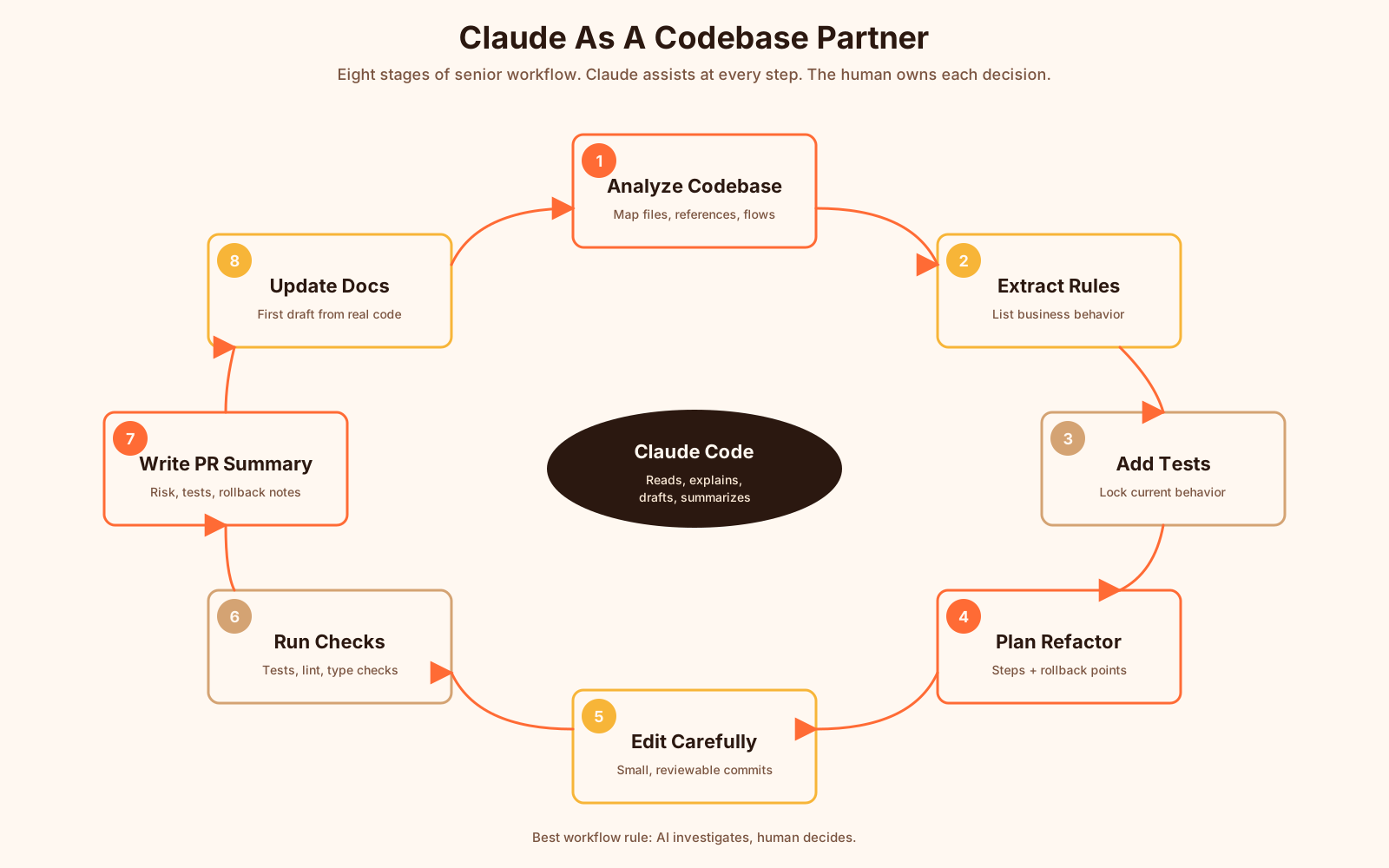
It can read files, follow references, inspect tests, summarize behavior, explain old code, help plan refactoring, suggest missing test cases, and generate documentation drafts. But it should not replace your judgment. It should make your judgment faster and better.
Let’s walk through what that looks like in a real engineering workflow.
Start With Codebase Understanding, Not Code Generation
Large repositories are full of hidden context.
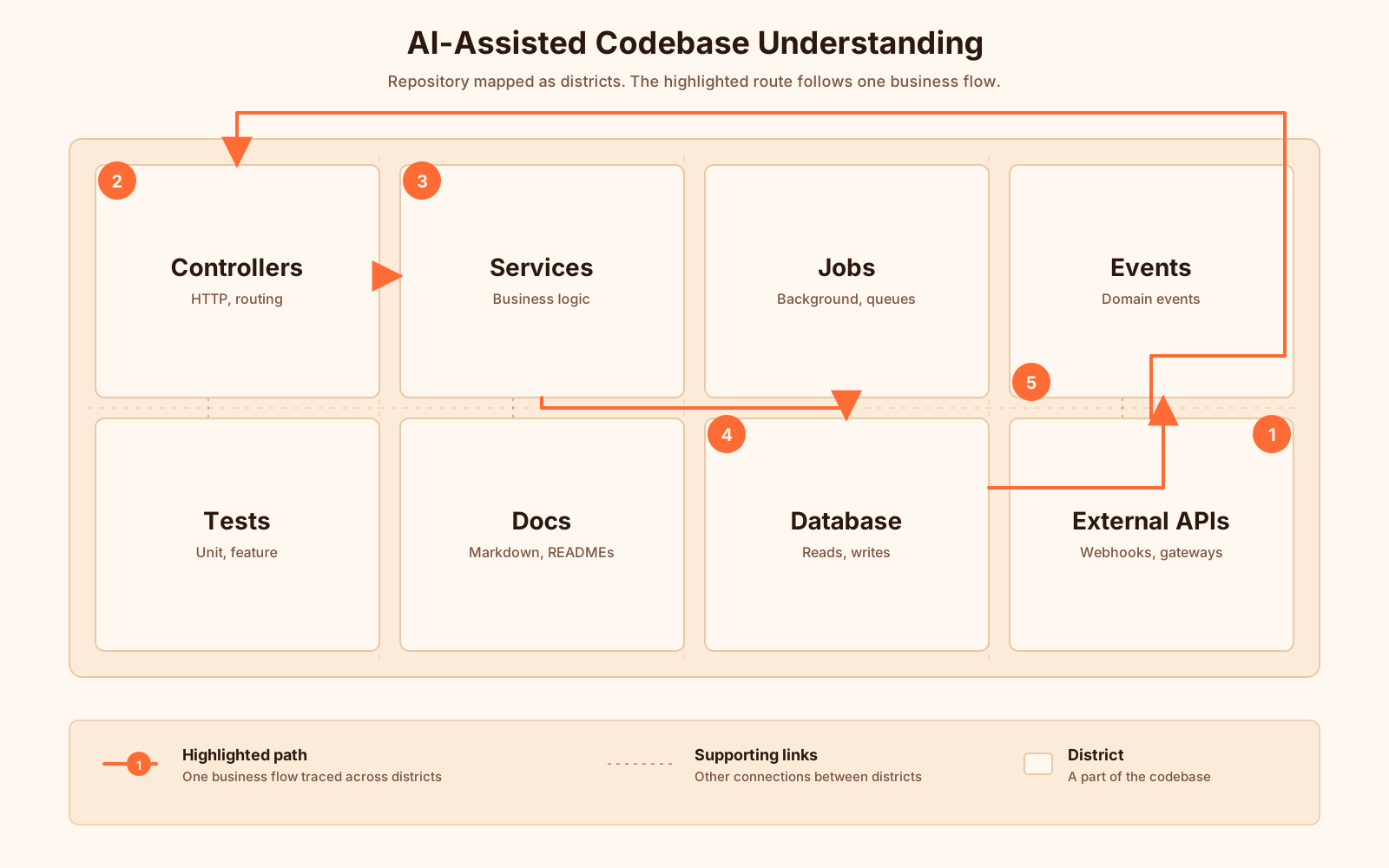
You may have controllers that call services, services that call repositories, repositories that call external APIs, and background jobs that change the same data later. The code may look simple in one file, but the behavior may live across many places.
A weak AI workflow starts like this:
Generate a payment retry service.A better senior-level workflow starts like this:
Analyze this repository and explain how payment retry currently works.
Focus on controllers, jobs, events, database writes, and external gateway calls.
Do not suggest changes yet. First give me the current behavior and risks.
That prompt changes the role of Claude.
You are not asking it to produce code. You are asking it to build a mental model.
In a mature system, that is usually the first step.
Claude may find things like:
- a retry button in an admin controller
- a queued job that retries failed payments automatically
- a webhook handler that also updates transaction status
- a cron command that marks old payments as abandoned
- a service that maps gateway errors into internal error codes
Now you have a map.
And once you have a map, you can make better decisions.
Ask Claude To Explain Legacy Code Like A System, Not A Snippet
Legacy code is often not bad code.
Sometimes it is old code that survived many product changes.
It may contain business rules that were never documented. A weird if statement may exist because of a payment provider bug from 2019. A duplicated validation rule may exist because mobile clients still send old payloads. A strange database column may exist because reporting depends on it.
When you ask Claude to explain legacy code, avoid asking only for a line-by-line summary.
This is too shallow:
Explain this method.This is better:
Explain this method from a production behavior perspective.
Identify:
1. inputs and outputs
2. database reads and writes
3. external services called
4. side effects
5. hidden business rules
6. edge cases
7. what could break if we refactor it
Here is a small example.
public function applyDiscount(User $user, Cart $cart, string $code): Cart
{
    $coupon = $this->coupons->findActiveByCode($code);

    if (!$coupon) {
        throw new InvalidCouponException();
    }

    if ($coupon->first_order_only && $user->orders()->exists()) {
        throw new CouponNotAllowedException('Coupon is only valid for first order.');
    }

    if ($cart->subtotal < $coupon->minimum_amount) {
        throw new CouponNotAllowedException('Cart amount is too low.');
    }

    $cart->discount_total = min(
        $coupon->amount,
        $cart->subtotal
    );

    $cart->coupon_id = $coupon->id;
    $cart->save();

    return $cart;
}
A junior prompt may ask Claude to “clean this up.”
A senior prompt asks something else:
Analyze this discount method. Do not refactor yet.
What business rules does it enforce?
What assumptions does it make?
What tests should exist before changing it?
You want Claude to say something like:
- the coupon must be active
- first-order-only coupons are blocked if the user has any previous order
- the minimum amount is checked before applying the discount
- discount cannot exceed subtotal
- the method mutates and saves the cart
- existing order lookup may become expensive if not indexed
- behavior depends on what
findActiveByCode()means internally
That is useful.
It gives you the list of things you must protect before refactoring.
Use Claude To Find Hidden Business Rules
Hidden business rules are one of the biggest risks in old systems.
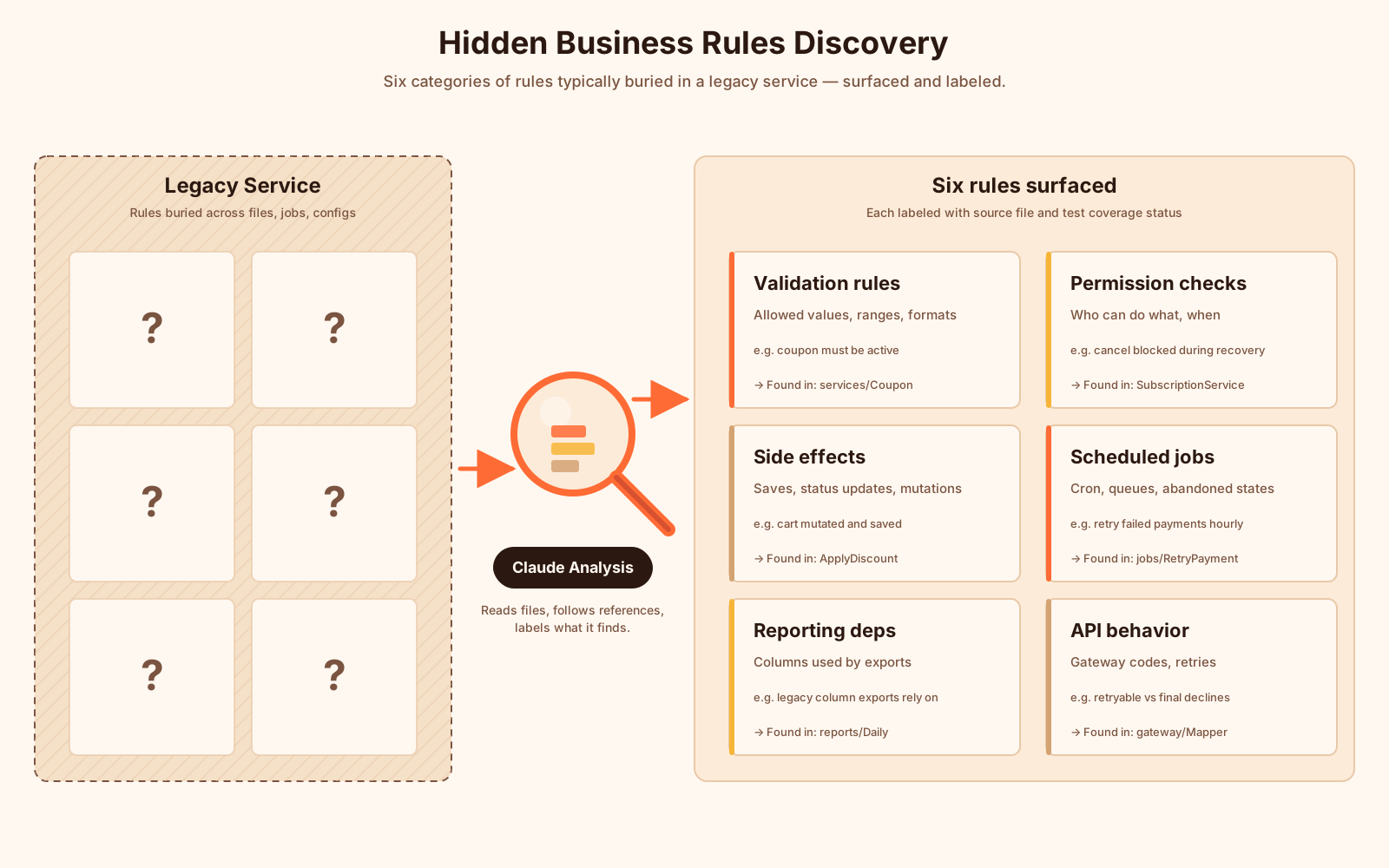
They are often not in documentation. They are hidden in conditionals, database defaults, scheduled jobs, admin tools, and exception messages.
A useful Claude prompt:
Search this feature and list all business rules related to subscription cancellation.
Group them by source file.
For each rule, include:
- what triggers it
- what it changes
- what user or system behavior depends on it
- whether the rule is covered by tests
This style of prompt helps you build a rule inventory.
For example, Claude might find:
Rule: Users cannot cancel subscriptions with pending payment recovery.
Source: app/Services/SubscriptionCancellationService.php
Effect: cancellation is blocked and user sees a payment recovery message.
Test coverage: missing.
That is not just a summary. That is refactoring safety data.
Once you know the rules, you can protect them.
A practical next prompt:
Based on the business rules you found, suggest characterization tests.
Use PHPUnit examples.
Do not change production code yet.
Claude may produce something like:
public function test_user_cannot_cancel_subscription_during_payment_recovery(): void
{
    $user = User::factory()->create();

    $subscription = Subscription::factory()->create([
        'user_id' => $user->id,
        'status' => 'active',
        'payment_recovery_status' => 'pending',
    ]);

    $this->expectException(CancellationNotAllowedException::class);

    app(SubscriptionCancellationService::class)->cancel($subscription);
}
You still need to review the test. You still need to check factories, exception names, and real domain behavior.
But Claude helped you move from “I think this code does something” to “here is a behavior we can lock down.”
That is valuable.
Plan Safe Refactoring Before Editing Files
Claude Code can edit files, but senior developers should not jump directly to edits.
For risky code, ask for a refactoring plan first.
Create a safe refactoring plan for this service.
Constraints:
- do not change public behavior
- preserve database writes
- preserve exception types
- add tests before structural changes
- make small commits
- explain rollback points
A good plan may look like this:
Step 1: Add characterization tests for current behavior.
Step 2: Extract pure calculation logic into a private method.
Step 3: Extract gateway mapping into a dedicated class.
Step 4: Replace duplicated conditionals with named methods.
Step 5: Run full test suite and compare important outputs.
This is exactly the kind of work senior engineers do manually.
Claude helps you draft it faster.
But you should still decide whether the plan is correct.
A strong rule: never let AI refactor business-critical code without tests around current behavior.
Use Claude For Tests, Not Just Implementation
Many teams use AI to generate implementation code and forget tests.
That is backwards.
Claude is often more useful when you ask it to find missing tests.
Review this service and existing tests.
List important behaviors that are not covered.
Prioritize risky cases first.
Then write PHPUnit test examples for the top five missing cases.
For a payment feature, Claude may suggest cases like:
- gateway timeout
- duplicated webhook
- invalid currency
- already-paid invoice
- declined card with retryable error
- declined card with non-retryable error
- user without permission
You can then ask:
Write these tests using existing project conventions.
Follow the style of tests in tests/Feature/Payment.
Do not invent helper methods if similar helpers already exist.
That last line matters.
AI often invents helpers that look nice but do not exist. Asking it to follow existing conventions reduces that risk.
Use Claude For Documentation That Explains Real Behavior
Documentation is painful when it is separated from the code.
Claude can help convert code understanding into docs.
For example:
Create internal documentation for the payment retry flow based on the code you analyzed.
Include:
- overview
- sequence of events
- database fields involved
- queue jobs
- external gateway calls
- failure modes
- operational notes
- links to important files
This can produce a useful first draft.
But again, the human owns the final document.
You should verify every claim, remove uncertain language, and make sure links point to real files.
A nice pattern is to ask Claude to mark uncertainty:
If you are not sure about something, mark it as "Needs verification" instead of guessing.That instruction is simple, but powerful.
It makes the output safer.
Use Claude For Pull Request Summaries
Pull request summaries are another great use case.
Claude can compare changed files and produce a clear explanation:
Summarize this branch for a pull request.
Include:
- what changed
- why it changed
- risk areas
- tests added or updated
- manual QA checklist
- rollback notes
A useful PR summary might look like this:
## What changed

Refactored payment retry handling by extracting gateway error mapping into `GatewayErrorMapper`.

## Why

The old retry service mixed retry decisions, gateway response parsing, and database updates in one class.

## Risk areas

- retryable vs non-retryable decline mapping
- duplicate webhook handling
- transaction status transitions

## Tests

- added characterization tests for current retry behavior
- added mapper unit tests for gateway error codes

## Manual QA

- test failed payment retry from admin panel
- test duplicate webhook payload
- test non-retryable card decline
This is not just “nice writing.”
It helps reviewers focus on the right risks.
Where Claude Helps Most
Claude is useful when the task needs reasoning across context.
Good use cases:
- explain unfamiliar code
- map feature behavior across files
- find hidden business rules
- suggest missing tests
- compare two implementations
- draft refactoring plans
- summarize risky changes
- create internal docs
- review code for common security and performance issues
Weak use cases:
- blindly generating large features
- replacing domain experts
- making production decisions alone
- editing critical code without tests
- approving its own changes
The best workflow is not “AI writes, human accepts.”
The best workflow is “AI investigates, human decides.”
A Practical Prompt Template For Senior Developers
Here is a reusable prompt:
You are helping me analyze a production codebase.
Do not change files yet.

Goal:
Understand how [feature name] works today.

Please inspect relevant files and explain:
1. entry points
2. main classes/functions involved
3. database reads and writes
4. external API calls
5. events, jobs, queues, or scheduled commands
6. hidden business rules
7. current test coverage
8. risky areas if we refactor this
9. recommended characterization tests

If something is unclear, say "Needs verification" instead of guessing.
This prompt is boring in the best way.
It makes Claude slow down.
It also gives you output that is useful for engineering work, not just demo videos.
Final Thought
Claude Code is powerful, but the safest way to use it is not as a magic code generator.
Use it as a codebase partner.
Let it read, map, explain, compare, and challenge your assumptions.
Then you make the engineering decision.
That is the senior developer workflow.
Not faster typing.
Better understanding.