You've probably watched a teammate try to settle this argument on Slack. Someone posts a Cursor screenshot, someone else fires back with a Claude Code transcript, and within ten minutes the thread has turned into a religious war that nobody asked for. The wrong question — "which one writes better code?" — keeps producing the same useless answer, which is "depends," followed by another twenty messages.
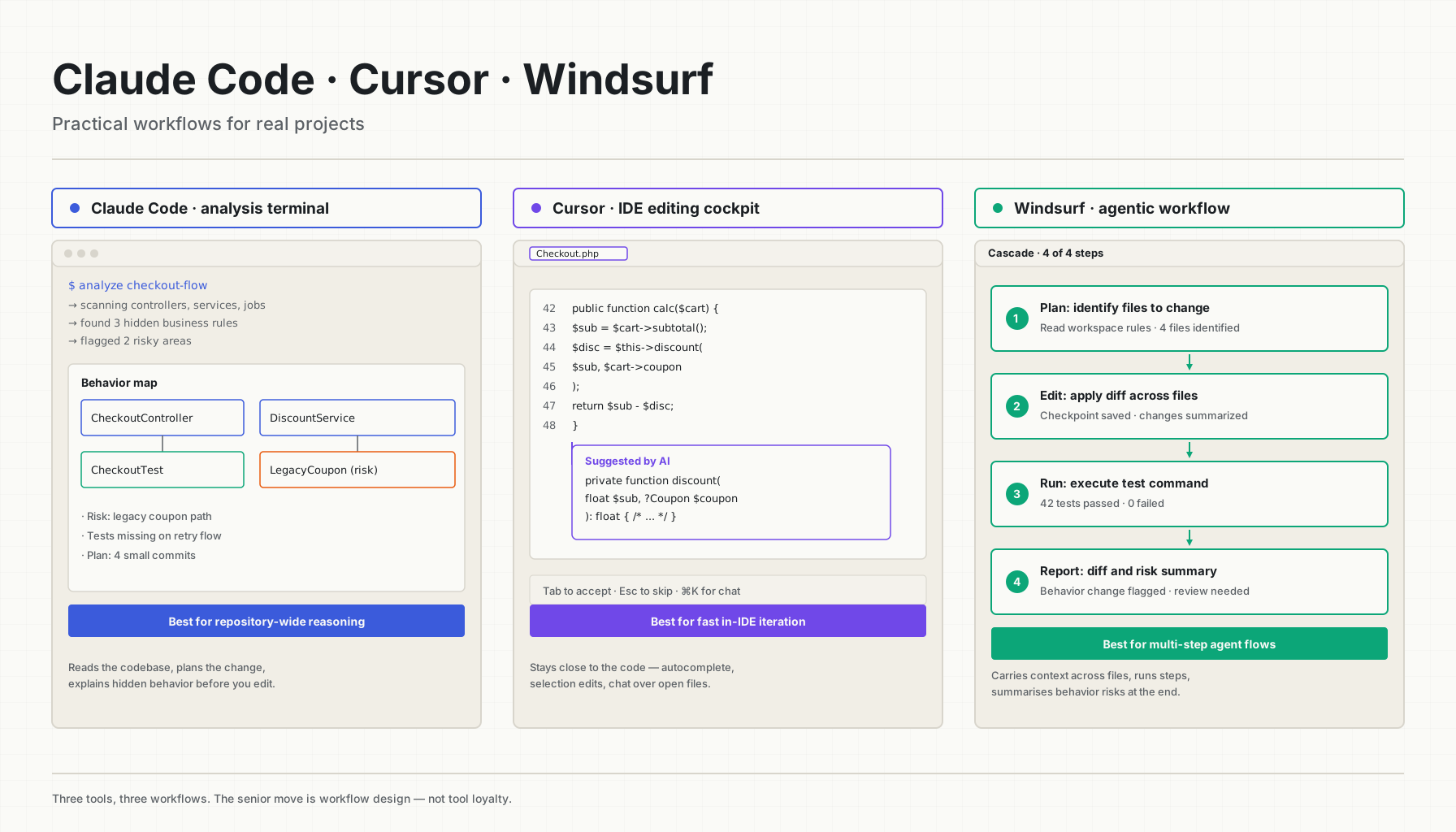
The better question is much narrower: which tool fits this part of this workflow? Because Claude Code, Cursor, and Windsurf are genuinely different shapes. They look interchangeable on a feature checklist, and then you actually use them for a week and the differences are obvious. Claude Code wants you in the terminal, reasoning across the whole repo, planning before touching anything. Cursor wants you in the IDE, autocomplete-fast, never breaking flow. Windsurf wants to drive — multi-step agent runs, project memory, Cascade carrying context across the work session.
This isn't a fan war. It's a workflow note from someone who's tried to get all three to do real work and learned, the boring way, where each one earns its keep.
The Real Difference Is Workflow
Picture a classic Tuesday: you've been asked to update a legacy payment feature that nobody on the current team wrote. The actual task isn't "write code" — it's eight smaller things in a trench coat. You need to understand the current flow, hunt down the hidden business rules, audit the tests, write the missing ones, make the actual change, run the suite, update docs, and write a PR summary that won't get bounced back from review.
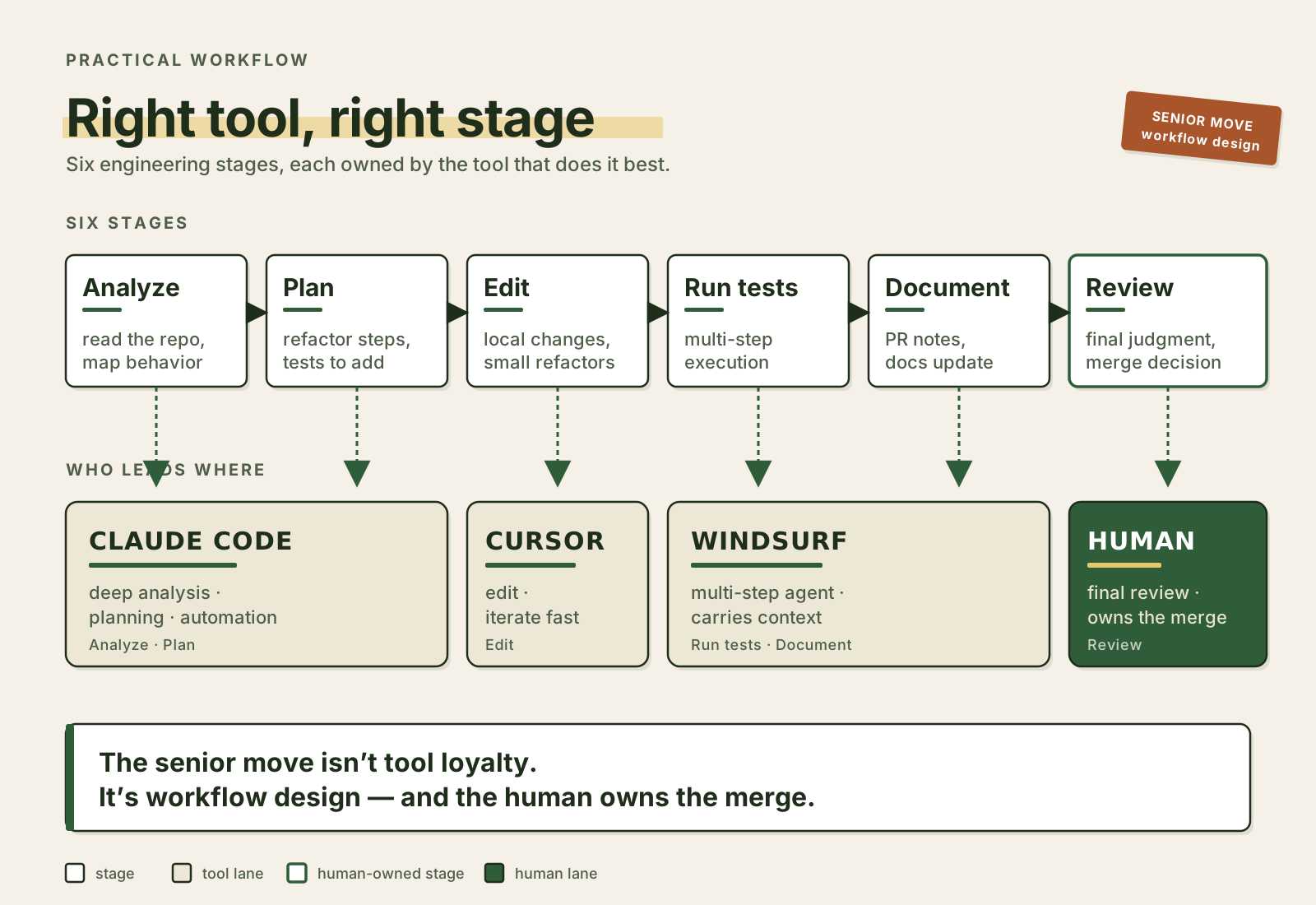
Different tools fit different parts of that. A workflow that holds up under real pressure usually looks more like this:
Claude Code -> analyze and plan
Cursor -> edit and navigate quickly
Windsurf -> run agentic multi-step workflow
Human -> review, decide, test, approve
You're allowed to combine them. Tool loyalty is a junior trait. The senior move is workflow design — picking what each one is best at, then chaining them so the human owns the merge button at the end.
Claude Code: Best For Deep Codebase Analysis
Claude Code earns its rent before you write a single line. Drop into the terminal, point it at the repo, ask it a question that would normally take you a half-day of grep + git-blame archaeology, and get back something coherent enough to actually use. It can inspect files, reason across folders, run tests, automate dev tasks, hold project memory through CLAUDE.md, and reach into external systems via MCP when you wire it up.
The strongest workflow starts before any implementation. Something like:
Analyze how subscription cancellation works in this repository.
Do not edit files yet.
Find controllers, services, jobs, events, tests, and documentation.
List hidden business rules and risky areas before refactoring.
That kind of read-only, "build me a mental model" prompt is where Claude Code shines — and where the other two tools, in my experience, often want to start editing before they've understood. Once you've got the mental map, the next prompt writes itself:
Create a safe refactoring plan.
Include characterization tests, small commits, rollback points, and behavior comparison steps.
That's not code generation. That's an engineering teammate who's read the file you haven't read yet.
Good Claude Code Use Cases
Reach for Claude Code when the work is bigger than one file. The pattern repeats across:
- repository-wide analysis
- legacy code explanation
- refactoring plans
- characterization test suggestions
- pull request summaries
- documentation drafts
- terminal-based automation
- hooks and deterministic checks around AI actions
- MCP connections to issue trackers, docs systems, internal APIs
A real example I lean on for any non-trivial branch:
Review this branch and create a pull request summary.
Include what changed, why it changed, test coverage, risk areas, and manual QA steps.
Mark uncertainty clearly.
The "mark uncertainty clearly" line is doing a lot of quiet work. Without it the model writes confident summaries about behavior it inferred but didn't verify — and that's how a "small refactor" PR sneaks past review.
Cursor: Best For Fast IDE-Based Productivity
Cursor feels closer to a normal editor with a clever passenger in the seat next to you. That's the whole point. You don't leave the IDE — you select code, ask, edit, accept, autocomplete, keep moving. For day-to-day implementation work where you already know what you want, that flow is hard to beat.
Say you're inside a service and want to clean up a method:
Refactor this method for readability.
Keep behavior the same.
Use existing project style.
Do not introduce new abstractions unless necessary.
Or you've just shipped a validator and want tests to match the rest of the suite:
Add tests for this validator using the same style as nearby tests.Cursor wins when you've already done the thinking. It compresses the typing. The AI sits close to the code you're editing, so local navigation is fast and the suggestions usually land in roughly the right place.
Good Cursor Use Cases
The natural fits:
- fast autocomplete
- local edits
- quick explanations of selected code
- test creation near the implementation
- small refactors
- IDE chat over files
- rapid iteration while you stay in editor flow
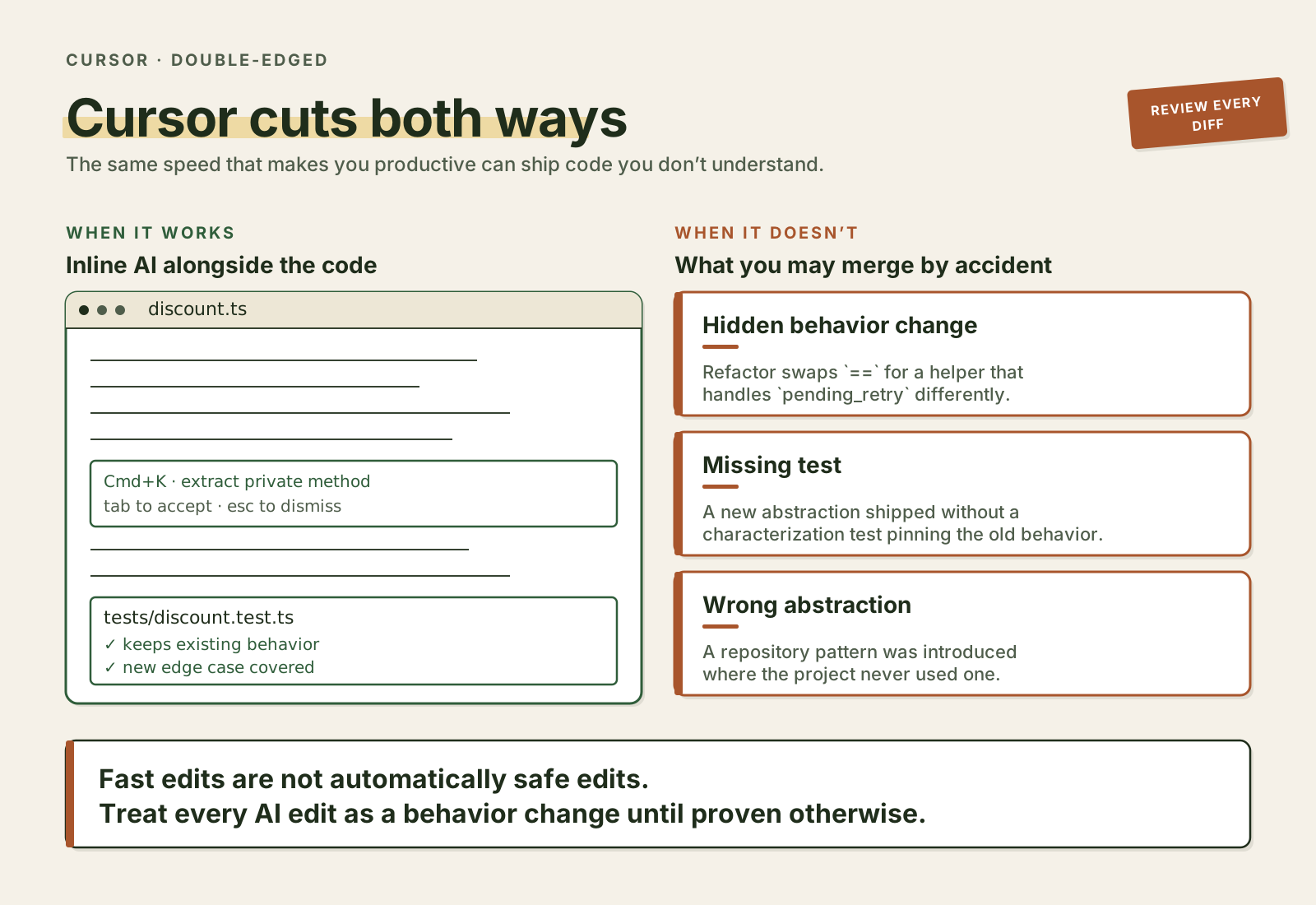
The trap is the same trap that comes with every speed tool — fast doesn't mean safe. If you accept changes too quickly, you'll merge code you don't fully understand, and that's how plausible-but-wrong logic ends up in production. That's not really a Cursor bug, it's the cost of letting AI edit your codebase at all. Cursor just makes it cheap enough to do constantly, which is exactly what makes the discipline harder.
Windsurf: Best For Agentic Project Workflows
Windsurf's Cascade is built around a different premise: instead of a single autocomplete suggestion, you're working with an assistant that can execute multi-step tasks while you watch (or, more honestly, while you make coffee and then come back to review the diff). Add the rules and memories system on top, and the assistant can carry project conventions across sessions instead of relearning them every morning.
That changes what your prompts look like. A Windsurf-shaped prompt might be:
Implement this small API change.
Follow workspace rules.
Update the controller, service, tests, and documentation.
Run the relevant test command.
Show me the final diff and risks.
The agent has to plan, edit several files, hit errors, recover, and continue — all the things a human would do, except faster and without complaining. When it works, it really works. When it doesn't, you spend twenty minutes untangling files you didn't ask it to touch, which is its own kind of penalty.
Good Windsurf Use Cases
Reach for Windsurf when:
- the task spans multiple files in a way you can describe in one prompt
- you want project-aware agent behavior
- conventions live in rules and memories
- there's iterative editing with checkpoints to validate at
- you'd rather supervise an agent than do the keystrokes yourself
The risk is the same risk you take with any agentic tool — the more autonomy you grant, the stronger the guardrails need to be. Use rules. Use tests. Use checkpoints. Review every diff before accepting. And don't let the agent quietly modify files it wasn't asked about — that's how a "fix the auth middleware" task sprouts a config-rewrite tail you didn't notice until staging caught fire.
The Biggest Risk: AI Editing Real Project Files
All three tools become risky at the same moment — when they start editing real files. The danger isn't bad syntax; the model writes syntactically correct code almost without exception. The danger is plausible code that subtly changes behavior in ways the diff doesn't make obvious. Like this:
// Old behavior
if ($invoice->status === 'paid') {
    return;
}

$this->paymentGateway->charge($invoice);
The AI proposes:
if ($invoice->isPayable()) {
    $this->paymentGateway->charge($invoice);
}
Looks cleaner. Reads like a refactor. But what's actually inside isPayable()? Does it treat pending_retry the same way the original code did? Does it exclude manual_invoice and awaiting_capture? Does it match the original semantics down to the edge cases — including the ones nobody documented because the team that knew them left two years ago?
Maybe yes. Maybe no. The point is you can't tell from the diff. Every AI edit should be reviewed as a behavior change until proven otherwise — even (especially) when it claims to be "just" a refactor.
Use Tool-Specific Guardrails
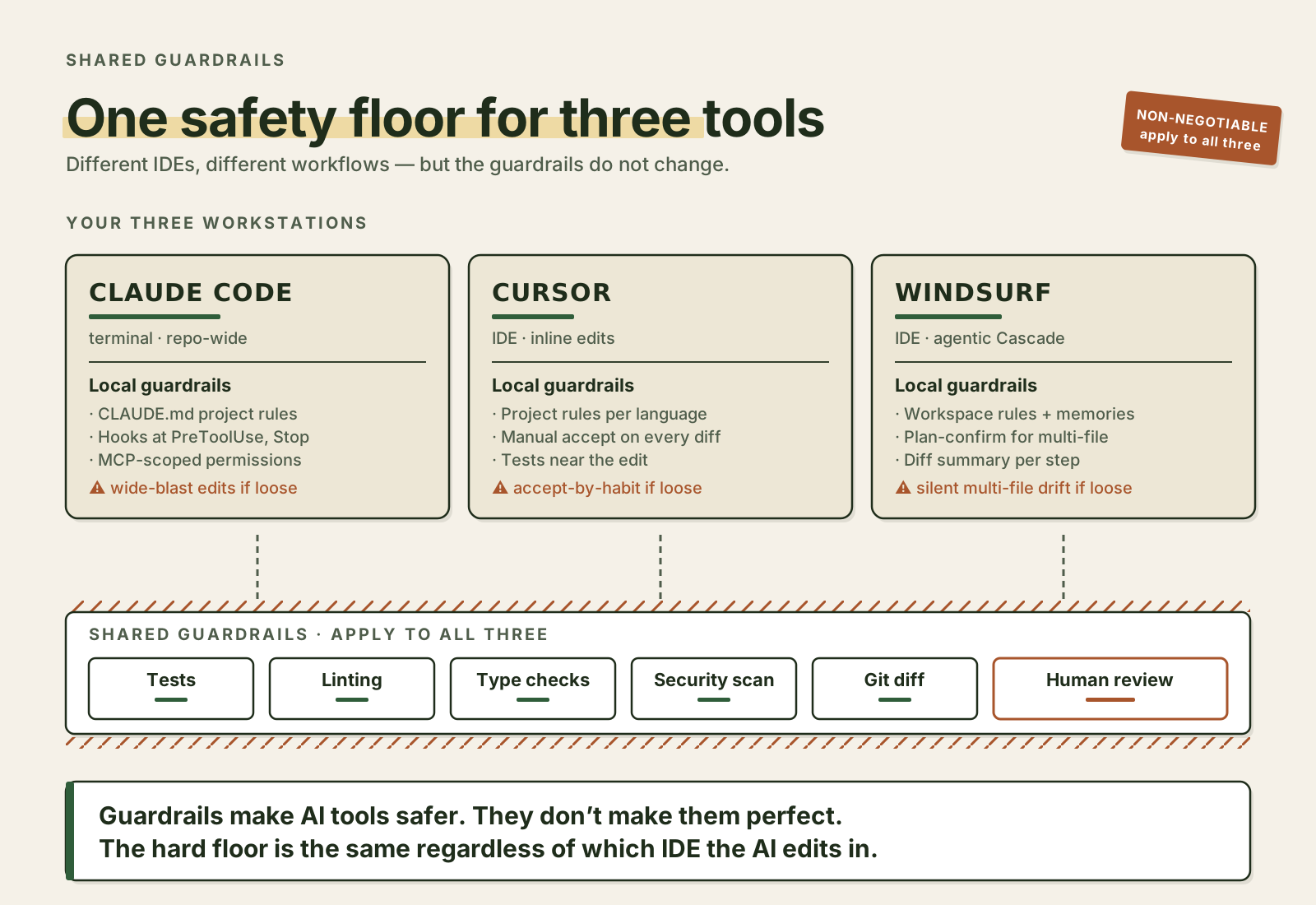
Each tool has a different lever for keeping the AI honest, and the trick is to actually pull them.
For Claude Code, project instructions and hooks. A CLAUDE.md in the repo root is the cheapest, most powerful safety net you can write:
# Project Rules

- Do not change public API responses without explicit approval.
- Add or update tests before refactoring production behavior.
- Prefer small commits.
- Run `composer test` for PHP changes.
- Mark uncertain assumptions clearly.
- Do not modify migration history.
Hooks then enforce the deterministic stuff — formatters, type checks, the test command — at specific points in the workflow, so the model can't talk its way past them.
For Cursor, project rules plus a strict review habit. Something like:
When editing Laravel code, follow existing service boundaries.
Do not introduce repositories unless the project already uses them.
Do not generate tests with fake helper methods that do not exist.
That last rule is there because, in my experience, AI-generated tests have a habit of inventing helpers — assertJsonHasShape, Factory::makeWithRelations — that look real, pass review at a glance, and break the build the moment someone runs the suite.
For Windsurf, lean on rules, memories, workflows, and checkpoints together. A useful one:
Before making multi-file changes, summarize the intended files and wait for confirmation.
After changes, show a concise diff summary and list any behavior risks.
That two-step "summarize then act" pattern catches the "agent decided to also rewrite the env loader" case before it ships.
Guardrails make all three tools meaningfully safer. They don't make them perfect, and anyone who tells you otherwise is selling something.
A Practical Combined Workflow
This is the workflow that holds up for real projects, with each tool taking the part it's actually good at.
1. Use Claude Code For Investigation
Open the terminal. Read-only prompt:
Analyze the checkout discount flow.
Do not edit files.
Find entry points, business rules, tests, database writes, and risky dependencies.
You walk away with a behavior map, a list of risky files, the test gaps, and a refactoring plan you didn't have to draft yourself.
2. Use Cursor For Focused Editing
Now flip into the IDE, open the relevant file, and let Cursor do the surgery:
Extract this discount calculation into a small private method.
Keep behavior identical.
Do not change validation or database writes.
Small local edit, easier navigation, quick test addition. You stay in flow. The change is bounded.
3. Use Windsurf For Multi-Step Follow-Through
Hand the rest to the agent:
Update the related tests and documentation for this discount behavior.
Follow workspace rules.
Run the relevant test command and summarize failures if any.
Tests get updated, docs get updated, the test command runs, you get a diff summary and a risk list. All the boring follow-through that gets dropped on Friday afternoons.
4. Human Review Owns The Merge
Before the merge button gets clicked, a human still has to ask the questions only a human can answer:
- does the business behavior actually match what was intended
- what's the production risk
- are the tests testing the right thing or just the new thing
- is the diff bigger than it should be
- did anything in the API contract shift
- any database impact, intended or otherwise
- security implications
The AI did the typing. The human does the deciding.
When To Use Which Tool
The shortcut, when you're in the middle of work and need to pick fast:
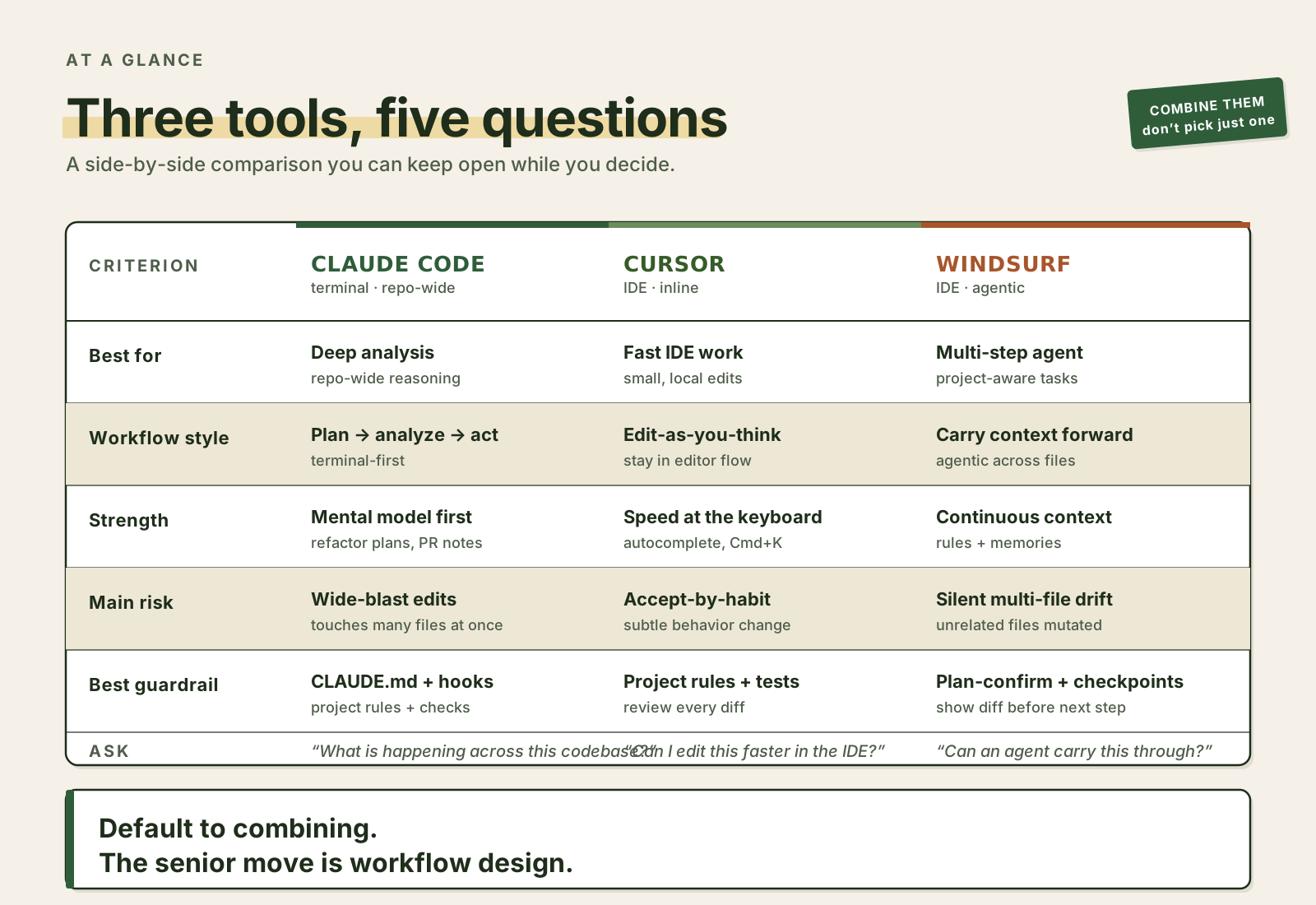
- "What is happening across this codebase?" → Claude Code
- "Can I edit this code faster while staying in the IDE?" → Cursor
- "Can an agent help carry this multi-step task through the project?" → Windsurf
That's the practical mental model. Not perfect, not the only way to slice it, but it's the one I keep coming back to.
What These Tools Should Not Replace
Useful as they are, none of these tools replace the things that actually keep a system alive: system design thinking, production ownership, code review, tests, monitoring, security review, domain knowledge, team communication. The AI doesn't know your customers. It hasn't seen the incident report from last quarter. It doesn't know which deadlines are real and which were invented to make a stakeholder feel heard. Unless you hand it that context, it's working in a vacuum — and even when you do, it can be confidently wrong.
So keep the human in the loop, always. Especially around database migrations, payments, authentication, authorization, anything security-sensitive, and any change that touches public API behavior. Those are the categories where "the AI was sure" is the most expensive sentence in the postmortem.
Final Thought
Claude Code, Cursor, and Windsurf aren't three flavors of the same wrapper. They encourage different working postures. Claude Code rewards the developer who reads before writing. Cursor rewards the developer who already knows what to type. Windsurf rewards the developer who's comfortable supervising an agent instead of being one.
The teams that get the most value out of all this aren't asking "which tool wins?" — they're asking "where does each one cut risk and save time?" That's a more useful question because the actual goal isn't generating more code. It's shipping safer changes, with better understanding, on a schedule a human can sustain. Pick the tool for the stage of work. Combine them. Keep the merge button in human hands.