So you shipped your first real Next.js app. The dev server was fast, the deploy was easy, the marketing page lit up Vercel's edge in 80ms. And then, a month in, the bills started looking weird, the dashboard pages started feeling slow, a security review flagged an env var, and you found yourself reading the docs at 1am wondering why a page you thought was static was hitting the database on every request.
Welcome to the part of Next.js nobody really warns you about. The framework is generous - it lets you write almost anything and it'll figure out how to render it. The flip side is that it lets you do the wrong thing without ever telling you. Most production-grade Next.js problems aren't exotic. They're a handful of patterns that get copy-pasted across pages until you've quietly turned your beautiful static site into a slow, leaky, server-rendered hairball.
Let's walk through the ones that show up over and over. None of these are obscure. All of them are the kind of mistake you only notice when something breaks.
"use client" Everywhere, Just To Be Safe
This is the most common one, and it's the one that sets you up for almost every other mistake on this list.
You write a component. It needs useState. The TypeScript squiggle complains, you slap "use client" at the top, the squiggle goes away, the component works. You do that a few more times, the habit hardens, and within a few weeks you're starting every new file with "use client" because "what if I need a hook later?" Then the whole tree below it goes client-side, your bundle balloons, and the things that should have been server-rendered are now hydrating on the client for no reason.
The thing to remember is that "use client" is a boundary, not a label. The moment you put it on a component, everything that component imports - recursively - is also pulled into the client bundle. Heavy libraries, formatting helpers, date utilities, validation schemas, your entire UI kit - all of it gets shipped to the browser even if it's only used in one tiny dropdown.
"use client";

import { format } from "date-fns";
import { z } from "zod";
import { calculateTaxBreakdown } from "@/lib/billing";
import { Table, TableRow, TableCell } from "@/components/ui/table";
import { useState } from "react";

export function InvoiceTable({ invoices }) {
  const [sort, setSort] = useState("date");
  // ... 200 lines of rendering logic
}
Now date-fns, zod, your billing math, and the entire table component live in the client bundle of every page that uses this. The user pays the download cost. The browser pays the parse cost. None of that needed to be client-side - only the useState did.
The right move is to keep client components small and push them as far down the tree as you can. Render the table on the server. Make the interactive bit - the sort toggle, the filter input - its own tiny client component that takes data as props and only handles the interaction.
import { format } from "date-fns";
import { calculateTaxBreakdown } from "@/lib/billing";
import { Table, TableRow, TableCell } from "@/components/ui/table";
import { SortToggle } from "./SortToggle";

export function InvoiceTable({ invoices, sort }) {
  const sorted = [...invoices].sort(sortFns[sort]);

  return (
    <Table>
      <SortToggle current={sort} />
      {sorted.map((inv) => (
        <TableRow key={inv.id}>
          <TableCell>{format(inv.issuedAt, "PP")}</TableCell>
          <TableCell>{calculateTaxBreakdown(inv).total}</TableCell>
        </TableRow>
      ))}
    </Table>
  );
}"use client";
import { useRouter, useSearchParams } from "next/navigation";
export function SortToggle({ current }) {
const router = useRouter();
const params = useSearchParams();
return (
<button
onClick={() => {
const next = new URLSearchParams(params);
next.set("sort", current === "date" ? "amount" : "date");
router.push(`?${next}`);
}}
>
Sort by {current === "date" ? "amount" : "date"}
</button>
);
}The big render - sorting, formatting, computing - happens on the server. The button is a client island ten lines long. The bundle is tiny. Your page paints faster because there's less hydration work.
A useful heuristic: if a component doesn't need a hook, an event handler, browser APIs, or third-party libraries that require the DOM, it doesn't need "use client". And even when it does, look at where the directive lives. Putting "use client" on a leaf is fine. Putting it on a layout is almost always a mistake - you've just opted the entire route subtree into the client bundle.
Confusing Caching With Rendering
Caching is the part of Next.js people get wrong the most often, and the part where the cost shows up latest. Static pages turn dynamic without anyone noticing. Dynamic pages get cached by accident and serve stale data for hours. Both bugs look fine in development.
The first thing to know is that there are multiple caches stacked on top of each other in Next.js, and they interact. There's the request memoization cache that dedupes identical fetch calls inside a single render. There's the data cache that persists fetch responses across requests. There's the full route cache that stores rendered HTML. There's the router cache on the client that holds prefetched route segments. They all have different lifetimes, different invalidation triggers, and different ways to opt out.
You don't need to memorize all four to write good Next.js. You do need to remember that whenever a page "isn't fresh enough" or "is somehow stale," there's probably one of those caches sitting in the way.
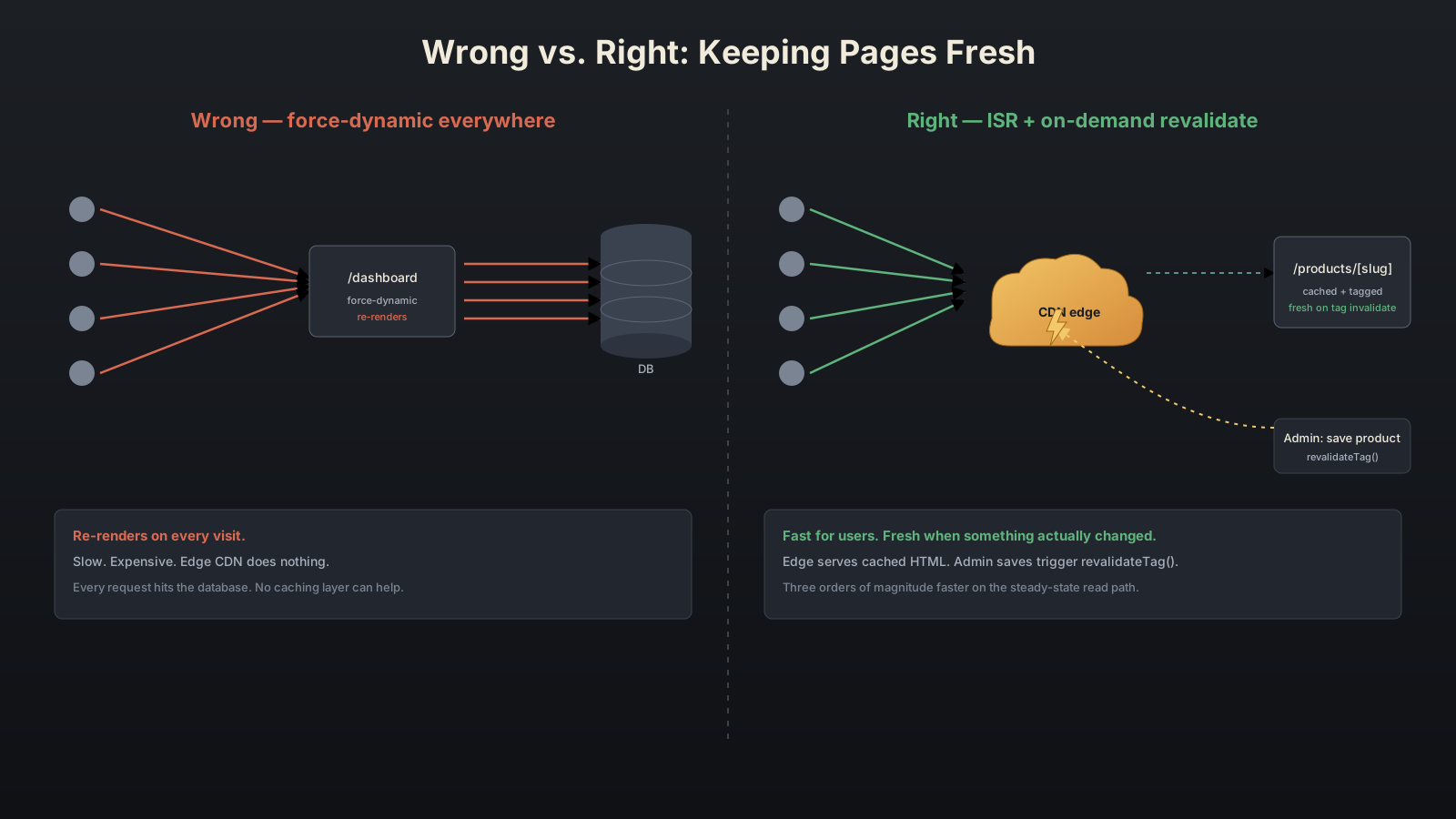
The mistake people make first is reaching for export const dynamic = "force-dynamic" because something doesn't update fast enough. That works - it kills caching for the route - but you've also killed the fast path. The page now re-renders on every request, hits the database every time, and the CDN edge can't help you. If the data only changes every few minutes, you've thrown away three orders of magnitude of performance for no good reason.
The right fix in most "stale data" cases is on-demand revalidation, not force-dynamic. You let the page stay cached, and you invalidate the cache when something changes:
import { revalidateTag } from "next/cache";

export async function POST(req: Request) {
  const { productId } = await req.json();
  await updateProduct(productId);

  revalidateTag(`product-${productId}`);
  revalidateTag("product-list");

  return Response.json({ ok: true });
}async function getProduct(slug: string) {
const res = await fetch(`${API}/products/${slug}`, {
next: { tags: [`product-${slug}`], revalidate: 3600 },
});
return res.json();
}The page stays cached. The next request after revalidateTag regenerates it. Users get static-fast pages; admins get near-instant updates when they actually change something.
The other half of the caching mistake is the opposite: you want a dynamic page, but caching sneaks in and freezes the data. The classic shape is a server component that fetches a non-trivial endpoint and forgets to mark the fetch as uncached:
async function getBilling() {
  // Whether this is cached depends on the Next.js version
  // and the request configuration - be explicit.
  const res = await fetch(`${API}/billing`);
  return res.json();
}
Whether that fetch ends up cached depends on the Next.js version, the route's other rendering signals, and a couple of project-level defaults. The fix is to stop relying on the inference. If you want fresh data, say so:
const res = await fetch(`${API}/billing`, { cache: "no-store" });And if you want it cached for a specific window, say that too:
const res = await fetch(`${API}/billing`, {
  next: { revalidate: 60, tags: [`billing-${userId}`] },
});
Being explicit at every fetch site is the cheapest way to stop guessing.
A related trap is the one where a whole route becomes dynamic from a single stray cookies() call you didn't write. Some shared util - analytics, an experiment lookup, a feature flag client - reads cookies deep in its initialization path, gets imported into a page that looks static, and the build silently flips the page to dynamic. The build output is the one place you'd notice: λ (or ƒ) instead of ○. If a route's caching matters, set export const dynamic = "error" on it. The build will fail the moment something downstream introduces a dynamic trigger, and you find out before production does.
Leaking Secrets Through The Client Bundle
This is the mistake that sometimes shows up in a security review and ruins a quarter. The Next.js bundler is willing to ship almost anything to the browser if you import it the wrong way, and "the wrong way" is easy to do by accident.
The most common shape is the NEXT_PUBLIC_ prefix used on something that shouldn't be public. The rule is simple: any env var whose name starts with NEXT_PUBLIC_ is embedded in the client bundle at build time. If you wrote NEXT_PUBLIC_STRIPE_SECRET_KEY=sk_live_... in your .env.local because you wanted it available everywhere, congratulations - your Stripe secret key is now sitting in a JavaScript file your users can download.
The fix is the boring one: only NEXT_PUBLIC_ what is genuinely public (publishable Stripe keys, public analytics IDs, your site URL). For anything secret - service-role tokens, server-side API keys, DB credentials - drop the prefix and read it only from server code.
import Stripe from "stripe";

// Secret - server only. No NEXT_PUBLIC_ prefix.
const key = process.env.STRIPE_SECRET_KEY;
if (!key) throw new Error("STRIPE_SECRET_KEY missing");

export const stripe = new Stripe(key, { apiVersion: "2024-06-20" });
The subtler version of this bug is when a file that uses secrets gets imported, somewhere down the chain, into a client component. The bundler follows the import graph. If lib/stripe.ts is reachable from a "use client" file, the bundler tries to ship it. It may strip the env var (because process.env.STRIPE_SECRET_KEY only exists on the server), but it ships the rest of the file - including, in the worst cases, internal URLs, helper logic, error messages with PII, or hard-coded staging endpoints.
The official guardrail for this is the server-only package:
import "server-only";
import Stripe from "stripe";

const key = process.env.STRIPE_SECRET_KEY;
if (!key) throw new Error("STRIPE_SECRET_KEY missing");

export const stripe = new Stripe(key, { apiVersion: "2024-06-20" });
That single import does one thing: if anything tries to import this file from a client component, the build fails. It's not a runtime check - it's a build-time fence. The error message is clear enough that the person who introduced the bad import will figure it out in seconds.
There's also a client-only package that does the opposite, but it's far less critical - the cost of accidentally rendering a client-only thing on the server is a bug, not a leak.
A third leakage path that catches people: dumping objects into Server Component props. Server Components serialize their props so they can be passed to client components. If you grab a User row out of the database - including password hashes, internal flags, ban reasons - and pass it as a prop to a client component, the entire object lands in the HTML stream the client downloads. Strip server-side objects before they cross the boundary.
import { ProfileEditor } from "./ProfileEditor";
import { getUserById } from "@/lib/users";

export default async function ProfilePage() {
  const user = await getUserById(userId);
  // user has passwordHash, mfaSecret, ipHistory[]...
  return <ProfileEditor user={user} />; // all of it ships to the client
}import { ProfileEditor } from "./ProfileEditor";
import { getUserById } from "@/lib/users";
export default async function ProfilePage() {
const u = await getUserById(userId);
const profile = {
id: u.id,
name: u.name,
avatarUrl: u.avatarUrl,
bio: u.bio,
};
return <ProfileEditor user={profile} />;
}The DTO version is two lines longer and ships nothing the client doesn't need. It's also the place where a future you, three months from now, won't accidentally include a new sensitive column just because the model gained a field.
Awaiting Data In Series When You Could Await In Parallel
This one is pure performance. Server Components let you fetch data inline, which is wonderful - and dangerous, because the most natural way to write it is the slowest.
export default async function DashboardPage() {
  const user = await getUser();
  const projects = await getProjects();
  const activity = await getActivity();
  const billing = await getBilling();

  return <Dashboard user={user} projects={projects} activity={activity} billing={billing} />;
}
Each await blocks on the previous one. If getUser takes 80ms and the others each take 120ms, the page waits 80 + 120 + 120 + 120 = 440ms before it can render anything. Most of that is the network or database sitting idle, waiting for the previous round trip to finish.
Promise.all fixes it for fetches that don't depend on each other:
export default async function DashboardPage() {
  const [user, projects, activity, billing] = await Promise.all([
    getUser(),
    getProjects(),
    getActivity(),
    getBilling(),
  ]);

  return <Dashboard user={user} projects={projects} activity={activity} billing={billing} />;
}
Same data, same code, but now the four fetches run concurrently. The page waits for the slowest one (~120ms), not the sum of all four. For dashboards with five or six panels, this is the single change that moves the page from "feels heavy" to "feels normal."
When fetches do depend on each other - you need the user before you can ask for their billing org - keep them sequential, but fire the independent ones off while you wait. The pattern looks like this:
const userP = getUser();
// kick off anything that doesn't need the user
const announcementsP = getAnnouncements();

const user = await userP;
const [projects, billing, announcements] = await Promise.all([
  getProjectsForUser(user.id),
  getBillingForOrg(user.orgId),
  announcementsP,
]);
Three round trips instead of five, and the announcements call overlaps with everything.
For pages with sections that load at different speeds, Suspense gives you something better than Promise.all: progressive rendering. Each panel becomes its own server-rendered chunk, and the page streams to the client as panels resolve. The shell renders instantly, then each panel pops in independently.
import { Suspense } from "react";

export default function DashboardPage() {
  return (
    <DashboardLayout>
      <Suspense fallback={<HeaderSkeleton />}>
        <UserHeader />
      </Suspense>
      <Suspense fallback={<ProjectsSkeleton />}>
        <Projects />
      </Suspense>
      <Suspense fallback={<BillingSkeleton />}>
        <Billing />
      </Suspense>
    </DashboardLayout>
  );
}
Each <Projects /> is an async server component that does its own fetch. The slow billing query no longer blocks the projects list. The user sees real content in 100ms instead of staring at a blank screen for the full slowest-fetch duration.
A related anti-pattern is the client-side waterfall: a client component that fetches some data in a useEffect, then renders a child that fetches more data in its useEffect, and so on. This works in development with mocked data. In production, with real latency, the user watches three loading spinners appear one after another. Move the fetches to the server, fan them out with Promise.all, and you've eliminated the entire pattern.
Hammering The Database From The Wrong Place
Closely related, but worth its own mistake: the database call that ended up running on every single page render, when it should have run once a day.
This usually shows up as getCategories() or getFeatureFlags() or getCurrentRates() - some lookup table that doesn't change very often, but is needed on most pages. Someone wrote it as a normal database query in a util. It ships, traffic ramps up, and now the DB is answering the same query a few hundred times a second from server components that don't realize they all want the same answer.
A few ways to fix this, in increasing order of complexity:
The first is the request memoization that comes for free with fetch. If you fetch the same URL with the same options inside a single render, Next.js dedupes it. For fetch-based lookups, you mostly don't need to do anything - make multiple components call getCategories() and only one round trip happens.
The second is unstable_cache (or the stable cache export, depending on your Next.js version), which lets you wrap any function - including a DB query - in a Next.js-managed cache with tags and TTLs.
import { unstable_cache } from "next/cache";
import { db } from "@/lib/db";

export const getCategories = unstable_cache(
  async () => db.category.findMany({ orderBy: { name: "asc" } }),
  ["categories-all"],
  { tags: ["categories"], revalidate: 3600 },
);
Now getCategories() hits the DB at most once per hour per server instance. Every render that needs the list gets the cached array. When you actually add a category, call revalidateTag("categories") and the cache regenerates.
The third is moving the data out of the request path entirely. Stuff that genuinely doesn't change at runtime - country lists, currency codes, the set of plans you offer - can live as a TypeScript file or a JSON in the repo. No cache eviction, no warm-up, no DB. The build is the source of truth.
The one I see most often, though, is the bug that doesn't look like a database mistake at all: a server component that calls a small util, and the util - innocently - has been growing a database call inside it. Logging utilities are a classic offender. "Let me just record that this page was rendered." And then every page render in every server component now ends with an INSERT. The fix is to push that kind of side effect off the request - queue it, batch it, fire-and-forget it through a worker. Render paths should be reads, never writes.
Middleware That Runs On Everything
middleware.ts is one of the most powerful files in the App Router and one of the easiest to misuse. By default, it runs on every request to your app - every route, every page, every API call, every asset that goes through the Next.js handler. Anything you put in there runs hundreds of times a second under load.
People reach for middleware for auth ("I'll just check the session here"), feature flags ("I'll fetch flags and put them on the request"), analytics ("I'll log every page view"), or A/B test assignment ("I'll bucket users at the edge"). Each of those is reasonable in isolation. Stack three of them on top of each other and your middleware now makes three network calls to outside services on every request before your page even starts rendering.
A few things to keep in mind:
The matcher config exists for a reason. Use it. If your middleware only cares about authenticated routes, scope it:
export const config = {
  matcher: ["/dashboard/:path*", "/account/:path*", "/api/private/:path*"],
};
Now the middleware doesn't fire on /, /about, /blog, the favicon, your static assets. The cost drops by an order of magnitude.
The other thing is that the middleware runtime is edge by default, which sounds great until you realize it can't use most Node-only APIs, can't use heavy crypto libraries, and is billed differently than your server functions in many hosting setups. Long-running auth checks, JWT verification with big keys, and signed cookie operations can be surprisingly expensive at the edge. If your auth check needs more than a small JWT verify, do the gate in middleware (cheap session presence check) and the real lookup in the route (full user object from the DB or cache).
The mistake to avoid is using middleware as a hidden global layer. Anything you add there runs on requests you forgot it could run on. Anything that fails there breaks routes that have nothing to do with the middleware's purpose. Treat it as production code: scoped, tested, monitored.
Forgetting That revalidate Doesn't Mean "Refresh Now"
This one is short but bites people the first time. ISR's revalidate: 60 does not mean "refresh this page every 60 seconds." It means: serve the cached version, and once 60 seconds have passed since the last regeneration, the next request gets the old version while a background job rebuilds it. The request after that gets the fresh one.
In low-traffic situations, that "next request" might not happen for hours. You set revalidate: 60 on a page that gets one request per day, and the data is a day old every time someone visits.
Two ways to handle that:
- For pages that genuinely need fresh data and don't get steady traffic, use on-demand revalidation triggered by the thing that changes the data - a webhook, a server action, an admin save handler. Then
revalidatebecomes a safety net rather than the main refresh mechanism. - For pages where users need to see their own change immediately after they make it (cart updates, profile edits, comments they just posted), don't rely on ISR for the post-action view. Revalidate the path inside the action, then redirect. The user lands on a page that was just regenerated.
"use server";
import { revalidatePath } from "next/cache";
import { redirect } from "next/navigation";

export async function updateProfile(formData: FormData) {
  await saveProfile(formData);
  revalidatePath("/profile");
  redirect("/profile");
}
The save updates the data, the revalidate clears the cache, the redirect lands the user on the fresh page. No "why is my own edit not showing up" bug.
Treating Server Actions Like RPC
Server actions are great. They're also frequently misused as a generic "send data to the server" mechanism, which they're not - they're tied to the page that calls them, they participate in the cache invalidation model, and they have a few sharp edges you don't notice until production.
The most common mistake is treating them as fire-and-forget mutations and skipping the revalidation. You delete an item with a server action, the database is updated, but the page still shows the old list because no cache was invalidated. Users hit refresh, the data finally updates, and they assume your app is buggy.
The fix is the same as with any other mutation: revalidate the paths and tags that depend on the data you changed.
"use server";
import { revalidatePath, revalidateTag } from "next/cache";

export async function deleteItem(id: string) {
  await db.item.delete({ where: { id } });
  revalidateTag("item-list");
  revalidatePath(`/items/${id}`);
}
The other mistake is exposing too much: server actions look like local function calls, but they're really endpoints with public surface. Validate the input as if it came from the network - because it did. zod, valibot, hand-written guards, whatever you use for API routes, you need on server actions too. Don't trust the form schema just because the form is rendered in your own app.
Shipping Without Looking At The Build Output
The single most useful debugging tool for Next.js in production isn't a dashboard - it's the route summary at the end of next build. It tells you exactly what the framework decided about every page.
Route (app)                          Size  First Load JS
○ /                              1.2 kB         84 kB
○ /about                          900 B         82 kB
ƒ /api/auth                          0 B          0 B
λ /dashboard                     12.4 kB        220 kB
● /blog/[slug]                    3.1 kB        118 kB
Three things to look for, every time:
- Anything you expected to be static (
○) showing up as dynamic (λ/ƒ). That's the framework telling you it found a dynamic trigger you didn't intend. - A First Load JS number that's too big on a page that should be light. Big numbers are usually
"use client"directives somewhere you didn't realize. - Routes you forgot you had. The build summary is the most honest map of your app.
Three minutes of looking at this every release will catch more bugs than most test suites.
What's Worth Remembering
None of these mistakes are mysterious once you know to look for them. The pattern is always the same: Next.js made the easy version of the wrong thing slightly too easy, and a habit hardened around it before anyone noticed the cost.
The remedies are correspondingly boring. Push "use client" down to the leaves. Be explicit about every fetch's cache settings. Use server-only and DTOs to keep boundaries clean. Use Promise.all and Suspense to fan out fetches. Scope middleware tightly. Look at the build output. Revalidate when things change instead of forcing dynamic everywhere.
The good news is that Next.js, more than most frameworks, rewards small fixes disproportionately. One Promise.all move can cut a dashboard's load time in half. One "use client" removed from a layout can shrink the bundle by hundreds of kilobytes. One revalidateTag call can convert a hot SSR endpoint into a cold static one. You don't need to rewrite the app - you need to walk through the request path with a critical eye and ask, at each step, does this need to be this expensive?
Usually the answer is no.