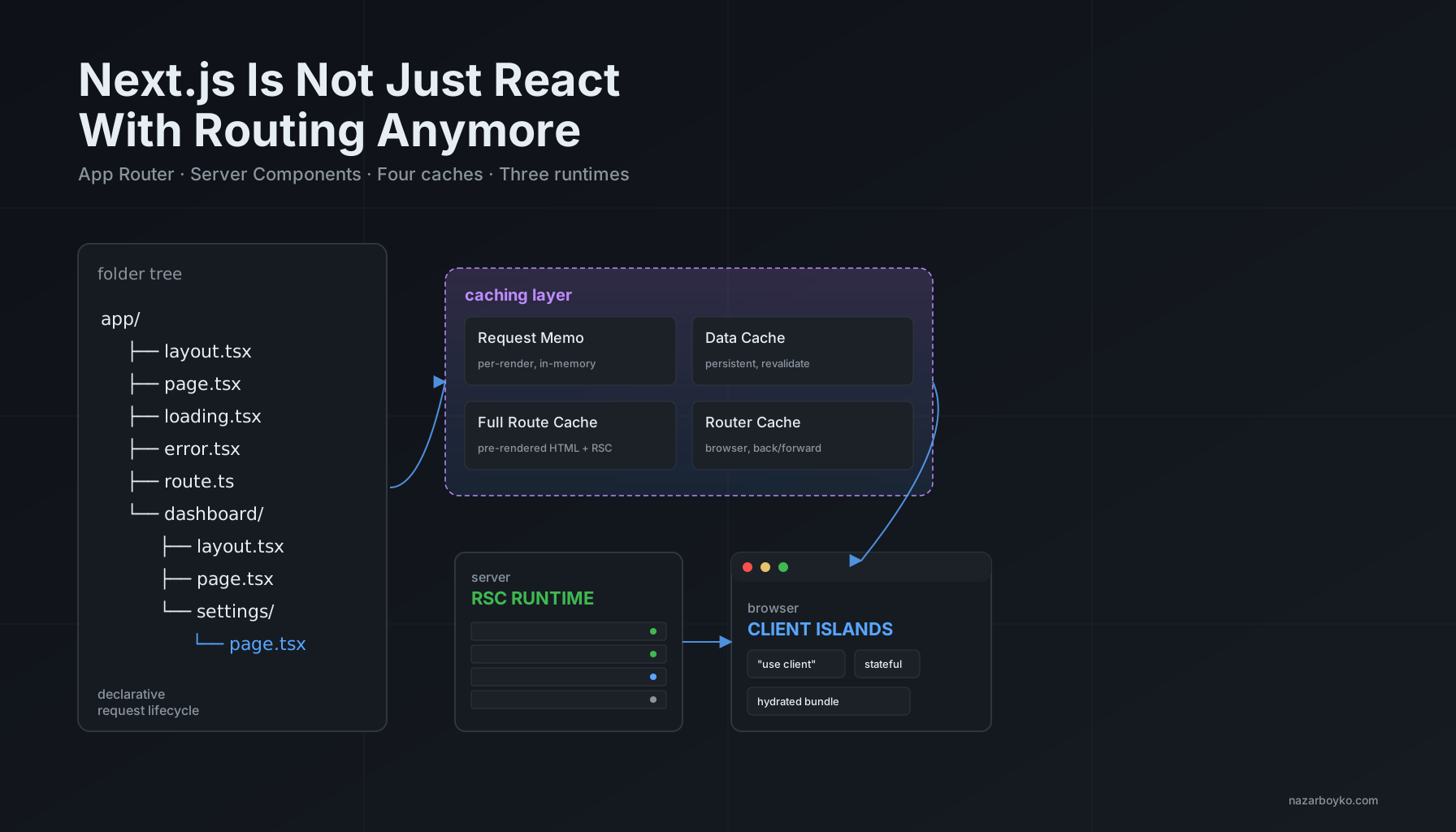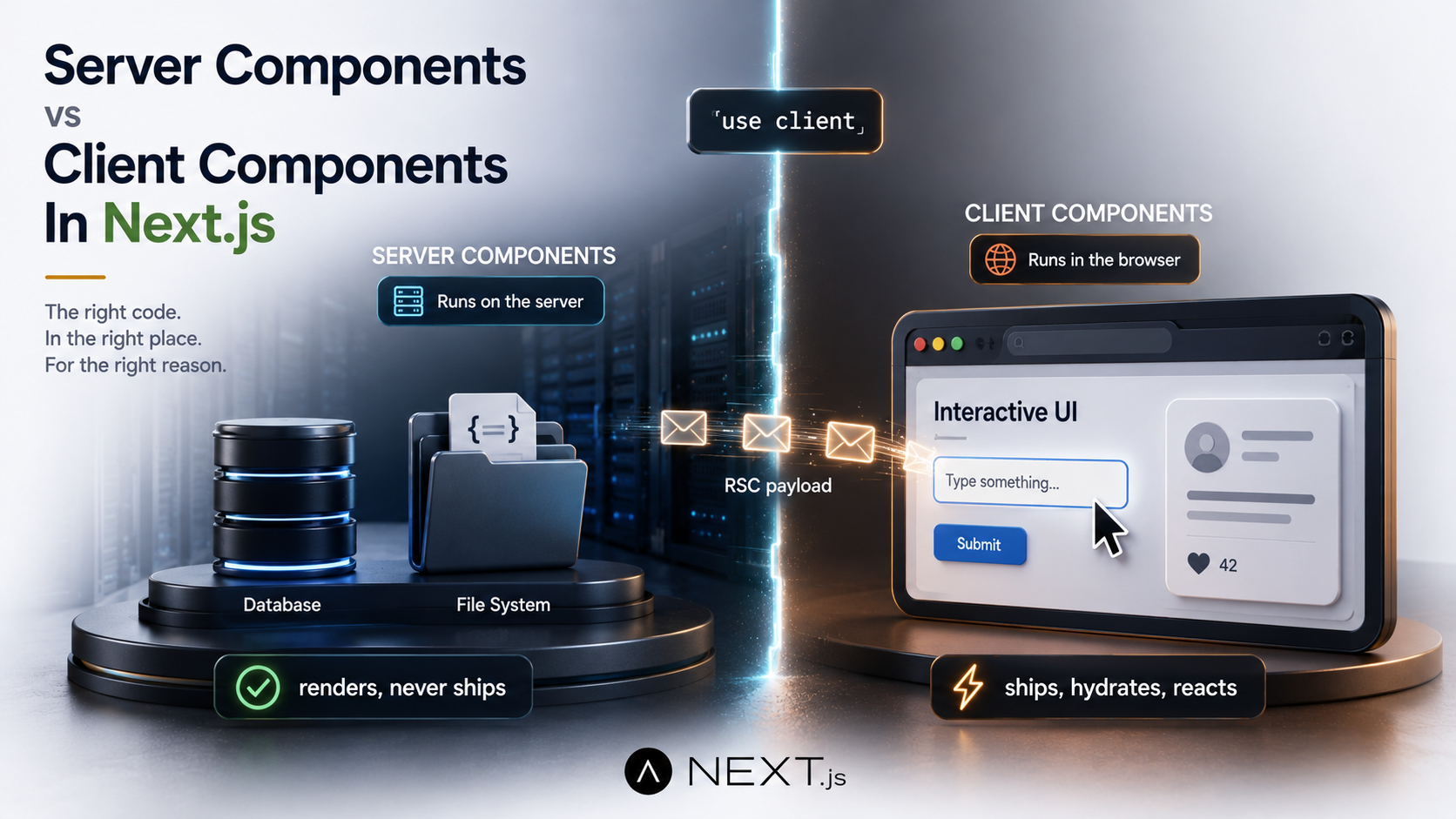
So you've got an App Router project in front of you, and at the top of half your files there's a little "use client" directive, and at the top of the other half there's nothing at all. You sort of know one is "server" and one is "client". You sort of know why. But the first time you try to add a useState to a page that fetches data from a database, or pass a function as a prop across that invisible line, something breaks in a way the error message doesn't quite explain.
The split between Server Components and Client Components is the single biggest mental model change in modern Next.js. It's not a perf optimization you can ignore. It's the foundation the rest of the framework sits on. Once you understand what actually runs where, and what crosses the boundary in between, most of the weird errors stop being weird.
Let's break the whole thing down. What each kind of component actually does. How the boundary works under the hood. What you can and can't pass across it. And the handful of gotchas that bite everyone the first time.
A Quick Bit Of History So The Defaults Make Sense
React Server Components are not a Next.js invention. The original RFC dropped on December 21, 2020, from the React team itself, in a post titled Introducing Zero-Bundle-Size React Server Components. The whole pitch in that announcement was right there in the title: components that render on the server and ship zero JavaScript to the browser.
Then it sat in research for years. RSCs went into React canary in 2023, and finally shipped as part of stable React 19 in 2024. Next.js was the first major framework to wire them into a real production-ready router, that's the App Router you're using today.
The reason this matters: when you're reading old Stack Overflow answers, blog posts written for Next.js 12, or even some current tutorials that haven't been updated, the assumption is often that "React" means "everything runs in the browser, with a server pre-rendering it for the first paint". In the App Router, that default flipped. Now everything is a Server Component unless you opt out with "use client". The mental model inverted, and a lot of code patterns that used to be normal are now mistakes.
Server Components: The Default You Get For Free
A Server Component runs on the server. Once. Per request, or once at build time, depending on whether the route is dynamic or static. Its code never gets bundled into the JavaScript that ships to the browser. The output of its render, the React tree it produces, is what gets sent to the client, but the component function itself stays on the server forever.
That sounds simple until you realize what it unlocks. You can write code like this:
import { db } from "@/lib/db";

export default async function DashboardPage() {
  const projects = await db.project.findMany({
    where: { archived: false },
    orderBy: { updatedAt: "desc" },
  });

  return (
    <ul>
      {projects.map((p) => (
        <li key={p.id}>{p.name}</li>
      ))}
    </ul>
  );
}
That's a real React component that talks directly to a database. No API route. No useEffect. No loading state. No getServerSideProps. The function is async, you await the query right inline, and the result becomes the rendered output. The database driver, the Prisma client, the credentials, the SQL, none of it ends up in the browser bundle. The user just sees the rendered list.
This is also why the framework happily lets you do things in Server Components that would be a disaster in client code. You can read environment variables that aren't prefixed with NEXT_PUBLIC_. You can use fs to read a file from disk. You can call internal-only APIs without worrying about CORS or auth tokens leaking. The code doesn't live in the user's browser, so the surface area for leaks shrinks dramatically.
What you give up in exchange: every interactive thing React has ever been famous for. No useState. No useEffect. No event handlers. No browser APIs. No useContext consumption. Server Components run once, produce HTML, and then they're done. They don't re-render in response to clicks. That's a Client Component's job.
Client Components: The Opt-In, Not The Default
A Client Component is what you get when you put "use client" at the top of a file. The name is misleading, and it's the source of about 80% of the confusion people have with the model. Let me say this directly because everyone gets it wrong at first:
Client Components are server-side rendered too. During the initial request, Next.js runs both your Server Components and your Client Components on the server to produce the HTML the user sees on first paint. The difference is that the Client Component's JavaScript also travels to the browser, where React re-runs it, attaches event handlers, hooks up state, and makes it interactive. The Server Component never makes that second journey.
That hydration step is what costs you. Every Client Component you add increases the bundle size, the hydration time, and the JavaScript the browser has to parse and execute before the page becomes interactive. So the practical question stops being "should this be a Client Component?" and becomes "how much of this tree actually needs to hydrate?".
Here's a Client Component:
"use client";

import { useState } from "react";

export function LikeButton({ initialCount }: { initialCount: number }) {
  const [count, setCount] = useState(initialCount);

  return (
    <button onClick={() => setCount(count + 1)}>
      Liked {count} times
    </button>
  );
}
That "use client" directive at the top is doing a lot of work. It's not just a label. It's marking the boundary. Once that file is a Client Component, everything it imports, directly or transitively, also becomes part of the client bundle. If LikeButton imports a 200kb chart library, that 200kb is now in the user's download. Even if you only show the button on one page.
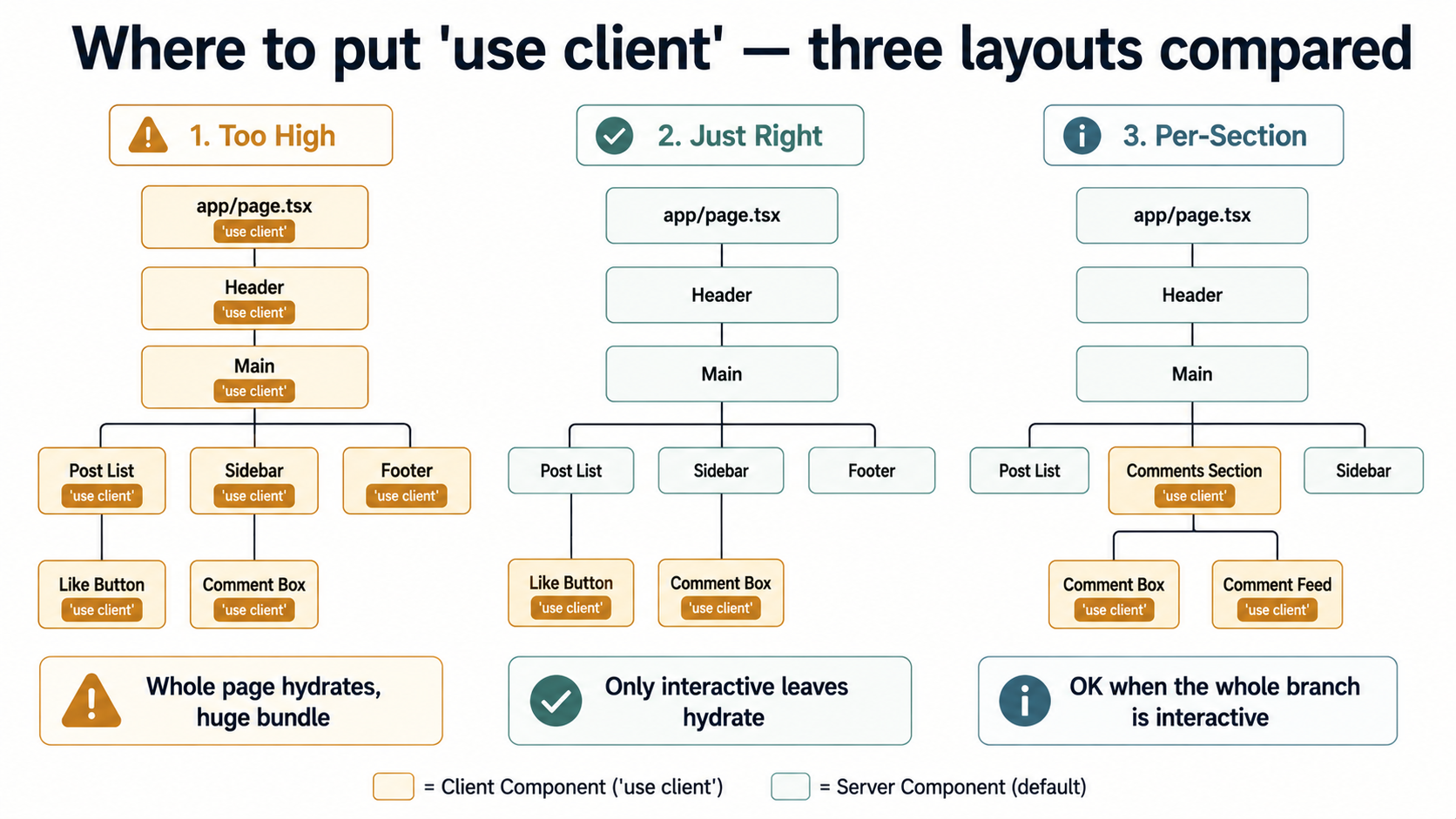
This is why people say "push use client as deep into the tree as possible". The directive defines a boundary; everything above the boundary stays on the server, and everything imported by code below the boundary ships to the browser. Putting "use client" at the top of your root layout would turn your entire app into a Client Component tree, which would defeat the whole point of the model.
How The Boundary Actually Works Under The Hood
Here's the part nobody really explains in the docs. When you request a page in the App Router, here's what happens, roughly:
- Next.js identifies the route and starts rendering on the server. It walks your component tree from the top.
- For every Server Component, it runs the function, gets the result, and adds it to a special data structure called the RSC Payload.
- When it hits a
"use client"boundary, it doesn't render that component on the server in the RSC pass. Instead, it puts a placeholder in the payload, something like "this slot is filled by theLikeButtoncomponent, here are its props, and here's the URL of its JavaScript file". - The serialized RSC Payload, that mix of rendered Server Component output and Client Component placeholders, is sent to the browser, along with the actual HTML for first paint (produced by a separate server-side render that includes both kinds of components, just for the initial HTML response).
- The browser parses the HTML, paints it, and then loads only the Client Component JavaScript bundles. React hydrates those placeholders into live, interactive components.
The RSC Payload isn't JSON, by the way. It's a custom serialization format the React team designed specifically for this. It can encode things JSON can't, Promises, for instance, so a Server Component can stream a partially-resolved tree to the client and the client can wait on the rest. That's the foundation Suspense + streaming is built on.
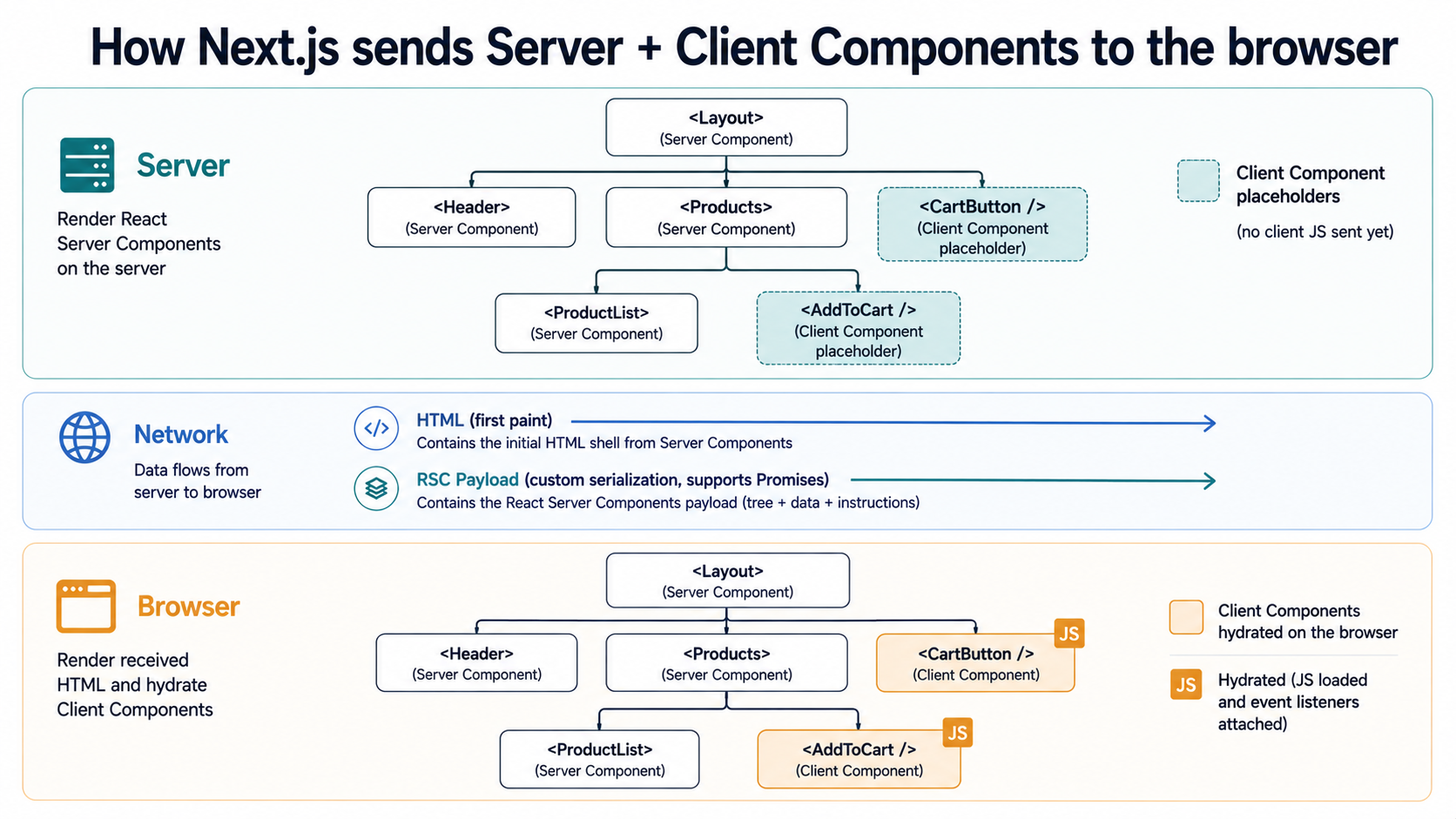
The big takeaway: the "use client" directive is not where rendering happens. It's where the bundle split happens. Server Components are server-only, and the framework guarantees their code never leaves the machine. Client Components render in both places, with the client render being the one that gives you interactivity.
What Lives Where: A Practical Cheat Sheet
| Feature | Server Component | Client Component |
|---|---|---|
useState, useEffect, useReducer |
❌ | ✅ |
Event handlers (onClick, onChange) |
❌ | ✅ |
Browser APIs (window, document, localStorage) |
❌ | ✅ |
useContext to read context |
❌ | ✅ |
| Direct database access | ✅ | ❌ |
async/await directly in the component |
✅ | ❌ (mostly, see below) |
Reading cookies() and headers() |
✅ | ❌ |
| Reading server-only env vars | ✅ | ❌ |
Importing fs, path, server-only libraries |
✅ | ❌ |
| Adds to the client bundle | ❌ | ✅ |
| Re-renders on state change | N/A | ✅ |
The general rule: Server Components are for data and structure. Client Components are for anything that needs to react to the user.
The Bundle Size Story, With Numbers
Here's where the model pays for itself. Consider a moderately complex blog post page: a header, a sidebar, the main article content, a comments section that needs to update in real time, a like button, and a footer.
In the Pages Router world, you had two choices. Either you used getServerSideProps and shipped a full hydration bundle for the entire tree (every component, every dependency, every helper utility), or you used static generation and did the same thing but at build time. The point is, the entire React tree had to hydrate. Even the static parts. Because React on the client didn't know which parts of the tree it could safely skip.
In the App Router with Server Components, the header, sidebar, article content, and footer all stay on the server. Their code, their markdown parser, their syntax highlighter, none of it ships. Only the comments section and the like button are Client Components, and only their code travels to the browser. If the comments component uses a 50kb WebSocket library and the like button uses 2kb of state logic, your client bundle is roughly that, plus React itself plus the Next.js runtime. Not the whole page.
The official Next.js docs phrase the strategy as "push the use client boundary as deep as possible". That's the bundle-size argument. The deeper you push it, the more of your tree stays on the server and never adds to the download. A common antipattern is wrapping a whole page in "use client" because one button needs state. That hydrates the entire page for the sake of one interactive element, and you've thrown away most of what the model gives you.
What Can Cross The Boundary
This is where most of the "why does my code break" moments come from. Server Components can pass props to Client Components, but those props have to be serializable. The framework runs them through that custom serialization format we talked about, and anything it can't serialize either crashes the build or fails silently at request time.
What's serializable:
- Primitives: strings, numbers, booleans,
null,undefined - Arrays and plain objects containing serializable things
- Dates (in modern React)
PromiseandSet(those are the extras that JSON.stringify can't do)- React elements (rendered output of other Server Components)
What's not:
- Functions, including arrow functions and class methods (with one exception we'll get to)
- Class instances, anything constructed from a class with prototype methods, like a Prisma
Decimal, a Mongoose document, an ORM model - Symbols, Maps, WeakMaps, WeakSets
- Anything with a circular reference
The class-instance one bites hard. If you fetch a row from Prisma in a Server Component and pass it down to a Client Component as a prop, anything that's a Decimal or a BigInt field will either lose precision, turn into a string, or fail. The fix is to convert ORM rows into plain objects before crossing the boundary, JSON.parse(JSON.stringify(row)) works in a pinch but is heavy-handed; a typed mapper is cleaner.
The exception to "no functions" is a Server Action, a function declared with "use server" either at the top of an async function or at the top of an entire file. Those can be passed as props to Client Components, and they end up on the client as a callable reference that, when invoked, does an RPC back to the server. The arguments and return value still have to be serializable, though.
The Big Gotcha: Client Components Can't Import Server Components
This one stops everyone the first time. The rule:
"use client";

import { ServerSidebar } from "./server-sidebar"; // ❌ This is wrong

export function ClientWrapper() {
  return (
    <div>
      <ServerSidebar />
    </div>
  );
}
That looks like it should work. It doesn't. The moment a file is a Client Component, everything it imports becomes part of the client bundle, and a Server Component, by definition, can't be in the client bundle. Next.js will silently convert ServerSidebar into a Client Component if you try this, which is almost never what you want.
The workaround is the composition pattern: instead of importing the Server Component, accept it as children or a prop.
"use client";

export function ClientWrapper({ children }: { children: React.ReactNode }) {
  return <div>{children}</div>;
}import { ClientWrapper } from "@/components/client-wrapper";
import { ServerSidebar } from "@/components/server-sidebar";
export default function Page() {
return (
<ClientWrapper>
<ServerSidebar />
</ClientWrapper>
);
}Now the parent, the Server Component, is doing the import. The ServerSidebar renders on the server, its rendered output is part of the RSC payload, and it gets slotted into the children placeholder of the ClientWrapper on the client. The ClientWrapper never imported ServerSidebar; it just received its already-rendered output as a prop. The bundle stays clean.
This pattern shows up constantly. Theme providers. Modal containers. Layout wrappers with interactive behavior. Anywhere you need a Client Component to be the outer shell of something that's mostly server-rendered content.
Context Providers: A Quiet Footgun
If you've used React for a while, your reflex when you need to share state across the tree is "reach for Context". In the App Router, this works, but with a twist: Context only works in Client Components. You can't create a Context, provide it in a Server Component, and have other Server Components consume it. It's just not a thing the model supports.
The standard pattern is to make a thin client wrapper:
"use client";

import { createContext, useContext, useState } from "react";

const ThemeContext = createContext({ theme: "light", toggle: () => {} });

export function ThemeProvider({ children }: { children: React.ReactNode }) {
  const [theme, setTheme] = useState("light");
  const toggle = () => setTheme((t) => (t === "light" ? "dark" : "light"));
  return (
    <ThemeContext.Provider value={{ theme, toggle }}>
      {children}
    </ThemeContext.Provider>
  );
}

export const useTheme = () => useContext(ThemeContext);
Then in your root layout, which is a Server Component:
import { ThemeProvider } from "@/components/theme-provider";

export default function RootLayout({ children }: { children: React.ReactNode }) {
  return (
    <html lang="en">
      <body>
        <ThemeProvider>{children}</ThemeProvider>
      </body>
    </html>
  );
}
Because ThemeProvider is the boundary, everything inside children can still be a Server Component. The provider itself is client, but the children it wraps are not automatically converted, they're rendered on the server and slotted in. The context is only consumable by other Client Components below it.
The other half of this gotcha: any Server Component descendant can't call useTheme(). So if you need theme-aware logic in something that's currently a Server Component, you have to either pull that piece into a Client Component, or pass the theme value down through props.
Data Fetching: The Pattern That Actually Works
In a Server Component, fetching data is just await. You don't need React Query, you don't need SWR, you don't need a separate API route. The framework handles caching, deduplication, and request memoization for you (by default, and yes, that default has its own gotchas, which we'll get to).
async function getPost(slug: string) {
  const res = await fetch(`https://cms.example.com/posts/${slug}`);
  if (!res.ok) throw new Error("Post not found");
  return res.json();
}

export default async function PostPage({ params }: { params: { slug: string } }) {
  const post = await getPost(params.slug);

  return (
    <article>
      <h1>{post.title}</h1>
      <div>{post.body}</div>
    </article>
  );
}
That's a fully working page. No loading state component required (the parent layout's loading.tsx handles that). No client-side data fetching. The post is fetched on the server, rendered to HTML, and the user gets a fully populated page on first response.
In a Client Component, you can't await at the top level. You have to use something like the use hook (React 19+) to unwrap a promise, or fall back to the old useEffect + state pattern, or use a library like React Query for caching. This is by design, Client Components run in the browser, where blocking on a fetch during render would block the UI.
The pattern that catches people: when you fetch in a Server Component, the request happens once on the server, the result goes into the rendered HTML, and the data never lives in JavaScript on the client. So you can't useState from it in a Client Component child without explicitly passing it down as a prop. The data went from server to HTML; it didn't become a JavaScript object that lives in the browser.
A Few Gotchas That Bite Everyone
These are the ones I see come up most often.
The fetch caching default. Next.js used to aggressively cache fetch calls in Server Components by default, which meant the same URL with the same options would return cached data even when you didn't want it to. This is opt-out, not opt-in. To get a fresh request every time, you have to pass { cache: 'no-store' } or use the new 'use cache' directive in newer versions. Forgetting this is how you end up with a dashboard showing "live" data that's actually stuck on whatever shipped at build time.
Suspense boundaries must be above async components. If you have an async Server Component and you want to wrap it in <Suspense> to show a loading fallback, the Suspense has to be the parent of the async component, not inside it. Inside the async component, the await blocks the render before Suspense can do anything. People write it inside-out and wonder why the fallback never shows.
Build-time vs request-time fetches. During next build, your Server Components run too, that's how static pages get generated. If your component fetches from an internal API route on localhost, that fetch will fail at build time because there's no server running yet. The fix is to call your data layer directly (the database, the function, the CMS SDK) instead of going through /api/* from a Server Component on the same app. There's no network hop to save by going through the API route, and the build will break.
The whole-page hydration mistake. Adding "use client" to a route's top-level page component because you need one interactive widget is the most common bundle-size mistake. Push it down. Make the interactive widget the only thing that's a Client Component, and let the rest of the page stay on the server. Your bundle will thank you.
Mixing concerns in one file. A file is either a Server Component file or a Client Component file. You can't have both kinds of components defined in the same file unless that file is a Client Component file (and then everything in it is client). When in doubt, split into two files and let the imports tell the framework where the boundary is.
When To Reach For Each One
If I had to compress the whole decision down to three lines, they'd go something like this. Default everything to a Server Component, because that's the model's default and the bundle pays for it. Add "use client" only when you actually need state, a browser API, a hook that doesn't work on the server, or an event handler. And when you do, push it down to the smallest component that needs it, not the whole route.
That's it. Everything else, the caching, the serialization rules, the import constraints, the context patterns, falls out of getting that one decision right consistently.
The model takes a few projects to internalize. The first time you build a real app with it, you'll over-use "use client", you'll hit the import-server-from-client error, you'll wonder why your function-as-prop is throwing, and you'll forget that Context doesn't propagate to Server Components. That's fine. Every one of those mistakes teaches you the same lesson from a different angle: the boundary is real, it's structural, and the framework will hold you to it.
Once it clicks, you start writing code that does in 50kb of client bundle what used to take 500kb. Pages get faster. Time-to-interactive drops. The mental load of "what runs where" stops being a question you ask on every file and becomes background knowledge. That's the moment Server Components stop feeling like a constraint and start feeling like the unlock they were designed to be.