
You've seen this pattern even if nobody named it for you:
<Tabs defaultValue="general">
  <Tabs.List>
    <Tabs.Trigger value="general">General</Tabs.Trigger>
    <Tabs.Trigger value="security">Security</Tabs.Trigger>
  </Tabs.List>
  <Tabs.Content value="general">…</Tabs.Content>
  <Tabs.Content value="security">…</Tabs.Content>
</Tabs>
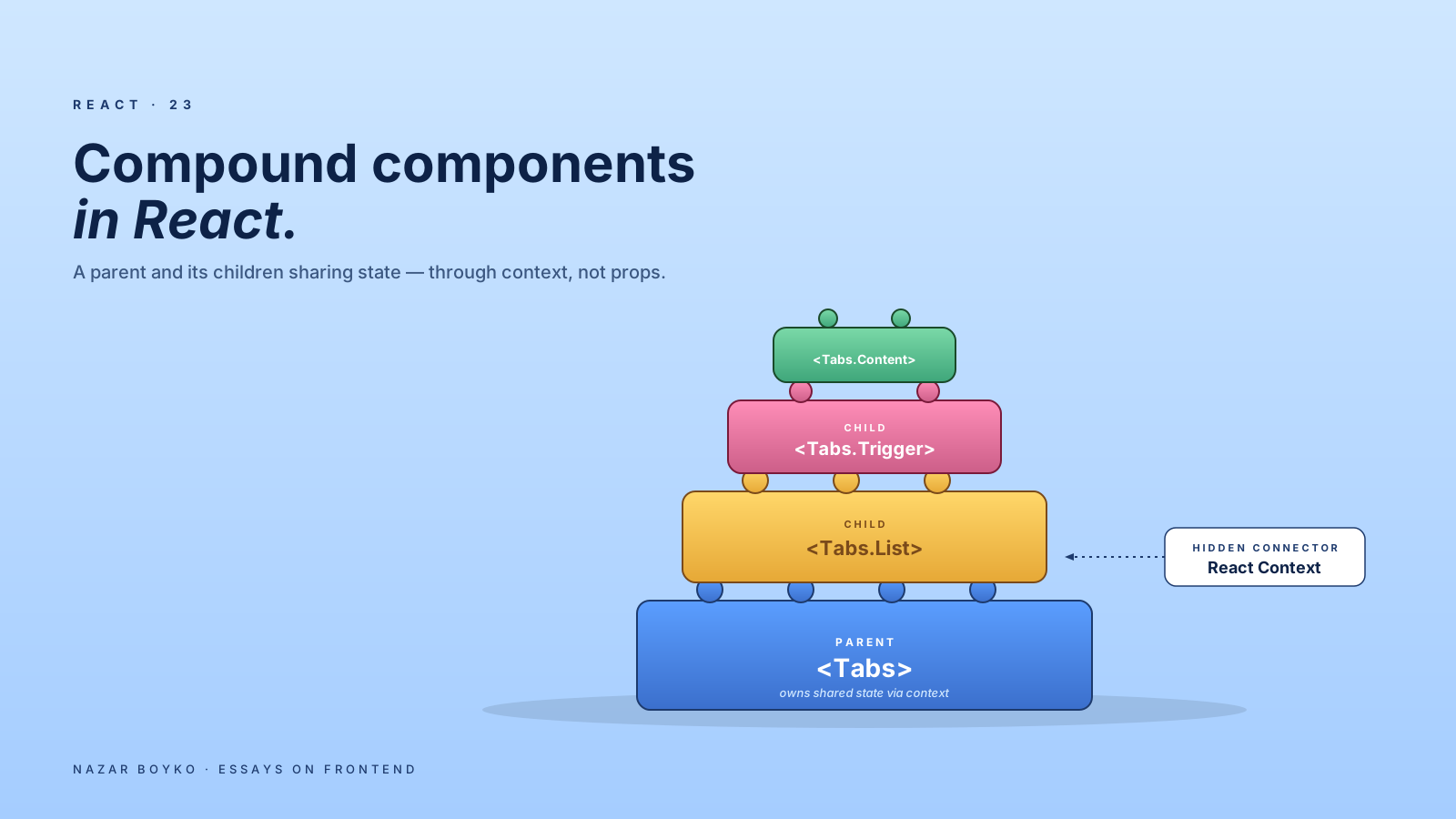
That's a compound component. The parent (Tabs) and its children (Tabs.List, Tabs.Trigger, Tabs.Content) work together as a unit, sharing state implicitly without you wiring it up by hand. It's one of the cleanest patterns React has, and it's how almost every modern UI library (Radix, React Aria, Headless UI, MUI's newer APIs) shapes its complex components.
This article is about how the pattern works under the hood, when it earns its keep, and the small ways it can go wrong.
What "Compound" Actually Means
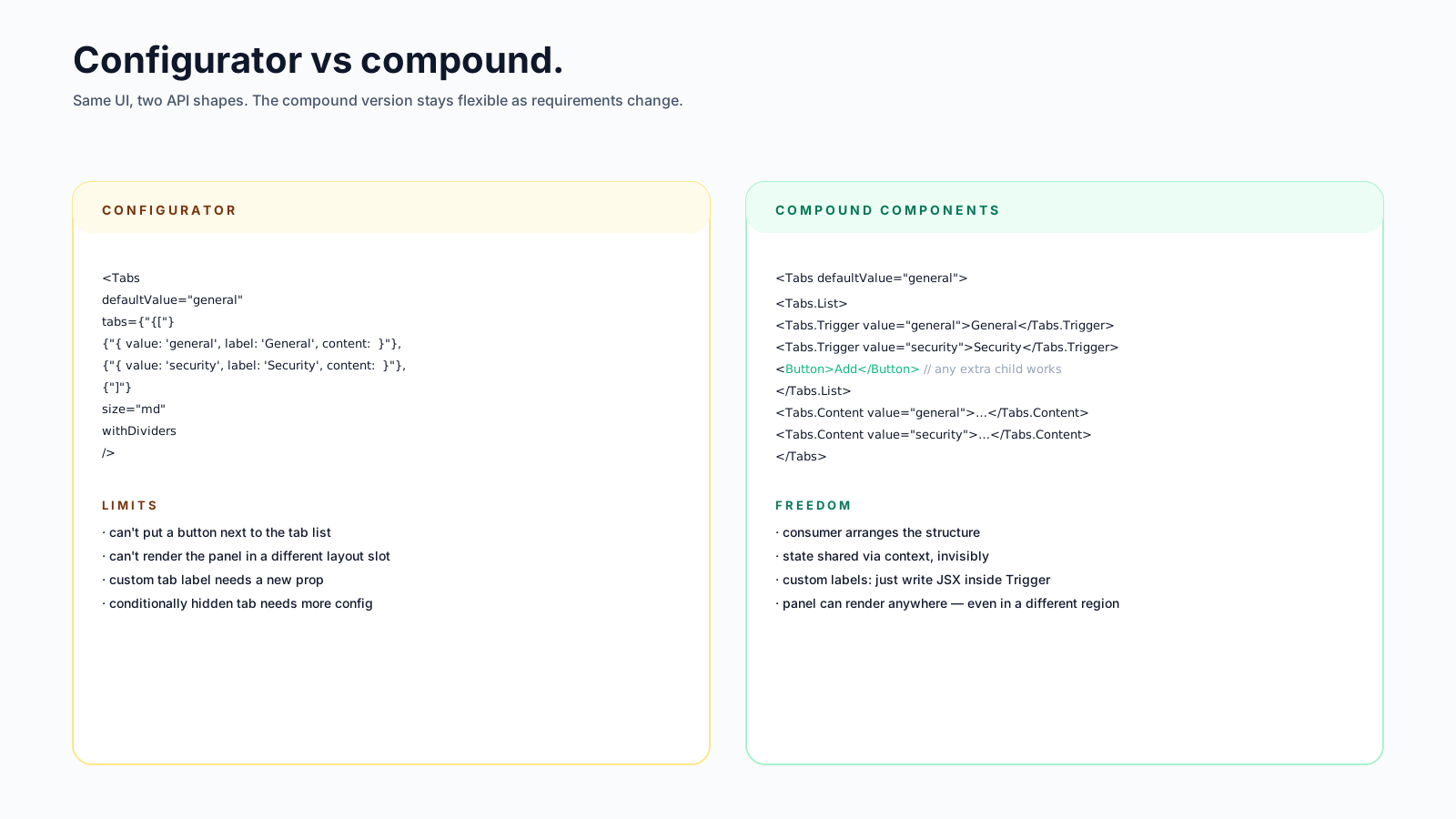
The classic alternative to compound components is the configurator — one component with a long props list:
<Tabs
  tabs={[
    { value: 'general', label: 'General', content: <General /> },
    { value: 'security', label: 'Security', content: <Security /> },
  ]}
  defaultValue="general"
/>
This works for trivial cases. It falls apart the moment a consumer wants something the configurator didn't anticipate: a custom tab label with an icon, an inline action button next to the tab list, a tab that's hidden conditionally, a custom layout where the content panel sits in a different part of the page.
Compound components solve this by letting the consumer compose the structure. The parent gives the children access to shared state (active tab, selected value, open state) and the children render however they want.
How They Communicate
Under the hood, compound components share state in one of two ways. Most modern implementations use context:
const TabsContext = createContext(null);

export function Tabs({ defaultValue, value, onValueChange, children }) {
  const [internal, setInternal] = useState(defaultValue);
  const isControlled = value !== undefined;
  const current = isControlled ? value : internal;

  const change = (next) => {
    if (!isControlled) setInternal(next);
    onValueChange?.(next);
  };

  return (
    <TabsContext.Provider value={{ value: current, onChange: change }}>
      <div className="tabs">{children}</div>
    </TabsContext.Provider>
  );
}

Tabs.List = function TabsList({ children }) {
  return <div role="tablist">{children}</div>;
};

Tabs.Trigger = function TabsTrigger({ value, children }) {
  const ctx = useContext(TabsContext);
  if (!ctx) throw new Error('Tabs.Trigger must be inside <Tabs>');

  const selected = ctx.value === value;
  return (
    <button
      role="tab"
      aria-selected={selected}
      onClick={() => ctx.onChange(value)}
    >
      {children}
    </button>
  );
};

Tabs.Content = function TabsContent({ value, children }) {
  const ctx = useContext(TabsContext);
  if (ctx.value !== value) return null;
  return <div role="tabpanel">{children}</div>;
};
A small but real example. Three things to notice:
- The state lives in
Tabs. Children read it via context. The consumer sees a clean structural API; the wiring is invisible. - The component supports both controlled and uncontrolled mode. If
valueis passed, the parent owns it; otherwiseTabsmanages its own. - The throw on missing context is the defensive guardrail. Using
Tabs.Triggeroutside<Tabs>produces a clear error, not a confusing blank screen.
That's the whole pattern in essence.
When To Reach For It
Compound components shine when:
- The component has multiple distinct child slots that the consumer wants control over (Tabs has triggers and panels; Select has a button, options, dividers, groups).
- Children need shared state (which tab is active, which option is selected, whether the disclosure is open).
- Layout is flexible — the consumer might want the trigger in one place and the content in another, or might want to add custom UI between them.
- You want to mirror the structure of the underlying widget (a tablist + tab + tabpanel maps cleanly to a
<Tabs.List>+<Tabs.Trigger>+<Tabs.Content>).
Examples where this is the obvious right shape: Tabs, Accordion, Disclosure, Select, Combobox, Dialog (Dialog.Trigger + Dialog.Content + Dialog.Title), Popover, Menu, Form (with Form.Field, Form.Label, Form.Error).
When Not To
The pattern adds files, namespaces, and a touch of magic. For a <Card>, a <Button>, a <Tooltip> with a single trigger and content — overkill. The configurator is fine when:
- The component has zero or one shared piece of state.
- There's no meaningful layout flexibility.
- The component is leaf-level (a Button doesn't need
Button.LabelandButton.Icon).
Reaching for compound components on every component is a common over-engineering mistake. The pattern earns its keep when there's real flexibility to give the consumer; otherwise it's three files where one would do.
Two Implementation Patterns
There are two common ways to expose the children:
Static properties on the parent (Tabs.List, Tabs.Trigger):
import { Tabs } from '@/components/Tabs';

<Tabs>
  <Tabs.List>…</Tabs.List>
</Tabs>
Reads naturally, autocompletes well, no extra imports. The downside is that bundlers can't tree-shake unused subcomponents — Tabs brings them all.
Named exports from the same module:
import { Tabs, TabsList, TabsTrigger, TabsContent } from '@/components/Tabs';

<Tabs>
  <TabsList>…</TabsList>
</Tabs>
More imports per file, but tree-shakeable and a bit easier to reason about for some teams. Radix uses this approach.
Both work. Pick one and be consistent across the codebase. The difference is mostly aesthetic.
Avoiding The Magic Cost
Two pitfalls show up in compound implementations:
Implicit context everywhere. A consumer who reads only the parent component's props doesn't know what state the children have access to. If the children can also dispatch actions (e.g. Tabs.Trigger setting state), the data flow is opaque. The fix is good docs and good types — the context value should have an interface that's exported, even if it's not a public consumer API.
"Helpful" auto-mapping. Some implementations try to be clever — they walk children with React.Children.map, inject props, or filter by component identity. This breaks the moment a consumer wraps a Tabs.Trigger in a custom component for tracking, or renders triggers in a .map. Stick to context: it works through any depth and any wrapper.
// ❌ breaks the moment a consumer wraps in <Tracked />
React.Children.map(children, child =>
  child.type === Tabs.Trigger ? cloneElement(child, ...) : child
);

// ✅ context works through any wrapper
const ctx = useContext(TabsContext);
Compound vs Render Props vs Hooks
Three patterns can solve overlapping problems. The rough decision:
- Compound components when the shape of the UI is composable but the behaviour should be shared and standardised. The consumer arranges the structure; the system handles state, ARIA, keyboard.
- Render props when the consumer needs full control of the output but wants the parent's logic. Less common in 2026 — hooks usually fit better.
- Hooks when you only need the behaviour, not any structural opinion.
useDisclosure()returns{ isOpen, open, close, toggle }— the consumer renders whatever they want with it.
Many libraries combine all three: a hook for headless behaviour (useTabs()), compound components for the standard layout (<Tabs.List>), and named slot components for the building blocks. Pick the layer that fits the consumer's actual need.
A Worked Example: An Accordion In Compound Style
For one more concrete example, here's how an Accordion looks in this style:
const AccordionContext = createContext(null);
const ItemContext = createContext(null);

function Accordion({ type = 'single', children, defaultValue = [] }) {
  const [open, setOpen] = useState(
    Array.isArray(defaultValue) ? defaultValue : [defaultValue]
  );

  const toggle = (value) => {
    setOpen((curr) => {
      if (type === 'single') return curr.includes(value) ? [] : [value];
      return curr.includes(value)
        ? curr.filter((v) => v !== value)
        : [...curr, value];
    });
  };

  return (
    <AccordionContext.Provider value={{ open, toggle }}>
      {children}
    </AccordionContext.Provider>
  );
}

Accordion.Item = function Item({ value, children }) {
  return (
    <ItemContext.Provider value={value}>
      <div className="accordion-item">{children}</div>
    </ItemContext.Provider>
  );
};

Accordion.Trigger = function Trigger({ children }) {
  const value = useContext(ItemContext);
  const { open, toggle } = useContext(AccordionContext);
  const isOpen = open.includes(value);

  return (
    <button
      aria-expanded={isOpen}
      onClick={() => toggle(value)}
    >
      {children}
    </button>
  );
};

Accordion.Panel = function Panel({ children }) {
  const value = useContext(ItemContext);
  const { open } = useContext(AccordionContext);
  if (!open.includes(value)) return null;
  return <div role="region">{children}</div>;
};
Used like:
<Accordion type="multiple" defaultValue={['faq-1']}>
  <Accordion.Item value="faq-1">
    <Accordion.Trigger>What is React?</Accordion.Trigger>
    <Accordion.Panel>A library for building UIs.</Accordion.Panel>
  </Accordion.Item>
  <Accordion.Item value="faq-2">
    <Accordion.Trigger>Why compound components?</Accordion.Trigger>
    <Accordion.Panel>So consumers control structure.</Accordion.Panel>
  </Accordion.Item>
</Accordion>
Two contexts (one for the accordion, one for each item) keep the children's state lookups simple. The consumer's code reads as plain HTML-like structure. Adding "expanded by default", "single vs multiple open", or even a custom layout (trigger above, panel inside a sidebar) doesn't change the API.
The Honest Summary
Compound components are not magic; they're context plus careful naming. Reach for them when you'd otherwise be inventing prop-shaped tentacles for layout flexibility. Skip them when the component is a leaf with one job.
The pattern's quiet superpower: it lets a system (the parent) own the rules — accessibility, state, keyboard navigation — while letting the consumer own the structure. That separation is why every serious headless UI library ships with this shape, and why most app-level component libraries eventually drift toward it too.






