Vue gives you three tools that all "react when something changes": computed, watch, and watchEffect. They look similar at the call site. They do very different jobs. Picking the wrong one is one of those decisions that quietly causes performance problems, infinite loops, or stale data — and the bug looks like the framework's fault until you see what's happening.
This article is the practical decision guide. What each one is for, what each one isn't, and the small set of patterns that consistently work in production code.
The One-Sentence Difference
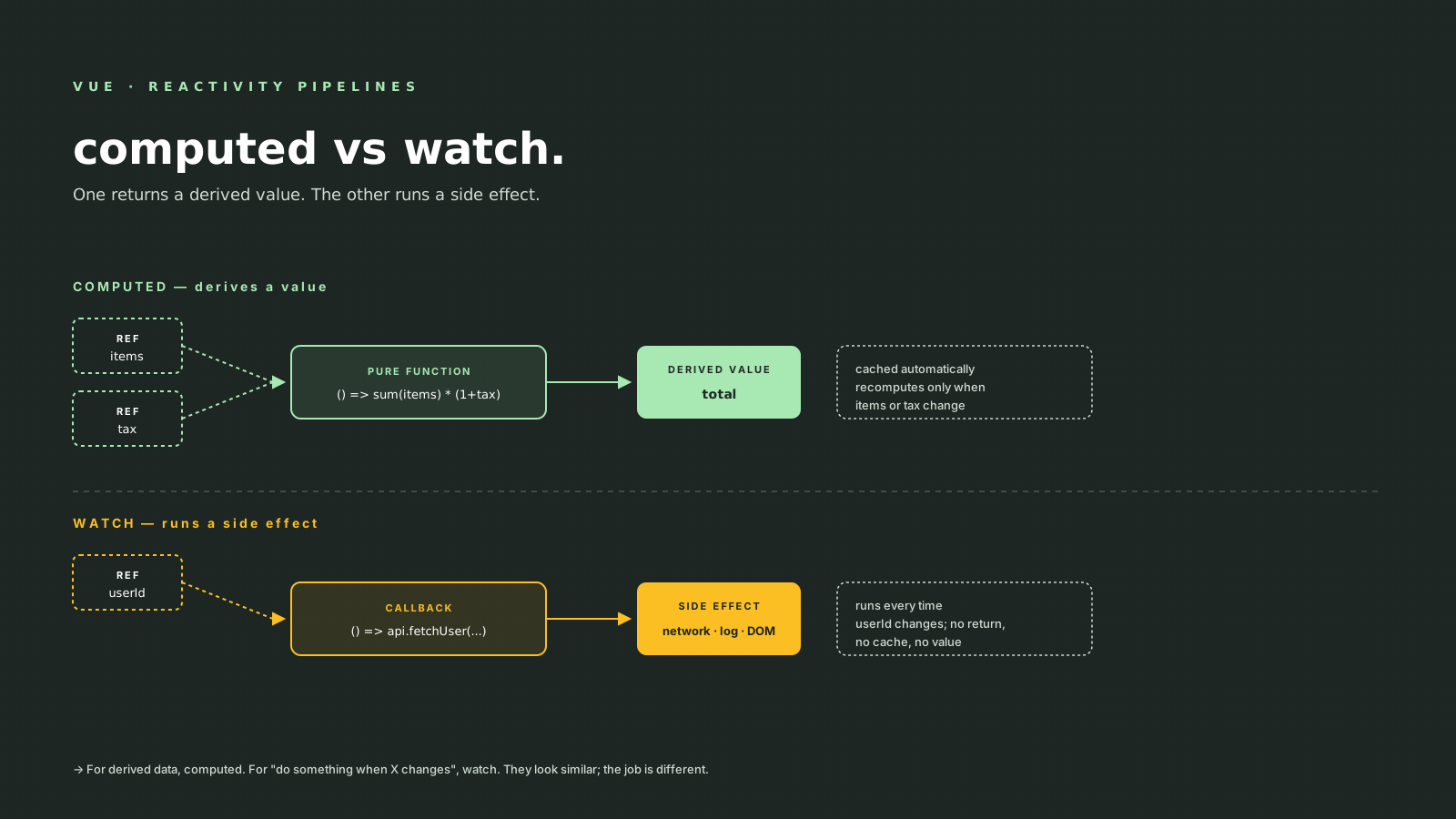
computedturns reactive inputs into a derived value. Returns something. Cached. Pure.watchruns a side effect when a specific reactive source changes. Returns nothing useful. Not cached.watchEffectiswatchwith automatic dependency tracking — useful when you want a side effect that depends on multiple sources but don't want to list them.
If you're computing a value to display, you want computed. If you're triggering something to happen (network call, log, DOM mutation, navigation), you want watch or watchEffect. Mixing the two is the source of most bugs in this corner of Vue.
What computed Actually Does
computed takes a getter function and returns a read-only ref (or a writable computed if you give it an object with get/set). The getter runs once on first access, the result is cached, and Vue tracks the reactive sources you read inside.
import { ref, computed } from 'vue'

const items = ref<Item[]>([])
const taxRate = ref(0.1)

const total = computed(() =>
  items.value.reduce((acc, i) => acc + i.price, 0) * (1 + taxRate.value)
)
Three properties make computed the right tool for derived state:
- It's cached. If
itemsandtaxRatehaven't changed, readingtotal.valuereturns the cached number — no re-computation. - It's pure. The getter shouldn't have side effects. If it does, you've probably picked the wrong tool.
- It's lazy. The getter doesn't run until something reads
total.value. If no template binds to it and no other effect reads it, it's free.
The cache is what makes computed cheap to use everywhere. You can have ten computed properties all reading the same source — Vue runs each of them once per change, and only when something needs the result.
// Writable computed — useful for v-model on derived fields
const fullName = computed({
  get: () => `${first.value} ${last.value}`,
  set: (val) => {
    [first.value, last.value] = val.split(' ')
  },
})
This is the shape that pairs nicely with form inputs that present a derived view of underlying state.
What watch Actually Does
watch takes a reactive source (a ref, a getter, an array of either) and a callback. The callback runs after the source changes, with the new and old values handed in.
import { ref, watch } from 'vue'

const userId = ref<number | null>(null)
const user = ref<User | null>(null)

watch(userId, async (newId, oldId) => {
  if (newId == null) {
    user.value = null
    return
  }
  user.value = await api.fetchUser(newId)
})
watch is for side effects — fetching data, calling an analytics SDK, syncing with localStorage, navigating, opening a modal. The callback isn't supposed to return anything; it does work.
A few options worth knowing:
watch(source, cb, {
  immediate: true,    // run the callback once on registration, with oldValue = undefined
  deep: true,         // watch nested mutations of an object/array
  flush: 'pre',       // run before component re-render (default)
                      // 'post' = after DOM update, 'sync' = synchronously on change
  once: true,         // only fire the first time the source changes
})
immediate: true is the option I reach for most often. It saves the duplicate "load on mount, reload on change" pattern:
// Before
onMounted(() => loadData(userId.value))
watch(userId, () => loadData(userId.value))

// After
watch(userId, (id) => loadData(id), { immediate: true })
deep: true is more expensive than people expect. It walks the entire object on every change, which is fine for small objects and painful for large ones. If you only care about one property, watch a getter that returns that property:
watch(() => state.user.email, (email) => {
  validate(email)
})
That's cheaper than watch(state, ..., { deep: true }) because Vue only tracks the one accessed property.
When To Use Which: A Decision Tree
The flowchart that's never failed me:
- Are you returning a value from a function of reactive state? →
computed. (Total price, formatted name, filtered list, derived URL.) - Are you doing something because a value changed? →
watch. (Fetch when ID changes, log when status changes, navigate when authentication changes.) - Are you doing a side effect with multiple reactive deps and don't want to list them? →
watchEffect. (Less common; usually you want explicit deps.) - Are you trying to mutate state inside a computed? → Stop. Move it to
watchor to an event handler.
The fourth case is the source of "infinite loop" bugs. A computed that mutates a ref inside its getter triggers itself, re-reads the ref, recomputes, mutates, and Vue eventually crashes with a recursion warning.
watchEffect — The Auto-Tracking Cousin
watchEffect runs once immediately, tracks any reactive source it reads, and re-runs whenever any of those sources change. No source argument required.
import { ref, watchEffect } from 'vue'

const userId = ref(1)
const includeArchived = ref(false)

watchEffect(async () => {
  const list = await api.list({
    userId: userId.value,
    archived: includeArchived.value,
  })
  setList(list)
})
Convenience: you don't list the deps, Vue figures them out. Trade-off: you can't see the deps at the call site, which makes the code harder to reason about during code review. The classic Vue team recommendation is watch by default, watchEffect when the dependency list is genuinely long.
watchEffect also accepts a cleanup function via onWatcherCleanup (Vue 3.5+) — useful for cancellation:
import { watchEffect, onWatcherCleanup } from 'vue'

watchEffect(async () => {
  const controller = new AbortController()
  onWatcherCleanup(() => controller.abort())

  const data = await fetch(url.value, { signal: controller.signal }).then(r => r.json())
  setData(data)
})
When the source changes (or the component unmounts), the previous request is aborted before the next one fires. This is the same shape as React's AbortController + useEffect cleanup.
Common Bugs With These Three
The patterns that bite, in roughly the order you'll meet them:
- Putting a side effect inside
computed. It works, but it's silently wrong — the side effect re-runs every time anything reads the computed, which can be many times per render. Move it towatch. - Forgetting
immediate: true. A watcher that fetches "when ID changes" doesn't fetch on the first render unless you ask for it. The duplicateonMountedis the smell. - Watching a
reactiveobject directly.watch(state, ...)implicitly creates a deep watcher (Vue does this for you). The pitfall is the opposite:newValue === oldValuebecause both reference the same proxy, so you can't compare them. If you only care about one property, watch a getter() => state.count— cheaper, and you get distinct old/new values. - Watching a destructured value.
watch(state.count, ...)watches a number (the value at the time of the call), not a reactive source. Vue will warn. Use() => state.countto wrap it as a getter. flush: 'sync'to "fix" a timing issue. Almost always the wrong answer. Sync watchers run inside the reactive setter, can re-trigger themselves, and bypass the render scheduler. Reach forflush: 'post'if you need to read the DOM after an update.- Reading the DOM in a
watchwithoutflush: 'post'. The DOM hasn't updated yet. The default is'pre', which fires before the render commits. - Infinite loops. Almost always one of: mutating state inside
computed; a watcher that mutates the source it watches; awatchEffectthat reads and writes the same ref.
A Real Worked Example
A typical "search page" controller:
import { ref, computed, watch } from 'vue'

const query = ref('')
const sortBy = ref<'name' | 'date'>('name')
const allItems = ref<Item[]>([])

// derived: filtered + sorted view of allItems
const visibleItems = computed(() => {
  const filtered = allItems.value.filter((i) =>
    i.name.toLowerCase().includes(query.value.toLowerCase())
  )
  return sortBy.value === 'name'
    ? filtered.sort((a, b) => a.name.localeCompare(b.name))
    : filtered.sort((a, b) => +b.date - +a.date)
})

// side effect: persist sort preference
watch(sortBy, (next) => {
  localStorage.setItem('sortBy', next)
})

// side effect: refetch when the query stabilises
let timer: ReturnType<typeof setTimeout>
watch(query, (q) => {
  clearTimeout(timer)
  timer = setTimeout(() => {
    refetch(q)
  }, 200)
})
computed produces what the template renders. watch runs the side effects. The split is visible at a glance, and a reviewer can tell what each piece is for without reading the whole file.
A Mental Model In One Sentence
computed is a value that updates when its inputs change. watch and watchEffect are a thing that happens when an input changes. Once you make that distinction, the choice usually picks itself — and most of the bugs in this corner of Vue stop showing up.