Memory leaks in Node.js rarely arrive with a crash. The first sign is a service that runs perfectly for an hour, gets noticeably slower by hour twelve, and gets restarted by your orchestrator at 3am with an OOM kill. The next morning the team blames "a weird spike," restarts everything by hand, and the cycle continues.
The frustrating thing about Node memory leaks is that the language is supposed to handle this for you. V8 has a generational garbage collector. References fall out of scope and get cleaned up. Most of the time, that is exactly what happens. The leaks come from the small percentage of code that holds references on purpose — caches, event listeners, closures, timers — and forgets to let go.
This article is the playbook I run when a Node service starts behaving like that. None of the tools are exotic; all of them are free.
First, Confirm It Is Actually A Leak
Memory growth on its own is not a leak. V8 grows the heap toward --max-old-space-size and only collects when it has to. The default isn't a fixed number any more — modern Node (18+) sizes the old space dynamically based on host RAM (the legacy 32-bit-era "1.5 GB" figure is misleading; on a 16 GB host it can default closer to 4 GB). The takeaway is the same either way: always set --max-old-space-size explicitly to match your container limit. A service that holds 800 MB steady-state at peak load is not necessarily leaking; it is just using memory.
The signal you want is monotonic growth that does not respond to a quiet period. Plot RSS (resident set size) and process.memoryUsage().heapUsed over time:
setInterval(() => {
  const m = process.memoryUsage();
  logger.info({
    rssMB: (m.rss / 1024 / 1024).toFixed(1),
    heapMB: (m.heapUsed / 1024 / 1024).toFixed(1),
    extMB: (m.external / 1024 / 1024).toFixed(1),
  }, 'mem');
}, 30_000);
If heapUsed keeps climbing under steady traffic, you have a leak. If it grows during a load test and falls when traffic drops, you do not — you have a service whose working set is what you measured.
Take A Heap Snapshot
The single most useful diagnostic in Node is a V8 heap snapshot. It is a capture of every object on the heap, with sizes and references, that you load into Chrome DevTools and pick apart.
Two ways to take one in production:
import { writeHeapSnapshot } from 'node:v8';

// On a signal
process.on('SIGUSR2', () => {
  const file = `/tmp/heap-${Date.now()}.heapsnapshot`;
  writeHeapSnapshot(file);
  console.log({ msg: 'snapshot.written', file });
});
Or, even simpler, start your process with --heapsnapshot-signal=SIGUSR2 and Node will write a snapshot every time you kill -USR2 <pid>. No code change required.
The workflow:
- Start the service. Hit it with a known traffic pattern. Take snapshot A.
- Run another 10 minutes of traffic. Take snapshot B.
- Open Chrome → DevTools → Memory → Load both files.
- Switch the comparison view to "Comparison" and select snapshot B vs A. Sort by
# Delta.
The objects whose count grew between A and B are your candidates. Click one to see who is keeping it alive (the "Retainers" panel). That retention chain is the bug.
The Common Suspects
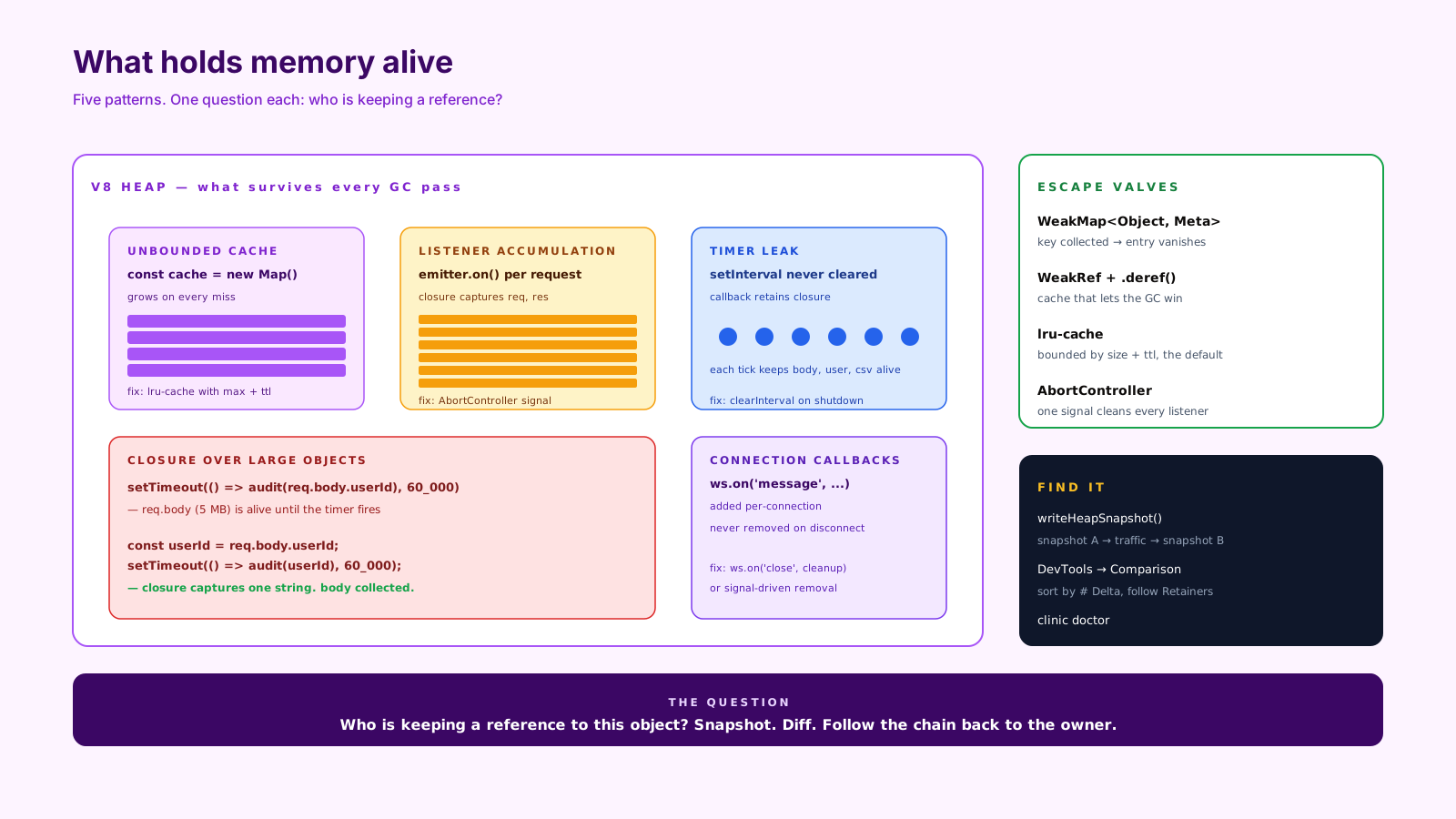
In ten years of pulling these apart, the same five patterns produce most of the leaks I see in Node services.
Unbounded caches. Someone added an in-memory cache to "just store the last few." The "last few" became "all requests since the process started." A Map that only ever grows is a leak by another name. The fix is an LRU cache with a hard size limit (lru-cache is the standard library) or a WeakMap if the keys are objects you do not control the lifetime of.
import { LRUCache } from 'lru-cache';
const cache = new LRUCache<string, User>({ max: 10_000, ttl: 60 * 60 * 1000 });
Event listener accumulation. A function that calls emitter.on(...) on every request adds a listener every request. After 10,000 requests, there are 10,000 listeners, every emit is slow, and every closure those listeners capture is retained. Node helpfully warns at 11 listeners ("Possible EventEmitter memory leak detected"); take that warning seriously.
// Wrong — adds a listener per request
app.get('/x', (req, res) => {
  someEmitter.on('event', () => res.write(...));
});

// Right — once, outside the handler, or use AbortController to clean up per-request
Closures over large objects. A timer or a promise captures the entire request context — the body, the user, the parsed CSV — and the GC cannot collect any of it until the closure is gone.
// Wrong — the whole 5MB body is alive until the timer fires
setTimeout(() => audit(req.body.userId), 60_000);

// Right — capture only what you need
const userId = req.body.userId;
setTimeout(() => audit(userId), 60_000);
Timer leaks. A setInterval you never clearInterval runs forever, which means its callback runs forever, which means everything its closure captures lives forever. unref() the timer if you do not need it to keep the process alive, and clearInterval it on shutdown.
Forgotten cleanup in long-lived connections. WebSocket handlers, SSE streams, queue subscriptions — anything that registers callbacks per connection and does not unregister them on disconnect. The pattern is the same: every connection adds, no connection removes.
clinic doctor For The First Cut
If you do not know yet whether the problem is CPU, GC, or memory, clinic doctor will tell you in one command. It runs your process under instrumentation, captures a workload, and produces a report that points at the right tool next.
npx clinic doctor -- node server.js
# in another shell
npx autocannon -c 50 -d 60 http://localhost:3000/
# Ctrl+C clinic — it opens the report
For a memory leak, the report will flag heap growth and recommend a heap snapshot diff. Now you know where to spend your afternoon.
WeakMap And WeakRef When You Need Them
The two memory primitives most Node developers underuse:
WeakMapkeys do not prevent garbage collection of the key object. If the key is collected, the entry disappears. Right for "associate metadata with an object whose lifecycle I do not control."WeakRefholds a reference to an object that does not prevent collection. You call.deref()to get the object back if it still exists. Right for caches where you want the GC to win.
const userMeta = new WeakMap<User, { lastSeen: number }>();
function touch(u: User) {
  userMeta.set(u, { lastSeen: Date.now() });
} // when User is collected, the metadata disappears too
These are not first reaches. They are the right tool when you specifically need "alive only as long as something else is alive" semantics, and they prevent a specific class of leak that LRU caches cannot.
Production Habits That Prevent Most Of This
A handful of small things go a long way:
- Set
--max-old-space-sizeto match your container memory limit minus headroom. If your container is 1 GB, run Node with--max-old-space-size=768. You want OOM at the V8 layer, not from the kernel. - Wire
process.memoryUsage()to your metrics. Aheap_used_bytesgauge with an alert on slope means you find leaks in days, not in production incidents. - Bound every cache from day one. A
Mapis not a cache; an LRU is. - Pair every
addListener,setInterval, and connection handler with the corresponding cleanup, ideally through anAbortControllerso it is one call.
A One-Sentence Mental Model
A Node memory leak is a reference you forgot you were holding — find it by snapshotting twice, diffing, and following the retention chain back to the long-lived thing that owns it.