So, you've opened a DynamoDB tutorial, and somewhere around the third page you noticed something strange.
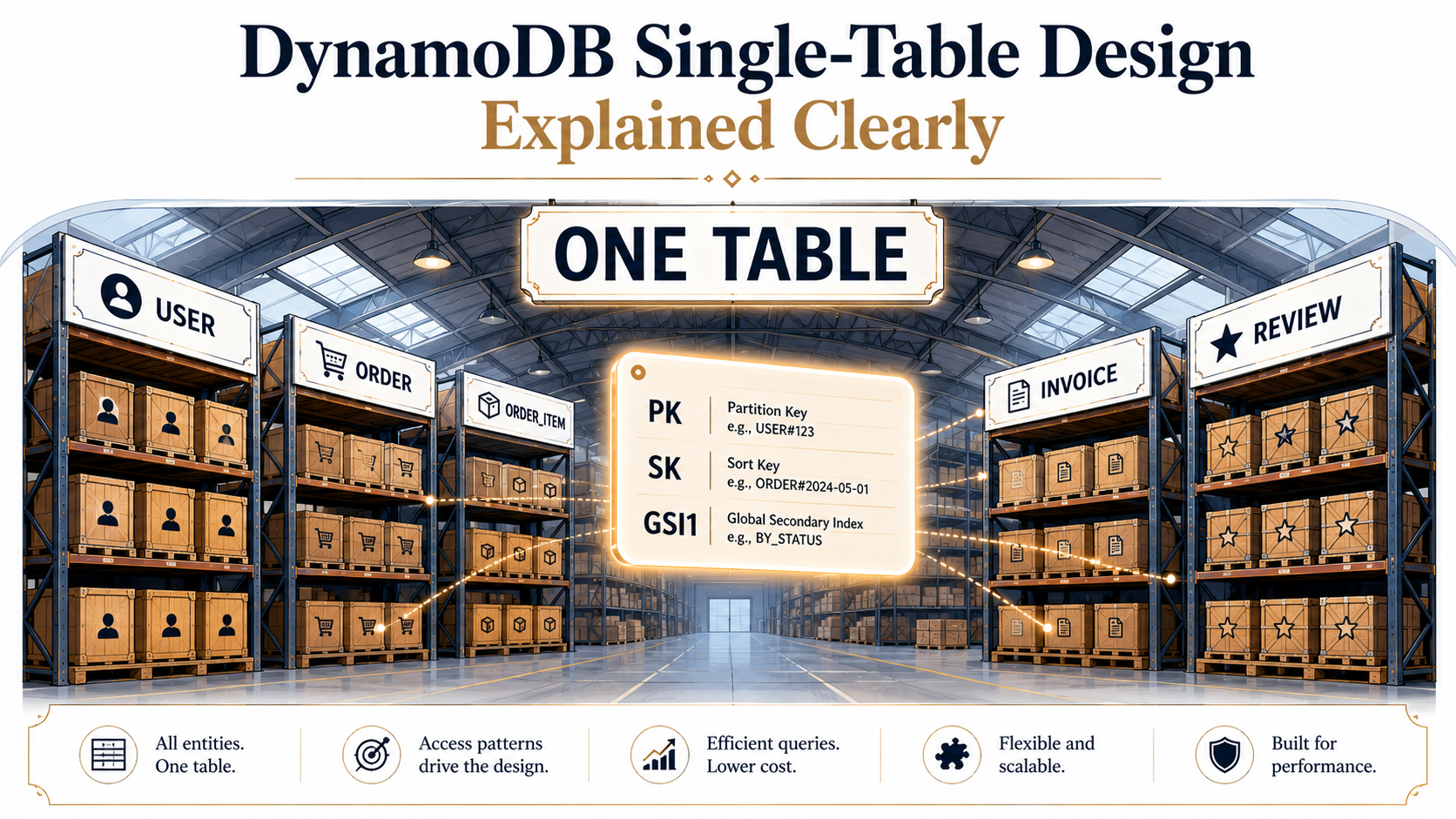
There's one table. Just one. And it has users in it. And orders. And order items. And maybe invoices. All living together, in the same table, like roommates.
If you're coming from MySQL or Postgres, that feels wrong. You've spent your whole career making sure orders and users live in different tables, joined by foreign keys, with neat little schemas. And now AWS is telling you to throw all of that in a blender and call it a feature.
Let's break it down properly, because once it clicks, it really clicks.
Why DynamoDB is built like this
DynamoDB is not a relational database. It's a distributed key-value store with some range-query superpowers bolted on. There is no JOIN. There is no GROUP BY. There is no SELECT *.
What you do have is one operation that's blindingly fast: "give me the items where the partition key is X, optionally filtered by the sort key." That's the entire query model. Everything else is built on top of that.
So when you design a DynamoDB table, you're really designing a set of access patterns. You're saying: "these are the questions my app will ask, in order of frequency", and then you're shaping the keys to make those questions fast.
That's why single-table design exists. Joins in your application code are slow and chatty. But if you can lay out your data so that one query returns everything related (the user, their last 10 orders, the items on those orders) in a single round trip, the database does its job and gets out of your way.
The price is the schema looking weirder than you're used to.
The two keys that decide everything
Every item in DynamoDB has a primary key, and the primary key is one or two attributes:
- Partition key (PK), also called the hash key. DynamoDB hashes this to decide which physical partition the item lives on.
- Sort key (SK), also called the range key. Optional. Items that share a PK are stored together, sorted by their SK.
That second part is the magic. When two items share a partition key, DynamoDB physically co-locates them and lets you range-scan across their sort keys. That's how you get "all of user 42's orders" in one shot: they share PK = USER#42, and their sort keys all start with ORDER#.
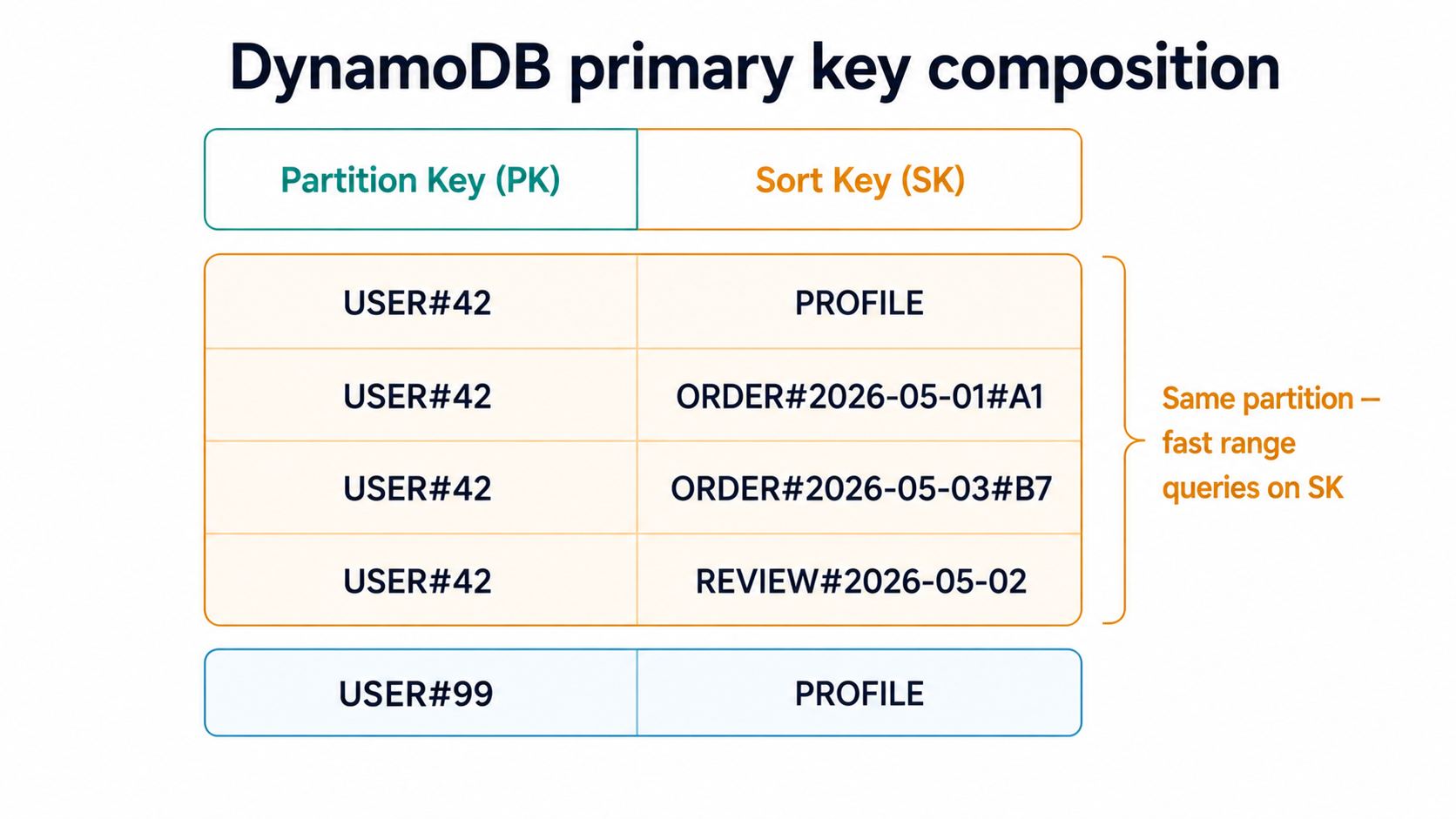
Think of the partition key as choosing a filing cabinet, and the sort key as the order documents are stacked inside that drawer. Pulling a single document is one operation. Pulling the top five documents in a drawer is one operation. But asking "find me all documents written by lawyers" across every cabinet; that's a full scan, and DynamoDB will let you do it, but it'll bill you for the privilege and the latency will reflect your bad life choices.
So your first design decision, before you write a line of code, is: what's the partition? Pick wrong and you'll either hot-spot a few partitions while the rest stay idle, or you'll end up scanning everything.
Putting different entities in the same table
Here's where most engineers' brains break. Imagine you've got three entities: User, Order, and OrderItem. In a relational world, that's three tables. In DynamoDB single-table land, it's one table where each item carries an entity-type marker baked into its keys.
The trick is a key naming convention. Something like this:
PK              | SK                       | (other attrs)
USER#42         | PROFILE                  | name, email, joined_at
USER#42         | ORDER#2026-05-01#A1      | total, status, currency
USER#42         | ORDER#2026-05-03#B7      | total, status, currency
ORDER#A1        | METADATA                 | shipping_address, payment_method
ORDER#A1        | ITEM#001                 | product_id, qty, price
ORDER#A1        | ITEM#002                 | product_id, qty, price
Look at that table for a moment. It's chaos until you notice the pattern.
Every item has a PK and an SK. The PK says which entity am I attached to: a user, an order, a product. The SK says what flavor of thing am I, and where do I sort within that grouping. Profile rows live at SK = PROFILE. Orders live under SK = ORDER#{date}#{id} so they sort chronologically. Items inside an order live under SK = ITEM#{seq} so they sort by line number.
You're using the keys themselves as both an index and a type tag.
A couple of helpful additions almost everyone adds:
- An
entity_typeattribute on every item ("User","Order","OrderItem"). It's redundant given the key prefix, but it makes filtering and debugging trivially easy. - A version attribute, like
schema_v: 1, so when you migrate item shapes later, you can do it gradually.
The reason people get freaked out by this layout is that they read it left-to-right like a SQL table. Don't. Read it like a filing cabinet, drawer by drawer. "Open drawer USER#42. The first document is the profile. The next five are orders, sorted by date. Done."
That's one query. One read unit. One round trip. No joins.
Modeling from access patterns, not entities
The hardest part isn't the syntax. It's the mental flip. In Postgres, you start with entities and add indexes later when something gets slow. In DynamoDB, you start with the questions your app needs to answer and design the keys to answer them.
A simple worked example. Say you're building a small e-commerce backend. Here are the access patterns you actually need:
- Get a user's profile.
- Get a user's most recent orders.
- Get an order and all its items.
- Get all orders placed today, across all users (for the ops dashboard).
- Get a user's order history filtered by status.
Patterns 1, 2, and 3 fall straight out of the schema above. Get user profile is Query PK=USER#42 SK=PROFILE. Get recent orders is Query PK=USER#42 SK begins_with ORDER# ORDER BY SK DESC LIMIT 10. Get order with items is Query PK=ORDER#A1.
Patterns 4 and 5 don't fit. There's no way to ask "give me everything from today" using PK=USER#42, because the data is partitioned by user. That's what GSIs are for.
Global Secondary Indexes: your alternate viewpoints
A Global Secondary Index (GSI) is a second copy of your table, with a different partition/sort key, kept in sync by DynamoDB automatically. You're not creating a new table. You're projecting the same data through a different lens.
Let's add a GSI to handle pattern 4 ("all orders placed today"). Call it GSI1. Its keys are GSI1PK and GSI1SK. On every order item, we write:
GSI1PK = ORDER_BY_DATE
GSI1SK = 2026-05-10T14:23:01Z#A1
Now Query GSI1 where GSI1PK=ORDER_BY_DATE and GSI1SK between '2026-05-10' and '2026-05-11' returns every order placed today, sorted by timestamp.
You only populate GSI1PK and GSI1SK on items where the GSI is meaningful. User profile rows can leave them blank, and DynamoDB simply won't index those items into GSI1. That's called a sparse index, and it's one of the most useful patterns in the toolkit: your GSI ends up containing only the items you actually care about for that access pattern.
For pattern 5 ("a user's orders filtered by status"), you have two reasonable options:
- Add status to the sort key:
SK = ORDER#PENDING#2026-05-03#B7. ThenQuery PK=USER#42 SK begins_with ORDER#PENDING#works directly. The downside is that when an order changes status, you have to delete the old item and write a new one with a different SK, since the SK can't be updated in place. - Add a second GSI keyed on
GSI2PK = USER#42#PENDING,GSI2SK = {timestamp}. Then you can flip the status with a simpleUpdateItemthat rewritesGSI2PKtoUSER#42#SHIPPED, and DynamoDB re-indexes for you.
Most teams pick option 2 because it survives status changes gracefully.
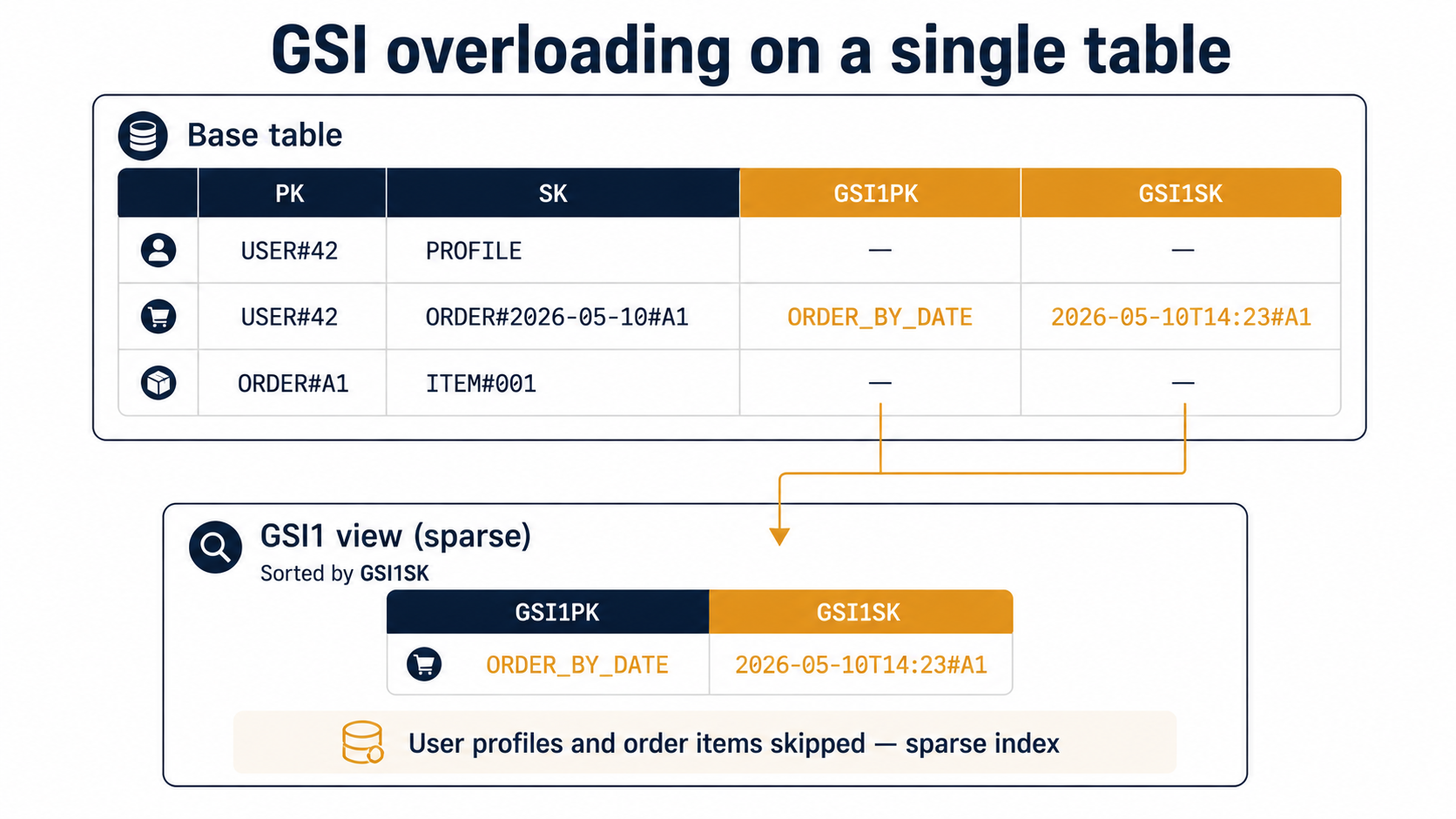
GSI overloading: reusing one GSI for many access patterns
Each table can have a limited number of GSIs (currently 20 per table, though you should never need that many), and each GSI costs storage and write capacity. So a real-world single-table design tries to make each GSI do double or triple duty.
The way you do it is overloading: different entity types put different meanings into the same GSI1PK and GSI1SK slots.
Going back to our example, suppose we also want pattern 6: "find a product's recent reviews". We can reuse GSI1 like this:
entity_type | PK          | SK                    | GSI1PK              | GSI1SK
Order       | USER#42     | ORDER#...#A1          | ORDER_BY_DATE       | 2026-05-10T14:23#A1
Review      | PRODUCT#P9  | REVIEW#abc            | PRODUCT#P9#REVIEWS  | 2026-05-09T10:00#abc
Both kinds of item land in GSI1, but they sit in different partitions of the GSI (ORDER_BY_DATE vs. PRODUCT#P9#REVIEWS), so a query against one doesn't accidentally return the other. You've got two access patterns paying rent on the same index.
The trick that makes this readable in practice is naming discipline. Every PK and SK and GSI key follows a strict template, and the templates are written down somewhere, usually in a Markdown table at the top of your repo's data layer module. Without that document, six months in, no one on the team remembers whether reviews go under PRODUCT#{id}#REVIEWS or REVIEW#{product}#....
A small SDK example
Just so the abstract conversation has something concrete behind it, here's what "get a user and their last five orders" looks like in code. The actual call is a Query against the base table:
import { DynamoDBClient } from "@aws-sdk/client-dynamodb";
import { DynamoDBDocumentClient, QueryCommand } from "@aws-sdk/lib-dynamodb";

const ddb = DynamoDBDocumentClient.from(new DynamoDBClient({}));

export async function getUserWithRecentOrders(userId: string) {
  const res = await ddb.send(
    new QueryCommand({
      TableName: "AppTable",
      KeyConditionExpression: "PK = :pk",
      FilterExpression: "SK = :profile OR begins_with(SK, :orderPrefix)",
      ExpressionAttributeValues: {
        ":pk": `USER#${userId}`,
        ":profile": "PROFILE",
        ":orderPrefix": "ORDER#",
      },
      ScanIndexForward: false,
    })
  );

  const profile = res.Items?.find((i) => i.entity_type === "User");
  const orders = res.Items?.filter((i) => i.entity_type === "Order") ?? [];
  return { profile, orders };
}
One round trip. One read against one partition. The application code does a small grouping step at the end to split the heterogeneous items back into typed objects. That grouping step is the price of admission for single-table design, and it's why most teams build a small mapper layer that turns { PK, SK, ... } items back into User, Order, OrderItem objects.
If Python is more your speed, the same query in boto3 is essentially identical in shape:
import boto3
from boto3.dynamodb.conditions import Key, Attr

ddb = boto3.resource("dynamodb").Table("AppTable")

def get_user_with_recent_orders(user_id: str):
    resp = ddb.query(
        KeyConditionExpression=Key("PK").eq(f"USER#{user_id}"),
        FilterExpression=Attr("SK").eq("PROFILE") | Attr("SK").begins_with("ORDER#"),
        ScanIndexForward=False,
    )
    items = resp.get("Items", [])
    profile = next((i for i in items if i.get("entity_type") == "User"), None)
    orders = [i for i in items if i.get("entity_type") == "Order"]
    return profile, orders
The point isn't the SDK. It's that the shape of the access is the same regardless of language: one partition key, optional sort-key filter, post-process the results into typed objects.
When single-table design is the wrong call
Single-table is powerful, but it's also opinionated, and you should know when not to reach for it.
You probably don't want single-table design if:
- You don't know your access patterns yet. Single-table design is the database equivalent of a CNC machine: fast, precise, painful to retool. If you're prototyping and access patterns are still moving, a more forgiving schema (or even a relational database) saves you from rewriting everything next month.
- Your data is genuinely independent. If your users, your audit log, and your billing events have no shared access patterns and you'd never query them together, the "one table" framing buys you nothing and costs you legibility. Split them.
- Heavy analytical queries dominate. DynamoDB is great at known queries. It's terrible at ad-hoc analytics across the whole dataset. If your team will spend more time slicing and aggregating than serving online requests, you want Athena, BigQuery, or a warehouse, not a single Dynamo table you'll end up scanning hourly.
- You're a small team without one person who owns the data layer. Single-table design is dense, and without a clear owner who keeps the key-naming document current, it rots fast. Six months in, your code is full of magic strings nobody understands.
For everything else (high-traffic transactional apps, well-understood domains, anything where p99 latency beats schema flexibility), it's hard to beat.
The mental model that finally makes it click
If there's one shift that makes single-table design feel natural, it's this: stop thinking of a DynamoDB table as a table in the SQL sense. Think of it as an index.
That's all it is. A big sorted index, partitioned by the first key, ordered by the second. The "rows" are just whatever your application decided to file under those keys, and the keys are designed around the questions you ask most often.
Once you start designing keys instead of tables, the whole pattern stops looking like a hack and starts looking like the right tool for the job. You're not denormalizing as a workaround. You're laying out your data the way the storage engine wants to be queried, and getting predictable single-digit-millisecond reads as the reward.
The schema will look weird to a Postgres-trained eye forever. That's fine. The fast queries don't care.